


SQL Azure BCDR
Harsh Chawla
Agenda
• What’s BCDR
• BCDR for SQL Azure DB
• Types of Recovery for Azure DB
Business continuity problem
Enabling the application to continuously operate during
unplanned and planned disruptive events
BCDR for on-premises SQL Server
• Maintaining Full Database / Differential / T-log backups
• SQL Cluster
• Log Shipping
• Database Mirroring
• AlwaysON
• Replication
• Database Snapshots
BCDR for SQL Azure DB
• No full/differential/t-log backup support
• No AlwaysON / SQL Cluster / Mirroring / log shipping etc.
Then How?
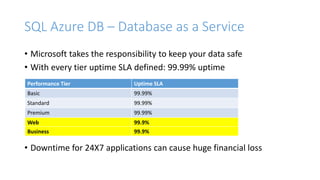
SQL Azure DB – Database as a Service
• Microsoft takes the responsibility to keep your data safe
• With every tier uptime SLA defined: 99.99% uptime
• Downtime for 24X7 applications can cause huge financial loss
Performance Tier Uptime SLA
Basic 99.99%
Standard 99.99%
Premium 99.99%
Web 99.9%
Business 99.9%
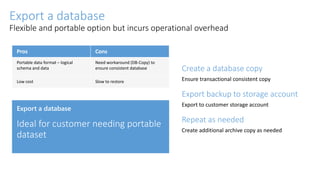
Create a database copy
Ensure transactional consistent copy
Export backup to storage account
Export to customer storage account
Repeat as needed
Create additional archive copy as needed
Export a database
Flexible and portable option but incurs operational overhead
Pros Cons
Portable data format – logical
schema and data
Need workaround (DB-Copy) to
ensure consistent database
Low cost Slow to restore
Export a database
Types of Recovery
• Recovery from Machine Failure
• Recovery from accidental errors - Oops recovery
• Recovery from regional/datacenter outage
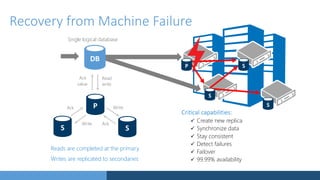
Reads are completed at the primary
Writes are replicated to secondaries
Single logical database
Write
Write Ack
Ack
Read
value write
Ack
Critical capabilities:
 Create new replica
 Synchronize data
 Stay consistent
 Detect failures
 Failover
 99.99% availability
Recovery from Machine Failure
Automatic backup
Full backups weekly, different backup daily,
log backups every 5 minutes
Daily and weekly backups automatically
uploaded to geo-redundant Azure Storage
Self-service restore
Point-in-time up to a second granularity
REST API, PowerShell, or Portal
Creates a new database in the same logical server
Tiered retention policy
Basic - 7 days
Standard - 14 days
Premium - 35 days
No additional cost to retain backups
Geo- replicated
Restore from backup
SQL Database
backups
sabcp01bl21
Azure Storage
sabcp01bl21
Oops recovery - Point-in-time restore
Restores the database to the point of deletion
(earlier backups are deleted)
Creates a new database on the server used by
the original database
You can choose to failover to the restored
database or use scripts to recover data
Recovery after accidental database deletion
Self-service
restore to point
of deletion
Backups retained for 7/14/35 days
Restore deleted database
Now -7 daysTime
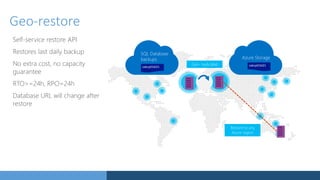
Geo-restore
Self-service restore API
Restores last daily backup
No extra cost, no capacity
guarantee
RTO>=24h, RPO=24h
Database URL will change after
restore
Geo- replicated
SQL Database
backups
sabcp01bl21
Azure Storage
sabcp01bl21
Restore to any
Azure region
Demo!!
East US
US West
LS ABC
Failover and
activation of
secondary
(during incident) West US
DB
LS XYZ
DB
• RTO<2h, RPO<5m
• REST and PowerShell API to opt-in and failover
• Automatic data replication and synchronization
• DMV+REST to monitor and guide failover decisions
• Single offline secondary with matching performance level in
the DR paired region
North Central
US
LS OPQ
DB
Recovery from regional/datacenter outage
Standard Replication
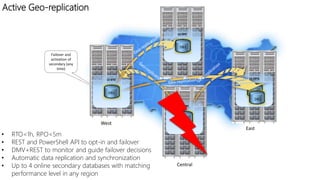
Active Geo-replication
LS ABC
South Central US
West US
Failover and
activation of
secondary (any
time)
East US
DB1
LS XYZ LS OPQ
• RTO<1h, RPO<5m
• REST and PowerShell API to opt-in and failover
• DMV+REST to monitor and guide failover decisions
• Automatic data replication and synchronization
• Up to 4 online secondary databases with matching
performance level in any region
DB1
DB1.old
North Central US
LS DFE
DB1
DB1
Demo!!
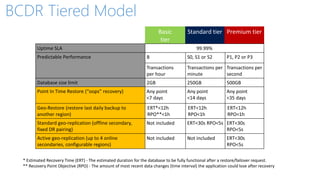
BCDR Tiered Model
B
Transactions
per hour
Transactions per
minute
Transactions per
second
)
ERT*<12h
RPO**<1h
ERT<12h
RPO<1h
ERT<12h
RPO<1h
ERT<30s RPO<5s ERT<30s
RPO<5s
ERT<30s
RPO<5s
* Estimated Recovery Time (ERT) - The estimated duration for the database to be fully functional after a restore/failover request.
** Recovery Point Objective (RPO) - The amount of most recent data changes (time interval) the application could lose after recovery
Q & A!!
Thank You!

SQL Azure DB - BCDR

  • 1.
  • 2.
    Agenda • What’s BCDR •BCDR for SQL Azure DB • Types of Recovery for Azure DB
  • 3.
    Business continuity problem Enablingthe application to continuously operate during unplanned and planned disruptive events
  • 4.
    BCDR for on-premisesSQL Server • Maintaining Full Database / Differential / T-log backups • SQL Cluster • Log Shipping • Database Mirroring • AlwaysON • Replication • Database Snapshots
  • 5.
    BCDR for SQLAzure DB • No full/differential/t-log backup support • No AlwaysON / SQL Cluster / Mirroring / log shipping etc. Then How?
  • 6.
    SQL Azure DB– Database as a Service • Microsoft takes the responsibility to keep your data safe • With every tier uptime SLA defined: 99.99% uptime • Downtime for 24X7 applications can cause huge financial loss Performance Tier Uptime SLA Basic 99.99% Standard 99.99% Premium 99.99% Web 99.9% Business 99.9%
  • 7.
    Create a databasecopy Ensure transactional consistent copy Export backup to storage account Export to customer storage account Repeat as needed Create additional archive copy as needed Export a database Flexible and portable option but incurs operational overhead Pros Cons Portable data format – logical schema and data Need workaround (DB-Copy) to ensure consistent database Low cost Slow to restore Export a database
  • 8.
    Types of Recovery •Recovery from Machine Failure • Recovery from accidental errors - Oops recovery • Recovery from regional/datacenter outage
  • 9.
    Reads are completedat the primary Writes are replicated to secondaries Single logical database Write Write Ack Ack Read value write Ack Critical capabilities:  Create new replica  Synchronize data  Stay consistent  Detect failures  Failover  99.99% availability Recovery from Machine Failure
  • 10.
    Automatic backup Full backupsweekly, different backup daily, log backups every 5 minutes Daily and weekly backups automatically uploaded to geo-redundant Azure Storage Self-service restore Point-in-time up to a second granularity REST API, PowerShell, or Portal Creates a new database in the same logical server Tiered retention policy Basic - 7 days Standard - 14 days Premium - 35 days No additional cost to retain backups Geo- replicated Restore from backup SQL Database backups sabcp01bl21 Azure Storage sabcp01bl21 Oops recovery - Point-in-time restore
  • 11.
    Restores the databaseto the point of deletion (earlier backups are deleted) Creates a new database on the server used by the original database You can choose to failover to the restored database or use scripts to recover data Recovery after accidental database deletion Self-service restore to point of deletion Backups retained for 7/14/35 days Restore deleted database Now -7 daysTime
  • 12.
    Geo-restore Self-service restore API Restoreslast daily backup No extra cost, no capacity guarantee RTO>=24h, RPO=24h Database URL will change after restore Geo- replicated SQL Database backups sabcp01bl21 Azure Storage sabcp01bl21 Restore to any Azure region
  • 13.
  • 14.
    East US US West LSABC Failover and activation of secondary (during incident) West US DB LS XYZ DB • RTO<2h, RPO<5m • REST and PowerShell API to opt-in and failover • Automatic data replication and synchronization • DMV+REST to monitor and guide failover decisions • Single offline secondary with matching performance level in the DR paired region North Central US LS OPQ DB Recovery from regional/datacenter outage Standard Replication
  • 15.
    Active Geo-replication LS ABC SouthCentral US West US Failover and activation of secondary (any time) East US DB1 LS XYZ LS OPQ • RTO<1h, RPO<5m • REST and PowerShell API to opt-in and failover • DMV+REST to monitor and guide failover decisions • Automatic data replication and synchronization • Up to 4 online secondary databases with matching performance level in any region DB1 DB1.old North Central US LS DFE DB1 DB1
  • 16.
  • 17.
    BCDR Tiered Model B Transactions perhour Transactions per minute Transactions per second ) ERT*<12h RPO**<1h ERT<12h RPO<1h ERT<12h RPO<1h ERT<30s RPO<5s ERT<30s RPO<5s ERT<30s RPO<5s * Estimated Recovery Time (ERT) - The estimated duration for the database to be fully functional after a restore/failover request. ** Recovery Point Objective (RPO) - The amount of most recent data changes (time interval) the application could lose after recovery
  • 18.
  • 19.

Editor's Notes

  • #3 Business continuity is the ability to continue business operations when a crisis or disaster occurs. Business continuity planning requires processes, procedures, and measures to ensure that business operations can continue without interruption. This topic focuses on the Azure SQL Database features that enable business continuity and disaster recovery. By storing your data in Azure SQL Database, you take advantage of many fault tolerance and secure infrastructure capabilities that you would otherwise have to design, acquire, implement, and manage. Todays applications need to have the ability to tolerate local failures, recover from disasters, support recovery from user or application errors, and planned events such as an application upgrade.
  • #4 Ask the question about IaaS and PaaS And then accordingly show the slide
  • #8  “Deployment Minutes” is the total number of minutes that a given Basic, Standard, or Premium Database has been deployed in Microsoft Azure during a billing month. “Maximum Available Minutes” is the sum of all Deployment Minutes across all Basic, Standard, and Premium Databases for a given Microsoft Azure subscription during a billing month. “Downtime” is the total accumulated Deployment Minutes across all Basic, Standard, and Premium Databases deployed by Customer in a given Microsoft Azure subscription during which the Database is unavailable. A minute is considered unavailable for a given Database if all continuous attempts by Customer to establish a connection to the Database within the minute fail. Monthly Uptime %= Maximum Available Minutes−Downtime Maximum Available Minutes
  • #9 Pro: Bacpac is a logical schema and local data format that is portable Lower cost that keeping DB running Con: Resource intensive to generate Required creation of another DB to ensure consistency Slow to restore – speed depends on the target edition tier
  • #11 By storing your data in Azure SQL Database, you take advantage of many fault tolerance and secure infrastructure capabilities that you would otherwise have to design, acquire, implement, and manage. Azure SQL Database has a built-in high availability subsystem that protects your database from failures of individual servers and devices in a datacenter. Azure SQL Database maintains multiple copies of all data in different physical nodes located across fully independent physical sub-systems to mitigate outages due to failures of individual server components, such as hard drives, network interface adapters, or even entire servers. At any one time, three database replicas are running—one primary and two or more replicas. Data is written to the primary and one secondary replica using a quorum based commit scheme before the transaction is considered committed. If the hardware fails on the primary replica, Azure SQL Database detects the failure and fails over to the secondary replica. In case of a physical loss of a replica, a new replica is automatically created. So there are always at minimum two physical, transactionally consistent copies of your data in the datacenter.
  • #12 Built-in Automatic Backup in Azure SQL Database Azure SQL Database automatically creates backups of every active database using the following schedule: Full database backup once a week, differential database backups once a day, and transaction log backups every 5 minutes. The full and differential backups are replicated across regions to ensure availability of the backups in the event of a disaster. Restoring an Active Database to a Point in Time For a database that is currently active, the earliest restore point available for the database is displayed in the Quick Glance section of the Dashboard for the database on the Azure Management Portal. For a complete walkthrough of restoring a database, see Submit a Database Restore Request.
  • #13 Restoring a Deleted Database You can restore a database that was deleted during its retention period to the point at which it was deleted. The retention period is determined by the service tier of the database while it existed or the number of days where the database exists, whichever is less.
  • #14 Geo-Restore Geo-Restore is the most basic disaster recovery option available in Azure SQL Database. It is available with Basic, Standard, and Premium service tiers. The weekly full backup and at least one daily differential backup are stored in a Geo-redundant storage to protect against region wide failures. When you submit a restore request, the database will be restored to the most recent daily backup. There are no charges for the additional backups that are stored, but if you use Geo-Restore, you will be charged for the restored database at normal rates once the restore is complete. For a complete walkthrough, see Submit a Database Restore Request. You can automate this operation using the PowerShell cmdlet <name> or REST API <operation name>. For more information, see Managing Azure SQL Databases with PowerShell and Managing Azure SQL Databases with REST API.
  • #15 Demo for - 1. Restore deleted databases 2. Point in time recovery of the databases
  • #18 Demo for configuration of Active- geo Replication Demo for connecting to the secondary replica and show how the sync works
  • #19 1m