AlwaysON
Internalsand Enhancements
Sumit Sarabhai
SQL Server Escalation Services
Microsoft
C:/>whoami
8+ years in MS
SQL vNext
Complex
Problems
PG
Engagement
Speaker in
UG Meets,
SQL Talks
&
SSGAS
conference
Expert in SQL
Engine
Currently
learning
HDInsight,
SQL Azure,
NoSQL and
BI
Agenda
 LeaseTimeout
 How it works?
 Split Brain Resolved!
 Enhancements
 Enhanced Availability Configuration
 Load Balanced Active Secondaries
 New Features
 DistributedTransaction Support
 Database Health events cause failover
LeaseTimeout
Concept
 The LeaseTimeout controls the lease mechanism inAlwaysON
 The lease is a simple handshake between the SQL resource DLL
and the SQL Server instance
 Expiration of lease means a system wide event taking place.
 The SQL Server resource DLL is responsible for the lease
heartbeat activity.
 A dedicated lease thread wakes up every 1/4 of the LeaseTimeout
and renew the lease
 Only present on the primary replica
 makes sure the SQL Server and Windows cluster state for AG remain
synchronized.
LeaseTimeout
Howit works?
The activity is a two-way handshake using a pair of named events
Resource DLL LeaseThread Server LeaseWorker/Thread
SetEvent(Client Event)
WaitForSingleObject(Client Event)
WaitForSingleObject(Server Event) SetEvent(Server Event)
Wait for 1/4 the LeaseTimeout Repeat Loop Until Shutdown or Lease Expires
LeaseTimeout
SplitBrainResolved!
Error: 19407, Severity: 16, State: 1.
The lease between availability group ‘MyAG’ and the Windows Server Failover Cluster has
expired. A connectivity issue occurred between the instance of SQL Server and the Windows
Server Failover Cluster. To determine whether the availability group is failing over
correctly, check the corresponding availability group resource in the Windows Server Failover
Cluster
AlwaysOn: The local replica of availability group ‘MyAG’ is going offline because
either the lease expired or lease renewal failed. This is an informational message
If the LeaseTimeout is
exceeded without the
signal exchange the
lease is declared
‘expired’
The cluster manager
undertakes the
configured corrective
actions. The AG is
offline at this point.
Resource DLL reports
that the availability
group no longer ‘looks
alive’ to theWindows
cluster manager
SQL Server prevents further
data modifications (avoiding
split-brain issues) on the
current primary.The DB is
offline at this point.
The cluster manager activity
helps select the proper
primary location and attempts
to online the availability
group.
Enhanced
Availability
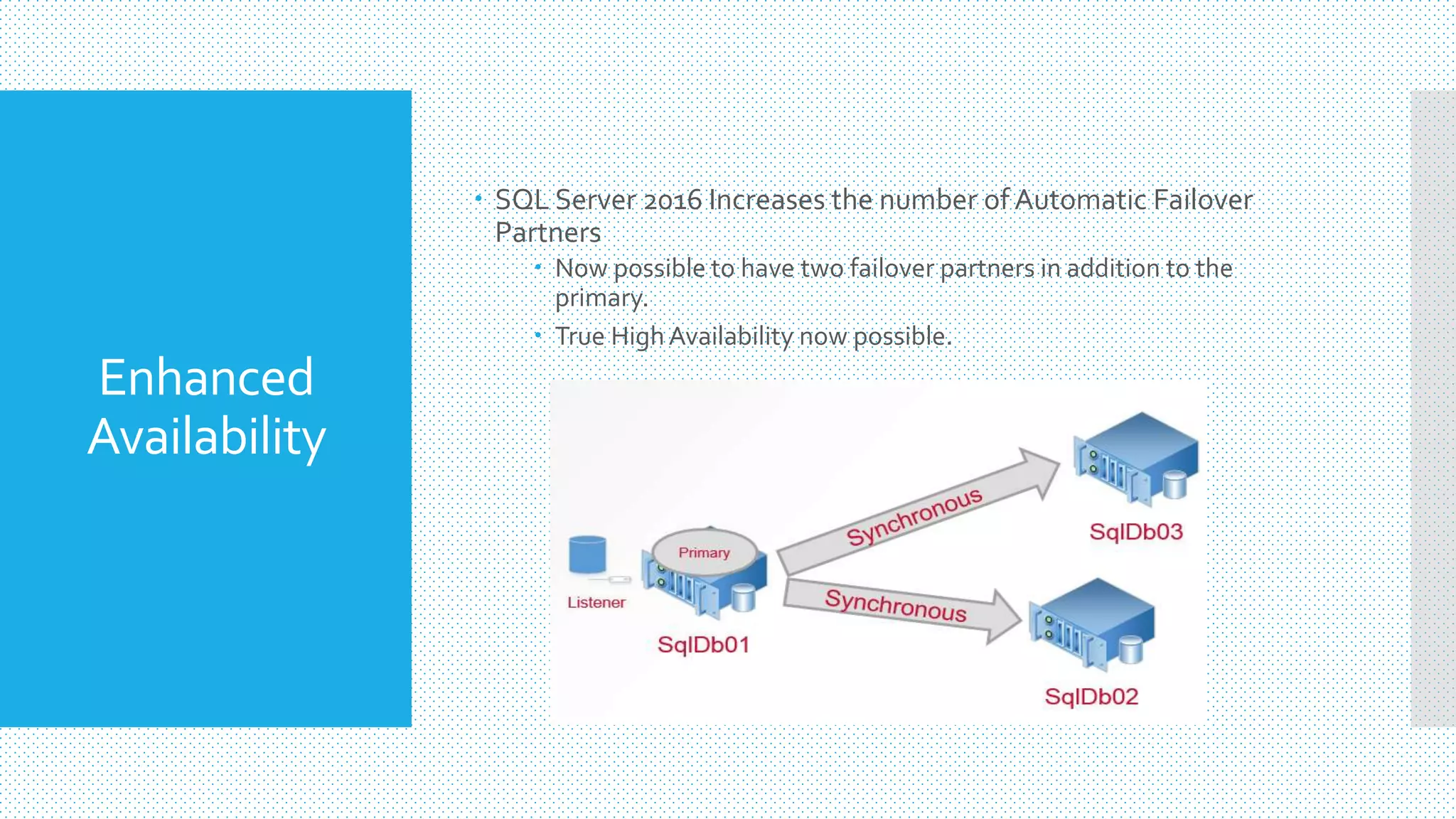
 SQL Server 2016 Increases the number of Automatic Failover
Partners
 Now possible to have two failover partners in addition to the
primary.
 True HighAvailability now possible.
Enhanced
Availability
 SQL Server 2016 Increases the number of Automatic Failover
Partners
 Now possible to have two failover partners in addition to the
primary.
 True HighAvailability now possible.
Enhanced
Availability
 SQL Server 2016 Increases the number of Automatic Failover
Partners
 Now possible to have two failover partners in addition to the
primary.
 True HighAvailability now possible.
Enhanced
Availability
 SQL Server 2016 Increases the number of Automatic Failover
Partners
 Now possible to have two failover partners in addition to the
primary.
 True HighAvailability now possible.
Enhanced
Availability
 SQL Server 2016 Increases the number of Automatic Failover
Partners
 Now possible to have two failover partners in addition to the
primary.
 True HighAvailability now possible.
SQL Server 2014 &
prior, this will result in
system offline.
Enhanced
Availability
 SQL Server 2016 Increases the number of Automatic Failover
Partners
 Now possible to have two failover partners in addition to the
primary.
 True HighAvailability now possible.
In SQL Server 2016 the
system will be online as
the listener fails over.
Load Balanced
Read-only
Replica
 Read-only routing refers to the ability of SQL Server to route
qualifying read-only connection requests to an availableAlwaysOn
readable secondary replica.
 Read-only clients must direct their connection requests to this
listener, and the client's connection strings must specify the
application intent as "read-only"
 SQL Server 2014 routing lists were the order of the secondaries that
you wanted to access in a failure precedent order.
alter availability group [sqlLabAg01]
modify replica on 'sqlLabDb01'
with
(
primary_role(read_only_routing_list =
)
;
go
('sqlLabDb02','sqlLabDb03','sqlLabDb01'))
Load Balanced
Read-only
Replica
 SQL Server 2016 allows for groups of replicas to be specified to
accessed in a round robin order.
 Configure load-balancing across a set of read-only replicas
 Note the additional parentheses in the routing list.
alter availability group [sqlLabAg01]
modify replica on 'sqlLabDb01'
with
(
primary_role(read_only_routing_list =
)
;
go
(('sqlLabDb02','sqlLabDb03‘),'sqlLabDb01')
Load Balanced
Read-only
Replica
 Allows for scaling out read-only workloads natively
 No need to code bespoke access to secondary replicas
 Workload will adjust in the event of a failover
 Need to be aware of redo latency
 Important to monitor the redo queue as the load balanced replicas
could be at different points in redo process.
 Try to avoid mixing Synchronous andAsynchronous replicas in the
same load balance group for data consistency.
Distributed
Transactions
 AlwaysOnAvailabilityGroups in SQL Server 2012 & 2014 DO NOT
SUPPORT DistributedTransactions.
 Cross Database, intra-instance queries
 Cross Database, inter-instance queries
 Biggest blocker for the adoption ofAvailability Group technology.
 It functions but is not supported.
 SQL Server 2016 fixes this problem.
Distributed
Transactions
 Requires Windows Server 2016 Windows Server 2012 (+KB3090973)
in order to support the use of DistributedTransactions.
 In the event of a failover the recovering database will contact the old
‘primary’ server for DTC.
 This will allow the system to complete crash recovery.
 Availability groups must be created with the CREATEAVAILABILITY
GROUP command and the WITH DTC_SUPPORT = PER_DB clause.
 You cannot currently alter an existing availability group.
Database
Health
Monitoring
 SQL Server 2016 will complete an AvailabilityGroup Failover if
database health is degraded.
 SQL Server 2012 & 2014 required an instance level event in order for a
failover to take place.
 AvailabilityGroup is still the unit of failover in the event of an issue.
 Detection of issues in one database will cause all databases in the
Availability Group to Failover.
 This change requires the setting the DB_FAILOVER option to ON in
the CREATE AVAILABILITYGROUP or ALTER AVAILABILITYGROUP
statements.
Thanks!
Questions Please?

Alwayson AG enhancements

  • 1.
    AlwaysON Internalsand Enhancements Sumit Sarabhai SQLServer Escalation Services Microsoft
  • 2.
    C:/>whoami 8+ years inMS SQL vNext Complex Problems PG Engagement Speaker in UG Meets, SQL Talks & SSGAS conference Expert in SQL Engine Currently learning HDInsight, SQL Azure, NoSQL and BI
  • 3.
    Agenda  LeaseTimeout  Howit works?  Split Brain Resolved!  Enhancements  Enhanced Availability Configuration  Load Balanced Active Secondaries  New Features  DistributedTransaction Support  Database Health events cause failover
  • 4.
    LeaseTimeout Concept  The LeaseTimeoutcontrols the lease mechanism inAlwaysON  The lease is a simple handshake between the SQL resource DLL and the SQL Server instance  Expiration of lease means a system wide event taking place.  The SQL Server resource DLL is responsible for the lease heartbeat activity.  A dedicated lease thread wakes up every 1/4 of the LeaseTimeout and renew the lease  Only present on the primary replica  makes sure the SQL Server and Windows cluster state for AG remain synchronized.
  • 5.
    LeaseTimeout Howit works? The activityis a two-way handshake using a pair of named events Resource DLL LeaseThread Server LeaseWorker/Thread SetEvent(Client Event) WaitForSingleObject(Client Event) WaitForSingleObject(Server Event) SetEvent(Server Event) Wait for 1/4 the LeaseTimeout Repeat Loop Until Shutdown or Lease Expires
  • 6.
    LeaseTimeout SplitBrainResolved! Error: 19407, Severity:16, State: 1. The lease between availability group ‘MyAG’ and the Windows Server Failover Cluster has expired. A connectivity issue occurred between the instance of SQL Server and the Windows Server Failover Cluster. To determine whether the availability group is failing over correctly, check the corresponding availability group resource in the Windows Server Failover Cluster AlwaysOn: The local replica of availability group ‘MyAG’ is going offline because either the lease expired or lease renewal failed. This is an informational message If the LeaseTimeout is exceeded without the signal exchange the lease is declared ‘expired’ The cluster manager undertakes the configured corrective actions. The AG is offline at this point. Resource DLL reports that the availability group no longer ‘looks alive’ to theWindows cluster manager SQL Server prevents further data modifications (avoiding split-brain issues) on the current primary.The DB is offline at this point. The cluster manager activity helps select the proper primary location and attempts to online the availability group.
  • 7.
    Enhanced Availability  SQL Server2016 Increases the number of Automatic Failover Partners  Now possible to have two failover partners in addition to the primary.  True HighAvailability now possible.
  • 8.
    Enhanced Availability  SQL Server2016 Increases the number of Automatic Failover Partners  Now possible to have two failover partners in addition to the primary.  True HighAvailability now possible.
  • 9.
    Enhanced Availability  SQL Server2016 Increases the number of Automatic Failover Partners  Now possible to have two failover partners in addition to the primary.  True HighAvailability now possible.
  • 10.
    Enhanced Availability  SQL Server2016 Increases the number of Automatic Failover Partners  Now possible to have two failover partners in addition to the primary.  True HighAvailability now possible.
  • 11.
    Enhanced Availability  SQL Server2016 Increases the number of Automatic Failover Partners  Now possible to have two failover partners in addition to the primary.  True HighAvailability now possible. SQL Server 2014 & prior, this will result in system offline.
  • 12.
    Enhanced Availability  SQL Server2016 Increases the number of Automatic Failover Partners  Now possible to have two failover partners in addition to the primary.  True HighAvailability now possible. In SQL Server 2016 the system will be online as the listener fails over.
  • 13.
    Load Balanced Read-only Replica  Read-onlyrouting refers to the ability of SQL Server to route qualifying read-only connection requests to an availableAlwaysOn readable secondary replica.  Read-only clients must direct their connection requests to this listener, and the client's connection strings must specify the application intent as "read-only"  SQL Server 2014 routing lists were the order of the secondaries that you wanted to access in a failure precedent order. alter availability group [sqlLabAg01] modify replica on 'sqlLabDb01' with ( primary_role(read_only_routing_list = ) ; go ('sqlLabDb02','sqlLabDb03','sqlLabDb01'))
  • 14.
    Load Balanced Read-only Replica  SQLServer 2016 allows for groups of replicas to be specified to accessed in a round robin order.  Configure load-balancing across a set of read-only replicas  Note the additional parentheses in the routing list. alter availability group [sqlLabAg01] modify replica on 'sqlLabDb01' with ( primary_role(read_only_routing_list = ) ; go (('sqlLabDb02','sqlLabDb03‘),'sqlLabDb01')
  • 15.
    Load Balanced Read-only Replica  Allowsfor scaling out read-only workloads natively  No need to code bespoke access to secondary replicas  Workload will adjust in the event of a failover  Need to be aware of redo latency  Important to monitor the redo queue as the load balanced replicas could be at different points in redo process.  Try to avoid mixing Synchronous andAsynchronous replicas in the same load balance group for data consistency.
  • 16.
    Distributed Transactions  AlwaysOnAvailabilityGroups inSQL Server 2012 & 2014 DO NOT SUPPORT DistributedTransactions.  Cross Database, intra-instance queries  Cross Database, inter-instance queries  Biggest blocker for the adoption ofAvailability Group technology.  It functions but is not supported.  SQL Server 2016 fixes this problem.
  • 17.
    Distributed Transactions  Requires WindowsServer 2016 Windows Server 2012 (+KB3090973) in order to support the use of DistributedTransactions.  In the event of a failover the recovering database will contact the old ‘primary’ server for DTC.  This will allow the system to complete crash recovery.  Availability groups must be created with the CREATEAVAILABILITY GROUP command and the WITH DTC_SUPPORT = PER_DB clause.  You cannot currently alter an existing availability group.
  • 18.
    Database Health Monitoring  SQL Server2016 will complete an AvailabilityGroup Failover if database health is degraded.  SQL Server 2012 & 2014 required an instance level event in order for a failover to take place.  AvailabilityGroup is still the unit of failover in the event of an issue.  Detection of issues in one database will cause all databases in the Availability Group to Failover.  This change requires the setting the DB_FAILOVER option to ON in the CREATE AVAILABILITYGROUP or ALTER AVAILABILITYGROUP statements.
  • 19.