vCenter charge back manager
By Preetam Zarey
For vZare.com
Version 1.0.1
Sunday, October 08, 2013
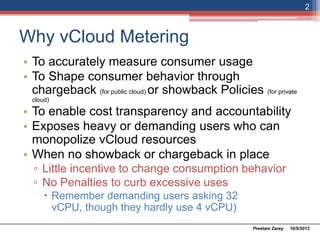
Why vCloud Metering
• To accurately measure consumer usage
• To Shape consumer behavior through
chargeback (for public cloud) or showback Policies (for private
cloud)
• To enable cost transparency and accountability
• Exposes heavy or demanding users who can
monopolize vCloud resources
• When no showback or chargeback in place
▫ Little incentive to change consumption behavior
▫ No Penalties to curb excessive uses
 Remember demanding users asking 32 vCPU,
though they hardly use 4 vCPU)
10/5/2013Preetam Zarey
2
Introduction
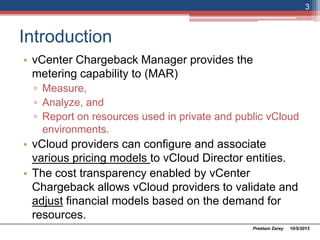
• vCenter Chargeback Manager provides the
metering capability to (MAR)
▫ Measure,
▫ Analyze, and
▫ Report on resources used in private and public vCloud
environments.
• vCloud providers can configure and associate
various pricing models to vCloud Director entities.
• The cost transparency enabled by vCenter
Chargeback allows vCloud providers to validate and
adjust financial models based on the demand for
resources.
10/5/2013Preetam Zarey
3
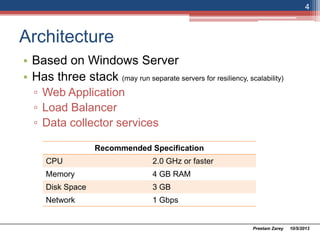
Architecture
• Based on Windows Server
• Has three stack (may run separate servers for resiliency, scalability)
▫ Web Application
▫ Load Balancer
▫ Data collector services
10/5/2013Preetam Zarey
4
Recommended Specification
CPU 2.0 GHz or faster
Memory 4 GB RAM
Disk Space 3 GB
Network 1 Gbps
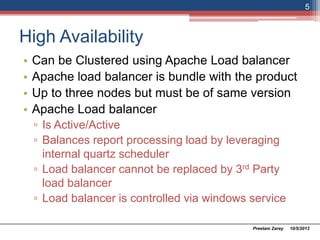
High Availability
• Can be Clustered using Apache Load balancer
• Apache load balancer is bundle with the product
• Up to three nodes but must be of same version
• Apache Load balancer
▫ Is Active/Active
▫ Balances report processing load by leveraging
internal quartz scheduler
▫ Load balancer cannot be replaced by 3rd Party
load balancer
▫ Load balancer is controlled via windows service
10/5/2013Preetam Zarey
5
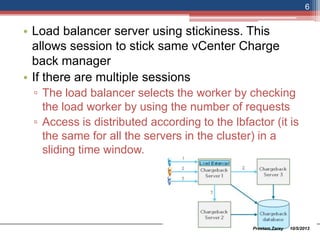
• Load balancer server using stickiness. This
allows session to stick same vCenter Charge
back manager
• If there are multiple sessions
▫ The load balancer selects the worker by checking
the load on the worker by using the number of
requests
▫ Access is distributed according to the lbfactor (it is
the same for all the servers in the cluster) in a
sliding time window.
10/5/2013Preetam Zarey
6
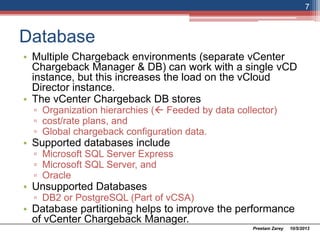
Database
• Multiple Chargeback environments (separate vCenter
Chargeback Manager & DB) can work with a single vCD
instance, but this increases the load on the vCloud
Director instance.
• The vCenter Chargeback DB stores
▫ Organization hierarchies ( Feeded by data collector)
▫ cost/rate plans, and
▫ Global chargeback configuration data.
• Supported databases include
▫ Microsoft SQL Server Express
▫ Microsoft SQL Server, and
▫ Oracle
• Unsupported Databases
▫ DB2 or PostgreSQL (Part of vCSA)
• Database partitioning helps to improve the performance
of vCenter Chargeback Manager.
10/5/2013Preetam Zarey
7
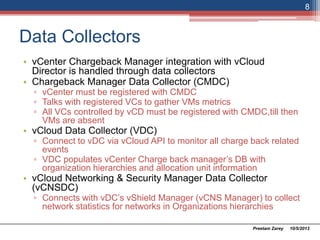
Data Collectors
• vCenter Chargeback Manager integration with vCloud
Director is handled through data collectors
• Chargeback Manager Data Collector (CMDC)
▫ vCenter must be registered with CMDC
▫ Talks with registered VCs to gather VMs metrics
▫ All VCs controlled by vCD must be registered with CMDC,till then
VMs are absent
• vCloud Data Collector (VDC)
▫ Connect to vDC via vCloud API to monitor all charge back related
events
▫ VDC populates vCenter Charge back manager’s DB with
organization hierarchies and allocation unit information
• vCloud Networking & Security Manager Data Collector
(vCNSDC)
▫ Connects with vDC’s vShield Manager (vCNS Manager) to collect
network statistics for networks in Organizations hierarchies
10/5/2013Preetam Zarey
8
• Install additional VDC and or vCNSDC on additional servers for HA
• But multiple data collector works in Active-Passive configuration
only
• One can have multiple data collector but it can connect to only one
vCD instance
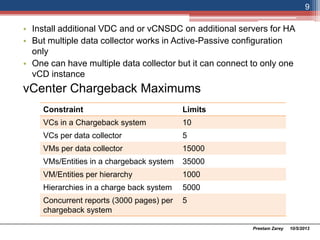
vCenter Chargeback Maximums
10/5/2013Preetam Zarey
9
Constraint Limits
VCs in a Chargeback system 10
VCs per data collector 5
VMs per data collector 15000
VMs/Entities in a chargeback system 35000
VM/Entities per hierarchy 1000
Hierarchies in a charge back system 5000
Concurrent reports (3000 pages) per
chargeback system
5
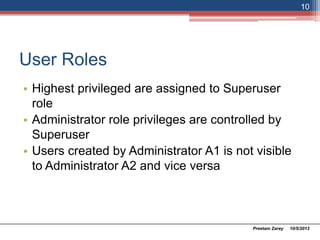
User Roles
• Highest privileged are assigned to Superuser
role
• Administrator role privileges are controlled by
Superuser
• Users created by Administrator A1 is not visible
to Administrator A2 and vice versa
10/5/2013Preetam Zarey
10
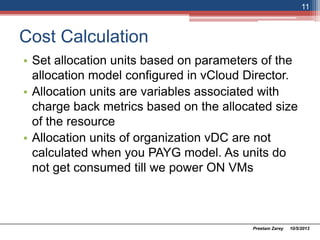
Cost Calculation
• Set allocation units based on parameters of the
allocation model configured in vCloud Director.
• Allocation units are variables associated with
charge back metrics based on the allocated size
of the resource
• Allocation units of organization vDC are not
calculated when you use PAYG model. As units
do not get consumed till we power ON VMs
10/5/2013Preetam Zarey
11
Pricing Models
• Installing VCDC & vCNSDC creates default cost models
and Billing policies
• Billing Policies
▫ Controls costs based on resources consumed
▫ Charged based on allocation of
 vCPU
 Memory
 Storage
▫ Cost time interval include
 Hourly
 Daily
 Weekly
 Monthly
 Quarterly
 Half-yearly
 Yearly
10/5/2013Preetam Zarey
12
Pricing Models - Rate Factors
• Rate Factors allow scaling of base cost for
specific chargeable entity.
• Use cases
▫ Promotional rate
 Offering 10 % discount for renewal of contracts.
Then simply modify the rate factor as 0.9 instead of
modifying base cost
▫ Rates for unique configurations
 When customer is requesting off the catalog service
offering
10/5/2013Preetam Zarey
13
Pricing Models – VM Instance
• VM instance assign fixed price to a hard bundle
of vCPU and Memory
• VM Instance linked with pricing model
• Pricing Model Includes
▫ Hierarchy selection criteria
▫ Fixed pricing table and a
▫ Default fixed price
• VM instance use step function, if the VM is
configured with vCPU & Memory which is not
per the catalog, then charge is based on the
next large instance size
10/5/2013Preetam Zarey
14
Reporting
• Can generate Cost, Usage and Comparison
(CuC) reports for hierarchies and entities. Match
the hierarchy with appropriate cost model when
generating reports
• Chargeback API can pull results in following
format
▫ PDF
▫ XML
▫ XSL
• Create service accounts with read-only
privileges to run reports from the UI or charge
API
10/5/2013Preetam Zarey
15
Thank you vZare.com
10/5/2013Preetam Zarey
16
My

My notes on vCenter charge back manager

  • 1.
    vCenter charge backmanager By Preetam Zarey For vZare.com Version 1.0.1 Sunday, October 08, 2013
  • 2.
    Why vCloud Metering •To accurately measure consumer usage • To Shape consumer behavior through chargeback (for public cloud) or showback Policies (for private cloud) • To enable cost transparency and accountability • Exposes heavy or demanding users who can monopolize vCloud resources • When no showback or chargeback in place ▫ Little incentive to change consumption behavior ▫ No Penalties to curb excessive uses  Remember demanding users asking 32 vCPU, though they hardly use 4 vCPU) 10/5/2013Preetam Zarey 2
  • 3.
    Introduction • vCenter ChargebackManager provides the metering capability to (MAR) ▫ Measure, ▫ Analyze, and ▫ Report on resources used in private and public vCloud environments. • vCloud providers can configure and associate various pricing models to vCloud Director entities. • The cost transparency enabled by vCenter Chargeback allows vCloud providers to validate and adjust financial models based on the demand for resources. 10/5/2013Preetam Zarey 3
  • 4.
    Architecture • Based onWindows Server • Has three stack (may run separate servers for resiliency, scalability) ▫ Web Application ▫ Load Balancer ▫ Data collector services 10/5/2013Preetam Zarey 4 Recommended Specification CPU 2.0 GHz or faster Memory 4 GB RAM Disk Space 3 GB Network 1 Gbps
  • 5.
    High Availability • Canbe Clustered using Apache Load balancer • Apache load balancer is bundle with the product • Up to three nodes but must be of same version • Apache Load balancer ▫ Is Active/Active ▫ Balances report processing load by leveraging internal quartz scheduler ▫ Load balancer cannot be replaced by 3rd Party load balancer ▫ Load balancer is controlled via windows service 10/5/2013Preetam Zarey 5
  • 6.
    • Load balancerserver using stickiness. This allows session to stick same vCenter Charge back manager • If there are multiple sessions ▫ The load balancer selects the worker by checking the load on the worker by using the number of requests ▫ Access is distributed according to the lbfactor (it is the same for all the servers in the cluster) in a sliding time window. 10/5/2013Preetam Zarey 6
  • 7.
    Database • Multiple Chargebackenvironments (separate vCenter Chargeback Manager & DB) can work with a single vCD instance, but this increases the load on the vCloud Director instance. • The vCenter Chargeback DB stores ▫ Organization hierarchies ( Feeded by data collector) ▫ cost/rate plans, and ▫ Global chargeback configuration data. • Supported databases include ▫ Microsoft SQL Server Express ▫ Microsoft SQL Server, and ▫ Oracle • Unsupported Databases ▫ DB2 or PostgreSQL (Part of vCSA) • Database partitioning helps to improve the performance of vCenter Chargeback Manager. 10/5/2013Preetam Zarey 7
  • 8.
    Data Collectors • vCenterChargeback Manager integration with vCloud Director is handled through data collectors • Chargeback Manager Data Collector (CMDC) ▫ vCenter must be registered with CMDC ▫ Talks with registered VCs to gather VMs metrics ▫ All VCs controlled by vCD must be registered with CMDC,till then VMs are absent • vCloud Data Collector (VDC) ▫ Connect to vDC via vCloud API to monitor all charge back related events ▫ VDC populates vCenter Charge back manager’s DB with organization hierarchies and allocation unit information • vCloud Networking & Security Manager Data Collector (vCNSDC) ▫ Connects with vDC’s vShield Manager (vCNS Manager) to collect network statistics for networks in Organizations hierarchies 10/5/2013Preetam Zarey 8
  • 9.
    • Install additionalVDC and or vCNSDC on additional servers for HA • But multiple data collector works in Active-Passive configuration only • One can have multiple data collector but it can connect to only one vCD instance vCenter Chargeback Maximums 10/5/2013Preetam Zarey 9 Constraint Limits VCs in a Chargeback system 10 VCs per data collector 5 VMs per data collector 15000 VMs/Entities in a chargeback system 35000 VM/Entities per hierarchy 1000 Hierarchies in a charge back system 5000 Concurrent reports (3000 pages) per chargeback system 5
  • 10.
    User Roles • Highestprivileged are assigned to Superuser role • Administrator role privileges are controlled by Superuser • Users created by Administrator A1 is not visible to Administrator A2 and vice versa 10/5/2013Preetam Zarey 10
  • 11.
    Cost Calculation • Setallocation units based on parameters of the allocation model configured in vCloud Director. • Allocation units are variables associated with charge back metrics based on the allocated size of the resource • Allocation units of organization vDC are not calculated when you use PAYG model. As units do not get consumed till we power ON VMs 10/5/2013Preetam Zarey 11
  • 12.
    Pricing Models • InstallingVCDC & vCNSDC creates default cost models and Billing policies • Billing Policies ▫ Controls costs based on resources consumed ▫ Charged based on allocation of  vCPU  Memory  Storage ▫ Cost time interval include  Hourly  Daily  Weekly  Monthly  Quarterly  Half-yearly  Yearly 10/5/2013Preetam Zarey 12
  • 13.
    Pricing Models -Rate Factors • Rate Factors allow scaling of base cost for specific chargeable entity. • Use cases ▫ Promotional rate  Offering 10 % discount for renewal of contracts. Then simply modify the rate factor as 0.9 instead of modifying base cost ▫ Rates for unique configurations  When customer is requesting off the catalog service offering 10/5/2013Preetam Zarey 13
  • 14.
    Pricing Models –VM Instance • VM instance assign fixed price to a hard bundle of vCPU and Memory • VM Instance linked with pricing model • Pricing Model Includes ▫ Hierarchy selection criteria ▫ Fixed pricing table and a ▫ Default fixed price • VM instance use step function, if the VM is configured with vCPU & Memory which is not per the catalog, then charge is based on the next large instance size 10/5/2013Preetam Zarey 14
  • 15.
    Reporting • Can generateCost, Usage and Comparison (CuC) reports for hierarchies and entities. Match the hierarchy with appropriate cost model when generating reports • Chargeback API can pull results in following format ▫ PDF ▫ XML ▫ XSL • Create service accounts with read-only privileges to run reports from the UI or charge API 10/5/2013Preetam Zarey 15
  • 16.