

Kuala Lumpur, Malaysia
8 & 9 March 2016
Session Code:
Simplify your BCDR
strategy with Azure
Susantha Silva
MVP (Cloud and Datacenter Management)
Muditha Chathuranga
Systems Engineer
http://www.infrontconsulting.com
Session Agenda
- Overview of Microsoft’s Disaster Recovery Solutions
- Overview of HYPER-V replication to Azure
- Overview of VMWare replication to Azure (Enhanced)
- Lessons learn from the field
Do you have a Disaster Recovery Plan?
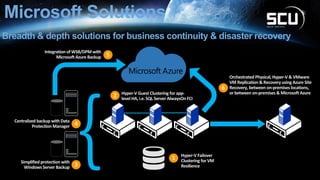
Microsoft Solutions
Breadth & depth solutions for business continuity & disaster recovery
Hyper-V Failover
Clustering for VM
Resilience
1
Hyper-V Guest Clustering for app-
level HA, i.e. SQL Server AlwaysOnFCI
2
Centralized backup with Data
Protection Manager 4
Simplified protection with
WindowsServer Backup 3
Integration of WSB/DPMwith
MicrosoftAzure Backup 5
Orchestrated Physical, Hyper-V & VMware
VM Replication & Recovery using Azure Site
Recovery, between on-premises locations,
or between on-premises & Microsoft Azure
6
Fundamentals of ASR
• Automated ≠Automatic, DR declaration must be manual
• Supports Hyper-V VMs, VMware VMs and physical servers
• DR automation is controlled from an Azure Vault
• ASR provides a complete DR solution (replication of workloads
and automated DR for failover/failback)
Microsoft Azure Site Recovery
One solution for multiple infrastructures
Hyper-V to Hyper-V
(on-premises)
Hyper-V Hyper-V
Replication
Hyper-V to Microsoft Azure
Hyper-V
Microsoft
Azure
Replication
VMware or physical to
VMware (on-premises)
VMware or physical VMware
Replication
Hyper-V to Hyper-V
(on-premises)
Hyper-V Hyper-V
Replication
SAN SAN
VMware or physical to
Microsoft Azure
VMware or physical
Microsoft
Azure
Replication
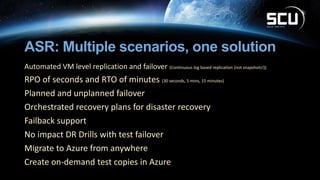
ASR: Multiple scenarios, one solution
Automated VM level replication and failover (Continuous log based replication (not snapshots!))
RPO of seconds and RTO of minutes (30 seconds, 5 mins, 15 minutes)
Planned and unplanned failover
Orchestrated recovery plans for disaster recovery
Failback support
No impact DR Drills with test failover
Migrate to Azure from anywhere
Create on-demand test copies in Azure
Azure Site Recovery use cases
• Disaster recovery
• Single click application recovery
• Compliance assurance without impacting production
• Disaster avoidance—hurricane warning
• Failover during real disasters—fire, earthquake, etc.
• Migration
• No impact on production during replication—just minutes of downtime during cutover
• Test before migration using Test Failover
• Free migration
• Dev/Test environment
• Using Test Failover get an identical copy of your production environment
• Use this for testing different scenarios like Patch Tuesday, new release testing
• Deploy new patches/bits to production with confidence
On-premises To
Azure
Protect your Hyper-V workloads
Safeguard your workloads
Protect on-premises Hyper-V workloads with Azure Site Recovery
Hyper-V to Azure
On-premises To
Azure
Protect your VMWare / Physical workloads (Enhanced)
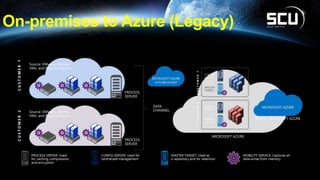
On-premises to Azure (Legacy)
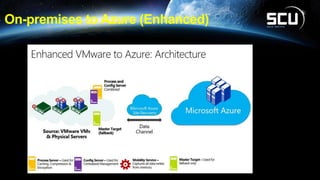
On-premises to Azure (Enhanced)
VMWare to Azure
PLEASE COMPLETE THE
SESSION EVALUATIONS
Feedback to us
+
Lucky draw prizes
http://aka.ms/tr2235

Simplify your BCDR strategy with Azure

  • 1.
  • 2.
    Session Code: Simplify yourBCDR strategy with Azure Susantha Silva MVP (Cloud and Datacenter Management) Muditha Chathuranga Systems Engineer http://www.infrontconsulting.com
  • 3.
    Session Agenda - Overviewof Microsoft’s Disaster Recovery Solutions - Overview of HYPER-V replication to Azure - Overview of VMWare replication to Azure (Enhanced) - Lessons learn from the field
  • 5.
    Do you havea Disaster Recovery Plan?
  • 6.
    Microsoft Solutions Breadth &depth solutions for business continuity & disaster recovery Hyper-V Failover Clustering for VM Resilience 1 Hyper-V Guest Clustering for app- level HA, i.e. SQL Server AlwaysOnFCI 2 Centralized backup with Data Protection Manager 4 Simplified protection with WindowsServer Backup 3 Integration of WSB/DPMwith MicrosoftAzure Backup 5 Orchestrated Physical, Hyper-V & VMware VM Replication & Recovery using Azure Site Recovery, between on-premises locations, or between on-premises & Microsoft Azure 6
  • 7.
    Fundamentals of ASR •Automated ≠Automatic, DR declaration must be manual • Supports Hyper-V VMs, VMware VMs and physical servers • DR automation is controlled from an Azure Vault • ASR provides a complete DR solution (replication of workloads and automated DR for failover/failback)
  • 8.
    Microsoft Azure SiteRecovery One solution for multiple infrastructures Hyper-V to Hyper-V (on-premises) Hyper-V Hyper-V Replication Hyper-V to Microsoft Azure Hyper-V Microsoft Azure Replication VMware or physical to VMware (on-premises) VMware or physical VMware Replication Hyper-V to Hyper-V (on-premises) Hyper-V Hyper-V Replication SAN SAN VMware or physical to Microsoft Azure VMware or physical Microsoft Azure Replication
  • 9.
    ASR: Multiple scenarios,one solution Automated VM level replication and failover (Continuous log based replication (not snapshots!)) RPO of seconds and RTO of minutes (30 seconds, 5 mins, 15 minutes) Planned and unplanned failover Orchestrated recovery plans for disaster recovery Failback support No impact DR Drills with test failover Migrate to Azure from anywhere Create on-demand test copies in Azure
  • 10.
    Azure Site Recoveryuse cases • Disaster recovery • Single click application recovery • Compliance assurance without impacting production • Disaster avoidance—hurricane warning • Failover during real disasters—fire, earthquake, etc. • Migration • No impact on production during replication—just minutes of downtime during cutover • Test before migration using Test Failover • Free migration • Dev/Test environment • Using Test Failover get an identical copy of your production environment • Use this for testing different scenarios like Patch Tuesday, new release testing • Deploy new patches/bits to production with confidence
  • 11.
  • 12.
    Safeguard your workloads Protecton-premises Hyper-V workloads with Azure Site Recovery
  • 13.
  • 14.
    On-premises To Azure Protect yourVMWare / Physical workloads (Enhanced)
  • 15.
  • 16.
  • 17.
  • 18.
    PLEASE COMPLETE THE SESSIONEVALUATIONS Feedback to us + Lucky draw prizes http://aka.ms/tr2235

Editor's Notes

  • #9 What are the different infrastructures that Azure Site Recovery can provide a solution for? Well first, for customers who have multiple sites, or work with a service provider as a secondary site, and Hyper-V is running on both sites, they can take advantage of Azure Site Recovery to orchestrate the replication and recovery between those sites. In that example, the engine of replication will be Hyper-V Replica, an inbox VM replication technology that’s built into Windows Server 2012 and 2012 R2. <click> For customers with an investment in SAN technology, that includes replication in the box, through integration with Hyper-V, System Center and Azure Site Recovery, customers can orchestrate the replication and recovery of their key workloads between those sites, this time, harnessing the power of the SAN, through asynchronous or synchronous replication, to transfer data between sites. <click> For customers who don’t have a second site, and are running Hyper-V on their primary site, using Azure Site Recovery, customers can orchestrate the replication and recovery of their on-premises workloads, into the Microsoft Azure datacenters, enabling this as a target for failover in the event of a disaster. The engine of replication in this example is Hyper-V Replica. <click> What about customers who don’t have Hyper-V within their datacenters? Well, as we mentioned at the start of the presentation, with the acquisition of InMage, under the umbrella of Azure Site Recovery, customers can orchestrate the replication and recovery of key workloads from physical, or VMware-based sites, over to a secondary site, running VMware also. This time, InMage Scout is providing the replication engine, and is transferring the data between the two on-premises locations. <click> Finally, just like we saw earlier, where a customers without a secondary location, could use ASR to replicate and recover Hyper-V-based VMs into Azure, with the new InMage technologies, in the future, you will be able to replicate and recover VMware-based VMs into Microsoft Azure. Again, this will be powered by InMage Scout. <click> So let’s dive into each of these in more detail, starting with Hyper-V to Hyper-V replication and recovery with ASR. <next slide>