SSIS Optimization  -Better Designs VarunRagul Mavoodu
Common Problems and Solutions Better designs Tips and Examples Agenda
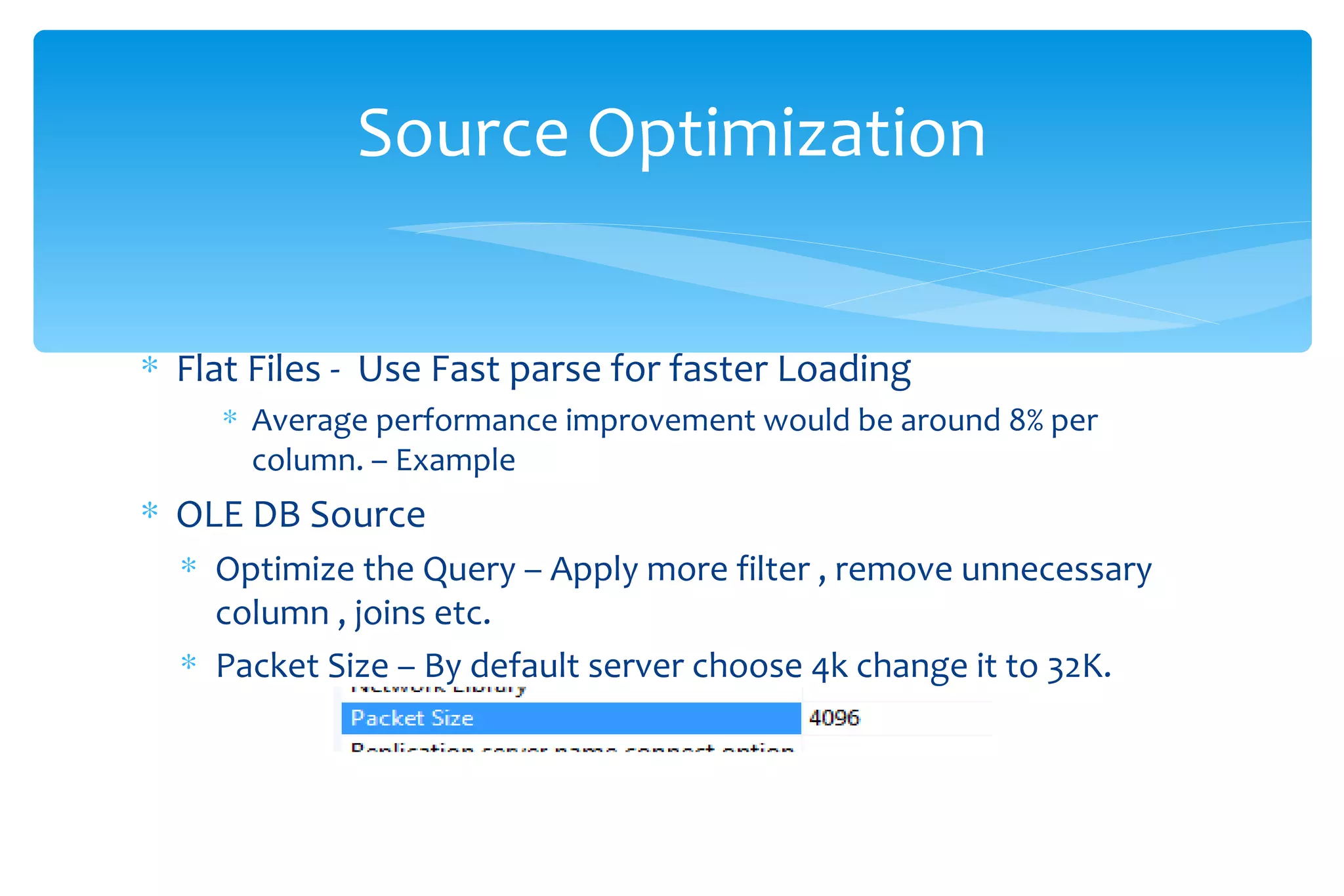
Flat Files -  Use Fast parse for faster Loading  Average performance improvement would be around 8% per column. – Example  OLE DB Source  Optimize the Query – Apply more filter , remove unnecessary column , joins etc. Packet Size – By default server choose 4k change it to 32K. Source Optimization
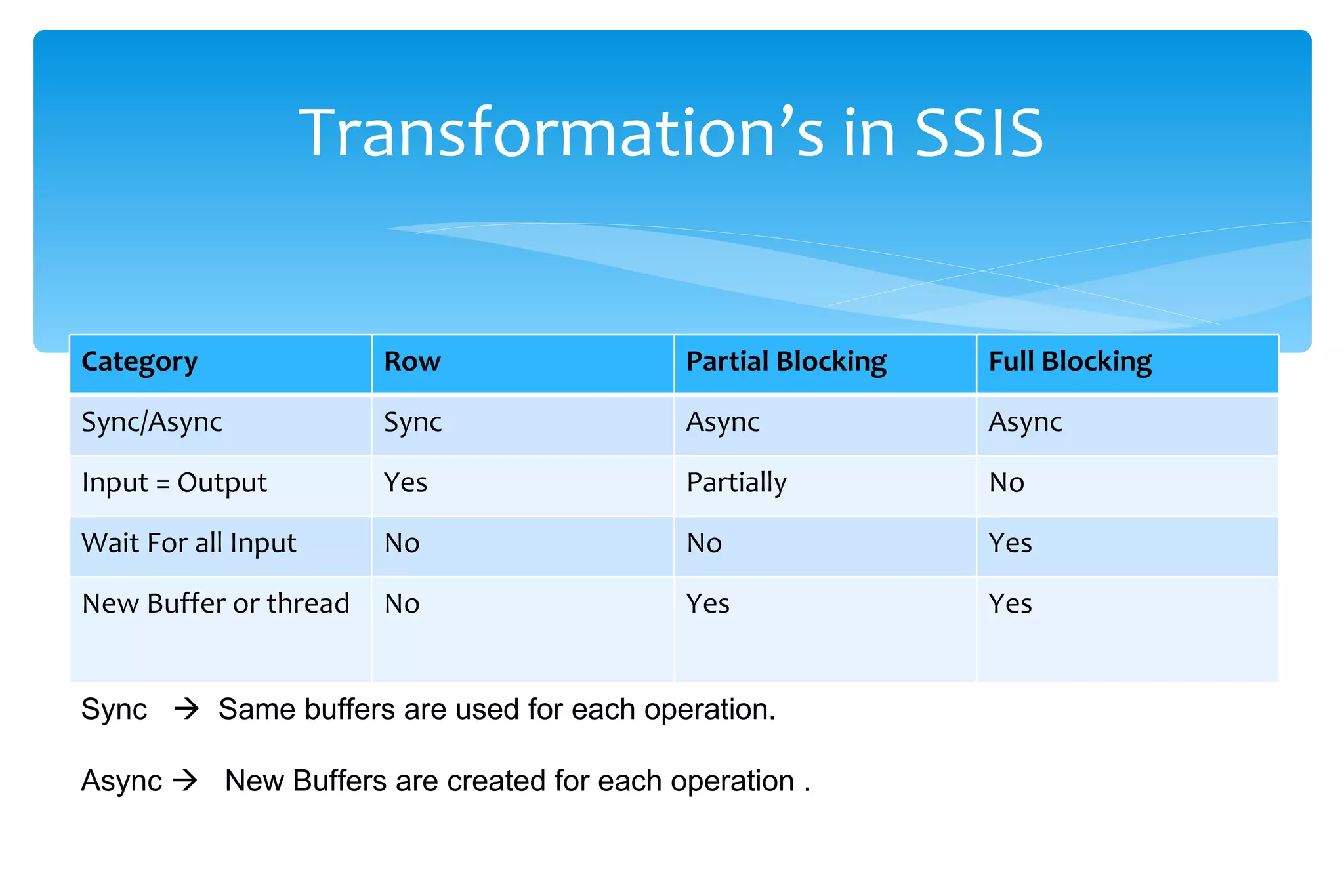
Transformation’s in SSIS Sync     Same buffers are used for each operation. Async     New Buffers are created for each operation . Category Row  Partial Blocking Full Blocking Sync/Async Sync Async Async Input = Output Yes Partially No Wait For all Input No No Yes New Buffer or thread  No Yes Yes
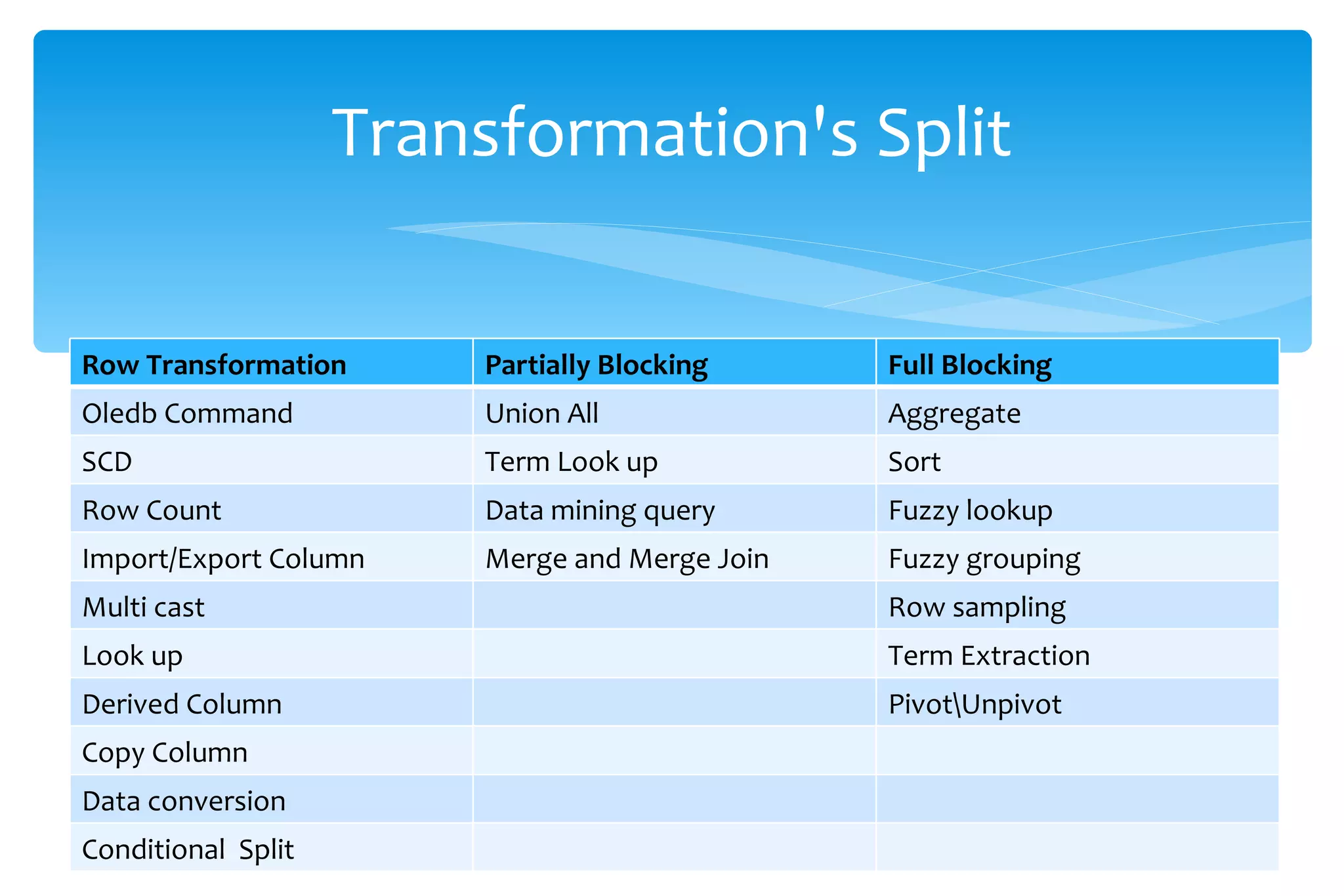
Transformation's Split Row Transformation Partially Blocking Full Blocking Oledb Command Union All  Aggregate SCD Term Look up  Sort Row Count Data mining query Fuzzy lookup Import/Export Column Merge and Merge Join  Fuzzy grouping Multi cast  Row sampling Look up  Term Extraction Derived Column Pivot\Unpivot Copy Column  Data conversion Conditional  Split
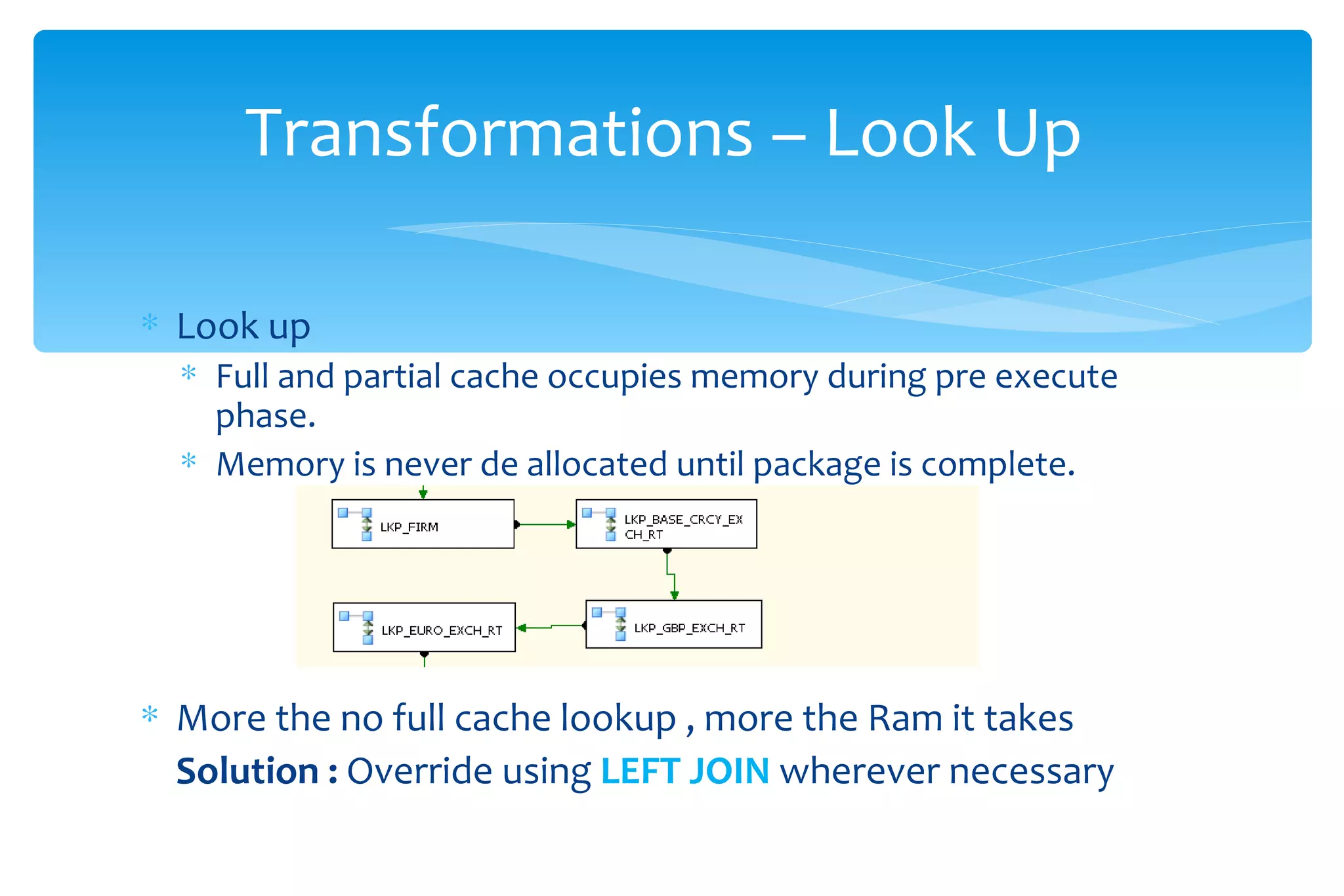
Look up Full and partial cache occupies memory during pre execute phase.  Memory is never de allocated until package is complete. More the no full cache lookup , more the Ram it takes Solution :  Override using  LEFT JOIN  wherever necessary  Transformations – Look Up
Try to Join data at database. Merge use sorted data from source and change the properties.  Use new features of 2008 like CDC which is very promising and can effectively replace Type 2  using SSIS. Try to Use Merge func of TSql . Transformations - Tips
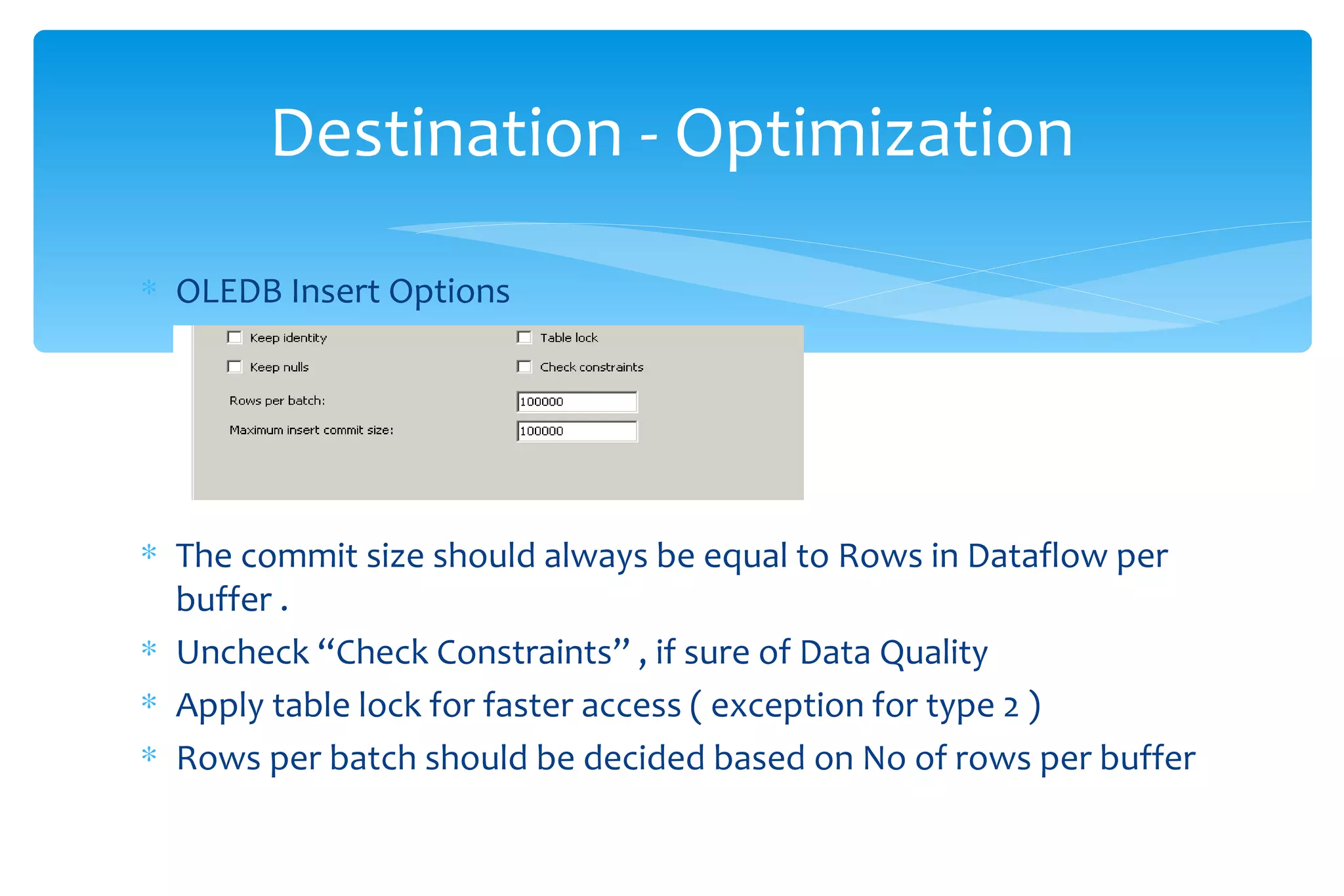
OLEDB Insert Options The commit size should always be equal to Rows in Dataflow per  buffer .  Uncheck “Check Constraints” , if sure of Data Quality  Apply table lock for faster access ( exception for type 2 ) Rows per batch should be decided based on No of rows per buffer Destination - Optimization
SQL Server Destination – Works well for small datasets  Average improvement of 20%  found on loading. Documented limitations on Error handling. Data Compression in 2008 – 30 % increase in Data loading when data is compressed but select was pretty much faster . During Data Loading process change the recovery to simple. Destination …..
Enable Trace flag 610 when doing bulk operation like index rebuild , bulk loading  . If the target table has a clustered index an order insert will improve perf. Destination ….
Index Strategy for Data loading Based on the delta  Single Clustered Index – Leave as such  Single Non clustered and data > 100 % - Drop and reload  Multiple Non Clustered  and data ? 10 % - Drop and reload  Always remember Sql Server Auto update Stats only on a 20% increase in data. Destiantion …
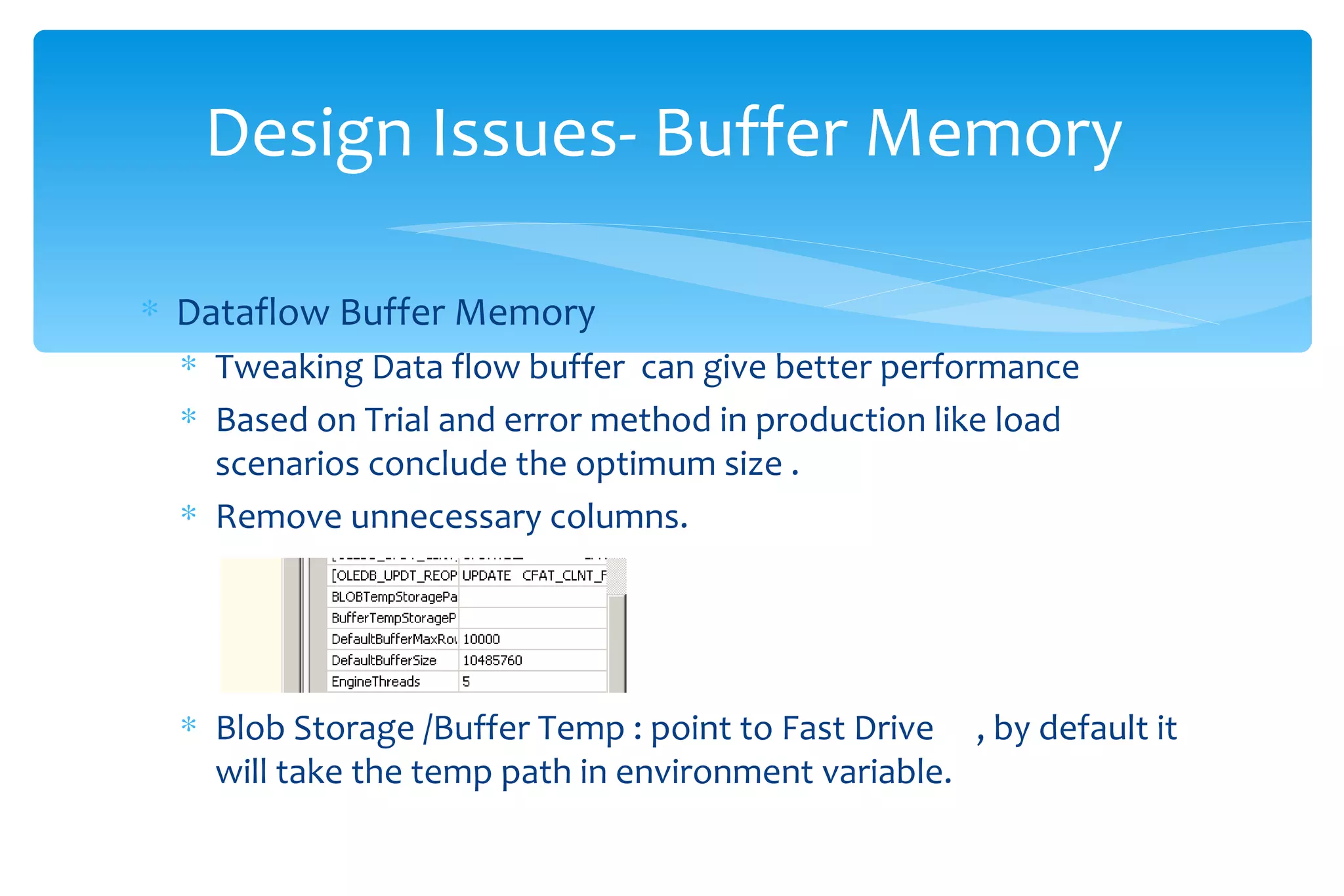
Dataflow Buffer Memory Tweaking Data flow buffer  can give better performance  Based on Trial and error method in production like load scenarios conclude the optimum size . Remove unnecessary columns. Blob Storage /Buffer Temp : point to Fast Drive  , by default it will take the temp path in environment variable. Design Issues- Buffer Memory
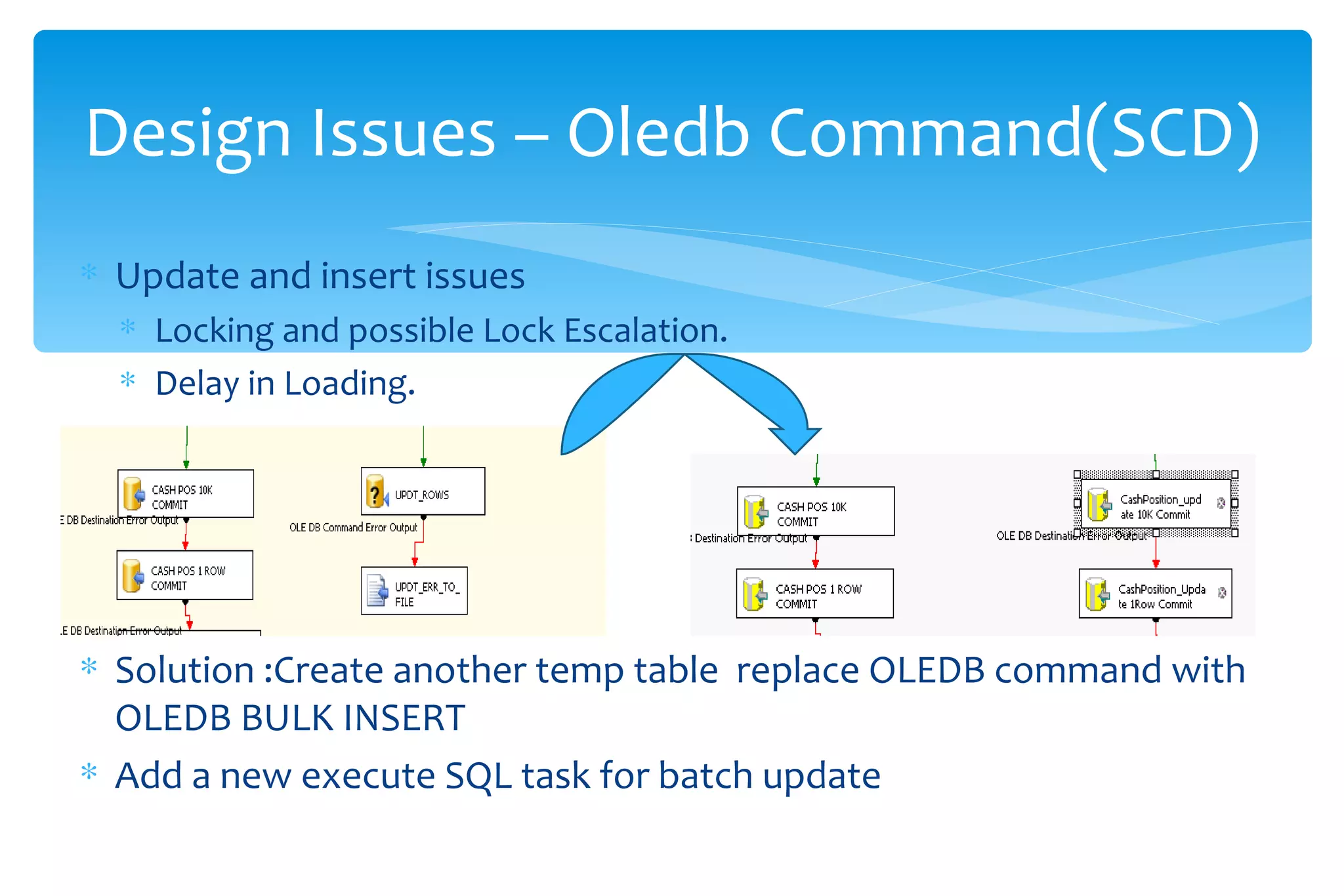
Update and insert issues  Locking and possible Lock Escalation.  Delay in Loading. Solution :Create another temp table  replace OLEDB command with  OLEDB BULK INSERT Add a new execute SQL task for batch update  Design Issues – Oledb Command(SCD)
Always use queries in Lookup do not default . Always use nolock wherever possible , it will improve large table scans. Try to use shared Look up when tables are reused . Use cast and convert at Sql rather than at SSIS. Sort at Source. Merge instead of SCD. Design Issues
Measuring performance Performance Counters Buffers Spooled – Should be low as 0  - The no of buffers that where written on the BLOB storage  .  It indicates the ram has been exhausted and where written on file system  Disc I/O  - Disk Per /Sec should be less than 10 for optimum performance  Try to Dissect your SSIS to analyze performance  Example : Using Row Count as target to test Source speed
SSIS is not an Service . It is an EXE  SSIS Service installed on service  is just for monitoring purpose . Myths..
SQL Server  2008 R2  Parallel DWH and SSRS Improvements SQL Server  2012  Ready Cloud SQL Server ,Better UI  . Data tap , Deployment wizard etc.  Undo/Redo and couple other transforms  Editions Of Sql Server
MVP    Brian Knight ,  Jamie  , Phil Brammer , Rafael Salas .. Blue shirt Guys    Matt Mason , Denny Lee , Bob Bojanic ,   David Noor  ,Matt Carroll , Thomas Kejser SQL CAT team Blog  Blogs and Materials

Ssis optimization –better designs

  • 1.
    SSIS Optimization -Better Designs VarunRagul Mavoodu
  • 2.
    Common Problems andSolutions Better designs Tips and Examples Agenda
  • 3.
    Flat Files - Use Fast parse for faster Loading Average performance improvement would be around 8% per column. – Example OLE DB Source Optimize the Query – Apply more filter , remove unnecessary column , joins etc. Packet Size – By default server choose 4k change it to 32K. Source Optimization
  • 4.
    Transformation’s in SSISSync  Same buffers are used for each operation. Async  New Buffers are created for each operation . Category Row Partial Blocking Full Blocking Sync/Async Sync Async Async Input = Output Yes Partially No Wait For all Input No No Yes New Buffer or thread No Yes Yes
  • 5.
    Transformation's Split RowTransformation Partially Blocking Full Blocking Oledb Command Union All Aggregate SCD Term Look up Sort Row Count Data mining query Fuzzy lookup Import/Export Column Merge and Merge Join Fuzzy grouping Multi cast Row sampling Look up Term Extraction Derived Column Pivot\Unpivot Copy Column Data conversion Conditional Split
  • 6.
    Look up Fulland partial cache occupies memory during pre execute phase. Memory is never de allocated until package is complete. More the no full cache lookup , more the Ram it takes Solution : Override using LEFT JOIN wherever necessary Transformations – Look Up
  • 7.
    Try to Joindata at database. Merge use sorted data from source and change the properties. Use new features of 2008 like CDC which is very promising and can effectively replace Type 2 using SSIS. Try to Use Merge func of TSql . Transformations - Tips
  • 8.
    OLEDB Insert OptionsThe commit size should always be equal to Rows in Dataflow per buffer . Uncheck “Check Constraints” , if sure of Data Quality Apply table lock for faster access ( exception for type 2 ) Rows per batch should be decided based on No of rows per buffer Destination - Optimization
  • 9.
    SQL Server Destination– Works well for small datasets Average improvement of 20% found on loading. Documented limitations on Error handling. Data Compression in 2008 – 30 % increase in Data loading when data is compressed but select was pretty much faster . During Data Loading process change the recovery to simple. Destination …..
  • 10.
    Enable Trace flag610 when doing bulk operation like index rebuild , bulk loading . If the target table has a clustered index an order insert will improve perf. Destination ….
  • 11.
    Index Strategy forData loading Based on the delta Single Clustered Index – Leave as such Single Non clustered and data > 100 % - Drop and reload Multiple Non Clustered and data ? 10 % - Drop and reload Always remember Sql Server Auto update Stats only on a 20% increase in data. Destiantion …
  • 12.
    Dataflow Buffer MemoryTweaking Data flow buffer can give better performance Based on Trial and error method in production like load scenarios conclude the optimum size . Remove unnecessary columns. Blob Storage /Buffer Temp : point to Fast Drive , by default it will take the temp path in environment variable. Design Issues- Buffer Memory
  • 13.
    Update and insertissues Locking and possible Lock Escalation. Delay in Loading. Solution :Create another temp table replace OLEDB command with OLEDB BULK INSERT Add a new execute SQL task for batch update Design Issues – Oledb Command(SCD)
  • 14.
    Always use queriesin Lookup do not default . Always use nolock wherever possible , it will improve large table scans. Try to use shared Look up when tables are reused . Use cast and convert at Sql rather than at SSIS. Sort at Source. Merge instead of SCD. Design Issues
  • 15.
    Measuring performance PerformanceCounters Buffers Spooled – Should be low as 0 - The no of buffers that where written on the BLOB storage . It indicates the ram has been exhausted and where written on file system Disc I/O - Disk Per /Sec should be less than 10 for optimum performance Try to Dissect your SSIS to analyze performance Example : Using Row Count as target to test Source speed
  • 16.
    SSIS is notan Service . It is an EXE SSIS Service installed on service is just for monitoring purpose . Myths..
  • 17.
    SQL Server 2008 R2 Parallel DWH and SSRS Improvements SQL Server 2012 Ready Cloud SQL Server ,Better UI . Data tap , Deployment wizard etc. Undo/Redo and couple other transforms Editions Of Sql Server
  • 18.
    MVP  Brian Knight , Jamie , Phil Brammer , Rafael Salas .. Blue shirt Guys  Matt Mason , Denny Lee , Bob Bojanic , David Noor ,Matt Carroll , Thomas Kejser SQL CAT team Blog Blogs and Materials