Governance and administration
for Teams App development
Jenkins NS
@jenkinsns
Jenkins NS
Modern Workplace Solution Architect
International Speaker
Trainer
Independent Consultant
Blogger
@jenkinsns
jenkinsns@gmail.com
http://www.jenkinsblogs.com
Founder, JPOWER4
jenkinsns@jpower4.com
http://www.jpower4.com
SPEAKER
SPFx: https://www.facebook.com/spfxinfo/
MS Teams: https://www.facebook.com/msteamsinfo
Github : https://github.com/jenkinsns
Other References
What I’ll cover
 Introduction to Teams
 Introduction to managing Teams
 Teams configuration
 Day-to-day support lifecycle of Microsoft Teamsdsdwsd
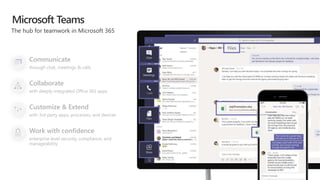
Communicate
through chat, meetings & calls
Collaborate
with deeply integrated Office 365 apps
Customize & Extend
with 3rd party apps, processes, and devices
Work with confidence
enterprise level security, compliance, and
manageability
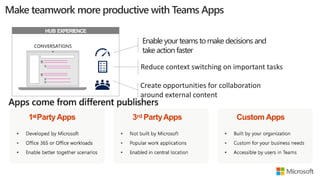
1stPartyApps 3rd PartyApps Custom Apps
HUB EXPERIENCE
Enable your teams tomake decisions and
take action faster
Reduce context switching on important tasks
Create opportunities for collaboration
around external content
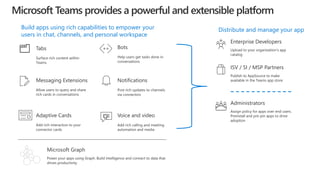
Tabs
Surface rich content within
Teams
Distribute and manage your app
Bots
Help users get tasks done in
conversations
Voice and video
Add rich calling and meeting
automation and media
Messaging Extensions
Allow users to query and share
rich cards in conversations
Power your apps using Graph. Build intelligence and connect to data that
drives productivity
Microsoft Graph
Adaptive Cards
Add rich interaction to your
connector cards
Notifications
Post rich updates to channels
via connectors
Enterprise Developers
Upload to your organization’s app
catalog
ISV / SI / MSP Partners
Publish to AppSource to make
available in the Teams app store
Build apps using rich capabilities to empower your
users in chat, channels, and personal workspace
Administrators
Assign policy for apps over end users.
Preinstall and pre-pin apps to drive
adoption
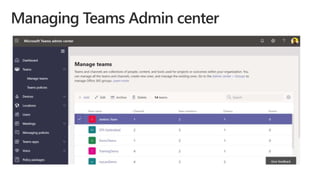
Introduction to managing Teams
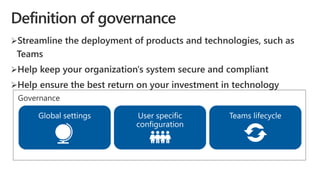
Governance
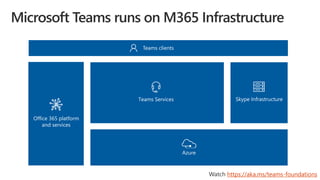
Teams clients
Teams Services Skype Infrastructure
Office 365 platform
and services
Azure
https://aka.ms/teams-foundations
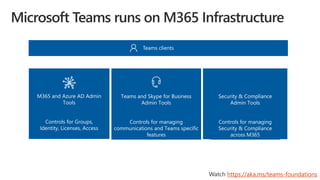
Teams clients
Teams and Skype for Business
Admin Tools
Controls for managing
communications and Teams specific
features
M365 and Azure AD Admin
Tools
Controls for Groups,
Identity, Licenses, Access
https://aka.ms/teams-foundations
Security & Compliance
Admin Tools
Controls for managing
Security & Compliance
across M365
Teams Configuration
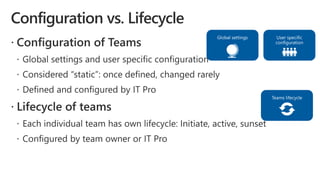
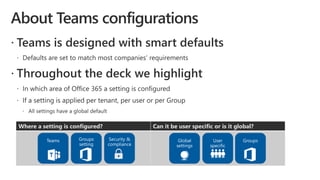
Where a setting is configured? Can it be user specific or is it global?
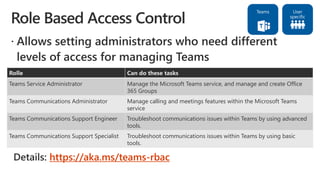
https://aka.ms/teams-rbac
Rolle Can do these tasks
Teams Service Administrator Manage the Microsoft Teams service, and manage and create Office
365 Groups
Teams Communications Administrator Manage calling and meetings features within the Microsoft Teams
service
Teams Communications Support Engineer Troubleshoot communications issues within Teams by using advanced
tools.
Teams Communications Support Specialist Troubleshoot communications issues within Teams by using basic
tools.
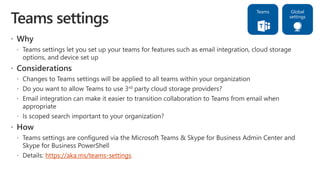
https://aka.ms/teams-settings
https://aka.ms/teams-messaging
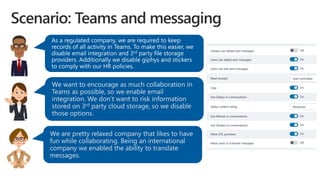
We want to encourage as much collaboration in
Teams as possible, so we enable email
integration. We don’t want to risk information
stored on 3rd party cloud storage, so we disable
those options.
We are pretty relaxed company that likes to have
fun while collaborating. Being an international
company we enabled the ability to translate
messages.
https://aka.ms/teams-meeting-settings
https://aka.ms/teams-meeting-policies
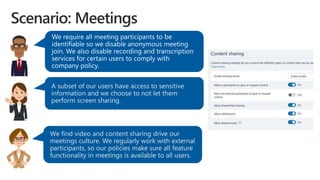
A subset of our users have access to sensitive
information and we choose to not let them
perform screen sharing.
We find video and content sharing drive our
meetings culture. We regularly work with external
participants, so our policies make sure all feature
functionality in meetings is available to all users.
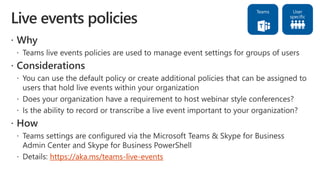
https://aka.ms/teams-live-events
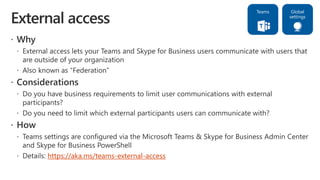
https://aka.ms/teams-external-access
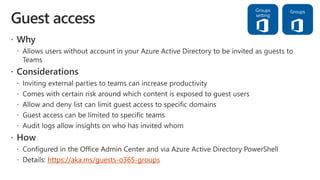
https://aka.ms/guests-o365-groups
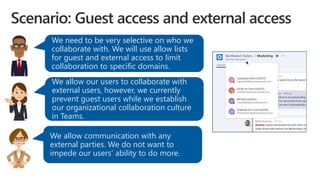
We need to be very selective on who we
collaborate with. We will use allow lists
for guest and external access to limit
collaboration to specific domains.
We allow our users to collaborate with
external users, however, we currently
prevent guest users while we establish
our organizational collaboration culture
in Teams.
We allow communication with any
external parties. We do not want to
impede our users’ ability to do more.
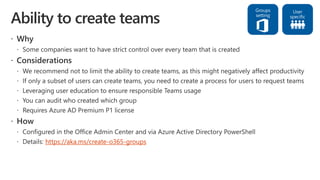
https://aka.ms/create-o365-groups
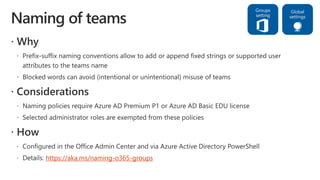
https://aka.ms/naming-o365-groups
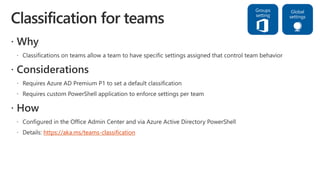
https://aka.ms/teams-classification
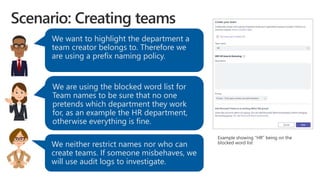
We want to highlight the department a
team creator belongs to. Therefore we
are using a prefix naming policy.
We are using the blocked word list for
Team names to be sure that no one
pretends which department they work
for, as an example the HR department,
otherwise everything is fine.
We neither restrict names nor who can
create teams. If someone misbehaves, we
will use audit logs to investigate.
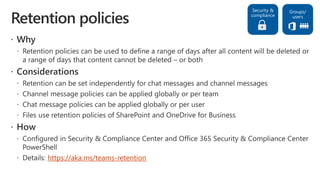
https://aka.ms/teams-retention
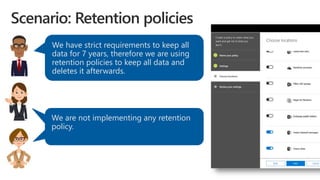
We have strict requirements to keep all
data for 7 years, therefore we are using
retention policies to keep all data and
deletes it afterwards.
We are not implementing any retention
policy.
We are not implementing any retention
policy.
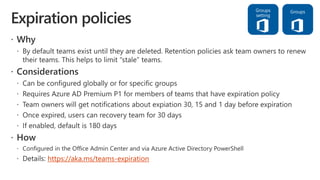
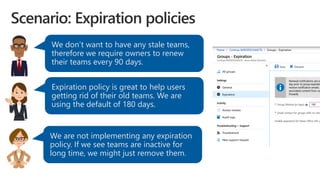
https://aka.ms/teams-expiration
We don’t want to have any stale teams,
therefore we require owners to renew
their teams every 90 days.
Expiration policy is great to help users
getting rid of their old teams. We are
using the default of 180 days.
We are not implementing any expiration
policy. If we see teams are inactive for
long time, we might just remove them.
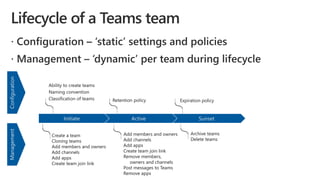
Day-to-day support lifecycle of teams
SunsetActiveInitiate
ConfigurationManagement
Expiration policyRetention policy
Ability to create teams
Naming convention
Classification of teams
Create a team
Cloning teams
Add members and owners
Add channels
Add apps
Create team join link
Archive teams
Delete teams
Add members and owners
Add channels
Add apps
Create team join link
Remove members,
owners and channels
Post messages to Teams
Remove apps
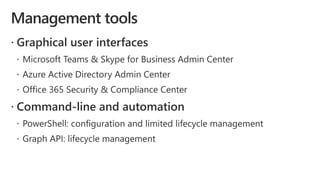
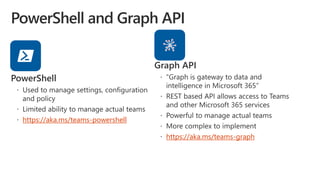
https://aka.ms/teams-powershell
https://aka.ms/teams-graph
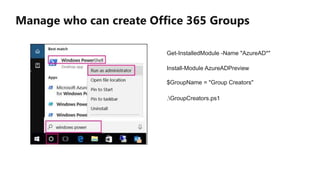
Manage who can create Office 365 Groups
Get-InstalledModule -Name "AzureAD*"
Install-Module AzureADPreview
$GroupName = "Group Creators"
.GroupCreators.ps1
$GroupName = "<SecurityGroupName>“
$AllowGroupCreation = "False"
Connect-AzureAD
$settingsObjectID = (Get-AzureADDirectorySetting | Where-object -Property Displayname -Value
"Group.Unified" -EQ).id
if(!$settingsObjectID)
{
$template = Get-AzureADDirectorySettingTemplate | Where-object {$_.displayname -eq "group.unified"}
$settingsCopy = $template.CreateDirectorySetting() New-AzureADDirectorySetting -DirectorySetting
$settingsCopy $settingsObjectID = (Get-AzureADDirectorySetting | Where-object -Property Displayname
-Value "Group.Unified" -EQ).id }
$settingsCopy = Get-AzureADDirectorySetting -Id $settingsObjectID
$settingsCopy["EnableGroupCreation"] = $AllowGroupCreation
if(
$GroupName)
{
$settingsCopy["GroupCreationAllowedGroupId"] = (Get-AzureADGroup -SearchString
$GroupName).objectid
} else {
$settingsCopy["GroupCreationAllowedGroupId"] = $GroupName } Set-AzureADDirectorySetting -Id
$settingsObjectID -DirectorySetting $settingsCopy (Get-AzureADDirectorySetting -Id
$settingsObjectID).Valueshttps://docs.microsoft.com/en-us/office365/admin/create-groups/manage-creation-of-groups?view=o365-
worldwide
Demo
https://aka.ms/Teamsblog
References
Enjoy the Bootcamp
Call to action
Join Office 365 developer program
https://dev.office.com/devprogram
to leverage all resources for Office 365
development learning
Build applications on Office 365 platform
Attend MVP led local community events to
continue learning on Office 365 development
Share your feedback on Bootcamp at
https://aka.ms/Microsoft365DevBootcampSurvey2019

Governance and administration for teams app development

  • 1.
    Governance and administration forTeams App development Jenkins NS @jenkinsns
  • 2.
    Jenkins NS Modern WorkplaceSolution Architect International Speaker Trainer Independent Consultant Blogger @jenkinsns jenkinsns@gmail.com http://www.jenkinsblogs.com Founder, JPOWER4 jenkinsns@jpower4.com http://www.jpower4.com SPEAKER SPFx: https://www.facebook.com/spfxinfo/ MS Teams: https://www.facebook.com/msteamsinfo Github : https://github.com/jenkinsns Other References
  • 3.
    What I’ll cover Introduction to Teams  Introduction to managing Teams  Teams configuration  Day-to-day support lifecycle of Microsoft Teamsdsdwsd
  • 4.
    Communicate through chat, meetings& calls Collaborate with deeply integrated Office 365 apps Customize & Extend with 3rd party apps, processes, and devices Work with confidence enterprise level security, compliance, and manageability
  • 5.
    1stPartyApps 3rd PartyAppsCustom Apps HUB EXPERIENCE Enable your teams tomake decisions and take action faster Reduce context switching on important tasks Create opportunities for collaboration around external content
  • 6.
    Tabs Surface rich contentwithin Teams Distribute and manage your app Bots Help users get tasks done in conversations Voice and video Add rich calling and meeting automation and media Messaging Extensions Allow users to query and share rich cards in conversations Power your apps using Graph. Build intelligence and connect to data that drives productivity Microsoft Graph Adaptive Cards Add rich interaction to your connector cards Notifications Post rich updates to channels via connectors Enterprise Developers Upload to your organization’s app catalog ISV / SI / MSP Partners Publish to AppSource to make available in the Teams app store Build apps using rich capabilities to empower your users in chat, channels, and personal workspace Administrators Assign policy for apps over end users. Preinstall and pre-pin apps to drive adoption
  • 7.
  • 8.
  • 10.
    Teams clients Teams ServicesSkype Infrastructure Office 365 platform and services Azure https://aka.ms/teams-foundations
  • 11.
    Teams clients Teams andSkype for Business Admin Tools Controls for managing communications and Teams specific features M365 and Azure AD Admin Tools Controls for Groups, Identity, Licenses, Access https://aka.ms/teams-foundations Security & Compliance Admin Tools Controls for managing Security & Compliance across M365
  • 13.
  • 14.
    Where a settingis configured? Can it be user specific or is it global?
  • 16.
    https://aka.ms/teams-rbac Rolle Can dothese tasks Teams Service Administrator Manage the Microsoft Teams service, and manage and create Office 365 Groups Teams Communications Administrator Manage calling and meetings features within the Microsoft Teams service Teams Communications Support Engineer Troubleshoot communications issues within Teams by using advanced tools. Teams Communications Support Specialist Troubleshoot communications issues within Teams by using basic tools.
  • 17.
  • 18.
  • 19.
    We want toencourage as much collaboration in Teams as possible, so we enable email integration. We don’t want to risk information stored on 3rd party cloud storage, so we disable those options. We are pretty relaxed company that likes to have fun while collaborating. Being an international company we enabled the ability to translate messages.
  • 20.
  • 21.
  • 22.
    A subset ofour users have access to sensitive information and we choose to not let them perform screen sharing. We find video and content sharing drive our meetings culture. We regularly work with external participants, so our policies make sure all feature functionality in meetings is available to all users.
  • 23.
  • 24.
  • 25.
  • 26.
    We need tobe very selective on who we collaborate with. We will use allow lists for guest and external access to limit collaboration to specific domains. We allow our users to collaborate with external users, however, we currently prevent guest users while we establish our organizational collaboration culture in Teams. We allow communication with any external parties. We do not want to impede our users’ ability to do more.
  • 27.
  • 28.
  • 29.
  • 30.
    We want tohighlight the department a team creator belongs to. Therefore we are using a prefix naming policy. We are using the blocked word list for Team names to be sure that no one pretends which department they work for, as an example the HR department, otherwise everything is fine. We neither restrict names nor who can create teams. If someone misbehaves, we will use audit logs to investigate.
  • 31.
  • 32.
    We have strictrequirements to keep all data for 7 years, therefore we are using retention policies to keep all data and deletes it afterwards. We are not implementing any retention policy. We are not implementing any retention policy.
  • 33.
  • 34.
    We don’t wantto have any stale teams, therefore we require owners to renew their teams every 90 days. Expiration policy is great to help users getting rid of their old teams. We are using the default of 180 days. We are not implementing any expiration policy. If we see teams are inactive for long time, we might just remove them.
  • 35.
  • 36.
    SunsetActiveInitiate ConfigurationManagement Expiration policyRetention policy Abilityto create teams Naming convention Classification of teams Create a team Cloning teams Add members and owners Add channels Add apps Create team join link Archive teams Delete teams Add members and owners Add channels Add apps Create team join link Remove members, owners and channels Post messages to Teams Remove apps
  • 39.
  • 40.
    Manage who cancreate Office 365 Groups Get-InstalledModule -Name "AzureAD*" Install-Module AzureADPreview $GroupName = "Group Creators" .GroupCreators.ps1
  • 41.
    $GroupName = "<SecurityGroupName>“ $AllowGroupCreation= "False" Connect-AzureAD $settingsObjectID = (Get-AzureADDirectorySetting | Where-object -Property Displayname -Value "Group.Unified" -EQ).id if(!$settingsObjectID) { $template = Get-AzureADDirectorySettingTemplate | Where-object {$_.displayname -eq "group.unified"} $settingsCopy = $template.CreateDirectorySetting() New-AzureADDirectorySetting -DirectorySetting $settingsCopy $settingsObjectID = (Get-AzureADDirectorySetting | Where-object -Property Displayname -Value "Group.Unified" -EQ).id } $settingsCopy = Get-AzureADDirectorySetting -Id $settingsObjectID $settingsCopy["EnableGroupCreation"] = $AllowGroupCreation if( $GroupName) { $settingsCopy["GroupCreationAllowedGroupId"] = (Get-AzureADGroup -SearchString $GroupName).objectid } else { $settingsCopy["GroupCreationAllowedGroupId"] = $GroupName } Set-AzureADDirectorySetting -Id $settingsObjectID -DirectorySetting $settingsCopy (Get-AzureADDirectorySetting -Id $settingsObjectID).Valueshttps://docs.microsoft.com/en-us/office365/admin/create-groups/manage-creation-of-groups?view=o365- worldwide
  • 43.
  • 44.
  • 45.
  • 46.
    Call to action JoinOffice 365 developer program https://dev.office.com/devprogram to leverage all resources for Office 365 development learning Build applications on Office 365 platform Attend MVP led local community events to continue learning on Office 365 development Share your feedback on Bootcamp at https://aka.ms/Microsoft365DevBootcampSurvey2019

Editor's Notes

  • #5 [This is an animated slide. Please show it in presentation mode] [MAIN POINT TO LAND] Microsoft Teams is a hub for teamwork, a chat-based workspace that enables teams to be more productive by giving them a single and secure location that brings together everything a team needs: chats, meetings, calls, files, and tools. Microsoft Teams is one place for all the needs your teams have.   Microsoft Teams delivers on four core promises to create a digital workspace for high performing teams. [COMMUNICATE] First, Microsoft Teams solves for the communication needs of a diverse workforce. Since preview, Microsoft Teams has evolved to a complete meeting and calling solution, including chat and voice and video, as we have completed our roadmap for bringing Skype for Business Online features and functionality into Teams. You can use Teams for informal 1:1 communications or group chats – directly on your phone if you’re on the go. Or you can have an open conversation in a channel. This enables people to share information in a transparent way to accelerate decision making. And it's super easy to move from a chat into a face-to-face meeting, helping you to bridge geographical barriers.   [COLLABORATE] When it comes to collaboration, the deep Office integration enables today’s multigenerational workforce to use the Office apps they are familiar with and love - Word, Excel, PowerPoint, OneNote, SharePoint, Planner, even Power BI - right within the context of Teams. You can avoid email attachments and having to search for the latest version of a document. Teams brings all the Office 365 services together – so that you can easily share and co-author files.   [CUSTOMIZE] Many of you use other services in addition to Office 365 which results in having to jump between and spend time in disparate experiences. We built Teams to be the hub for all the services and tools your teams use on a day to day basis. So, you can customize Teams with tabs, connector and bots to include the apps and services you need - <mention relevant 3rd party apps like GitHub and Trello>. We have also created an extensible platform, to enable building apps and to integrate with business processes. And for Firstline workers, Teams provides an additional set of capabilities including schedule management.    [WORK WITH CONFIDENCE] Microsoft Teams comes with the enterprise grade security, compliance and manageability that you expect from Office 365 which customers tell us is a huge value add for them.
  • #6 `
  • #7 Microsoft Teams has an open developer platform with a rich set of capabilities to build apps or integrate with new or existing business processes and services.