Microsoft Flow & PowerApps End-to-End
Maarten Eekels
About me
20+ yrs in IT, 13 yrs in SharePoint
CTO Portiva
DIWUG board member
Speaker, vlogger
Contact
meekels@portiva.nl
www.eekels.net
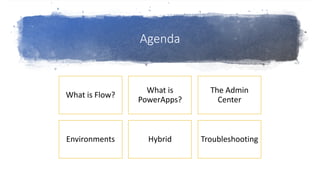
Agenda
What is Flow?
What is
PowerApps?
The Admin
Center
Environments Hybrid Troubleshooting
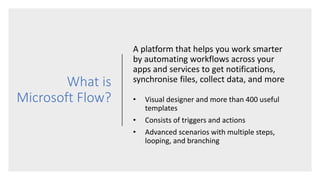
What is
Microsoft Flow?
A platform that helps you work smarter
by automating workflows across your
apps and services to get notifications,
synchronise files, collect data, and more
• Visual designer and more than 400 useful
templates
• Consists of triggers and actions
• Advanced scenarios with multiple steps,
looping, and branching
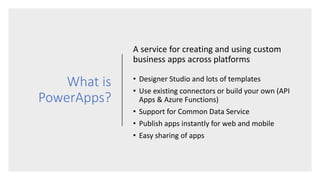
What is
PowerApps?
A service for creating and using custom
business apps across platforms
• Designer Studio and lots of templates
• Use existing connectors or build your own (API
Apps & Azure Functions)
• Support for Common Data Service
• Publish apps instantly for web and mobile
• Easy sharing of apps
DEMO
Admin Center
• Manage environments
• Manage security
• Manage data policies
Environments
• Created under Azure AD tenant and its
resources can only be accessed by users within
that tenant
• Bound to geographical location
• Always a “default” environment
• Max one Common Data Service database
• Typical use cases:
• Test / production
• Specific teams or departments
• Geographical branches
DEMO
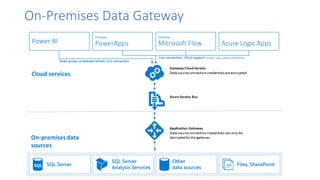
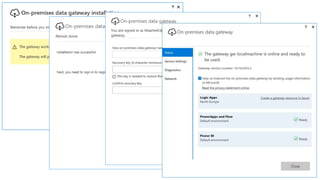
On-Premises Data Gateway
DEMO
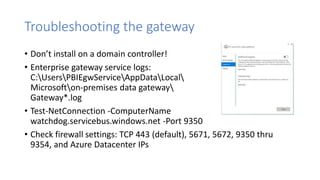
Troubleshooting the gateway
• Don’t install on a domain controller!
• Enterprise gateway service logs:
C:UsersPBIEgwServiceAppDataLocal
Microsofton-premises data gateway
Gateway*.log
• Test-NetConnection -ComputerName
watchdog.servicebus.windows.net -Port 9350
• Check firewall settings: TCP 443 (default), 5671, 5672, 9350 thru
9354, and Azure Datacenter IPs
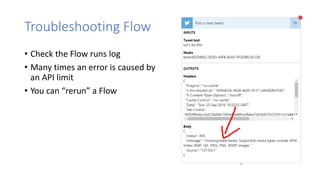
Troubleshooting Flow
• Check the Flow runs log
• Many times an error is caused by
an API limit
• You can “rerun” a Flow
Troubleshooting PowerApps
• The Studio is WYSIWYG
• When connection is Flow is changed: remove Flow from App, re-add
Flow, reshare App
• Excel data must be formatted as table and cannot contain calculated
columns
@maarteneekels
meekels@portiva.nl

SPSVIE17 - Microsoft Flow And PowerApps - End-To-End

  • 1.
    Microsoft Flow &PowerApps End-to-End Maarten Eekels
  • 2.
    About me 20+ yrsin IT, 13 yrs in SharePoint CTO Portiva DIWUG board member Speaker, vlogger Contact meekels@portiva.nl www.eekels.net
  • 3.
    Agenda What is Flow? Whatis PowerApps? The Admin Center Environments Hybrid Troubleshooting
  • 4.
    What is Microsoft Flow? Aplatform that helps you work smarter by automating workflows across your apps and services to get notifications, synchronise files, collect data, and more • Visual designer and more than 400 useful templates • Consists of triggers and actions • Advanced scenarios with multiple steps, looping, and branching
  • 5.
    What is PowerApps? A servicefor creating and using custom business apps across platforms • Designer Studio and lots of templates • Use existing connectors or build your own (API Apps & Azure Functions) • Support for Common Data Service • Publish apps instantly for web and mobile • Easy sharing of apps
  • 6.
  • 7.
    Admin Center • Manageenvironments • Manage security • Manage data policies
  • 8.
    Environments • Created underAzure AD tenant and its resources can only be accessed by users within that tenant • Bound to geographical location • Always a “default” environment • Max one Common Data Service database • Typical use cases: • Test / production • Specific teams or departments • Geographical branches
  • 9.
  • 10.
  • 12.
  • 13.
    Troubleshooting the gateway •Don’t install on a domain controller! • Enterprise gateway service logs: C:UsersPBIEgwServiceAppDataLocal Microsofton-premises data gateway Gateway*.log • Test-NetConnection -ComputerName watchdog.servicebus.windows.net -Port 9350 • Check firewall settings: TCP 443 (default), 5671, 5672, 9350 thru 9354, and Azure Datacenter IPs
  • 14.
    Troubleshooting Flow • Checkthe Flow runs log • Many times an error is caused by an API limit • You can “rerun” a Flow
  • 15.
    Troubleshooting PowerApps • TheStudio is WYSIWYG • When connection is Flow is changed: remove Flow from App, re-add Flow, reshare App • Excel data must be formatted as table and cannot contain calculated columns
  • 17.