
2017 DataWorks Summit , San Jose California
Sandra Guija and Snehal Sakhare
Speed it up and Spark it up
at Intel
IT@Intel
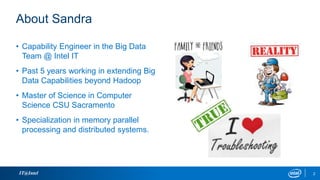
About Sandra
IT@Intel
• Capability Engineer in the Big Data
Team @ Intel IT
• Past 5 years working in extending Big
Data Capabilities beyond Hadoop
• Master of Science in Computer
Science CSU Sacramento
• Specialization in memory parallel
processing and distributed systems.
2
About Snehal
• Working with Hadoop 3+ years as
Application Developer @ IT-Intel
Corporation.
• Master of Science in Computer
Science- CSU, Sacramento
• Publications - Power Efficient
MapReduce Workload Acceleration
using Integrated-GPU
• Zumba lover
IT@Intel 3
Objective
• Share our experience and key learnings in the journey of data
ingestion framework using Spark
• How to speed up application development using reusable ingestion
framework
• How to improve job performance
IT@Intel 4
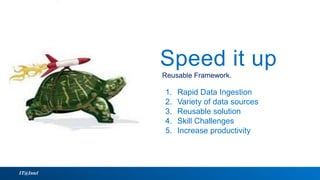
Reusable Framework.
Speed it up
IT@Intel
1. Rapid Data Ingestion
2. Variety of data sources
3. Reusable solution
4. Skill Challenges
5. Increase productivity
Reusable Framework.
Speed it up
1. Rapid Data Ingestion
2. Variety of data sources
3. Reusable solution
4. Skill Challenges
5. Increase productivity
IT@Intel 6
Reusable Framework with Spark
• Spark takes us to next level
• Data is distributed in memory
• Lazy Computations – Optimize the job before executing
• Efficient pipelining – Avoid data hitting the hard disk.
• Uniform Data access using Spark SQL
• Spark SQL is the core of the ingestion framework
16pt Intel Clear Subhead, Date, Etc.
Video
IT@Intel
IT@Intel 8
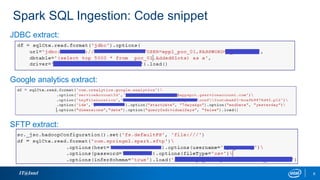
Spark SQL Ingestion: Code snippet
JDBC extract:
Google analytics extract:
SFTP extract:
IT@Intel 9
BDRF: Seamless Spark job deployment
• Job Deployment is easier than ever in -local, yarn-client or yarn-cluster mode.
spark_mode: yarn-cluster
• Dependencies management in yarn-cluster mode.
#Run spark batch job
if [ "$SPARK_MODE" = 'yarn-cluster' ]; then
spark-submit --master ${SPARK_MODE} 
--conf "spark.driver.extraClassPath=${SPARK_CLUSTER_EXTRACLASSPATH}" 
--conf "spark.executor.extraClassPath=${SPARK_CLUSTER_EXTRACLASSPATH}" 
--conf "spark.executor.memory = ${exec-mem}" 
--conf "spark.yarn.dist.files=${SPARK_YARN_DIST_FILES},${INI_FILE}" 
--py-files "${SPARK_PYTHON_FILES}" 
${SPARK_SCRIPT} $(basename ${INI_FILE}) ${HDENV} ${NUM_EXEC} ${GATEWAY}
• Put a framework utilization dashboard for projects.
Spark it Up
Spark @ Intel IT
IT@Intel
16pt Intel Clear Subhead, Date, Etc.
Speed it up
IT@Intel
Spark it upBetter resources utilization
Lessons learned:
1. JDBC single executor
2. Tune-up executor memory
3. Large datasets/numerous files
4. Custom package cluster mode
Spark it up
Better resources utilization
Lessons learned:
1. JDBC single executor
2. Tune-up executor memory
3. Large datasets/numerous files
4. Custom package cluster mode
Spark it up
Better resources utilization
1. Parallelism
2. Challenge with Big datasets
3. Deploy dependencies
4. Optimization
Parallelism
IT@Intel 12
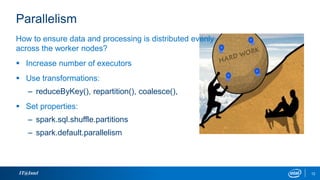
How to ensure data and processing is distributed evenly
across the worker nodes?
 Increase number of executors
 Use transformations:
– reduceByKey(), repartition(), coalesce(),
 Set properties:
– spark.sql.shuffle.partitions
– spark.default.parallelism
IT@Intel 13
Solution :
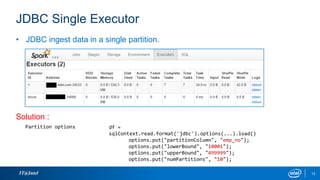
• JDBC ingest data in a single partition.
df =
sqlContext.read.format('jdbc').options(...).load()
options.put("partitionColumn", "emp_no");
options.put("lowerBound", "10001");
options.put("upperBound", "499999");
options.put("numPartitions", "10");
Partition options
JDBC Single Executor
IT@Intel 14
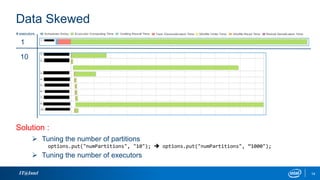
# executors
1
10
Solution :
 Tuning the number of partitions
options.put("numPartitions", "10");  options.put("numPartitions", “1000");
 Tuning the number of executors
Data Skewed
IT@Intel 15
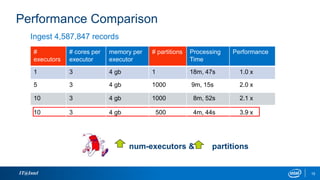
#
executors
# cores per
executor
memory per
executor
# partitions Processing
Time
Performance
1 3 4 gb 1 18m, 47s 1.0 x
Ingest 4,587,847 records
Performance Comparison
num-executors & partitions
5 3 4 gb 1000 9m, 15s 2.0 x
10 3 4 gb 1000 8m, 52s 2.1 x
10 3 4 gb 500 4m, 44s 3.9 x
IT@Intel 16
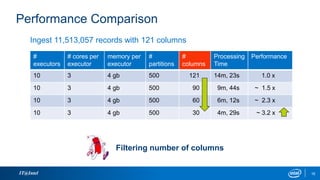
#
executors
# cores per
executor
memory per
executor
#
partitions
#
columns
Processing
Time
Performance
10 3 4 gb 500 121 14m, 23s 1.0 x
10 3 4 gb 500 90 9m, 44s ~ 1.5 x
10 3 4 gb 500 60 6m, 12s ~ 2.3 x
10 3 4 gb 500 30 4m, 29s ~ 3.2 x
Ingest 11,513,057 records with 121 columns
Performance Comparison
Filtering number of columns
Challenge with Big datasets
IT@Intel 17
 Failures when running queries:
– > 2.3 TB
– > 6 billion records
WARN servlet.ServletHandler: Error for /jobs/job/
java.lang.OutOfMemoryError: Java heap space
at java.util.Arrays.copyOf(Arrays.java:2367)
ERROR server.TransportRequestHandler: Error sending result RpcResponse{requestId=8891220538372697062,
body=NioManagedBuffer{buf=java.nio.HeapByteBuffer[pos=0 lim=166 cap=166]}} to node019:40175; closing connection
org.apache.spark.SparkException: Error sending message
Caused by: java.nio.channels.ClosedChannelException
ERROR executor.CoarseGrainedExecutorBackend: RECEIVED SIGNAL 15: SIGTERM
Container
is killed
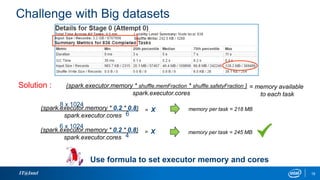
Challenge with Big datasets
IT@Intel 18
Use formula to set executor memory and cores
(spark.executor.memory * shuffle.memFraction * shuffle.safetyFraction )
spark.executor.cores
= memory available
to each task
Solution :
(spark.executor.memory * 0.2 * 0.8)
spark.executor.cores
= X
8 x 1024
6
memory per task = 218 MB
(spark.executor.memory * 0.2 * 0.8)
spark.executor.cores
= X
6 x 1024
4
memory per task = 245 MB
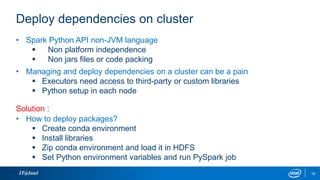
Deploy dependencies on cluster
IT@Intel 19
• Spark Python API non-JVM language
 Non platform independence
 Non jars files or code packing
• Managing and deploy dependencies on a cluster can be a pain
 Executors need access to third-party or custom libraries
 Python setup in each node
• How to deploy packages?
 Create conda environment
 Install libraries
 Zip conda environment and load it in HDFS
 Set Python environment variables and run PySpark job
Solution :
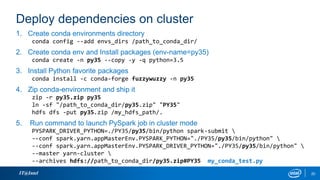
Deploy dependencies on cluster
IT@Intel 20
1. Create conda environments directory
conda config --add envs_dirs /path_to_conda_dir/
2. Create conda env and Install packages (env-name=py35)
conda create -n py35 --copy -y -q python=3.5
3. Install Python favorite packages
conda install -c conda-forge fuzzywuzzy -n py35
4. Zip conda-environment and ship it
zip -r py35.zip py35
ln -sf "/path_to_conda_dir/py35.zip" "PY35"
hdfs dfs -put py35.zip /my_hdfs_path/.
5. Run command to launch PySpark job in cluster mode
PYSPARK_DRIVER_PYTHON=./PY35/py35/bin/python spark-submit 
--conf spark.yarn.appMasterEnv.PYSPARK_PYTHON="./PY35/py35/bin/python" 
--conf spark.yarn.appMasterEnv.PYSPARK_DRIVER_PYTHON="./PY35/py35/bin/python" 
--master yarn-cluster 
--archives hdfs://path_to_conda_dir/py35.zip#PY35 my_conda_test.py
IT@Intel 21
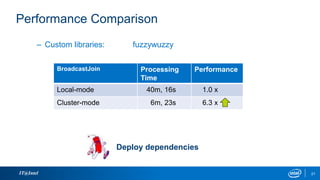
BroadcastJoin Processing
Time
Performance
Local-mode 40m, 16s 1.0 x
Cluster-mode 6m, 23s 6.3 x
– Custom libraries: fuzzywuzzy
Performance Comparison
Deploy dependencies
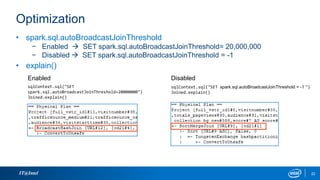
Optimization
IT@Intel 22
• spark.sql.autoBroadcastJoinThreshold
− Enabled  SET spark.sql.autoBroadcastJoinThreshold= 20,000,000
− Disabled  SET spark.sql.autoBroadcastJoinThreshold = -1
• explain()
sqlContext.sql("SET
spark.sql.autoBroadcastJoinThreshold=20000000")
Joined.explain()
Enabled
sqlContext.sql("SET spark.sql.autoBroadcastJoinThreshold = -1 ")
Joined.explain()
Disabled
IT@Intel 23
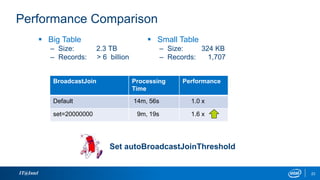
BroadcastJoin Processing
Time
Performance
Default 14m, 56s 1.0 x
set=20000000 9m, 19s 1.6 x
 Big Table
– Size: 2.3 TB
– Records: > 6 billion
 Small Table
– Size: 324 KB
– Records: 1,707
Performance Comparison
Set autoBroadcastJoinThreshold
Optimization
IT@Intel 24
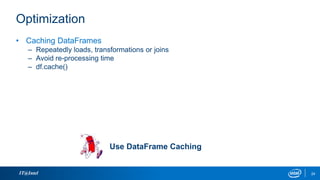
• Caching DataFrames
– Repeatedly loads, transformations or joins
– Avoid re-processing time
– df.cache()
Use DataFrame Caching
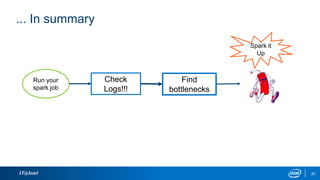
... In summary
IT@Intel 25
Run your
spark job
Check
Logs!!!
Find
bottlenecks
Spark it
Up
Legal Disclaimer
THE INFORMATION PROVIDED IN THIS PAPER IS INTENDED TO BE GENERAL IN NATURE AND IS
NOT SPECIFIC GUIDANCE. RECOMMENDATIONS (INCLUDING POTENTIAL COST SAVINGS) ARE
BASED UPON INTEL’S EXPERIENCE AND ARE ESTIMATES ONLY. INTEL DOES NOT GUARANTEE
OR WARRANT OTHERS WILL OBTAIN SIMILAR RESULTS.
INFORMATION IN THIS DOCUMENT IS PROVIDED IN CONNECTION WITH INTEL PRODUCTS AND
SERVICES. NO LICENSE, EXPRESS OR IMPLIED, BY ESTOPPEL OR OTHERWISE, TO ANY
INTELLECTUAL PROPERTY RIGHTS IS GRANTED BY THIS DOCUMENT. EXCEPT AS PROVIDED
IN INTEL’S TERMS AND CONDITIONS OF SALE FOR SUCH PRODUCTS, INTEL ASSUMES NO
LIABILITY WHATSOEVER AND INTEL DISCLAIMS ANY EXPRESS OR IMPLIED WARRANTY,
RELATING TO SALE AND/OR USE OF INTEL PRODUCTS AND SERVICES INCLUDING LIABILITY
OR WARRANTIES RELATING TO FITNESS FOR A PARTICULAR PURPOSE, MERCHANTABILITY,
OR INFRINGEMENT OF ANY PATENT, COPYRIGHT OR OTHER INTELLECTUAL PROPERTY RIGHT.
Intel, the Intel logo, Intel. Experience What’s Inside, the Intel. Experience What’s Inside logo, and Xeon
are trademarks of Intel Corporation in the U.S. and other countries.
*Other names and brands may be claimed as the property of others.
Copyright © 2017 Intel Corporation. All rights reserved.
IT@Intel 26
Q & A
IT@Intel
IT@Intel

Speed it up and Spark it up at Intel

  • 1.
    2017 DataWorks Summit, San Jose California Sandra Guija and Snehal Sakhare Speed it up and Spark it up at Intel IT@Intel
  • 2.
    About Sandra IT@Intel • CapabilityEngineer in the Big Data Team @ Intel IT • Past 5 years working in extending Big Data Capabilities beyond Hadoop • Master of Science in Computer Science CSU Sacramento • Specialization in memory parallel processing and distributed systems. 2
  • 3.
    About Snehal • Workingwith Hadoop 3+ years as Application Developer @ IT-Intel Corporation. • Master of Science in Computer Science- CSU, Sacramento • Publications - Power Efficient MapReduce Workload Acceleration using Integrated-GPU • Zumba lover IT@Intel 3
  • 4.
    Objective • Share ourexperience and key learnings in the journey of data ingestion framework using Spark • How to speed up application development using reusable ingestion framework • How to improve job performance IT@Intel 4
  • 5.
    Reusable Framework. Speed itup IT@Intel 1. Rapid Data Ingestion 2. Variety of data sources 3. Reusable solution 4. Skill Challenges 5. Increase productivity Reusable Framework. Speed it up 1. Rapid Data Ingestion 2. Variety of data sources 3. Reusable solution 4. Skill Challenges 5. Increase productivity
  • 6.
    IT@Intel 6 Reusable Frameworkwith Spark • Spark takes us to next level • Data is distributed in memory • Lazy Computations – Optimize the job before executing • Efficient pipelining – Avoid data hitting the hard disk. • Uniform Data access using Spark SQL • Spark SQL is the core of the ingestion framework
  • 7.
    16pt Intel ClearSubhead, Date, Etc. Video IT@Intel
  • 8.
    IT@Intel 8 Spark SQLIngestion: Code snippet JDBC extract: Google analytics extract: SFTP extract:
  • 9.
    IT@Intel 9 BDRF: SeamlessSpark job deployment • Job Deployment is easier than ever in -local, yarn-client or yarn-cluster mode. spark_mode: yarn-cluster • Dependencies management in yarn-cluster mode. #Run spark batch job if [ "$SPARK_MODE" = 'yarn-cluster' ]; then spark-submit --master ${SPARK_MODE} --conf "spark.driver.extraClassPath=${SPARK_CLUSTER_EXTRACLASSPATH}" --conf "spark.executor.extraClassPath=${SPARK_CLUSTER_EXTRACLASSPATH}" --conf "spark.executor.memory = ${exec-mem}" --conf "spark.yarn.dist.files=${SPARK_YARN_DIST_FILES},${INI_FILE}" --py-files "${SPARK_PYTHON_FILES}" ${SPARK_SCRIPT} $(basename ${INI_FILE}) ${HDENV} ${NUM_EXEC} ${GATEWAY} • Put a framework utilization dashboard for projects.
  • 10.
    Spark it Up Spark@ Intel IT IT@Intel
  • 11.
    16pt Intel ClearSubhead, Date, Etc. Speed it up IT@Intel Spark it upBetter resources utilization Lessons learned: 1. JDBC single executor 2. Tune-up executor memory 3. Large datasets/numerous files 4. Custom package cluster mode Spark it up Better resources utilization Lessons learned: 1. JDBC single executor 2. Tune-up executor memory 3. Large datasets/numerous files 4. Custom package cluster mode Spark it up Better resources utilization 1. Parallelism 2. Challenge with Big datasets 3. Deploy dependencies 4. Optimization
  • 12.
    Parallelism IT@Intel 12 How toensure data and processing is distributed evenly across the worker nodes?  Increase number of executors  Use transformations: – reduceByKey(), repartition(), coalesce(),  Set properties: – spark.sql.shuffle.partitions – spark.default.parallelism
  • 13.
    IT@Intel 13 Solution : •JDBC ingest data in a single partition. df = sqlContext.read.format('jdbc').options(...).load() options.put("partitionColumn", "emp_no"); options.put("lowerBound", "10001"); options.put("upperBound", "499999"); options.put("numPartitions", "10"); Partition options JDBC Single Executor
  • 14.
    IT@Intel 14 # executors 1 10 Solution:  Tuning the number of partitions options.put("numPartitions", "10");  options.put("numPartitions", “1000");  Tuning the number of executors Data Skewed
  • 15.
    IT@Intel 15 # executors # coresper executor memory per executor # partitions Processing Time Performance 1 3 4 gb 1 18m, 47s 1.0 x Ingest 4,587,847 records Performance Comparison num-executors & partitions 5 3 4 gb 1000 9m, 15s 2.0 x 10 3 4 gb 1000 8m, 52s 2.1 x 10 3 4 gb 500 4m, 44s 3.9 x
  • 16.
    IT@Intel 16 # executors # coresper executor memory per executor # partitions # columns Processing Time Performance 10 3 4 gb 500 121 14m, 23s 1.0 x 10 3 4 gb 500 90 9m, 44s ~ 1.5 x 10 3 4 gb 500 60 6m, 12s ~ 2.3 x 10 3 4 gb 500 30 4m, 29s ~ 3.2 x Ingest 11,513,057 records with 121 columns Performance Comparison Filtering number of columns
  • 17.
    Challenge with Bigdatasets IT@Intel 17  Failures when running queries: – > 2.3 TB – > 6 billion records WARN servlet.ServletHandler: Error for /jobs/job/ java.lang.OutOfMemoryError: Java heap space at java.util.Arrays.copyOf(Arrays.java:2367) ERROR server.TransportRequestHandler: Error sending result RpcResponse{requestId=8891220538372697062, body=NioManagedBuffer{buf=java.nio.HeapByteBuffer[pos=0 lim=166 cap=166]}} to node019:40175; closing connection org.apache.spark.SparkException: Error sending message Caused by: java.nio.channels.ClosedChannelException ERROR executor.CoarseGrainedExecutorBackend: RECEIVED SIGNAL 15: SIGTERM Container is killed
  • 18.
    Challenge with Bigdatasets IT@Intel 18 Use formula to set executor memory and cores (spark.executor.memory * shuffle.memFraction * shuffle.safetyFraction ) spark.executor.cores = memory available to each task Solution : (spark.executor.memory * 0.2 * 0.8) spark.executor.cores = X 8 x 1024 6 memory per task = 218 MB (spark.executor.memory * 0.2 * 0.8) spark.executor.cores = X 6 x 1024 4 memory per task = 245 MB
  • 19.
    Deploy dependencies oncluster IT@Intel 19 • Spark Python API non-JVM language  Non platform independence  Non jars files or code packing • Managing and deploy dependencies on a cluster can be a pain  Executors need access to third-party or custom libraries  Python setup in each node • How to deploy packages?  Create conda environment  Install libraries  Zip conda environment and load it in HDFS  Set Python environment variables and run PySpark job Solution :
  • 20.
    Deploy dependencies oncluster IT@Intel 20 1. Create conda environments directory conda config --add envs_dirs /path_to_conda_dir/ 2. Create conda env and Install packages (env-name=py35) conda create -n py35 --copy -y -q python=3.5 3. Install Python favorite packages conda install -c conda-forge fuzzywuzzy -n py35 4. Zip conda-environment and ship it zip -r py35.zip py35 ln -sf "/path_to_conda_dir/py35.zip" "PY35" hdfs dfs -put py35.zip /my_hdfs_path/. 5. Run command to launch PySpark job in cluster mode PYSPARK_DRIVER_PYTHON=./PY35/py35/bin/python spark-submit --conf spark.yarn.appMasterEnv.PYSPARK_PYTHON="./PY35/py35/bin/python" --conf spark.yarn.appMasterEnv.PYSPARK_DRIVER_PYTHON="./PY35/py35/bin/python" --master yarn-cluster --archives hdfs://path_to_conda_dir/py35.zip#PY35 my_conda_test.py
  • 21.
    IT@Intel 21 BroadcastJoin Processing Time Performance Local-mode40m, 16s 1.0 x Cluster-mode 6m, 23s 6.3 x – Custom libraries: fuzzywuzzy Performance Comparison Deploy dependencies
  • 22.
    Optimization IT@Intel 22 • spark.sql.autoBroadcastJoinThreshold −Enabled  SET spark.sql.autoBroadcastJoinThreshold= 20,000,000 − Disabled  SET spark.sql.autoBroadcastJoinThreshold = -1 • explain() sqlContext.sql("SET spark.sql.autoBroadcastJoinThreshold=20000000") Joined.explain() Enabled sqlContext.sql("SET spark.sql.autoBroadcastJoinThreshold = -1 ") Joined.explain() Disabled
  • 23.
    IT@Intel 23 BroadcastJoin Processing Time Performance Default14m, 56s 1.0 x set=20000000 9m, 19s 1.6 x  Big Table – Size: 2.3 TB – Records: > 6 billion  Small Table – Size: 324 KB – Records: 1,707 Performance Comparison Set autoBroadcastJoinThreshold
  • 24.
    Optimization IT@Intel 24 • CachingDataFrames – Repeatedly loads, transformations or joins – Avoid re-processing time – df.cache() Use DataFrame Caching
  • 25.
    ... In summary IT@Intel25 Run your spark job Check Logs!!! Find bottlenecks Spark it Up
  • 26.
    Legal Disclaimer THE INFORMATIONPROVIDED IN THIS PAPER IS INTENDED TO BE GENERAL IN NATURE AND IS NOT SPECIFIC GUIDANCE. RECOMMENDATIONS (INCLUDING POTENTIAL COST SAVINGS) ARE BASED UPON INTEL’S EXPERIENCE AND ARE ESTIMATES ONLY. INTEL DOES NOT GUARANTEE OR WARRANT OTHERS WILL OBTAIN SIMILAR RESULTS. INFORMATION IN THIS DOCUMENT IS PROVIDED IN CONNECTION WITH INTEL PRODUCTS AND SERVICES. NO LICENSE, EXPRESS OR IMPLIED, BY ESTOPPEL OR OTHERWISE, TO ANY INTELLECTUAL PROPERTY RIGHTS IS GRANTED BY THIS DOCUMENT. EXCEPT AS PROVIDED IN INTEL’S TERMS AND CONDITIONS OF SALE FOR SUCH PRODUCTS, INTEL ASSUMES NO LIABILITY WHATSOEVER AND INTEL DISCLAIMS ANY EXPRESS OR IMPLIED WARRANTY, RELATING TO SALE AND/OR USE OF INTEL PRODUCTS AND SERVICES INCLUDING LIABILITY OR WARRANTIES RELATING TO FITNESS FOR A PARTICULAR PURPOSE, MERCHANTABILITY, OR INFRINGEMENT OF ANY PATENT, COPYRIGHT OR OTHER INTELLECTUAL PROPERTY RIGHT. Intel, the Intel logo, Intel. Experience What’s Inside, the Intel. Experience What’s Inside logo, and Xeon are trademarks of Intel Corporation in the U.S. and other countries. *Other names and brands may be claimed as the property of others. Copyright © 2017 Intel Corporation. All rights reserved. IT@Intel 26
  • 27.
  • 28.