WIFI SSID:Spark+AISummit | Password: UnifiedDataAnalytics
Luca Canali, CERN
Performance
Troubleshooting Using
Apache Spark Metrics
#UnifiedDataAnalytics #SparkAISummit
About Luca
3#UnifiedDataAnalytics #SparkAISummit
• Data Engineer at CERN
– Hadoop and Spark service, database services
– 19+ years of experience with data engineering
• Sharing and community
– Blog, notes, tools, contributions to Apache Spark
@LucaCanaliDB – http://cern.ch/canali
4
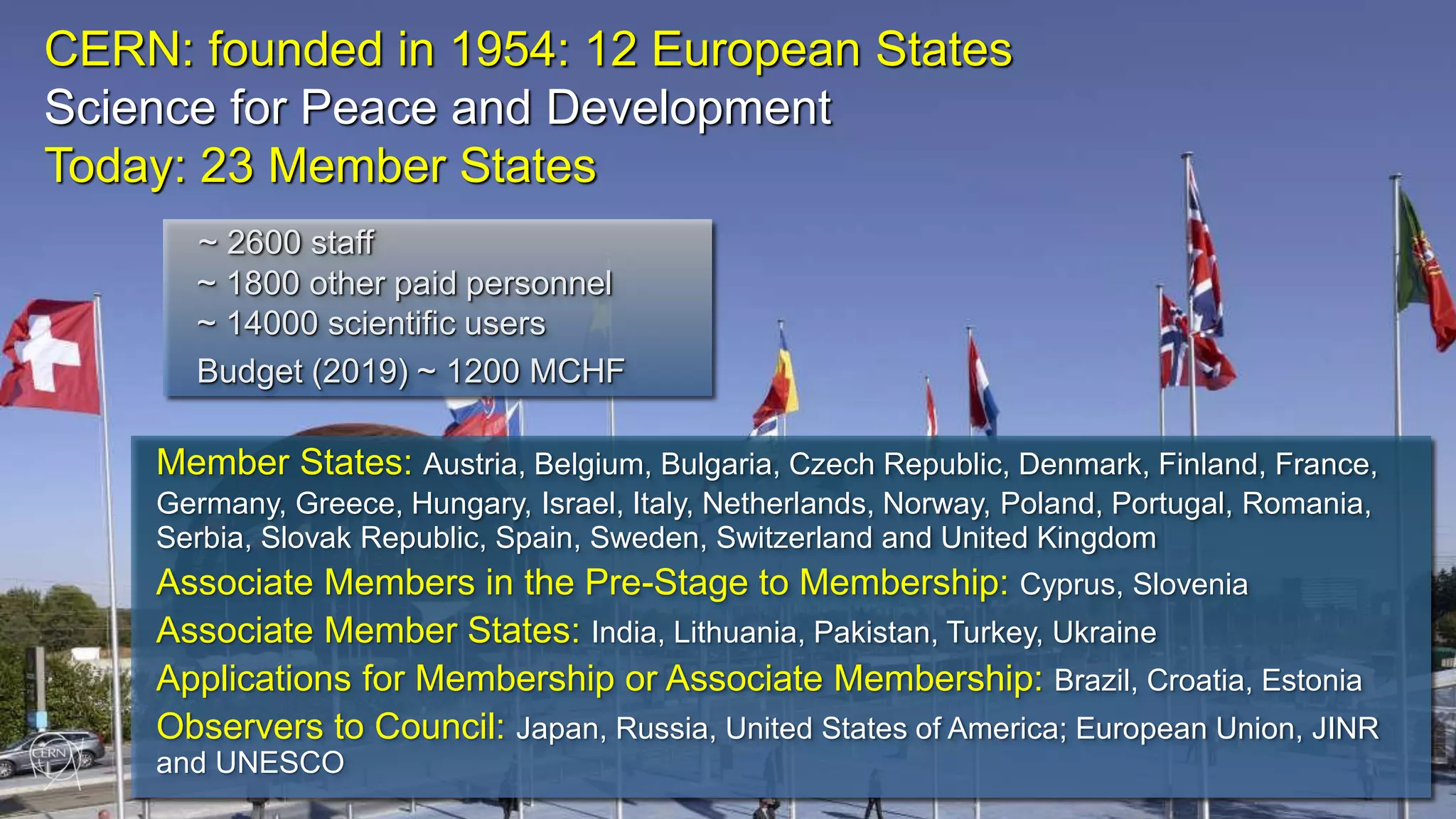
CERN: founded in 1954: 12 European States
Science for Peace and Development
Today: 23 Member States
Member States: Austria, Belgium, Bulgaria, Czech Republic, Denmark, Finland, France,
Germany, Greece, Hungary, Israel, Italy, Netherlands, Norway, Poland, Portugal, Romania,
Serbia, Slovak Republic, Spain, Sweden, Switzerland and United Kingdom
Associate Members in the Pre-Stage to Membership: Cyprus, Slovenia
Associate Member States: India, Lithuania, Pakistan, Turkey, Ukraine
Applications for Membership or Associate Membership: Brazil, Croatia, Estonia
Observers to Council: Japan, Russia, United States of America; European Union, JINR
and UNESCO
~ 2600 staff
~ 1800 other paid personnel
~ 14000 scientific users
Budget (2019) ~ 1200 MCHF
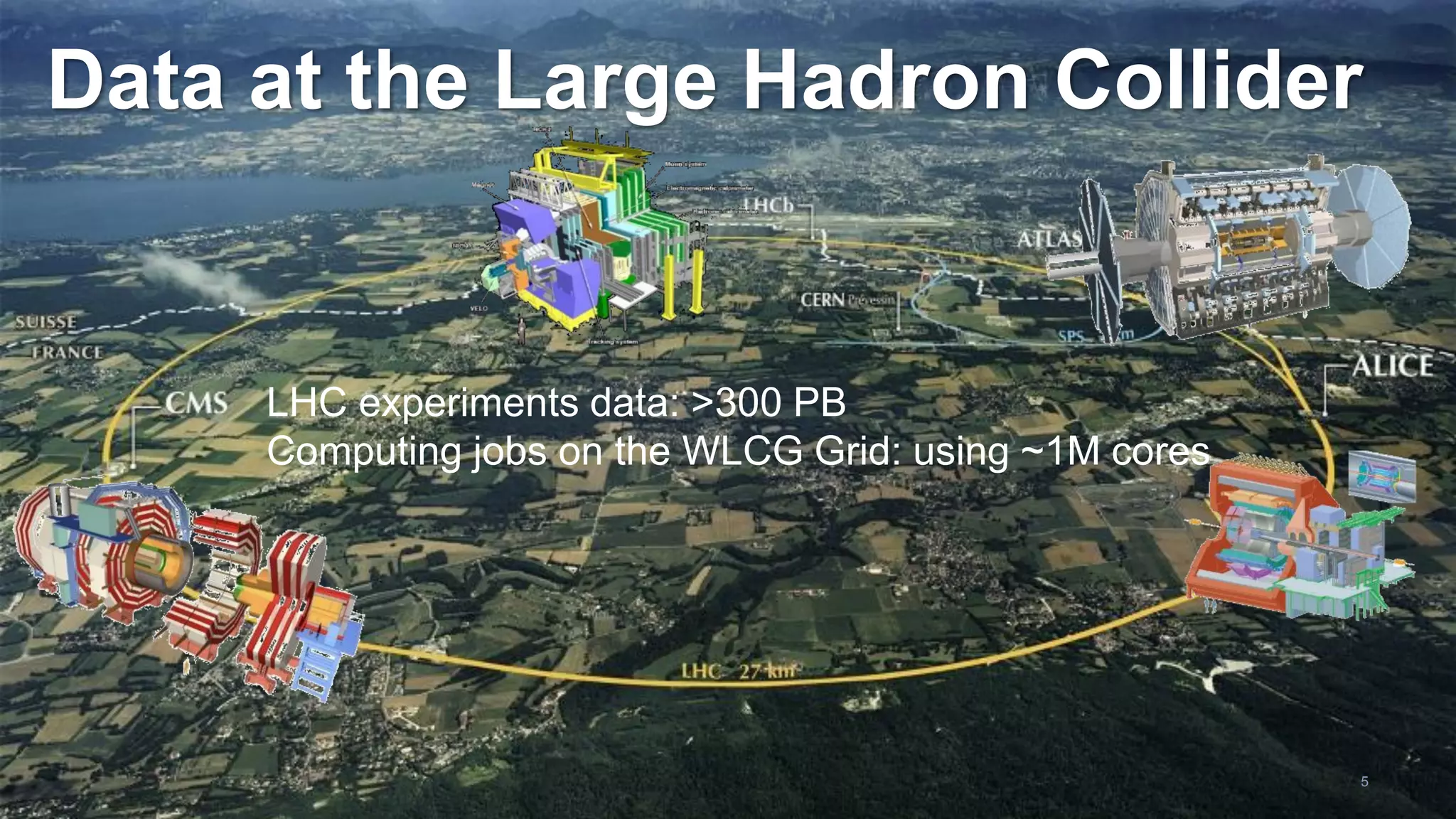
Data at the Large Hadron Collider
LHC experiments data: >300 PB
Computing jobs on the WLCG Grid: using ~1M cores
5
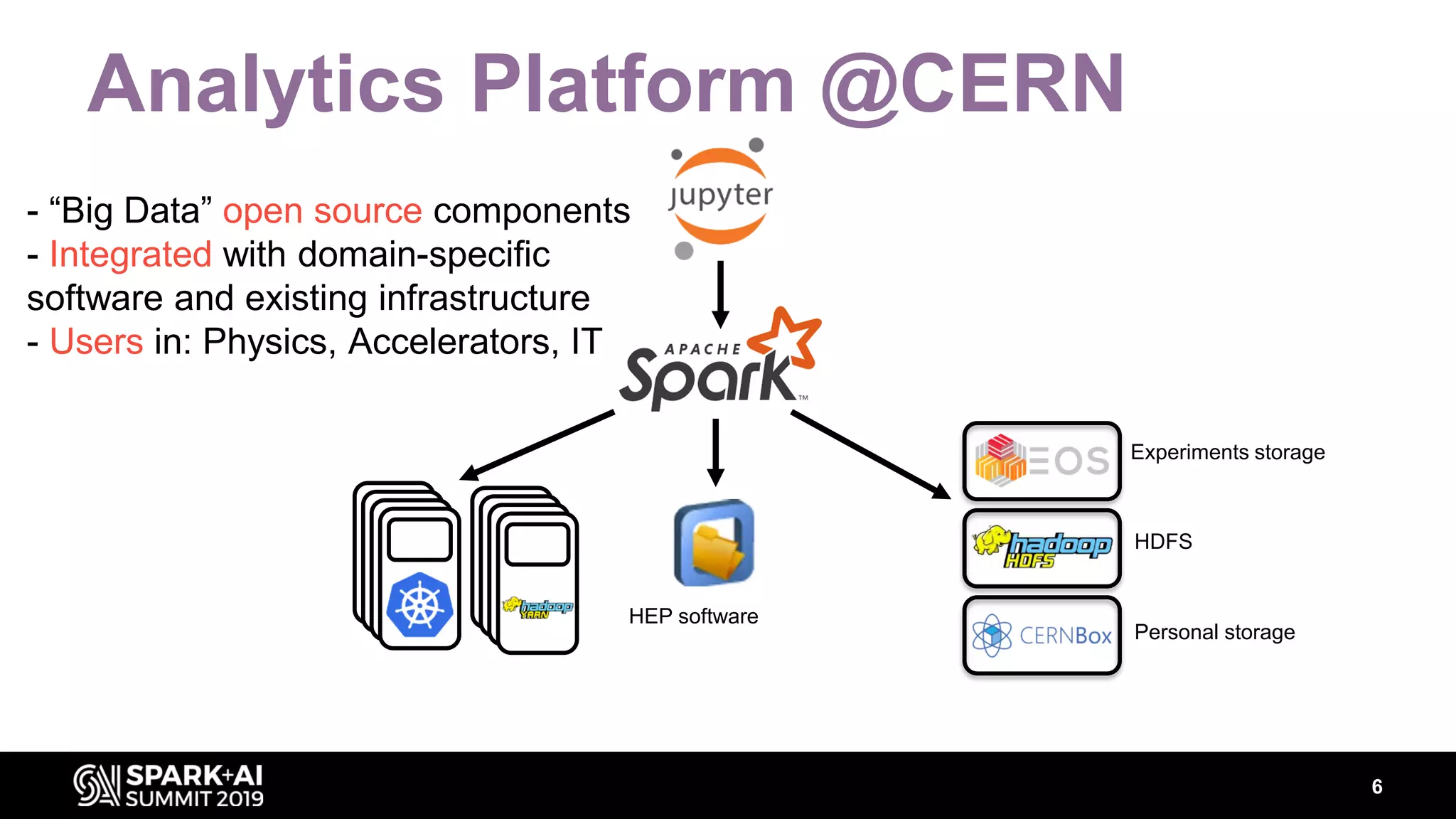
Analytics Platform @CERN
HEP software
Experiments storage
HDFS
Personal storage
- “Big Data” open source components
- Integrated with domain-specific
software and existing infrastructure
- Users in: Physics, Accelerators, IT
6
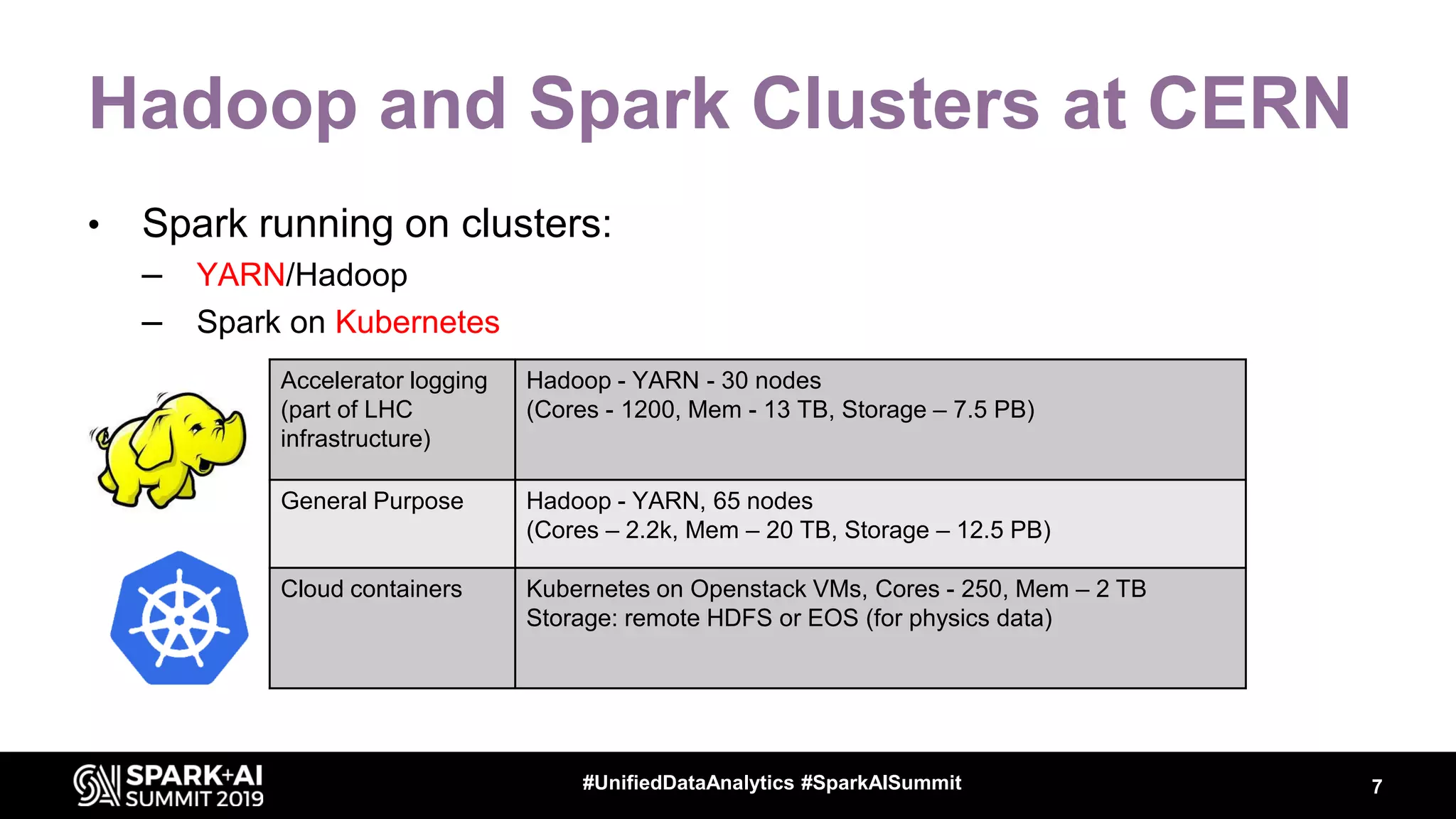
Hadoop and Spark Clusters at CERN
• Spark running on clusters:
– YARN/Hadoop
– Spark on Kubernetes
Accelerator logging
(part of LHC
infrastructure)
Hadoop - YARN - 30 nodes
(Cores - 1200, Mem - 13 TB, Storage – 7.5 PB)
General Purpose Hadoop - YARN, 65 nodes
(Cores – 2.2k, Mem – 20 TB, Storage – 12.5 PB)
Cloud containers Kubernetes on Openstack VMs, Cores - 250, Mem – 2 TB
Storage: remote HDFS or EOS (for physics data)
7#UnifiedDataAnalytics #SparkAISummit
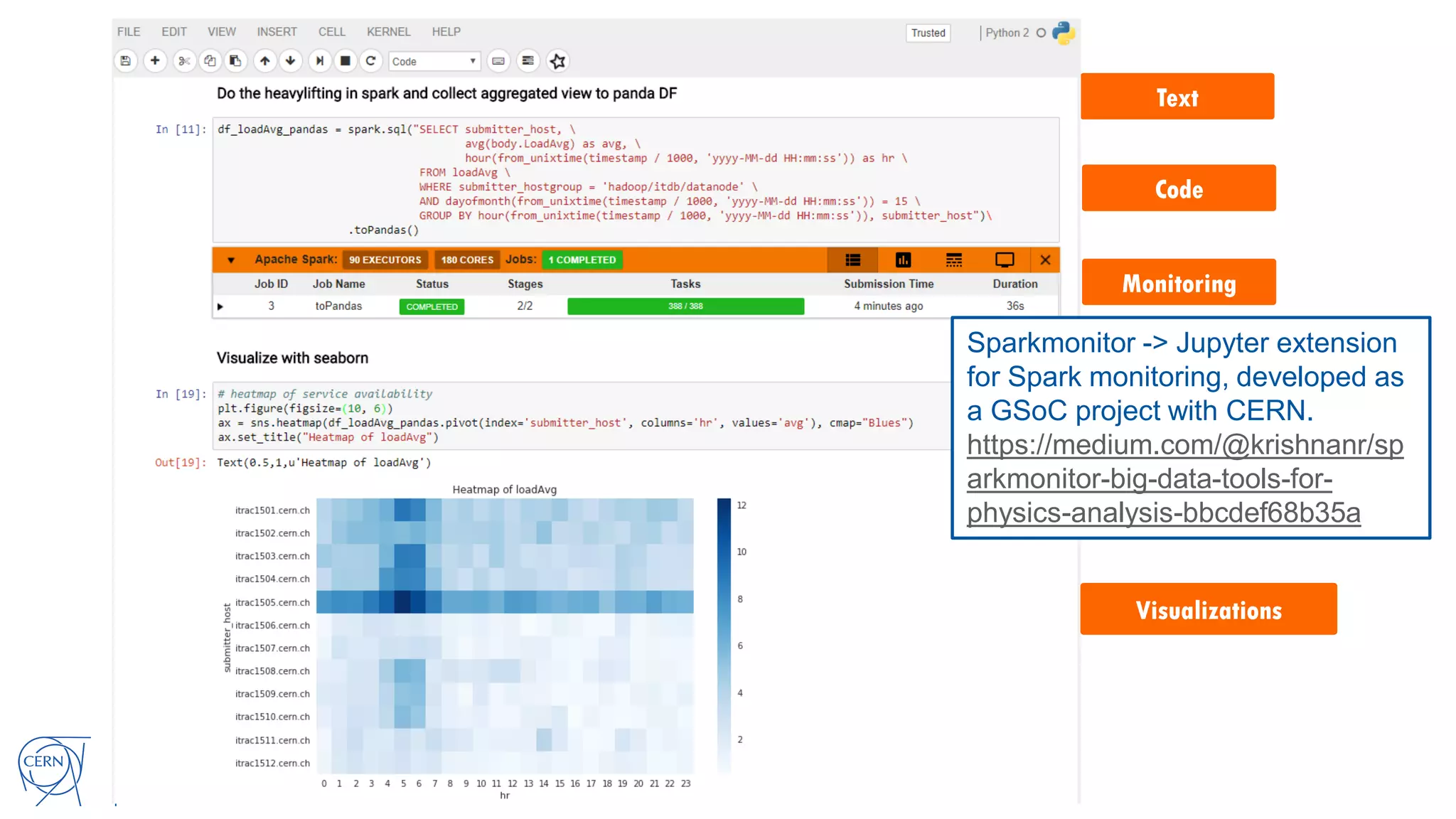
Text
Code
Monitoring
Visualizations
Sparkmonitor -> Jupyter extension
for Spark monitoring, developed as
a GSoC project with CERN.
https://medium.com/@krishnanr/sp
arkmonitor-big-data-tools-for-
physics-analysis-bbcdef68b35a
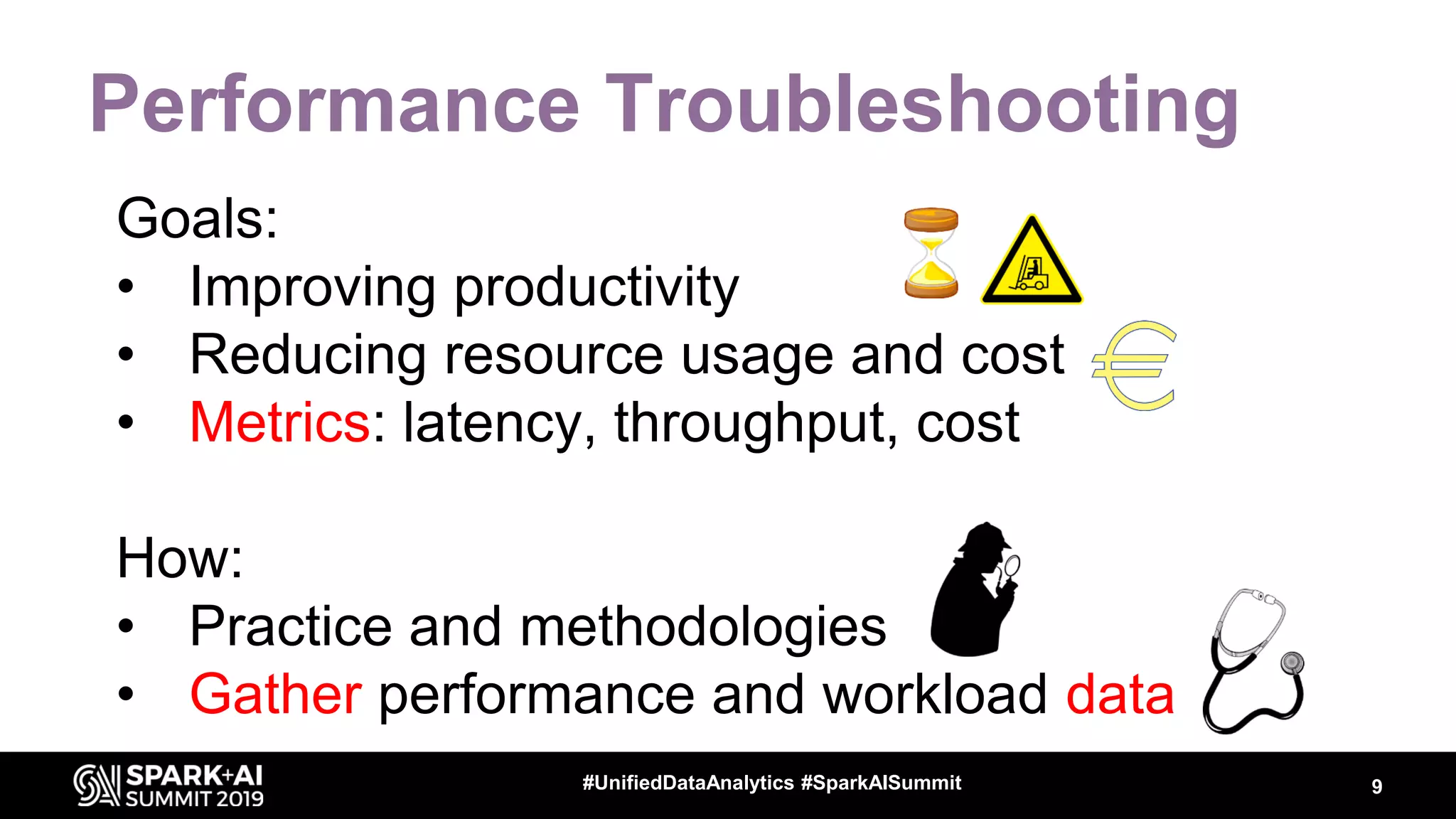
Performance Troubleshooting
Goals:
• Improving productivity
• Reducing resource usage and cost
• Metrics: latency, throughput, cost
How:
• Practice and methodologies
• Gather performance and workload data
9#UnifiedDataAnalytics #SparkAISummit
Performance Methodologies and
Anti-Patterns
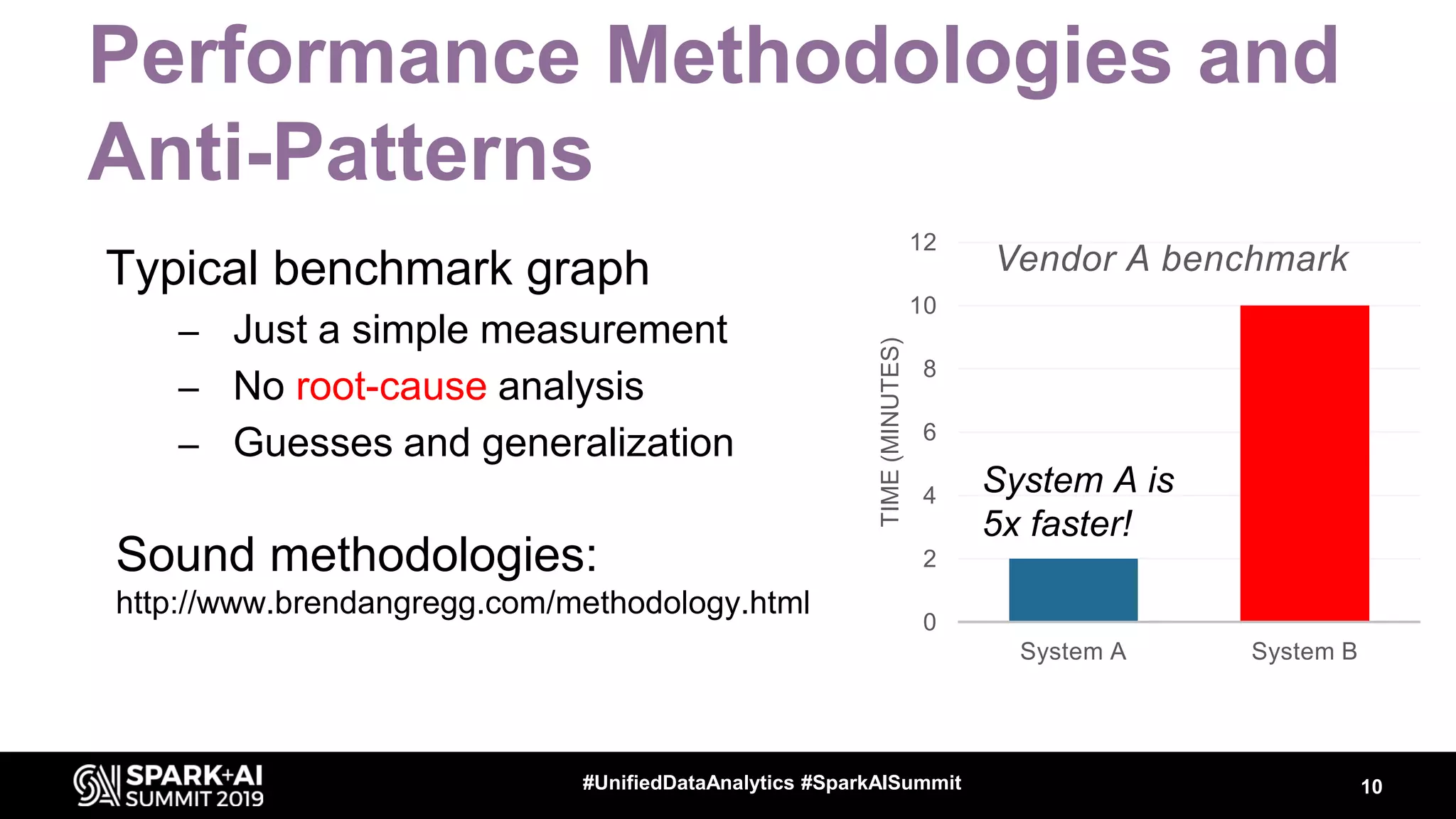
Typical benchmark graph
– Just a simple measurement
– No root-cause analysis
– Guesses and generalization
Sound methodologies:
http://www.brendangregg.com/methodology.html
10#UnifiedDataAnalytics #SparkAISummit
0
2
4
6
8
10
12
System A System B
TIME(MINUTES)
Vendor A benchmark
System A is
5x faster!
Workload and Performance Data
• You want data to find answers to questions like
– What is my workload doing?
– Where is it spending time?
– What are the bottlenecks (CPU, I/O)?
– How are systems resources used?
– Why do I measure the {latency/throughput} that I
measure?
• Why is not 10x better?
11#EUdev2
Data + Context => Insights
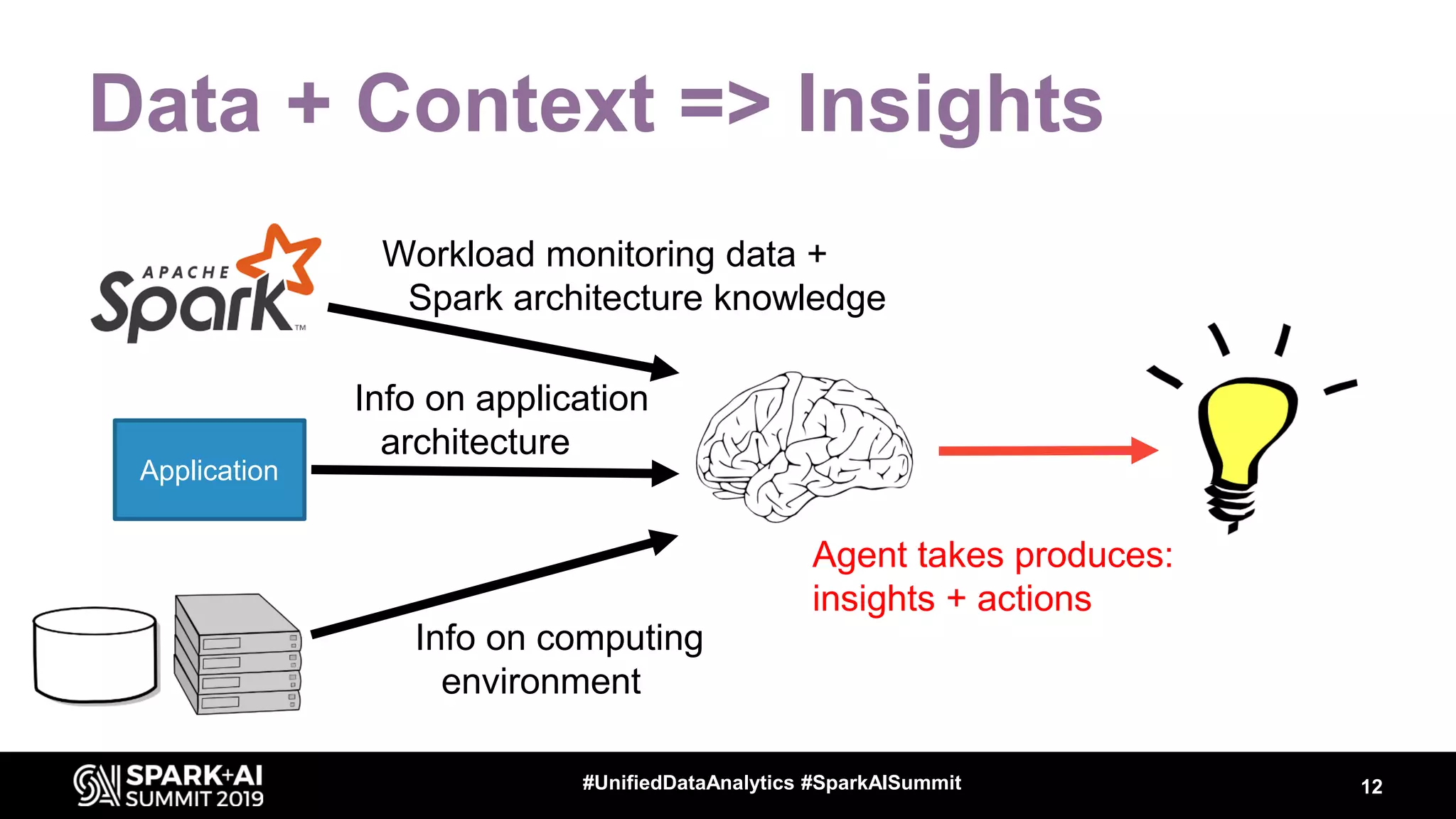
Workload monitoring data +
Spark architecture knowledge
12#UnifiedDataAnalytics #SparkAISummit
Application
Info on application
architecture
Info on computing
environment
Agent takes produces:
insights + actions
Measuring Spark
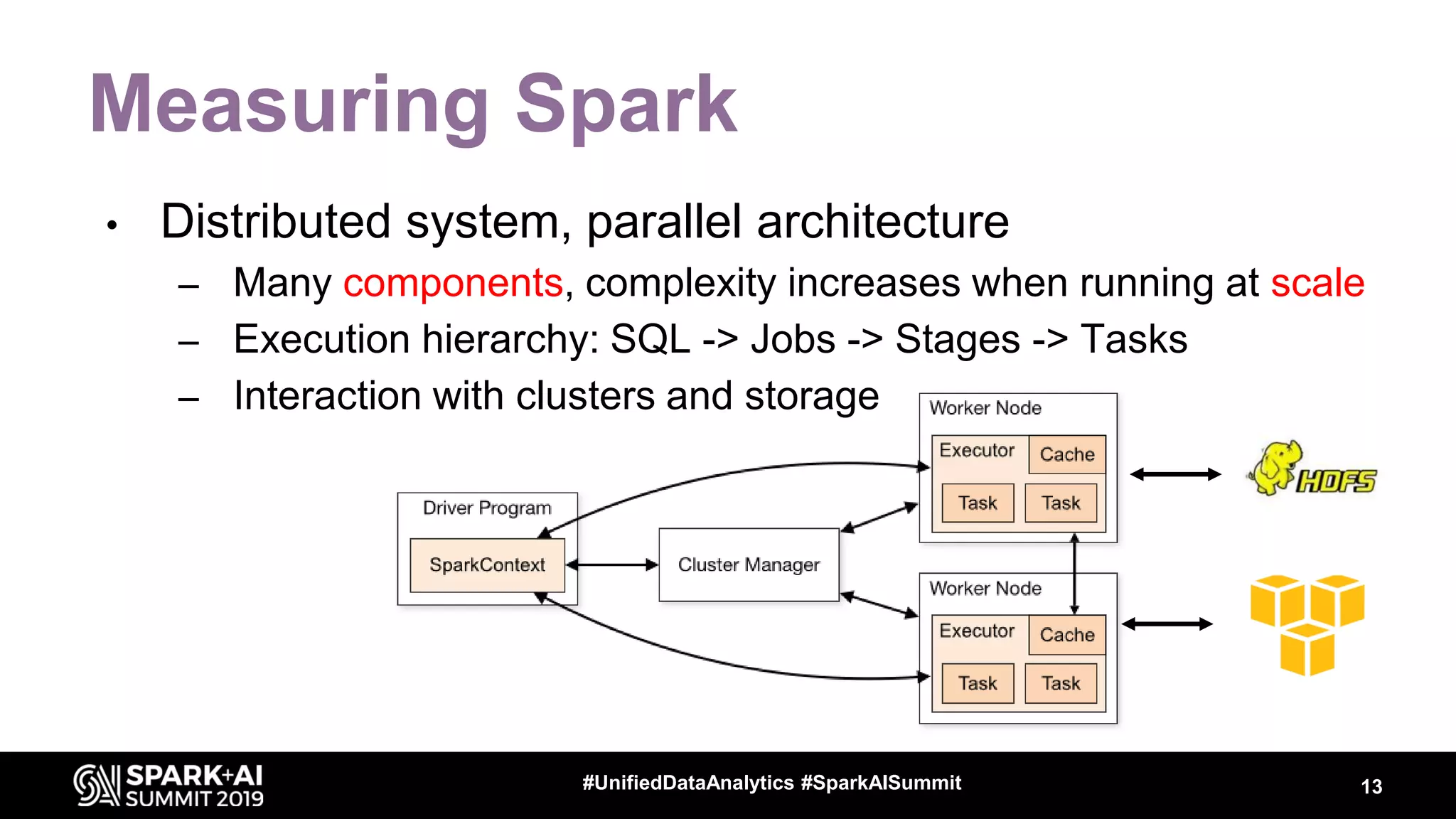
• Distributed system, parallel architecture
– Many components, complexity increases when running at scale
– Execution hierarchy: SQL -> Jobs -> Stages -> Tasks
– Interaction with clusters and storage
13#UnifiedDataAnalytics #SparkAISummit
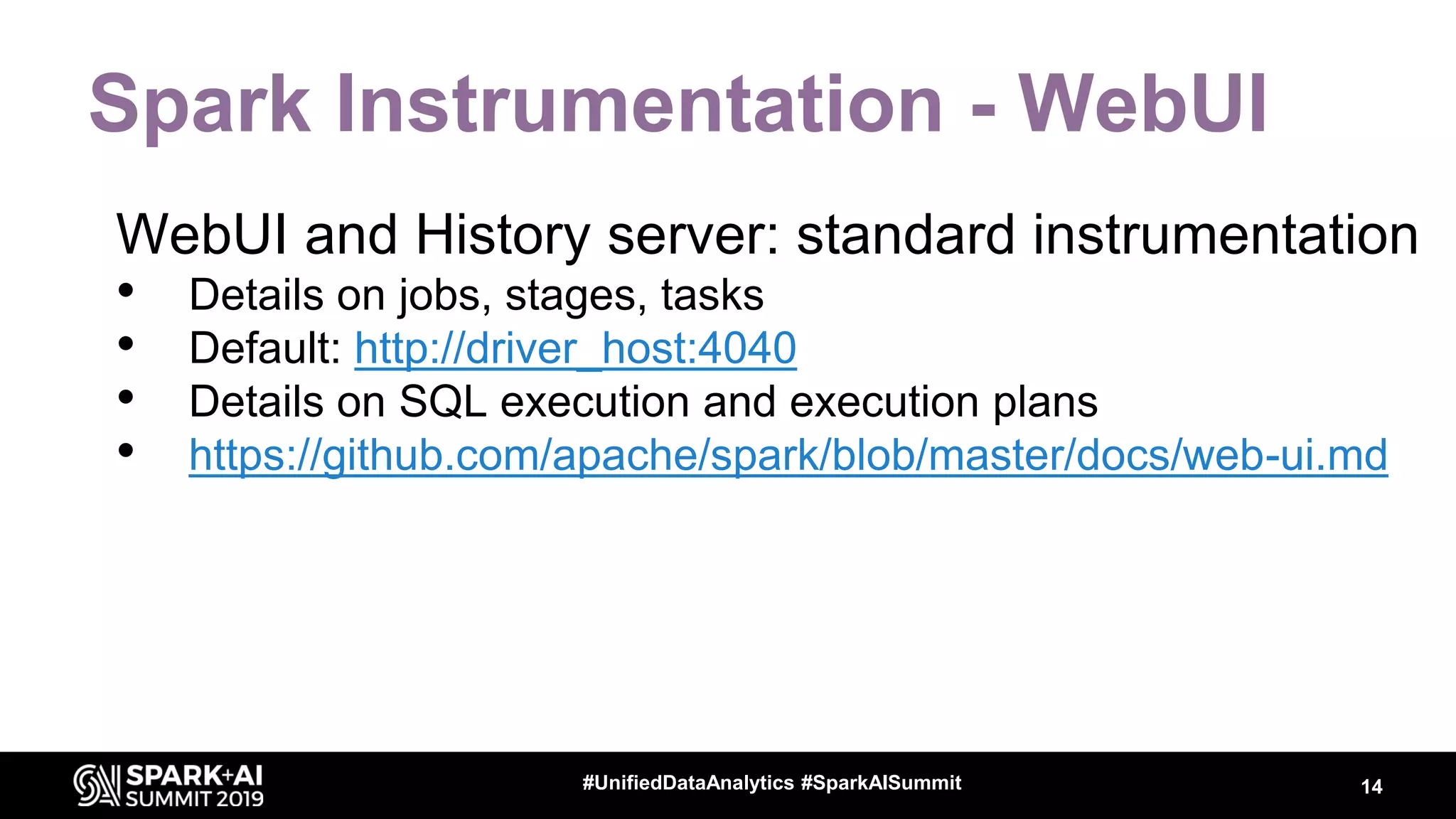
Spark Instrumentation - WebUI
WebUI and History server: standard instrumentation
• Details on jobs, stages, tasks
• Default: http://driver_host:4040
• Details on SQL execution and execution plans
• https://github.com/apache/spark/blob/master/docs/web-ui.md
14#UnifiedDataAnalytics #SparkAISummit
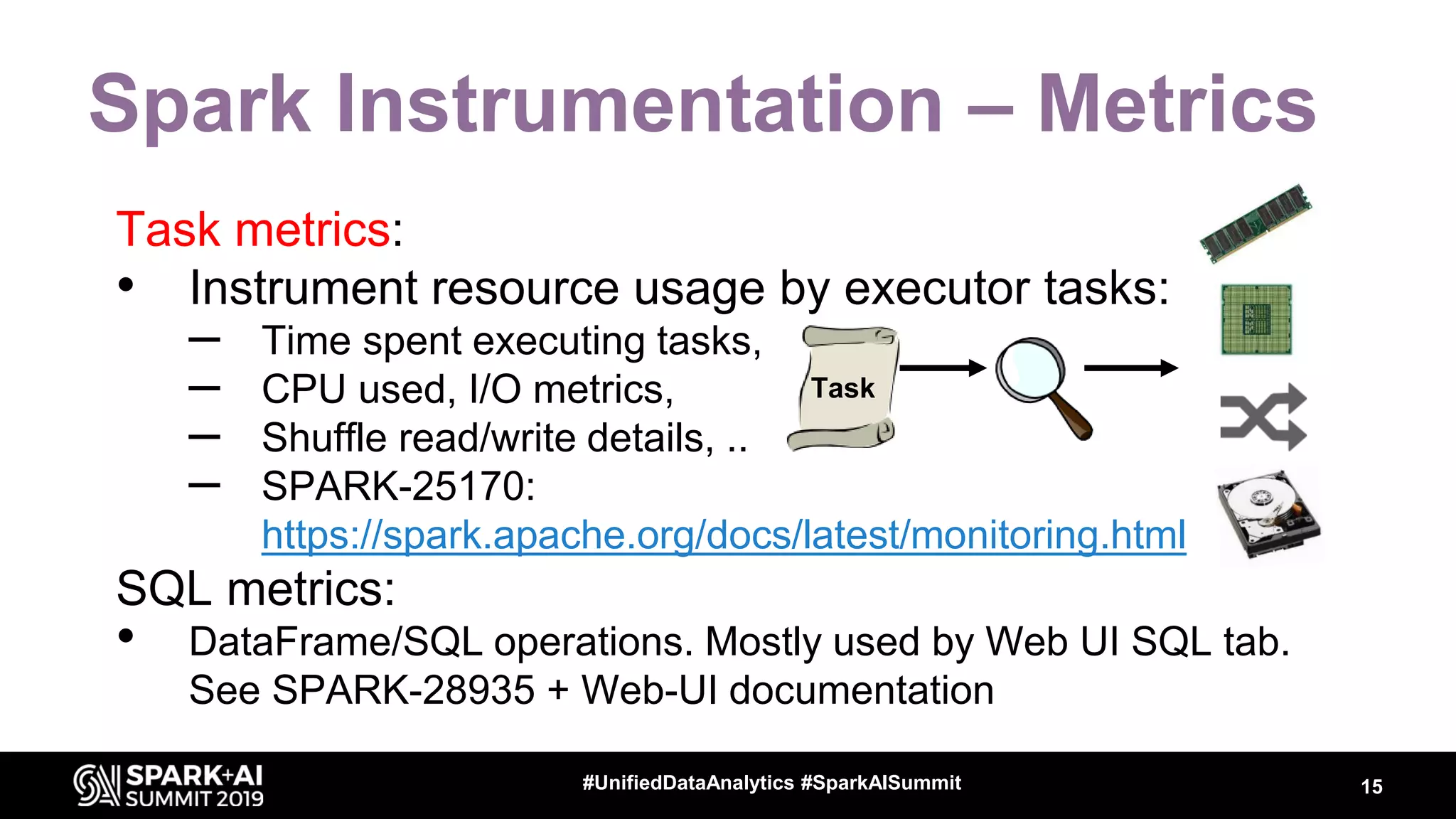
Spark Instrumentation – Metrics
Task metrics:
• Instrument resource usage by executor tasks:
– Time spent executing tasks,
– CPU used, I/O metrics,
– Shuffle read/write details, ..
– SPARK-25170:
https://spark.apache.org/docs/latest/monitoring.html
SQL metrics:
• DataFrame/SQL operations. Mostly used by Web UI SQL tab.
See SPARK-28935 + Web-UI documentation
15#UnifiedDataAnalytics #SparkAISummit
Task
How to Gather Spark Task Metrics
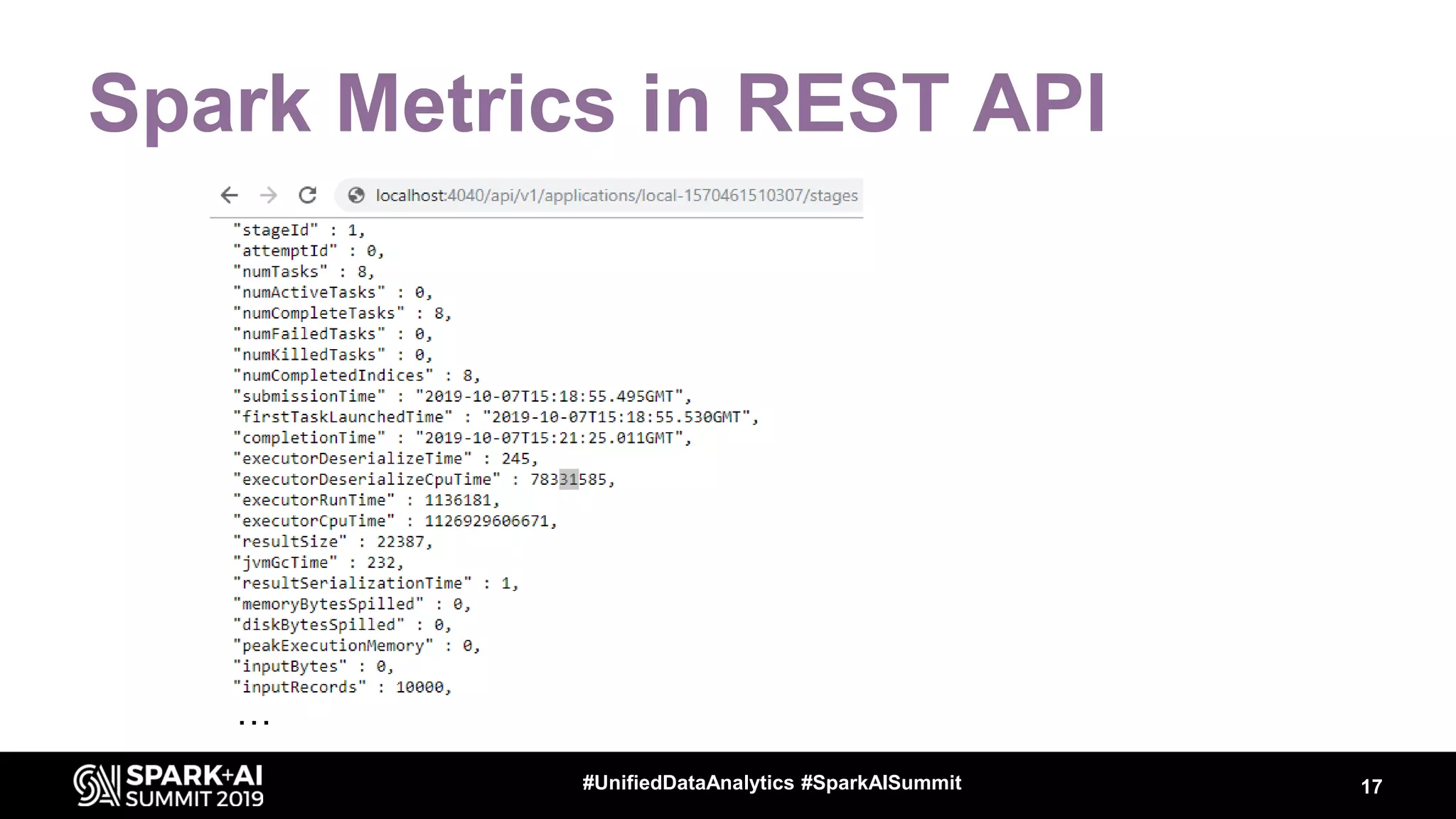
• Web UI exposes REST API
Example: http://localhost:4040/api/v1/applications
History server reads from Event Log (JSON file)
– spark.eventLog.enabled=true
– spark.eventLog.dir = <path>
• Programmatic interface via “Spark Listeners”
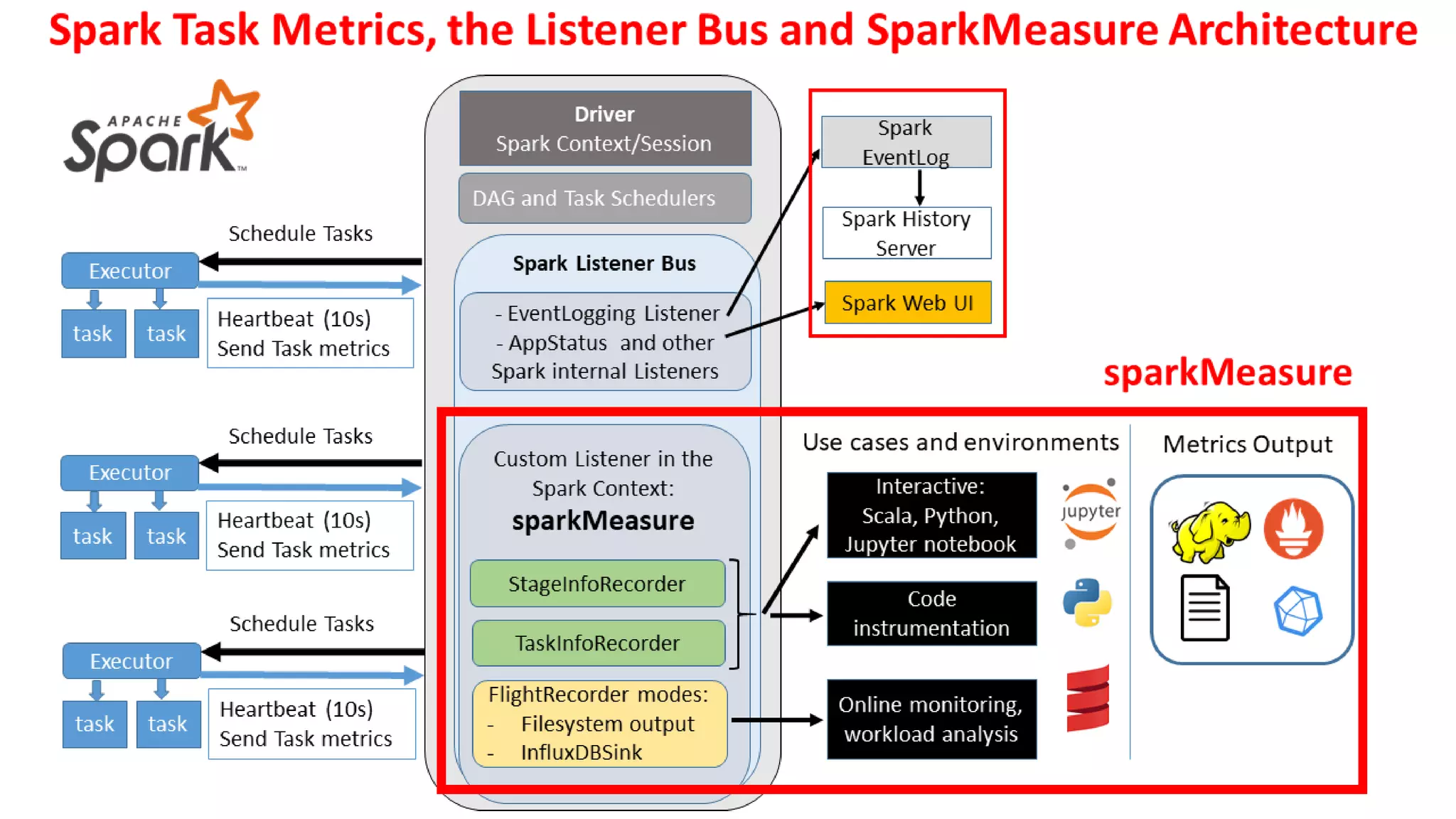
sparkMeasure -> a tool and working example code of
how to collect metrics with Spark Listeners
16#UnifiedDataAnalytics #SparkAISummit
Spark Metrics in REST API
…
17#UnifiedDataAnalytics #SparkAISummit
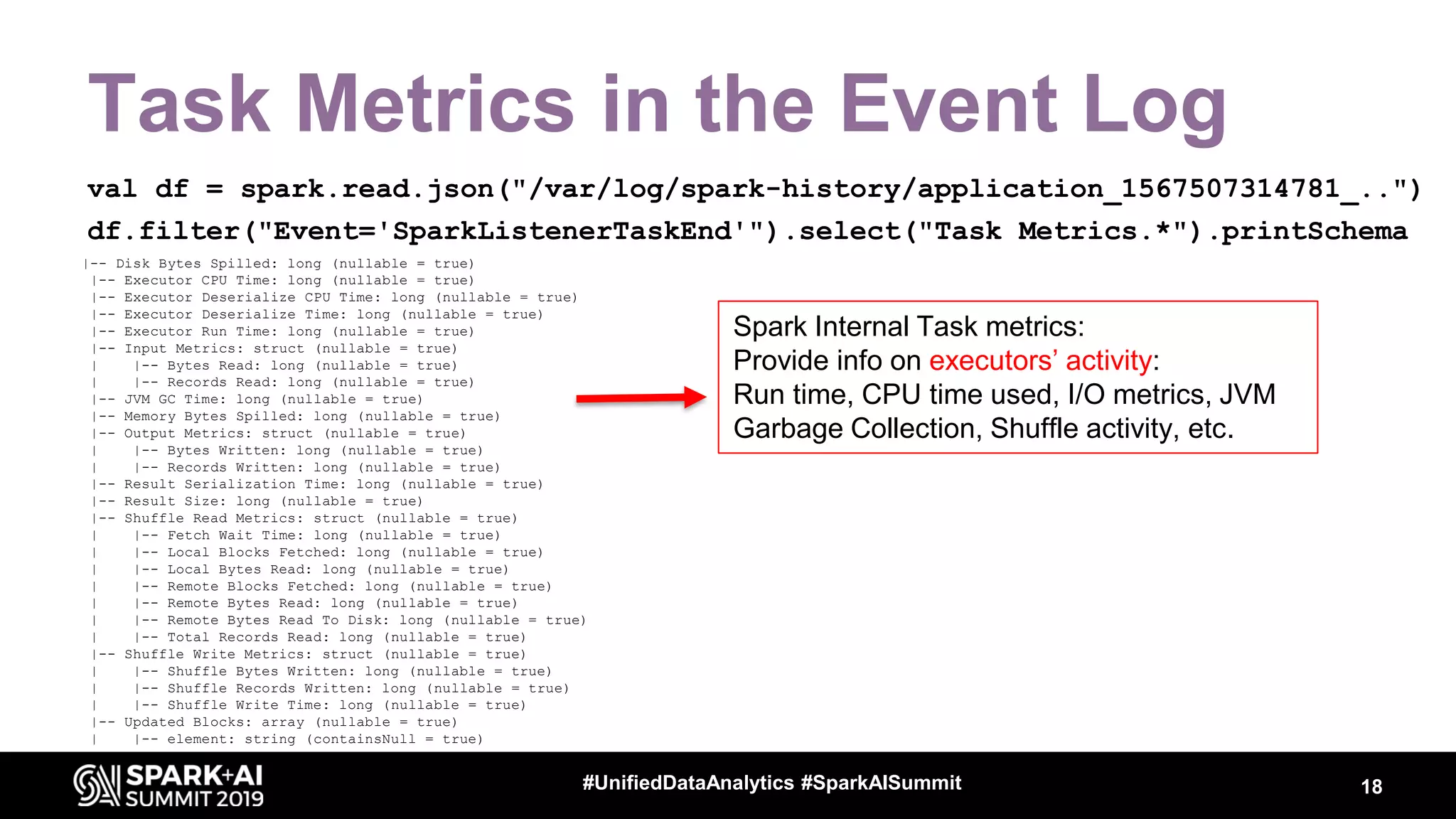
Task Metrics in the Event Log
val df = spark.read.json("/var/log/spark-history/application_1567507314781_..")
df.filter("Event='SparkListenerTaskEnd'").select("Task Metrics.*").printSchema
18#UnifiedDataAnalytics #SparkAISummit
|-- Disk Bytes Spilled: long (nullable = true)
|-- Executor CPU Time: long (nullable = true)
|-- Executor Deserialize CPU Time: long (nullable = true)
|-- Executor Deserialize Time: long (nullable = true)
|-- Executor Run Time: long (nullable = true)
|-- Input Metrics: struct (nullable = true)
| |-- Bytes Read: long (nullable = true)
| |-- Records Read: long (nullable = true)
|-- JVM GC Time: long (nullable = true)
|-- Memory Bytes Spilled: long (nullable = true)
|-- Output Metrics: struct (nullable = true)
| |-- Bytes Written: long (nullable = true)
| |-- Records Written: long (nullable = true)
|-- Result Serialization Time: long (nullable = true)
|-- Result Size: long (nullable = true)
|-- Shuffle Read Metrics: struct (nullable = true)
| |-- Fetch Wait Time: long (nullable = true)
| |-- Local Blocks Fetched: long (nullable = true)
| |-- Local Bytes Read: long (nullable = true)
| |-- Remote Blocks Fetched: long (nullable = true)
| |-- Remote Bytes Read: long (nullable = true)
| |-- Remote Bytes Read To Disk: long (nullable = true)
| |-- Total Records Read: long (nullable = true)
|-- Shuffle Write Metrics: struct (nullable = true)
| |-- Shuffle Bytes Written: long (nullable = true)
| |-- Shuffle Records Written: long (nullable = true)
| |-- Shuffle Write Time: long (nullable = true)
|-- Updated Blocks: array (nullable = true)
| |-- element: string (containsNull = true)
Spark Internal Task metrics:
Provide info on executors’ activity:
Run time, CPU time used, I/O metrics, JVM
Garbage Collection, Shuffle activity, etc.
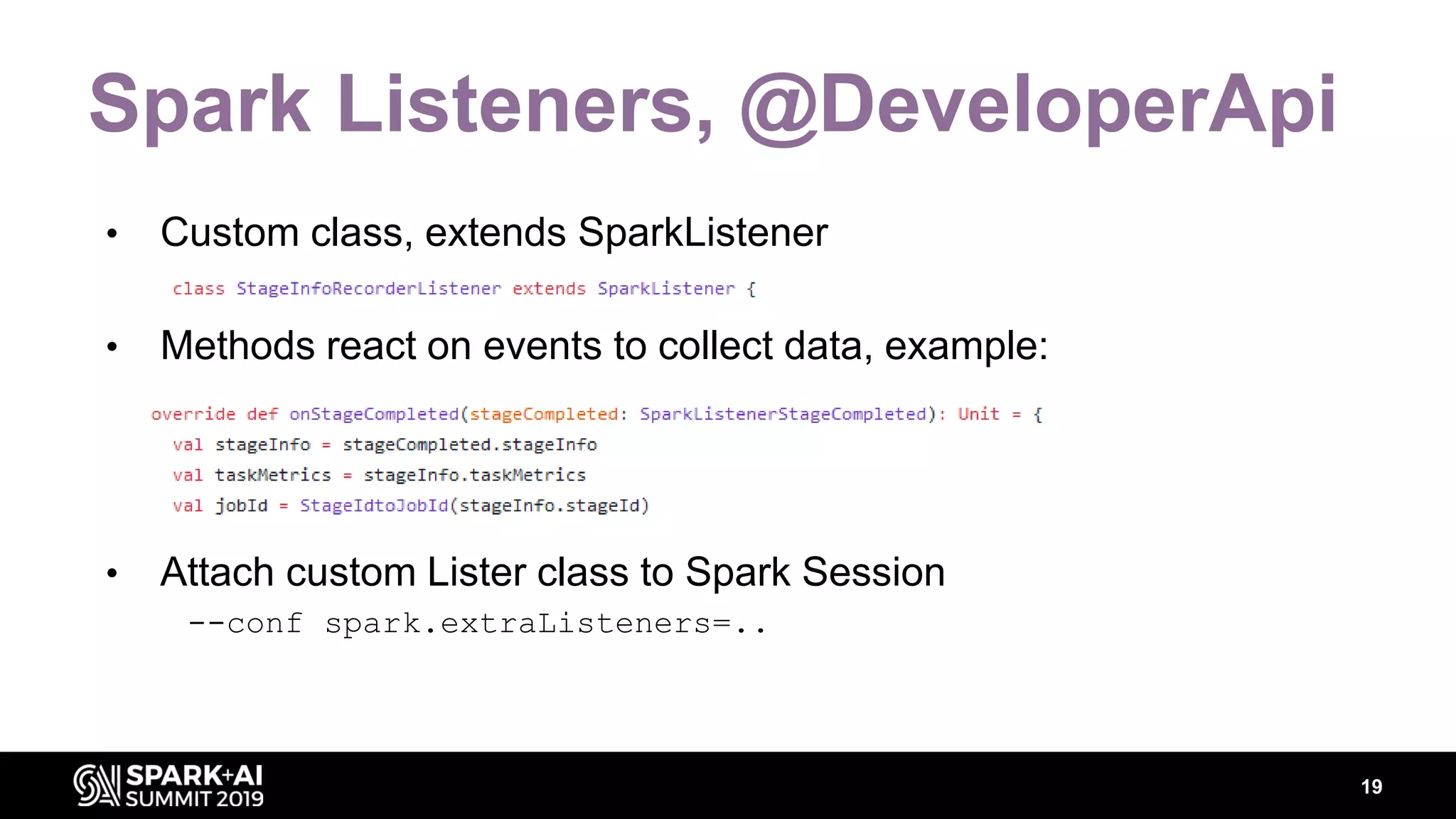
Spark Listeners, @DeveloperApi
• Custom class, extends SparkListener
• Methods react on events to collect data, example:
• Attach custom Lister class to Spark Session
--conf spark.extraListeners=..
19
SparkMeasure Architecture
20#UnifiedDataAnalytics #SparkAISummit
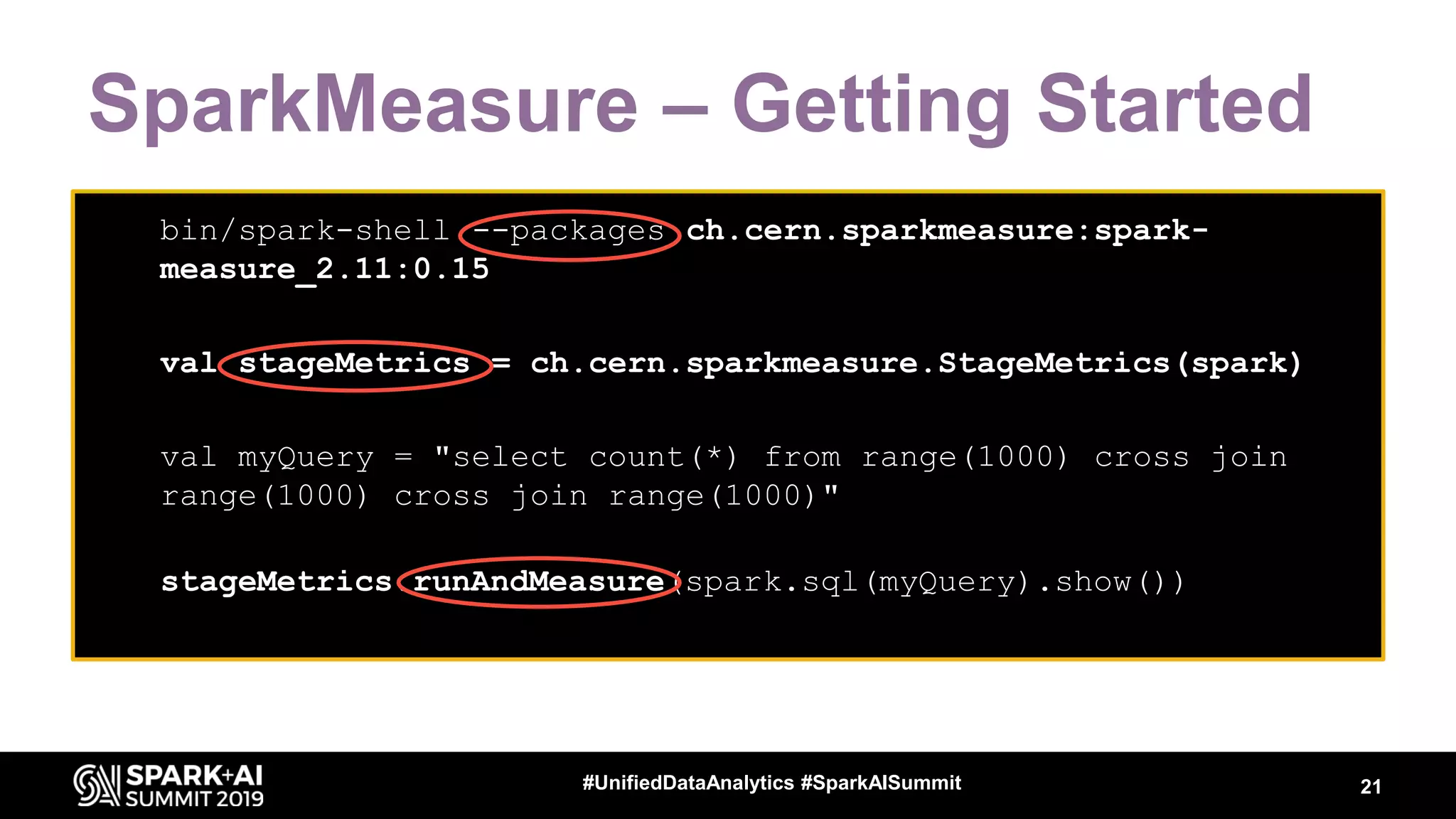
SparkMeasure – Getting Started
21#UnifiedDataAnalytics #SparkAISummit
• bin/spark-shell --packages ch.cern.sparkmeasure:spark-
measure_2.11:0.15
• bin/spark-shell --packages ch.cern.sparkmeasure:spark-
measure_2.11:0.15
• val stageMetrics = ch.cern.sparkmeasure.StageMetrics(spark)
•
• bin/spark-shell --packages ch.cern.sparkmeasure:spark-
measure_2.11:0.15
• val stageMetrics = ch.cern.sparkmeasure.StageMetrics(spark)
•
• val myQuery = "select count(*) from range(1000) cross join
range(1000) cross join range(1000)"
• stageMetrics.runAndMeasure(spark.sql(myQuery).show())
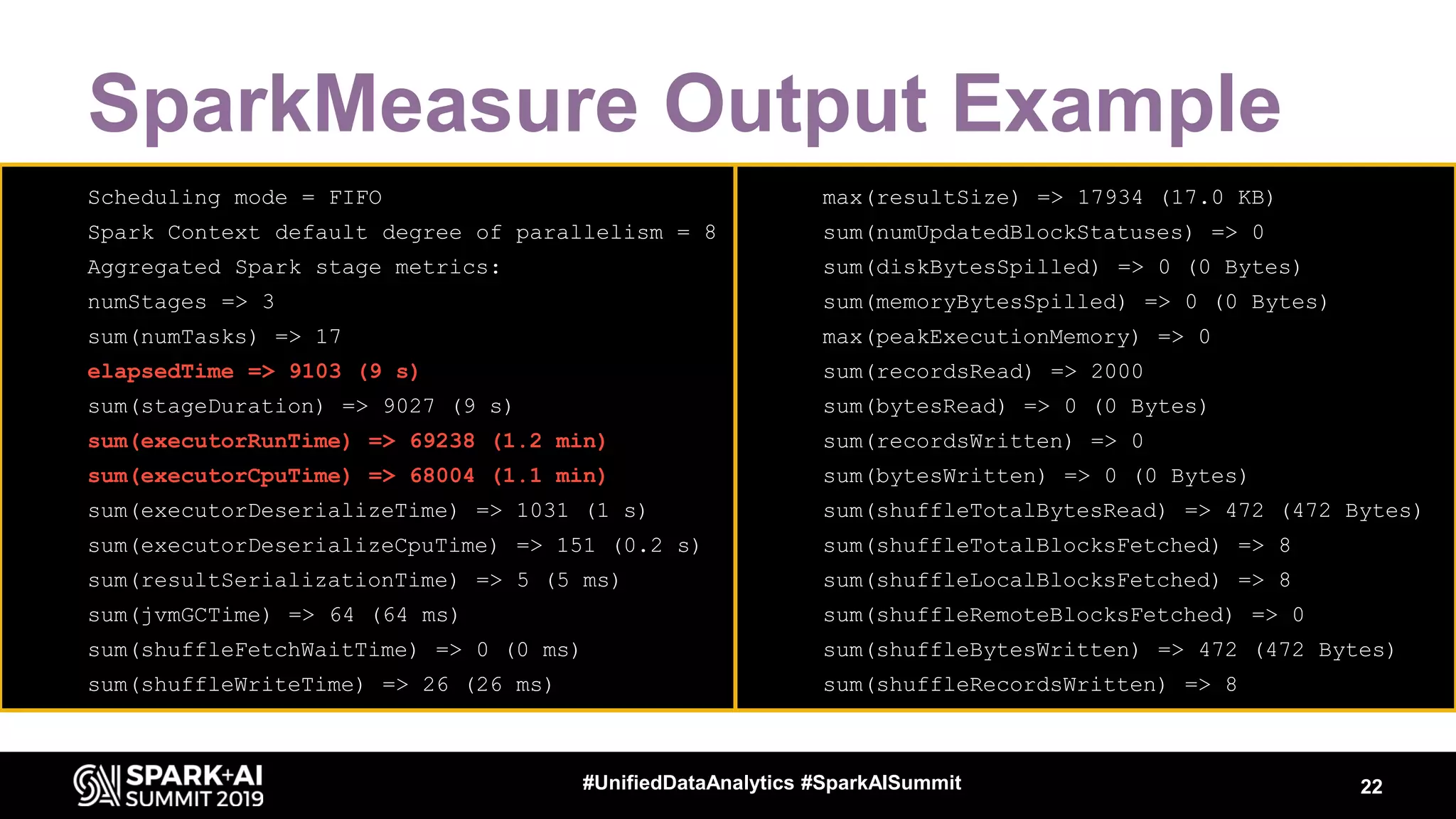
SparkMeasure Output Example
22#UnifiedDataAnalytics #SparkAISummit
• Scheduling mode = FIFO
• Spark Context default degree of parallelism = 8
• Aggregated Spark stage metrics:
• numStages => 3
• sum(numTasks) => 17
• elapsedTime => 9103 (9 s)
• sum(stageDuration) => 9027 (9 s)
• sum(executorRunTime) => 69238 (1.2 min)
• sum(executorCpuTime) => 68004 (1.1 min)
• sum(executorDeserializeTime) => 1031 (1 s)
• sum(executorDeserializeCpuTime) => 151 (0.2 s)
• sum(resultSerializationTime) => 5 (5 ms)
• sum(jvmGCTime) => 64 (64 ms)
• sum(shuffleFetchWaitTime) => 0 (0 ms)
• sum(shuffleWriteTime) => 26 (26 ms)
• max(resultSize) => 17934 (17.0 KB)
• sum(numUpdatedBlockStatuses) => 0
• sum(diskBytesSpilled) => 0 (0 Bytes)
• sum(memoryBytesSpilled) => 0 (0 Bytes)
• max(peakExecutionMemory) => 0
• sum(recordsRead) => 2000
• sum(bytesRead) => 0 (0 Bytes)
• sum(recordsWritten) => 0
• sum(bytesWritten) => 0 (0 Bytes)
• sum(shuffleTotalBytesRead) => 472 (472 Bytes)
• sum(shuffleTotalBlocksFetched) => 8
• sum(shuffleLocalBlocksFetched) => 8
• sum(shuffleRemoteBlocksFetched) => 0
• sum(shuffleBytesWritten) => 472 (472 Bytes)
• sum(shuffleRecordsWritten) => 8
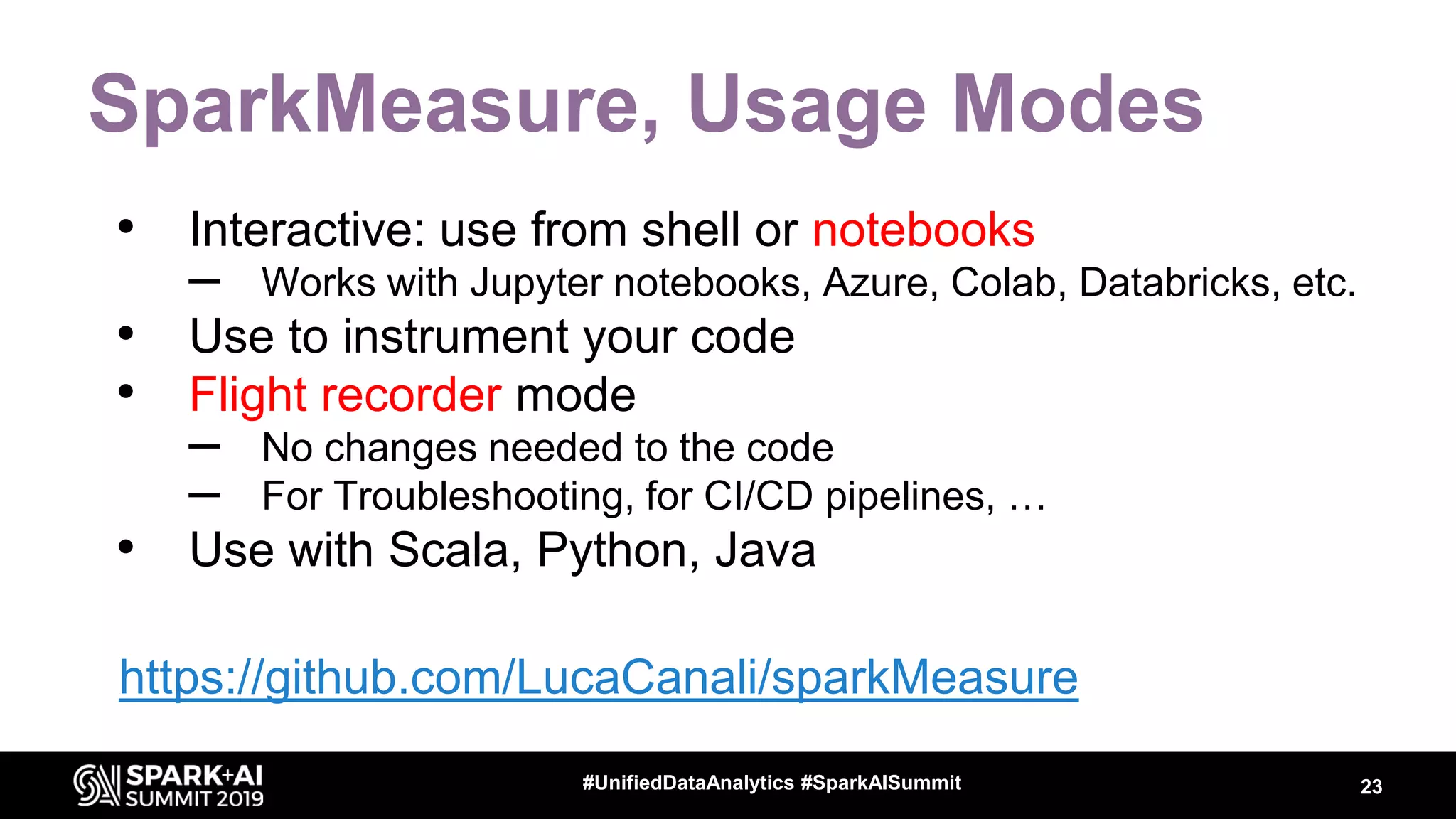
SparkMeasure, Usage Modes
• Interactive: use from shell or notebooks
– Works with Jupyter notebooks, Azure, Colab, Databricks, etc.
• Use to instrument your code
• Flight recorder mode
– No changes needed to the code
– For Troubleshooting, for CI/CD pipelines, …
• Use with Scala, Python, Java
23#UnifiedDataAnalytics #SparkAISummit
https://github.com/LucaCanali/sparkMeasure
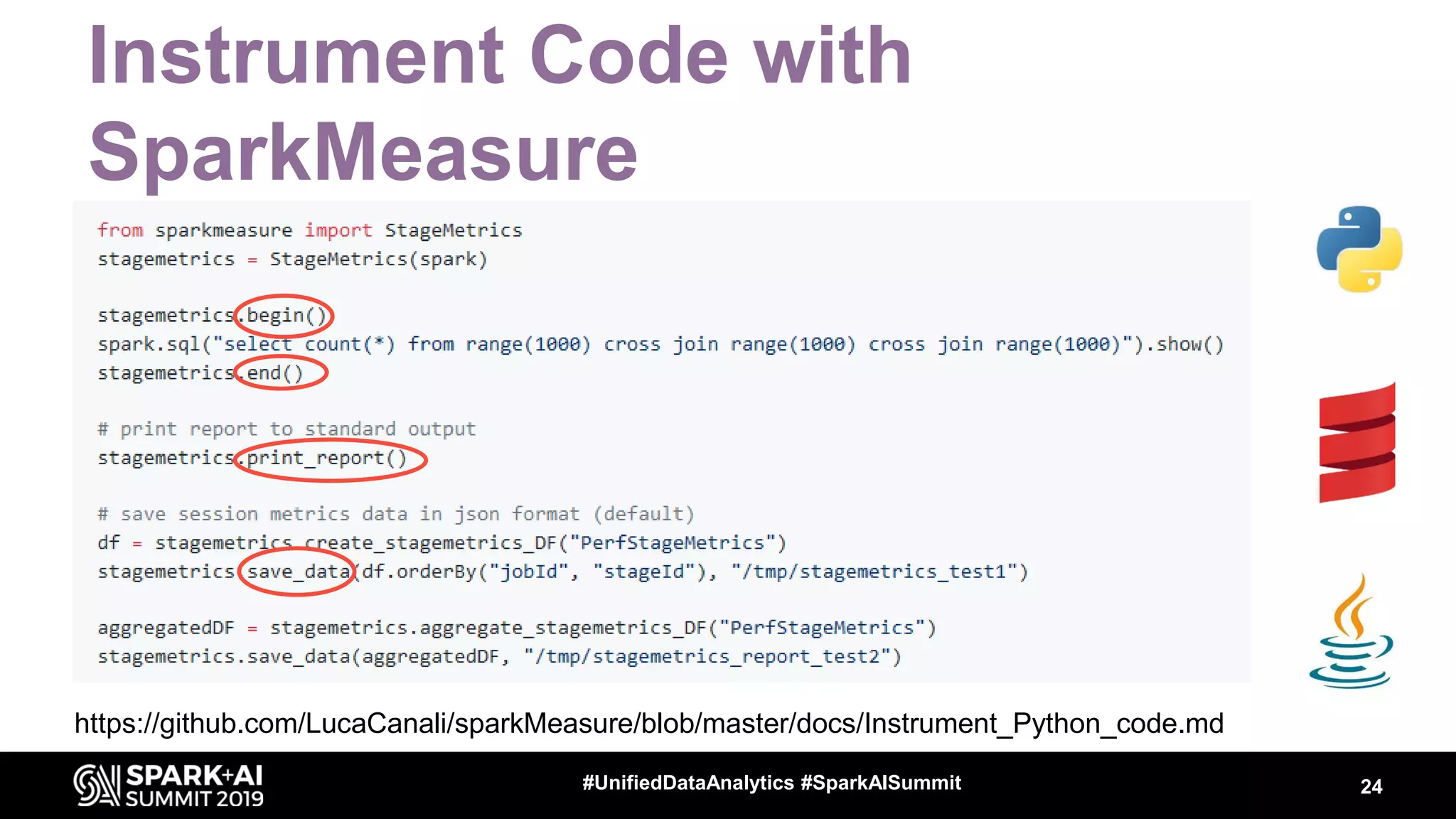
Instrument Code with
SparkMeasure
24#UnifiedDataAnalytics #SparkAISummit
https://github.com/LucaCanali/sparkMeasure/blob/master/docs/Instrument_Python_code.md
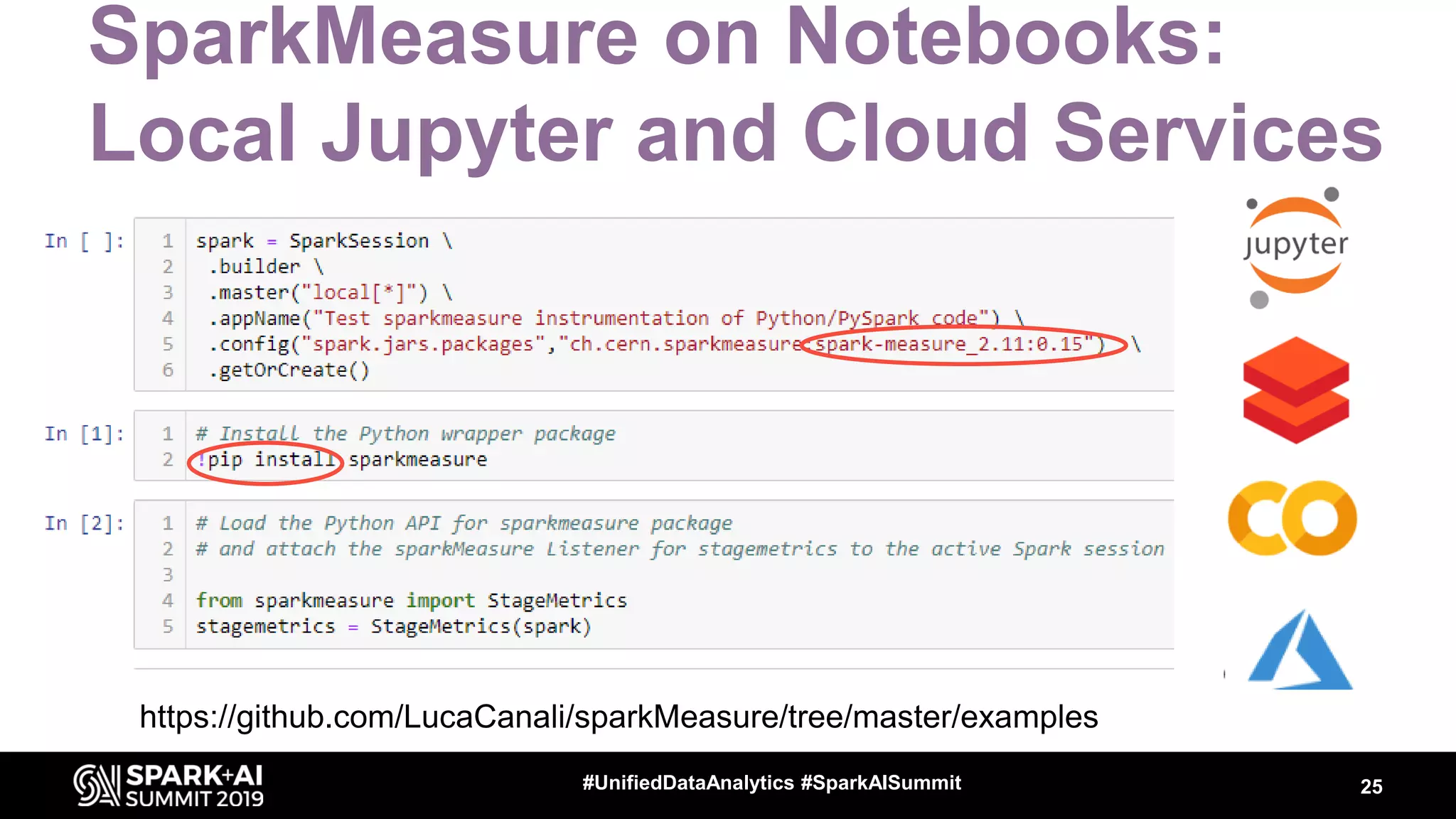
SparkMeasure on Notebooks:
Local Jupyter and Cloud Services
25#UnifiedDataAnalytics #SparkAISummit
https://github.com/LucaCanali/sparkMeasure/tree/master/examples
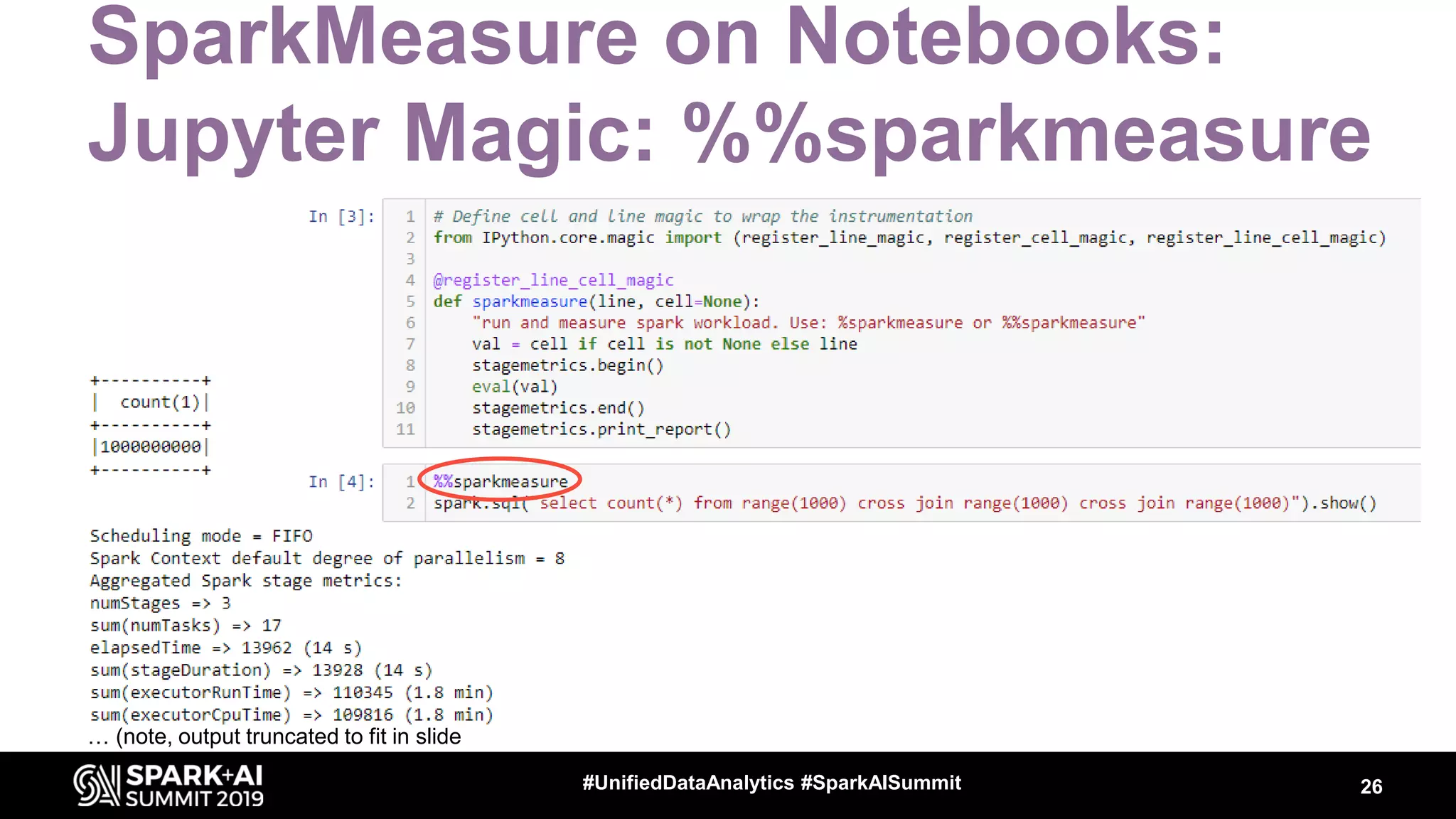
SparkMeasure on Notebooks:
Jupyter Magic: %%sparkmeasure
26#UnifiedDataAnalytics #SparkAISummit
… (note, output truncated to fit in slide
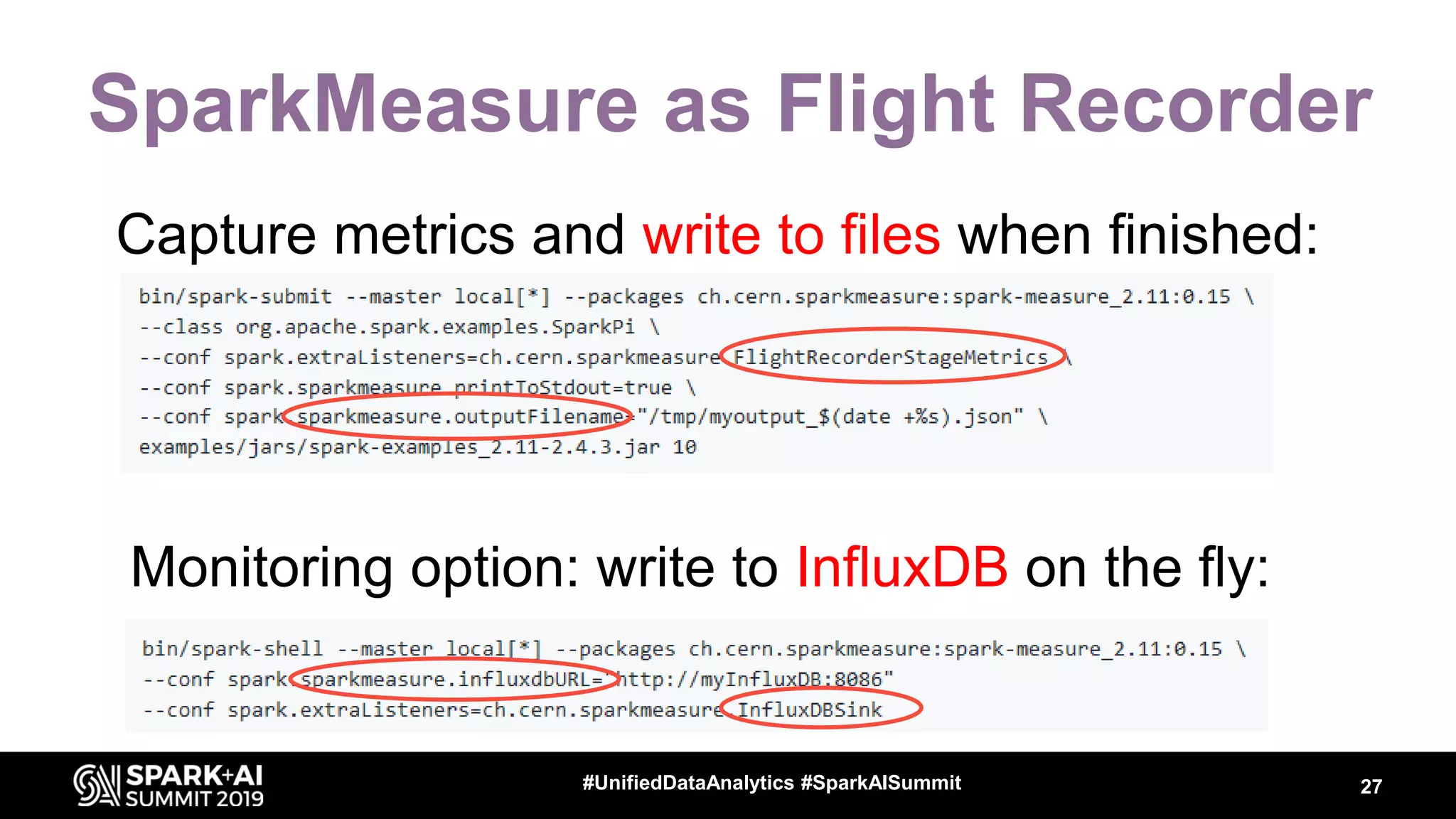
SparkMeasure as Flight Recorder
Capture metrics and write to files when finished:
27#UnifiedDataAnalytics #SparkAISummit
Monitoring option: write to InfluxDB on the fly:
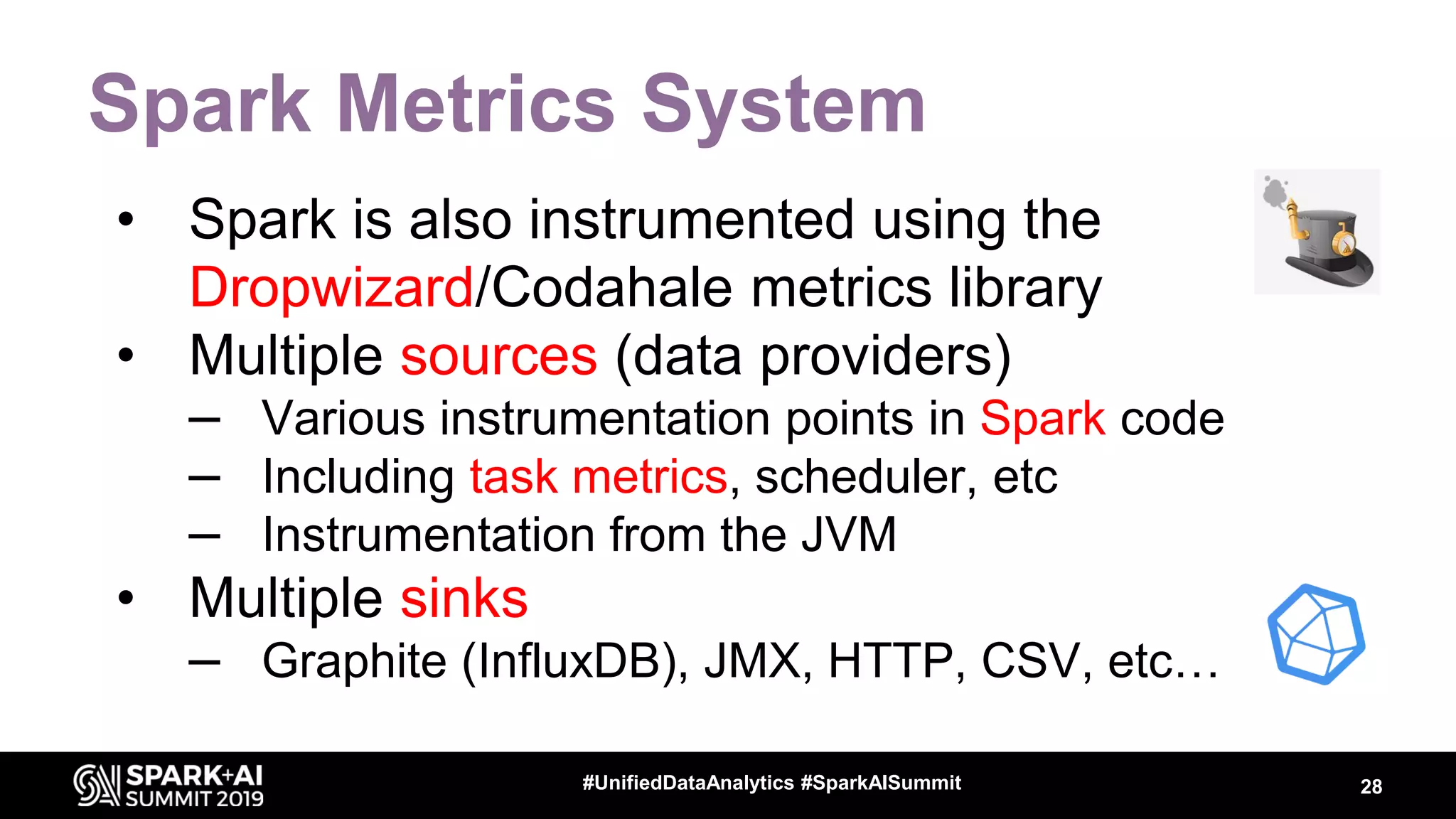
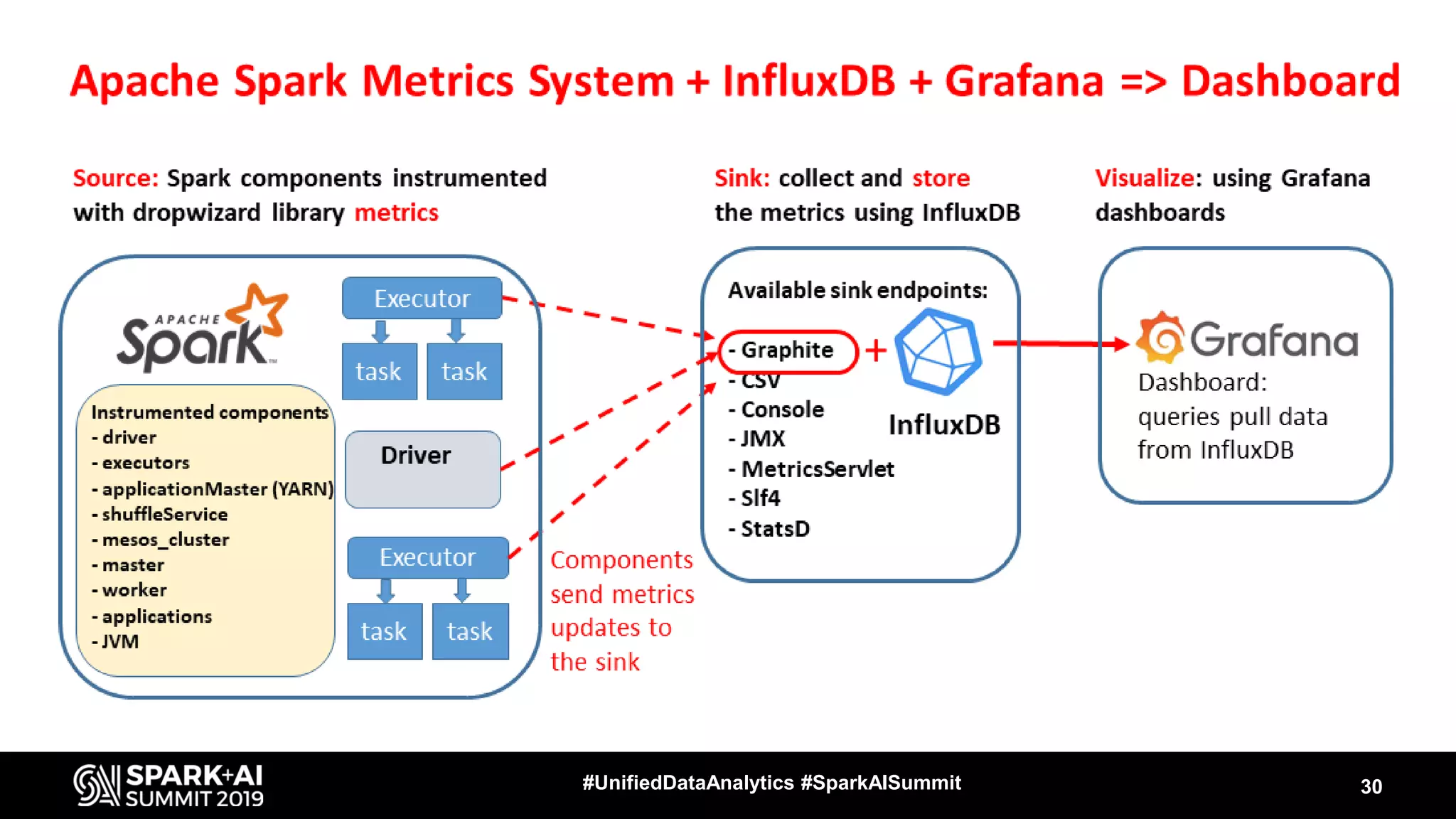
Spark Metrics System
• Spark is also instrumented using the
Dropwizard/Codahale metrics library
• Multiple sources (data providers)
– Various instrumentation points in Spark code
– Including task metrics, scheduler, etc
– Instrumentation from the JVM
• Multiple sinks
– Graphite (InfluxDB), JMX, HTTP, CSV, etc…
28#UnifiedDataAnalytics #SparkAISummit
Ingredients for a Spark
Performance Dashboard
• Architecture
– Know how the “Dropwizard metrics system” works
– Which Spark components are instrumented
• Configure backend components
– InfluxDB and Grafana
• Relevant Spark configuration parameters
• Dashboard graphs
– familiarize with available metrics
– InfluxDB query building for dashboard graphs
29#UnifiedDataAnalytics #SparkAISummit
Spark Performance Dashboard
30#UnifiedDataAnalytics #SparkAISummit
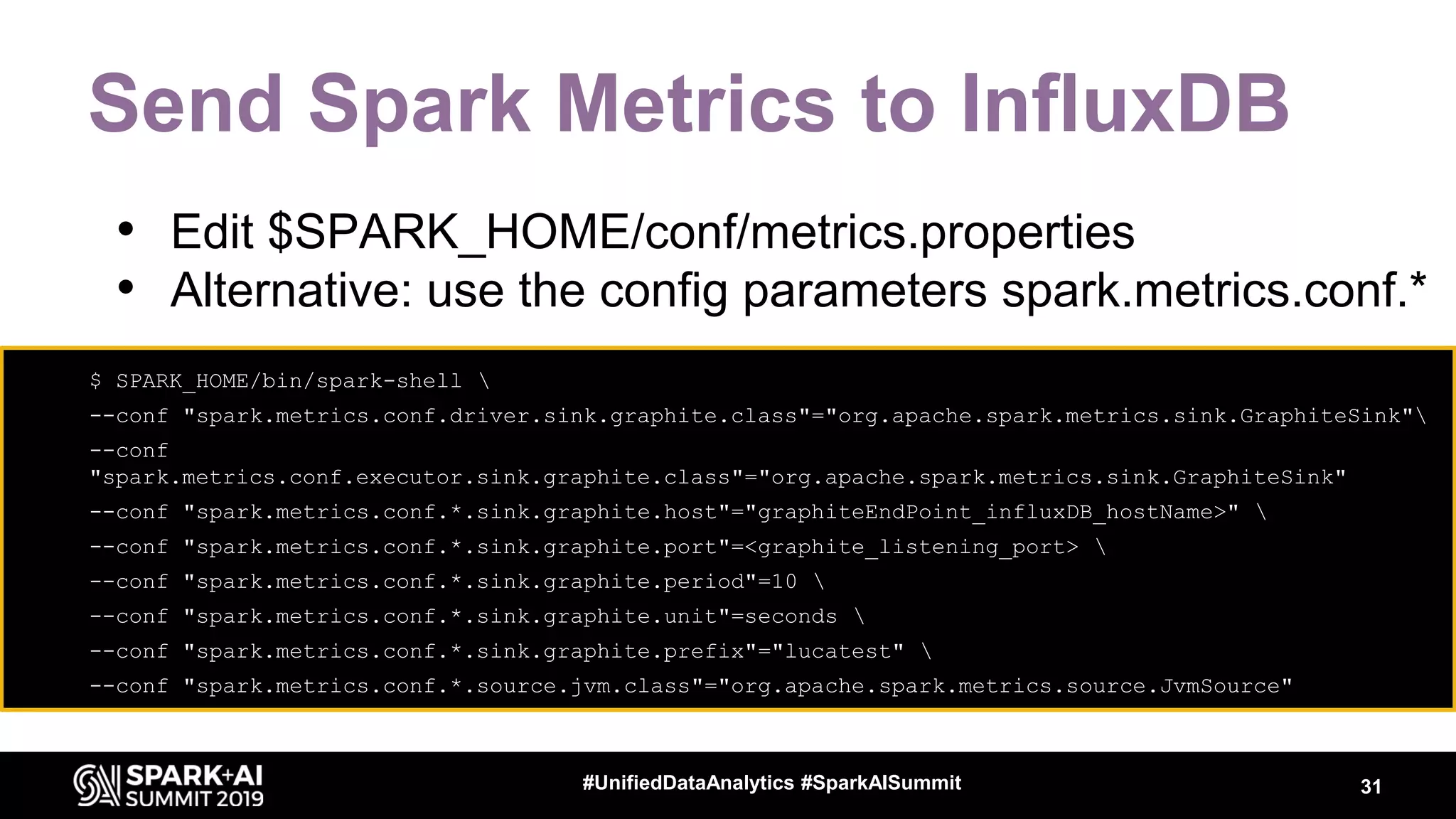
Send Spark Metrics to InfluxDB
31#UnifiedDataAnalytics #SparkAISummit
• $ SPARK_HOME/bin/spark-shell 
• --conf "spark.metrics.conf.driver.sink.graphite.class"="org.apache.spark.metrics.sink.GraphiteSink"
• --conf
"spark.metrics.conf.executor.sink.graphite.class"="org.apache.spark.metrics.sink.GraphiteSink"
• --conf "spark.metrics.conf.*.sink.graphite.host"="graphiteEndPoint_influxDB_hostName>" 
• --conf "spark.metrics.conf.*.sink.graphite.port"=<graphite_listening_port> 
• --conf "spark.metrics.conf.*.sink.graphite.period"=10 
• --conf "spark.metrics.conf.*.sink.graphite.unit"=seconds 
• --conf "spark.metrics.conf.*.sink.graphite.prefix"="lucatest" 
• --conf "spark.metrics.conf.*.source.jvm.class"="org.apache.spark.metrics.source.JvmSource"
• Edit $SPARK_HOME/conf/metrics.properties
• Alternative: use the config parameters spark.metrics.conf.*
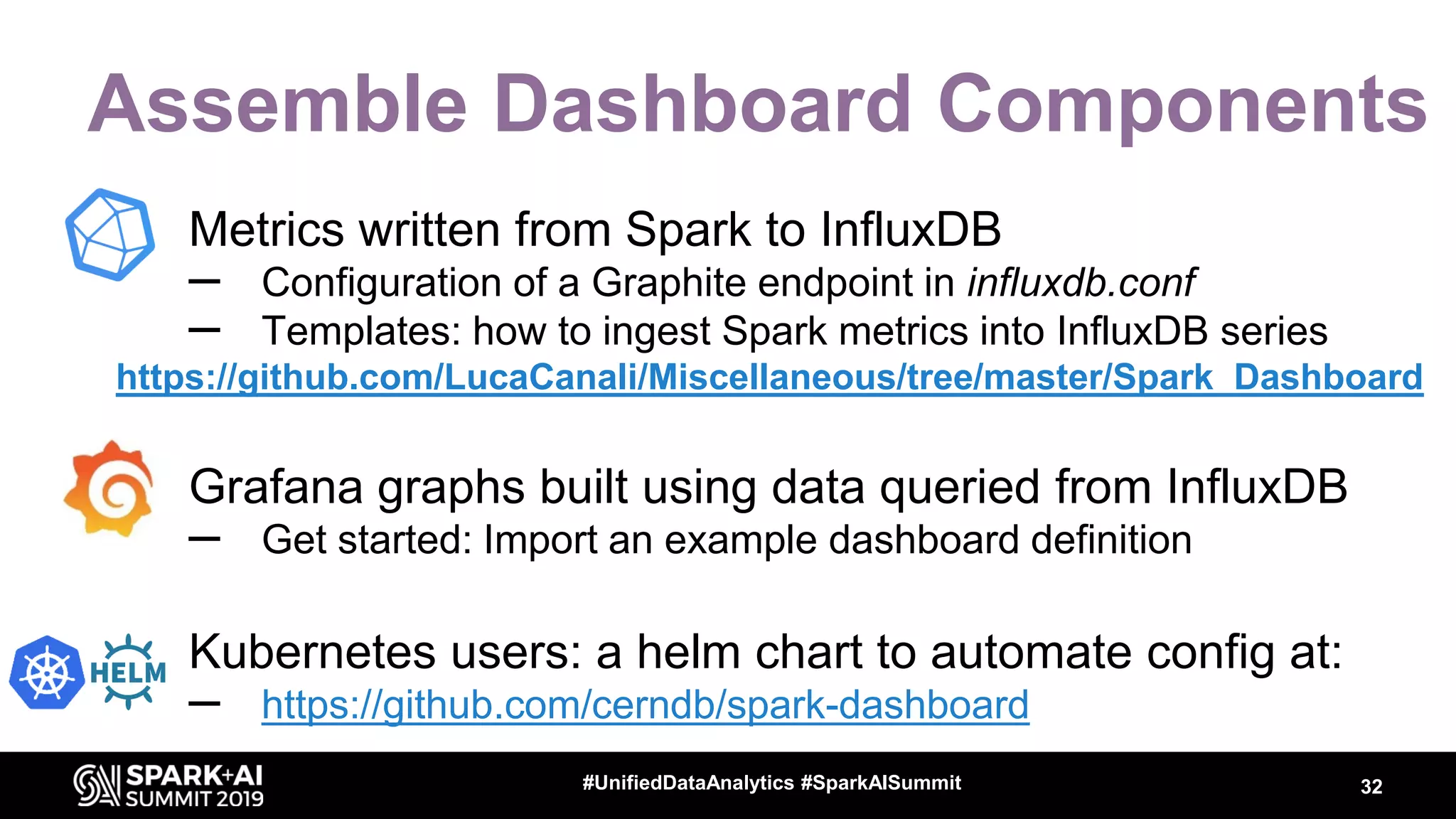
Assemble Dashboard Components
• Metrics written from Spark to InfluxDB
– Configuration of a Graphite endpoint in influxdb.conf
– Templates: how to ingest Spark metrics into InfluxDB series
https://github.com/LucaCanali/Miscellaneous/tree/master/Spark_Dashboard
• Grafana graphs built using data queried from InfluxDB
– Get started: Import an example dashboard definition
• Kubernetes users: a helm chart to automate config at:
– https://github.com/cerndb/spark-dashboard
32#UnifiedDataAnalytics #SparkAISummit
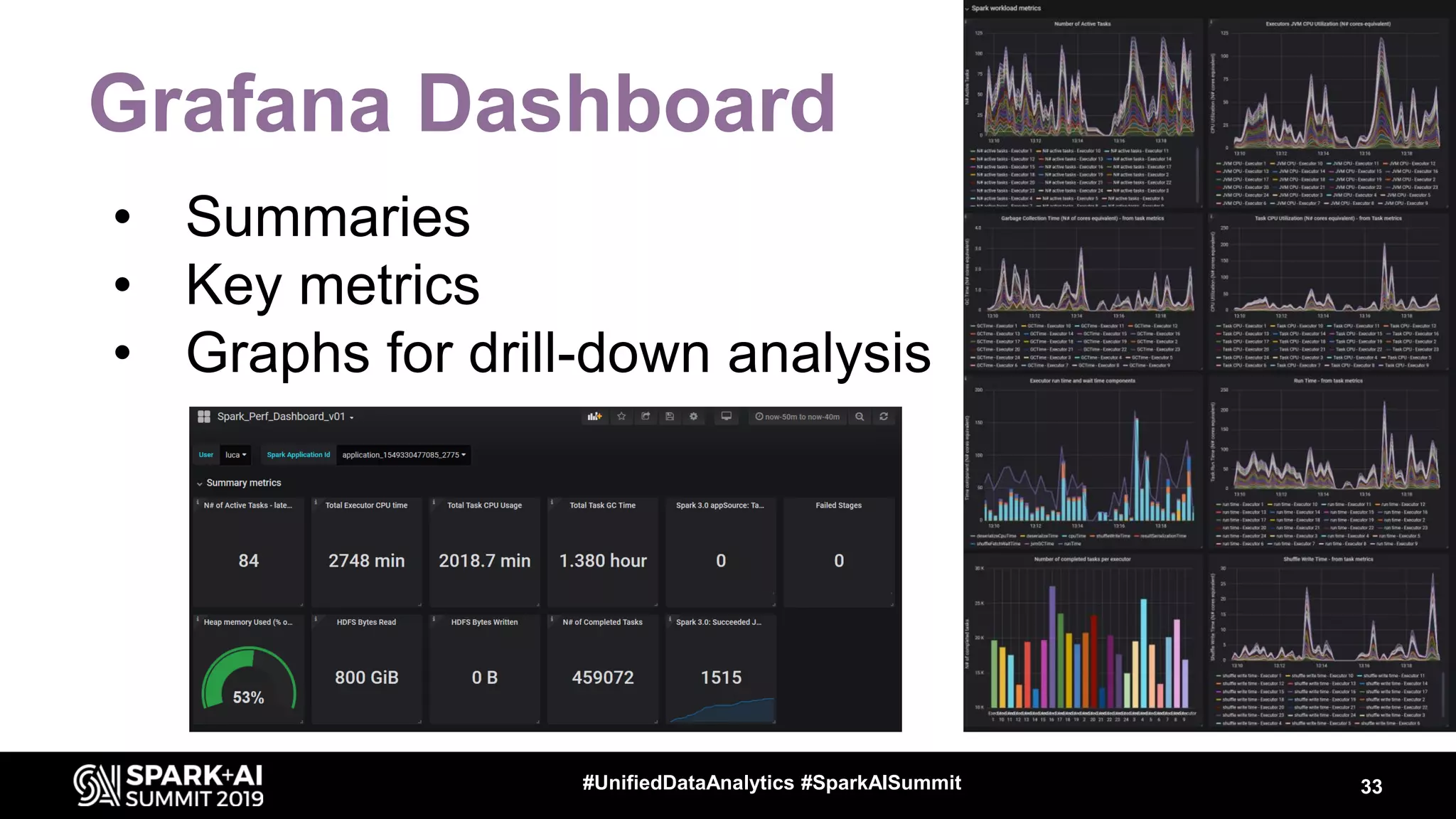
Grafana Dashboard
• Summaries
• Key metrics
• Graphs for drill-down analysis
33#UnifiedDataAnalytics #SparkAISummit
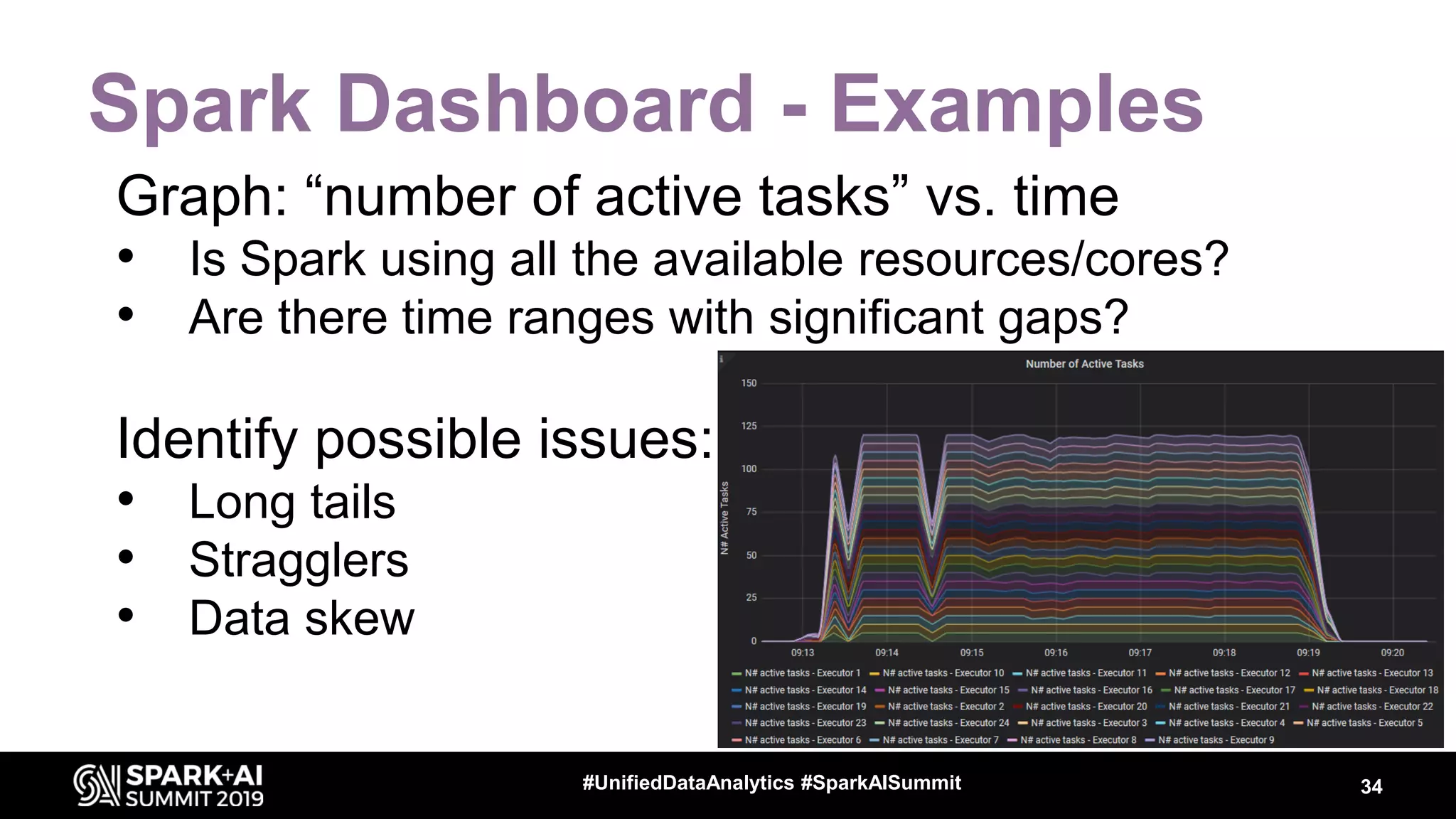
Spark Dashboard - Examples
Graph: “number of active tasks” vs. time
• Is Spark using all the available resources/cores?
• Are there time ranges with significant gaps?
Identify possible issues:
• Long tails
• Stragglers
• Data skew
34#UnifiedDataAnalytics #SparkAISummit
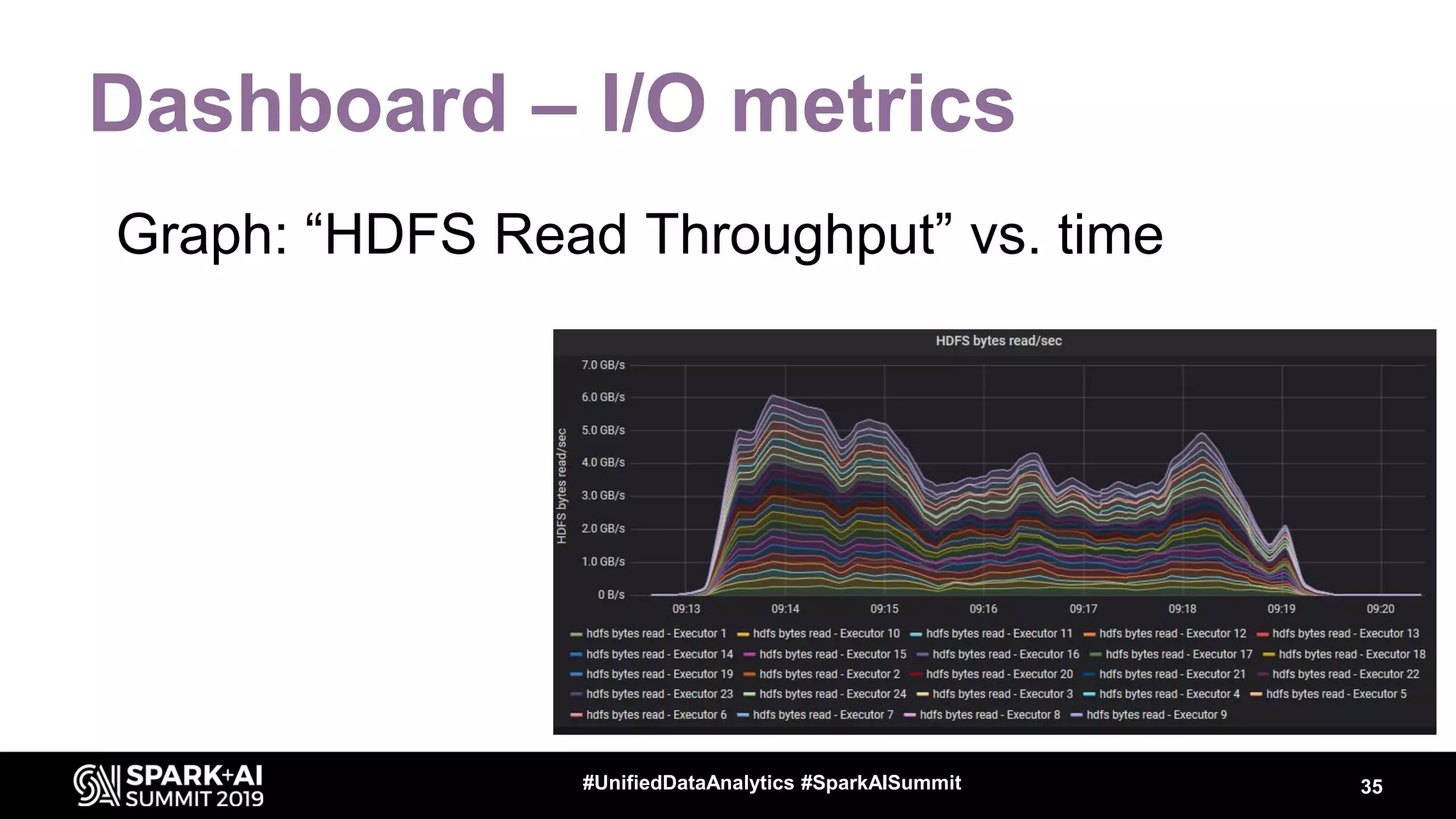
Dashboard – I/O metrics
Graph: “HDFS Read Throughput” vs. time
35#UnifiedDataAnalytics #SparkAISummit
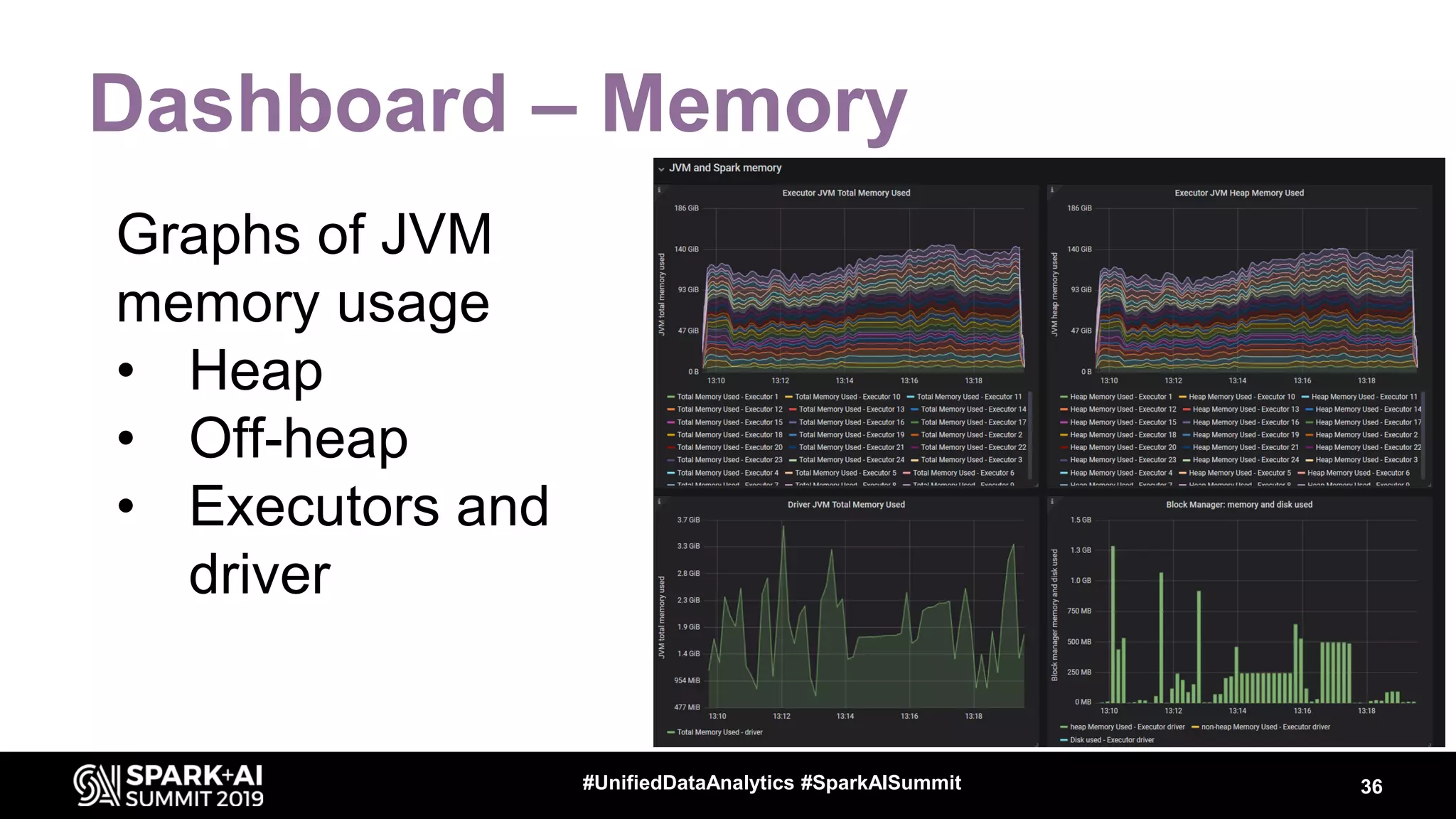
Dashboard – Memory
Graphs of JVM
memory usage
• Heap
• Off-heap
• Executors and
driver
36#UnifiedDataAnalytics #SparkAISummit
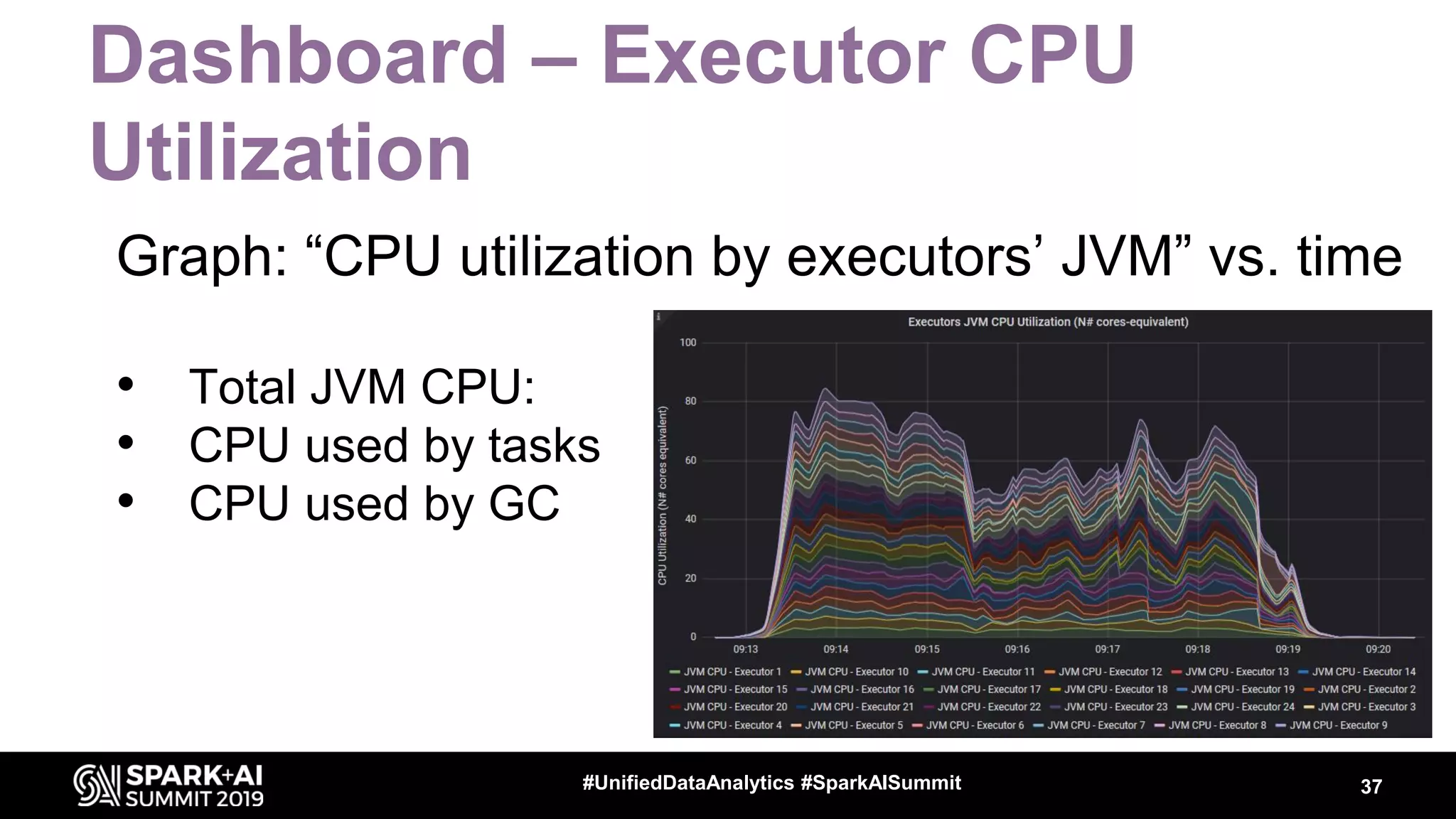
Dashboard – Executor CPU
Utilization
Graph: “CPU utilization by executors’ JVM” vs. time
• Total JVM CPU:
• CPU used by tasks
• CPU used by GC
37#UnifiedDataAnalytics #SparkAISummit
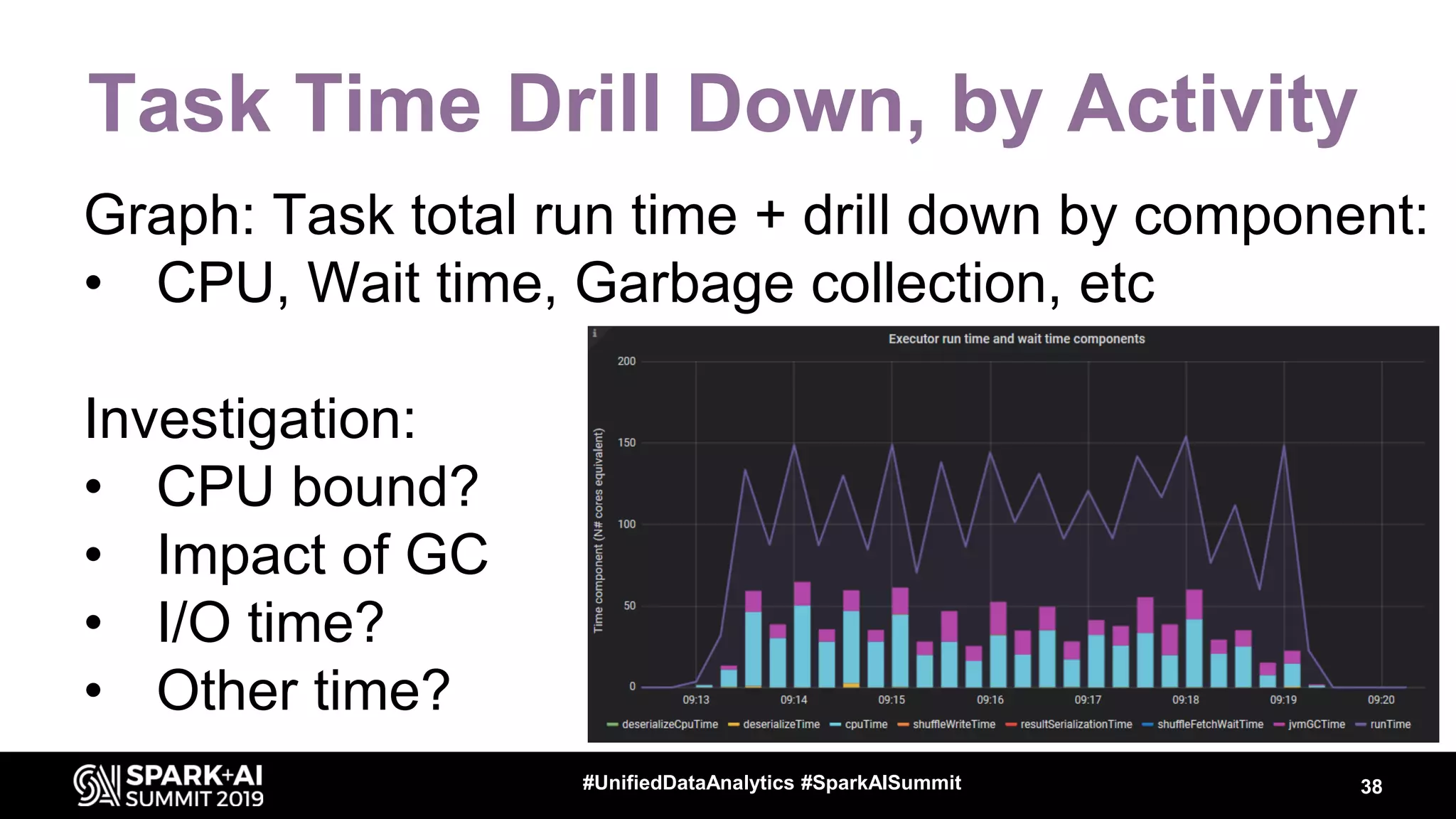
Task Time Drill Down, by Activity
Graph: Task total run time + drill down by component:
• CPU, Wait time, Garbage collection, etc
Investigation:
• CPU bound?
• Impact of GC
• I/O time?
• Other time?
38#UnifiedDataAnalytics #SparkAISummit
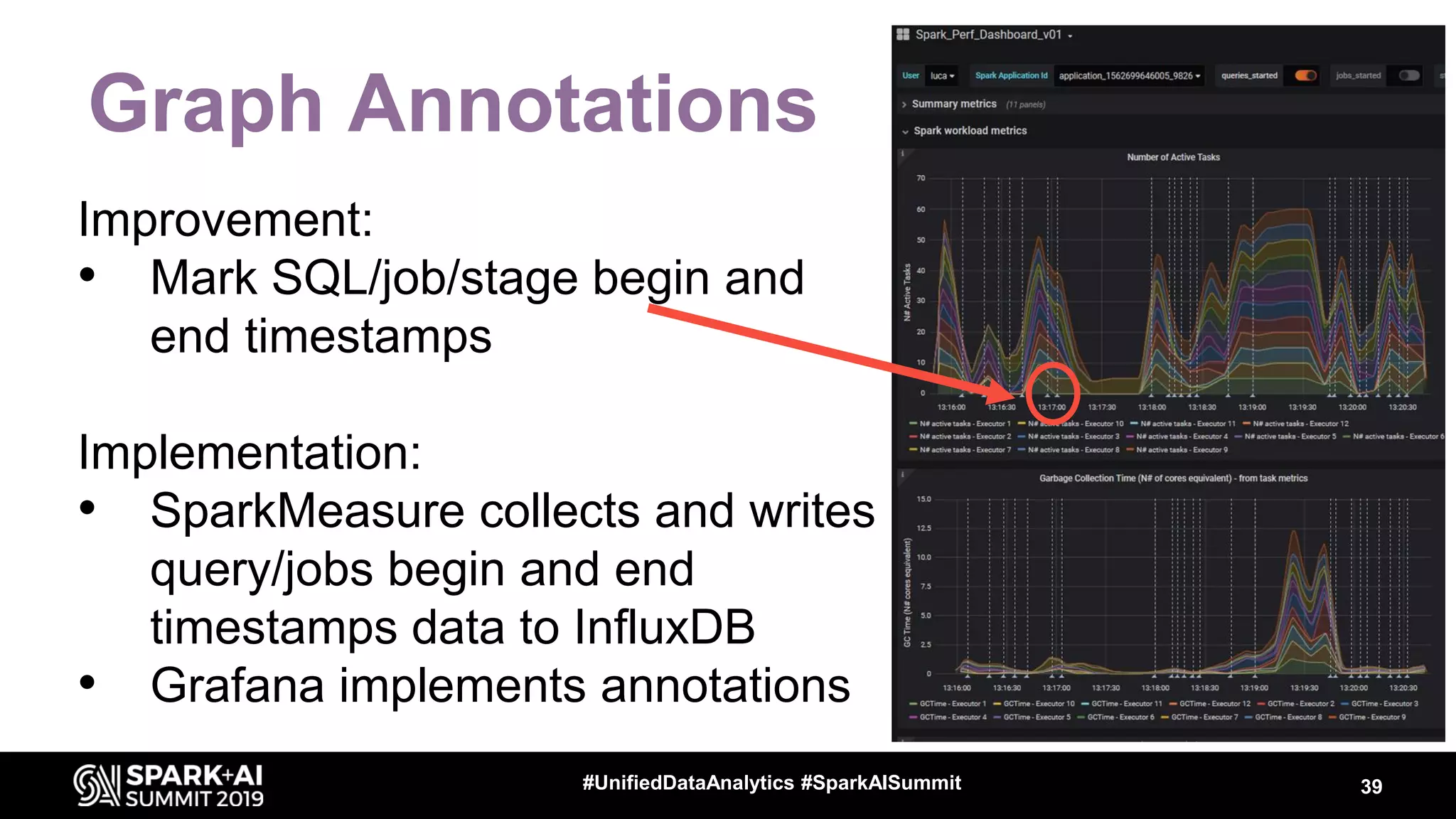
Graph Annotations
Improvement:
• Mark SQL/job/stage begin and
end timestamps
Implementation:
• SparkMeasure collects and writes
query/jobs begin and end
timestamps data to InfluxDB
• Grafana implements annotations
39#UnifiedDataAnalytics #SparkAISummit
Spark Dashboard, Lessons Learned
• Very useful to search for bottlenecks
– Many instrumented components
– Drilldown where time is spent
– Time evolution details
• Time series of N# active tasks, CPU, I/O, memory, etc
• Effort: you have to understand the root causes
– Use data to make and prove or disprove models
– The instrumentation is still evolving
• example: I/O time is not measured directly, Python UDF, etc
40#UnifiedDataAnalytics #SparkAISummit
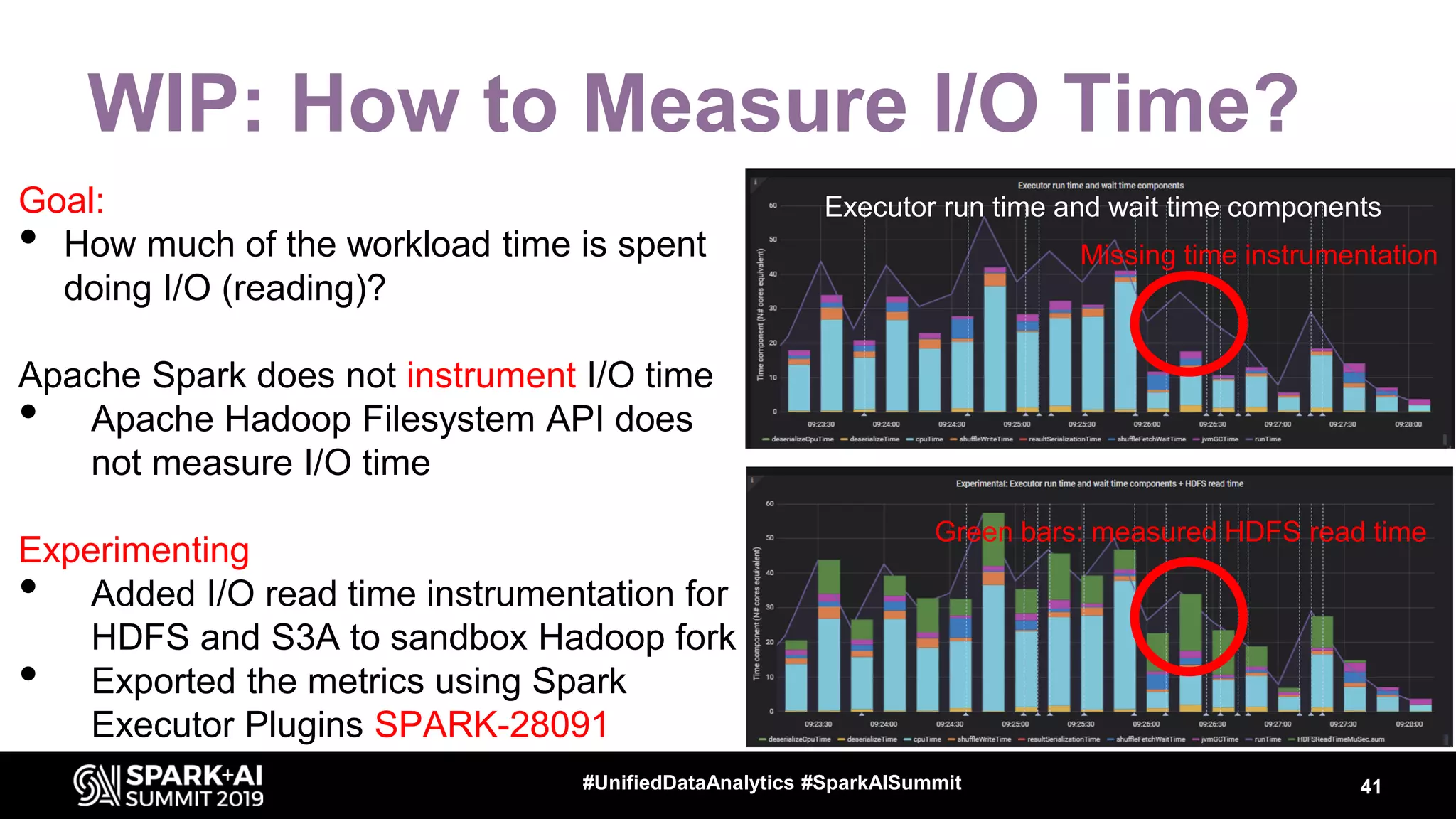
WIP: How to Measure I/O Time?
Goal:
• How much of the workload time is spent
doing I/O (reading)?
Apache Spark does not instrument I/O time
• Apache Hadoop Filesystem API does
not measure I/O time
Experimenting
• Added I/O read time instrumentation for
HDFS and S3A to sandbox Hadoop fork
• Exported the metrics using Spark
Executor Plugins SPARK-28091
41#UnifiedDataAnalytics #SparkAISummit
Missing time instrumentation
Green bars: measured HDFS read time
Executor run time and wait time components
Executor Plugins Extend Metrics
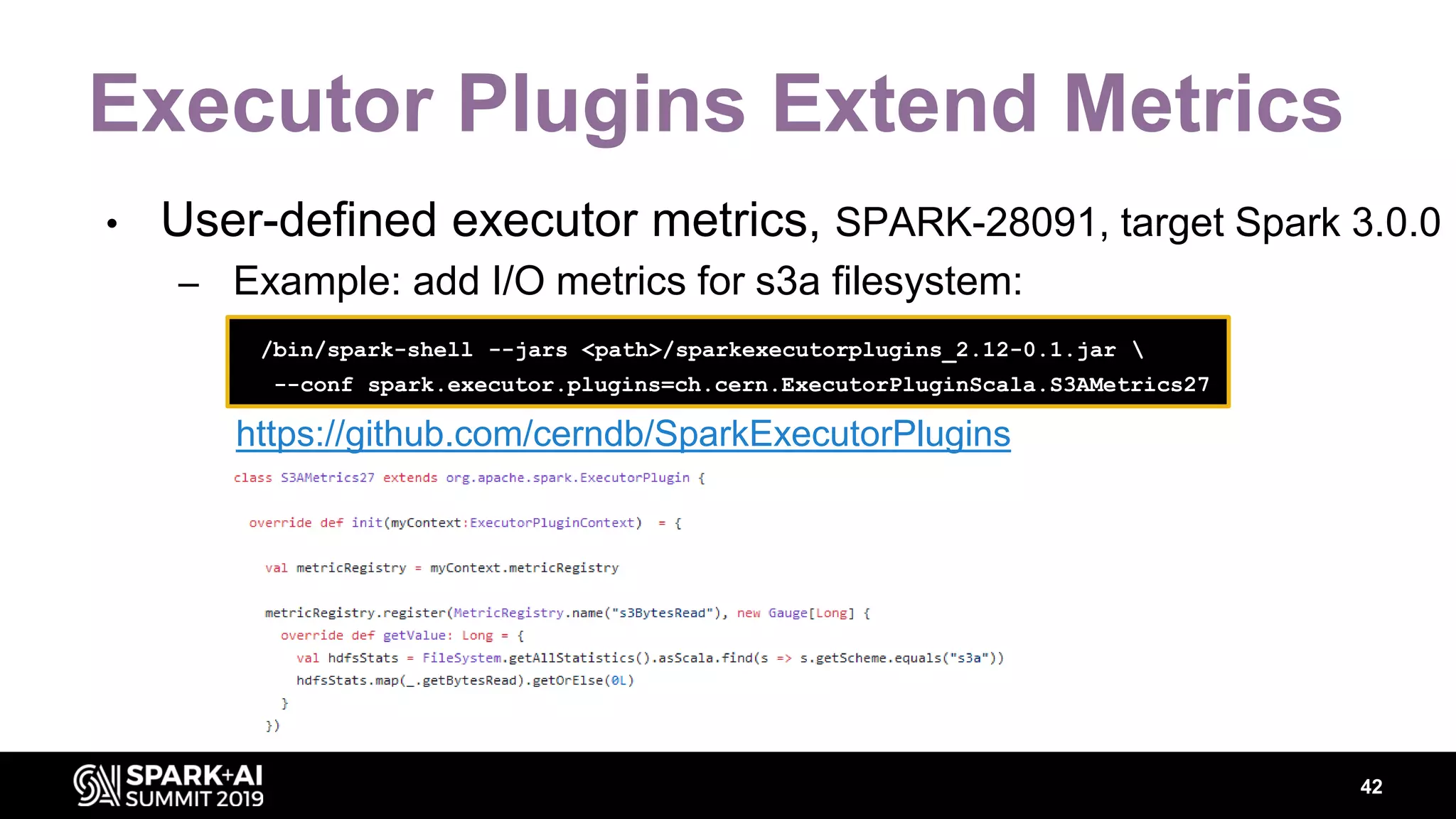
• User-defined executor metrics, SPARK-28091, target Spark 3.0.0
– Example: add I/O metrics for s3a filesystem:
42
/bin/spark-shell --jars <path>/sparkexecutorplugins_2.12-0.1.jar 
--conf spark.executor.plugins=ch.cern.ExecutorPluginScala.S3AMetrics27
https://github.com/cerndb/SparkExecutorPlugins
Metrics from OS Monitoring
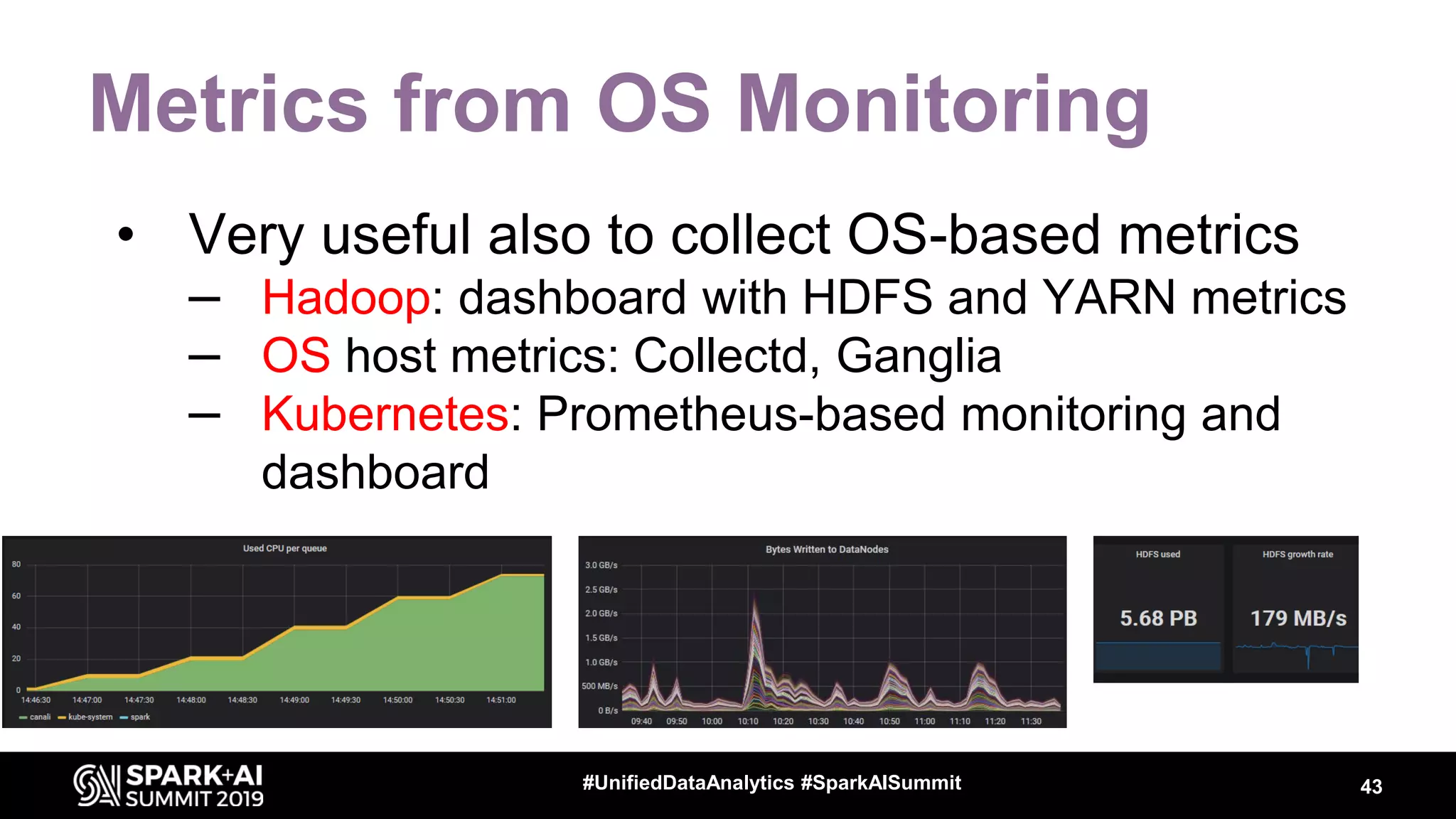
• Very useful also to collect OS-based metrics
– Hadoop: dashboard with HDFS and YARN metrics
– OS host metrics: Collectd, Ganglia
– Kubernetes: Prometheus-based monitoring and
dashboard
43#UnifiedDataAnalytics #SparkAISummit
Notable JIRAs about Metrics
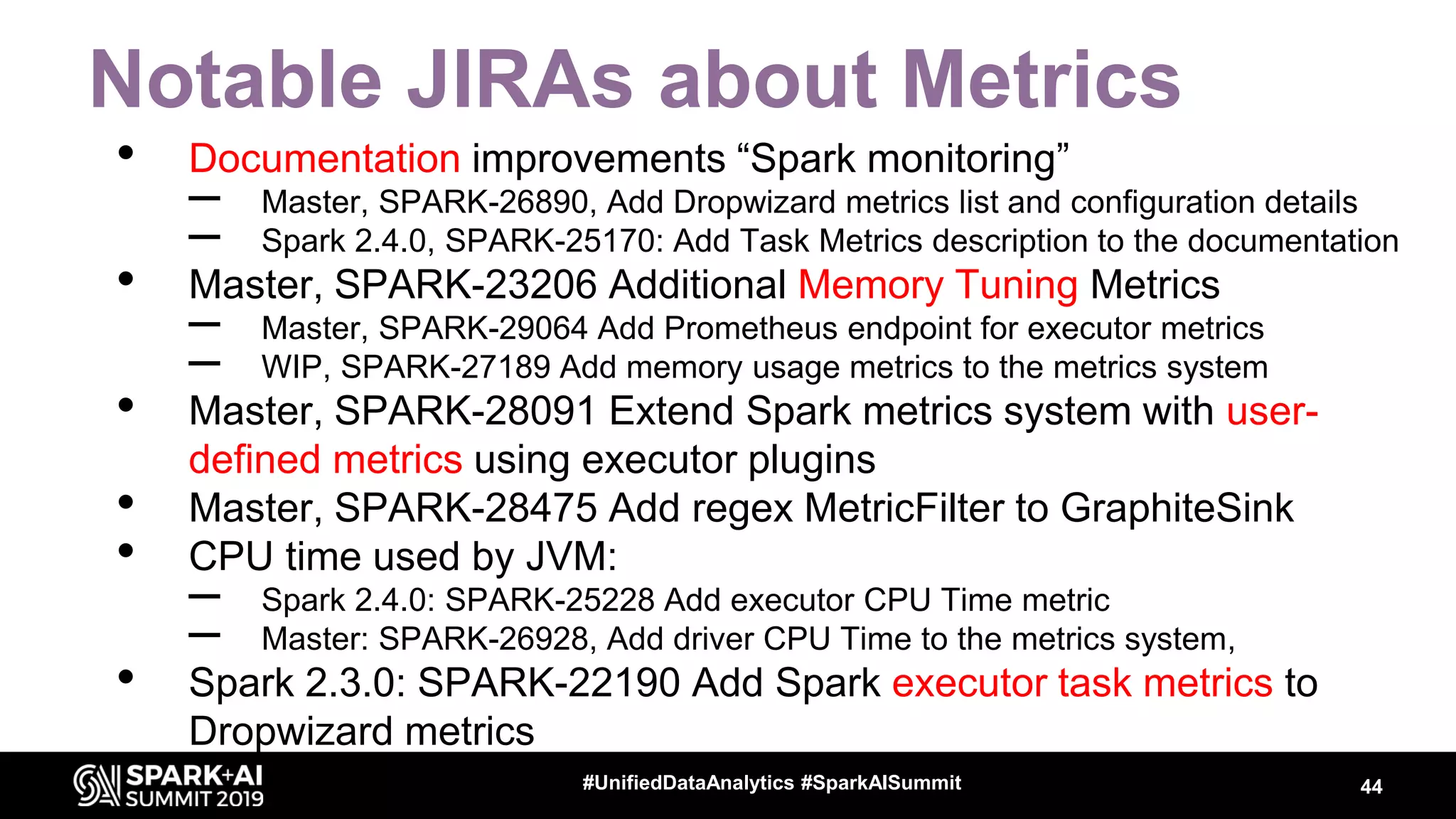
• Documentation improvements “Spark monitoring”
– Master, SPARK-26890, Add Dropwizard metrics list and configuration details
– Spark 2.4.0, SPARK-25170: Add Task Metrics description to the documentation
• Master, SPARK-23206 Additional Memory Tuning Metrics
– Master, SPARK-29064 Add Prometheus endpoint for executor metrics
– WIP, SPARK-27189 Add memory usage metrics to the metrics system
• Master, SPARK-28091 Extend Spark metrics system with user-
defined metrics using executor plugins
• Master, SPARK-28475 Add regex MetricFilter to GraphiteSink
• CPU time used by JVM:
– Spark 2.4.0: SPARK-25228 Add executor CPU Time metric
– Master: SPARK-26928, Add driver CPU Time to the metrics system,
• Spark 2.3.0: SPARK-22190 Add Spark executor task metrics to
Dropwizard metrics
44#UnifiedDataAnalytics #SparkAISummit
Conclusions
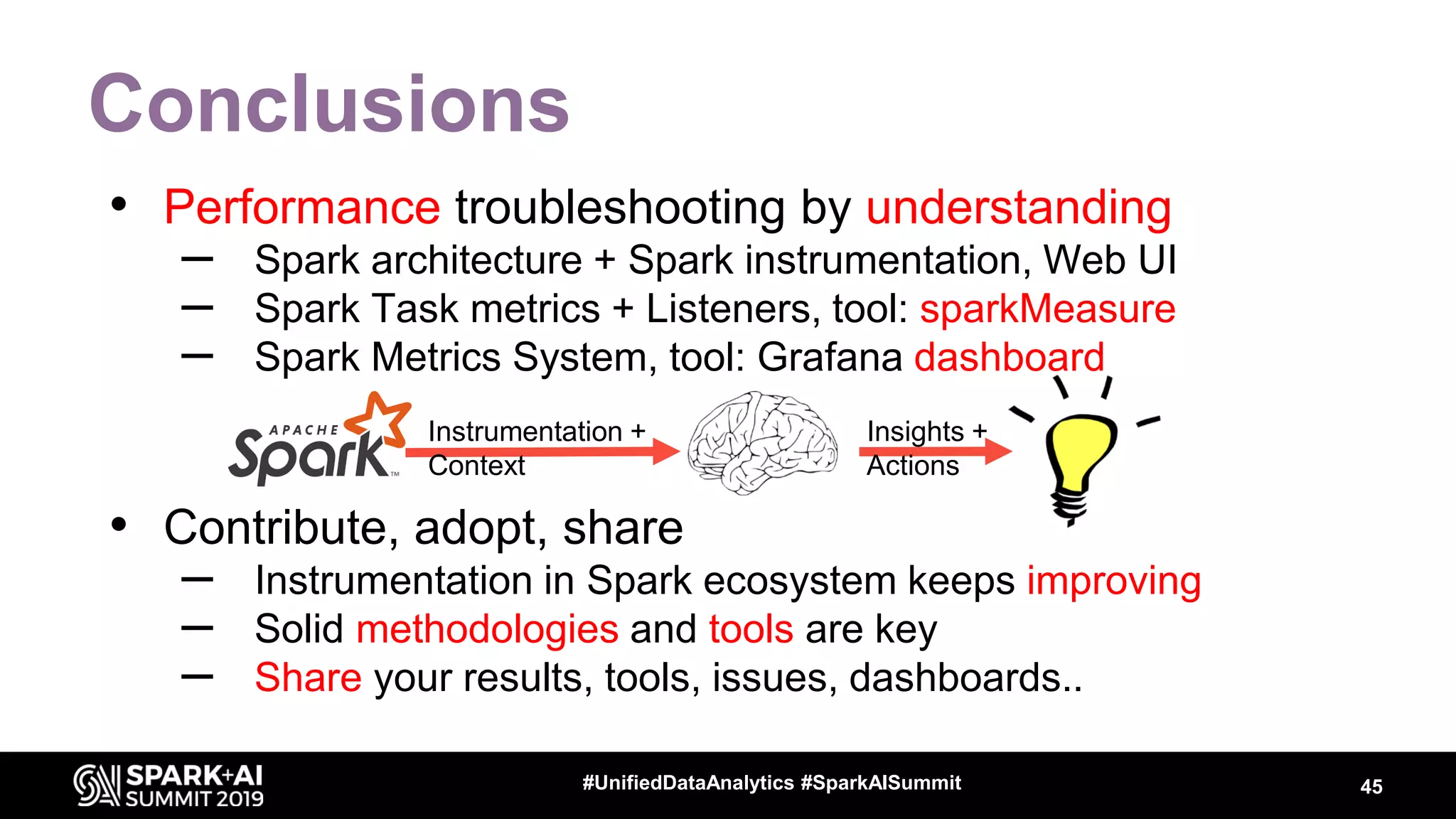
• Performance troubleshooting by understanding
– Spark architecture + Spark instrumentation, Web UI
– Spark Task metrics + Listeners, tool: sparkMeasure
– Spark Metrics System, tool: Grafana dashboard
• Contribute, adopt, share
– Instrumentation in Spark ecosystem keeps improving
– Solid methodologies and tools are key
– Share your results, tools, issues, dashboards..
45#UnifiedDataAnalytics #SparkAISummit
Instrumentation +
Context
Insights +
Actions
Acknowledgements
• Colleagues at CERN
– Hadoop and Spark service, in particular Prasanth Kothuri and
Riccardo Castellotti
• Thanks to Apache Spark committers and community
– Help with JIRAs and PRs
• References:
– https://github.com/LucaCanali/sparkmeasure
– https://db-blog.web.cern.ch/blog/luca-canali/2019-02-
performance-dashboard-apache-spark
46#UnifiedDataAnalytics #SparkAISummit
DON’T FORGET TO RATE
AND REVIEW THE SESSIONS
SEARCH SPARK + AI SUMMIT

Performance Troubleshooting Using Apache Spark Metrics

  • 1.
    WIFI SSID:Spark+AISummit |Password: UnifiedDataAnalytics
  • 2.
    Luca Canali, CERN Performance TroubleshootingUsing Apache Spark Metrics #UnifiedDataAnalytics #SparkAISummit
  • 3.
    About Luca 3#UnifiedDataAnalytics #SparkAISummit •Data Engineer at CERN – Hadoop and Spark service, database services – 19+ years of experience with data engineering • Sharing and community – Blog, notes, tools, contributions to Apache Spark @LucaCanaliDB – http://cern.ch/canali
  • 4.
    4 CERN: founded in1954: 12 European States Science for Peace and Development Today: 23 Member States Member States: Austria, Belgium, Bulgaria, Czech Republic, Denmark, Finland, France, Germany, Greece, Hungary, Israel, Italy, Netherlands, Norway, Poland, Portugal, Romania, Serbia, Slovak Republic, Spain, Sweden, Switzerland and United Kingdom Associate Members in the Pre-Stage to Membership: Cyprus, Slovenia Associate Member States: India, Lithuania, Pakistan, Turkey, Ukraine Applications for Membership or Associate Membership: Brazil, Croatia, Estonia Observers to Council: Japan, Russia, United States of America; European Union, JINR and UNESCO ~ 2600 staff ~ 1800 other paid personnel ~ 14000 scientific users Budget (2019) ~ 1200 MCHF
  • 5.
    Data at theLarge Hadron Collider LHC experiments data: >300 PB Computing jobs on the WLCG Grid: using ~1M cores 5
  • 6.
    Analytics Platform @CERN HEPsoftware Experiments storage HDFS Personal storage - “Big Data” open source components - Integrated with domain-specific software and existing infrastructure - Users in: Physics, Accelerators, IT 6
  • 7.
    Hadoop and SparkClusters at CERN • Spark running on clusters: – YARN/Hadoop – Spark on Kubernetes Accelerator logging (part of LHC infrastructure) Hadoop - YARN - 30 nodes (Cores - 1200, Mem - 13 TB, Storage – 7.5 PB) General Purpose Hadoop - YARN, 65 nodes (Cores – 2.2k, Mem – 20 TB, Storage – 12.5 PB) Cloud containers Kubernetes on Openstack VMs, Cores - 250, Mem – 2 TB Storage: remote HDFS or EOS (for physics data) 7#UnifiedDataAnalytics #SparkAISummit
  • 8.
    Text Code Monitoring Visualizations Sparkmonitor -> Jupyterextension for Spark monitoring, developed as a GSoC project with CERN. https://medium.com/@krishnanr/sp arkmonitor-big-data-tools-for- physics-analysis-bbcdef68b35a
  • 9.
    Performance Troubleshooting Goals: • Improvingproductivity • Reducing resource usage and cost • Metrics: latency, throughput, cost How: • Practice and methodologies • Gather performance and workload data 9#UnifiedDataAnalytics #SparkAISummit
  • 10.
    Performance Methodologies and Anti-Patterns Typicalbenchmark graph – Just a simple measurement – No root-cause analysis – Guesses and generalization Sound methodologies: http://www.brendangregg.com/methodology.html 10#UnifiedDataAnalytics #SparkAISummit 0 2 4 6 8 10 12 System A System B TIME(MINUTES) Vendor A benchmark System A is 5x faster!
  • 11.
    Workload and PerformanceData • You want data to find answers to questions like – What is my workload doing? – Where is it spending time? – What are the bottlenecks (CPU, I/O)? – How are systems resources used? – Why do I measure the {latency/throughput} that I measure? • Why is not 10x better? 11#EUdev2
  • 12.
    Data + Context=> Insights Workload monitoring data + Spark architecture knowledge 12#UnifiedDataAnalytics #SparkAISummit Application Info on application architecture Info on computing environment Agent takes produces: insights + actions
  • 13.
    Measuring Spark • Distributedsystem, parallel architecture – Many components, complexity increases when running at scale – Execution hierarchy: SQL -> Jobs -> Stages -> Tasks – Interaction with clusters and storage 13#UnifiedDataAnalytics #SparkAISummit
  • 14.
    Spark Instrumentation -WebUI WebUI and History server: standard instrumentation • Details on jobs, stages, tasks • Default: http://driver_host:4040 • Details on SQL execution and execution plans • https://github.com/apache/spark/blob/master/docs/web-ui.md 14#UnifiedDataAnalytics #SparkAISummit
  • 15.
    Spark Instrumentation –Metrics Task metrics: • Instrument resource usage by executor tasks: – Time spent executing tasks, – CPU used, I/O metrics, – Shuffle read/write details, .. – SPARK-25170: https://spark.apache.org/docs/latest/monitoring.html SQL metrics: • DataFrame/SQL operations. Mostly used by Web UI SQL tab. See SPARK-28935 + Web-UI documentation 15#UnifiedDataAnalytics #SparkAISummit Task
  • 16.
    How to GatherSpark Task Metrics • Web UI exposes REST API Example: http://localhost:4040/api/v1/applications History server reads from Event Log (JSON file) – spark.eventLog.enabled=true – spark.eventLog.dir = <path> • Programmatic interface via “Spark Listeners” sparkMeasure -> a tool and working example code of how to collect metrics with Spark Listeners 16#UnifiedDataAnalytics #SparkAISummit
  • 17.
    Spark Metrics inREST API … 17#UnifiedDataAnalytics #SparkAISummit
  • 18.
    Task Metrics inthe Event Log val df = spark.read.json("/var/log/spark-history/application_1567507314781_..") df.filter("Event='SparkListenerTaskEnd'").select("Task Metrics.*").printSchema 18#UnifiedDataAnalytics #SparkAISummit |-- Disk Bytes Spilled: long (nullable = true) |-- Executor CPU Time: long (nullable = true) |-- Executor Deserialize CPU Time: long (nullable = true) |-- Executor Deserialize Time: long (nullable = true) |-- Executor Run Time: long (nullable = true) |-- Input Metrics: struct (nullable = true) | |-- Bytes Read: long (nullable = true) | |-- Records Read: long (nullable = true) |-- JVM GC Time: long (nullable = true) |-- Memory Bytes Spilled: long (nullable = true) |-- Output Metrics: struct (nullable = true) | |-- Bytes Written: long (nullable = true) | |-- Records Written: long (nullable = true) |-- Result Serialization Time: long (nullable = true) |-- Result Size: long (nullable = true) |-- Shuffle Read Metrics: struct (nullable = true) | |-- Fetch Wait Time: long (nullable = true) | |-- Local Blocks Fetched: long (nullable = true) | |-- Local Bytes Read: long (nullable = true) | |-- Remote Blocks Fetched: long (nullable = true) | |-- Remote Bytes Read: long (nullable = true) | |-- Remote Bytes Read To Disk: long (nullable = true) | |-- Total Records Read: long (nullable = true) |-- Shuffle Write Metrics: struct (nullable = true) | |-- Shuffle Bytes Written: long (nullable = true) | |-- Shuffle Records Written: long (nullable = true) | |-- Shuffle Write Time: long (nullable = true) |-- Updated Blocks: array (nullable = true) | |-- element: string (containsNull = true) Spark Internal Task metrics: Provide info on executors’ activity: Run time, CPU time used, I/O metrics, JVM Garbage Collection, Shuffle activity, etc.
  • 19.
    Spark Listeners, @DeveloperApi •Custom class, extends SparkListener • Methods react on events to collect data, example: • Attach custom Lister class to Spark Session --conf spark.extraListeners=.. 19
  • 20.
  • 21.
    SparkMeasure – GettingStarted 21#UnifiedDataAnalytics #SparkAISummit • bin/spark-shell --packages ch.cern.sparkmeasure:spark- measure_2.11:0.15 • bin/spark-shell --packages ch.cern.sparkmeasure:spark- measure_2.11:0.15 • val stageMetrics = ch.cern.sparkmeasure.StageMetrics(spark) • • bin/spark-shell --packages ch.cern.sparkmeasure:spark- measure_2.11:0.15 • val stageMetrics = ch.cern.sparkmeasure.StageMetrics(spark) • • val myQuery = "select count(*) from range(1000) cross join range(1000) cross join range(1000)" • stageMetrics.runAndMeasure(spark.sql(myQuery).show())
  • 22.
    SparkMeasure Output Example 22#UnifiedDataAnalytics#SparkAISummit • Scheduling mode = FIFO • Spark Context default degree of parallelism = 8 • Aggregated Spark stage metrics: • numStages => 3 • sum(numTasks) => 17 • elapsedTime => 9103 (9 s) • sum(stageDuration) => 9027 (9 s) • sum(executorRunTime) => 69238 (1.2 min) • sum(executorCpuTime) => 68004 (1.1 min) • sum(executorDeserializeTime) => 1031 (1 s) • sum(executorDeserializeCpuTime) => 151 (0.2 s) • sum(resultSerializationTime) => 5 (5 ms) • sum(jvmGCTime) => 64 (64 ms) • sum(shuffleFetchWaitTime) => 0 (0 ms) • sum(shuffleWriteTime) => 26 (26 ms) • max(resultSize) => 17934 (17.0 KB) • sum(numUpdatedBlockStatuses) => 0 • sum(diskBytesSpilled) => 0 (0 Bytes) • sum(memoryBytesSpilled) => 0 (0 Bytes) • max(peakExecutionMemory) => 0 • sum(recordsRead) => 2000 • sum(bytesRead) => 0 (0 Bytes) • sum(recordsWritten) => 0 • sum(bytesWritten) => 0 (0 Bytes) • sum(shuffleTotalBytesRead) => 472 (472 Bytes) • sum(shuffleTotalBlocksFetched) => 8 • sum(shuffleLocalBlocksFetched) => 8 • sum(shuffleRemoteBlocksFetched) => 0 • sum(shuffleBytesWritten) => 472 (472 Bytes) • sum(shuffleRecordsWritten) => 8
  • 23.
    SparkMeasure, Usage Modes •Interactive: use from shell or notebooks – Works with Jupyter notebooks, Azure, Colab, Databricks, etc. • Use to instrument your code • Flight recorder mode – No changes needed to the code – For Troubleshooting, for CI/CD pipelines, … • Use with Scala, Python, Java 23#UnifiedDataAnalytics #SparkAISummit https://github.com/LucaCanali/sparkMeasure
  • 24.
    Instrument Code with SparkMeasure 24#UnifiedDataAnalytics#SparkAISummit https://github.com/LucaCanali/sparkMeasure/blob/master/docs/Instrument_Python_code.md
  • 25.
    SparkMeasure on Notebooks: LocalJupyter and Cloud Services 25#UnifiedDataAnalytics #SparkAISummit https://github.com/LucaCanali/sparkMeasure/tree/master/examples
  • 26.
    SparkMeasure on Notebooks: JupyterMagic: %%sparkmeasure 26#UnifiedDataAnalytics #SparkAISummit … (note, output truncated to fit in slide
  • 27.
    SparkMeasure as FlightRecorder Capture metrics and write to files when finished: 27#UnifiedDataAnalytics #SparkAISummit Monitoring option: write to InfluxDB on the fly:
  • 28.
    Spark Metrics System •Spark is also instrumented using the Dropwizard/Codahale metrics library • Multiple sources (data providers) – Various instrumentation points in Spark code – Including task metrics, scheduler, etc – Instrumentation from the JVM • Multiple sinks – Graphite (InfluxDB), JMX, HTTP, CSV, etc… 28#UnifiedDataAnalytics #SparkAISummit
  • 29.
    Ingredients for aSpark Performance Dashboard • Architecture – Know how the “Dropwizard metrics system” works – Which Spark components are instrumented • Configure backend components – InfluxDB and Grafana • Relevant Spark configuration parameters • Dashboard graphs – familiarize with available metrics – InfluxDB query building for dashboard graphs 29#UnifiedDataAnalytics #SparkAISummit
  • 30.
  • 31.
    Send Spark Metricsto InfluxDB 31#UnifiedDataAnalytics #SparkAISummit • $ SPARK_HOME/bin/spark-shell • --conf "spark.metrics.conf.driver.sink.graphite.class"="org.apache.spark.metrics.sink.GraphiteSink" • --conf "spark.metrics.conf.executor.sink.graphite.class"="org.apache.spark.metrics.sink.GraphiteSink" • --conf "spark.metrics.conf.*.sink.graphite.host"="graphiteEndPoint_influxDB_hostName>" • --conf "spark.metrics.conf.*.sink.graphite.port"=<graphite_listening_port> • --conf "spark.metrics.conf.*.sink.graphite.period"=10 • --conf "spark.metrics.conf.*.sink.graphite.unit"=seconds • --conf "spark.metrics.conf.*.sink.graphite.prefix"="lucatest" • --conf "spark.metrics.conf.*.source.jvm.class"="org.apache.spark.metrics.source.JvmSource" • Edit $SPARK_HOME/conf/metrics.properties • Alternative: use the config parameters spark.metrics.conf.*
  • 32.
    Assemble Dashboard Components •Metrics written from Spark to InfluxDB – Configuration of a Graphite endpoint in influxdb.conf – Templates: how to ingest Spark metrics into InfluxDB series https://github.com/LucaCanali/Miscellaneous/tree/master/Spark_Dashboard • Grafana graphs built using data queried from InfluxDB – Get started: Import an example dashboard definition • Kubernetes users: a helm chart to automate config at: – https://github.com/cerndb/spark-dashboard 32#UnifiedDataAnalytics #SparkAISummit
  • 33.
    Grafana Dashboard • Summaries •Key metrics • Graphs for drill-down analysis 33#UnifiedDataAnalytics #SparkAISummit
  • 34.
    Spark Dashboard -Examples Graph: “number of active tasks” vs. time • Is Spark using all the available resources/cores? • Are there time ranges with significant gaps? Identify possible issues: • Long tails • Stragglers • Data skew 34#UnifiedDataAnalytics #SparkAISummit
  • 35.
    Dashboard – I/Ometrics Graph: “HDFS Read Throughput” vs. time 35#UnifiedDataAnalytics #SparkAISummit
  • 36.
    Dashboard – Memory Graphsof JVM memory usage • Heap • Off-heap • Executors and driver 36#UnifiedDataAnalytics #SparkAISummit
  • 37.
    Dashboard – ExecutorCPU Utilization Graph: “CPU utilization by executors’ JVM” vs. time • Total JVM CPU: • CPU used by tasks • CPU used by GC 37#UnifiedDataAnalytics #SparkAISummit
  • 38.
    Task Time DrillDown, by Activity Graph: Task total run time + drill down by component: • CPU, Wait time, Garbage collection, etc Investigation: • CPU bound? • Impact of GC • I/O time? • Other time? 38#UnifiedDataAnalytics #SparkAISummit
  • 39.
    Graph Annotations Improvement: • MarkSQL/job/stage begin and end timestamps Implementation: • SparkMeasure collects and writes query/jobs begin and end timestamps data to InfluxDB • Grafana implements annotations 39#UnifiedDataAnalytics #SparkAISummit
  • 40.
    Spark Dashboard, LessonsLearned • Very useful to search for bottlenecks – Many instrumented components – Drilldown where time is spent – Time evolution details • Time series of N# active tasks, CPU, I/O, memory, etc • Effort: you have to understand the root causes – Use data to make and prove or disprove models – The instrumentation is still evolving • example: I/O time is not measured directly, Python UDF, etc 40#UnifiedDataAnalytics #SparkAISummit
  • 41.
    WIP: How toMeasure I/O Time? Goal: • How much of the workload time is spent doing I/O (reading)? Apache Spark does not instrument I/O time • Apache Hadoop Filesystem API does not measure I/O time Experimenting • Added I/O read time instrumentation for HDFS and S3A to sandbox Hadoop fork • Exported the metrics using Spark Executor Plugins SPARK-28091 41#UnifiedDataAnalytics #SparkAISummit Missing time instrumentation Green bars: measured HDFS read time Executor run time and wait time components
  • 42.
    Executor Plugins ExtendMetrics • User-defined executor metrics, SPARK-28091, target Spark 3.0.0 – Example: add I/O metrics for s3a filesystem: 42 /bin/spark-shell --jars <path>/sparkexecutorplugins_2.12-0.1.jar --conf spark.executor.plugins=ch.cern.ExecutorPluginScala.S3AMetrics27 https://github.com/cerndb/SparkExecutorPlugins
  • 43.
    Metrics from OSMonitoring • Very useful also to collect OS-based metrics – Hadoop: dashboard with HDFS and YARN metrics – OS host metrics: Collectd, Ganglia – Kubernetes: Prometheus-based monitoring and dashboard 43#UnifiedDataAnalytics #SparkAISummit
  • 44.
    Notable JIRAs aboutMetrics • Documentation improvements “Spark monitoring” – Master, SPARK-26890, Add Dropwizard metrics list and configuration details – Spark 2.4.0, SPARK-25170: Add Task Metrics description to the documentation • Master, SPARK-23206 Additional Memory Tuning Metrics – Master, SPARK-29064 Add Prometheus endpoint for executor metrics – WIP, SPARK-27189 Add memory usage metrics to the metrics system • Master, SPARK-28091 Extend Spark metrics system with user- defined metrics using executor plugins • Master, SPARK-28475 Add regex MetricFilter to GraphiteSink • CPU time used by JVM: – Spark 2.4.0: SPARK-25228 Add executor CPU Time metric – Master: SPARK-26928, Add driver CPU Time to the metrics system, • Spark 2.3.0: SPARK-22190 Add Spark executor task metrics to Dropwizard metrics 44#UnifiedDataAnalytics #SparkAISummit
  • 45.
    Conclusions • Performance troubleshootingby understanding – Spark architecture + Spark instrumentation, Web UI – Spark Task metrics + Listeners, tool: sparkMeasure – Spark Metrics System, tool: Grafana dashboard • Contribute, adopt, share – Instrumentation in Spark ecosystem keeps improving – Solid methodologies and tools are key – Share your results, tools, issues, dashboards.. 45#UnifiedDataAnalytics #SparkAISummit Instrumentation + Context Insights + Actions
  • 46.
    Acknowledgements • Colleagues atCERN – Hadoop and Spark service, in particular Prasanth Kothuri and Riccardo Castellotti • Thanks to Apache Spark committers and community – Help with JIRAs and PRs • References: – https://github.com/LucaCanali/sparkmeasure – https://db-blog.web.cern.ch/blog/luca-canali/2019-02- performance-dashboard-apache-spark 46#UnifiedDataAnalytics #SparkAISummit
  • 47.
    DON’T FORGET TORATE AND REVIEW THE SESSIONS SEARCH SPARK + AI SUMMIT