SharePoint 2010 Training Course
                      Administrator - Level 100 (Beginner)
Thuan Nguyen (MVP, MCITP, MCTS) – Principal SharePoint Consultant


              Mail: contact@thesoldier.net | Website: www.thesoldier.net
Thuan Nguyen - MVP, MCITP, MCTS


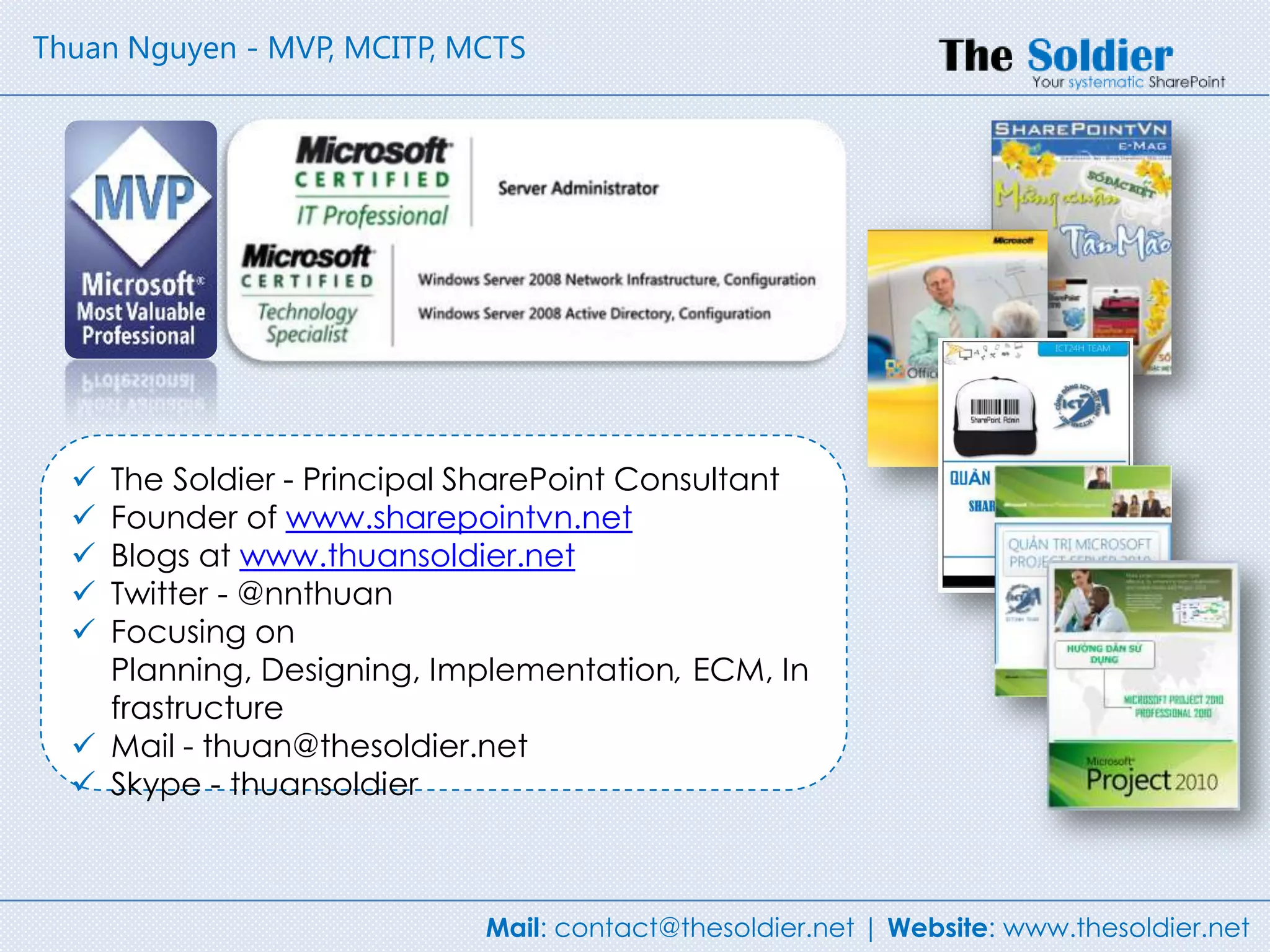
   The Soldier - Principal SharePoint Consultant
   Founder of www.sharepointvn.net
   Blogs at www.thuansoldier.net
   Twitter - @nnthuan
   Focusing on
    Planning, Designing, Implementation, ECM, In
    frastructure
   Mail - thuan@thesoldier.net
   Skype - thuansoldier


                            Mail: contact@thesoldier.net | Website: www.thesoldier.net
Lets start with the basics – what are you
going to need?

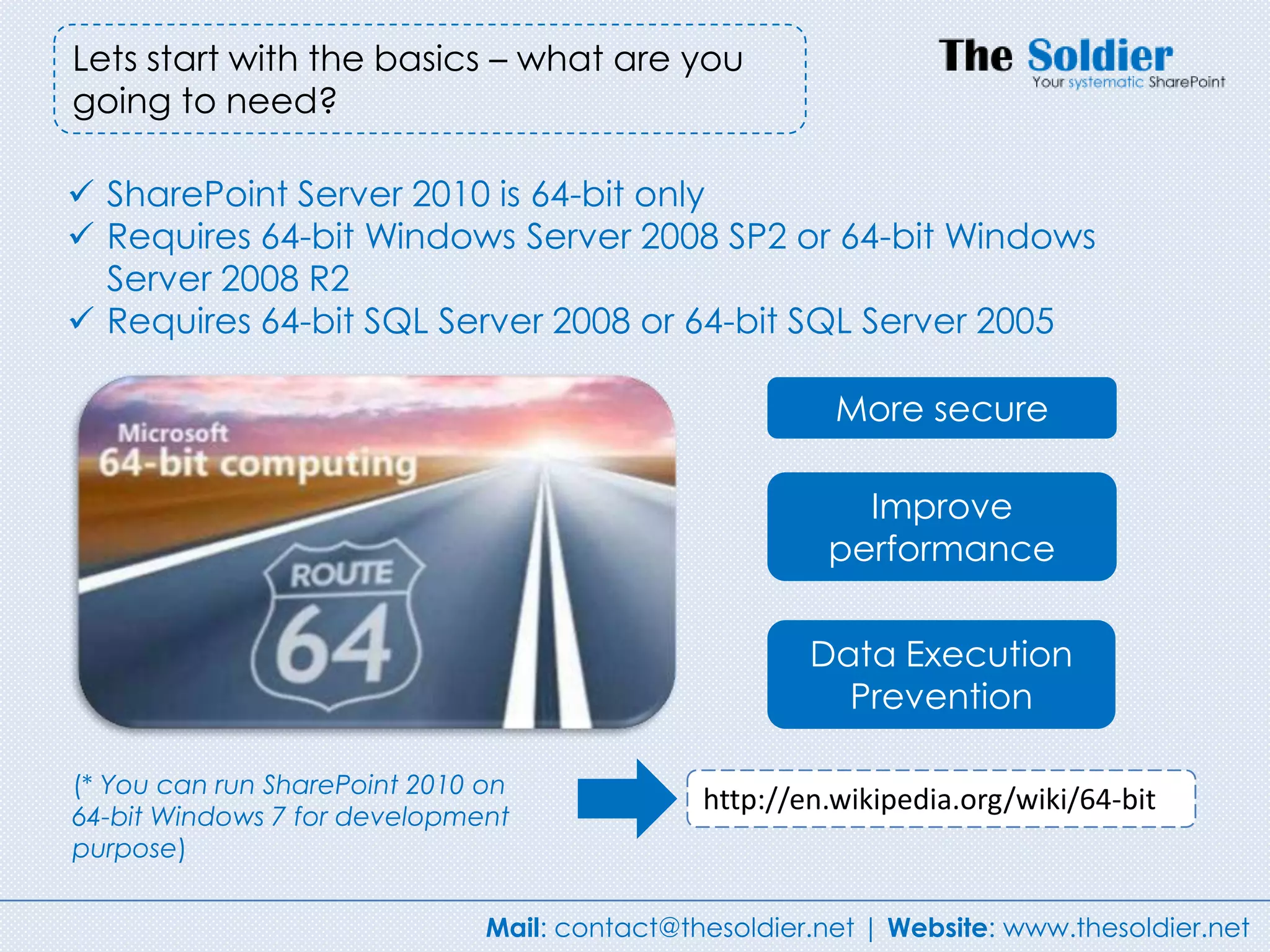
 SharePoint Server 2010 is 64-bit only
 Requires 64-bit Windows Server 2008 SP2 or 64-bit Windows
  Server 2008 R2
 Requires 64-bit SQL Server 2008 or 64-bit SQL Server 2005

                                                         More secure

                                                           Improve
                                                         performance

                                                       Data Execution
                                                         Prevention

(* You can run SharePoint 2010 on
                                               http://en.wikipedia.org/wiki/64-bit
64-bit Windows 7 for development
purpose)


                               Mail: contact@thesoldier.net | Website: www.thesoldier.net
You need to know for your
         planning server


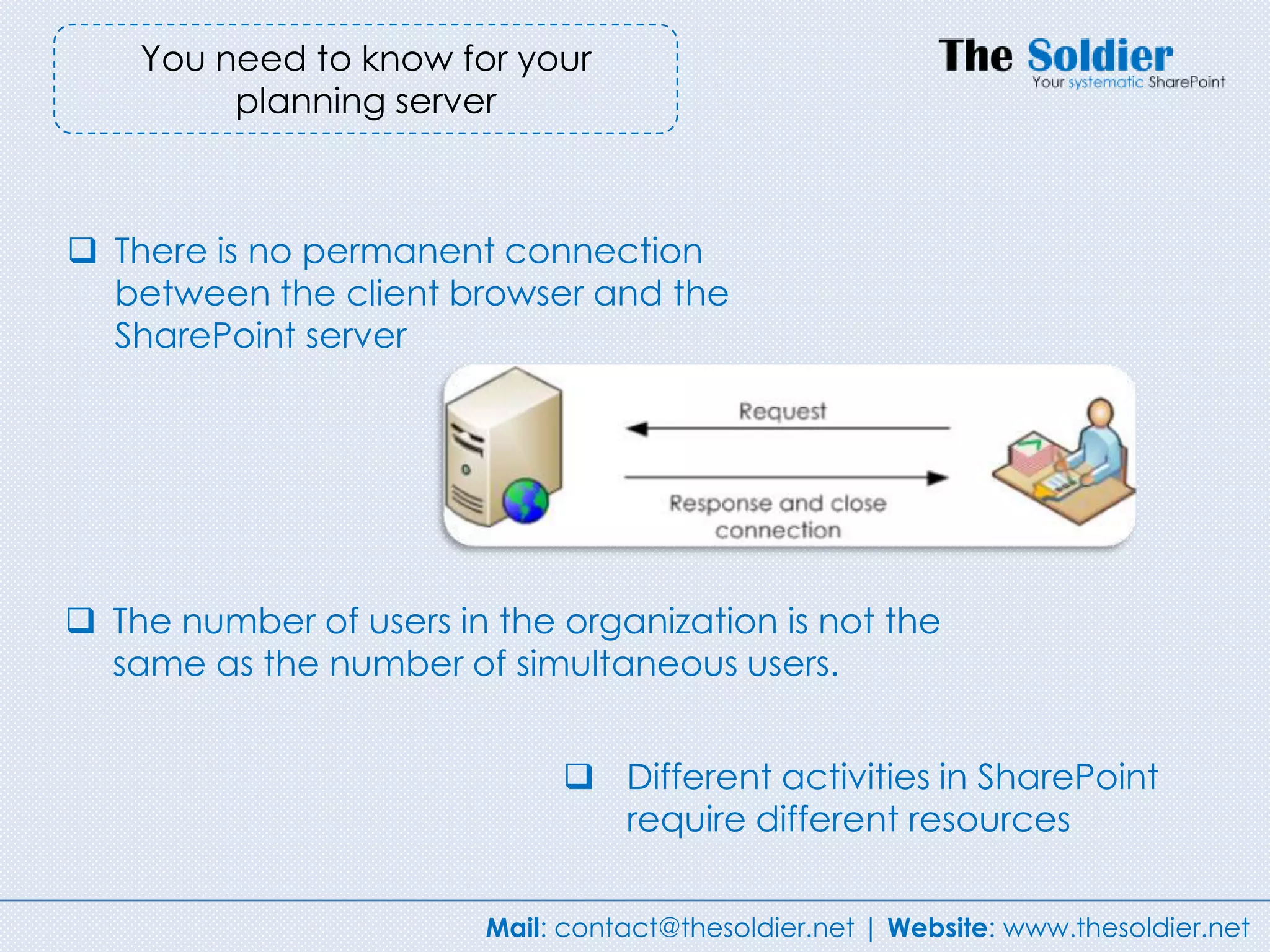
 There is no permanent connection
  between the client browser and the
  SharePoint server


 The number of users in the organization is not the
  same as the number of simultaneous users.


                              Different activities in SharePoint
                               require different resources

                        Mail: contact@thesoldier.net | Website: www.thesoldier.net
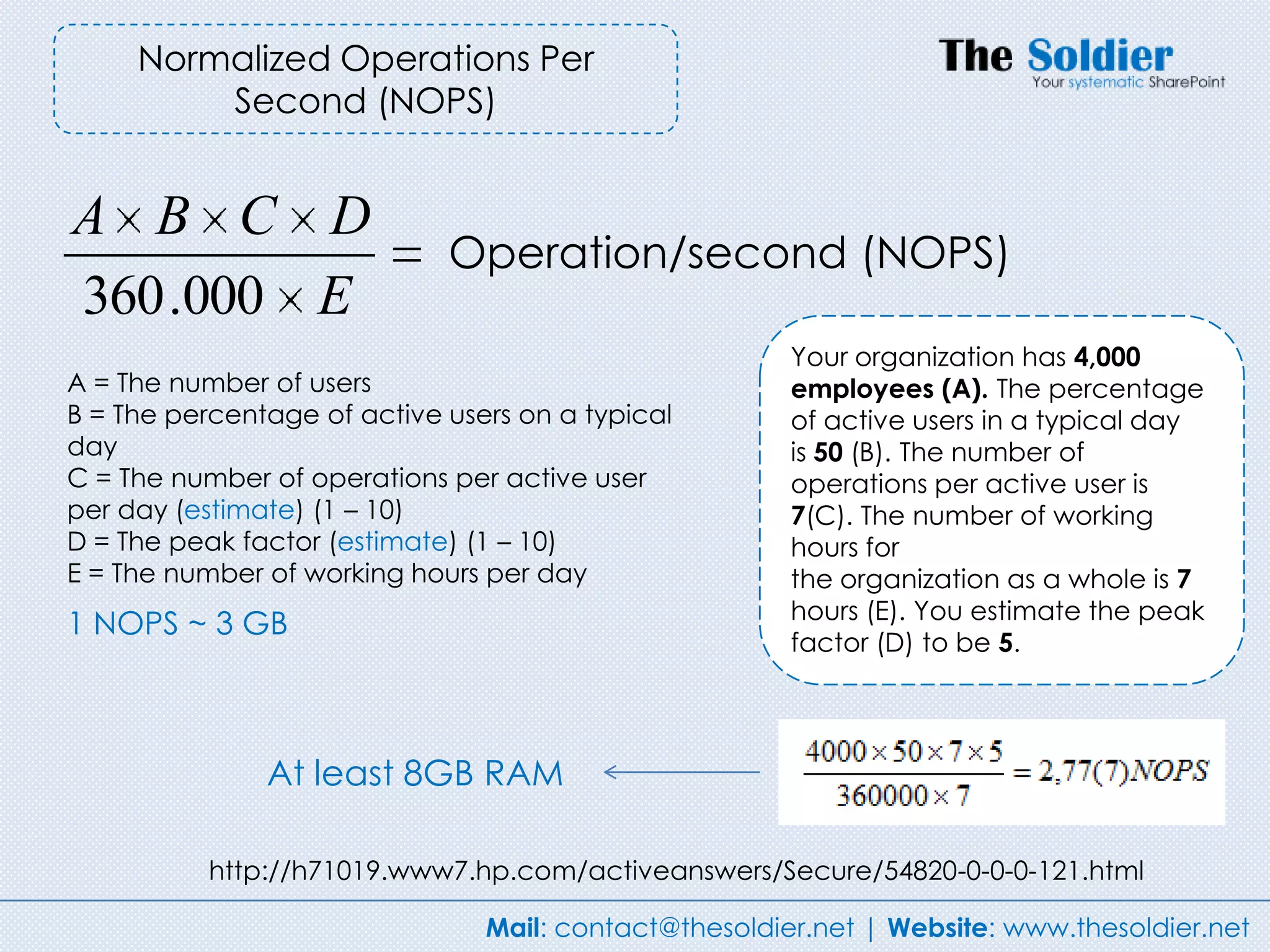
Normalized Operations Per
         Second (NOPS)


A B C D
                             Operation/second (NOPS)
360 .000 E
                                                       Your organization has 4,000
A = The number of users                                employees (A). The percentage
B = The percentage of active users on a typical        of active users in a typical day
day                                                    is 50 (B). The number of
C = The number of operations per active user           operations per active user is
per day (estimate) (1 – 10)                            7(C). The number of working
D = The peak factor (estimate) (1 – 10)                hours for
E = The number of working hours per day                the organization as a whole is 7
                                                       hours (E). You estimate the peak
1 NOPS ~ 3 GB
                                                       factor (D) to be 5.


               At least 8GB RAM

           http://h71019.www7.hp.com/activeanswers/Secure/54820-0-0-0-121.html

                                Mail: contact@thesoldier.net | Website: www.thesoldier.net
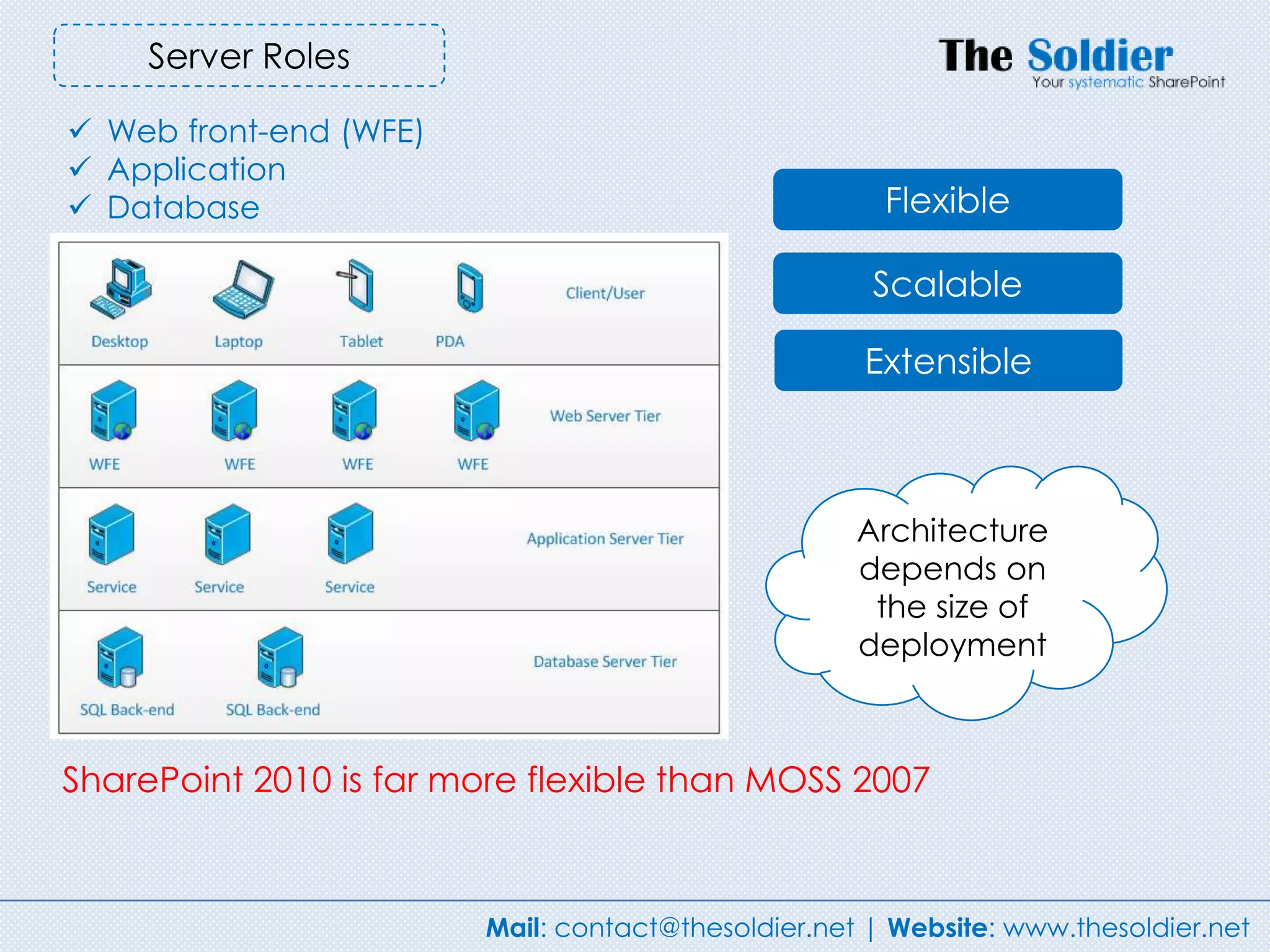
Server Roles

 Web front-end (WFE)
 Application
 Database                                            Flexible

                                                     Scalable

                                                    Extensible


                                                    Architecture
                                                    depends on
                                                     the size of
                                                    deployment


SharePoint 2010 is far more flexible than MOSS 2007


                        Mail: contact@thesoldier.net | Website: www.thesoldier.net
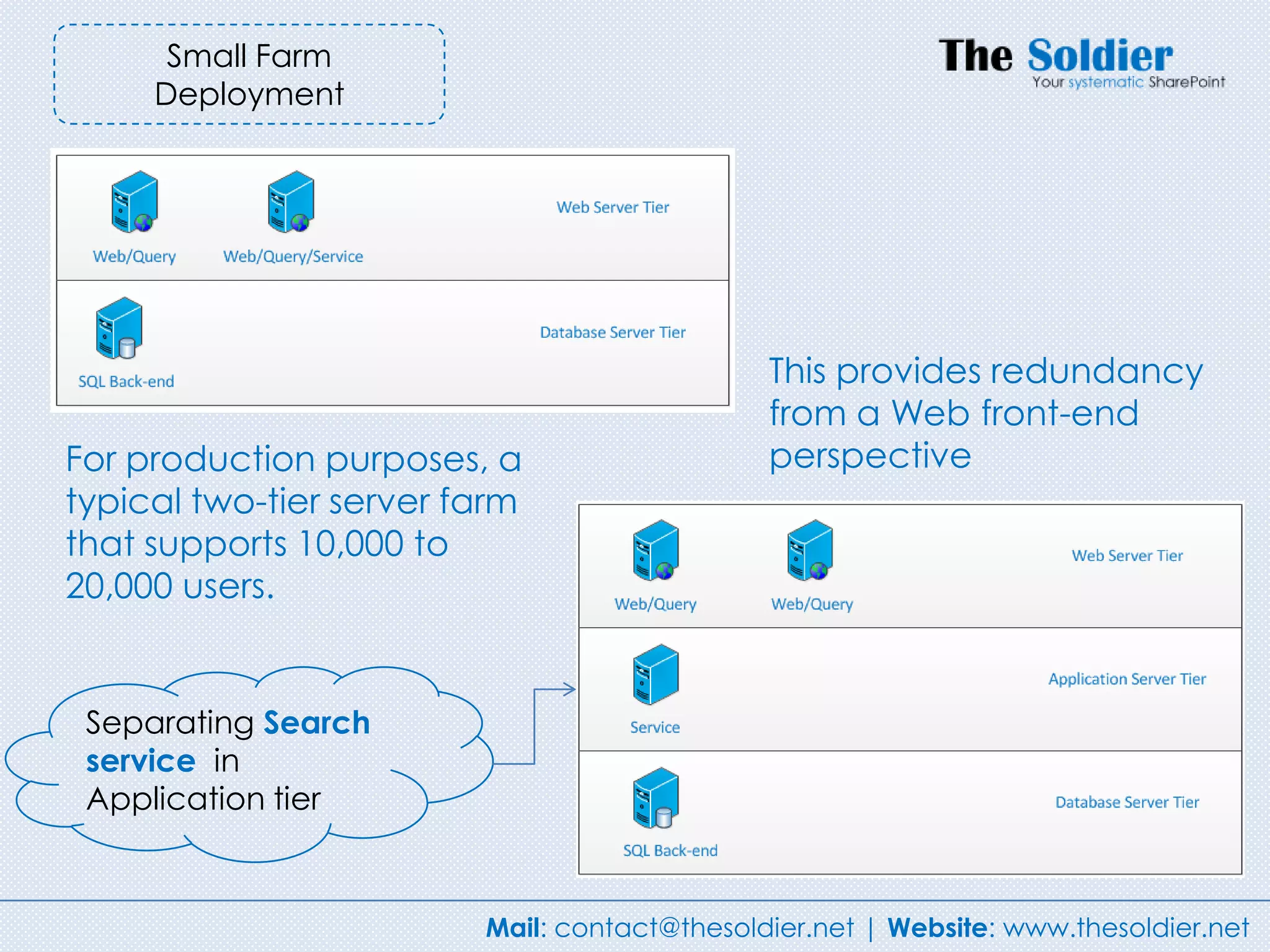
Small Farm
     Deployment


                                              This provides redundancy
                                              from a Web front-end
For production purposes, a                    perspective
typical two-tier server farm
that supports 10,000 to
20,000 users.


 Separating Search
 service in
 Application tier


                         Mail: contact@thesoldier.net | Website: www.thesoldier.net
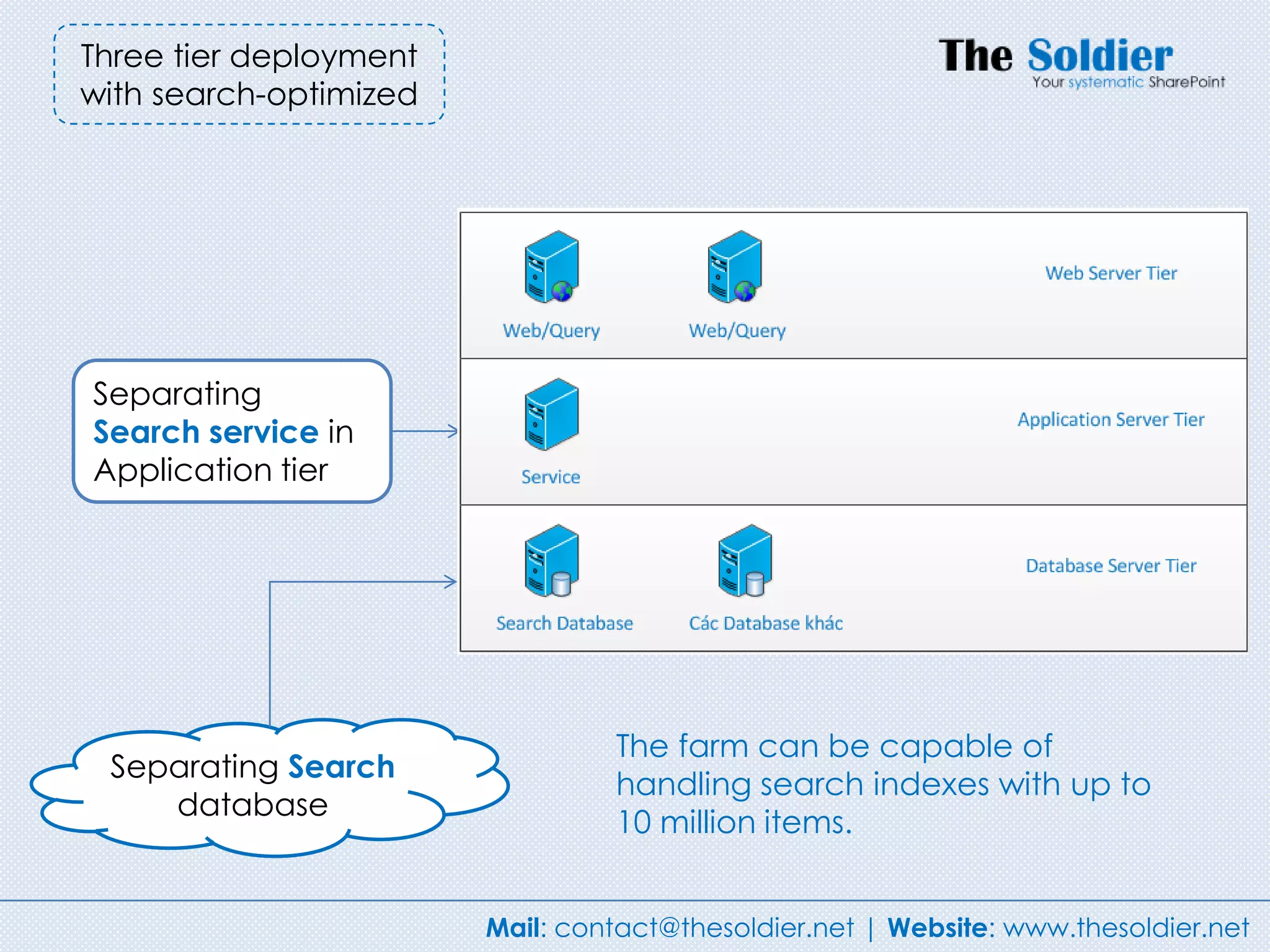
Three tier deployment
with search-optimized


Separating
Search service in
Application tier


                                 The farm can be capable of
 Separating Search
                                 handling search indexes with up to
    database
                                 10 million items.


                        Mail: contact@thesoldier.net | Website: www.thesoldier.net
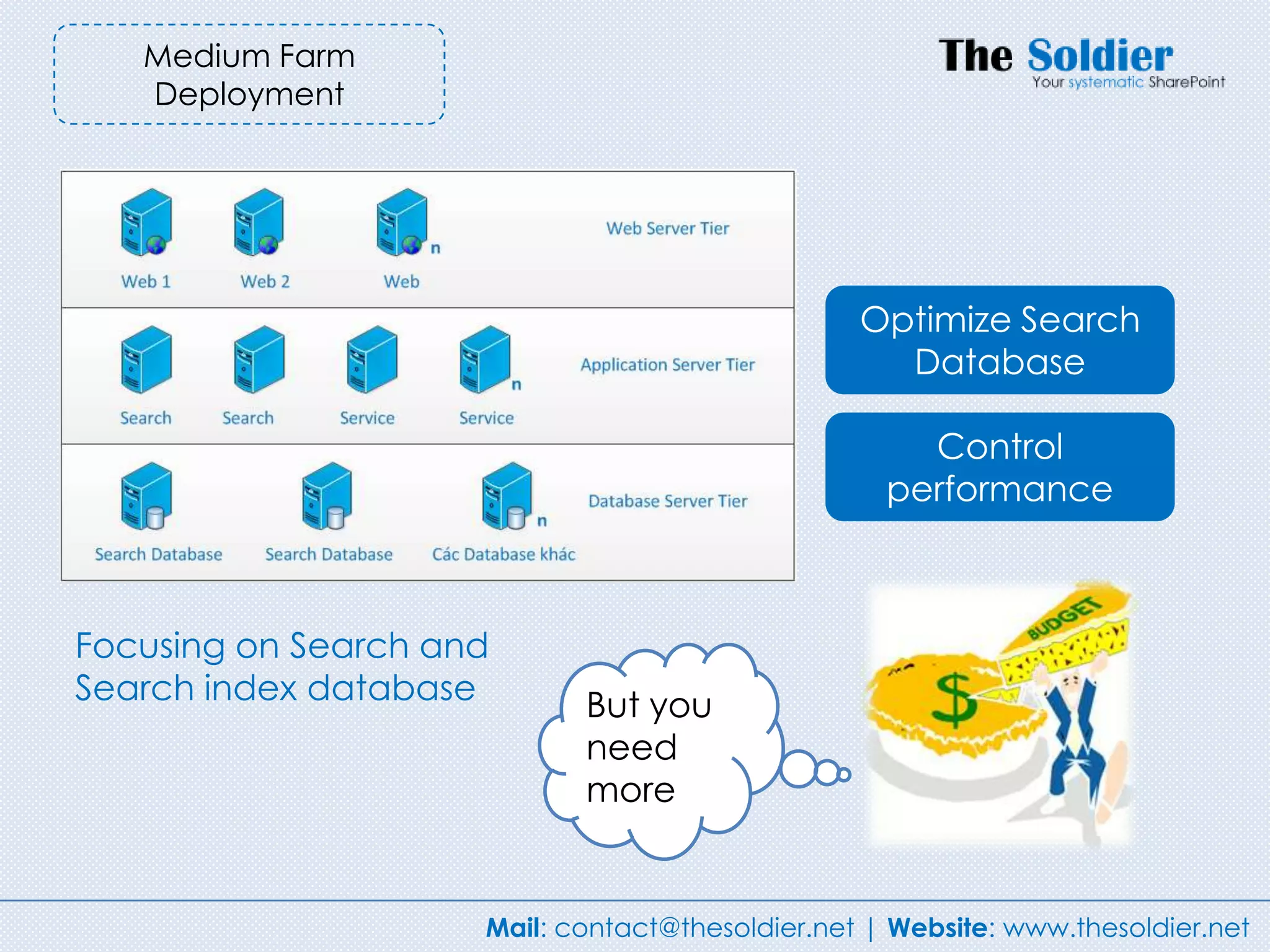
Medium Farm
   Deployment


                                                 Optimize Search
                                                   Database

                                                     Control
                                                   performance


Focusing on Search and
Search index database       But you
                            need
                            more


                     Mail: contact@thesoldier.net | Website: www.thesoldier.net
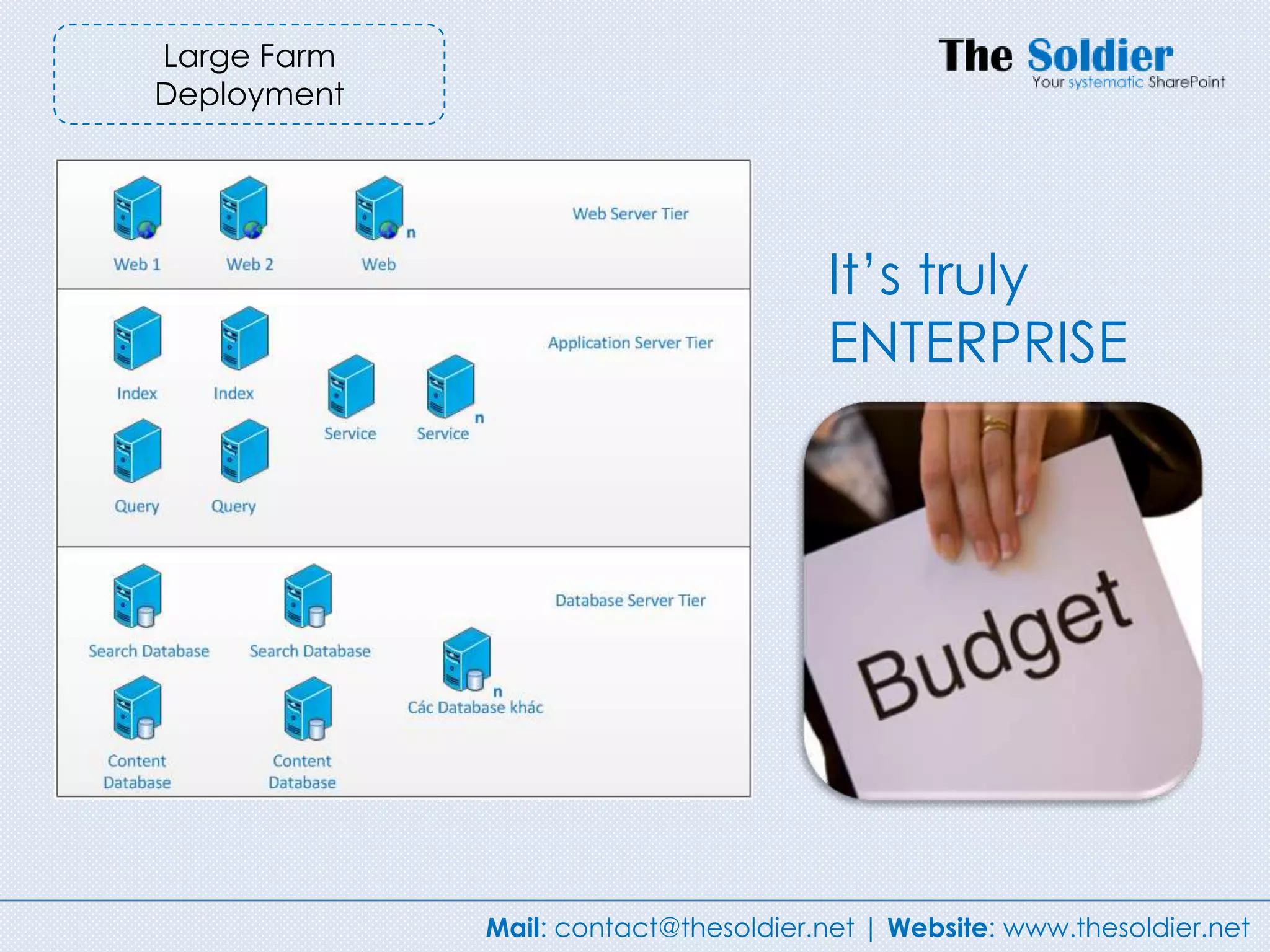
Large Farm
Deployment


                                      It‟s truly
                                      ENTERPRISE


             Mail: contact@thesoldier.net | Website: www.thesoldier.net
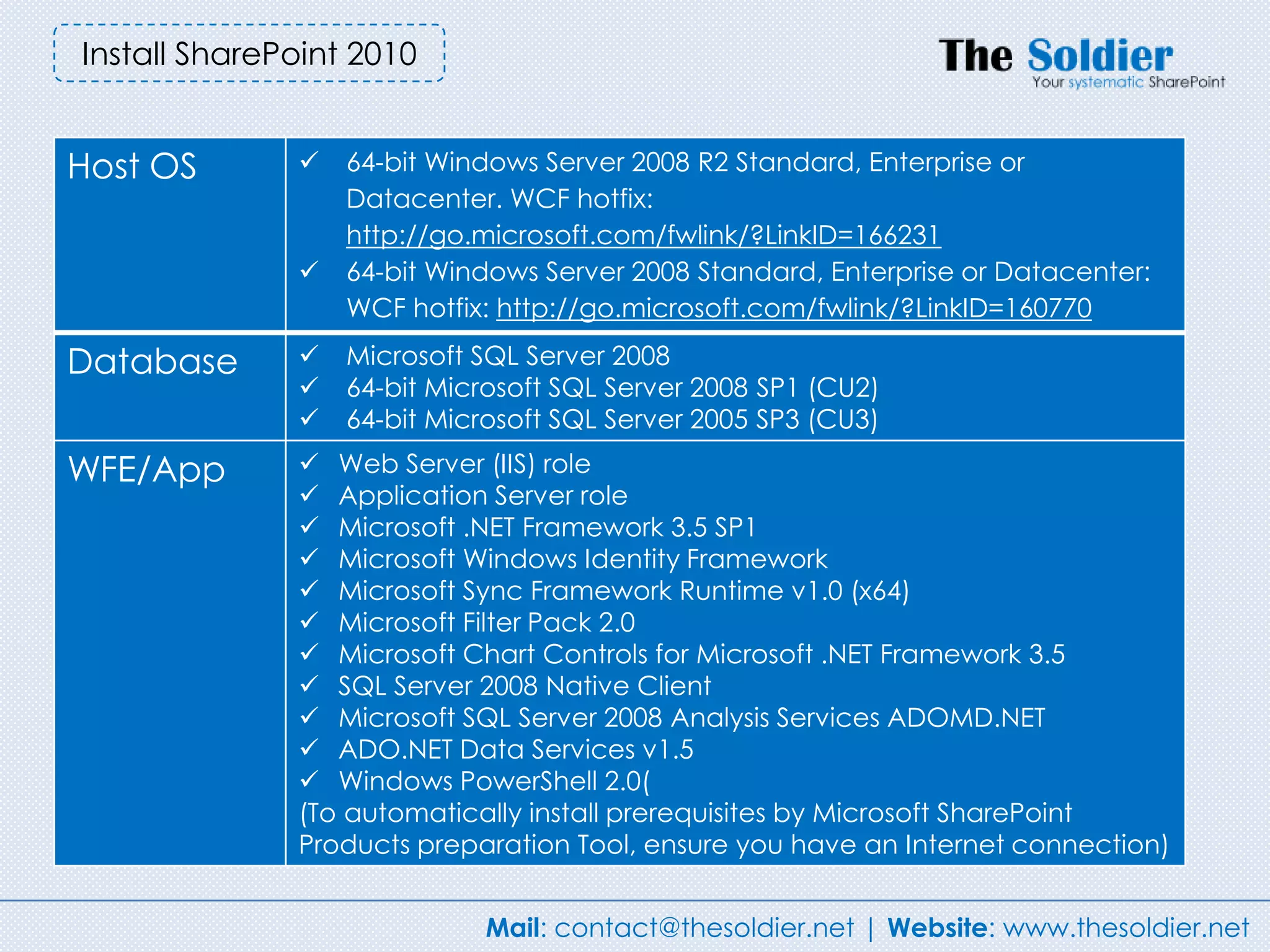
Install SharePoint 2010


Host OS          64-bit Windows Server 2008 R2 Standard, Enterprise or
                  Datacenter. WCF hotfix:
                  http://go.microsoft.com/fwlink/?LinkID=166231
                 64-bit Windows Server 2008 Standard, Enterprise or Datacenter:
                  WCF hotfix: http://go.microsoft.com/fwlink/?LinkID=160770

Database         Microsoft SQL Server 2008
                 64-bit Microsoft SQL Server 2008 SP1 (CU2)
                 64-bit Microsoft SQL Server 2005 SP3 (CU3)

WFE/App        Web Server (IIS) role
               Application Server role
               Microsoft .NET Framework 3.5 SP1
               Microsoft Windows Identity Framework
               Microsoft Sync Framework Runtime v1.0 (x64)
               Microsoft Filter Pack 2.0
               Microsoft Chart Controls for Microsoft .NET Framework 3.5
               SQL Server 2008 Native Client
               Microsoft SQL Server 2008 Analysis Services ADOMD.NET
               ADO.NET Data Services v1.5
               Windows PowerShell 2.0(
              (To automatically install prerequisites by Microsoft SharePoint
              Products preparation Tool, ensure you have an Internet connection)


                            Mail: contact@thesoldier.net | Website: www.thesoldier.net
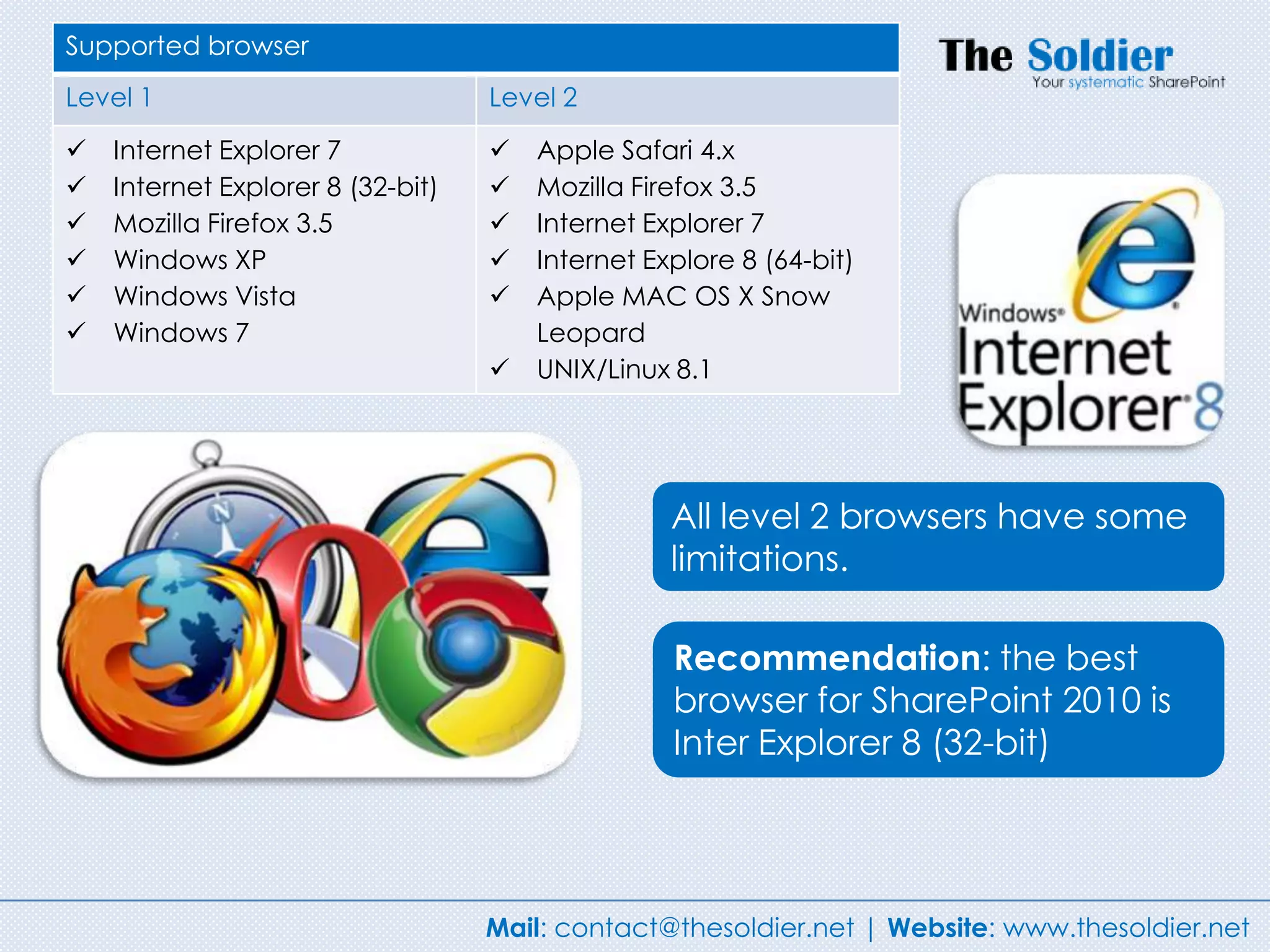
Supported browser
Level 1                            Level 2

   Internet Explorer 7               Apple Safari 4.x
   Internet Explorer 8 (32-bit)      Mozilla Firefox 3.5
   Mozilla Firefox 3.5               Internet Explorer 7
   Windows XP                        Internet Explore 8 (64-bit)
   Windows Vista                     Apple MAC OS X Snow
   Windows 7                          Leopard
                                      UNIX/Linux 8.1


                                                  All level 2 browsers have some
                                                  limitations.

                                                  Recommendation: the best
                                                  browser for SharePoint 2010 is
                                                  Inter Explorer 8 (32-bit)


                                   Mail: contact@thesoldier.net | Website: www.thesoldier.net
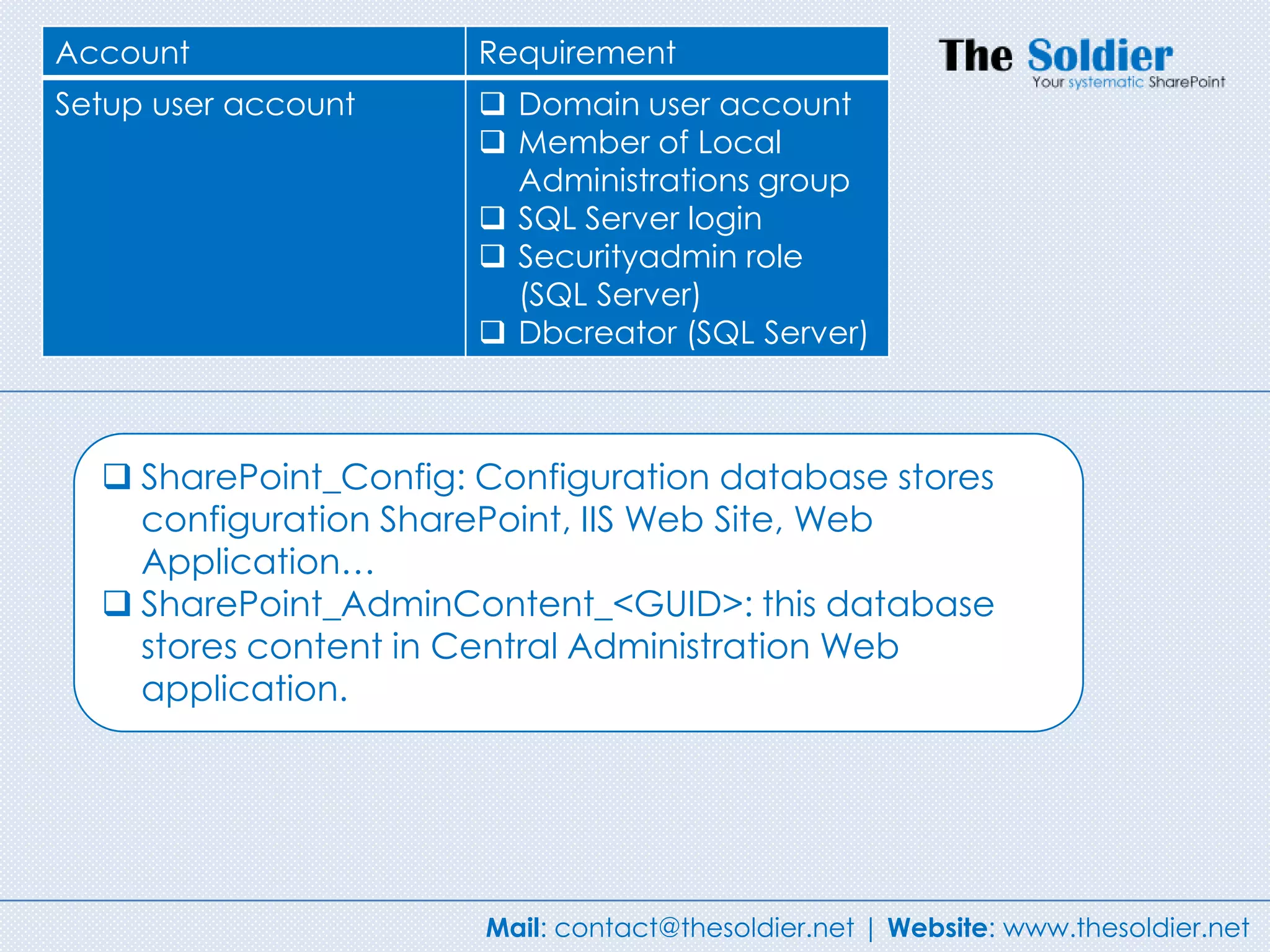
Account                Requirement
Setup user account      Domain user account
                        Member of Local
                         Administrations group
                        SQL Server login
                        Securityadmin role
                         (SQL Server)
                        Dbcreator (SQL Server)


   SharePoint_Config: Configuration database stores
    configuration SharePoint, IIS Web Site, Web
    Application…
   SharePoint_AdminContent_<GUID>: this database
    stores content in Central Administration Web
    application.


                       Mail: contact@thesoldier.net | Website: www.thesoldier.net
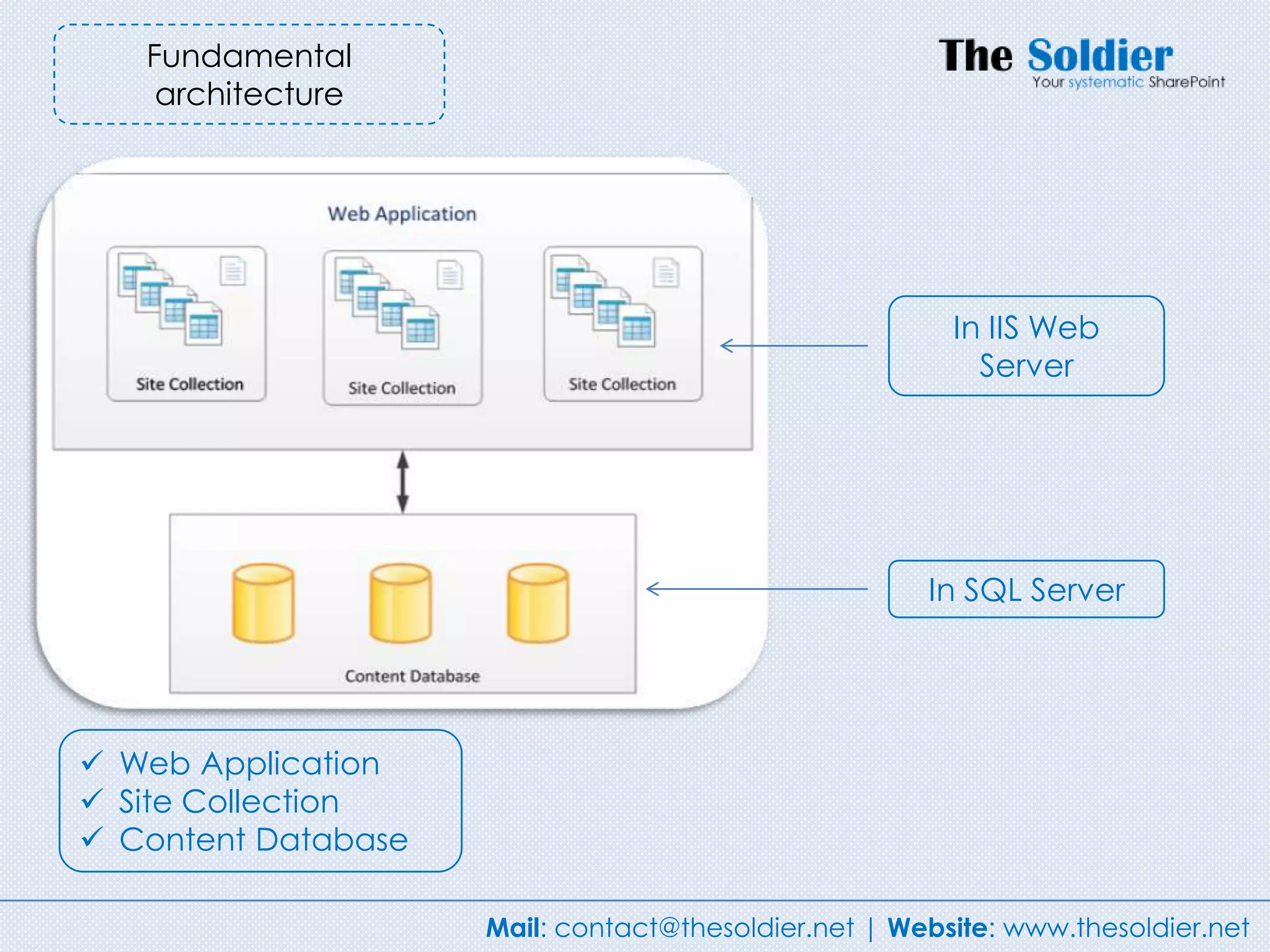
Fundamental
    architecture


                                                        In IIS Web
                                                          Server


                                                      In SQL Server


 Web Application
 Site Collection
 Content Database

                     Mail: contact@thesoldier.net | Website: www.thesoldier.net
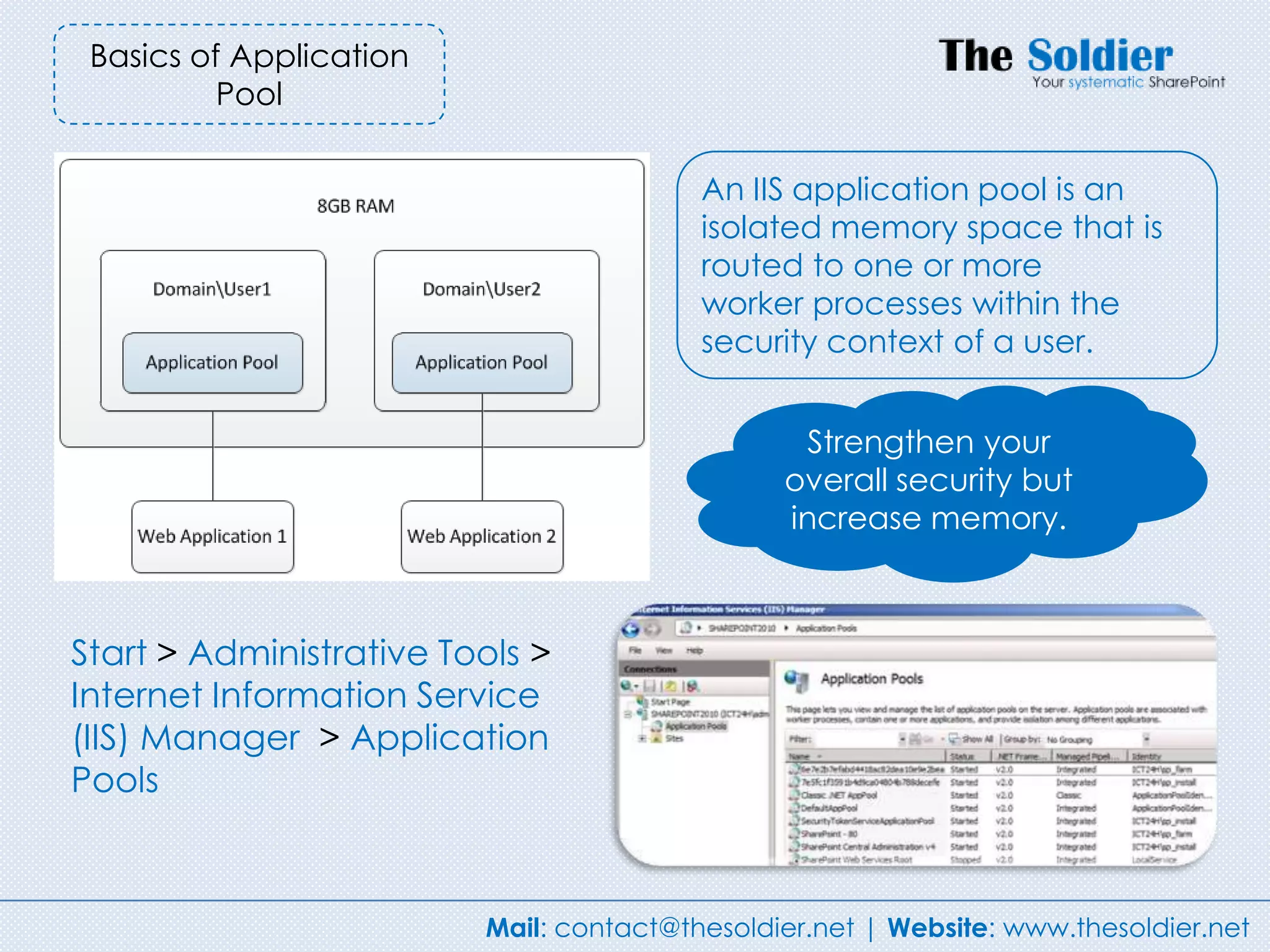
Basics of Application
          Pool

                                         An IIS application pool is an
                                         isolated memory space that is
                                         routed to one or more
                                         worker processes within the
                                         security context of a user.


                                                Strengthen your
                                               overall security but
                                               increase memory.


Start > Administrative Tools >
Internet Information Service
(IIS) Manager > Application
Pools


                         Mail: contact@thesoldier.net | Website: www.thesoldier.net
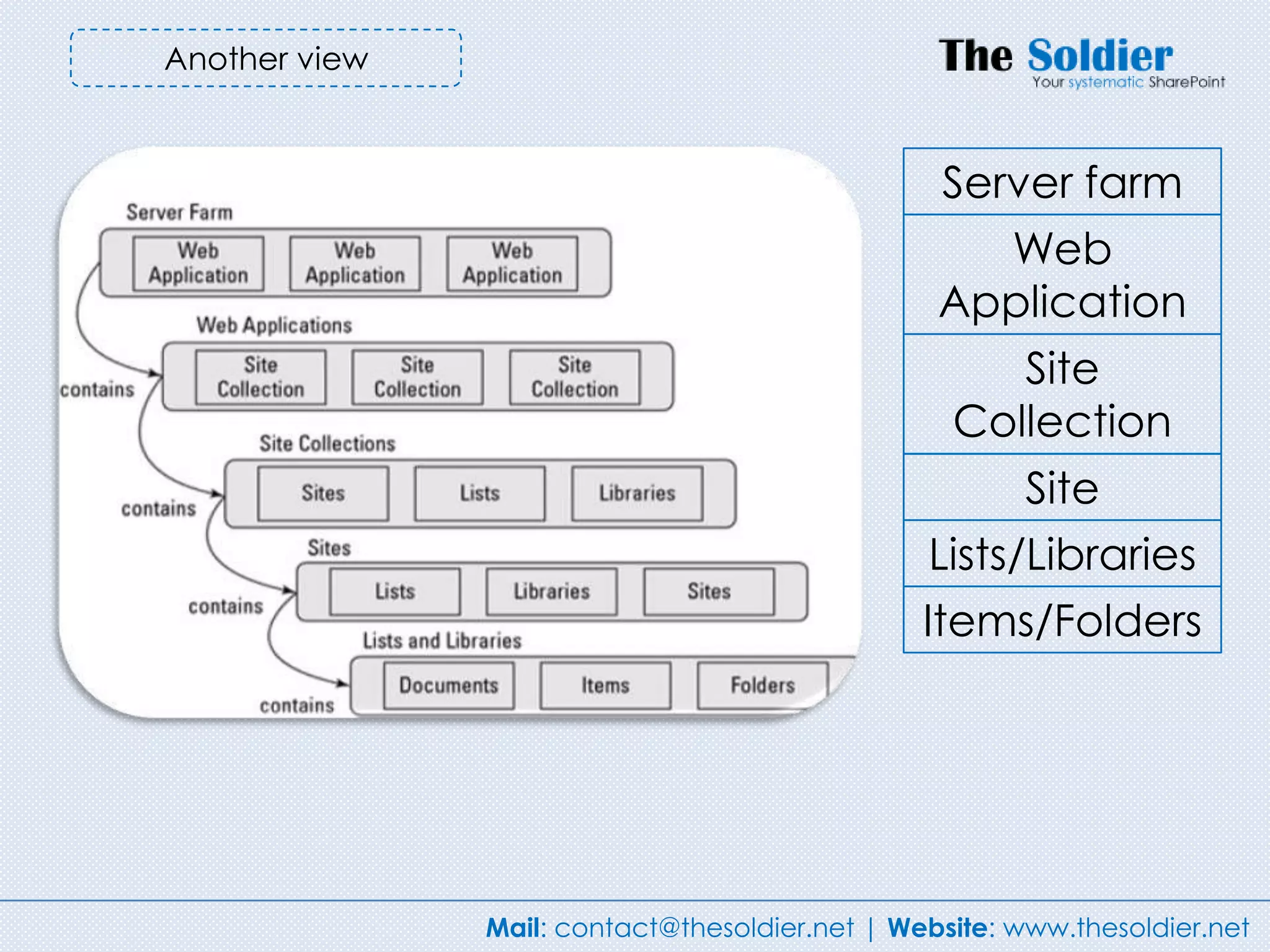
Another view


                                                 Server farm
                                                   Web
                                                 Application
                                                     Site
                                                  Collection
                                                       Site
                                                Lists/Libraries
                                                Items/Folders


               Mail: contact@thesoldier.net | Website: www.thesoldier.net
Service Application – Your
core importance in
SharePoint environment


         Mail: contact@thesoldier.net | Website: www.thesoldier.net
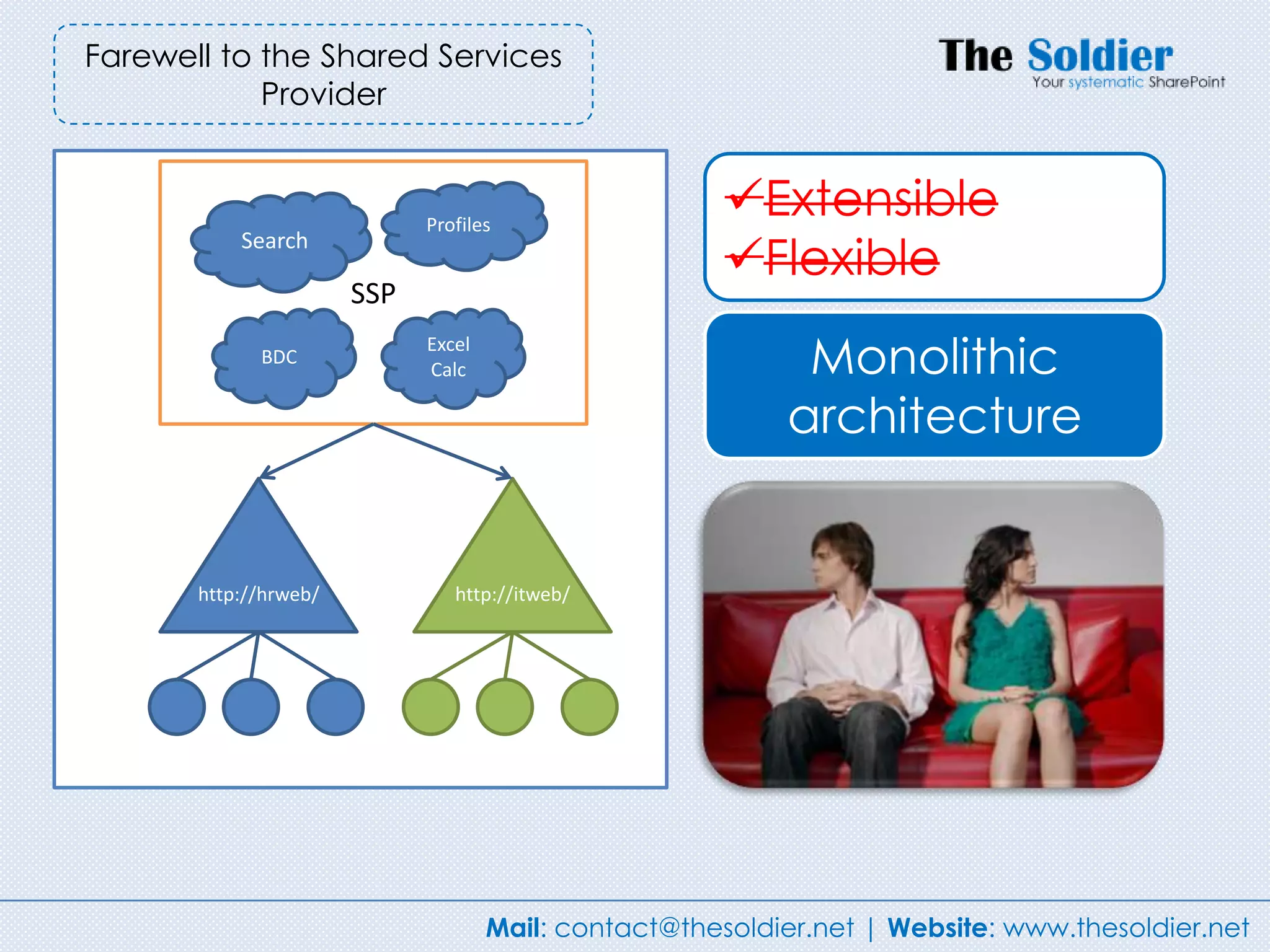
Farewell to the Shared Services
            Provider


                             Profiles
                                                       Extensible
           Search
                                                       Flexible
                       SSP
             BDC
                             Excel
                             Calc                           Monolithic
                                                           architecture


       http://hrweb/            http://itweb/


                                     Mail: contact@thesoldier.net | Website: www.thesoldier.net
Share Service Provider in
        SharePoint 2007


The monolithic design meant that all services were available to all
Web applications.

You could not have a separate service for one Web application.

There was only one SSP for each farm, which meant that there
was a single point of failure. If this SSP failed, all users lost all SSP
functionality.

You could not implement granular services to individual business
groups.

SSP limited the security functionality of SSP.


                            Mail: contact@thesoldier.net | Website: www.thesoldier.net
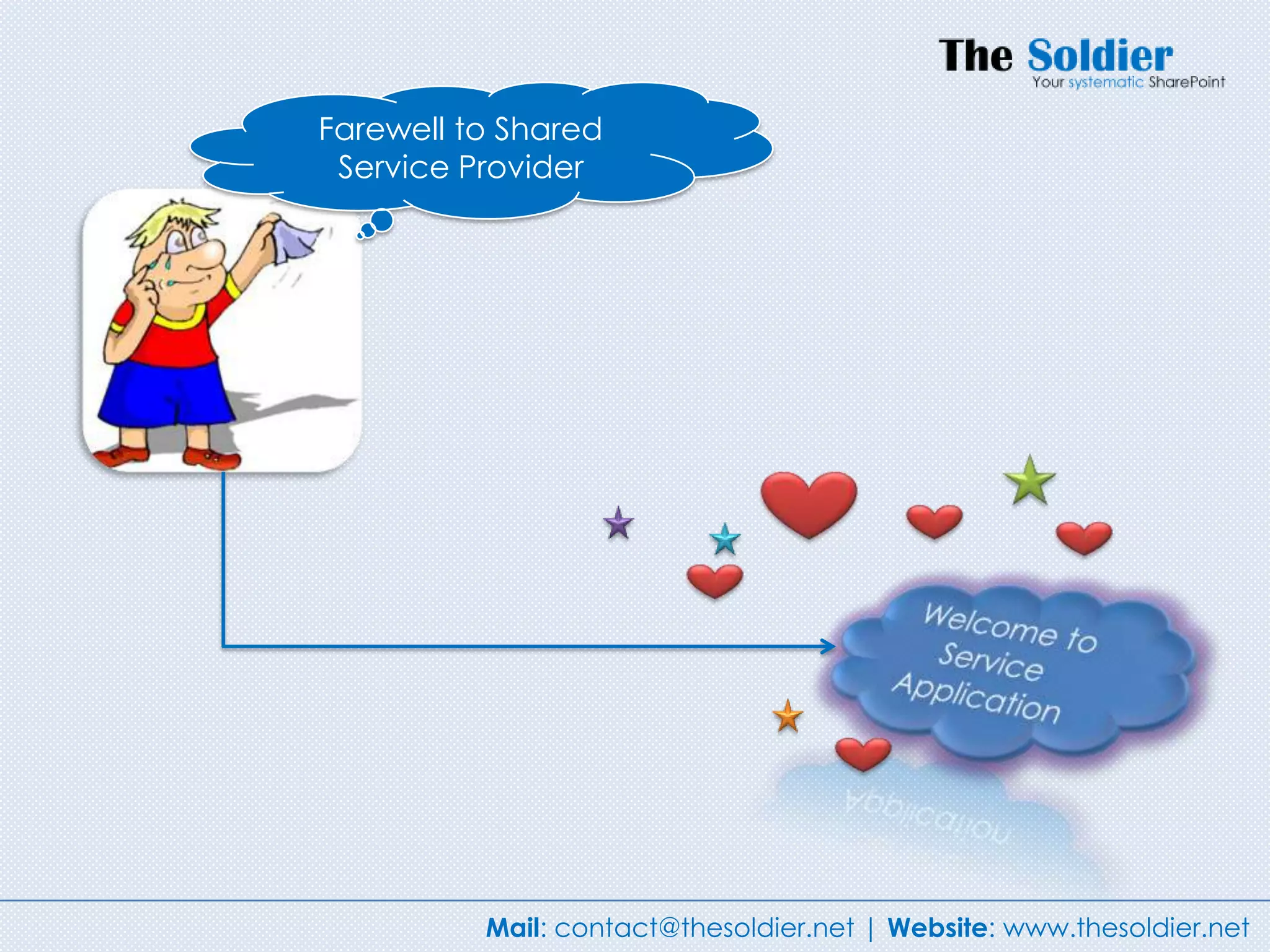
Farewell to Shared
 Service Provider


          Mail: contact@thesoldier.net | Website: www.thesoldier.net
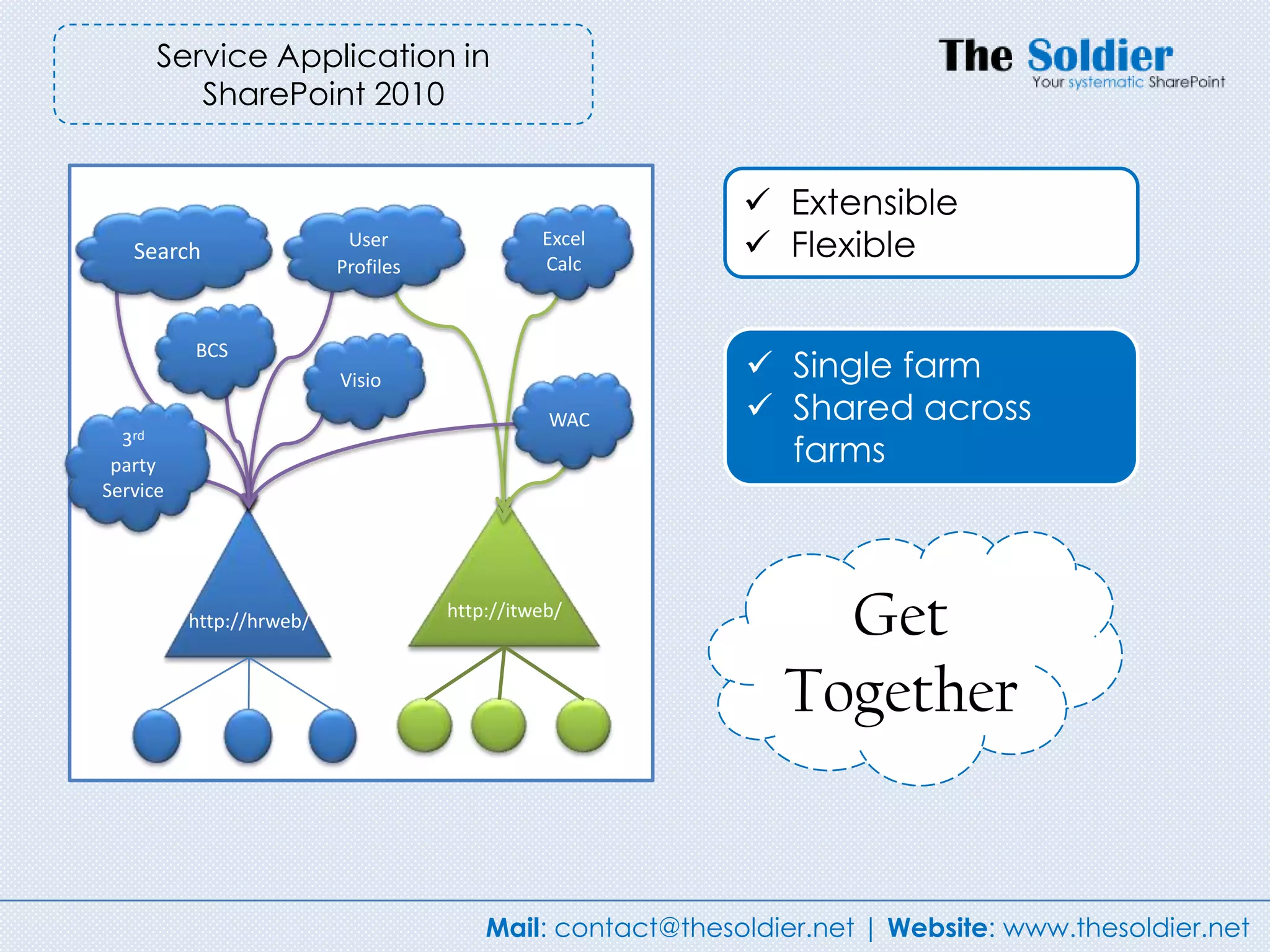
Service Application in
         SharePoint 2010


                                                             Extensible
   Search
                           User
                          Profiles
                                               Excel
                                               Calc
                                                             Flexible

          BCS
                          Visio                              Single farm
                                                WAC          Shared across
  3rd
 party                                                        farms
Service


          http://hrweb/              http://itweb/
                                                                 Get
                                                               Together


                                         Mail: contact@thesoldier.net | Website: www.thesoldier.net
Service Applications is buffet


                    Mail: contact@thesoldier.net | Website: www.thesoldier.net
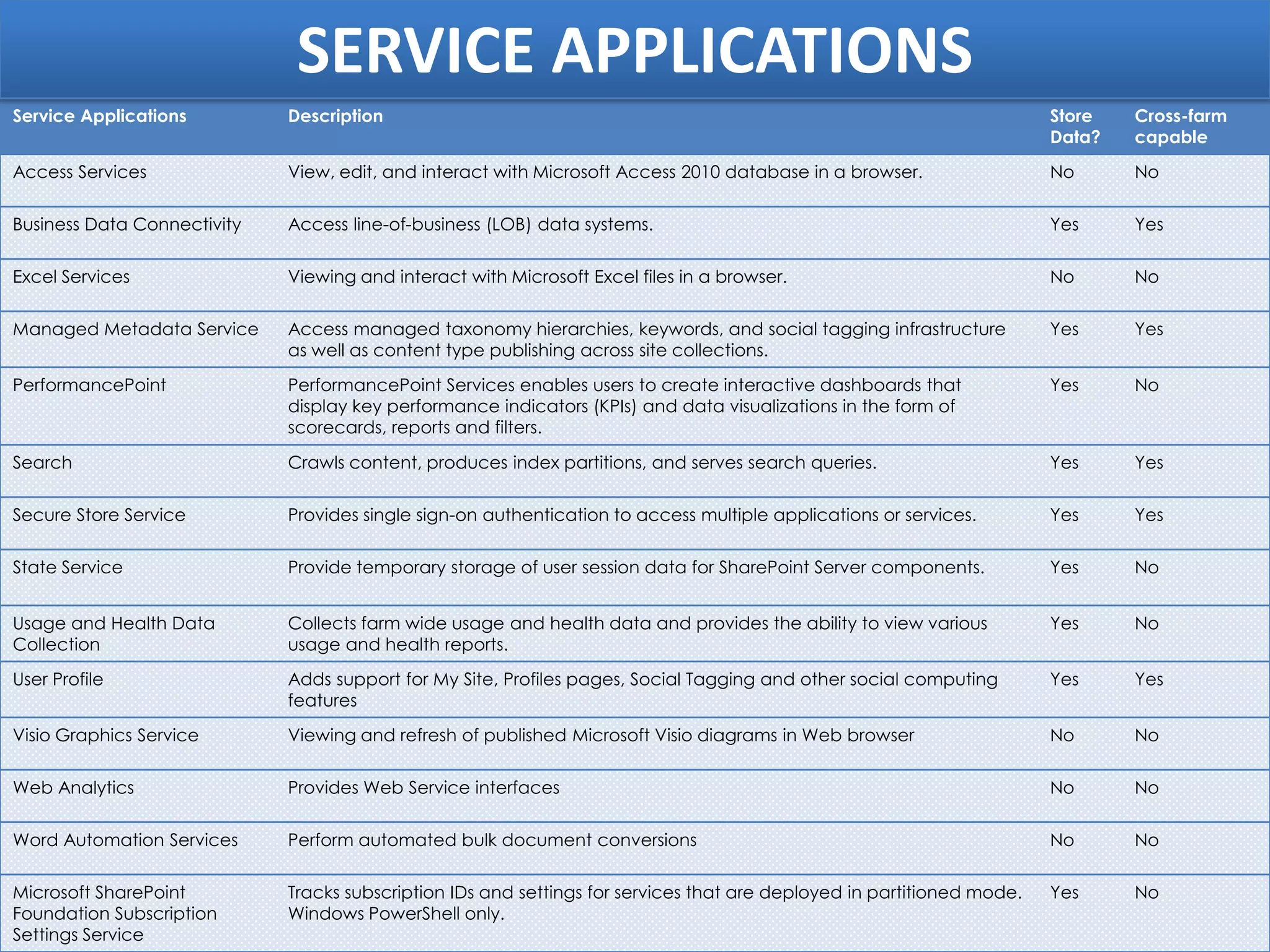
SERVICE APPLICATIONS
Service Applications         Description                                                                                Store   Cross-farm
                                                                                                                        Data?   capable
Access Services              View, edit, and interact with Microsoft Access 2010 database in a browser.                 No      No

Business Data Connectivity   Access line-of-business (LOB) data systems.                                                Yes     Yes

Excel Services               Viewing and interact with Microsoft Excel files in a browser.                              No      No

Managed Metadata Service     Access managed taxonomy hierarchies, keywords, and social tagging infrastructure           Yes     Yes
                             as well as content type publishing across site collections.
PerformancePoint             PerformancePoint Services enables users to create interactive dashboards that              Yes     No
                             display key performance indicators (KPIs) and data visualizations in the form of
                             scorecards, reports and filters.

Search                       Crawls content, produces index partitions, and serves search queries.                      Yes     Yes

Secure Store Service         Provides single sign-on authentication to access multiple applications or services.        Yes     Yes

State Service                Provide temporary storage of user session data for SharePoint Server components.           Yes     No


Usage and Health Data        Collects farm wide usage and health data and provides the ability to view various          Yes     No
Collection                   usage and health reports.
User Profile                 Adds support for My Site, Profiles pages, Social Tagging and other social computing        Yes     Yes
                             features
Visio Graphics Service       Viewing and refresh of published Microsoft Visio diagrams in Web browser                   No      No

Web Analytics                Provides Web Service interfaces                                                            No      No

Word Automation Services     Perform automated bulk document conversions                                                No      No

Microsoft SharePoint         Tracks subscription IDs and settings for services that are deployed in partitioned mode.   Yes     No
Foundation Subscription      Windows PowerShell only.
Settings Service
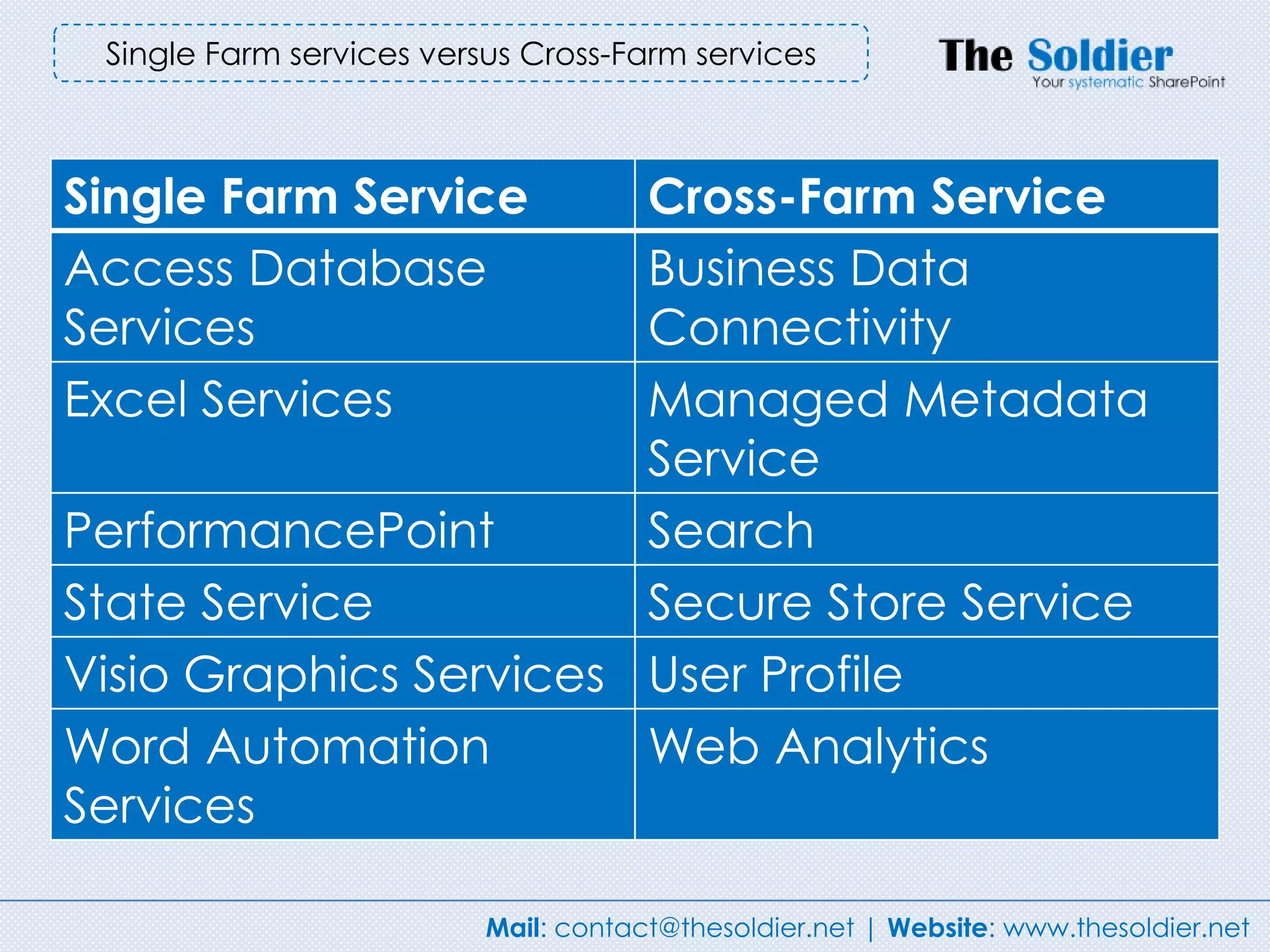
Single Farm services versus Cross-Farm services


Single Farm Service     Cross-Farm Service
Access Database         Business Data
Services                Connectivity
Excel Services          Managed Metadata
                        Service
PerformancePoint        Search
State Service           Secure Store Service
Visio Graphics Services User Profile
Word Automation         Web Analytics
Services

                          Mail: contact@thesoldier.net | Website: www.thesoldier.net
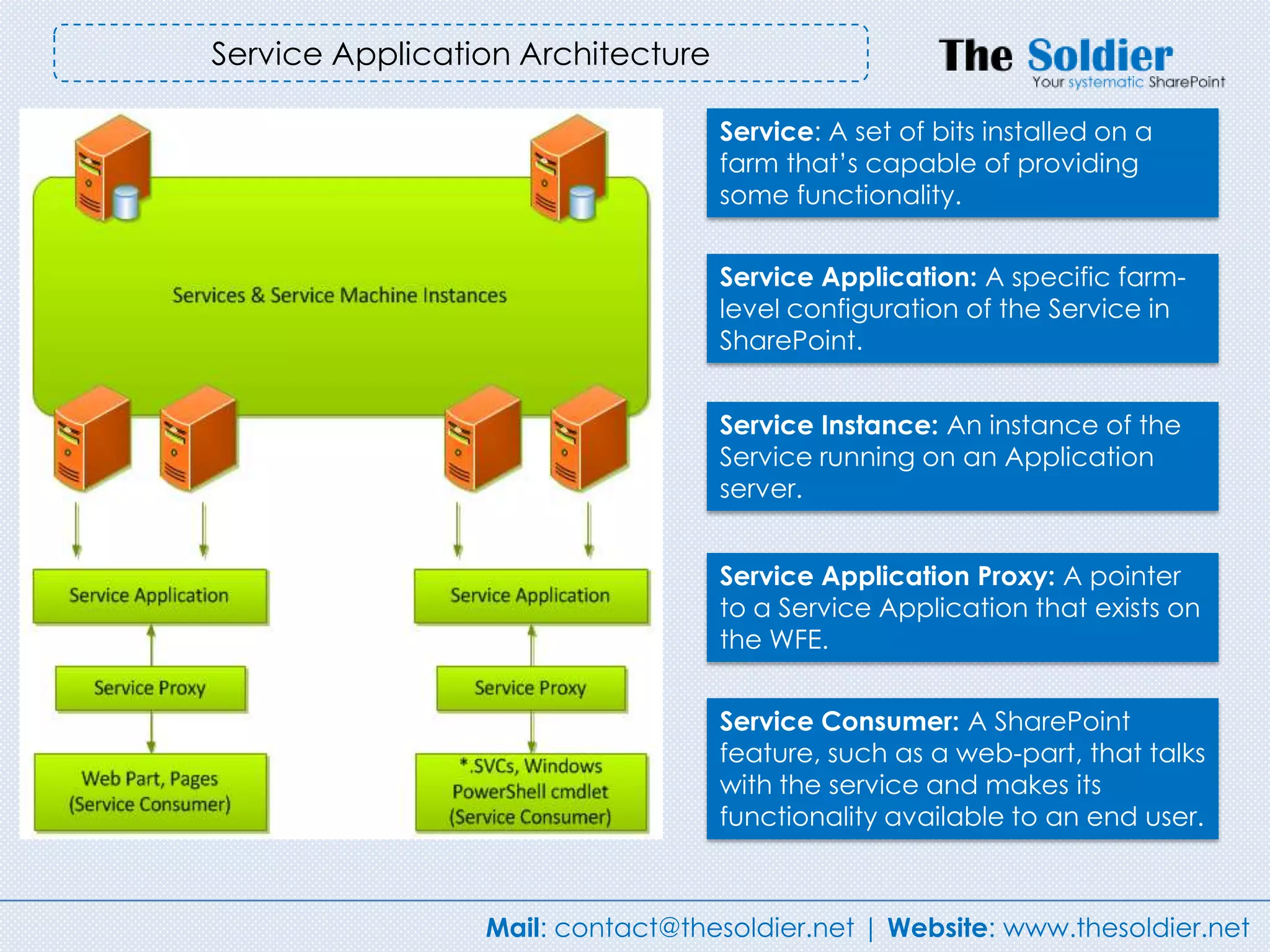
Service Application Architecture

                                   Service: A set of bits installed on a
                                   farm that‟s capable of providing
                                   some functionality.


                                   Service Application: A specific farm-
                                   level configuration of the Service in
                                   SharePoint.


                                   Service Instance: An instance of the
                                   Service running on an Application
                                   server.


                                   Service Application Proxy: A pointer
                                   to a Service Application that exists on
                                   the WFE.


                                   Service Consumer: A SharePoint
                                   feature, such as a web-part, that talks
                                   with the service and makes its
                                   functionality available to an end user.


                 Mail: contact@thesoldier.net | Website: www.thesoldier.net
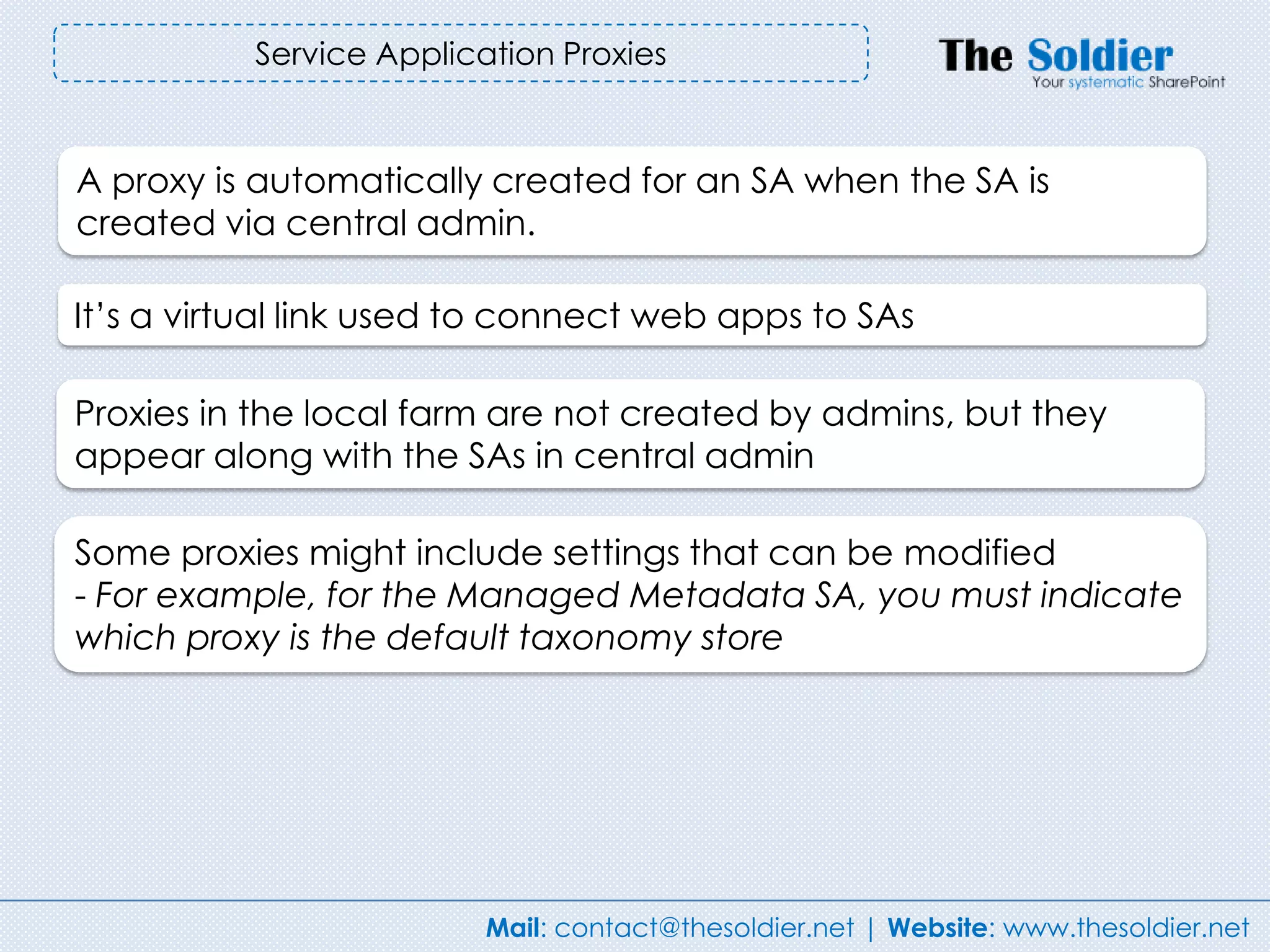
Service Application Proxies


A proxy is automatically created for an SA when the SA is
created via central admin.

It‟s a virtual link used to connect web apps to SAs

Proxies in the local farm are not created by admins, but they
appear along with the SAs in central admin

Some proxies might include settings that can be modified
- For example, for the Managed Metadata SA, you must indicate
which proxy is the default taxonomy store


                          Mail: contact@thesoldier.net | Website: www.thesoldier.net
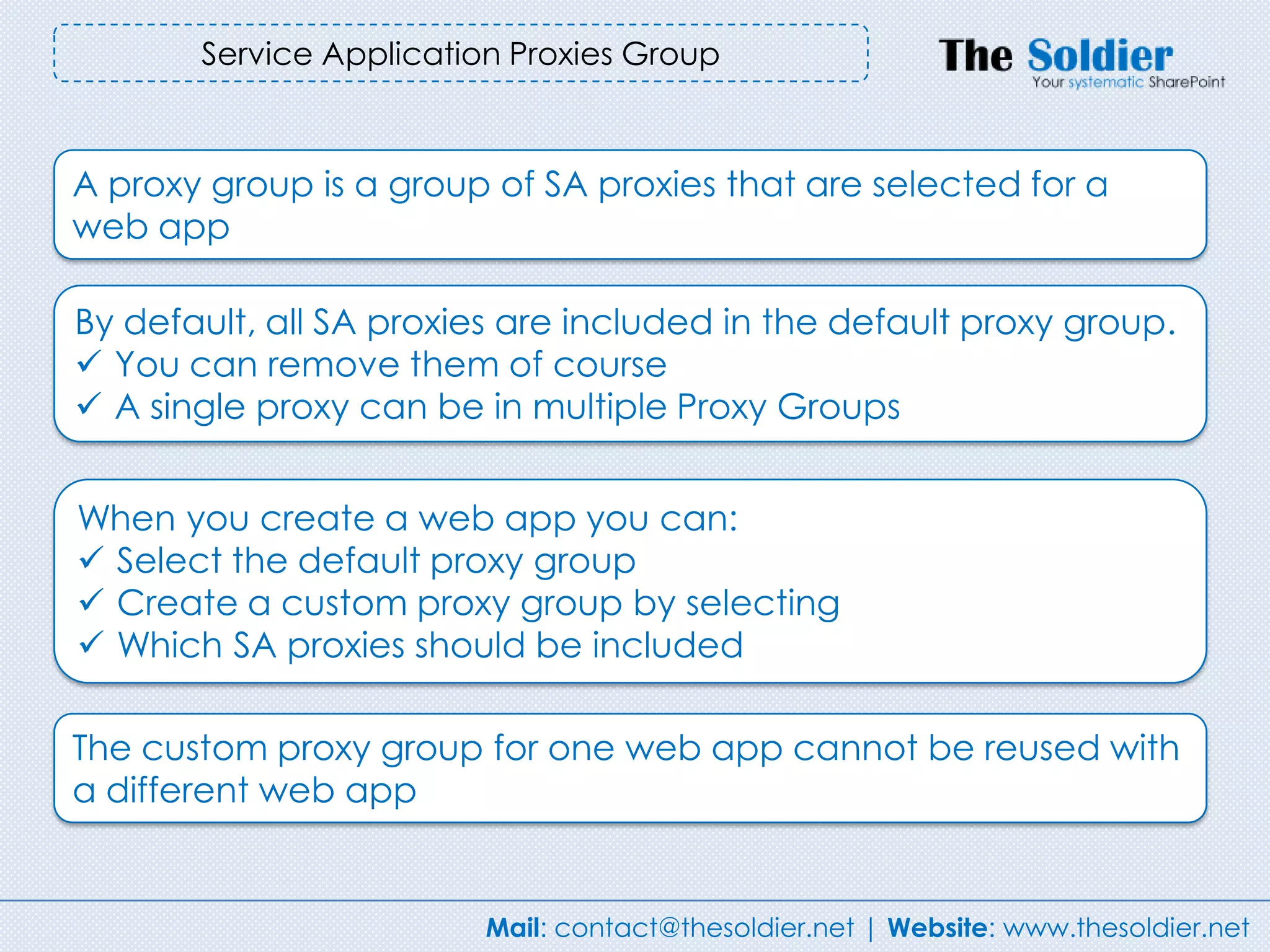
Service Application Proxies Group


A proxy group is a group of SA proxies that are selected for a
web app

By default, all SA proxies are included in the default proxy group.
 You can remove them of course
 A single proxy can be in multiple Proxy Groups


When you create a web app you can:
 Select the default proxy group
 Create a custom proxy group by selecting
 Which SA proxies should be included

The custom proxy group for one web app cannot be reused with
a different web app


                         Mail: contact@thesoldier.net | Website: www.thesoldier.net
SharePoint 2010 Hosting
Service Provider ???
                        You can
                          do


          Mail: contact@thesoldier.net | Website: www.thesoldier.net
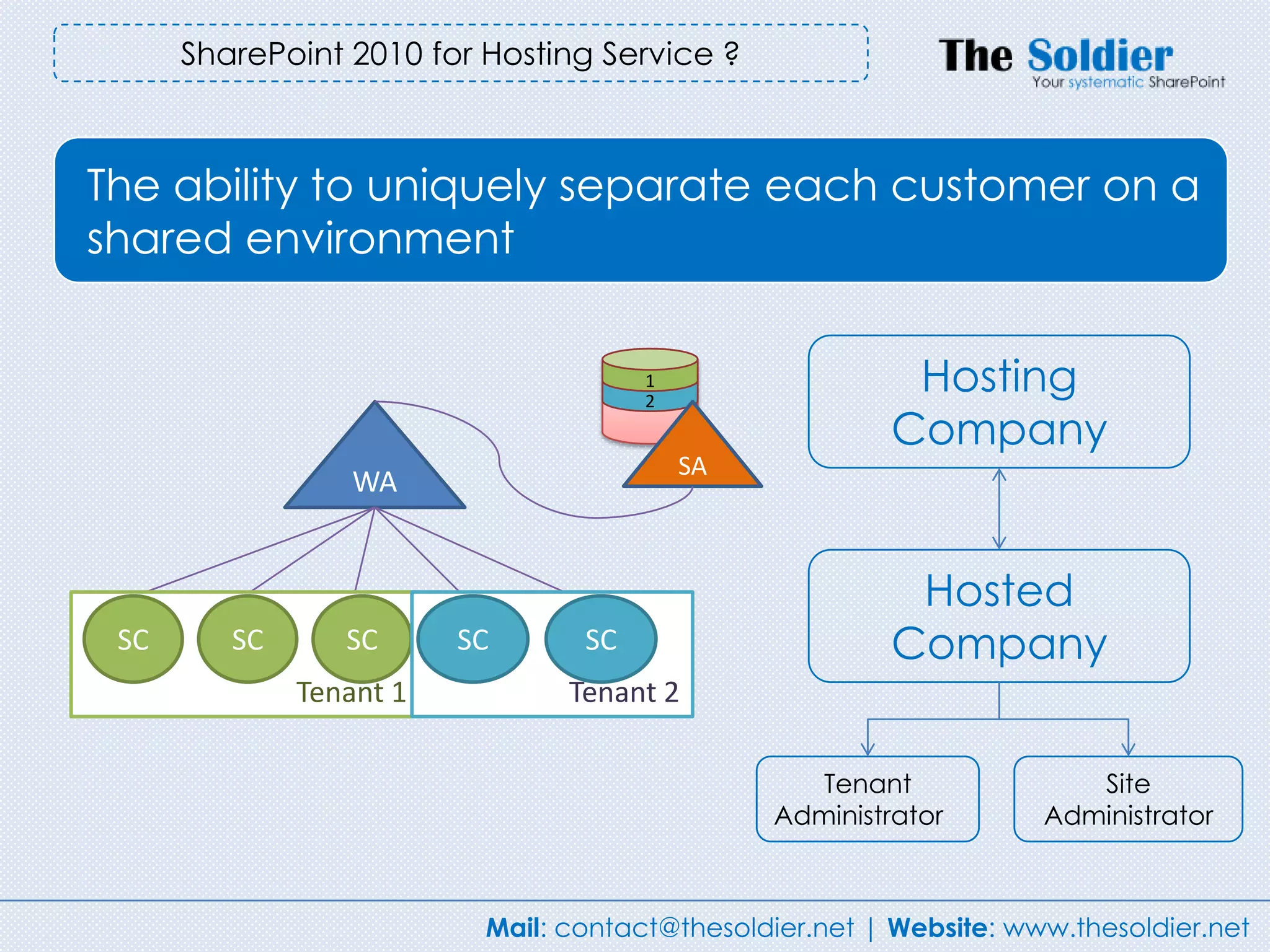
SharePoint 2010 for Hosting Service ?


The ability to uniquely separate each customer on a
shared environment


                                       1
                                       2
                                                          Hosting
                                                         Company
                                           SA
                  WA


                                                          Hosted
 SC      SC
         SC       SC
                 SC       SC
                         SC     SCSC                     Company
              Tenant 1           Tenant 2

                                                   Tenant               Site
                                                Administrator        Administrator


                           Mail: contact@thesoldier.net | Website: www.thesoldier.net
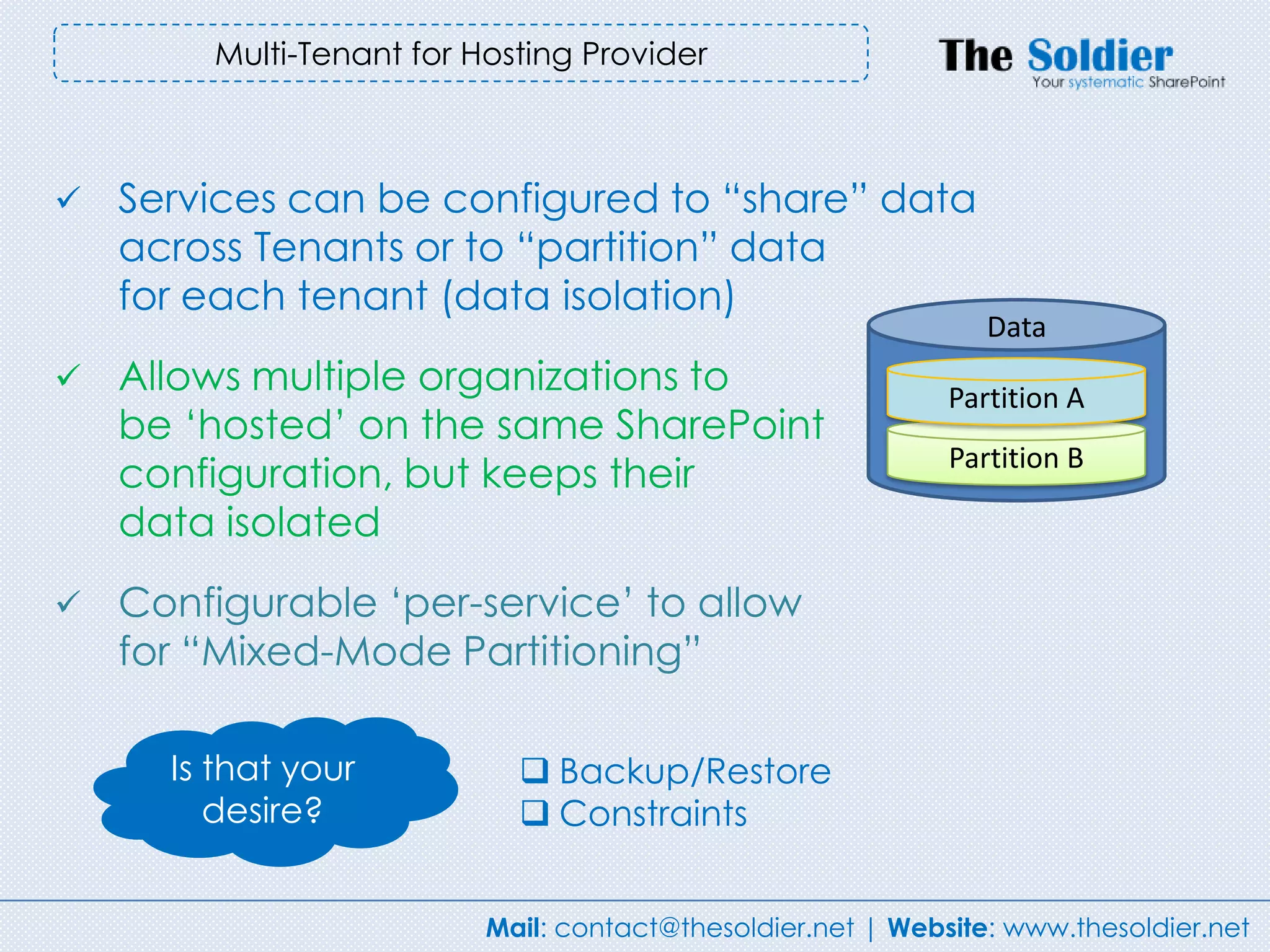
Multi-Tenant for Hosting Provider


   Services can be configured to “share” data
    across Tenants or to “partition” data
    for each tenant (data isolation)
                                                                Data
   Allows multiple organizations to                         Partition A
    be „hosted‟ on the same SharePoint
                                                             Partition B
    configuration, but keeps their
    data isolated
   Configurable „per-service‟ to allow
    for “Mixed-Mode Partitioning”

      Is that your           Backup/Restore
         desire?             Constraints


                          Mail: contact@thesoldier.net | Website: www.thesoldier.net
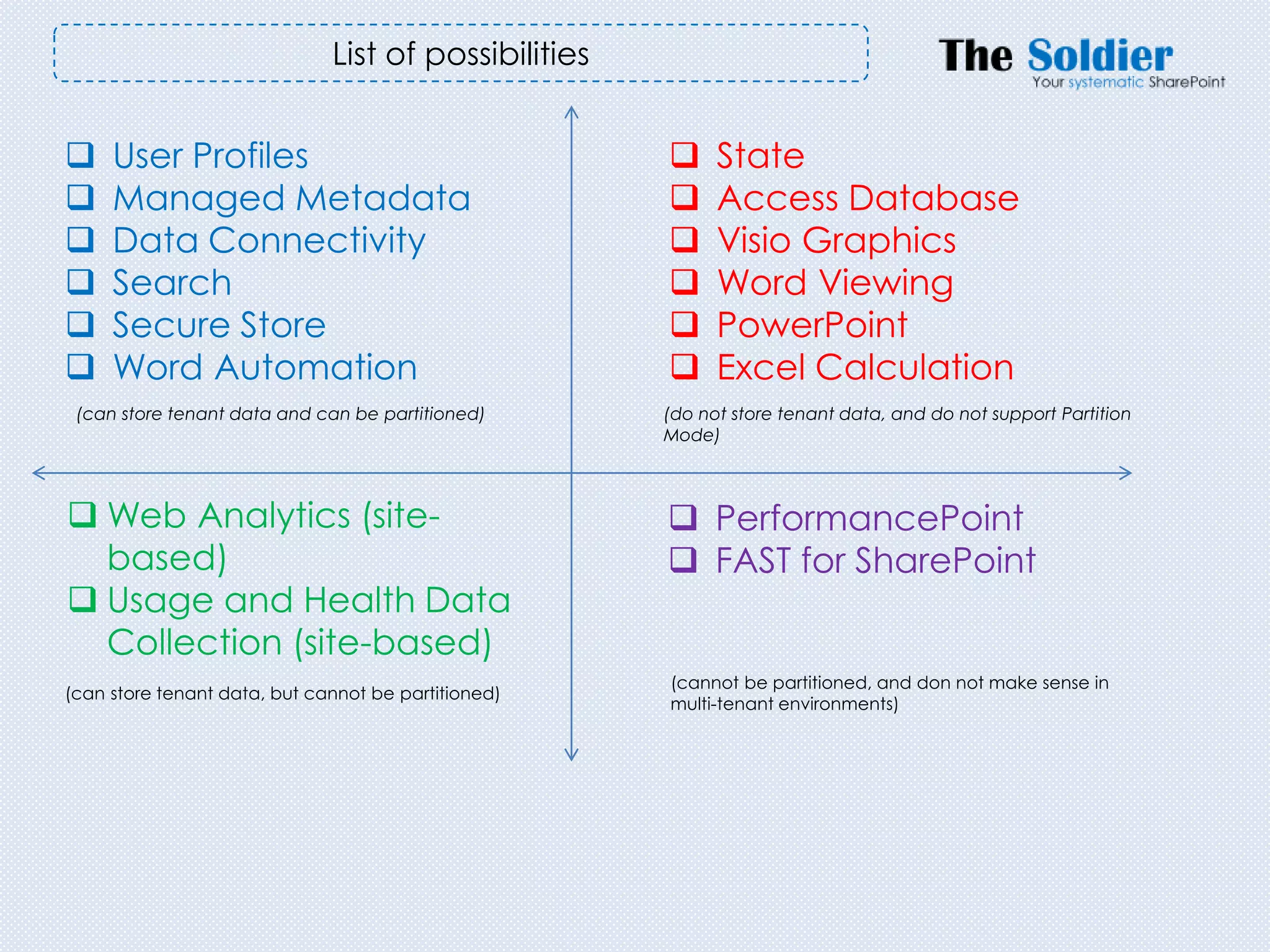
List of possibilities


    User Profiles                                         State
    Managed Metadata                                      Access Database
    Data Connectivity                                     Visio Graphics
    Search                                                Word Viewing
    Secure Store                                          PowerPoint
    Word Automation                                       Excel Calculation
 (can store tenant data and can be partitioned)       (do not store tenant data, and do not support Partition
                                                      Mode)


 Web Analytics (site-                                 PerformancePoint
  based)                                               FAST for SharePoint
 Usage and Health Data
  Collection (site-based)
                                                      (cannot be partitioned, and don not make sense in
(can store tenant data, but cannot be partitioned)
                                                      multi-tenant environments)
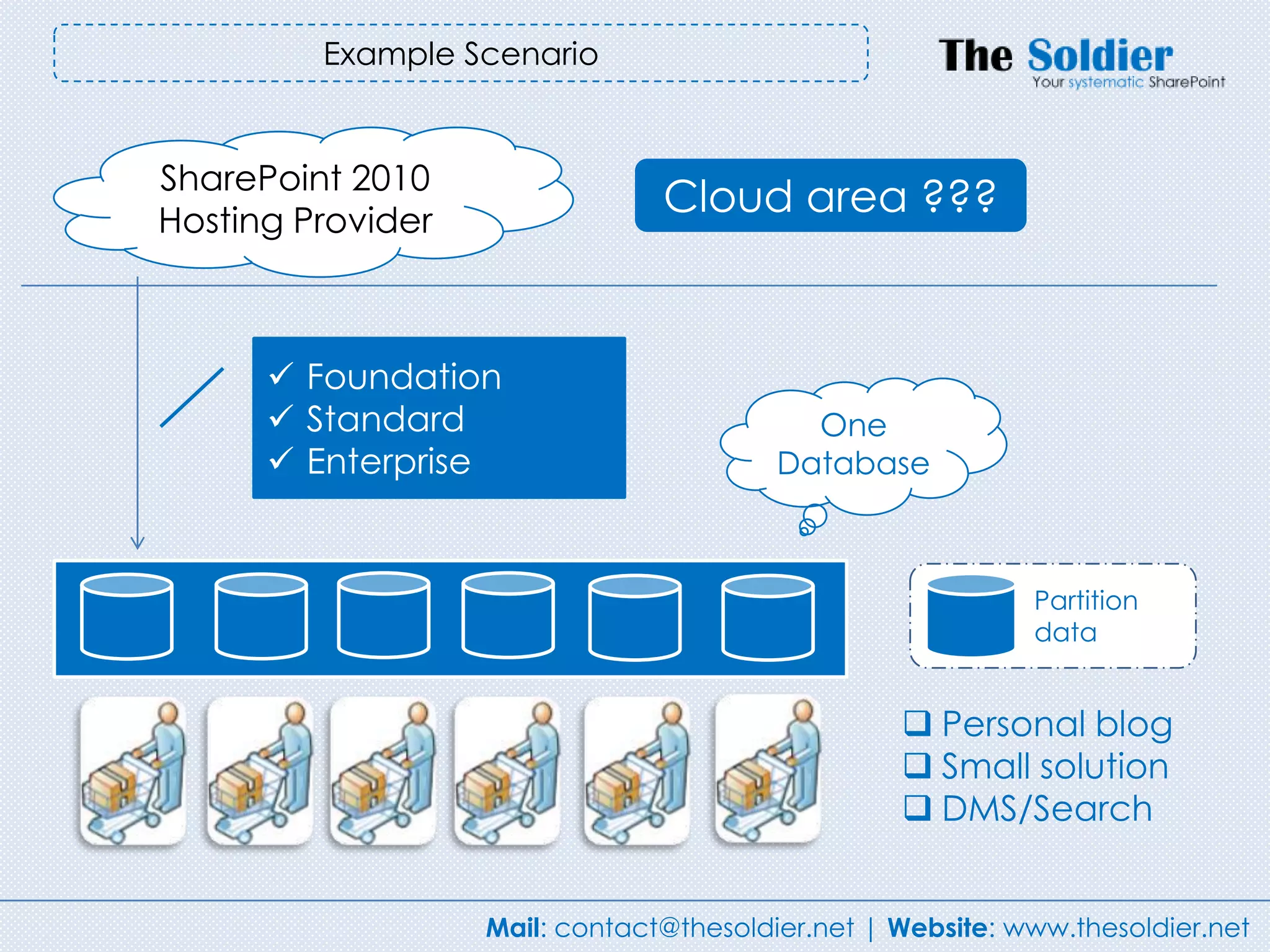
Example Scenario


SharePoint 2010
Hosting Provider
                                Cloud area ???


       Foundation
       Standard                           One
       Enterprise                       Database


                                                            Partition
                                                            data


                                                   Personal blog
                                                   Small solution
                                                   DMS/Search


                   Mail: contact@thesoldier.net | Website: www.thesoldier.net
To be continued…


      Mail: contact@thesoldier.net | Website: www.thesoldier.net
Thanks for your attending


contact@thesoldier.net
www.thesoldier.net


                    Mail: contact@thesoldier.net | Website: www.thesoldier.net

Sp administration-training-prism

  • 1.
    SharePoint 2010 TrainingCourse Administrator - Level 100 (Beginner) Thuan Nguyen (MVP, MCITP, MCTS) – Principal SharePoint Consultant Mail: contact@thesoldier.net | Website: www.thesoldier.net
  • 2.
    Thuan Nguyen -MVP, MCITP, MCTS  The Soldier - Principal SharePoint Consultant  Founder of www.sharepointvn.net  Blogs at www.thuansoldier.net  Twitter - @nnthuan  Focusing on Planning, Designing, Implementation, ECM, In frastructure  Mail - thuan@thesoldier.net  Skype - thuansoldier Mail: contact@thesoldier.net | Website: www.thesoldier.net
  • 3.
    Lets start withthe basics – what are you going to need?  SharePoint Server 2010 is 64-bit only  Requires 64-bit Windows Server 2008 SP2 or 64-bit Windows Server 2008 R2  Requires 64-bit SQL Server 2008 or 64-bit SQL Server 2005 More secure Improve performance Data Execution Prevention (* You can run SharePoint 2010 on http://en.wikipedia.org/wiki/64-bit 64-bit Windows 7 for development purpose) Mail: contact@thesoldier.net | Website: www.thesoldier.net
  • 4.
    You need toknow for your planning server  There is no permanent connection between the client browser and the SharePoint server  The number of users in the organization is not the same as the number of simultaneous users.  Different activities in SharePoint require different resources Mail: contact@thesoldier.net | Website: www.thesoldier.net
  • 5.
    Normalized Operations Per Second (NOPS) A B C D Operation/second (NOPS) 360 .000 E Your organization has 4,000 A = The number of users employees (A). The percentage B = The percentage of active users on a typical of active users in a typical day day is 50 (B). The number of C = The number of operations per active user operations per active user is per day (estimate) (1 – 10) 7(C). The number of working D = The peak factor (estimate) (1 – 10) hours for E = The number of working hours per day the organization as a whole is 7 hours (E). You estimate the peak 1 NOPS ~ 3 GB factor (D) to be 5. At least 8GB RAM http://h71019.www7.hp.com/activeanswers/Secure/54820-0-0-0-121.html Mail: contact@thesoldier.net | Website: www.thesoldier.net
  • 6.
    Server Roles  Webfront-end (WFE)  Application  Database Flexible Scalable Extensible Architecture depends on the size of deployment SharePoint 2010 is far more flexible than MOSS 2007 Mail: contact@thesoldier.net | Website: www.thesoldier.net
  • 7.
    Small Farm Deployment This provides redundancy from a Web front-end For production purposes, a perspective typical two-tier server farm that supports 10,000 to 20,000 users. Separating Search service in Application tier Mail: contact@thesoldier.net | Website: www.thesoldier.net
  • 8.
    Three tier deployment withsearch-optimized Separating Search service in Application tier The farm can be capable of Separating Search handling search indexes with up to database 10 million items. Mail: contact@thesoldier.net | Website: www.thesoldier.net
  • 9.
    Medium Farm Deployment Optimize Search Database Control performance Focusing on Search and Search index database But you need more Mail: contact@thesoldier.net | Website: www.thesoldier.net
  • 10.
    Large Farm Deployment It‟s truly ENTERPRISE Mail: contact@thesoldier.net | Website: www.thesoldier.net
  • 11.
    Install SharePoint 2010 HostOS  64-bit Windows Server 2008 R2 Standard, Enterprise or Datacenter. WCF hotfix: http://go.microsoft.com/fwlink/?LinkID=166231  64-bit Windows Server 2008 Standard, Enterprise or Datacenter: WCF hotfix: http://go.microsoft.com/fwlink/?LinkID=160770 Database  Microsoft SQL Server 2008  64-bit Microsoft SQL Server 2008 SP1 (CU2)  64-bit Microsoft SQL Server 2005 SP3 (CU3) WFE/App  Web Server (IIS) role  Application Server role  Microsoft .NET Framework 3.5 SP1  Microsoft Windows Identity Framework  Microsoft Sync Framework Runtime v1.0 (x64)  Microsoft Filter Pack 2.0  Microsoft Chart Controls for Microsoft .NET Framework 3.5  SQL Server 2008 Native Client  Microsoft SQL Server 2008 Analysis Services ADOMD.NET  ADO.NET Data Services v1.5  Windows PowerShell 2.0( (To automatically install prerequisites by Microsoft SharePoint Products preparation Tool, ensure you have an Internet connection) Mail: contact@thesoldier.net | Website: www.thesoldier.net
  • 12.
    Supported browser Level 1 Level 2  Internet Explorer 7  Apple Safari 4.x  Internet Explorer 8 (32-bit)  Mozilla Firefox 3.5  Mozilla Firefox 3.5  Internet Explorer 7  Windows XP  Internet Explore 8 (64-bit)  Windows Vista  Apple MAC OS X Snow  Windows 7 Leopard  UNIX/Linux 8.1 All level 2 browsers have some limitations. Recommendation: the best browser for SharePoint 2010 is Inter Explorer 8 (32-bit) Mail: contact@thesoldier.net | Website: www.thesoldier.net
  • 13.
    Account Requirement Setup user account  Domain user account  Member of Local Administrations group  SQL Server login  Securityadmin role (SQL Server)  Dbcreator (SQL Server)  SharePoint_Config: Configuration database stores configuration SharePoint, IIS Web Site, Web Application…  SharePoint_AdminContent_<GUID>: this database stores content in Central Administration Web application. Mail: contact@thesoldier.net | Website: www.thesoldier.net
  • 14.
    Fundamental architecture In IIS Web Server In SQL Server  Web Application  Site Collection  Content Database Mail: contact@thesoldier.net | Website: www.thesoldier.net
  • 15.
    Basics of Application Pool An IIS application pool is an isolated memory space that is routed to one or more worker processes within the security context of a user. Strengthen your overall security but increase memory. Start > Administrative Tools > Internet Information Service (IIS) Manager > Application Pools Mail: contact@thesoldier.net | Website: www.thesoldier.net
  • 16.
    Another view Server farm Web Application Site Collection Site Lists/Libraries Items/Folders Mail: contact@thesoldier.net | Website: www.thesoldier.net
  • 17.
    Service Application –Your core importance in SharePoint environment Mail: contact@thesoldier.net | Website: www.thesoldier.net
  • 18.
    Farewell to theShared Services Provider Profiles Extensible Search Flexible SSP BDC Excel Calc Monolithic architecture http://hrweb/ http://itweb/ Mail: contact@thesoldier.net | Website: www.thesoldier.net
  • 19.
    Share Service Providerin SharePoint 2007 The monolithic design meant that all services were available to all Web applications. You could not have a separate service for one Web application. There was only one SSP for each farm, which meant that there was a single point of failure. If this SSP failed, all users lost all SSP functionality. You could not implement granular services to individual business groups. SSP limited the security functionality of SSP. Mail: contact@thesoldier.net | Website: www.thesoldier.net
  • 20.
    Farewell to Shared Service Provider Mail: contact@thesoldier.net | Website: www.thesoldier.net
  • 21.
    Service Application in SharePoint 2010  Extensible Search User Profiles Excel Calc  Flexible BCS Visio  Single farm WAC  Shared across 3rd party farms Service http://hrweb/ http://itweb/ Get Together Mail: contact@thesoldier.net | Website: www.thesoldier.net
  • 22.
    Service Applications isbuffet Mail: contact@thesoldier.net | Website: www.thesoldier.net
  • 23.
    SERVICE APPLICATIONS Service Applications Description Store Cross-farm Data? capable Access Services View, edit, and interact with Microsoft Access 2010 database in a browser. No No Business Data Connectivity Access line-of-business (LOB) data systems. Yes Yes Excel Services Viewing and interact with Microsoft Excel files in a browser. No No Managed Metadata Service Access managed taxonomy hierarchies, keywords, and social tagging infrastructure Yes Yes as well as content type publishing across site collections. PerformancePoint PerformancePoint Services enables users to create interactive dashboards that Yes No display key performance indicators (KPIs) and data visualizations in the form of scorecards, reports and filters. Search Crawls content, produces index partitions, and serves search queries. Yes Yes Secure Store Service Provides single sign-on authentication to access multiple applications or services. Yes Yes State Service Provide temporary storage of user session data for SharePoint Server components. Yes No Usage and Health Data Collects farm wide usage and health data and provides the ability to view various Yes No Collection usage and health reports. User Profile Adds support for My Site, Profiles pages, Social Tagging and other social computing Yes Yes features Visio Graphics Service Viewing and refresh of published Microsoft Visio diagrams in Web browser No No Web Analytics Provides Web Service interfaces No No Word Automation Services Perform automated bulk document conversions No No Microsoft SharePoint Tracks subscription IDs and settings for services that are deployed in partitioned mode. Yes No Foundation Subscription Windows PowerShell only. Settings Service
  • 24.
    Single Farm servicesversus Cross-Farm services Single Farm Service Cross-Farm Service Access Database Business Data Services Connectivity Excel Services Managed Metadata Service PerformancePoint Search State Service Secure Store Service Visio Graphics Services User Profile Word Automation Web Analytics Services Mail: contact@thesoldier.net | Website: www.thesoldier.net
  • 25.
    Service Application Architecture Service: A set of bits installed on a farm that‟s capable of providing some functionality. Service Application: A specific farm- level configuration of the Service in SharePoint. Service Instance: An instance of the Service running on an Application server. Service Application Proxy: A pointer to a Service Application that exists on the WFE. Service Consumer: A SharePoint feature, such as a web-part, that talks with the service and makes its functionality available to an end user. Mail: contact@thesoldier.net | Website: www.thesoldier.net
  • 26.
    Service Application Proxies Aproxy is automatically created for an SA when the SA is created via central admin. It‟s a virtual link used to connect web apps to SAs Proxies in the local farm are not created by admins, but they appear along with the SAs in central admin Some proxies might include settings that can be modified - For example, for the Managed Metadata SA, you must indicate which proxy is the default taxonomy store Mail: contact@thesoldier.net | Website: www.thesoldier.net
  • 27.
    Service Application ProxiesGroup A proxy group is a group of SA proxies that are selected for a web app By default, all SA proxies are included in the default proxy group.  You can remove them of course  A single proxy can be in multiple Proxy Groups When you create a web app you can:  Select the default proxy group  Create a custom proxy group by selecting  Which SA proxies should be included The custom proxy group for one web app cannot be reused with a different web app Mail: contact@thesoldier.net | Website: www.thesoldier.net
  • 28.
    SharePoint 2010 Hosting ServiceProvider ??? You can do Mail: contact@thesoldier.net | Website: www.thesoldier.net
  • 29.
    SharePoint 2010 forHosting Service ? The ability to uniquely separate each customer on a shared environment 1 2 Hosting Company SA WA Hosted SC SC SC SC SC SC SC SCSC Company Tenant 1 Tenant 2 Tenant Site Administrator Administrator Mail: contact@thesoldier.net | Website: www.thesoldier.net
  • 30.
    Multi-Tenant for HostingProvider  Services can be configured to “share” data across Tenants or to “partition” data for each tenant (data isolation) Data  Allows multiple organizations to Partition A be „hosted‟ on the same SharePoint Partition B configuration, but keeps their data isolated  Configurable „per-service‟ to allow for “Mixed-Mode Partitioning” Is that your  Backup/Restore desire?  Constraints Mail: contact@thesoldier.net | Website: www.thesoldier.net
  • 31.
    List of possibilities  User Profiles  State  Managed Metadata  Access Database  Data Connectivity  Visio Graphics  Search  Word Viewing  Secure Store  PowerPoint  Word Automation  Excel Calculation (can store tenant data and can be partitioned) (do not store tenant data, and do not support Partition Mode)  Web Analytics (site-  PerformancePoint based)  FAST for SharePoint  Usage and Health Data Collection (site-based) (cannot be partitioned, and don not make sense in (can store tenant data, but cannot be partitioned) multi-tenant environments)
  • 32.
    Example Scenario SharePoint 2010 HostingProvider Cloud area ???  Foundation  Standard One  Enterprise Database Partition data  Personal blog  Small solution  DMS/Search Mail: contact@thesoldier.net | Website: www.thesoldier.net
  • 33.
    To be continued… Mail: contact@thesoldier.net | Website: www.thesoldier.net
  • 34.
    Thanks for yourattending contact@thesoldier.net www.thesoldier.net Mail: contact@thesoldier.net | Website: www.thesoldier.net