Matt BremerSharePoint Technology Specialist, Microsoft CorporationTwitter: @mattbremerSharePoint 2010 Application Development
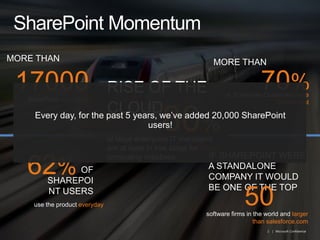
SharePoint MomentumMORE THAN80%RISE OF THE CLOUDEvery day, for the past 5 years, we’ve added 20,000 SharePoint users!of large enterprise IT managers are at least in trial stage for cloud computing initiativesMORE THAN SharePointcustomers170005062%IF SHAREPOINT WERE A STANDALONE COMPANY IT WOULD BE ONE OF THE TOPsoftware firms in the world andlarger than salesforce.comOF SHAREPOINT USERSuse the product everyday70%of  Enterprise Customershave SharePoint
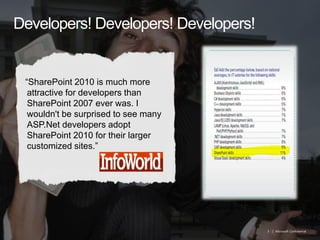
Developers! Developers! Developers!“SharePoint 2010 is much more attractive for developers than SharePoint 2007 ever was. I wouldn't be surprised to see many ASP.Net developers adopt SharePoint 2010 for their larger customized sites.”Robert Half Survey (2011)
AgendaWake Up!Developer ProductivityRich Platform ServicesFlexible DeploymentBest PracticesQuestions
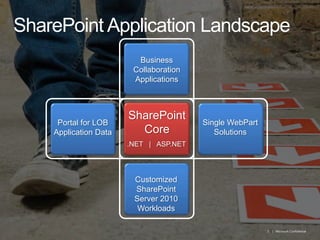
SharePoint Application LandscapeBusiness Collaboration ApplicationsSharePoint CoreSingle WebPartSolutionsPortal for LOB Application Data.NET   |   ASP.NETCustomized SharePoint Server 2010 Workloads
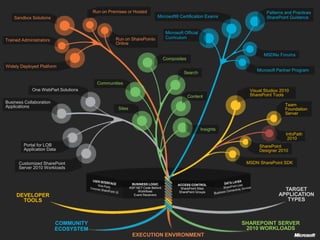
Run on Premises or HostedPatterns and Practices SharePoint GuidanceMicrosoft® Certification ExamsSandbox SolutionsMicrosoft Official CurriculumRun on SharePoint® OnlineTrained AdministratorsMSDN® ForumsCompositesWidely Deployed PlatformMicrosoft Partner ProgramSearchCommunitiesOne WebPart SolutionsVisual Studio® 2010 SharePoint ToolsContentBusiness Collaboration ApplicationsTeam Foundation ServerSitesInsightsInfoPath 2010Portal for LOBApplication DataSharePoint Designer 2010MSDN SharePoint SDKCustomized SharePoint Server 2010 WorkloadsUSER INTERFACEWeb PartsCommon SharePoint UIDATA LAYERSharePoint ListsBusiness Connectivity ServicesBUSINESS LOGICASP.NET Code BehindWorkflowsEvent ReceiversACCESS CONTROLSharePoint SitesSharePoint GroupsTARGET APPLICATION TYPESDEVELOPER TOOLSCOMMUNITY ECOSYSTEMSHAREPOINT SERVER 2010 WORKLOADSEXECUTION ENVIRONMENT
Managed Code
Trust?GAC (Full Trust)BIN (CAS)
Unmanaged Code
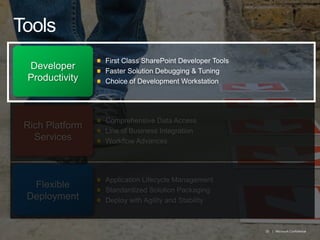
ToolsFirst Class SharePoint Developer ToolsFaster Solution Debugging & TuningChoice of Development WorkstationDeveloper ProductivityComprehensive Data AccessLine of Business Integration Workflow AdvancesRich Platform ServicesApplication Lifecycle Management Standardized Solution PackagingDeploy with Agility and StabilityFlexible Deployment
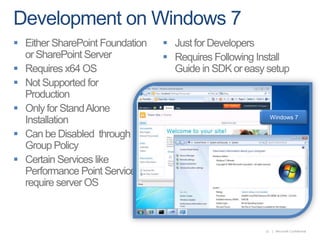
Development on Windows 7Either SharePoint Foundation or SharePoint ServerRequires x64 OSNot Supported for    ProductionOnly for Stand Alone InstallationCan be Disabled  through Group PolicyCertain Services like Performance Point Services require server OSJust for DevelopersRequires Following Install Guide in SDK or easy setupWindows 7
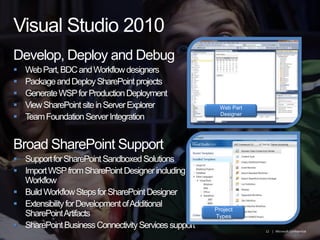
Visual Studio 2010Develop, Deploy and DebugWeb Part, BDC and Workflow designersPackage and Deploy SharePoint projectsGenerate WSP for Production DeploymentView SharePoint site in Server ExplorerTeam Foundation Server IntegrationBroad SharePoint SupportSupport for SharePoint Sandboxed SolutionsImport WSP from SharePoint Designer including WorkflowBuild Workflow Steps for SharePoint DesignerExtensibility for Development of Additional SharePoint ArtifactsSharePoint Business Connectivity Services supportWeb Part DesignerProject Types
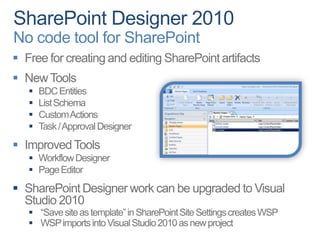
SharePoint Designer 2010No code tool for SharePointFree for creating and editing SharePoint artifactsNew Tools BDC EntitiesList SchemaCustom ActionsTask / Approval DesignerImproved Tools Workflow DesignerPage EditorSharePoint Designer work can be upgraded to Visual Studio 2010“Save site as template” in SharePoint Site Settings creates WSPWSP imports into Visual Studio 2010 as new project
Developer DashboardEnable via STSADM:stsadm -o setproperty -pn developer-dashboard -pvondemandEnable via PowerShell:$dash = [Microsoft.SharePoint.Administration.SPWebService]::ContentService.DeveloperDashboardSettings; $dash.DisplayLevel = 'OnDemand'; $dash.TraceEnabled = $true; $dash.Update() Quick Debug or Monitor Page Performance
DemoVisual Web Part in Visual Studio 2010
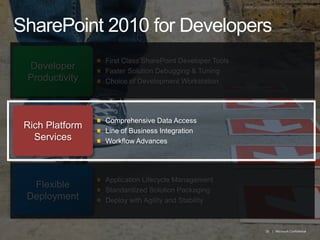
SharePoint 2010 for DevelopersFirst Class SharePoint Developer ToolsFaster Solution Debugging & TuningChoice of Development WorkstationDeveloper ProductivityComprehensive Data AccessLine of Business Integration Workflow AdvancesRich Platform ServicesApplication Lifecycle Management Standardized Solution PackagingDeploy with Agility and StabilityFlexible Deployment
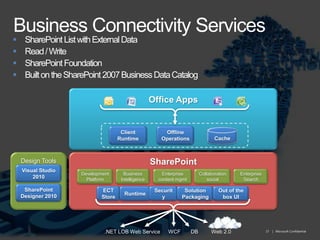
Business Connectivity ServicesSharePoint List with External DataRead / WriteSharePoint FoundationBuilt on the SharePoint 2007 Business Data CatalogOffice AppsClient RuntimeOffline OperationsCacheDesign ToolsSharePointVisual Studio 2010EnterpriseSearchDevelopmentPlatformBusiness IntelligenceEnterprise content mgmtCollaboration socialSharePoint Designer 2010ECT StoreRuntimeSecuritySolution PackagingOut of the box UIWeb 2.0DBWCFWeb Service.NET LOB
DemoWork with BCS in SharePoint Designer and Visual Studio
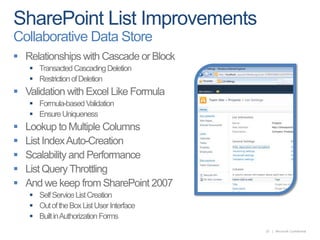
SharePoint List ImprovementsCollaborative Data StoreRelationships with Cascade or BlockTransacted Cascading DeletionRestriction of DeletionValidation with Excel Like FormulaFormula-based ValidationEnsure UniquenessLookup to Multiple ColumnsList Index Auto-CreationScalability and PerformanceList Query ThrottlingAnd we keep from SharePoint 2007Self Service List CreationOut of the Box List User InterfaceBuilt in Authorization Forms
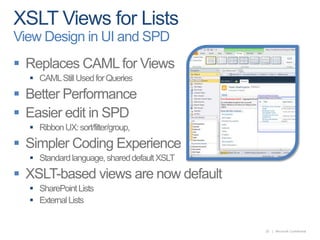
XSLT Views for ListsView Design in UI and SPDReplaces CAML for ViewsCAML Still Used for QueriesBetter PerformanceEasier edit in SPDRibbon UX: sort/filter/group,                                              conditional formatting,…Simpler Coding ExperienceStandard language, shared default XSLTXSLT-based views are now defaultSharePoint ListsExternal Lists
DemoRelational Lists and Validation
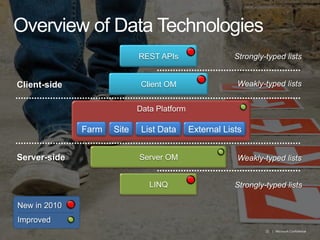
Overview of Data TechnologiesREST APIsStrongly-typed listsClientOMWeakly-typed listsClient-sideData PlatformFarmSiteList DataExternal ListsServerOMServer-sideWeakly-typed listsLINQStrongly-typed listsNew in 2010Improved
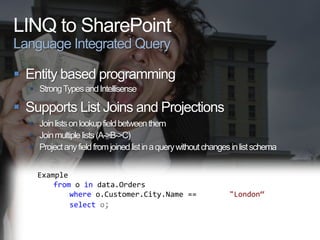
LINQ to SharePointLanguage Integrated QueryEntity based programmingStrong Types and IntellisenseSupports List Joins and ProjectionsJoin lists on lookup field between themJoin multiple lists (A->B->C)Project any field from joined list in a query without changes in list schemaExamplefromoindata.Orderswhereo.Customer.City.Name == "London“selecto;
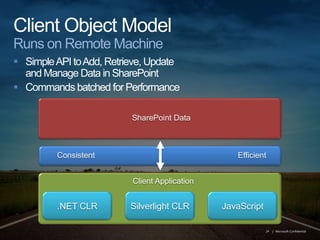
Client Object ModelRuns on Remote MachineSimple API to Add, Retrieve, Updateand Manage Data in SharePointCommands batched for PerformanceSharePoint DataConsistentEfficientClient Application.NET CLRSilverlight CLRJavaScript
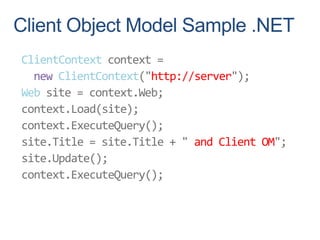
Client Object Model Sample .NETClientContext context =newClientContext("http://server");Web site = context.Web;context.Load(site);context.ExecuteQuery();site.Title = site.Title + " and Client OM";site.Update();context.ExecuteQuery();
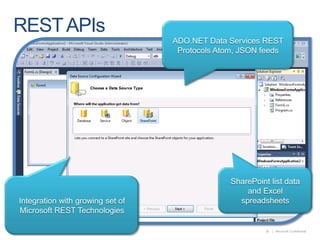
REST APIsADO.NET Data Services REST Protocols Atom, JSON feedsSharePoint list data and Excel spreadsheetsIntegration with growing set of Microsoft REST Technologies
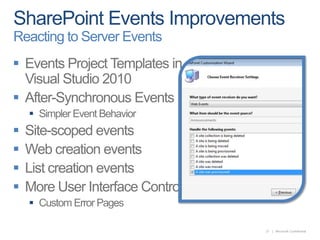
SharePoint Events ImprovementsReacting to Server EventsEvents Project Templates in Visual Studio 2010After-Synchronous EventsSimpler Event BehaviorSite-scoped eventsWeb creation eventsList creation eventsMore User Interface ControlCustom Error Pages
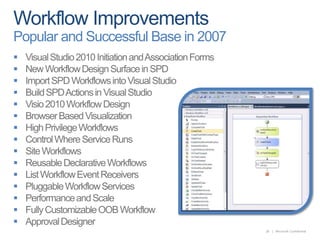
Workflow ImprovementsPopular and Successful Base in 2007Visual Studio 2010 Initiation and Association FormsNew Workflow Design Surface in SPDImport SPD Workflows into Visual StudioBuild SPD Actions in Visual Studio Visio 2010 Workflow DesignBrowser Based VisualizationHigh Privilege WorkflowsControl Where Service RunsSite WorkflowsReusable Declarative WorkflowsList Workflow Event ReceiversPluggable Workflow ServicesPerformance and ScaleFully Customizable OOB WorkflowApproval Designer
Use Visual Studio and SharePoint Designer to create a Workflow
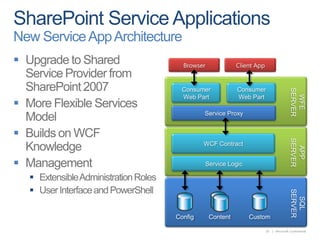
SharePoint Service ApplicationsNew Service App ArchitectureUpgrade to Shared Service Provider from SharePoint 2007More Flexible Services ModelBuilds on WCF KnowledgeManagement Extensible Administration RolesUser Interface and PowerShellBrowserClient AppConsumerWeb PartConsumerWeb PartWFE SERVERService ProxyWCF ContractAPPSERVERService LogicSQLSERVERContentConfigCustom
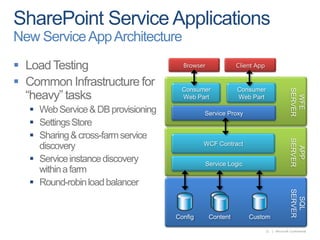
SharePoint Service ApplicationsNew Service App ArchitectureLoad TestingCommon Infrastructure for “heavy” tasksWeb Service & DB provisioningSettings StoreSharing & cross-farm service discoveryService instance discovery within a farmRound-robin load balancerBrowserClient AppConsumerWeb PartConsumerWeb PartWFE SERVERService ProxyWCF ContractAPPSERVERService LogicSQLSERVERContentConfigCustom
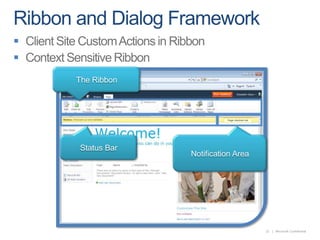
Ribbon and Dialog FrameworkClient Site Custom Actions in RibbonContext Sensitive RibbonThe RibbonStatus BarNotification Area
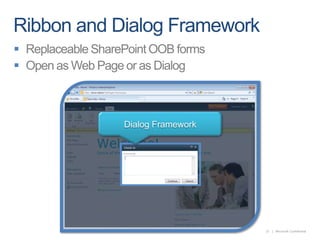
Ribbon and Dialog FrameworkReplaceable SharePoint OOB formsOpen as Web Page or as DialogDialog Framework
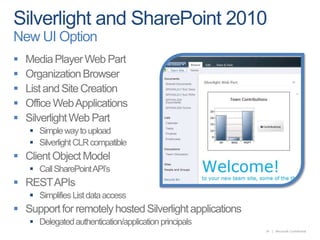
Silverlight and SharePoint 2010New UI OptionMedia Player Web PartOrganization BrowserList and Site CreationOffice Web ApplicationsSilverlight Web PartSimple way to uploadSilverlight CLR compatible Client Object ModelCall SharePoint API’sREST APIsSimplifies List data accessSupport for remotely hosted Silverlight applicationsDelegated authentication/application principals
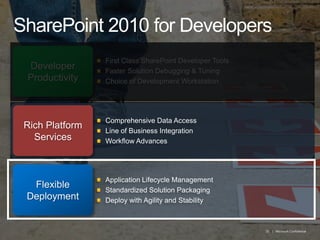
SharePoint 2010 for DevelopersFirst Class SharePoint Developer ToolsFaster Solution Debugging & TuningChoice of Development WorkstationDeveloper ProductivityComprehensive Data AccessLine of Business Integration Workflow AdvancesRich Platform ServicesApplication Lifecycle Management Standardized Solution PackagingDeploy with Agility and StabilityFlexible Deployment
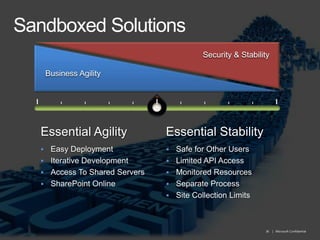
Sandboxed SolutionsSecurity & StabilitySecurity & StabilityBusinessAgilityBusinessAgilityEssential AgilityEssential StabilityEasy Deployment
Iterative Development
Access To Shared Servers
SharePoint Online
Safe for Other Users
Limited API Access
Monitored Resources
Separate Process
Site Collection LimitsSandboxed Solutions
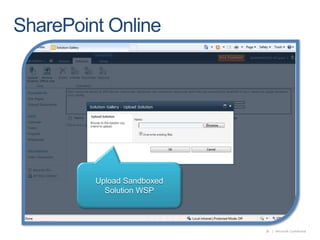
SharePoint OnlineUpload Sandboxed Solution WSP
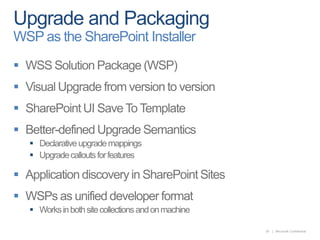
Upgrade and PackagingWSP as the SharePoint InstallerWSS Solution Package (WSP)Visual Upgrade from version to versionSharePoint UI Save To TemplateBetter-defined Upgrade SemanticsDeclarative upgrade mappingsUpgrade callouts for featuresApplication discovery in SharePoint SitesWSPs as unified developer formatWorks in both site collections and on machine
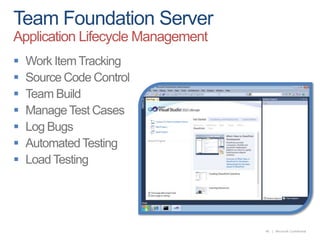
Team Foundation ServerApplication Lifecycle ManagementWork Item TrackingSource Code ControlTeam BuildManage Test CasesLog BugsAutomated TestingLoad Testing
Key TakeawaysVisual Studio 2010Install on Windows 7SharePoint Designer 2010Developer DashboardDeveloper ProductivityBusiness Connectivity Services LINQ, REST and Data ImprovementsClient Object ModelSilverlight Web PartWorkflow ImprovementsRich Platform ServicesTeam Foundation ServerSandboxed SolutionsWSP Solution UpgradeSharePoint OnlineFlexible Deployment
Best Practices
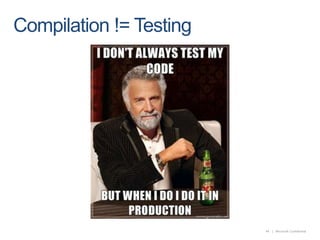
Testing

SharePoint 2010 Application Development

  • 1.
    Matt BremerSharePoint TechnologySpecialist, Microsoft CorporationTwitter: @mattbremerSharePoint 2010 Application Development
  • 2.
    SharePoint MomentumMORE THAN80%RISEOF THE CLOUDEvery day, for the past 5 years, we’ve added 20,000 SharePoint users!of large enterprise IT managers are at least in trial stage for cloud computing initiativesMORE THAN SharePointcustomers170005062%IF SHAREPOINT WERE A STANDALONE COMPANY IT WOULD BE ONE OF THE TOPsoftware firms in the world andlarger than salesforce.comOF SHAREPOINT USERSuse the product everyday70%of Enterprise Customershave SharePoint
  • 3.
    Developers! Developers! Developers!“SharePoint2010 is much more attractive for developers than SharePoint 2007 ever was. I wouldn't be surprised to see many ASP.Net developers adopt SharePoint 2010 for their larger customized sites.”Robert Half Survey (2011)
  • 4.
    AgendaWake Up!Developer ProductivityRichPlatform ServicesFlexible DeploymentBest PracticesQuestions
  • 5.
    SharePoint Application LandscapeBusinessCollaboration ApplicationsSharePoint CoreSingle WebPartSolutionsPortal for LOB Application Data.NET | ASP.NETCustomized SharePoint Server 2010 Workloads
  • 6.
    Run on Premisesor HostedPatterns and Practices SharePoint GuidanceMicrosoft® Certification ExamsSandbox SolutionsMicrosoft Official CurriculumRun on SharePoint® OnlineTrained AdministratorsMSDN® ForumsCompositesWidely Deployed PlatformMicrosoft Partner ProgramSearchCommunitiesOne WebPart SolutionsVisual Studio® 2010 SharePoint ToolsContentBusiness Collaboration ApplicationsTeam Foundation ServerSitesInsightsInfoPath 2010Portal for LOBApplication DataSharePoint Designer 2010MSDN SharePoint SDKCustomized SharePoint Server 2010 WorkloadsUSER INTERFACEWeb PartsCommon SharePoint UIDATA LAYERSharePoint ListsBusiness Connectivity ServicesBUSINESS LOGICASP.NET Code BehindWorkflowsEvent ReceiversACCESS CONTROLSharePoint SitesSharePoint GroupsTARGET APPLICATION TYPESDEVELOPER TOOLSCOMMUNITY ECOSYSTEMSHAREPOINT SERVER 2010 WORKLOADSEXECUTION ENVIRONMENT
  • 7.
  • 8.
  • 9.
  • 10.
    ToolsFirst Class SharePointDeveloper ToolsFaster Solution Debugging & TuningChoice of Development WorkstationDeveloper ProductivityComprehensive Data AccessLine of Business Integration Workflow AdvancesRich Platform ServicesApplication Lifecycle Management Standardized Solution PackagingDeploy with Agility and StabilityFlexible Deployment
  • 11.
    Development on Windows7Either SharePoint Foundation or SharePoint ServerRequires x64 OSNot Supported for ProductionOnly for Stand Alone InstallationCan be Disabled through Group PolicyCertain Services like Performance Point Services require server OSJust for DevelopersRequires Following Install Guide in SDK or easy setupWindows 7
  • 12.
    Visual Studio 2010Develop,Deploy and DebugWeb Part, BDC and Workflow designersPackage and Deploy SharePoint projectsGenerate WSP for Production DeploymentView SharePoint site in Server ExplorerTeam Foundation Server IntegrationBroad SharePoint SupportSupport for SharePoint Sandboxed SolutionsImport WSP from SharePoint Designer including WorkflowBuild Workflow Steps for SharePoint DesignerExtensibility for Development of Additional SharePoint ArtifactsSharePoint Business Connectivity Services supportWeb Part DesignerProject Types
  • 13.
    SharePoint Designer 2010Nocode tool for SharePointFree for creating and editing SharePoint artifactsNew Tools BDC EntitiesList SchemaCustom ActionsTask / Approval DesignerImproved Tools Workflow DesignerPage EditorSharePoint Designer work can be upgraded to Visual Studio 2010“Save site as template” in SharePoint Site Settings creates WSPWSP imports into Visual Studio 2010 as new project
  • 14.
    Developer DashboardEnable viaSTSADM:stsadm -o setproperty -pn developer-dashboard -pvondemandEnable via PowerShell:$dash = [Microsoft.SharePoint.Administration.SPWebService]::ContentService.DeveloperDashboardSettings; $dash.DisplayLevel = 'OnDemand'; $dash.TraceEnabled = $true; $dash.Update() Quick Debug or Monitor Page Performance
  • 15.
    DemoVisual Web Partin Visual Studio 2010
  • 16.
    SharePoint 2010 forDevelopersFirst Class SharePoint Developer ToolsFaster Solution Debugging & TuningChoice of Development WorkstationDeveloper ProductivityComprehensive Data AccessLine of Business Integration Workflow AdvancesRich Platform ServicesApplication Lifecycle Management Standardized Solution PackagingDeploy with Agility and StabilityFlexible Deployment
  • 17.
    Business Connectivity ServicesSharePointList with External DataRead / WriteSharePoint FoundationBuilt on the SharePoint 2007 Business Data CatalogOffice AppsClient RuntimeOffline OperationsCacheDesign ToolsSharePointVisual Studio 2010EnterpriseSearchDevelopmentPlatformBusiness IntelligenceEnterprise content mgmtCollaboration socialSharePoint Designer 2010ECT StoreRuntimeSecuritySolution PackagingOut of the box UIWeb 2.0DBWCFWeb Service.NET LOB
  • 18.
    DemoWork with BCSin SharePoint Designer and Visual Studio
  • 19.
    SharePoint List ImprovementsCollaborativeData StoreRelationships with Cascade or BlockTransacted Cascading DeletionRestriction of DeletionValidation with Excel Like FormulaFormula-based ValidationEnsure UniquenessLookup to Multiple ColumnsList Index Auto-CreationScalability and PerformanceList Query ThrottlingAnd we keep from SharePoint 2007Self Service List CreationOut of the Box List User InterfaceBuilt in Authorization Forms
  • 20.
    XSLT Views forListsView Design in UI and SPDReplaces CAML for ViewsCAML Still Used for QueriesBetter PerformanceEasier edit in SPDRibbon UX: sort/filter/group, conditional formatting,…Simpler Coding ExperienceStandard language, shared default XSLTXSLT-based views are now defaultSharePoint ListsExternal Lists
  • 21.
  • 22.
    Overview of DataTechnologiesREST APIsStrongly-typed listsClientOMWeakly-typed listsClient-sideData PlatformFarmSiteList DataExternal ListsServerOMServer-sideWeakly-typed listsLINQStrongly-typed listsNew in 2010Improved
  • 23.
    LINQ to SharePointLanguageIntegrated QueryEntity based programmingStrong Types and IntellisenseSupports List Joins and ProjectionsJoin lists on lookup field between themJoin multiple lists (A->B->C)Project any field from joined list in a query without changes in list schemaExamplefromoindata.Orderswhereo.Customer.City.Name == "London“selecto;
  • 24.
    Client Object ModelRunson Remote MachineSimple API to Add, Retrieve, Updateand Manage Data in SharePointCommands batched for PerformanceSharePoint DataConsistentEfficientClient Application.NET CLRSilverlight CLRJavaScript
  • 25.
    Client Object ModelSample .NETClientContext context =newClientContext("http://server");Web site = context.Web;context.Load(site);context.ExecuteQuery();site.Title = site.Title + " and Client OM";site.Update();context.ExecuteQuery();
  • 26.
    REST APIsADO.NET DataServices REST Protocols Atom, JSON feedsSharePoint list data and Excel spreadsheetsIntegration with growing set of Microsoft REST Technologies
  • 27.
    SharePoint Events ImprovementsReactingto Server EventsEvents Project Templates in Visual Studio 2010After-Synchronous EventsSimpler Event BehaviorSite-scoped eventsWeb creation eventsList creation eventsMore User Interface ControlCustom Error Pages
  • 28.
    Workflow ImprovementsPopular andSuccessful Base in 2007Visual Studio 2010 Initiation and Association FormsNew Workflow Design Surface in SPDImport SPD Workflows into Visual StudioBuild SPD Actions in Visual Studio Visio 2010 Workflow DesignBrowser Based VisualizationHigh Privilege WorkflowsControl Where Service RunsSite WorkflowsReusable Declarative WorkflowsList Workflow Event ReceiversPluggable Workflow ServicesPerformance and ScaleFully Customizable OOB WorkflowApproval Designer
  • 29.
    Use Visual Studioand SharePoint Designer to create a Workflow
  • 30.
    SharePoint Service ApplicationsNewService App ArchitectureUpgrade to Shared Service Provider from SharePoint 2007More Flexible Services ModelBuilds on WCF KnowledgeManagement Extensible Administration RolesUser Interface and PowerShellBrowserClient AppConsumerWeb PartConsumerWeb PartWFE SERVERService ProxyWCF ContractAPPSERVERService LogicSQLSERVERContentConfigCustom
  • 31.
    SharePoint Service ApplicationsNewService App ArchitectureLoad TestingCommon Infrastructure for “heavy” tasksWeb Service & DB provisioningSettings StoreSharing & cross-farm service discoveryService instance discovery within a farmRound-robin load balancerBrowserClient AppConsumerWeb PartConsumerWeb PartWFE SERVERService ProxyWCF ContractAPPSERVERService LogicSQLSERVERContentConfigCustom
  • 32.
    Ribbon and DialogFrameworkClient Site Custom Actions in RibbonContext Sensitive RibbonThe RibbonStatus BarNotification Area
  • 33.
    Ribbon and DialogFrameworkReplaceable SharePoint OOB formsOpen as Web Page or as DialogDialog Framework
  • 34.
    Silverlight and SharePoint2010New UI OptionMedia Player Web PartOrganization BrowserList and Site CreationOffice Web ApplicationsSilverlight Web PartSimple way to uploadSilverlight CLR compatible Client Object ModelCall SharePoint API’sREST APIsSimplifies List data accessSupport for remotely hosted Silverlight applicationsDelegated authentication/application principals
  • 35.
    SharePoint 2010 forDevelopersFirst Class SharePoint Developer ToolsFaster Solution Debugging & TuningChoice of Development WorkstationDeveloper ProductivityComprehensive Data AccessLine of Business Integration Workflow AdvancesRich Platform ServicesApplication Lifecycle Management Standardized Solution PackagingDeploy with Agility and StabilityFlexible Deployment
  • 36.
    Sandboxed SolutionsSecurity &StabilitySecurity & StabilityBusinessAgilityBusinessAgilityEssential AgilityEssential StabilityEasy Deployment
  • 37.
  • 38.
  • 39.
  • 40.
  • 41.
  • 42.
  • 43.
  • 44.
  • 45.
  • 46.
    Upgrade and PackagingWSPas the SharePoint InstallerWSS Solution Package (WSP)Visual Upgrade from version to versionSharePoint UI Save To TemplateBetter-defined Upgrade SemanticsDeclarative upgrade mappingsUpgrade callouts for featuresApplication discovery in SharePoint SitesWSPs as unified developer formatWorks in both site collections and on machine
  • 47.
    Team Foundation ServerApplicationLifecycle ManagementWork Item TrackingSource Code ControlTeam BuildManage Test CasesLog BugsAutomated TestingLoad Testing
  • 48.
    Key TakeawaysVisual Studio2010Install on Windows 7SharePoint Designer 2010Developer DashboardDeveloper ProductivityBusiness Connectivity Services LINQ, REST and Data ImprovementsClient Object ModelSilverlight Web PartWorkflow ImprovementsRich Platform ServicesTeam Foundation ServerSandboxed SolutionsWSP Solution UpgradeSharePoint OnlineFlexible Deployment
  • 49.
  • 50.

Editor's Notes

  • #4 Incredible eco-system of partners and community. Anyone that has acquired SharePoint development skills probably already knows how desirable the skill set is by the amount of calls they receive from recruiters.
  • #6 Categorized types of applications (app) built on SP (howdo people use SP?)Business Collaboration app – probably decided to use SP as base platform you will build your business app on Portal – SP is often a required place to expose data from back end systemSingle web part – one little extra piece of functionalityCustomized SP server workloads – extra tweaking to SP when customers want something not quite out of the box
  • #7 Microsoft poster summarizes working with SharePointIncludes Target application types – from our last slideFor further information, audience can access a whitepaper by David Chappell on the SharePoint Development Platform
  • #8 Traditional SharePoint & .NET Development in VSCompiledRuns Server-Side
  • #10 Leverages “new” Web 2.0 approachNot compiledJavaScriptSilverlightRuns Client-Side
  • #11 Part 1 – Developer Tools
  • #12 Install SP 2010 on Windows 7 or Windows Vista – no longer need a server operating system.Applies to both SharePoint Foundation 2010 or SharePoint Server 2010Requires 64bit OSRequires installation steps to be followed for Windows 7 (does not do all pre-requisites for you unless you use easy setup)
  • #13 Large new tool set in Visual Studio 2010, e.g. SharePoint packaging now built into Visual Studio, large amount of new project artifactsThis talk is an overview, each subject area is really an entire talk in itself!
  • #14 Now a must have on a developers machine, for workflows, configuring business connectivity services etc…Has had a makeover!
  • #15 Can turn on/off on demand.Can get additional details about a page using this tool.
  • #16 Walkthrough of creating a Visual Web Part to show off the new tools available in Visual Studio 2010 for SharePoint 2010.
  • #17 Part 2 – Improvements in the platform
  • #18 Brings LOB data into SharePointIs the SP 2010 version of the Business Data CatalogData is now Read/WriteAvailable in SharePoint Foundation and offline in Office Client apps
  • #20 Now has the ability to create relationships between lists that can either cascade deletes or block deletes.Can do lookups to multiple columns, get prompted to create sql type indexes.One caveat to large lists – there is now throttling for large views. If you build a web page that tries to display view over 5000 items, it will get blocked and you will have to handle it. Need to use indexers, different types of views or other strategies.
  • #21 Recommended way for creating views in SP 2010 will be XSLT, not CAML.XSLT more of a generally used standard than CAML.CAML still valuable for queries.
  • #22 Walkthrough of new list capabilities:Use Multiple value lookupsImplement relationships between listsSet validation rules on list columns
  • #23 How you can access data in lists?2007 had SharePoint Server Object Model2010 now also has:REST APIs – ability to use REST style URLs and get data back in ATOM formatClient OM – you can make calls from a remote machine onto your SP 2010 box and get data backLINQ to SharePoint – can write and execute LINQ queries on the server side getting strongly typed behavior
  • #24 Gives you build time Intellisense so you don’t find errors in your queries when you run your codeGives you an easy way to do joins and project fields from within the joins no matter how far the joins are through relationships that you call
  • #25 Same concepts as Server OM, just done in a slightly different way – main difference being commands are batched up before sending across the wire.Not all of the Server API is replicated in the Client OM, but most isHas 3 types: .NET, Silverlight and JavaScript
  • #26 Establish a client context, set up the Load methods (does not actually action anything at this point), call ExecuteQuery (gives the developer control over when the calls are made).Looks mostly like the standard SP Server API.
  • #27 A good way to get images out of excel for adding into end user sitesIs a great way to lookup dataSupported using ADO.NET data services in SP (need these to use REST in SP)
  • #28 New Project Wizard allows you to create an event handler for a specific event inside of SP and will add it into a feature and then WSP package.
  • #29 A lot of new stuff here!
  • #30 Walkthrough of creating a Workflow in Visual StudioDemonstrate new Site Workflow feature
  • #31  New arch breaks the limitations of SSP model Now each “service” is independent and can be independently scaled & configured Web applications can be associated with any service application, not a pre-canned set of options Services can be shared across farms, facilitating complete service farms
  • #32 Designed for running some applications/tasks that are too big for a code behind page and ASPS file.SP has an infrastructure because some of the services in SP are like this – e.g. Timer Service. Known as SSP in 2007.Made the services model more flexible to allow developers to create new services. Builds on WCF knowledge to create contracts and implement services in WCF. Has built in management functionality for dealing with these services.
  • #33 Ribbon (like other Office products) - is context sensitive, uses AJAX, can work with Ribbon using JavaScriptStatus Bar – to give user some noticeNotification Area – can host pop ups you don’t need to keep on the screen
  • #34 Dialog Framework allows you to create a dialog which doesn’t require a post back to the server.Dialogs are built using a SP User Interface (UI) web page, pass in a parameter so chrome isn’t shown.
  • #35 SP has a Silverlight web part so you can host Silverlight apps in SharePoint without running the code on the server.
  • #36 Part 3 – Flexible Deployment
  • #37 Sandboxed Solutions – new technology designed to strike a balance between business agility (code customization), security and stability (server stability).Allows custom code to be run on the server but limiting its execution to a site collection. It monitors the resources the code uses and it restricts the API calls it can make using CAS. It can get shut down by the server if it breaks these rules.
  • #38 With Sandboxed Solutions, Silverlight and Business Connectivity Services, SP Online becomes more flexible and useful for developers.The SP Online UI is the same a the SP Server version UI
  • #40 A lot of binary custom code will, or is likely to continue to work, assembly versioning redirects have been created for many of the SharePoint DLLs.You are able to keep the V3 UI if you want to.WSP packaging has been enhanced to support upgrading your custom code (e.g. code callouts to callout to custom upgrade code).
  • #41 If building a SP application in Visual Studio2010, you get access to all of the TFS and other application lifecycle management features in visual studio.
  • #46 Use SPDispose CheckerUse using statementsDo not dispose of an object you did not create (e.g. SPContext.Current)Avoid greedy objects (e.g. AllWebs)
  • #47 If SharePoint shows you a warning message, read it carefully!! It’s doing it for a reasons. Don’t go deleting a Title column or modifying a base content type without understanding the impact of those actionsThere are developers who do SharePoint and SharePoint developers. Do not think of a SharePoint app like a traditional ASP.NET app.Stay out of IIS!Do not modify the web.config! If you must modify the web.config, use the API, specifically (SPWebConfiguration) with a PowerShell cmdlet or custom STSADM extension so it is farm safe.
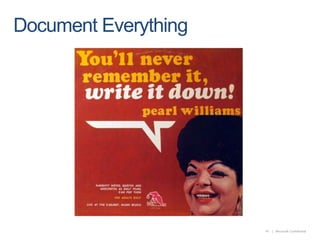
  • #48 If it’s not documented, it didn’t happen