
Security Bootcamp 2012 -
ď‚§ Microsoft SharePoint Most Valuable
 Professional (2011,2012)
ď‚§ Author, Writer, Trainer & Public Speaker
ď‚§ Founder & Editor in Chief of SharePointVN
 Publisher
ď‚§ Focus on Microsoft Security & Federation
 Identity, Infrastructure, Methodologies and
 Architecture.
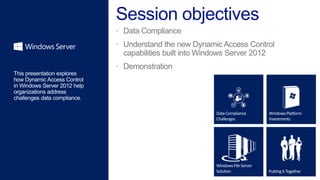
 Data Compliance
 Understand the new Dynamic Access Control
  capabilities built into Windows Server 2012
 Demonstration
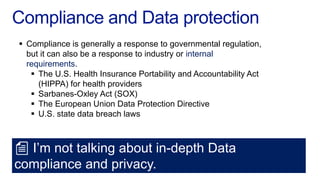
ď‚§ Compliance is generally a response to governmental regulation,
  but it can also be a response to industry or internal
  requirements.
   ď‚§ The U.S. Health Insurance Portability and Accountability Act
     (HIPPA) for health providers
   ď‚§ Sarbanes-Oxley Act (SOX)
   ď‚§ The European Union Data Protection Directive
   ď‚§ U.S. state data breach laws


  I’m not talking about in-depth Data
compliance and privacy.
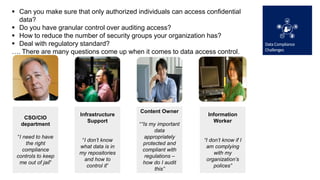
ď‚§ Can you make sure that only authorized individuals can access confidential
  data?
ď‚§ Do you have granular control over auditing access?
ď‚§ How to reduce the number of security groups your organization has?
ď‚§ Deal with regulatory standard?
…. There are many questions come up when it comes to data access control.


                                          Content Owner
                      Infrastructure                             Information
    CSO/CIO
                         Support                                   Worker
   department                             ““Is my important
                                                 data
 “I need to have                             appropriately
                       “I don’t know                           “I don’t know if I
     the right                              protected and
                      what data is in                           am complying
    compliance                              compliant with
                      my repositories                               with my
 controls to keep                            regulations –
                        and how to                              organization’s
  me out of jail”                           how do I audit
                          control it”                               polices”
                                                 this”
Distributed                     Regulatory
Storage growth                Information                     compliance                     Data leakage

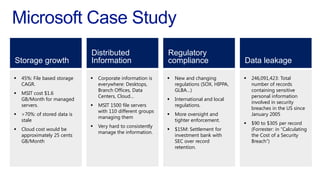
ď‚§   45%: File based storage   ď‚§   Corporate information is    ď‚§   New and changing           ď‚§   246,091,423: Total
    CAGR.                         everywhere: Desktops,           regulations (SOX, HIPPA,       number of records
                                  Branch Offices, Data            GLBA…)                         containing sensitive
ď‚§   MSIT cost $1.6
                                  Centers, Cloud…                                                personal information
    GB/Month for managed                                      ď‚§   International and local
                                                                                                 involved in security
    servers.                  ď‚§   MSIT 1500 file servers          regulations.
                                                                                                 breaches in the US since
                                  with 110 different groups
ď‚§   >70%: of stored data is                                   ď‚§   More oversight and             January 2005
                                  managing them
    stale                                                         tighter enforcement.
                                                                                             ď‚§   $90 to $305 per record
                              ď‚§   Very hard to consistently
   Cloud cost would be                                          $15M: Settlement for           (Forrester: in “Calculating
                                  manage the information.
    approximately 25 cents                                        investment bank with           the Cost of a Security
    GB/Month                                                      SEC over record                Breach”)
                                                                  retention.
Data                            Expression-based               Expression-based
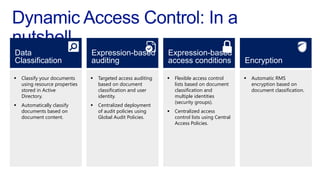
Classification                  auditing                       access conditions                 Encryption

ď‚§   Classify your documents     ď‚§   Targeted access auditing   ď‚§   Flexible access control       ď‚§   Automatic RMS
    using resource properties       based on document              lists based on document           encryption based on
    stored in Active                classification and user        classification and                document classification.
    Directory.                      identity.                      multiple identities
                                                                   (security groups).
ď‚§   Automatically classify      ď‚§   Centralized deployment
    documents based on              of audit policies using    ď‚§   Centralized access
    document content.               Global Audit Policies.         control lists using Central
                                                                   Access Policies.
Data Classification
                                ď‚§ File Classification Infrastructure provides insight into your data
Data                              by automating classification processes.
Classification                  ď‚§ File Classification Infrastructure uses classification rules to
                                  automatically scan files and classify them according to the
ď‚§   Classify your documents       contents of the file.
    using resource properties   ď‚§ Some examples of classification rules include:
    stored in Active
    Directory.
                                    Classify any file that contains the string “SBC12
                                       Confidential” as having high business impact.
ď‚§   Automatically classify
    documents based on             ď‚§ Classify any file that contains at least 10 social security
    document content.                  numbers as having personally identifiable information.
                                ď‚§ Data Classification Toolkit
ď‚§ A content classification rule that searches a set of files for the
Data                              string “SBC12 Confidential”. If the string is found in a file, the
Classification                    Impact resource property is set to High on the file.
                                ď‚§ A content classification rule that searches a set of files for a
ď‚§   Classify your documents       regular expression that matches a social security number at
    using resource properties     least 10 times in one file. If the pattern is found, the file is
    stored in Active
    Directory.
                                  classified as having personally identifiable information and the
                                  Personally Identifiable Information resource property is set to
ď‚§   Automatically classify
    documents based on            High.
    document content.
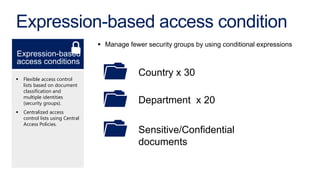
Expression-based access condition
                                  ď‚§ Manage fewer security groups by using conditional expressions
Expression-based
access conditions
                                               Country x 30
ď‚§   Flexible access control
    lists based on document
    classification and
    multiple identities
    (security groups).                         Department x 20
ď‚§   Centralized access
    control lists using Central
    Access Policies.
                                               Sensitive/Confidential
                                               documents
What is Central Access Policy?
ď‚§ You can think of Central Access Policies as a safety
  net that your organization applies across its servers to
  enhance the local access policy
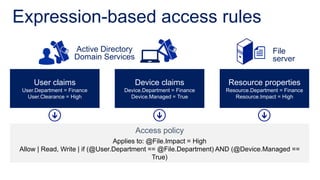
Expression-based access rules
                    Active Directory                                             File
                    Domain Services                                              server

     User claims                       Device claims            Resource properties
 User.Department = Finance       Device.Department = Finance    Resource.Department = Finance
   User.Clearance = High           Device.Managed = True           Resource.Impact = High


                                       Access policy
                                Applies to: @File.Impact = High
Allow | Read, Write | if (@User.Department == @File.Department) AND (@Device.Managed ==
                                             True)
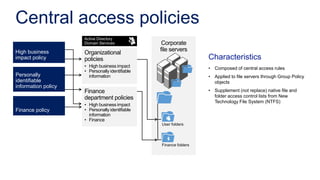
Central access policies
                     Active Directory
                     Domain Services              Corporate
High business                                    file servers
                     Organizational
impact policy        policies                                      Characteristics
                     • High business impact                        • Composed of central access rules
                     • Personally identifiable
Personally             information                                 • Applied to file servers through Group Policy
identifiable                                                         objects
information policy
                     Finance                                       • Supplement (not replace) native file and
                     department policies                             folder access control lists from New
                                                                     Technology File System (NTFS)
                     • High business impact
Finance policy       • Personally identifiable
                       information
                     • Finance
                                                 User folders


                                                 Finance folders
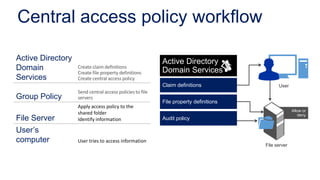
Central access policy workflow

Active Directory                                          Active Directory
Domain             Create claim definitions
                                                          Domain Services
                   Create file property definitions
Services           Create central access policy
                                                          Claim definitions                 User
                   Send central access policies to file
Group Policy       servers
                                                          File property definitions
                   Apply access policy to the
                                                                                                    Allow or
                   shared folder                                                                       deny
File Server        Identify information                   Audit policy

User’s
computer           User tries to access information
                                                                                      File server
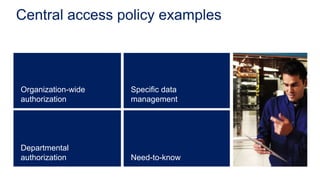
Central access policy examples


Organization-wide   Specific data
authorization       management


Departmental
authorization       Need-to-know
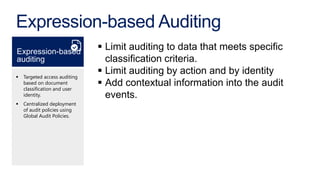
Expression-based Auditing
Expression-based
                               ď‚§ Limit auditing to data that meets specific
auditing                         classification criteria.
ď‚§   Targeted access auditing
                               ď‚§ Limit auditing by action and by identity
    based on document
    classification and user
                               ď‚§ Add contextual information into the audit
    identity.                    events.
ď‚§   Centralized deployment
    of audit policies using
    Global Audit Policies.
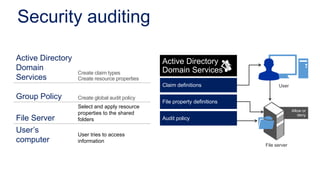
Security auditing

Active Directory                                Active Directory
Domain                                          Domain Services
                   Create claim types
Services           Create resource properties
                                                Claim definitions                 User

Group Policy       Create global audit policy
                                                File property definitions
                   Select and apply resource
                                                                                          Allow or
                   properties to the shared                                                  deny
File Server        folders                      Audit policy

User’s             User tries to access
computer           information
                                                                            File server
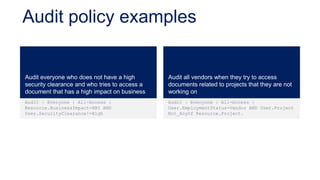
Audit policy examples


Audit everyone who does not have a high        Audit all vendors when they try to access
security clearance and who tries to access a   documents related to projects that they are not
document that has a high impact on business    working on
Audit | Everyone | All-Access |                Audit | Everyone | All-Access |
Resource.BusinessImpact=HBI AND                User.EmploymentStatus=Vendor AND User.Project
User.SecurityClearance!=High                   Not_AnyOf Resource.Project.
Data Encryption Challenges
ď‚§ How do I protect sensitive information after it leaves my
  protected environment?
ď‚§ I cannot get the users to encrypt their sensitive data.
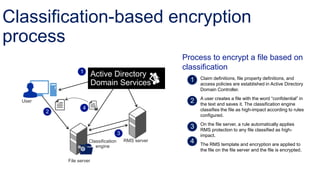
Classification-based encryption
process
                                                          Process to encrypt a file based on
                   1
                                                          classification
                           Active Directory                    Claim definitions, file property definitions, and
                           Domain Services                     access policies are established in Active Directory
                                                               Domain Controller.
                                                               A user creates a file with the word “confidential” in
  User
                                                               the text and saves it. The classification engine
                    4                                          classifies the file as high-impact according to rules
         2
                                                               configured.
                                                               On the file server, a rule automatically applies
                                                               RMS protection to any file classified as high-
                                         3                     impact.
                        Classification       RMS server
                           engine                              The RMS template and encryption are applied to
                                                               the file on the file server and the file is encrypted.

             File server
23
Demonstration Lab
ď‚§ There are two virtual machines that are involved in the
  demonstration lab.
   ď‚§ AD-Srv (Active Directory Domain Controller)
   ď‚§ File-Srv (File Server)
ď‚§ There are two security groups
   ď‚§ Finance
   ď‚§ System Integration
ď‚§ There are two domain users:
   ď‚§ thuan@sbc12.local (Finance)
   ď‚§ thang@sbc12.local (System Integration)
Steps
ď‚§ Create a new claim
   ď‚§ Department
ď‚§ Create resources properties and add it to resource property list
   ď‚§ Finance Department
ď‚§ Create a new central access rule/central policies
   ď‚§ Resource Finance Department Exists
   ď‚§ Resource Finance Department Equals Value Finance
ď‚§ Publish central access policy
   ď‚§ Configure Group Policy and enable KDC
ď‚§ Install File Server Resource Manager on File server
   ď‚§ Update-FSRMClassificationPropertyDefinition
ď‚§ Add Central Access Policy to shared folder
ď‚§ Validate
Thanks for joining with us

Dynamic access control sbc12 - thuan nguyen

  • 1.
  • 2.
    ď‚§ Microsoft SharePointMost Valuable Professional (2011,2012) ď‚§ Author, Writer, Trainer & Public Speaker ď‚§ Founder & Editor in Chief of SharePointVN Publisher ď‚§ Focus on Microsoft Security & Federation Identity, Infrastructure, Methodologies and Architecture.
  • 3.
     Data Compliance Understand the new Dynamic Access Control capabilities built into Windows Server 2012  Demonstration
  • 4.
     Compliance isgenerally a response to governmental regulation, but it can also be a response to industry or internal requirements.  The U.S. Health Insurance Portability and Accountability Act (HIPPA) for health providers  Sarbanes-Oxley Act (SOX)  The European Union Data Protection Directive  U.S. state data breach laws I’m not talking about in-depth Data compliance and privacy.
  • 5.
     Can youmake sure that only authorized individuals can access confidential data?  Do you have granular control over auditing access?  How to reduce the number of security groups your organization has?  Deal with regulatory standard? …. There are many questions come up when it comes to data access control. Content Owner Infrastructure Information CSO/CIO Support Worker department ““Is my important data “I need to have appropriately “I don’t know “I don’t know if I the right protected and what data is in am complying compliance compliant with my repositories with my controls to keep regulations – and how to organization’s me out of jail” how do I audit control it” polices” this”
  • 6.
    Distributed Regulatory Storage growth Information compliance Data leakage  45%: File based storage  Corporate information is  New and changing  246,091,423: Total CAGR. everywhere: Desktops, regulations (SOX, HIPPA, number of records Branch Offices, Data GLBA…) containing sensitive  MSIT cost $1.6 Centers, Cloud… personal information GB/Month for managed  International and local involved in security servers.  MSIT 1500 file servers regulations. breaches in the US since with 110 different groups  >70%: of stored data is  More oversight and January 2005 managing them stale tighter enforcement.  $90 to $305 per record  Very hard to consistently  Cloud cost would be  $15M: Settlement for (Forrester: in “Calculating manage the information. approximately 25 cents investment bank with the Cost of a Security GB/Month SEC over record Breach”) retention.
  • 7.
    Data Expression-based Expression-based Classification auditing access conditions Encryption ď‚§ Classify your documents ď‚§ Targeted access auditing ď‚§ Flexible access control ď‚§ Automatic RMS using resource properties based on document lists based on document encryption based on stored in Active classification and user classification and document classification. Directory. identity. multiple identities (security groups). ď‚§ Automatically classify ď‚§ Centralized deployment documents based on of audit policies using ď‚§ Centralized access document content. Global Audit Policies. control lists using Central Access Policies.
  • 9.
    Data Classification  File Classification Infrastructure provides insight into your data Data by automating classification processes. Classification  File Classification Infrastructure uses classification rules to automatically scan files and classify them according to the  Classify your documents contents of the file. using resource properties  Some examples of classification rules include: stored in Active Directory.  Classify any file that contains the string “SBC12 Confidential” as having high business impact.  Automatically classify documents based on  Classify any file that contains at least 10 social security document content. numbers as having personally identifiable information.  Data Classification Toolkit
  • 10.
     A contentclassification rule that searches a set of files for the Data string “SBC12 Confidential”. If the string is found in a file, the Classification Impact resource property is set to High on the file.  A content classification rule that searches a set of files for a  Classify your documents regular expression that matches a social security number at using resource properties least 10 times in one file. If the pattern is found, the file is stored in Active Directory. classified as having personally identifiable information and the Personally Identifiable Information resource property is set to  Automatically classify documents based on High. document content.
  • 12.
    Expression-based access condition ď‚§ Manage fewer security groups by using conditional expressions Expression-based access conditions Country x 30 ď‚§ Flexible access control lists based on document classification and multiple identities (security groups). Department x 20 ď‚§ Centralized access control lists using Central Access Policies. Sensitive/Confidential documents
  • 13.
    What is CentralAccess Policy? ď‚§ You can think of Central Access Policies as a safety net that your organization applies across its servers to enhance the local access policy
  • 14.
    Expression-based access rules Active Directory File Domain Services server User claims Device claims Resource properties User.Department = Finance Device.Department = Finance Resource.Department = Finance User.Clearance = High Device.Managed = True Resource.Impact = High Access policy Applies to: @File.Impact = High Allow | Read, Write | if (@User.Department == @File.Department) AND (@Device.Managed == True)
  • 15.
    Central access policies Active Directory Domain Services Corporate High business file servers Organizational impact policy policies Characteristics • High business impact • Composed of central access rules • Personally identifiable Personally information • Applied to file servers through Group Policy identifiable objects information policy Finance • Supplement (not replace) native file and department policies folder access control lists from New Technology File System (NTFS) • High business impact Finance policy • Personally identifiable information • Finance User folders Finance folders
  • 16.
    Central access policyworkflow Active Directory Active Directory Domain Create claim definitions Domain Services Create file property definitions Services Create central access policy Claim definitions User Send central access policies to file Group Policy servers File property definitions Apply access policy to the Allow or shared folder deny File Server Identify information Audit policy User’s computer User tries to access information File server
  • 17.
    Central access policyexamples Organization-wide Specific data authorization management Departmental authorization Need-to-know
  • 18.
    Expression-based Auditing Expression-based ď‚§ Limit auditing to data that meets specific auditing classification criteria. ď‚§ Targeted access auditing ď‚§ Limit auditing by action and by identity based on document classification and user ď‚§ Add contextual information into the audit identity. events. ď‚§ Centralized deployment of audit policies using Global Audit Policies.
  • 19.
    Security auditing Active Directory Active Directory Domain Domain Services Create claim types Services Create resource properties Claim definitions User Group Policy Create global audit policy File property definitions Select and apply resource Allow or properties to the shared deny File Server folders Audit policy User’s User tries to access computer information File server
  • 20.
    Audit policy examples Auditeveryone who does not have a high Audit all vendors when they try to access security clearance and who tries to access a documents related to projects that they are not document that has a high impact on business working on Audit | Everyone | All-Access | Audit | Everyone | All-Access | Resource.BusinessImpact=HBI AND User.EmploymentStatus=Vendor AND User.Project User.SecurityClearance!=High Not_AnyOf Resource.Project.
  • 21.
    Data Encryption Challenges ď‚§How do I protect sensitive information after it leaves my protected environment? ď‚§ I cannot get the users to encrypt their sensitive data.
  • 22.
    Classification-based encryption process Process to encrypt a file based on 1 classification Active Directory Claim definitions, file property definitions, and Domain Services access policies are established in Active Directory Domain Controller. A user creates a file with the word “confidential” in User the text and saves it. The classification engine 4 classifies the file as high-impact according to rules 2 configured. On the file server, a rule automatically applies RMS protection to any file classified as high- 3 impact. Classification RMS server engine The RMS template and encryption are applied to the file on the file server and the file is encrypted. File server
  • 23.
  • 24.
    Demonstration Lab ď‚§ Thereare two virtual machines that are involved in the demonstration lab. ď‚§ AD-Srv (Active Directory Domain Controller) ď‚§ File-Srv (File Server) ď‚§ There are two security groups ď‚§ Finance ď‚§ System Integration ď‚§ There are two domain users: ď‚§ thuan@sbc12.local (Finance) ď‚§ thang@sbc12.local (System Integration)
  • 25.
    Steps ď‚§ Create anew claim ď‚§ Department ď‚§ Create resources properties and add it to resource property list ď‚§ Finance Department ď‚§ Create a new central access rule/central policies ď‚§ Resource Finance Department Exists ď‚§ Resource Finance Department Equals Value Finance ď‚§ Publish central access policy ď‚§ Configure Group Policy and enable KDC ď‚§ Install File Server Resource Manager on File server ď‚§ Update-FSRMClassificationPropertyDefinition ď‚§ Add Central Access Policy to shared folder ď‚§ Validate
  • 26.