

Major Sponsors Minor Sponsors
Who Is Shailen Sukul ?
Shailen (pronounced Shay-Len) Sukul is a bleeding edge Entrepreneur working with the latest Web
technologies to create compelling solutions. He loves to present at user groups and write articles
and whitepapers based on his work.
He currently works as a Senior SharePointArchitect at Readify and specializes in installation,
configuration, development and training on the SharePoint platform with a side focus on Azure.
When working on startups in his “night” job, he prefersAWS and ASP.Net MVC with open source
databases and is now dabbling with nodeJS and Ruby.
You can follow him on twitter @shailensukul and check out his blog at: http://shailensukul.com
Find more about me at au.linkedin.com/in/shailensukul
Who Is Shailen Sukul ?
• Checkout my open source projects
 Taxomatic: http://taxomatic.codeplex.com/ - SharePoint 2013 App
coming soon!
 SharePoint Smart Serve http://smartserve.codeplex.com/
 Multi-Threaded File Download Manager
http://bloodhound.codeplex.com/
 DBRef http://dbref.codeplex.com/
• Checkout my blog at: http://www.shailensukul.com
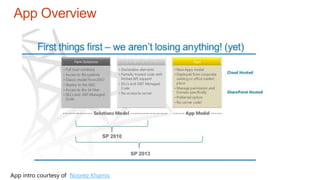
App Overview
App intro courtesy of Noorez Khamis
What Are Apps
• Apps for SharePoint are self-contained pieces of functionality that extend
the capabilities of a SharePoint website (Microsoft)
• Stand-alone applications that are easy to install, use, manage, upgrade
and remove
• Ability to download and purchase apps from the Office Marketplace or from
an organization’s private App Catalog
• Allow developers capability to create any application they want which runs
outside the core SharePoint framework
• Uses familiar web standards like HTML, JS, CSS, etc
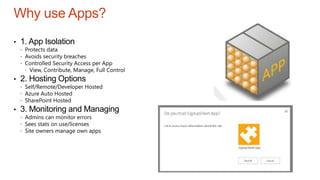
Why use Apps?
• 1. App Isolation
 Protects data
 Avoids security breaches
 Controlled Security Access per App
 View, Contribute, Manage, Full Control
• 2. Hosting Options
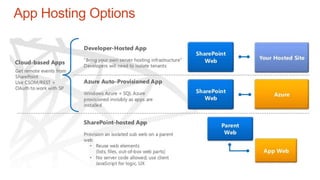
 Self/Remote/Developer Hosted
 Azure Auto Hosted
 SharePoint Hosted
• 3. Monitoring and Managing
 Admins can monitor errors
 Sees stats on use/licenses
 Site owners manage own apps
Why did Microsoft go down the App Route?
• Easier to upgrade to newer versions/patches
• Create rich apps that tie into SharePoint but not dependent on it
• Allow developers to use any development platform they like
• Reduction of
 Server outages and downtime
 Errors due to custom code
 Testing
 Performance and scaling problems
• Fine grained control for administrators
• Office Marketplace and Cross-Device (Mobiles & Tablets)
Sandbox solutions
• Use Apps instead:
You can't run sandboxed code on a single server installation of SharePoint
2013 on Windows Server 2012 + domain controller.
You can install and activate the solution without any problems, but any
sandboxed code will throw the following error:
An unknown exception occurred while executing a sandboxed code solution
request in the worker process.
Reference: http://www.jrjlee.com/2013/04/another-reason-to-stop-
developing.html
App Hosting Options
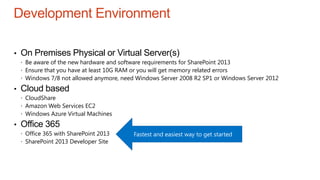
Development Environment
• On Premises Physical or Virtual Server(s)
 Be aware of the new hardware and software requirements for SharePoint 2013
 Ensure that you have at least 10G RAM or you will get memory related errors
 Windows 7/8 not allowed anymore, need Windows Server 2008 R2 SP1 or Windows Server 2012
• Cloud based
 CloudShare
 Amazon Web Services EC2
 Windows Azure Virtual Machines
• Office 365
 Office 365 with SharePoint 2013
 SharePoint 2013 Developer Site
Fastest and easiest way to get started
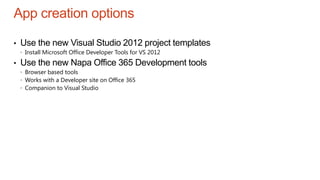
App creation options
• Use the new Visual Studio 2012 project templates
 Install Microsoft Office Developer Tools for VS 2012
• Use the new Napa Office 365 Development tools
 Browser based tools
 Works with a Developer site on Office 365
 Companion to Visual Studio
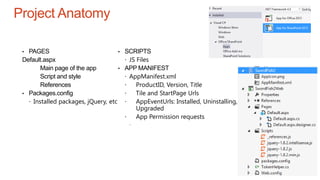
Project Anatomy
• PAGES
Default.aspx
Main page of the app
Script and style
References
• Packages.config
 Installed packages, jQuery, etc
• SCRIPTS
 JS Files
• APP MANIFEST
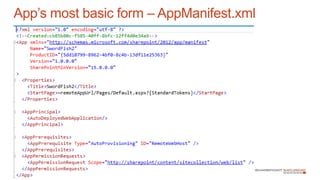
 AppManifest.xml
 ProductID, Version, Title
 Tile and StartPage Urls
 AppEventUrls: Installed, Uninstalling,
Upgraded
 App Permission requests
Apps
• Apps can run in a server which can be hosted in the cloud. This can be
cross domain and interacts with SharePoint via REST/Oauth (Server Side
code, JSONP for cross domain calls)
• Word of caution: In the web.config of SharePoint, all of these cross domain
calls, they have turned request validation to off for handlers which accept
these calls. This means that the App developer has the ability to insert any
JS or HTML from the client side. This means that Apps can have malicious
code or can be hijacked by other IFrame apps. The resolution is to design
apps to leverage Shared tokens. A simpler way is not to use a Part App
and instead to use a Page App.
Apps
• Reference (Sahil Malik): http://blah.winsmarts.com/2012-8-
SharePoint_Apps_a_word_of_caution.aspx
Now, SharePoint 2013 uses numerous services etc. to enable cross-domain oAuth
protected requests. If you examine the web.config of SharePoint 2013, you’ll see
numerous elements like this,
<location path="_vti_bin/CrossDomainAjax.ashx">
<system.web>
<httpRuntime requestValidationMode="2.0" />
</system.web>
</location>
This means, ASP.NET 2.0 style request validation. Request validation was enabled by
default. However, it applied only to ASP.NET pages (.aspx files and their class files)
and only when those pages were executing. SharePoint 2013 has chosen to go with
the 2.0 model, not the 4.0 model. I can understand why, it is unreasonable for
Microsoft to validate every single request that you will send, Microsoft doesn’t know
about your incoming requests. As a result, your non-aspx artifacts are wide open to
XSS attack.
Apps
What kind of attack you may ask?
Imagine you have a banking app that uses oAuth to securely access your account
information.
Imagine that you have a second app on the same page that shows you funny cat videos
from youtube.
The cat videos app can have full client side access to the banking app. Not all apps will
have this issue, depends how you write them of course. But certainly some will. This
means, the funny cats will be able to access cookies, tamper with the page, even iFrames,
and worst case scenario, masquerade as an authenticated you, and allow the cat videos
app to do whatever the hell it pleases in the Bank of America app – as you of course.
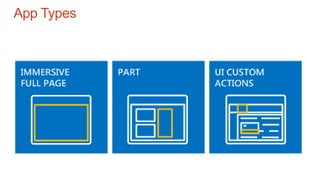
App Types
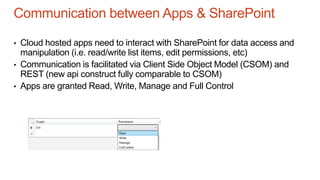
Communication between Apps & SharePoint
• Cloud hosted apps need to interact with SharePoint for data access and
manipulation (i.e. read/write list items, edit permissions, etc)
• Communication is facilitated via Client Side Object Model (CSOM) and
REST (new api construct fully comparable to CSOM)
• Apps are granted Read, Write, Manage and Full Control
App’s most basic form – AppManifest.xml
Public Office Marketplace – Publish your app to the Office Store to
make the app available so that it can be acquired by users of any
SharePoint deployment
Internal organization app catalog – Publish your apps to an internal
organization app catalog, hosted on your SharePoint deployment, to
make them available to uses with access to that SharePoint
deployment
Note: Developers can use the “Developer” site template to test out
their apps
Options for publishing Apps
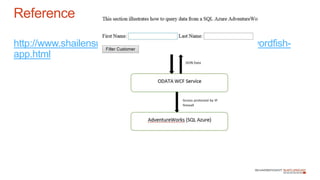
Hands On Guide
http://www.shailensukul.com/2012/10/sharepoint-2013-swordfish-
app.html
Reference
1. Download the AdventureWorks database from
http://msftdbprodsamples.codeplex.com/releases/view/37304
2. Read
D:ShailenCodeSharePointSwordFishAzureDbReadMe.htm
Create the database
1. From the command prompt, type:
CreateAdventureWorksForSQLAzure.cmd servername username
password
2. Create a firewall rule to allow connection to DB from Dev box
Create The database
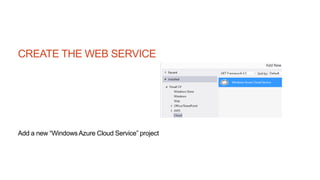
CREATE THE WEB SERVICE
Add a new “WindowsAzure Cloud Service” project
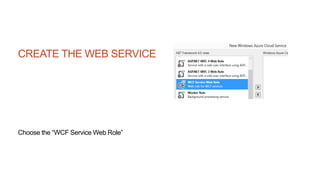
CREATE THE WEB SERVICE
Choose the “WCF Service Web Role”
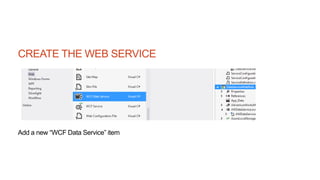
CREATE THE WEB SERVICE
Add a new “WCF Data Service” item
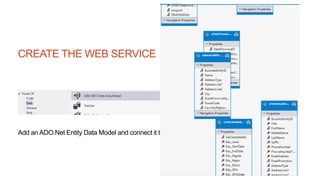
CREATE THE WEB SERVICE
Add an ADO.Net Entity Data Model and connect it to the Azure database
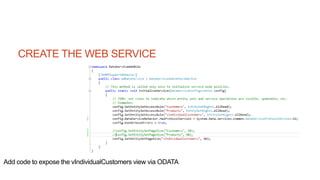
CREATE THE WEB SERVICE
Add code to expose the vIndividualCustomers view via ODATA
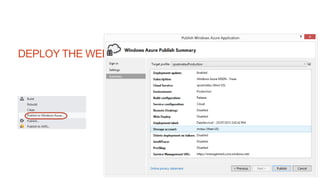
DEPLOY THE WEB SERVICE
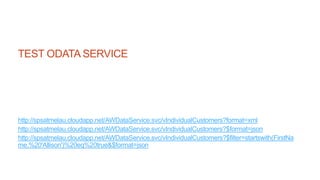
TEST ODATA SERVICE
http://spsatmelau.cloudapp.net/AWDataService.svc/vIndividualCustomers?format=xml
http://spsatmelau.cloudapp.net/AWDataService.svc/vIndividualCustomers?$format=json
http://spsatmelau.cloudapp.net/AWDataService.svc/vIndividualCustomers?$filter=startswith(FirstNa
me,%20'Allison')%20eq%20true&$format=json
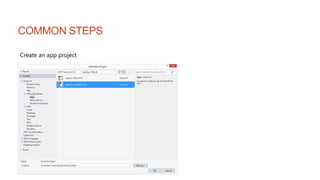
COMMON STEPS
Create an app project
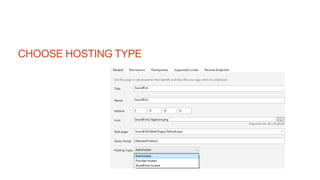
CHOOSE HOSTING TYPE
AUTOHOSTED
Autohosted apps for SharePoint are hosted on WindowsAzure Web Sites, a
kind of WindowsAzure "lite." As with a provider-hosted app for SharePoint, an
autohosted app for SharePoint interacts with a SharePoint 2013 website but also
uses resources and services that reside on a remote site that is hosted by the
WindowsAzure Web Sites infrastructure.
AUTOHOSTED
Benefit: When you deploy an autohosted app for SharePoint, all
Windows Azure and Windows Azure SQL Database components
are provisioned for you when the app for SharePoint is installed.
Benefit: The Windows Azure Web Sites infrastructure handles
load balancing, multi-tenancy, and other important maintenance
tasks for you.
Consideration: If you are using autohosting for your app, each
installation of the app provisions its own Windows Azure Web Site.
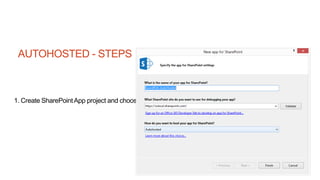
AUTOHOSTED - STEPS
1. Create SharePointApp project and choose the Autohosted option
AUTOHOSTED - STEPS
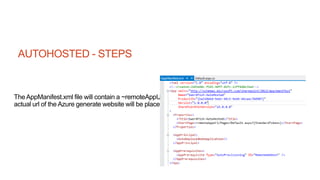
The AppManifest.xml file will contain a ~remoteAppUrl placeholder where the
actual url of the Azure generate website will be placed
AUTOHOSTED - STEPS
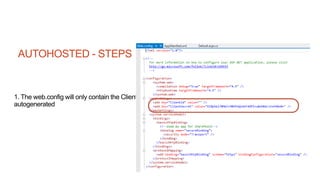
1. The web.config will only contain the ClientSecret and the ClientId will be
autogenerated
AUTOHOSTED - STEPS
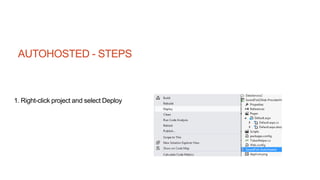
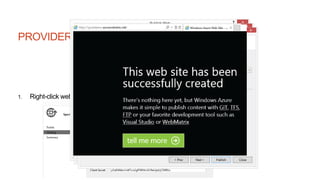
1. Right-click project and select Deploy
AUTOHOSTED
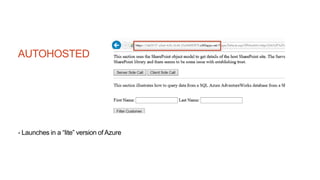
- Launches in a “lite” version of Azure
PROVIDER HOSTED
Provider-hosted apps for SharePoint includes components that are deployed and hosted outside of
the SharePoint farm, usually by the developer, but in some scenarios by the customer. The provider-
hosted app for SharePoint interacts with a SharePoint 2013 site but also uses resources and
services that reside on the remote site.
PROVIDER HOSTED
Benefit: The provider-hosted app for SharePoint can be hosted on Windows
Azure or any remote web platform, including non-Microsoft platforms. It
interacts with SharePoint 2013 by using one of the SharePoint client object
models or its REST/OData-based web service. Depending on the scenario it
gains authorization to SharePoint data using either the SharePoint 2013
implementation of the OAuth standard or a JavaScript cross-domain library.
Benefit: This approach enables you to use any hosting service you want.
PROVIDER HOSTED
Consideration: This option provides you with a great deal of flexibility, but it
places the responsibility for creating the installation, upgrade, and uninstallation
logic of the remote components on the developer.
Within the category of provider-hosted apps for SharePoint, there are important
architectural differences between apps for SharePoint whose remote
components will be installed outside the corporate firewall of the SharePoint farm
where the app is installed and those whose remote components will be installed
within that firewall. Let's look at the benefits and considerations for these two
scenarios.
PROVIDER HOSTED
Provider-hosted with remote components outside the firewall
Benefit: This approach enables you to use JavaScript or the SharePoint REST/OData web
service.
Benefit: This approach enables you to use SharePoint JavaScript cross-domain library for
authorization.
Consideration: This approach places responsibility on the development team for maintaining
the remote site and for managing tenancy isolation among the customers that are using the
app.
Provider-hosted with remote components inside the firewall
Benefit: This approach enables you to use any programming languages that you wish.
Benefit: This approach enables you to interact with a SharePoint 2013 site by using one of the
SharePoint client object models or its REST/OData-based web service, and to use the OAuth
protocol for app authentication and authorization.
Consideration: This approach places responsibility on the development team to provide a
packaging and installation system for the remote components.
PROVIDER HOSTED - STEPS
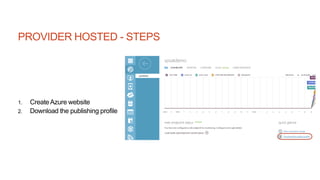
1. CreateAzure website
2. Download the publishing profile
PROVIDER HOSTED - STEPS
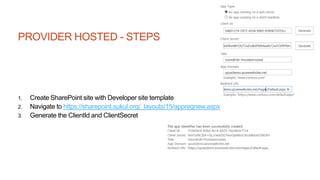
1. Create SharePoint site with Developer site template
2. Navigate to https://sharepoint.sukul.org/_layouts/15/appregnew.aspx
3. Generate the ClientId and ClientSecret
PROVIDER HOSTED - STEPS
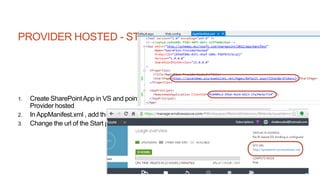
1. Create SharePointApp in VS and point to Developer site created earlier. Choose
Provider hosted
2. In AppManifest.xml , add the ClientId from above
3. Change the url of the Start page to the Azure website
PROVIDER HOSTED - STEPS
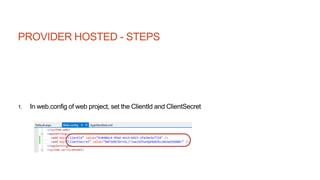
1. In web.config of web project, set the ClientId and ClientSecret
PROVIDER HOSTED - STEPS
1. Right-click web project and pick “Publish”, and use the profile from above
PROVIDER HOSTED - STEPS
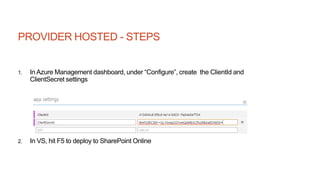
1. In Azure Management dashboard, under “Configure”, create the ClientId and
ClientSecret settings
2. In VS, hit F5 to deploy to SharePoint Online
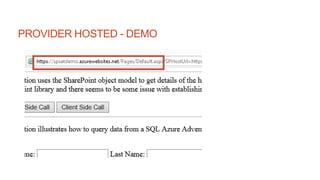
PROVIDER HOSTED - DEMO
SHAREPOINT HOSTED
SharePoint-hosted apps for SharePoint are installed on a SharePoint 2013 website,
called the host web, and that have their resources hosted on an isolated subsite of a host
web, called the app web. This approach enables you to reuse common SharePoint
artifacts, such as lists and Web Parts. When you take this approach, you can use only
JavaScript and you cannot use any server-side code.
Benefit: This approach enables you to reuse common SharePoint artifacts, such as lists
and Web Parts.
Consideration: You can use only JavaScript in the app, and you cannot use any server-
side code.
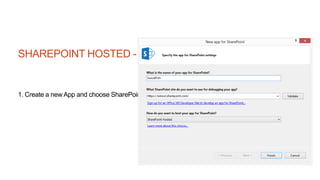
SHAREPOINT HOSTED - STEPS
1. Create a new App and choose SharePoint hosted
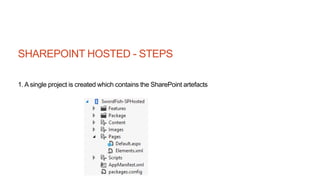
SHAREPOINT HOSTED - STEPS
1. A single project is created which contains the SharePoint artefacts
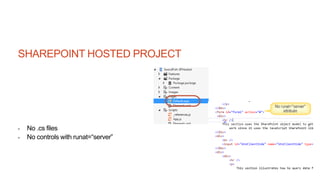
SHAREPOINT HOSTED PROJECT
- No .cs files
- No controls with runat=“server”
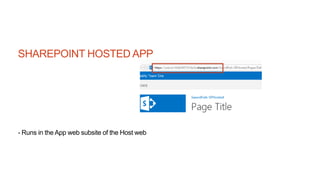
SHAREPOINT HOSTED APP
- Runs in the App web subsite of the Host web
SHAREPOINT HOSTED APP
Demo
Contact details:
Shailen@sukul.org
@ShailenSukul
http://shailensukul.com
Related links:
SharePoint Hosting Models - http://msdn.microsoft.com/en-
us/library/fp179887.aspx
Guidelines for registering apps for SharePoint 2013
http://msdn.microsoft.com/en-us/library/jj687469.aspx
Build a SharePoint Provider Hosted App in 5 mins
- http://www.looselytyped.net/2012/10/24/build-a-sharepoint-
provider-hosted-app-in-5-mins/
SharePoint 2013 Best Practices -
http://social.technet.microsoft.com/wiki/contents/articles/12438.
sharepoint-2013-best-practices.aspx
Major Sponsors Minor Sponsors

SharePoint 2013 App Provisioning Models

  • 1.
  • 2.
    Who Is ShailenSukul ? Shailen (pronounced Shay-Len) Sukul is a bleeding edge Entrepreneur working with the latest Web technologies to create compelling solutions. He loves to present at user groups and write articles and whitepapers based on his work. He currently works as a Senior SharePointArchitect at Readify and specializes in installation, configuration, development and training on the SharePoint platform with a side focus on Azure. When working on startups in his “night” job, he prefersAWS and ASP.Net MVC with open source databases and is now dabbling with nodeJS and Ruby. You can follow him on twitter @shailensukul and check out his blog at: http://shailensukul.com Find more about me at au.linkedin.com/in/shailensukul
  • 3.
    Who Is ShailenSukul ? • Checkout my open source projects  Taxomatic: http://taxomatic.codeplex.com/ - SharePoint 2013 App coming soon!  SharePoint Smart Serve http://smartserve.codeplex.com/  Multi-Threaded File Download Manager http://bloodhound.codeplex.com/  DBRef http://dbref.codeplex.com/ • Checkout my blog at: http://www.shailensukul.com
  • 4.
    App Overview App introcourtesy of Noorez Khamis
  • 5.
    What Are Apps •Apps for SharePoint are self-contained pieces of functionality that extend the capabilities of a SharePoint website (Microsoft) • Stand-alone applications that are easy to install, use, manage, upgrade and remove • Ability to download and purchase apps from the Office Marketplace or from an organization’s private App Catalog • Allow developers capability to create any application they want which runs outside the core SharePoint framework • Uses familiar web standards like HTML, JS, CSS, etc
  • 6.
    Why use Apps? •1. App Isolation  Protects data  Avoids security breaches  Controlled Security Access per App  View, Contribute, Manage, Full Control • 2. Hosting Options  Self/Remote/Developer Hosted  Azure Auto Hosted  SharePoint Hosted • 3. Monitoring and Managing  Admins can monitor errors  Sees stats on use/licenses  Site owners manage own apps
  • 7.
    Why did Microsoftgo down the App Route? • Easier to upgrade to newer versions/patches • Create rich apps that tie into SharePoint but not dependent on it • Allow developers to use any development platform they like • Reduction of  Server outages and downtime  Errors due to custom code  Testing  Performance and scaling problems • Fine grained control for administrators • Office Marketplace and Cross-Device (Mobiles & Tablets)
  • 8.
    Sandbox solutions • UseApps instead: You can't run sandboxed code on a single server installation of SharePoint 2013 on Windows Server 2012 + domain controller. You can install and activate the solution without any problems, but any sandboxed code will throw the following error: An unknown exception occurred while executing a sandboxed code solution request in the worker process. Reference: http://www.jrjlee.com/2013/04/another-reason-to-stop- developing.html
  • 9.
  • 10.
    Development Environment • OnPremises Physical or Virtual Server(s)  Be aware of the new hardware and software requirements for SharePoint 2013  Ensure that you have at least 10G RAM or you will get memory related errors  Windows 7/8 not allowed anymore, need Windows Server 2008 R2 SP1 or Windows Server 2012 • Cloud based  CloudShare  Amazon Web Services EC2  Windows Azure Virtual Machines • Office 365  Office 365 with SharePoint 2013  SharePoint 2013 Developer Site Fastest and easiest way to get started
  • 11.
    App creation options •Use the new Visual Studio 2012 project templates  Install Microsoft Office Developer Tools for VS 2012 • Use the new Napa Office 365 Development tools  Browser based tools  Works with a Developer site on Office 365  Companion to Visual Studio
  • 12.
    Project Anatomy • PAGES Default.aspx Mainpage of the app Script and style References • Packages.config  Installed packages, jQuery, etc • SCRIPTS  JS Files • APP MANIFEST  AppManifest.xml  ProductID, Version, Title  Tile and StartPage Urls  AppEventUrls: Installed, Uninstalling, Upgraded  App Permission requests
  • 13.
    Apps • Apps canrun in a server which can be hosted in the cloud. This can be cross domain and interacts with SharePoint via REST/Oauth (Server Side code, JSONP for cross domain calls) • Word of caution: In the web.config of SharePoint, all of these cross domain calls, they have turned request validation to off for handlers which accept these calls. This means that the App developer has the ability to insert any JS or HTML from the client side. This means that Apps can have malicious code or can be hijacked by other IFrame apps. The resolution is to design apps to leverage Shared tokens. A simpler way is not to use a Part App and instead to use a Page App.
  • 14.
    Apps • Reference (SahilMalik): http://blah.winsmarts.com/2012-8- SharePoint_Apps_a_word_of_caution.aspx Now, SharePoint 2013 uses numerous services etc. to enable cross-domain oAuth protected requests. If you examine the web.config of SharePoint 2013, you’ll see numerous elements like this, <location path="_vti_bin/CrossDomainAjax.ashx"> <system.web> <httpRuntime requestValidationMode="2.0" /> </system.web> </location> This means, ASP.NET 2.0 style request validation. Request validation was enabled by default. However, it applied only to ASP.NET pages (.aspx files and their class files) and only when those pages were executing. SharePoint 2013 has chosen to go with the 2.0 model, not the 4.0 model. I can understand why, it is unreasonable for Microsoft to validate every single request that you will send, Microsoft doesn’t know about your incoming requests. As a result, your non-aspx artifacts are wide open to XSS attack.
  • 15.
    Apps What kind ofattack you may ask? Imagine you have a banking app that uses oAuth to securely access your account information. Imagine that you have a second app on the same page that shows you funny cat videos from youtube. The cat videos app can have full client side access to the banking app. Not all apps will have this issue, depends how you write them of course. But certainly some will. This means, the funny cats will be able to access cookies, tamper with the page, even iFrames, and worst case scenario, masquerade as an authenticated you, and allow the cat videos app to do whatever the hell it pleases in the Bank of America app – as you of course.
  • 16.
  • 17.
    Communication between Apps& SharePoint • Cloud hosted apps need to interact with SharePoint for data access and manipulation (i.e. read/write list items, edit permissions, etc) • Communication is facilitated via Client Side Object Model (CSOM) and REST (new api construct fully comparable to CSOM) • Apps are granted Read, Write, Manage and Full Control
  • 18.
    App’s most basicform – AppManifest.xml
  • 19.
    Public Office Marketplace– Publish your app to the Office Store to make the app available so that it can be acquired by users of any SharePoint deployment Internal organization app catalog – Publish your apps to an internal organization app catalog, hosted on your SharePoint deployment, to make them available to uses with access to that SharePoint deployment Note: Developers can use the “Developer” site template to test out their apps Options for publishing Apps
  • 20.
  • 21.
  • 22.
    1. Download theAdventureWorks database from http://msftdbprodsamples.codeplex.com/releases/view/37304 2. Read D:ShailenCodeSharePointSwordFishAzureDbReadMe.htm Create the database
  • 23.
    1. From thecommand prompt, type: CreateAdventureWorksForSQLAzure.cmd servername username password 2. Create a firewall rule to allow connection to DB from Dev box Create The database
  • 24.
    CREATE THE WEBSERVICE Add a new “WindowsAzure Cloud Service” project
  • 25.
    CREATE THE WEBSERVICE Choose the “WCF Service Web Role”
  • 26.
    CREATE THE WEBSERVICE Add a new “WCF Data Service” item
  • 27.
    CREATE THE WEBSERVICE Add an ADO.Net Entity Data Model and connect it to the Azure database
  • 28.
    CREATE THE WEBSERVICE Add code to expose the vIndividualCustomers view via ODATA
  • 29.
  • 30.
  • 32.
  • 33.
  • 34.
    AUTOHOSTED Autohosted apps forSharePoint are hosted on WindowsAzure Web Sites, a kind of WindowsAzure "lite." As with a provider-hosted app for SharePoint, an autohosted app for SharePoint interacts with a SharePoint 2013 website but also uses resources and services that reside on a remote site that is hosted by the WindowsAzure Web Sites infrastructure.
  • 35.
    AUTOHOSTED Benefit: When youdeploy an autohosted app for SharePoint, all Windows Azure and Windows Azure SQL Database components are provisioned for you when the app for SharePoint is installed. Benefit: The Windows Azure Web Sites infrastructure handles load balancing, multi-tenancy, and other important maintenance tasks for you. Consideration: If you are using autohosting for your app, each installation of the app provisions its own Windows Azure Web Site.
  • 36.
    AUTOHOSTED - STEPS 1.Create SharePointApp project and choose the Autohosted option
  • 37.
    AUTOHOSTED - STEPS TheAppManifest.xml file will contain a ~remoteAppUrl placeholder where the actual url of the Azure generate website will be placed
  • 38.
    AUTOHOSTED - STEPS 1.The web.config will only contain the ClientSecret and the ClientId will be autogenerated
  • 39.
    AUTOHOSTED - STEPS 1.Right-click project and select Deploy
  • 40.
    AUTOHOSTED - Launches ina “lite” version of Azure
  • 41.
    PROVIDER HOSTED Provider-hosted appsfor SharePoint includes components that are deployed and hosted outside of the SharePoint farm, usually by the developer, but in some scenarios by the customer. The provider- hosted app for SharePoint interacts with a SharePoint 2013 site but also uses resources and services that reside on the remote site.
  • 42.
    PROVIDER HOSTED Benefit: Theprovider-hosted app for SharePoint can be hosted on Windows Azure or any remote web platform, including non-Microsoft platforms. It interacts with SharePoint 2013 by using one of the SharePoint client object models or its REST/OData-based web service. Depending on the scenario it gains authorization to SharePoint data using either the SharePoint 2013 implementation of the OAuth standard or a JavaScript cross-domain library. Benefit: This approach enables you to use any hosting service you want.
  • 43.
    PROVIDER HOSTED Consideration: Thisoption provides you with a great deal of flexibility, but it places the responsibility for creating the installation, upgrade, and uninstallation logic of the remote components on the developer. Within the category of provider-hosted apps for SharePoint, there are important architectural differences between apps for SharePoint whose remote components will be installed outside the corporate firewall of the SharePoint farm where the app is installed and those whose remote components will be installed within that firewall. Let's look at the benefits and considerations for these two scenarios.
  • 44.
    PROVIDER HOSTED Provider-hosted withremote components outside the firewall Benefit: This approach enables you to use JavaScript or the SharePoint REST/OData web service. Benefit: This approach enables you to use SharePoint JavaScript cross-domain library for authorization. Consideration: This approach places responsibility on the development team for maintaining the remote site and for managing tenancy isolation among the customers that are using the app. Provider-hosted with remote components inside the firewall Benefit: This approach enables you to use any programming languages that you wish. Benefit: This approach enables you to interact with a SharePoint 2013 site by using one of the SharePoint client object models or its REST/OData-based web service, and to use the OAuth protocol for app authentication and authorization. Consideration: This approach places responsibility on the development team to provide a packaging and installation system for the remote components.
  • 45.
    PROVIDER HOSTED -STEPS 1. CreateAzure website 2. Download the publishing profile
  • 46.
    PROVIDER HOSTED -STEPS 1. Create SharePoint site with Developer site template 2. Navigate to https://sharepoint.sukul.org/_layouts/15/appregnew.aspx 3. Generate the ClientId and ClientSecret
  • 47.
    PROVIDER HOSTED -STEPS 1. Create SharePointApp in VS and point to Developer site created earlier. Choose Provider hosted 2. In AppManifest.xml , add the ClientId from above 3. Change the url of the Start page to the Azure website
  • 48.
    PROVIDER HOSTED -STEPS 1. In web.config of web project, set the ClientId and ClientSecret
  • 49.
    PROVIDER HOSTED -STEPS 1. Right-click web project and pick “Publish”, and use the profile from above
  • 50.
    PROVIDER HOSTED -STEPS 1. In Azure Management dashboard, under “Configure”, create the ClientId and ClientSecret settings 2. In VS, hit F5 to deploy to SharePoint Online
  • 51.
  • 52.
    SHAREPOINT HOSTED SharePoint-hosted appsfor SharePoint are installed on a SharePoint 2013 website, called the host web, and that have their resources hosted on an isolated subsite of a host web, called the app web. This approach enables you to reuse common SharePoint artifacts, such as lists and Web Parts. When you take this approach, you can use only JavaScript and you cannot use any server-side code. Benefit: This approach enables you to reuse common SharePoint artifacts, such as lists and Web Parts. Consideration: You can use only JavaScript in the app, and you cannot use any server- side code.
  • 53.
    SHAREPOINT HOSTED -STEPS 1. Create a new App and choose SharePoint hosted
  • 54.
    SHAREPOINT HOSTED -STEPS 1. A single project is created which contains the SharePoint artefacts
  • 55.
    SHAREPOINT HOSTED PROJECT -No .cs files - No controls with runat=“server”
  • 56.
    SHAREPOINT HOSTED APP -Runs in the App web subsite of the Host web
  • 57.
  • 58.
    Contact details: Shailen@sukul.org @ShailenSukul http://shailensukul.com Related links: SharePointHosting Models - http://msdn.microsoft.com/en- us/library/fp179887.aspx Guidelines for registering apps for SharePoint 2013 http://msdn.microsoft.com/en-us/library/jj687469.aspx Build a SharePoint Provider Hosted App in 5 mins - http://www.looselytyped.net/2012/10/24/build-a-sharepoint- provider-hosted-app-in-5-mins/ SharePoint 2013 Best Practices - http://social.technet.microsoft.com/wiki/contents/articles/12438. sharepoint-2013-best-practices.aspx
  • 59.

Editor's Notes

  • #13 Demo real project
  • #24 Demonstrate via SQL Management Studio. Passwords are in D:\Shailen\Code\SharePoint\SwordFish\Azure-Related-Config