

Lotus Notes Transition to
Office 365
Thuan Nguyen
Solution Architect, FPT Software, Japan
About Me
A Solution Architect at FPT Software, helping
customers effectively build a digital workplace with
Microsoft Products and Technologies.
Email: ThuanNN@Fsoft.com.vn
Blog: http://thuansoldier.net
LinkedIn: linkedin.com/in/thuansoldier
Twitter: @nnthuan
 Different organizations have different reasons of
Notes transition.
 The presentation is not going to compare between
Lotus Notes & Office 365.
 There is no silver bullet in any Notes transition to
Office 365
 Your experience and thoughts may vary
Disclaimer
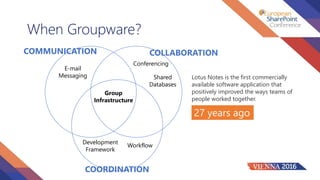
When Groupware?
Group
Infrastructure
COLLABORATION
Conferencing
Shared
Databases
Development
Framework
Workflow
COMMUNICATION
COORDINATION
E-mail
Messaging Lotus Notes is the first commercially
available software application that
positively improved the ways teams of
people worked together.
27 years ago
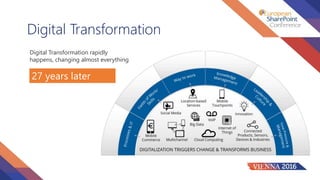
Digital Transformation
Digital Transformation rapidly
happens, changing almost everything
27 years later
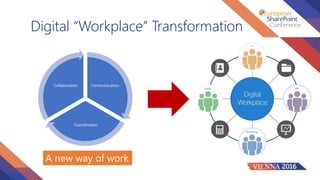
Communication
Coordination
Collaboration
Digital “Workplace” Transformation
A new way of work
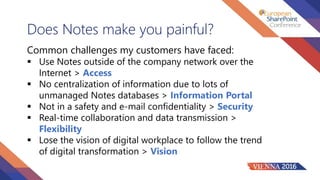
Does Notes make you painful?
Common challenges my customers have faced:
 Use Notes outside of the company network over the
Internet > Access
 No centralization of information due to lots of
unmanaged Notes databases > Information Portal
 Not in a safety and e-mail confidentiality > Security
 Real-time collaboration and data transmission >
Flexibility
 Lose the vision of digital workplace to follow the trend
of digital transformation > Vision
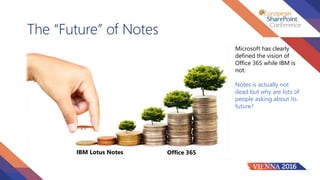
The “Future” of Notes
IBM Lotus Notes Office 365
Microsoft has clearly
defined the vision of
Office 365 while IBM is
not.
Notes is actually not
dead but why are lots of
people asking about its
future?
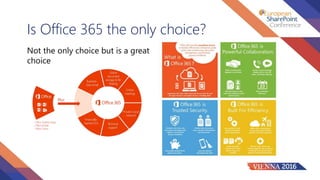
Is Office 365 the only choice?
Not the only choice but is a great
choice
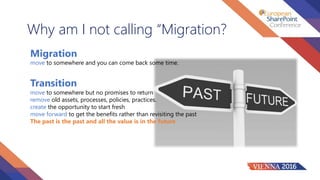
Why am I not calling “Migration?
Migration
Transition
move to somewhere but no promises to return
remove old assets, processes, policies, practices.
create the opportunity to start fresh
move forward to get the benefits rather than revisiting the past
The past is the past and all the value is in the future
move to somewhere and you can come back some time.
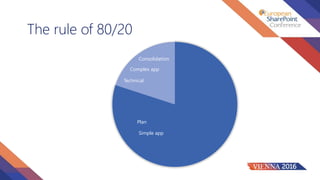
The rule of 80/20
Plan
Technical
Simple app
Complex app
Consolidation
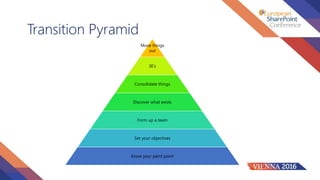
Transition Pyramid
Move things
out
3E’s
Consolidate things
Discover what exists
Form up a team
Set your objectives
Know your paint point
Where to “actually” start?
Team Governance
Assessment
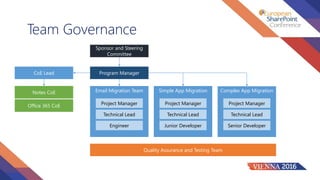
Team Governance
Sponsor and Steering
Committee
Program ManagerCoE Lead
Notes CoE
Office 365 CoE
Email Migration Team Simple App Migration Complex App Migration
Project Manager
Technical Lead
Engineer
Project Manager
Technical Lead
Junior Developer
Project Manager
Technical Lead
Senior Developer
Quality Assurance and Testing Team
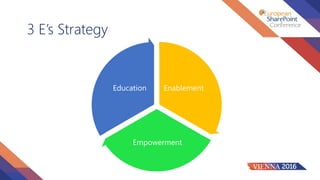
3 E’s Strategy
Enablement
Empowerment
Education
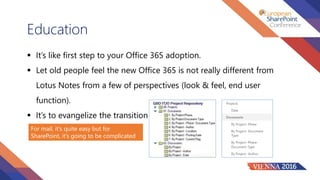
Education
 It’s like first step to your Office 365 adoption.
 Let old people feel the new Office 365 is not really different from
Lotus Notes from a few of perspectives (look & feel, end user
function).
 It’s to evangelize the transition
For mail, it’s quite easy but for
SharePoint, it’s going to be complicated
Enablement
 Give your end users the opportunities to regain some of the
things they have been educated.
 Some demonstration in Office 365 is highly recommended
Empowerment
 Empower your end users to experiment Outlook email as if they
have never heard.
 Create some SharePoint sites which have similar look & feel you
educate for experiment.
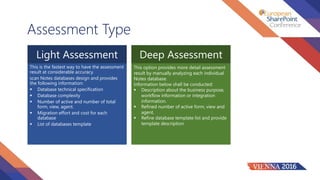
Assessment Type
Light Assessment Deep Assessment
This is the fastest way to have the assessment
result at considerable accuracy.
scan Notes databases design and provides
the following information:
 Database technical specification
 Database complexity
 Number of active and number of total
form, view, agent.
 Migration effort and cost for each
database
 List of databases template
This option provides more detail assessment
result by manually analyzing each individual
Notes database.
Information below shall be conducted:
 Description about the business purpose,
workflow information or integration
information.
 Refined number of active form, view and
agent.
 Refine database template list and provide
template description
Light Assessment Purpose
Conduct discovery of all Notes applications
Classify complexity level of Notes application
Identify standard template-based application
Consolidate similar structured applications
Prepare for deep assessment and resource estimate
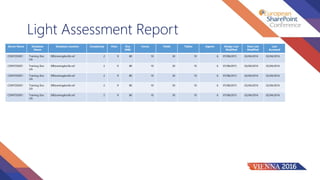
Light Assessment Report
Server Name Database
Name
Database Location Complexity View Size
(MB)
Forms Fields Tables Agents Design Last
Modified
Data Last
Modified
Last
Accessed
CONTOSO01 Training Doc
Lib
DBtraningdoclib.nsf 2 9 80 10 30 10 6 07/08/2015 02/04/2016 02/04/2016
CONTOSO01 Training Doc
Lib
DBtraningdoclib.nsf 2 9 80 10 30 10 6 07/08/2015 02/04/2016 02/04/2016
CONTOSO01 Training Doc
Lib
DBtraningdoclib.nsf 2 9 80 10 30 10 6 07/08/2015 02/04/2016 02/04/2016
CONTOSO01 Training Doc
Lib
DBtraningdoclib.nsf 2 9 80 10 30 10 6 07/08/2015 02/04/2016 02/04/2016
CONTOSO01 Training Doc
Lib
DBtraningdoclib.nsf 2 9 80 10 30 10 6 07/08/2015 02/04/2016 02/04/2016
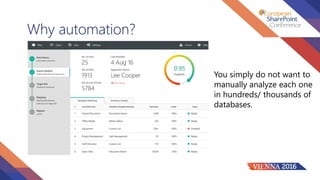
Why automation?
You simply do not want to
manually analyze each one
in hundreds/ thousands of
databases.
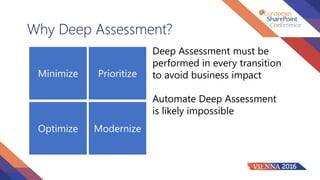
Why Deep Assessment?
Minimize
Optimize
Prioritize
Modernize
Deep Assessment must be
performed in every transition
to avoid business impact
Automate Deep Assessment
is likely impossible
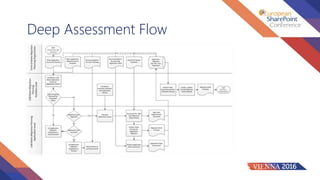
Deep Assessment Flow
Before the Implementation
Do explore what Office 365 is offering
Do know boundaries and limitations for Office 365
The problem should only be Notes application migrated to
SharePoint Online
Email Migration to Office 365
 Convert from .NSF to .PST
 3rd conversion tool like Binary Tree CMT is
highly recommended.
 Challenges are coexistence or Notes email
decommission process.
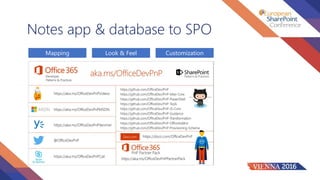
Notes app & database to SPO
Mapping CustomizationLook & Feel
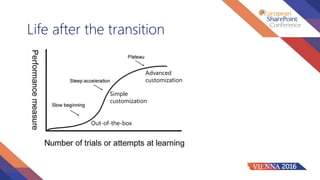
Life after the transition
Out-of-the-box
Simple
customization
Advanced
customization
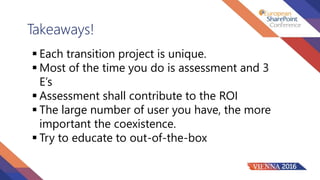
Takeaways!
 Each transition project is unique.
 Most of the time you do is assessment and 3
E’s
 Assessment shall contribute to the ROI
 The large number of user you have, the more
important the coexistence.
 Try to educate to out-of-the-box
Q & A
THANK YOU FOR YOUR
ATTENDING

Lotus Notes Transition To Office 365

  • 2.
    Lotus Notes Transitionto Office 365 Thuan Nguyen Solution Architect, FPT Software, Japan
  • 3.
    About Me A SolutionArchitect at FPT Software, helping customers effectively build a digital workplace with Microsoft Products and Technologies. Email: ThuanNN@Fsoft.com.vn Blog: http://thuansoldier.net LinkedIn: linkedin.com/in/thuansoldier Twitter: @nnthuan
  • 4.
     Different organizationshave different reasons of Notes transition.  The presentation is not going to compare between Lotus Notes & Office 365.  There is no silver bullet in any Notes transition to Office 365  Your experience and thoughts may vary Disclaimer
  • 5.
    When Groupware? Group Infrastructure COLLABORATION Conferencing Shared Databases Development Framework Workflow COMMUNICATION COORDINATION E-mail Messaging LotusNotes is the first commercially available software application that positively improved the ways teams of people worked together. 27 years ago
  • 6.
    Digital Transformation Digital Transformationrapidly happens, changing almost everything 27 years later
  • 7.
  • 8.
    Does Notes makeyou painful? Common challenges my customers have faced:  Use Notes outside of the company network over the Internet > Access  No centralization of information due to lots of unmanaged Notes databases > Information Portal  Not in a safety and e-mail confidentiality > Security  Real-time collaboration and data transmission > Flexibility  Lose the vision of digital workplace to follow the trend of digital transformation > Vision
  • 9.
    The “Future” ofNotes IBM Lotus Notes Office 365 Microsoft has clearly defined the vision of Office 365 while IBM is not. Notes is actually not dead but why are lots of people asking about its future?
  • 10.
    Is Office 365the only choice? Not the only choice but is a great choice
  • 11.
    Why am Inot calling “Migration? Migration Transition move to somewhere but no promises to return remove old assets, processes, policies, practices. create the opportunity to start fresh move forward to get the benefits rather than revisiting the past The past is the past and all the value is in the future move to somewhere and you can come back some time.
  • 12.
    The rule of80/20 Plan Technical Simple app Complex app Consolidation
  • 13.
    Transition Pyramid Move things out 3E’s Consolidatethings Discover what exists Form up a team Set your objectives Know your paint point
  • 14.
    Where to “actually”start? Team Governance Assessment
  • 15.
    Team Governance Sponsor andSteering Committee Program ManagerCoE Lead Notes CoE Office 365 CoE Email Migration Team Simple App Migration Complex App Migration Project Manager Technical Lead Engineer Project Manager Technical Lead Junior Developer Project Manager Technical Lead Senior Developer Quality Assurance and Testing Team
  • 16.
  • 17.
    Education  It’s likefirst step to your Office 365 adoption.  Let old people feel the new Office 365 is not really different from Lotus Notes from a few of perspectives (look & feel, end user function).  It’s to evangelize the transition For mail, it’s quite easy but for SharePoint, it’s going to be complicated
  • 18.
    Enablement  Give yourend users the opportunities to regain some of the things they have been educated.  Some demonstration in Office 365 is highly recommended
  • 19.
    Empowerment  Empower yourend users to experiment Outlook email as if they have never heard.  Create some SharePoint sites which have similar look & feel you educate for experiment.
  • 20.
    Assessment Type Light AssessmentDeep Assessment This is the fastest way to have the assessment result at considerable accuracy. scan Notes databases design and provides the following information:  Database technical specification  Database complexity  Number of active and number of total form, view, agent.  Migration effort and cost for each database  List of databases template This option provides more detail assessment result by manually analyzing each individual Notes database. Information below shall be conducted:  Description about the business purpose, workflow information or integration information.  Refined number of active form, view and agent.  Refine database template list and provide template description
  • 21.
    Light Assessment Purpose Conductdiscovery of all Notes applications Classify complexity level of Notes application Identify standard template-based application Consolidate similar structured applications Prepare for deep assessment and resource estimate
  • 22.
    Light Assessment Report ServerName Database Name Database Location Complexity View Size (MB) Forms Fields Tables Agents Design Last Modified Data Last Modified Last Accessed CONTOSO01 Training Doc Lib DBtraningdoclib.nsf 2 9 80 10 30 10 6 07/08/2015 02/04/2016 02/04/2016 CONTOSO01 Training Doc Lib DBtraningdoclib.nsf 2 9 80 10 30 10 6 07/08/2015 02/04/2016 02/04/2016 CONTOSO01 Training Doc Lib DBtraningdoclib.nsf 2 9 80 10 30 10 6 07/08/2015 02/04/2016 02/04/2016 CONTOSO01 Training Doc Lib DBtraningdoclib.nsf 2 9 80 10 30 10 6 07/08/2015 02/04/2016 02/04/2016 CONTOSO01 Training Doc Lib DBtraningdoclib.nsf 2 9 80 10 30 10 6 07/08/2015 02/04/2016 02/04/2016
  • 23.
    Why automation? You simplydo not want to manually analyze each one in hundreds/ thousands of databases.
  • 24.
    Why Deep Assessment? Minimize Optimize Prioritize Modernize DeepAssessment must be performed in every transition to avoid business impact Automate Deep Assessment is likely impossible
  • 25.
  • 26.
    Before the Implementation Doexplore what Office 365 is offering Do know boundaries and limitations for Office 365 The problem should only be Notes application migrated to SharePoint Online
  • 27.
    Email Migration toOffice 365  Convert from .NSF to .PST  3rd conversion tool like Binary Tree CMT is highly recommended.  Challenges are coexistence or Notes email decommission process.
  • 28.
    Notes app &database to SPO Mapping CustomizationLook & Feel
  • 29.
    Life after thetransition Out-of-the-box Simple customization Advanced customization
  • 30.
    Takeaways!  Each transitionproject is unique.  Most of the time you do is assessment and 3 E’s  Assessment shall contribute to the ROI  The large number of user you have, the more important the coexistence.  Try to educate to out-of-the-box
  • 31.
  • 32.
    THANK YOU FORYOUR ATTENDING

Editor's Notes

  • #3 To add your image, first delete the place holder image as shown in the white box. Then insert your picture and scale it to be bigger than the size of the white box shown. Finally, right click on your image and select ‘Send to back’ – your image should now be framed correctly.