apps for the modern enterprise
INTRODUCTION TO
SHAREPOINT AS A
DEVELOPMENT PLATFORM
RON COURVILLE
apps for the modern enterprise
SharePoint as a development platform
SharePoint from
the perspective of
a developer
Some code demos,
but no coding
experience
required
Why deliver
custom code
Overview of most
common custom
code patterns
apps for the modern enterprise
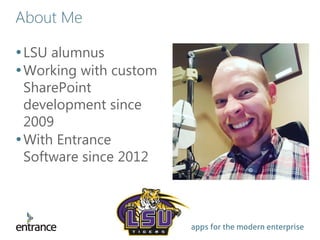
About Me
•LSU alumnus
•Working with custom
SharePoint
development since
2009
•With Entrance
Software since 2012
apps for the modern enterprise
A software team that speaks your language
apps for the modern enterprise
What is SharePoint? (technically)
•An application?
• “Intranet to go”
•A framework?
• “Toolset that makes software creation easier”
•A platform?
• “An ecosystem of applications”
•Higher business value: Custom software can
be delivered with…
Less time to delivery More consistent user experience
Less bugs More bang for the buck
apps for the modern enterprise
Know WHY you are deploying custom code
Out of the box
• Pros
• More affordable
• Faster rollout
• Pre-tested by Microsoft
• Cons
• Functionality restricted to existing
toolset
• Limited control of presentation
• Does not support large scale
applications
Custom code
• Pros
• Complete control of functionality
• Can support large scale applications
• Allows more complex design
• Can avoid speed and data limit
restrictions
• Control over presentation
• Cons
• Costly
• Delays rollout
• Additional complexity (i.e. risk of
new bugs)
• On-prem upgrade compatibility not
guaranteed
apps for the modern enterprise
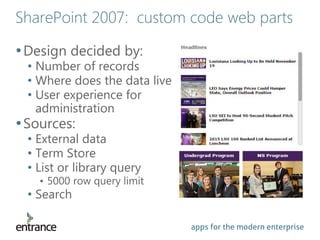
SharePoint 2007: custom code web parts
•Design decided by:
• Number of records
• Where does the data live
• User experience for
administration
•Sources:
• External data
• Term Store
• List or library query
• 5000 row query limit
• Search
apps for the modern enterprise
SharePoint 2007: custom code web parts
• Content Query
• Query a list within the current site
collection
• Returns data as XSL
• Can work well for simple web parts
• Content Editor
• Injects HTML / JavaScript snippet into
the page
• 2010: SharePoint Services library
• 2013: JavaScript Object Model (JSOM)
• More clean, more powerful
• JavaScript and web developers will
love it
apps for the modern enterprise
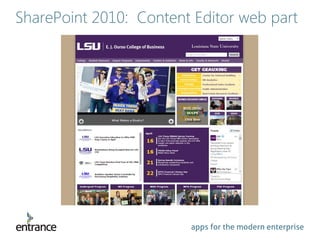
SharePoint 2010: Content Editor web part
apps for the modern enterprise
SharePoint 2010: farm and sandbox solutions
•Farm solutions
• “Solution package” in 2007
• More powerful, globally
accessibly functions
• Timer jobs, event receivers, site
definitions, custom content
organizer rules, etc.
• Deploys to IIS application pool
• Dangerous
• Difficult deployment
• Not supported in Office 365
apps for the modern enterprise
SharePoint 2010: farm and sandbox solutions
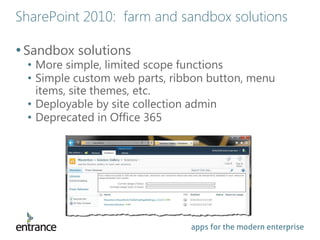
•Sandbox solutions
• More simple, limited scope functions
• Simple custom web parts, ribbon button, menu
items, site themes, etc.
• Deployable by site collection admin
• Deprecated in Office 365
apps for the modern enterprise
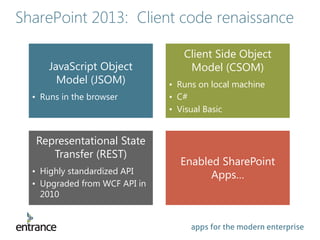
SharePoint 2013: Client code renaissance
JavaScript Object
Model (JSOM)
• Runs in the browser
Client Side Object
Model (CSOM)
• Runs on local machine
• C#
• Visual Basic
Representational State
Transfer (REST)
• Highly standardized API
• Upgraded from WCF API in
2010
Enabled SharePoint
Apps…
apps for the modern enterprise
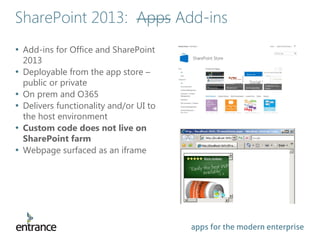
• Add-ins for Office and SharePoint
2013
• Deployable from the app store –
public or private
• On prem and O365
• Delivers functionality and/or UI to
the host environment
• Custom code does not live on
SharePoint farm
• Webpage surfaced as an iframe
SharePoint 2013: Apps Add-ins
apps for the modern enterprise
Why host custom code outside of SharePoint?
No memory leaks in the farm
• Degrade performance
• Difficult to track, and can take down the whole farm
Dedicated and isolated app resources
• Separation of concerns
Support large scale applications
• > 5000 rows
• Faster read/write access
Can re-use outside of SharePoint
• App data readily accessible by other LOB
apps for the modern enterprise
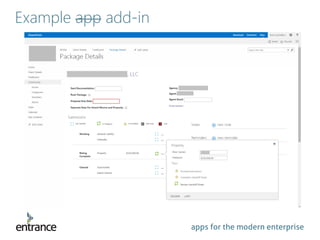
Example app add-in
apps for the modern enterprise
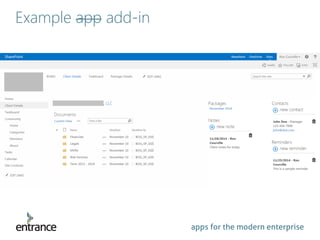
Example app add-in
apps for the modern enterprise
Types of SharePoint add-ins
SharePoint Hosted
• Hosted on the farm in app web,
accessible in the (isolated) app
domain
• Client side technologies only
• Can implement most common
SharePoint tools
• Easiest to roll out
Provider Hosted
• Hosted on independent, external
server
• Independent web application
• Any architecture
• Any web language(s)
• Most freedom of control
• More technically challenging
apps for the modern enterprise
SharePoint 2013: custom code web parts
•Less coding required!
•Content By Search web part
• Similar to Content Query web part
• No (reasonable) limit to searchable items
• Can search the entire SharePoint farm + outside
content sources (ex. File shares or non-SP sites)
•JS Link – DEMO
• https://roncourville.sharepoint.com/Demo_JSLink
apps for the modern enterprise
What’s next?
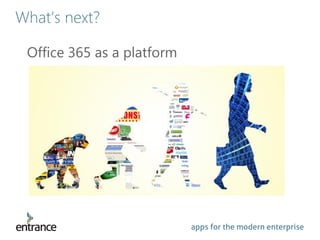
Office 365 as a platform
apps for the modern enterprise
Questions?
Learn more at www.EntranceSoftware.com

Introduction to SharePoint as a Development Platform

  • 1.
    apps for themodern enterprise INTRODUCTION TO SHAREPOINT AS A DEVELOPMENT PLATFORM RON COURVILLE
  • 2.
    apps for themodern enterprise SharePoint as a development platform SharePoint from the perspective of a developer Some code demos, but no coding experience required Why deliver custom code Overview of most common custom code patterns
  • 3.
    apps for themodern enterprise About Me •LSU alumnus •Working with custom SharePoint development since 2009 •With Entrance Software since 2012
  • 4.
    apps for themodern enterprise A software team that speaks your language
  • 5.
    apps for themodern enterprise What is SharePoint? (technically) •An application? • “Intranet to go” •A framework? • “Toolset that makes software creation easier” •A platform? • “An ecosystem of applications” •Higher business value: Custom software can be delivered with… Less time to delivery More consistent user experience Less bugs More bang for the buck
  • 6.
    apps for themodern enterprise Know WHY you are deploying custom code Out of the box • Pros • More affordable • Faster rollout • Pre-tested by Microsoft • Cons • Functionality restricted to existing toolset • Limited control of presentation • Does not support large scale applications Custom code • Pros • Complete control of functionality • Can support large scale applications • Allows more complex design • Can avoid speed and data limit restrictions • Control over presentation • Cons • Costly • Delays rollout • Additional complexity (i.e. risk of new bugs) • On-prem upgrade compatibility not guaranteed
  • 7.
    apps for themodern enterprise SharePoint 2007: custom code web parts •Design decided by: • Number of records • Where does the data live • User experience for administration •Sources: • External data • Term Store • List or library query • 5000 row query limit • Search
  • 8.
    apps for themodern enterprise SharePoint 2007: custom code web parts • Content Query • Query a list within the current site collection • Returns data as XSL • Can work well for simple web parts • Content Editor • Injects HTML / JavaScript snippet into the page • 2010: SharePoint Services library • 2013: JavaScript Object Model (JSOM) • More clean, more powerful • JavaScript and web developers will love it
  • 9.
    apps for themodern enterprise SharePoint 2010: Content Editor web part
  • 10.
    apps for themodern enterprise SharePoint 2010: farm and sandbox solutions •Farm solutions • “Solution package” in 2007 • More powerful, globally accessibly functions • Timer jobs, event receivers, site definitions, custom content organizer rules, etc. • Deploys to IIS application pool • Dangerous • Difficult deployment • Not supported in Office 365
  • 11.
    apps for themodern enterprise SharePoint 2010: farm and sandbox solutions •Sandbox solutions • More simple, limited scope functions • Simple custom web parts, ribbon button, menu items, site themes, etc. • Deployable by site collection admin • Deprecated in Office 365
  • 12.
    apps for themodern enterprise SharePoint 2013: Client code renaissance JavaScript Object Model (JSOM) • Runs in the browser Client Side Object Model (CSOM) • Runs on local machine • C# • Visual Basic Representational State Transfer (REST) • Highly standardized API • Upgraded from WCF API in 2010 Enabled SharePoint Apps…
  • 13.
    apps for themodern enterprise • Add-ins for Office and SharePoint 2013 • Deployable from the app store – public or private • On prem and O365 • Delivers functionality and/or UI to the host environment • Custom code does not live on SharePoint farm • Webpage surfaced as an iframe SharePoint 2013: Apps Add-ins
  • 14.
    apps for themodern enterprise Why host custom code outside of SharePoint? No memory leaks in the farm • Degrade performance • Difficult to track, and can take down the whole farm Dedicated and isolated app resources • Separation of concerns Support large scale applications • > 5000 rows • Faster read/write access Can re-use outside of SharePoint • App data readily accessible by other LOB
  • 15.
    apps for themodern enterprise Example app add-in
  • 16.
    apps for themodern enterprise Example app add-in
  • 17.
    apps for themodern enterprise Types of SharePoint add-ins SharePoint Hosted • Hosted on the farm in app web, accessible in the (isolated) app domain • Client side technologies only • Can implement most common SharePoint tools • Easiest to roll out Provider Hosted • Hosted on independent, external server • Independent web application • Any architecture • Any web language(s) • Most freedom of control • More technically challenging
  • 18.
    apps for themodern enterprise SharePoint 2013: custom code web parts •Less coding required! •Content By Search web part • Similar to Content Query web part • No (reasonable) limit to searchable items • Can search the entire SharePoint farm + outside content sources (ex. File shares or non-SP sites) •JS Link – DEMO • https://roncourville.sharepoint.com/Demo_JSLink
  • 19.
    apps for themodern enterprise What’s next? Office 365 as a platform
  • 20.
    apps for themodern enterprise Questions? Learn more at www.EntranceSoftware.com