SharePoint 2010 and its development tools
PMI POWERPOINT TEMPLATE
MAXIMUM 2 LINES, ARIAL 28PT
BOLD
                                            1
SharePoint and its Development tools


 What’s New in SharePoint 2010
 New Developer Tools for SharePoint 2010


                                            2
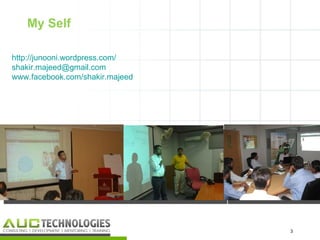
My Self

http://junooni.wordpress.com/
shakir.majeed@gmail.com
www.facebook.com/shakir.majeed


                                 3
                                     3
Three giveaways for you


•   I will ask three question in the end, one who will give right
    answer gets the giveaway 


                                                                    4
                                                                        4
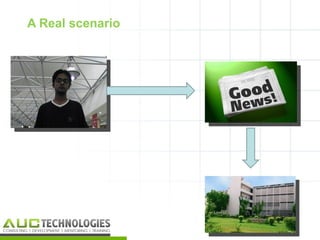
A Real scenario


                  5
                      5
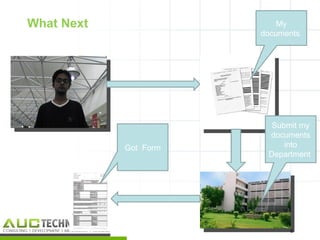
What Next                  My
                       documents


                         Submit my
                        documents
            Got Form        into
                        Department


                             6
                                 6
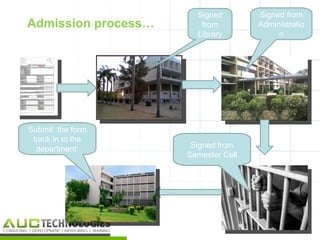
Signed        Signed from
Admission process…      from         Administratio
                       Library            n


Submit the form
 back in to the
  department          Signed from
                     Semester Cell


                                              7
                                                  7
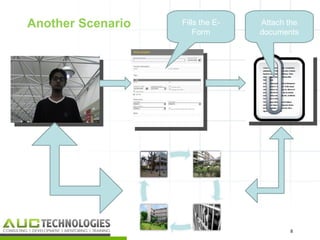
Another Scenario   Fills the E-   Attach the
                       Form       documents


                                         8
                                             8
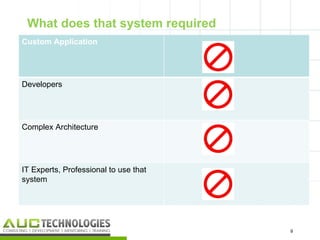
What does that system required
Custom Application


Developers


Complex Architecture


IT Experts, Professional to use that
system


                                       9
                                           9
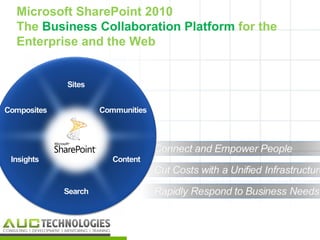
Microsoft SharePoint 2010
The Business Collaboration Platform for the
Enterprise and the Web


                                              10
SharePoint to me


                   I can use it for
                   Ironing
                   Studying
                   Computer Table
                   Kitchen Table


                                      11
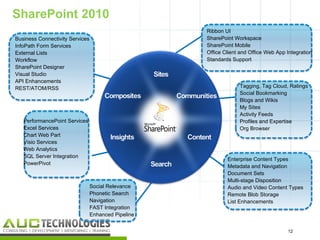
SharePoint 2010
                                                     Ribbon UI
Business Connectivity Services                       SharePoint Workspace
InfoPath Form Services                               SharePoint Mobile
External Lists                                       Office Client and Office Web App Integration
Workflow                                             Standards Support
SharePoint Designer
Visual Studio
API Enhancements
REST/ATOM/RSS                                                     Tagging, Tag Cloud, Ratings
                                                                  Social Bookmarking
                                                                  Blogs and Wikis
                                                                  My Sites
                                                                  Activity Feeds
   PerformancePoint Services                                      Profiles and Expertise
   Excel Services                                                 Org Browser
   Chart Web Part
   Visio Services
   Web Analytics
   SQL Server Integration
                                                             Enterprise Content Types
   PowerPivot
                                                             Metadata and Navigation
                                                             Document Sets
                                                             Multi-stage Disposition
                                 Social Relevance            Audio and Video Content Types
                                 Phonetic Search             Remote Blob Storage
                                 Navigation                  List Enhancements
                                 FAST Integration
                                 Enhanced Pipeline


                                                                                      12
                                                                                       12
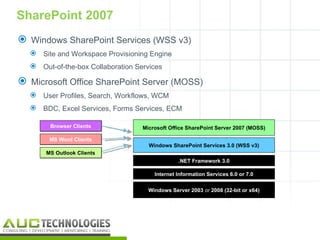
SharePoint 2007
 Windows SharePoint Services (WSS v3)
   Site and Workspace Provisioning Engine
   Out-of-the-box Collaboration Services

 Microsoft Office SharePoint Server (MOSS)
   User Profiles, Search, Workflows, WCM
   BDC, Excel Services, Forms Services, ECM

        Browser Clients            Microsoft Office SharePoint Server 2007 (MOSS)

       MS Word Clients
                                     Windows SharePoint Services 3.0 (WSS v3)
      MS Outlook Clients
                                                .NET Framework 3.0

                                       Internet Information Services 6.0 or 7.0


                                     Windows Server 2003 or 2008 (32-bit or x64)


                                                                                    13
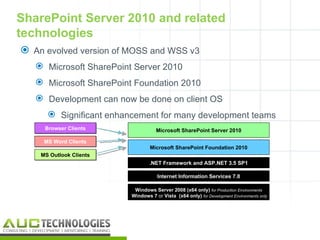
SharePoint Server 2010 and related
technologies
 An evolved version of MOSS and WSS v3
    Microsoft SharePoint Server 2010
    Microsoft SharePoint Foundation 2010
    Development can now be done on client OS
       Significant enhancement for many development teams
     Browser Clients                Microsoft SharePoint Server 2010

     MS Word Clients
                                 Microsoft SharePoint Foundation 2010
    MS Outlook Clients
                                 .NET Framework and ASP.NET 3.5 SP1

                                    Internet Information Services 7.0

                          Windows Server 2008 (x64 only) for Production Environments
                         Windows 7 or Vista (x64 only) for Development Environments only


                                                                                           14
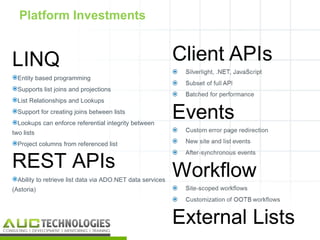
Platform Investments


LINQ
Entity based programming
Supports list joins and projections
List Relationships and Lookups
Support for creating joins between lists
Lookups can enforce referential integrity between
two lists
Project columns from referenced list


REST APIs
Ability to retrieve list data via ADO.NET data services
(Astoria)


                                                           15
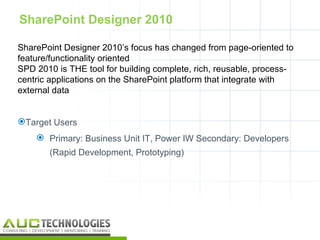
SharePoint Designer 2010

SharePoint Designer 2010’s focus has changed from page-oriented to
feature/functionality oriented
SPD 2010 is THE tool for building complete, rich, reusable, process-
centric applications on the SharePoint platform that integrate with
external data


Target Users
     Primary: Business Unit IT, Power IW Secondary: Developers
       (Rapid Development, Prototyping)


                                                                   16
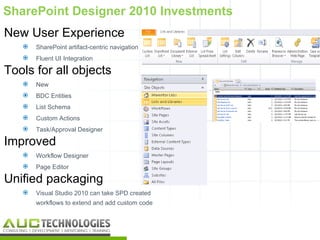
SharePoint Designer 2010 Investments
New User Experience
      SharePoint artifact-centric navigation
      Fluent UI Integration

Tools for all objects
      New
      BDC Entities
      List Schema
      Custom Actions
      Task/Approval Designer

Improved
      Workflow Designer
      Page Editor

Unified packaging
      Visual Studio 2010 can take SPD created
       workflows to extend and add custom code


                                                 17
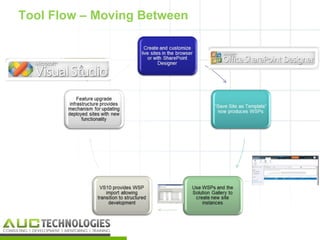
Tool Flow – Moving Between


                             18
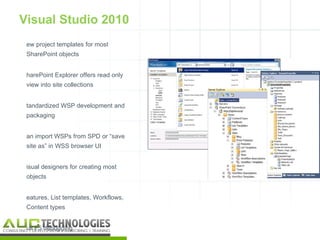
Visual Studio 2010
 ew project templates for most
 SharePoint objects


 harePoint Explorer offers read only
 view into site collections


 tandardized WSP development and
 packaging


 an import WSPs from SPD or “save
 site as” in WSS browser UI


 isual designers for creating most
 objects


 eatures, List templates, Workflows,
 Content types


 ull F5 debugging
                                       19
Development Environments

 Local or remote “development” with the
 browser and SharePoint Designer
       Local development with Visual Studio 2010
       SharePoint installation on client operating systems supported for
        development
       Support for Vista and Windows 7 installations
       Requires 64-bit installation


                                                                            20
Visio and SharePoint


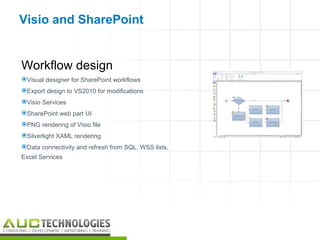
Workflow design
Visual designer for SharePoint workflows
Export design to VS2010 for modifications
Visio Services
SharePoint web part UI
PNG rendering of Visio file
Silverlight XAML rendering
Data connectivity and refresh from SQL, WSS lists,
Excel Services


                                                      21
Business Connectivity Services

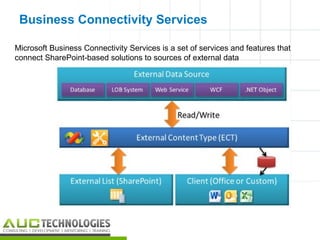
Microsoft Business Connectivity Services is a set of services and features that
connect SharePoint-based solutions to sources of external data


                                                                                  22
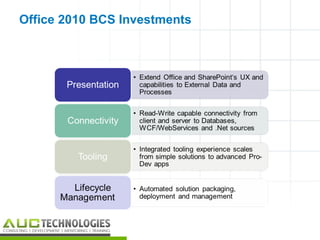
Office 2010 BCS Investments


                              23
Demo


       24
        24
Its time for Giveaways
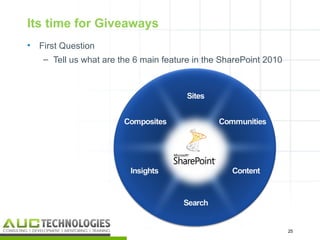
•   First Question
     – Tell us what are the 6 main feature in the SharePoint 2010


                                                                    25
                                                                     25
Its time for Giveaways


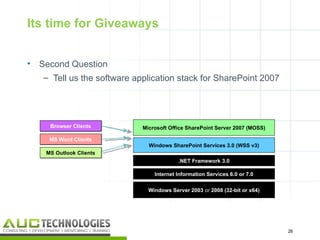
•   Second Question
    – Tell us the software application stack for SharePoint 2007


      Browser Clients        Microsoft Office SharePoint Server 2007 (MOSS)

      MS Word Clients
                               Windows SharePoint Services 3.0 (WSS v3)
     MS Outlook Clients
                                          .NET Framework 3.0

                                 Internet Information Services 6.0 or 7.0


                               Windows Server 2003 or 2008 (32-bit or x64)


                                                                              26
                                                                               26
Its time for Giveaways


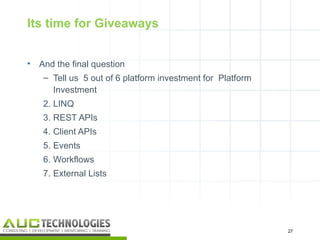
•   And the final question
     – Tell us 5 out of 6 platform investment for Platform
       Investment
     2. LINQ
     3. REST APIs
     4. Client APIs
     5. Events
     6. Workflows
     7. External Lists


                                                             27
                                                              27
Thank You
Facebook: http://www.facebook.com/shakir.majeed
Blog: http://junooni.wordpress.com/
Email: shakir.majeed@gmail.com


                                                  28

AUC Tech-SP 2010

  • 1.
    SharePoint 2010 andits development tools PMI POWERPOINT TEMPLATE MAXIMUM 2 LINES, ARIAL 28PT BOLD 1
  • 2.
    SharePoint and itsDevelopment tools  What’s New in SharePoint 2010  New Developer Tools for SharePoint 2010 2
  • 3.
  • 4.
    Three giveaways foryou • I will ask three question in the end, one who will give right answer gets the giveaway  4 4
  • 5.
  • 6.
    What Next My documents Submit my documents Got Form into Department 6 6
  • 7.
    Signed Signed from Admission process… from Administratio Library n Submit the form back in to the department Signed from Semester Cell 7 7
  • 8.
    Another Scenario Fills the E- Attach the Form documents 8 8
  • 9.
    What does thatsystem required Custom Application Developers Complex Architecture IT Experts, Professional to use that system 9 9
  • 10.
    Microsoft SharePoint 2010 TheBusiness Collaboration Platform for the Enterprise and the Web 10
  • 11.
    SharePoint to me I can use it for Ironing Studying Computer Table Kitchen Table 11
  • 12.
    SharePoint 2010 Ribbon UI Business Connectivity Services SharePoint Workspace InfoPath Form Services SharePoint Mobile External Lists Office Client and Office Web App Integration Workflow Standards Support SharePoint Designer Visual Studio API Enhancements REST/ATOM/RSS Tagging, Tag Cloud, Ratings Social Bookmarking Blogs and Wikis My Sites Activity Feeds PerformancePoint Services Profiles and Expertise Excel Services Org Browser Chart Web Part Visio Services Web Analytics SQL Server Integration Enterprise Content Types PowerPivot Metadata and Navigation Document Sets Multi-stage Disposition Social Relevance Audio and Video Content Types Phonetic Search Remote Blob Storage Navigation List Enhancements FAST Integration Enhanced Pipeline 12 12
  • 13.
    SharePoint 2007  WindowsSharePoint Services (WSS v3)  Site and Workspace Provisioning Engine  Out-of-the-box Collaboration Services  Microsoft Office SharePoint Server (MOSS)  User Profiles, Search, Workflows, WCM  BDC, Excel Services, Forms Services, ECM Browser Clients Microsoft Office SharePoint Server 2007 (MOSS) MS Word Clients Windows SharePoint Services 3.0 (WSS v3) MS Outlook Clients .NET Framework 3.0 Internet Information Services 6.0 or 7.0 Windows Server 2003 or 2008 (32-bit or x64) 13
  • 14.
    SharePoint Server 2010and related technologies  An evolved version of MOSS and WSS v3  Microsoft SharePoint Server 2010  Microsoft SharePoint Foundation 2010  Development can now be done on client OS  Significant enhancement for many development teams Browser Clients Microsoft SharePoint Server 2010 MS Word Clients Microsoft SharePoint Foundation 2010 MS Outlook Clients .NET Framework and ASP.NET 3.5 SP1 Internet Information Services 7.0 Windows Server 2008 (x64 only) for Production Environments Windows 7 or Vista (x64 only) for Development Environments only 14
  • 15.
    Platform Investments LINQ Entity basedprogramming Supports list joins and projections List Relationships and Lookups Support for creating joins between lists Lookups can enforce referential integrity between two lists Project columns from referenced list REST APIs Ability to retrieve list data via ADO.NET data services (Astoria) 15
  • 16.
    SharePoint Designer 2010 SharePointDesigner 2010’s focus has changed from page-oriented to feature/functionality oriented SPD 2010 is THE tool for building complete, rich, reusable, process- centric applications on the SharePoint platform that integrate with external data Target Users  Primary: Business Unit IT, Power IW Secondary: Developers (Rapid Development, Prototyping) 16
  • 17.
    SharePoint Designer 2010Investments New User Experience  SharePoint artifact-centric navigation  Fluent UI Integration Tools for all objects  New  BDC Entities  List Schema  Custom Actions  Task/Approval Designer Improved  Workflow Designer  Page Editor Unified packaging  Visual Studio 2010 can take SPD created workflows to extend and add custom code 17
  • 18.
    Tool Flow –Moving Between 18
  • 19.
    Visual Studio 2010 ew project templates for most SharePoint objects harePoint Explorer offers read only view into site collections tandardized WSP development and packaging an import WSPs from SPD or “save site as” in WSS browser UI isual designers for creating most objects eatures, List templates, Workflows, Content types ull F5 debugging 19
  • 20.
    Development Environments Localor remote “development” with the browser and SharePoint Designer  Local development with Visual Studio 2010  SharePoint installation on client operating systems supported for development  Support for Vista and Windows 7 installations  Requires 64-bit installation 20
  • 21.
    Visio and SharePoint Workflowdesign Visual designer for SharePoint workflows Export design to VS2010 for modifications Visio Services SharePoint web part UI PNG rendering of Visio file Silverlight XAML rendering Data connectivity and refresh from SQL, WSS lists, Excel Services 21
  • 22.
    Business Connectivity Services MicrosoftBusiness Connectivity Services is a set of services and features that connect SharePoint-based solutions to sources of external data 22
  • 23.
    Office 2010 BCSInvestments 23
  • 24.
    Demo 24 24
  • 25.
    Its time forGiveaways • First Question – Tell us what are the 6 main feature in the SharePoint 2010 25 25
  • 26.
    Its time forGiveaways • Second Question – Tell us the software application stack for SharePoint 2007 Browser Clients Microsoft Office SharePoint Server 2007 (MOSS) MS Word Clients Windows SharePoint Services 3.0 (WSS v3) MS Outlook Clients .NET Framework 3.0 Internet Information Services 6.0 or 7.0 Windows Server 2003 or 2008 (32-bit or x64) 26 26
  • 27.
    Its time forGiveaways • And the final question – Tell us 5 out of 6 platform investment for Platform Investment 2. LINQ 3. REST APIs 4. Client APIs 5. Events 6. Workflows 7. External Lists 27 27
  • 28.
    Thank You Facebook: http://www.facebook.com/shakir.majeed Blog:http://junooni.wordpress.com/ Email: shakir.majeed@gmail.com 28

Editor's Notes

  • #4 About me, I am the User Group Leader for SharePoint Techies, and I am working as Senior SharePoint Consultant at Twin Technology. I got 3 plus years of experience on SharePoint technology. Plus I am Microsoft Certified Technology Specialist for Application Development in SharePoint 2010
  • #6 Right 7 years back in the month of January, I got the news from my brother that I got admission in Department Of Computer Science, University of Karachi.
  • #7 Now I have to submit my documents to the department, then the department issued a form, first to fill it properly and then submit one section to Semester cell
  • #8 Then I took my form, got it signed from the Mahmud hussain Library, then from Administration Block. From Administration block then to go at Semester Cell, and finally submit this form in the Department
  • #9 Another Scenario Now Shakir is really happy to get the admission in DCS, DCS asked him to submit the form and document Online. Shakir logged on to the department site, fills the e-form and attach the document, a work flow ( series of task intiated for each of representative of library, administration and semester cell to evaluate the forms and documents online and approved It)
  • #10 What you think, what we require to achieve this system, Custom Application Team of Developer who has hands on skills Complex architecture IT Pros to deal with it
  • #13 Microsoft has come up with a lot of new features in SharePoint 2010, As you can see that there are 6 sections in this pie, Sites Communities Content Search Insight Composites This pie charts summarizes the features SharePoint 2010 has.
  • #29 WinHEC 2005