Digital Audio
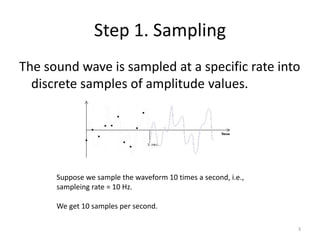
The sound wave is sampled at a specific rate into
discrete samples of amplitude values.
Step 1. Sampling
3
Suppose we sample the waveform 10 times a second, i.e.,
sampleing rate = 10 Hz.
We get 10 samples per second.
Digitization
• It’s a 2 step process in the AD/DA card
– Audio signal is filtered. Remember human hearing
range is 20 khz to 20 hz. Filtering here removes all
frequencies out of that range (anti aliasing filter)
– Voltage of the audio waveform is measured at
several thousand times per second (sampling)
– Each measurement is than expressed in binaries
(quantization)
– These binary numbers are then stored on disk
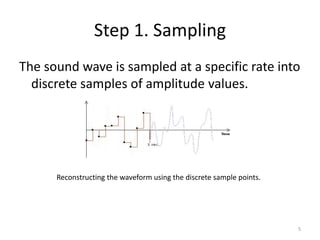
The sound wave is sampled at a specific rate into
discrete samples of amplitude values.
Step 1. Sampling
5
Reconstructing the waveform using the discrete sample points.
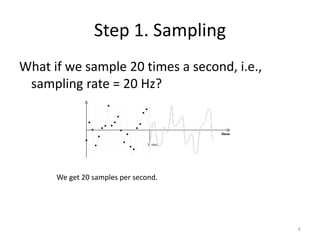
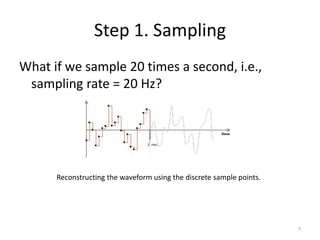
What if we sample 20 times a second, i.e.,
sampling rate = 20 Hz?
Step 1. Sampling
6
We get 20 samples per second.
What if we sample 20 times a second, i.e.,
sampling rate = 20 Hz?
Step 1. Sampling
7
Reconstructing the waveform using the discrete sample points.
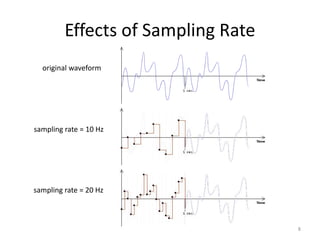
Effects of Sampling Rate
8
original waveform
sampling rate = 10 Hz
sampling rate = 20 Hz
Effects of Sampling Rate
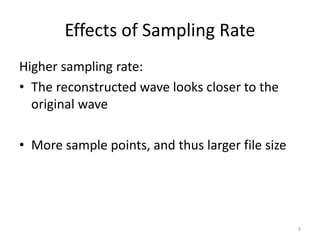
Higher sampling rate:
• The reconstructed wave looks closer to the
original wave
• More sample points, and thus larger file size
9
Sampling Rate Examples
• 11,025 Hz AM Radio Quality/Speech
• 22,050 Hz Near FM Radio Quality (high-end
multimedia)
• 44,100 Hz CD Quality
• 48,000 Hz DAT (digital audio tape) Quality
• 96,000 Hz DVD-Audio Quality
• 192,000 Hz DVD-Audio Quality
10
Step 2. Quantization
• Each of the discrete samples of amplitude values obtained
from the sampling step are mapped and rounded to the
nearest value on a scale of discrete levels.
• The number of levels in the scale is expressed in bit depth--
the power of 2.
• An 8-bit audio allows 28 = 256 possible levels in the scale
• CD-quality audio is 16-bit (i.e., 216 = 65,536 possible levels)
11
Step 2. Quantization
12
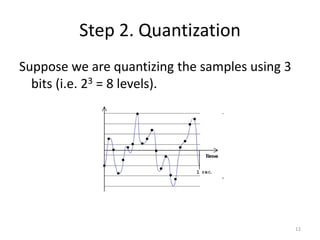
Suppose we are quantizing the samples using 3
bits (i.e. 23 = 8 levels).
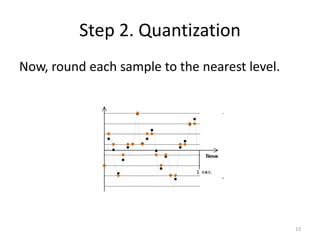
Now, round each sample to the nearest level.
Step 2. Quantization
13
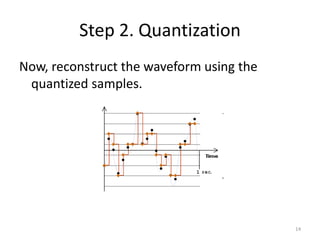
Now, reconstruct the waveform using the
quantized samples.
Step 2. Quantization
14
Effects of Quantization
• Data with different original amplitudes may be
quantized onto the same level
 loss of subtle differences of samples
• With lower bit depth, samples with larger
differences may also be quantized onto the
same level.
15
Bit Depth
• Bit depth of a digital audio is also referred to
as resolution.
• For digital audio, higher resolution means
higher bit depth.
16
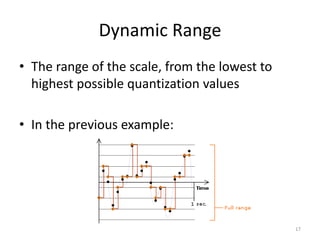
Dynamic Range
• The range of the scale, from the lowest to
highest possible quantization values
• In the previous example:
17
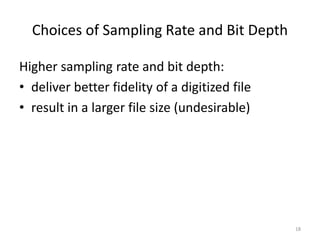
Choices of Sampling Rate and Bit Depth
Higher sampling rate and bit depth:
• deliver better fidelity of a digitized file
• result in a larger file size (undesirable)
18
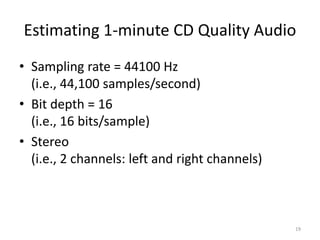
Estimating 1-minute CD Quality Audio
• Sampling rate = 44100 Hz
(i.e., 44,100 samples/second)
• Bit depth = 16
(i.e., 16 bits/sample)
• Stereo
(i.e., 2 channels: left and right channels)
19
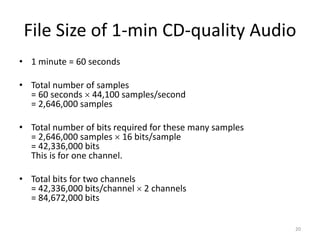
File Size of 1-min CD-quality Audio
• 1 minute = 60 seconds
• Total number of samples
= 60 seconds  44,100 samples/second
= 2,646,000 samples
• Total number of bits required for these many samples
= 2,646,000 samples  16 bits/sample
= 42,336,000 bits
This is for one channel.
• Total bits for two channels
= 42,336,000 bits/channel  2 channels
= 84,672,000 bits
20
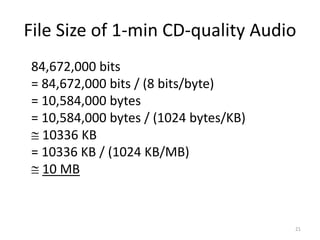
File Size of 1-min CD-quality Audio
84,672,000 bits
= 84,672,000 bits / (8 bits/byte)
= 10,584,000 bytes
= 10,584,000 bytes / (1024 bytes/KB)
 10336 KB
= 10336 KB / (1024 KB/MB)
 10 MB
21
Human Hearing Range
• Human hearing range: 20 Hz to 20,000 Hz
• Most sensitive to 2,000 Hz to 5,000 Hz
22
Nyquist Theorem
We must sample at least 2 points in each sound
wave cycle to be able to reconstruct the sound
wave satisfactorily.
Sampling rate of the audio  twice of the
audio frequency (called a Nyquist rate)
Sampling rate of the audio is higher for audio
with higher pitch
23
Most Common Choices of Bit Depth
• 8-bit
– usually sufficient for speech
– in general, too low for music
• 16-bit
– minimal bit depth for music
• 24-bit
• 32-bit
24
Audio File Compression
• Lossless
• Lossy
– gets rid of some data, but human perception is
taken into consideration so that the data removed
causes the least noticeable distortion
– e.g. MP3 (good compression rate while preserving
the perceivably high quality of the audio)
25
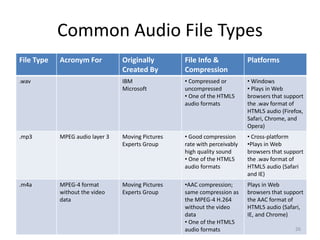
Common Audio File Types
File Type Acronym For Originally
Created By
File Info &
Compression
Platforms
.wav IBM
Microsoft
• Compressed or
uncompressed
• One of the HTML5
audio formats
• Windows
• Plays in Web
browsers that support
the .wav format of
HTML5 audio (Firefox,
Safari, Chrome, and
Opera)
.mp3 MPEG audio layer 3 Moving Pictures
Experts Group
• Good compression
rate with perceivably
high quality sound
• One of the HTML5
audio formats
• Cross-platform
•Plays in Web
browsers that support
the .wav format of
HTML5 audio (Safari
and IE)
.m4a MPEG-4 format
without the video
data
Moving Pictures
Experts Group
•AAC compression;
same compression as
the MPEG-4 H.264
without the video
data
• One of the HTML5
audio formats
Plays in Web
browsers that support
the AAC format of
HTML5 audio (Safari,
IE, and Chrome)
26
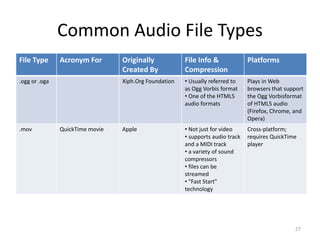
Common Audio File Types
File Type Acronym For Originally
Created By
File Info &
Compression
Platforms
.ogg or .oga Xiph.Org Foundation • Usually referred to
as Ogg Vorbis format
• One of the HTML5
audio formats
Plays in Web
browsers that support
the Ogg Vorbisformat
of HTML5 audio
(Firefox, Chrome, and
Opera)
.mov QuickTime movie Apple • Not just for video
• supports audio track
and a MIDI track
• a variety of sound
compressors
• files can be
streamed
• "Fast Start"
technology
Cross-platform;
requires QuickTime
player
27
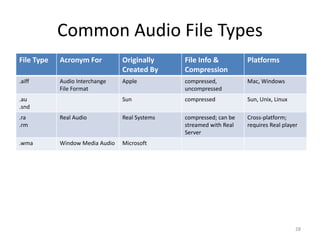
Common Audio File Types
File Type Acronym For Originally
Created By
File Info &
Compression
Platforms
.aiff Audio Interchange
File Format
Apple compressed,
uncompressed
Mac, Windows
.au
.snd
Sun compressed Sun, Unix, Linux
.ra
.rm
Real Audio Real Systems compressed; can be
streamed with Real
Server
Cross-platform;
requires Real player
.wma Window Media Audio Microsoft
28
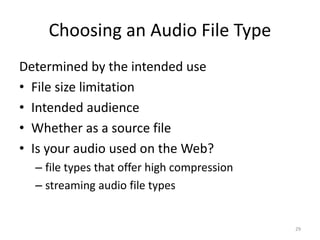
Choosing an Audio File Type
Determined by the intended use
• File size limitation
• Intended audience
• Whether as a source file
• Is your audio used on the Web?
– file types that offer high compression
– streaming audio file types
29
Intended Audience
• What is the equipment that your audience will
use to listen to your audio?
• If they are listening on computers, what are
their operating systems?
– cross-platform vs. single platform
If you are keeping the file for future editing,
choose a file type:
• uncompressed
• allows lossless compression
30

Sound digitalisation

  • 2.
  • 3.
    The sound waveis sampled at a specific rate into discrete samples of amplitude values. Step 1. Sampling 3 Suppose we sample the waveform 10 times a second, i.e., sampleing rate = 10 Hz. We get 10 samples per second.
  • 4.
    Digitization • It’s a2 step process in the AD/DA card – Audio signal is filtered. Remember human hearing range is 20 khz to 20 hz. Filtering here removes all frequencies out of that range (anti aliasing filter) – Voltage of the audio waveform is measured at several thousand times per second (sampling) – Each measurement is than expressed in binaries (quantization) – These binary numbers are then stored on disk
  • 5.
    The sound waveis sampled at a specific rate into discrete samples of amplitude values. Step 1. Sampling 5 Reconstructing the waveform using the discrete sample points.
  • 6.
    What if wesample 20 times a second, i.e., sampling rate = 20 Hz? Step 1. Sampling 6 We get 20 samples per second.
  • 7.
    What if wesample 20 times a second, i.e., sampling rate = 20 Hz? Step 1. Sampling 7 Reconstructing the waveform using the discrete sample points.
  • 8.
    Effects of SamplingRate 8 original waveform sampling rate = 10 Hz sampling rate = 20 Hz
  • 9.
    Effects of SamplingRate Higher sampling rate: • The reconstructed wave looks closer to the original wave • More sample points, and thus larger file size 9
  • 10.
    Sampling Rate Examples •11,025 Hz AM Radio Quality/Speech • 22,050 Hz Near FM Radio Quality (high-end multimedia) • 44,100 Hz CD Quality • 48,000 Hz DAT (digital audio tape) Quality • 96,000 Hz DVD-Audio Quality • 192,000 Hz DVD-Audio Quality 10
  • 11.
    Step 2. Quantization •Each of the discrete samples of amplitude values obtained from the sampling step are mapped and rounded to the nearest value on a scale of discrete levels. • The number of levels in the scale is expressed in bit depth-- the power of 2. • An 8-bit audio allows 28 = 256 possible levels in the scale • CD-quality audio is 16-bit (i.e., 216 = 65,536 possible levels) 11
  • 12.
    Step 2. Quantization 12 Supposewe are quantizing the samples using 3 bits (i.e. 23 = 8 levels).
  • 13.
    Now, round eachsample to the nearest level. Step 2. Quantization 13
  • 14.
    Now, reconstruct thewaveform using the quantized samples. Step 2. Quantization 14
  • 15.
    Effects of Quantization •Data with different original amplitudes may be quantized onto the same level  loss of subtle differences of samples • With lower bit depth, samples with larger differences may also be quantized onto the same level. 15
  • 16.
    Bit Depth • Bitdepth of a digital audio is also referred to as resolution. • For digital audio, higher resolution means higher bit depth. 16
  • 17.
    Dynamic Range • Therange of the scale, from the lowest to highest possible quantization values • In the previous example: 17
  • 18.
    Choices of SamplingRate and Bit Depth Higher sampling rate and bit depth: • deliver better fidelity of a digitized file • result in a larger file size (undesirable) 18
  • 19.
    Estimating 1-minute CDQuality Audio • Sampling rate = 44100 Hz (i.e., 44,100 samples/second) • Bit depth = 16 (i.e., 16 bits/sample) • Stereo (i.e., 2 channels: left and right channels) 19
  • 20.
    File Size of1-min CD-quality Audio • 1 minute = 60 seconds • Total number of samples = 60 seconds  44,100 samples/second = 2,646,000 samples • Total number of bits required for these many samples = 2,646,000 samples  16 bits/sample = 42,336,000 bits This is for one channel. • Total bits for two channels = 42,336,000 bits/channel  2 channels = 84,672,000 bits 20
  • 21.
    File Size of1-min CD-quality Audio 84,672,000 bits = 84,672,000 bits / (8 bits/byte) = 10,584,000 bytes = 10,584,000 bytes / (1024 bytes/KB)  10336 KB = 10336 KB / (1024 KB/MB)  10 MB 21
  • 22.
    Human Hearing Range •Human hearing range: 20 Hz to 20,000 Hz • Most sensitive to 2,000 Hz to 5,000 Hz 22
  • 23.
    Nyquist Theorem We mustsample at least 2 points in each sound wave cycle to be able to reconstruct the sound wave satisfactorily. Sampling rate of the audio  twice of the audio frequency (called a Nyquist rate) Sampling rate of the audio is higher for audio with higher pitch 23
  • 24.
    Most Common Choicesof Bit Depth • 8-bit – usually sufficient for speech – in general, too low for music • 16-bit – minimal bit depth for music • 24-bit • 32-bit 24
  • 25.
    Audio File Compression •Lossless • Lossy – gets rid of some data, but human perception is taken into consideration so that the data removed causes the least noticeable distortion – e.g. MP3 (good compression rate while preserving the perceivably high quality of the audio) 25
  • 26.
    Common Audio FileTypes File Type Acronym For Originally Created By File Info & Compression Platforms .wav IBM Microsoft • Compressed or uncompressed • One of the HTML5 audio formats • Windows • Plays in Web browsers that support the .wav format of HTML5 audio (Firefox, Safari, Chrome, and Opera) .mp3 MPEG audio layer 3 Moving Pictures Experts Group • Good compression rate with perceivably high quality sound • One of the HTML5 audio formats • Cross-platform •Plays in Web browsers that support the .wav format of HTML5 audio (Safari and IE) .m4a MPEG-4 format without the video data Moving Pictures Experts Group •AAC compression; same compression as the MPEG-4 H.264 without the video data • One of the HTML5 audio formats Plays in Web browsers that support the AAC format of HTML5 audio (Safari, IE, and Chrome) 26
  • 27.
    Common Audio FileTypes File Type Acronym For Originally Created By File Info & Compression Platforms .ogg or .oga Xiph.Org Foundation • Usually referred to as Ogg Vorbis format • One of the HTML5 audio formats Plays in Web browsers that support the Ogg Vorbisformat of HTML5 audio (Firefox, Chrome, and Opera) .mov QuickTime movie Apple • Not just for video • supports audio track and a MIDI track • a variety of sound compressors • files can be streamed • "Fast Start" technology Cross-platform; requires QuickTime player 27
  • 28.
    Common Audio FileTypes File Type Acronym For Originally Created By File Info & Compression Platforms .aiff Audio Interchange File Format Apple compressed, uncompressed Mac, Windows .au .snd Sun compressed Sun, Unix, Linux .ra .rm Real Audio Real Systems compressed; can be streamed with Real Server Cross-platform; requires Real player .wma Window Media Audio Microsoft 28
  • 29.
    Choosing an AudioFile Type Determined by the intended use • File size limitation • Intended audience • Whether as a source file • Is your audio used on the Web? – file types that offer high compression – streaming audio file types 29
  • 30.
    Intended Audience • Whatis the equipment that your audience will use to listen to your audio? • If they are listening on computers, what are their operating systems? – cross-platform vs. single platform If you are keeping the file for future editing, choose a file type: • uncompressed • allows lossless compression 30