AUTHOR: MOHAMMED ABDUL KHALEQ DWIKAT EMAIL:dwikatmo@hotmail.com
TOPIC: MULTIMEDIA I / DIGITAL AUDIO DATE: 3/7/2020 PAGE: 1 OF 7
DDiiggiittaall AAuuddiioo
Sound is a wave phenomenon like light, but it is macroscopic and
involves molecules of air being compressed and expanded under the
action of some physical device.
For example, a speaker in an audio system vibrates back and forth and
produces a longitudinal pressure wave that we perceive as sound.
Without air there is no sound—for example, in space. Since sound is a
pressure wave, it takes on continuous values, as opposed to digitized
ones with a finite range. Nevertheless, if we wish to use a digital
version of sound waves, we must form digitized representations of
audio information.
Digitization Sound
Sound is a pressure wave, taking continuous values. Increase /
decrease in pressure can be measured in amplitude, which can be
digitized by 2 steps
Digitization means conversion to a stream of numbers—preferably
integers for efficiency.
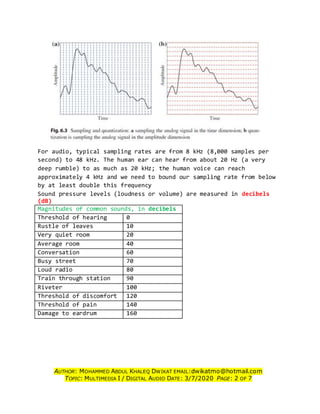
Sampling: Measuring the amplitude at equally spaced time intervals.
Measuring the quantity we are interested in, usually at evenly spaced
intervals (every one time unit)
Quantization: representing amplitude with one of finite digital
values, measure how loud the signal is.
Values change over time:
In amplitude: the pressure increases or decreases with time. Since
there is only one independent variable, time, we call this a 1D signal
Audio resolution: (such as 8- or 16-bit) determines the accuracy with
which a sound can be digitized.
What 8-bit sound resolution means: dividing the vertical axis into 256
levels upon quantization.
What 16-bit sound resolution means: dividing the vertical axis into
65,536 levels upon quantization.
Typical uniform quantization rates are 8-bit and 16-bit; 16-bit will
have more accuracy than 8-bit.
AUTHOR: MOHAMMED ABDUL KHALEQ DWIKAT EMAIL:dwikatmo@hotmail.com
TOPIC: MULTIMEDIA I / DIGITAL AUDIO DATE: 3/7/2020 PAGE: 2 OF 7
For audio, typical sampling rates are from 8 kHz (8,000 samples per
second) to 48 kHz. The human ear can hear from about 20 Hz (a very
deep rumble) to as much as 20 kHz; the human voice can reach
approximately 4 kHz and we need to bound our sampling rate from below
by at least double this frequency
Sound pressure levels (loudness or volume) are measured in decibels
(dB)
Magnitudes of common sounds, in decibels
Threshold of hearing 0
Rustle of leaves 10
Very quiet room 20
Average room 40
Conversation 60
Busy street 70
Loud radio 80
Train through station 90
Riveter 100
Threshold of discomfort 120
Threshold of pain 140
Damage to eardrum 160
AUTHOR: MOHAMMED ABDUL KHALEQ DWIKAT EMAIL:dwikatmo@hotmail.com
TOPIC: MULTIMEDIA I / DIGITAL AUDIO DATE: 3/7/2020 PAGE: 3 OF 7
Sampling frequency refers the rate at which the sampling is performed.
The standard sampling frequencies used in audio are 5.0125 kHz, 11.025
kHz, 22.05 kHz, and 44.1 kHz, with some exceptions, and these
frequencies are supported by most sound cards.
1000 Hz (1000 cycles occur per second) = 1 KHz, 1000 KHZ = 1 MHz
When digitizing audio data, Start with the following questions
 Sampling Rate/Frequency?? 8 KHZ to 48 KHZ
 Degree of quantization?? 8 or 16 bits
 Uniform quantization or No uniform Quantization??
 File Format??? AIFF, WAV, NIDI, MP3 etc…
Nyquist Theorem
For lossless digitization, the sampling rate (rate) should be at least
twice the maximum frequency (f) responses Indeed many times more the
better.
Mathematically (f < 0.5*rate) or (2f < rate), if we are given time,
use (f < 1/T) in KHz since the Rate = 1/t.
The frequency equal to half the Nyquist rate is called Nyquist
Frequency (f = 0.5*rate).
How do you calculate Nyquist frequency?
Divide the sampling rate by two to calculate the Nyquist frequency for
your system. For example, if the sampling rate of your system is 10
kHz (10,000 samples per second), the Nyquist frequency of your system
will be 5 kHz.
If signal is band limited (minimum frequency=f1, maximum frequency=f2),
then the required sampling rate is at least 2(f2 - f1) i.e.(2f < rate).
What if the sampling rate just equals the actual frequency? Constant line
Aliasing arises when a signal is discretely sampled at a rate that is
insufficient to capture the changes in the signal
In signal processing and related disciplines, aliasing is an effect that
causes different signals to become indistinguishable (or aliases of one another) when
sampled.
AUTHOR: MOHAMMED ABDUL KHALEQ DWIKAT EMAIL:dwikatmo@hotmail.com
TOPIC: MULTIMEDIA I / DIGITAL AUDIO DATE: 3/7/2020 PAGE: 4 OF 7
Acoustics: is the branch of physics that studies sound.
Digital audio: is created when you represent the characteristics of a
sound wave using numbers—a process referred to as digitizing. You can
digitize sound from a microphone, a synthesizer, existing recordings,
live radio and television broadcasts, and popular CD and DVDs. In
fact, you can digitize sounds from any natural or prerecorded source.
Digitized sound is sampled sound. Every nth fraction of a second, a
sample of sound is taken and stored as digital information in bits and
bytes.
The quality of this digital recording depends upon how often the
samples are taken (sampling rate or frequency, measured in kilohertz,
or thousands of samples per second) and how many numbers are used to
represent the value of each sample (bit depth, sample size,
resolution, or dynamic range). The more often you take a sample and
the more data you store about that sample, the finer the resolution
and quality of the captured sound when it is played back. Since the
quality of your audio is based on the quality of your recording and
not the device on which your end user will play the audio, digital
audio is said to be device independent.
The three sampling rates most often used in multimedia are 44.1 kHz
(CD-quality), 22.05 kHz, and 11.025 kHz. Sample sizes are either 8
bits or 16 bits. The larger the sample size, the more accurately the
data will describe the recorded sound.
An 8-bit sample size provides 256 equal measurement units to
describe the level and frequency of the sound in that slice of time. A
16-bit sample size, on the other hand, provides a staggering 65,536
equal units to describe the sound in that same slice of time.
Slices of analog waveforms are sampled at various frequencies,
and each discrete sample is then stored either as 8 bits or 16 bits
(or more) of data.
The value of each sample is rounded off to the nearest integer
Audio Filtering
Prior to sampling and AD conversion, the audio signal is also usually
filtered to remove unwanted frequencies. The frequencies kept depend
on the application. For speech, typically from 50 Hz to 10 kHz is
retained. Other frequencies are blocked. Why???
Synthetic Sounds
Digitized sound must still be converted to analog, for us to hear it.
AUTHOR: MOHAMMED ABDUL KHALEQ DWIKAT EMAIL:dwikatmo@hotmail.com
TOPIC: MULTIMEDIA I / DIGITAL AUDIO DATE: 3/7/2020 PAGE: 5 OF 7
Trimming Removing "dead air" or blank space from the front of a
recording and any unnecessary extra time off the end is your first
sound editing task.
Splicing ‫توصيل‬ and Assembly Using the same tools mentioned for
trimming, you will probably want to remove the extraneous noises that
inevitably creep into a recording
Volume Adjustments If you are trying to assemble ten different
recordings into a single sound track, there is little chance that all
the segments will have the same volume. To provide a consistent volume
level, select all the data in the file, and raise or lower the overall
volume by a certain amount. Don’t increase the volume too much, or you
may distort the file.
It is best to use a sound editor to normalize the assembled audio file
to a particular level, say 80 percent to 90 percent of maximum (without
clipping), or about –16 dB.
Format Conversion In some cases, your digital audio editing software
might read a format different from that read by your presentation or
authoring program. Most sound editing software will save files in your
choice of many formats, most of which can be read and imported by
multimedia authoring systems
Resampling / Downsampling If you have recorded and edited your
sounds at 16-bit sampling rates but are using lower rates and
resolutions in your project, you must resample or downsample the file.
Your software will examine the existing digital recording and work
through it to reduce the number of samples. This process may save
considerable disk space.
Fade-ins and Fade-outs Most programs offer enveloping capability,
useful for long sections that you wish to fade in or fade out
gradually. This enveloping helps to smooth out the very beginning and
the very end of a sound file
Equalization Some programs offer digital equalization (EQ)
capabilities that allow you to modify a recording’s frequency content
so that it sounds brighter (more high frequencies) or darker (low,
ominous rumbles ‫مشؤومة‬ ‫دمدمة‬ ).
Time Stretching Advanced programs let you alter the length (in time) of
a sound file without changing its pitch. This feature can be very
useful, but watch out: most time-stretching algorithms will severely
degrade the audio quality of the file if the length is altered more
than a few percent in either direction.
AUTHOR: MOHAMMED ABDUL KHALEQ DWIKAT EMAIL:dwikatmo@hotmail.com
TOPIC: MULTIMEDIA I / DIGITAL AUDIO DATE: 3/7/2020 PAGE: 6 OF 7
Reversing Sounds: Another simple manipulation is to reverse all or a
portion of a digital audio recording. Sounds, particularly spoken
dialog, can produce a surreal, otherworldly effect when played
backward.
Stereo audio: you receive information in one ear that is somewhat
different to information received by the other (Left & Right).
Mono audio: uses one audio channel to reproduce sound, your ears are
receiving 100% of the same information.
An Audio CD is a music CD like that you buy in a music store. It can
be played on any standard CD player (such as a CD deck, or your
car CD player, or a portable CD player)
A Data CD is similar to a CD or DVD that is used to install software
on your computer: it just contains data in files.
File Size vs. Quality
Remember that the sampling rate determines the frequency at which
samples will be taken for the recording. Sampling at higher rates
(such as 44.1 kHz or 22.05 kHz) more accurately captures the high-
frequency content of your sound. Audio resolution (such as 8- or 16-
bit) determines the accuracy with which a sound can be digitized.
Using more bits for the sample size yields a recording that sounds
more like its original.
Here are the formulas for determining the size (in bytes) of a digital
recording.
For a monophonic recording:
Sampling rate * duration of recording in seconds * (bit resolution / 8) * 1
For a stereo recording:
Sampling rate * duration of recording in seconds * (bit resolution / 8) * 2
(Remember, sampling rate is measured in kHz, or thousand samples per
second, so to convert from kHz to a whole number, you must multiply by
1,000. Resolution is measured in bits per sample. Since there are 8
bits in a byte, you have to divide the bit resolution by 8.) Thus the
formula for a 10-second recording at 22.05 kHz, 8-bit resolution would
be
22050 * 10 * 8 / 8 * 1
Which equals 220,500 bytes?
A 10-second stereo recording at 44.1 kHz,
16-bit resolution would be
AUTHOR: MOHAMMED ABDUL KHALEQ DWIKAT EMAIL:dwikatmo@hotmail.com
TOPIC: MULTIMEDIA I / DIGITAL AUDIO DATE: 3/7/2020 PAGE: 7 OF 7
44100 * 10 * (16 / 8) * 2 equals 1,764,000 bytes.
A 40-second mono recording at 11 kHz,8-bit resolution would be
11000 * 40 * 8 / 8 * 1
Which equals 440000 bytes.
Audio File Formats
AIFF: (Audio Interchange File Format)
Wave format (WAV): files when copied from the CD.
The MP3 format was developed by the Moving Picture Experts Group (MPEG)
MIDI (Musical Instrument Digital Interface)
A codec (compressor-decompressor) is software that compresses a stream of
audio or video data for storage or transmission, and then decompresses it for
playback.
MP3 is a popular audio compression standard. The ‘3’ stands for Layer 3, and
“MP” stands for the MPEG standard
The Moving Picture Experts Group (MPEG) was established in 1988 to create a
standard for delivery of digital video and audio.
State the Nyquist frequency for the following digital sample intervals.
Express the result in Hertz in each case.
(a) 1 millisecond
(b) 0.005 seconds
(c) 1 hour
2f < 1/T 2ft = 1 f = 1/2t
Answer:
(a) 1 millisecond → 0.5 KHz →500 Hz
(b) 0.005 seconds→ 100 Hz→ 0.1 KHz
(c) 1 hour→ 0.000139 Hz or 0.139 KHz
In an old Western movie, we notice that a stagecoach wheel appears to be
moving backwards at 5◦
per frame, even though the stagecoach is moving
forward. To what is this effect due? What is the true situation?
Answer:
This is an effect of aliasing: the wheel is moving forward at 355◦
per frame.
References
(Zi-Nian, Drew, & Liu, 2004)
(Voughan, 2011)

Digital audio

  • 1.
    AUTHOR: MOHAMMED ABDULKHALEQ DWIKAT EMAIL:dwikatmo@hotmail.com TOPIC: MULTIMEDIA I / DIGITAL AUDIO DATE: 3/7/2020 PAGE: 1 OF 7 DDiiggiittaall AAuuddiioo Sound is a wave phenomenon like light, but it is macroscopic and involves molecules of air being compressed and expanded under the action of some physical device. For example, a speaker in an audio system vibrates back and forth and produces a longitudinal pressure wave that we perceive as sound. Without air there is no sound—for example, in space. Since sound is a pressure wave, it takes on continuous values, as opposed to digitized ones with a finite range. Nevertheless, if we wish to use a digital version of sound waves, we must form digitized representations of audio information. Digitization Sound Sound is a pressure wave, taking continuous values. Increase / decrease in pressure can be measured in amplitude, which can be digitized by 2 steps Digitization means conversion to a stream of numbers—preferably integers for efficiency. Sampling: Measuring the amplitude at equally spaced time intervals. Measuring the quantity we are interested in, usually at evenly spaced intervals (every one time unit) Quantization: representing amplitude with one of finite digital values, measure how loud the signal is. Values change over time: In amplitude: the pressure increases or decreases with time. Since there is only one independent variable, time, we call this a 1D signal Audio resolution: (such as 8- or 16-bit) determines the accuracy with which a sound can be digitized. What 8-bit sound resolution means: dividing the vertical axis into 256 levels upon quantization. What 16-bit sound resolution means: dividing the vertical axis into 65,536 levels upon quantization. Typical uniform quantization rates are 8-bit and 16-bit; 16-bit will have more accuracy than 8-bit.
  • 2.
    AUTHOR: MOHAMMED ABDULKHALEQ DWIKAT EMAIL:dwikatmo@hotmail.com TOPIC: MULTIMEDIA I / DIGITAL AUDIO DATE: 3/7/2020 PAGE: 2 OF 7 For audio, typical sampling rates are from 8 kHz (8,000 samples per second) to 48 kHz. The human ear can hear from about 20 Hz (a very deep rumble) to as much as 20 kHz; the human voice can reach approximately 4 kHz and we need to bound our sampling rate from below by at least double this frequency Sound pressure levels (loudness or volume) are measured in decibels (dB) Magnitudes of common sounds, in decibels Threshold of hearing 0 Rustle of leaves 10 Very quiet room 20 Average room 40 Conversation 60 Busy street 70 Loud radio 80 Train through station 90 Riveter 100 Threshold of discomfort 120 Threshold of pain 140 Damage to eardrum 160
  • 3.
    AUTHOR: MOHAMMED ABDULKHALEQ DWIKAT EMAIL:dwikatmo@hotmail.com TOPIC: MULTIMEDIA I / DIGITAL AUDIO DATE: 3/7/2020 PAGE: 3 OF 7 Sampling frequency refers the rate at which the sampling is performed. The standard sampling frequencies used in audio are 5.0125 kHz, 11.025 kHz, 22.05 kHz, and 44.1 kHz, with some exceptions, and these frequencies are supported by most sound cards. 1000 Hz (1000 cycles occur per second) = 1 KHz, 1000 KHZ = 1 MHz When digitizing audio data, Start with the following questions  Sampling Rate/Frequency?? 8 KHZ to 48 KHZ  Degree of quantization?? 8 or 16 bits  Uniform quantization or No uniform Quantization??  File Format??? AIFF, WAV, NIDI, MP3 etc… Nyquist Theorem For lossless digitization, the sampling rate (rate) should be at least twice the maximum frequency (f) responses Indeed many times more the better. Mathematically (f < 0.5*rate) or (2f < rate), if we are given time, use (f < 1/T) in KHz since the Rate = 1/t. The frequency equal to half the Nyquist rate is called Nyquist Frequency (f = 0.5*rate). How do you calculate Nyquist frequency? Divide the sampling rate by two to calculate the Nyquist frequency for your system. For example, if the sampling rate of your system is 10 kHz (10,000 samples per second), the Nyquist frequency of your system will be 5 kHz. If signal is band limited (minimum frequency=f1, maximum frequency=f2), then the required sampling rate is at least 2(f2 - f1) i.e.(2f < rate). What if the sampling rate just equals the actual frequency? Constant line Aliasing arises when a signal is discretely sampled at a rate that is insufficient to capture the changes in the signal In signal processing and related disciplines, aliasing is an effect that causes different signals to become indistinguishable (or aliases of one another) when sampled.
  • 4.
    AUTHOR: MOHAMMED ABDULKHALEQ DWIKAT EMAIL:dwikatmo@hotmail.com TOPIC: MULTIMEDIA I / DIGITAL AUDIO DATE: 3/7/2020 PAGE: 4 OF 7 Acoustics: is the branch of physics that studies sound. Digital audio: is created when you represent the characteristics of a sound wave using numbers—a process referred to as digitizing. You can digitize sound from a microphone, a synthesizer, existing recordings, live radio and television broadcasts, and popular CD and DVDs. In fact, you can digitize sounds from any natural or prerecorded source. Digitized sound is sampled sound. Every nth fraction of a second, a sample of sound is taken and stored as digital information in bits and bytes. The quality of this digital recording depends upon how often the samples are taken (sampling rate or frequency, measured in kilohertz, or thousands of samples per second) and how many numbers are used to represent the value of each sample (bit depth, sample size, resolution, or dynamic range). The more often you take a sample and the more data you store about that sample, the finer the resolution and quality of the captured sound when it is played back. Since the quality of your audio is based on the quality of your recording and not the device on which your end user will play the audio, digital audio is said to be device independent. The three sampling rates most often used in multimedia are 44.1 kHz (CD-quality), 22.05 kHz, and 11.025 kHz. Sample sizes are either 8 bits or 16 bits. The larger the sample size, the more accurately the data will describe the recorded sound. An 8-bit sample size provides 256 equal measurement units to describe the level and frequency of the sound in that slice of time. A 16-bit sample size, on the other hand, provides a staggering 65,536 equal units to describe the sound in that same slice of time. Slices of analog waveforms are sampled at various frequencies, and each discrete sample is then stored either as 8 bits or 16 bits (or more) of data. The value of each sample is rounded off to the nearest integer Audio Filtering Prior to sampling and AD conversion, the audio signal is also usually filtered to remove unwanted frequencies. The frequencies kept depend on the application. For speech, typically from 50 Hz to 10 kHz is retained. Other frequencies are blocked. Why??? Synthetic Sounds Digitized sound must still be converted to analog, for us to hear it.
  • 5.
    AUTHOR: MOHAMMED ABDULKHALEQ DWIKAT EMAIL:dwikatmo@hotmail.com TOPIC: MULTIMEDIA I / DIGITAL AUDIO DATE: 3/7/2020 PAGE: 5 OF 7 Trimming Removing "dead air" or blank space from the front of a recording and any unnecessary extra time off the end is your first sound editing task. Splicing ‫توصيل‬ and Assembly Using the same tools mentioned for trimming, you will probably want to remove the extraneous noises that inevitably creep into a recording Volume Adjustments If you are trying to assemble ten different recordings into a single sound track, there is little chance that all the segments will have the same volume. To provide a consistent volume level, select all the data in the file, and raise or lower the overall volume by a certain amount. Don’t increase the volume too much, or you may distort the file. It is best to use a sound editor to normalize the assembled audio file to a particular level, say 80 percent to 90 percent of maximum (without clipping), or about –16 dB. Format Conversion In some cases, your digital audio editing software might read a format different from that read by your presentation or authoring program. Most sound editing software will save files in your choice of many formats, most of which can be read and imported by multimedia authoring systems Resampling / Downsampling If you have recorded and edited your sounds at 16-bit sampling rates but are using lower rates and resolutions in your project, you must resample or downsample the file. Your software will examine the existing digital recording and work through it to reduce the number of samples. This process may save considerable disk space. Fade-ins and Fade-outs Most programs offer enveloping capability, useful for long sections that you wish to fade in or fade out gradually. This enveloping helps to smooth out the very beginning and the very end of a sound file Equalization Some programs offer digital equalization (EQ) capabilities that allow you to modify a recording’s frequency content so that it sounds brighter (more high frequencies) or darker (low, ominous rumbles ‫مشؤومة‬ ‫دمدمة‬ ). Time Stretching Advanced programs let you alter the length (in time) of a sound file without changing its pitch. This feature can be very useful, but watch out: most time-stretching algorithms will severely degrade the audio quality of the file if the length is altered more than a few percent in either direction.
  • 6.
    AUTHOR: MOHAMMED ABDULKHALEQ DWIKAT EMAIL:dwikatmo@hotmail.com TOPIC: MULTIMEDIA I / DIGITAL AUDIO DATE: 3/7/2020 PAGE: 6 OF 7 Reversing Sounds: Another simple manipulation is to reverse all or a portion of a digital audio recording. Sounds, particularly spoken dialog, can produce a surreal, otherworldly effect when played backward. Stereo audio: you receive information in one ear that is somewhat different to information received by the other (Left & Right). Mono audio: uses one audio channel to reproduce sound, your ears are receiving 100% of the same information. An Audio CD is a music CD like that you buy in a music store. It can be played on any standard CD player (such as a CD deck, or your car CD player, or a portable CD player) A Data CD is similar to a CD or DVD that is used to install software on your computer: it just contains data in files. File Size vs. Quality Remember that the sampling rate determines the frequency at which samples will be taken for the recording. Sampling at higher rates (such as 44.1 kHz or 22.05 kHz) more accurately captures the high- frequency content of your sound. Audio resolution (such as 8- or 16- bit) determines the accuracy with which a sound can be digitized. Using more bits for the sample size yields a recording that sounds more like its original. Here are the formulas for determining the size (in bytes) of a digital recording. For a monophonic recording: Sampling rate * duration of recording in seconds * (bit resolution / 8) * 1 For a stereo recording: Sampling rate * duration of recording in seconds * (bit resolution / 8) * 2 (Remember, sampling rate is measured in kHz, or thousand samples per second, so to convert from kHz to a whole number, you must multiply by 1,000. Resolution is measured in bits per sample. Since there are 8 bits in a byte, you have to divide the bit resolution by 8.) Thus the formula for a 10-second recording at 22.05 kHz, 8-bit resolution would be 22050 * 10 * 8 / 8 * 1 Which equals 220,500 bytes? A 10-second stereo recording at 44.1 kHz, 16-bit resolution would be
  • 7.
    AUTHOR: MOHAMMED ABDULKHALEQ DWIKAT EMAIL:dwikatmo@hotmail.com TOPIC: MULTIMEDIA I / DIGITAL AUDIO DATE: 3/7/2020 PAGE: 7 OF 7 44100 * 10 * (16 / 8) * 2 equals 1,764,000 bytes. A 40-second mono recording at 11 kHz,8-bit resolution would be 11000 * 40 * 8 / 8 * 1 Which equals 440000 bytes. Audio File Formats AIFF: (Audio Interchange File Format) Wave format (WAV): files when copied from the CD. The MP3 format was developed by the Moving Picture Experts Group (MPEG) MIDI (Musical Instrument Digital Interface) A codec (compressor-decompressor) is software that compresses a stream of audio or video data for storage or transmission, and then decompresses it for playback. MP3 is a popular audio compression standard. The ‘3’ stands for Layer 3, and “MP” stands for the MPEG standard The Moving Picture Experts Group (MPEG) was established in 1988 to create a standard for delivery of digital video and audio. State the Nyquist frequency for the following digital sample intervals. Express the result in Hertz in each case. (a) 1 millisecond (b) 0.005 seconds (c) 1 hour 2f < 1/T 2ft = 1 f = 1/2t Answer: (a) 1 millisecond → 0.5 KHz →500 Hz (b) 0.005 seconds→ 100 Hz→ 0.1 KHz (c) 1 hour→ 0.000139 Hz or 0.139 KHz In an old Western movie, we notice that a stagecoach wheel appears to be moving backwards at 5◦ per frame, even though the stagecoach is moving forward. To what is this effect due? What is the true situation? Answer: This is an effect of aliasing: the wheel is moving forward at 355◦ per frame. References (Zi-Nian, Drew, & Liu, 2004) (Voughan, 2011)