Unit 2: Sound / Audio System
Chapter outline
2.1 Overview sound system
2.2 Producing digital audio
2.2 Music and speech
2.3 Speech Generation
2.4 Speech Analysis
2.5 Speech Transmission
2.6 Representation of audio files
2.7 Computer Music -MIDI
2.8 MIDI versus Digital Audio
2.1 Overview sound system
• Sound is a physical phenomenon produced by the vibration of matter, such as a violin string, a speaker
cone, or even a block of wood. These vibrations cause pressure variations in the surrounding medium—
usually air.
• When an object vibrates, it moves back and forth, pushing and pulling on nearby particles. For example:
• A violin string oscillates at a specific frequency, creating periodic disturbances.
• A speaker cone moves in response to an electrical signal, displacing air particles.
• A block of wood, when struck, vibrates and transfers energy to the air.
• These disturbances result in pressure variations in the medium. Regions of compressions (high
pressure, where particles are pushed closer together) alternate with regions of rarefactions (low
pressure, where particles are spread apart). This pattern propagates as a longitudinal wave, where
particle displacement occurs parallel to the direction of wave travel.
How Sound is Produced and Perceived
The process of sound production and perception involves a chain of events:
1. Vibration: An object (e.g., a guitar string) vibrates due to an external force (e.g., plucking). This vibration is often periodic, though
irregular vibrations (e.g., a crash) produce noise.
2. Disturbance of Medium: The vibrating object transfers energy to nearby air particles, causing them to oscillate. For instance, a
speaker cone pushes air particles outward during its forward motion (compression) and pulls them back during its inward motion
(rarefaction).
3. Propagation as Sound Waves: These pressure variations travel through the air as sound waves. The speed of sound in air at room
temperature (20°C) is approximately 343 m/s, but this varies with the medium (e.g., ~1480 m/s in water, ~5000 m/s in steel) and
conditions like temperature and humidity.
4. Reception by the Ear: When sound waves reach the human ear, they interact with the eardrum:
1. The eardrum vibrates in response to pressure changes.
2. These vibrations are transmitted via the ossicles (tiny bones in the middle ear) to the cochlea in the inner ear.
3. The cochlea converts mechanical vibrations into electrical signals via hair cells, which the auditory nerve sends to the brain.
5. Perception: The brain interprets these signals as sound, distinguishing pitch, loudness, and timbre. The human hearing range spans
20 Hz to 20 kHz, though sensitivity decreases with age (e.g., older adults may struggle to hear above 12–14 kHz).
Characteristics of Sound Waves
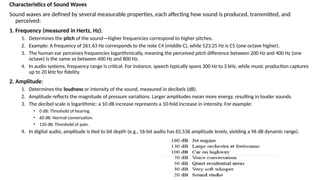
Sound waves are defined by several measurable properties, each affecting how sound is produced, transmitted, and
perceived:
1. Frequency (measured in Hertz, Hz):
1. Determines the pitch of the sound—higher frequencies correspond to higher pitches.
2. Example: A frequency of 261.63 Hz corresponds to the note C4 (middle C), while 523.25 Hz is C5 (one octave higher).
3. The human ear perceives frequencies logarithmically, meaning the perceived pitch difference between 200 Hz and 400 Hz (one
octave) is the same as between 400 Hz and 800 Hz.
4. In audio systems, frequency range is critical. For instance, speech typically spans 300 Hz to 3 kHz, while music production captures
up to 20 kHz for fidelity.
2. Amplitude:
1. Determines the loudness or intensity of the sound, measured in decibels (dB).
2. Amplitude reflects the magnitude of pressure variations. Larger amplitudes mean more energy, resulting in louder sounds.
3. The decibel scale is logarithmic: a 10 dB increase represents a 10-fold increase in intensity. For example:
• 0 dB: Threshold of hearing.
• 60 dB: Normal conversation.
• 120 dB: Threshold of pain.
4. In digital audio, amplitude is tied to bit depth (e.g., 16-bit audio has 65,536 amplitude levels, yielding a 96 dB dynamic range).
3. Wavelength:
Wavelength is defined as the distance between two successive compressions or rarefactions in a sound wave. It is usually denoted by
the Greek letter λ (lambda) and is measured in meters (m).
Where:
• λlambdaλ = Wavelength (in meters)
• v = Speed of sound in the medium (in meters per second, m/s)
• f = Frequency of the sound wave (in Hertz, Hz)
4. Speed:
1. The speed of sound depends on the medium and its properties:
• Air: ~343 m/s at 20°C, increasing with temperature (~0.6 m/s per °C).
• Water: ~1480 m/s, due to higher density and less compressibility.
• Steel: ~5000 m/s, as solids transmit vibrations more efficiently.
2. Speed affects latency in audio systems (e.g., a 343 m distance introduces a 1-second delay) and is
critical in applications like sonar or live sound reinforcement.
2.2 Producing digital audio
• Digital audio is the representation of sound in a format that can be
processed, stored, and transmitted by digital systems such as computers,
mobile devices, and digital audio players. Producing digital audio involves
converting analog sound waves into digital data through a process called
digitization.
Analog vs Digital Sound
• Analog sound is a continuous signal that varies smoothly over time. It directly
represents the air pressure variations that occur when sound is produced.
• Analog sound maintains a natural continuity, making it accurate but more
prone to degradation (e.g., noise, distortion over time).
• Digital sound is a discrete representation of an analog signal, broken into
individual samples and stored as binary numbers (0s and 1s).
• Digital sound allows for precise editing, storage, and sharing without
degradation, but its accuracy depends on sampling rate and bit
depth.
1. Capturing Analog Sound
Sound originates as analog vibrations in the air. To digitize this sound:
• A microphone is used to capture the air pressure variations.
• The microphone converts these variations into analog electrical signals, which are continuous waveforms.
• These signals still need to be digitized before they can be stored or manipulated by digital devices.
2. The Analog-to-Digital Conversion (ADC) Process
• The analog electrical signal is passed through an ADC (Analog-to-Digital Converter) which performs three main functions:
a. Sampling
•Sampling is the process of measuring the amplitude (signal strength) of the analog waveform at regular time intervals.
•The number of samples taken per second is called the Sampling Rate (fs), measured in Hertz (Hz).
Common Sampling Rates:
•44.1 kHz (used in audio CDs) – 44,100 samples per second.
•48 kHz (used in video/audio production).
•96 kHz or higher for professional audio.
•The higher the sampling rate, the more accurately the waveform is captured.
Nyquist Theorem: To accurately capture a signal, the sampling rate must be at least twice the highest frequency in the signal (human hearing
range is approx. 20 Hz to 20,000 Hz, so CD audio uses 44.1 kHz).
b. Quantization
• Quantization is the process of converting the amplitude of each sampled audio signal (a continuous value) into a finite set of discrete
levels that can be stored as digital numbers (bits).
• Bit Depth: The number of bits used to represent each sample, determining the dynamic range (the difference between the
quietest and loudest sounds).
•16-bit: 65,536 possible amplitude levels (2^16), offering a dynamic range of ~96 dB.
•24-bit: 16,777,216 levels (2^24), offering ~144 dB, common in professional recording.
Example:
If you record at 16-bit resolution:
• Each sample is mapped to one of 65,536 possible amplitude levels.
• This gives much more accurate sound representation than 8-bit (only 256 levels).
Quantization Error & Noise
• Quantization introduces error because it rounds off the original amplitude.
• The analog sample may have infinite precision (e.g., 0.812345 volts).
• Quantization maps that value to the nearest level in a set (e.g., 0.81 or 0.82).
• This causes quantization noise, which is more noticeable at low bit depths.
• Higher bit depth → Less error → Better dynamic range.
C. Encoding
• Encoding is the process of storing or transmitting the quantized digital audio data in a specific digital format so it can
be efficiently stored, compressed, and played back correctly.
• It involves converting the quantized samples (numbers) into a binary stream(A 16-bit number might look like
00000000 00001010) or format that can be:
• Saved to a file (e.g., WAV, MP3)
• Transmitted over a network (e.g., in streaming)
• Understood by playback software or hardware
Types of Audio Encoding
1. Uncompressed Encoding
• Example: PCM (Pulse Code Modulation)
• Stores all sample values exactly.
• Used in WAV and AIFF formats.
• High quality, large file size
2. Lossless Compression
• Compresses data without losing information.
• Recovers original sound exactly on playback.
• Examples: FLAC, ALAC
• Smaller file size than uncompressed
3. Lossy Compression
• Removes some data that's considered less important.
• Greatly reduces file size.
• Examples: MP3, AAC, OGG
• Quality depends on bitrate (e.g., 128 kbps vs 320 kbps)
Calculating Digital Audio File Size
The file size of a digital recording depends on:
• Sampling Rate (R): How many samples are taken per second (in Hz or samples/second).
• Bit Depth / Resolution (b): Number of bits used to represent each sample.
• Number of Channels (C): Mono = 1, Stereo = 2, etc.
• Duration (D): Total length of the recording in seconds.
Where:
• S = file size in bytes
• R = sampling rate (samples/second)
• b = bit depth (bits/sample)
• C = number of channels
• D = duration in seconds
Example:Suppose you record 10 seconds of stereo music (2 channels) at:
• Sampling rate = 44.1 kHz = 44,100 samples/sec
• Bit depth = 16 bits
• Channels = 2 (stereo)
• Duration = 10 seconds
2.3 Music and speech
Music Audio
Music audio consists of organized sound patterns designed to evoke emotion or
aesthetic pleasure. It is typically characterized by:
• Complex Waveforms: Music often involves multiple frequencies (harmonics) created
by instruments, vocals, or synthesizers. For example, a guitar chord combines
fundamental tones with overtones.
• Structure: It follows patterns like melodies (sequential notes), harmonies
(simultaneous notes), and rhythms (timing of beats), as seen in genres from classical to
hip-hop.
• Production: Music is recorded using multi-track systems, where individual instruments
or voices are captured separately (e.g., drums on one track, vocals on another). Post-
production involves mixing (balancing levels), adding effects (e.g., reverb, delay), and
mastering (finalizing audio quality).
• Formats: Common formats include WAV (uncompressed), MP3 (compressed), or FLAC
(lossless), with production often using high-resolution files to preserve detail.
• Applications: Music is used in entertainment, film scores, and therapeutic settings,
requiring dynamic range and spatial audio (e.g., surround sound).
Speech Audio
Speech audio is primarily a medium for communication, conveying linguistic content
through human voice. Its key features include:
• Waveform Simplicity: Compared to music, speech waveforms are less complex,
shaped by vocal cord vibrations, tongue movement, and lip articulation to form
phonemes (basic sound units).
• Structure: Speech follows grammatical and syntactic rules, with intonation (pitch
variation) and stress indicating meaning or emotion (e.g., a rising pitch for
questions).
• Production: Speech is captured with microphones optimized for clarity, often in
controlled environments to minimize background noise. Processing might involve
noise reduction or equalization to enhance intelligibility.
• Formats: Speech is often compressed for efficiency (e.g., AAC for podcasts) or
streamed live (e.g., VoIP codecs), with less emphasis on dynamic range than music.
• Applications: Speech is critical in telephony, audiobooks, voice assistants, and
accessibility tools (e.g., screen readers), prioritizing naturalness and comprehension.
Speech Fundamentals
Understanding speech generation requires insight into the basic units and properties of speech:
• Fundamental Frequency: The lowest periodic spectral component of a speech signal, present
in voiced sounds, is the fundamental frequency (F0). It corresponds to the vibration rate of the
vocal cords (e.g., 100 Hz for a male voice, 200 Hz for a female voice) and determines pitch.
Voiced sounds like "m," "v," and "l" exhibit this periodicity.
• Phones and Allophones: A phone is the smallest speech unit that distinguishes one word from
another (e.g., the "m" in "mat" vs. the "b" in "bat"). Allophones are variants of a phone,
influenced by context (e.g., the "p" in "pin" vs. "spin" differs slightly due to aspiration).
• Morphs: The smallest speech unit carrying meaning itself (e.g., "cat" as a morpheme), though
less directly tied to sound generation, informs how synthesized words are structured.
• Voiced vs. Unvoiced Sounds:
• Voiced Sounds: Produced by vocal cord vibration (e.g., "m," "v," "l"). The pronunciation varies strongly
between speakers due to differences in vocal tract shape, pitch, and articulation.
• Unvoiced Sounds: Generated with open vocal cords, relying on airflow turbulence (e.g., "f," "s"). These
are relatively speaker-independent, as their characteristics depend more on articulation than vocal cord
vibration.
2.4. Speech Generation
• Speech generation involves producing audible speech from text or other
inputs, with a critical requirement for real-time signal generation—the ability
to transform text into speech automatically and deliver it instantly. This is
essential for applications like virtual assistants, real-time translation, or live
narration. The content specifies two key criteria:
• Understandability: The generated speech must be clear and comprehensible,
forming a fundamental assumption for effective communication.
• Naturalness: The speech should sound natural to enhance user acceptance,
as unnatural tones can reduce trust or engagement (e.g., robotic voices may
annoy users despite being intelligible).
Human Speech Generation
Humans generate speech organically:
• Mechanism: Air from the lungs vibrates the vocal cords for voiced
sounds, while unvoiced sounds result from airflow through
constrictions. The vocal tract (throat, mouth, nasal cavity) shapes the
sound, producing formants—frequency maxima (e.g., 700 Hz, 1,200
Hz for "ah") that define speech quality.
• Variability: Each speaker’s unique vocal tract and control over pitch
and articulation create personalized speech patterns, especially for
voiced sounds.
Machine Speech Generation and Output
Machines generate speech using various methods, with the content detailing several
approaches:
1. Prerecorded Speech Playback
• Method: The simplest technique involves storing pre-recorded speech (e.g., words or
phrases) and playing it back in real-time. This is common in early telephone systems or GPS
devices.
• Storage: Speech is stored as Pulse Code Modulation (PCM) samples, which digitize analog
waveforms by sampling amplitude at regular intervals (e.g., 44.1 kHz for CD quality).
• Compression: Data compression (e.g., MP3) can reduce file size without relying on language-
specific properties, though this may slightly affect quality.
2. Sound Concatenation
• Method: Speech is synthesized by concatenating pre-recorded sound segments (e.g.,
phonemes or diphones) in real-time. This ensures timely delivery but requires smooth
transitions to avoid audible seams.
• Application: Used in early TTS systems, where a database of recorded sounds is pieced
together based on input text.
3. Formant Synthesis
• Method: This technique simulates the vocal tract using a filter to
generate speech. It focuses on formants—frequency maxima in the
speech spectrum caused by vocal tract resonances.
• Process:
• A pulse signal, with a frequency matching the fundamental frequency (F0),
simulates voiced sounds (e.g., vowels).
• A noise generator creates unvoiced sounds (e.g., "f," "s").
• The filter’s middle frequencies and bandwidths are adjusted to mimic
formant positions and sharpness, replicating human vocal tract behavior.
• Advantage: Offers control over pitch and timbre, making it suitable
for real-time applications, though it often sounds less natural due to
simplified modeling.
Speech synthesis system (combining all above 3)
The TTS (Text-to-Speech) process transforms written text into audible
speech, requiring real-time signal generation, understandability, and
naturalness. The flowchart outlines the workflow as follows:
Text → Transcription → Sound Script → Synthesis → Speech
1. Transcription
• Input: The process begins with raw text (e.g., "Hello, how are you?").
• Component: Letter-to-phone rules & Dictionary of Exceptions.
• Letter-to-Phone Rules: These are linguistic rules that map written letters or
letter combinations to their corresponding phonetic representations
(phones), the smallest speech units that distinguish words (e.g., "c" in "cat"
maps to /k/, while "c" in "city" maps to /s/). This step converts text into a
phonetic transcription.
• Dictionary of Exceptions: Some words don’t follow standard pronunciation
rules (e.g., "colonel" pronounced /ˈkɜːr.nəl/ instead of a literal spelling-based
sound). A dictionary stores these exceptions to ensure accurate phoneme
assignment.
• Output: A phonetic transcription, representing the text as a sequence
of phones (e.g., /hɛˈloʊ haʊ ɑr juː/ for "Hello, how are you?"). This
step handles variability in spelling-to-sound mapping, a critical
foundation for natural speech.
2. Sound Script
• Input: The phonetic transcription from the Transcription stage.
• Component: Sound Transfer.
• Sound Transfer: This stage translates the phonetic script into a set of instructions
or parameters for sound production. It determines how each phone will be
articulated, considering factors like duration, pitch (fundamental frequency), and
formants (frequency maxima from vocal tract resonances). For instance, it might
specify that the vowel /aʊ/ in "how" requires a diphthong transition and a
specific formant pattern.
• Role: Acts as an intermediary, bridging the abstract phonetic representation with
the physical sound synthesis process. It may involve quasi-stationary frames (e.g.,
30 ms for voiced sounds) to model periodicity, as noted in earlier content.
• Output: A sound script, a detailed plan for generating the audio
waveform, tailored to mimic human speech characteristics.
3. Synthesis
• Input: The sound script from the Sound Transfer stage.
• Process: This stage generates the actual audio signal using synthesis techniques.
Based on prior content, possible methods include:
• Prerecorded Playback: Using PCM samples of pre-recorded phones or words.
• Concatenation: Stitching together pre-recorded sound segments.
• Formant Synthesis: Simulating the vocal tract with filters, using pulse signals for voiced
sounds (e.g., "m," "v") and noise for unvoiced sounds (e.g., "f," "s"), with formant frequencies
and bandwidths adjusted.
• Linear Predictive Coding (LPC): Predicting audio samples based on past data, modeling the
vocal tract dynamically.
• Output: A synthesized audio waveform that represents the speech, designed to be
understandable and, ideally, natural.
4. Speech
• Output: The final audible speech played through speakers or headphones. This is
the end product, where the system delivers the text as spoken language in real-
time, meeting the requirements of clarity and user acceptance.
4. Linear Predictive Coding (LPC)
• Method: LPC is a widely used sound synthesis technique that simulates
human speech by predicting future samples based on past ones. It
models the vocal tract as a time-varying filter excited by either a periodic
pulse (voiced sounds) or noise (unvoiced sounds).
• Process:
• The fundamental frequency (F0) drives the pulse generator for voiced sounds.
• Formant frequencies and bandwidths are derived from the filter coefficients,
adjusted dynamically to match the input text.
• The system compresses data efficiently, making it viable for real-time use.
• Application: Common in low-bandwidth systems (e.g., early mobile
phones) and still used in some TTS engines for its computational
efficiency, though it may produce a synthetic quality.
2.5 Speech Analysis
• Speech analysis is the process of examining and extracting
meaningful information from speech signals. It plays a
crucial role in applications like speech recognition, speaker
identification, emotion detection, and speech synthesis.
Key Aspects of Speech Analysis
1. Speaker Identification and Verification:
• Acoustic Fingerprint: A unique characteristic of a person's voice that can be used for
identification and verification.
• Speech Probe: A stored sample of a person's voice, often a specific phrase, that the system
can compare with to identify or verify the speaker. This is commonly used in secure
environments like workplaces for employee verification.
2. Speech Recognition:
• Recognizing What is Said: The system not only identifies the speaker but also transcribes the
speech into text, allowing applications like speech-to-text, voice-controlled typing, or
translation systems.
• Application: Can assist people with disabilities, such as those who are unable to use
traditional keyboards.
3. Emotion and Intent Analysis:
• Analyzing How Something is Said: This involves studying emotional tone, stress, or mood in
speech. For example, a person might sound differently when angry compared to when calm.
• Lie Detection: One practical application could be detecting emotional cues like tension or
stress, which can be useful in lie detection or psychological research.
1. Acoustic and Phonetic Analysis
• Acoustic Analysis: This stage processes raw audio signals from the microphone to
extract relevant features. These features could include:
• Pitch: Indicates the perceived frequency of the sound.
• Formants: Resonant frequencies that shape the sound of vowels.
• Phonetic Analysis: After extracting the acoustic features, the system maps them
to phonemes—the smallest units of sound in a language. For example:
• The word "cat" is broken down into three phonemes: /k/, /æ/, /t/.
• This helps the system understand the basic units of speech that form words
2. Syntax (Grammatical Structure)
• This step involves analyzing the sentence structure to ensure that the recognized
speech follows grammatical rules:
• Part-of-Speech (POS) Tagging: Assigns words to their respective categories like nouns,
verbs, adjectives, etc.
• Parsing: Identifies the relationships between words in a sentence, typically focusing on
subject-verb-object constructions, ensuring that the sentence makes sense grammatically.
• This step is crucial for generating a structurally coherent interpretation of the spoken
words.
3. Recognized Speech (Text Output)
• At this stage, the system converts the recognized phonemes into actual words:
• Lexical Modeling: Uses a dictionary to match phonemes to the correct word.
• Statistical Language Models: Predicts which words are likely to follow one another in a
sentence. Common approaches include:
• N-grams: Based on the likelihood of word sequences.
• Neural Language Models: Use deep learning to predict the most likely sequence of words in context.
• This output is the raw transcription of the spoken language into text.
4. Semantic Analysis (Meaning Extraction)
• Once the speech is transcribed into text, the system must understand the meaning of
the words and the context:
• Named Entity Recognition (NER): Identifies important entities such as names, dates, locations,
etc. For example, in the sentence "Meet John on Monday", the system would identify "John" as
a person and "Monday" as a time.
• Sentiment Analysis: Determines the emotional tone of the speech, such as positive, negative,
or neutral. This is often used in customer service or feedback systems.
• Intent Classification: Determines the user's intent, for example:
• "Play music" → the system recognizes that the action request is to start playing music.
• This step is important for systems like virtual assistants (Siri, Alexa) to understand what action the user wants
to perform.
5. Understood Speech (Action/Response)
• The final stage involves the system executing an action or generating
a response based on the interpretation of the speech:
• Dialogue Management: In systems like chatbots or virtual assistants,
dialogue management helps maintain a coherent conversation by keeping
track of user requests, preferences, and previous interactions.
• Machine Translation: In multilingual systems, this step may involve
translating the speech into another language, which could be part of a
broader conversation between different languages.
• This is where the system delivers its response or takes action based
on what the user intends. For example, if the user says "Set an alarm
for 7 AM," the system sets an alarm for the specified time.
Challenges in Speech Analysis:
• Environmental Factors: Background noise, acoustics of the room, and even
the speaker's health or emotional state can all impact the accuracy of speech
analysis.
• Probability of Correct Word Recognition: As mentioned in the example, if
word recognition has a 95% accuracy rate per word, the overall sentence
recognition accuracy decreases exponentially as the number of words
increases. For a sentence with three words, the accuracy drops to 85.7% (0.95
x 0.95 x 0.95).
Goal of Speech Analysis:
• The primary goal is to maximize accuracy in word recognition, with an ideal
probability close to 1 (100%). However, in real-world conditions, various
factors (like noise or psychological state) affect the recognition rate, and the
system needs to account for these when making a decision.
2.6 Speech Transmission
• Speech transmission refers to the process of capturing, encoding, transmitting, and
reconstructing human speech signals across communication systems. This is
fundamental to technologies like telephony, VoIP, radio communications, and voice
messaging applications.
• Speech transmission focuses on efficient encoding of speech signals for low-bit-rate
transmission while minimizing quality loss. The section introduces key encoding
techniques used for speech input and output.
1. Pulse Code Modulation (PCM)
• Pulse Code Modulation (PCM) is a basic method used to digitize analog audio
signals, particularly in speech transmission.
•Encodes the waveform directly, without using speech-specific parameters.
•Suitable for high-quality audio (e.g., used in CD audio).
•PCM involves:
1.Sampling the analog signal at regular intervals.
2.Quantizing the amplitude of each sample.
3.Encoding these quantized values into binary format.
2. Source Encoding (Parametric Methods)
• Source Encoding, especially parametric methods, aims to compress
speech signals by exploiting the characteristics of human speech
rather than encoding the entire waveform.
•Instead of digitizing the raw signal, it encodes meaningful parameters
such as pitch, tone, and silence.
•More efficient than waveform encoding like PCM.
1. Analog Speech Signal (Input):
•The system starts with an analog speech signal, such as a human voice picked up by a
microphone.
2. A/D (Analog to Digital Converter):
•Converts the analog speech signal into a digital format for processing.
3. Speech Analysis:
•The digital speech signal undergoes analysis to extract essential features (e.g., pitch,
tone, and formants).
•This step compresses or encodes the speech by removing redundancies—resulting in
a coded speech signal.
4. Reconstruction:
•The coded signal is used to reconstruct a version of the original digital speech signal,
using parameters obtained during analysis.
5. D/A (Digital to Analog Converter):
•Converts the reconstructed digital signal back to an analog speech signal.
6. Analog Speech Signal (Output):
•The final output is an analog speech signal that can be heard through speakers or
other audio devices.
3. Recognition-Synthesis method
The Recognition-Synthesis method is a two-step approach to speech coding and reproduction:
1.Recognition: The input speech signal is analyzed to extract its linguistic content and acoustic
features, effectively "recognizing" what is being said.
2.Synthesis: A new speech signal is generated (synthesized) based on the extracted information,
rather than directly reconstructing the original waveform.
• This method is particularly useful for reducing bandwidth in speech transmission systems, as it
encodes higher-level representations (e.g., phonemes or parameters) rather than raw audio
samples
1. Analog Speech Signal (Input)
•The original spoken voice is input into the system.
2. Speech Recognition
•Analyzes the input and extracts high-level symbolic representations of the speech.
•These could include:
•Phonemes
•Formants
•Pitch and duration
•Output: Coded Speech Signal, which is a highly compressed version of the original.
3. Speech Synthesis
•Receives the coded data and reconstructs the speech using:
•Synthesizers (pulse/noise generators, filters)
•Rules or models (e.g., formant synthesis or articulatory synthesis)
4. Analog Speech Signal (Output)
•The synthetic voice is output as an analog signal.
2.7 Representation of audio files
• The representation of audio files refers to how audio data, such as speech or music, is stored
and structured digitally for playback, editing, or transmission.
•Analog Audio: Continuous waveforms that directly represent sound (e.g., from a microphone).
•Digital Audio: Discrete values representing sound sampled at intervals, suitable for storage, transmission, and
processing.
Process of Representing Audio Data
1.Digitization:
1. Sampling: The analog audio signal is sampled at regular intervals. For speech, a sampling rate of 8 kHz is
common (telephony-grade), while high-quality audio like music often uses 44.1 kHz (CD quality) to
capture frequencies up to 22.05 kHz.
2. Quantization: Each sample’s amplitude is mapped to a discrete level. A 16-bit depth (65,536 levels) is
standard for high-quality audio, while 8-bit (256 levels) is used in telephony.
3. Encoding: Samples are encoded into binary form, often using PCM. For example, a 16-bit sample at 44.1
kHz produces a bit rate of:
2.File Structure:
1. Header/Metadata: Contains information like sampling rate, bit depth, channels (mono/stereo),
duration, and metadata (e.g., title, artist).
2. Audio Data: The actual digitized samples, stored as a sequence of binary values.
3. Format-Specific Information: Some formats include additional data like compression parameters or tags
(e.g., ID3 tags in MP3).
Types of Audio File Representations
Audio files are represented in various formats, which can be categorized based on compression and data
preservation:
1.Uncompressed Formats:
1. WAV (Waveform Audio File Format):
• Stores raw PCM data, preserving the original samples without compression.
• Pros: High fidelity, widely supported for editing (e.g., in DAWs like Audacity).
• Cons: Large file size, inefficient for storage or transmission.
2. AIFF (Audio Interchange File Format):
• Similar to WAV, often used in professional audio on macOS systems.
2. Lossless Compressed Formats:
3. FLAC (Free Lossless Audio Codec):
• Compresses PCM data without losing any information, reducing file size by 30-50%.
• Example: The same 1-minute WAV file (10.584 MB) might compress to ~5-7 MB in FLAC.
• Pros: Smaller size than WAV, retains full quality.
• Cons: Still larger than lossy formats, requires more processing to decode.
4. ALAC (Apple Lossless Audio Codec): Apple’s equivalent to FLAC, used in iTunes and iOS devices.
3. Lossy Compressed Formats:
5. MP3 (MPEG-1 Audio Layer 3):
• Uses perceptual coding to discard inaudible frequencies (based on psychoacoustic models), achieving high compression.
• Pros: Small file size, ideal for transmission (e.g., VoIP, streaming).
• Cons: Loss of quality, especially at lower bit rates.
6. AAC (Advanced Audio Coding):
• Successor to MP3, used in iTunes and YouTube, offering better quality at lower bit rates (e.g., 96 kbps AAC sounds comparable to 128 kbps
MP3).
2.8 Computer Music-MIDI
• MIDI is a technical standard introduced in 1983 by a consortium of music equipment
manufacturers (e.g., Roland, Yamaha). Unlike audio files that store actual sound waveforms
(e.g., PCM data in WAV files), MIDI is a protocol that represents musical instructions or
performance data.
• It allows electronic musical instruments, computers, and software to communicate and
control each other, making it a cornerstone of computer music production.
• MIDI does not contain audio samples but instead encodes instructions for generating sound.
These instructions are sent as digital messages between devices (e.g., a keyboard to a
synthesizer) or within software (e.g., a Digital Audio Workstation like Ableton Live).
• Stored as .mid files, containing a sequence of MIDI events with timing information and
messages
MIDI Messages:
1. Note On/Off: Indicates when a note starts (velocity, or loudness) and stops. For example, "Note On, C4,
velocity 100" triggers a middle C note at a specific volume.
2. Pitch Bend: Adjusts pitch in real-time for expressive effects.
3. Control Change: Modifies parameters like volume, pan, or modulation (e.g., CC#7 for volume).
4. Program Change: Selects an instrument or sound patch (e.g., piano, violin) from a synthesizer’s bank.
5. Timing/Clock: Synchronizes tempo and rhythm across devices.
MIDI Hardware
MIDI devices communicate using three types of ports, each serving a specific purpose in the flow of
MIDI messages:
1.MIDI IN:
• A device with a MIDI IN port listens for incoming MIDI data, such as note on/off messages, control
changes, or program changes, and processes them (e.g., a synthesizer plays a note).
2.MIDI OUT:
• A device with a MIDI OUT port generates MIDI data and transmits it to another device’s MIDI IN port.
This is typically used by MIDI controllers or sequencers to control external devices.
3.MIDI THRU:
• MIDI THRU acts as a pass-through, allowing a device to relay the MIDI data it receives via its MIDI IN
port to the next device in the chain. This enables daisy-chaining multiple devices without needing a
separate MIDI OUT for each connection.
2.9 MIDI versus Digital Audio

chapter 2. multimedia computing for bca computer science

  • 1.
    Unit 2: Sound/ Audio System
  • 2.
    Chapter outline 2.1 Overviewsound system 2.2 Producing digital audio 2.2 Music and speech 2.3 Speech Generation 2.4 Speech Analysis 2.5 Speech Transmission 2.6 Representation of audio files 2.7 Computer Music -MIDI 2.8 MIDI versus Digital Audio
  • 3.
    2.1 Overview soundsystem • Sound is a physical phenomenon produced by the vibration of matter, such as a violin string, a speaker cone, or even a block of wood. These vibrations cause pressure variations in the surrounding medium— usually air. • When an object vibrates, it moves back and forth, pushing and pulling on nearby particles. For example: • A violin string oscillates at a specific frequency, creating periodic disturbances. • A speaker cone moves in response to an electrical signal, displacing air particles. • A block of wood, when struck, vibrates and transfers energy to the air. • These disturbances result in pressure variations in the medium. Regions of compressions (high pressure, where particles are pushed closer together) alternate with regions of rarefactions (low pressure, where particles are spread apart). This pattern propagates as a longitudinal wave, where particle displacement occurs parallel to the direction of wave travel.
  • 4.
    How Sound isProduced and Perceived The process of sound production and perception involves a chain of events: 1. Vibration: An object (e.g., a guitar string) vibrates due to an external force (e.g., plucking). This vibration is often periodic, though irregular vibrations (e.g., a crash) produce noise. 2. Disturbance of Medium: The vibrating object transfers energy to nearby air particles, causing them to oscillate. For instance, a speaker cone pushes air particles outward during its forward motion (compression) and pulls them back during its inward motion (rarefaction). 3. Propagation as Sound Waves: These pressure variations travel through the air as sound waves. The speed of sound in air at room temperature (20°C) is approximately 343 m/s, but this varies with the medium (e.g., ~1480 m/s in water, ~5000 m/s in steel) and conditions like temperature and humidity. 4. Reception by the Ear: When sound waves reach the human ear, they interact with the eardrum: 1. The eardrum vibrates in response to pressure changes. 2. These vibrations are transmitted via the ossicles (tiny bones in the middle ear) to the cochlea in the inner ear. 3. The cochlea converts mechanical vibrations into electrical signals via hair cells, which the auditory nerve sends to the brain. 5. Perception: The brain interprets these signals as sound, distinguishing pitch, loudness, and timbre. The human hearing range spans 20 Hz to 20 kHz, though sensitivity decreases with age (e.g., older adults may struggle to hear above 12–14 kHz).
  • 5.
    Characteristics of SoundWaves Sound waves are defined by several measurable properties, each affecting how sound is produced, transmitted, and perceived: 1. Frequency (measured in Hertz, Hz): 1. Determines the pitch of the sound—higher frequencies correspond to higher pitches. 2. Example: A frequency of 261.63 Hz corresponds to the note C4 (middle C), while 523.25 Hz is C5 (one octave higher). 3. The human ear perceives frequencies logarithmically, meaning the perceived pitch difference between 200 Hz and 400 Hz (one octave) is the same as between 400 Hz and 800 Hz. 4. In audio systems, frequency range is critical. For instance, speech typically spans 300 Hz to 3 kHz, while music production captures up to 20 kHz for fidelity. 2. Amplitude: 1. Determines the loudness or intensity of the sound, measured in decibels (dB). 2. Amplitude reflects the magnitude of pressure variations. Larger amplitudes mean more energy, resulting in louder sounds. 3. The decibel scale is logarithmic: a 10 dB increase represents a 10-fold increase in intensity. For example: • 0 dB: Threshold of hearing. • 60 dB: Normal conversation. • 120 dB: Threshold of pain. 4. In digital audio, amplitude is tied to bit depth (e.g., 16-bit audio has 65,536 amplitude levels, yielding a 96 dB dynamic range).
  • 6.
    3. Wavelength: Wavelength isdefined as the distance between two successive compressions or rarefactions in a sound wave. It is usually denoted by the Greek letter λ (lambda) and is measured in meters (m). Where: • λlambdaλ = Wavelength (in meters) • v = Speed of sound in the medium (in meters per second, m/s) • f = Frequency of the sound wave (in Hertz, Hz) 4. Speed: 1. The speed of sound depends on the medium and its properties: • Air: ~343 m/s at 20°C, increasing with temperature (~0.6 m/s per °C). • Water: ~1480 m/s, due to higher density and less compressibility. • Steel: ~5000 m/s, as solids transmit vibrations more efficiently. 2. Speed affects latency in audio systems (e.g., a 343 m distance introduces a 1-second delay) and is critical in applications like sonar or live sound reinforcement.
  • 7.
    2.2 Producing digitalaudio • Digital audio is the representation of sound in a format that can be processed, stored, and transmitted by digital systems such as computers, mobile devices, and digital audio players. Producing digital audio involves converting analog sound waves into digital data through a process called digitization. Analog vs Digital Sound • Analog sound is a continuous signal that varies smoothly over time. It directly represents the air pressure variations that occur when sound is produced. • Analog sound maintains a natural continuity, making it accurate but more prone to degradation (e.g., noise, distortion over time). • Digital sound is a discrete representation of an analog signal, broken into individual samples and stored as binary numbers (0s and 1s). • Digital sound allows for precise editing, storage, and sharing without degradation, but its accuracy depends on sampling rate and bit depth.
  • 8.
    1. Capturing AnalogSound Sound originates as analog vibrations in the air. To digitize this sound: • A microphone is used to capture the air pressure variations. • The microphone converts these variations into analog electrical signals, which are continuous waveforms. • These signals still need to be digitized before they can be stored or manipulated by digital devices. 2. The Analog-to-Digital Conversion (ADC) Process • The analog electrical signal is passed through an ADC (Analog-to-Digital Converter) which performs three main functions: a. Sampling •Sampling is the process of measuring the amplitude (signal strength) of the analog waveform at regular time intervals. •The number of samples taken per second is called the Sampling Rate (fs), measured in Hertz (Hz). Common Sampling Rates: •44.1 kHz (used in audio CDs) – 44,100 samples per second. •48 kHz (used in video/audio production). •96 kHz or higher for professional audio. •The higher the sampling rate, the more accurately the waveform is captured. Nyquist Theorem: To accurately capture a signal, the sampling rate must be at least twice the highest frequency in the signal (human hearing range is approx. 20 Hz to 20,000 Hz, so CD audio uses 44.1 kHz).
  • 9.
    b. Quantization • Quantizationis the process of converting the amplitude of each sampled audio signal (a continuous value) into a finite set of discrete levels that can be stored as digital numbers (bits). • Bit Depth: The number of bits used to represent each sample, determining the dynamic range (the difference between the quietest and loudest sounds). •16-bit: 65,536 possible amplitude levels (2^16), offering a dynamic range of ~96 dB. •24-bit: 16,777,216 levels (2^24), offering ~144 dB, common in professional recording. Example: If you record at 16-bit resolution: • Each sample is mapped to one of 65,536 possible amplitude levels. • This gives much more accurate sound representation than 8-bit (only 256 levels). Quantization Error & Noise • Quantization introduces error because it rounds off the original amplitude. • The analog sample may have infinite precision (e.g., 0.812345 volts). • Quantization maps that value to the nearest level in a set (e.g., 0.81 or 0.82). • This causes quantization noise, which is more noticeable at low bit depths. • Higher bit depth → Less error → Better dynamic range.
  • 10.
    C. Encoding • Encodingis the process of storing or transmitting the quantized digital audio data in a specific digital format so it can be efficiently stored, compressed, and played back correctly. • It involves converting the quantized samples (numbers) into a binary stream(A 16-bit number might look like 00000000 00001010) or format that can be: • Saved to a file (e.g., WAV, MP3) • Transmitted over a network (e.g., in streaming) • Understood by playback software or hardware Types of Audio Encoding 1. Uncompressed Encoding • Example: PCM (Pulse Code Modulation) • Stores all sample values exactly. • Used in WAV and AIFF formats. • High quality, large file size 2. Lossless Compression • Compresses data without losing information. • Recovers original sound exactly on playback. • Examples: FLAC, ALAC • Smaller file size than uncompressed 3. Lossy Compression • Removes some data that's considered less important. • Greatly reduces file size. • Examples: MP3, AAC, OGG • Quality depends on bitrate (e.g., 128 kbps vs 320 kbps)
  • 11.
    Calculating Digital AudioFile Size The file size of a digital recording depends on: • Sampling Rate (R): How many samples are taken per second (in Hz or samples/second). • Bit Depth / Resolution (b): Number of bits used to represent each sample. • Number of Channels (C): Mono = 1, Stereo = 2, etc. • Duration (D): Total length of the recording in seconds. Where: • S = file size in bytes • R = sampling rate (samples/second) • b = bit depth (bits/sample) • C = number of channels • D = duration in seconds Example:Suppose you record 10 seconds of stereo music (2 channels) at: • Sampling rate = 44.1 kHz = 44,100 samples/sec • Bit depth = 16 bits • Channels = 2 (stereo) • Duration = 10 seconds
  • 12.
    2.3 Music andspeech Music Audio Music audio consists of organized sound patterns designed to evoke emotion or aesthetic pleasure. It is typically characterized by: • Complex Waveforms: Music often involves multiple frequencies (harmonics) created by instruments, vocals, or synthesizers. For example, a guitar chord combines fundamental tones with overtones. • Structure: It follows patterns like melodies (sequential notes), harmonies (simultaneous notes), and rhythms (timing of beats), as seen in genres from classical to hip-hop. • Production: Music is recorded using multi-track systems, where individual instruments or voices are captured separately (e.g., drums on one track, vocals on another). Post- production involves mixing (balancing levels), adding effects (e.g., reverb, delay), and mastering (finalizing audio quality). • Formats: Common formats include WAV (uncompressed), MP3 (compressed), or FLAC (lossless), with production often using high-resolution files to preserve detail. • Applications: Music is used in entertainment, film scores, and therapeutic settings, requiring dynamic range and spatial audio (e.g., surround sound).
  • 13.
    Speech Audio Speech audiois primarily a medium for communication, conveying linguistic content through human voice. Its key features include: • Waveform Simplicity: Compared to music, speech waveforms are less complex, shaped by vocal cord vibrations, tongue movement, and lip articulation to form phonemes (basic sound units). • Structure: Speech follows grammatical and syntactic rules, with intonation (pitch variation) and stress indicating meaning or emotion (e.g., a rising pitch for questions). • Production: Speech is captured with microphones optimized for clarity, often in controlled environments to minimize background noise. Processing might involve noise reduction or equalization to enhance intelligibility. • Formats: Speech is often compressed for efficiency (e.g., AAC for podcasts) or streamed live (e.g., VoIP codecs), with less emphasis on dynamic range than music. • Applications: Speech is critical in telephony, audiobooks, voice assistants, and accessibility tools (e.g., screen readers), prioritizing naturalness and comprehension.
  • 14.
    Speech Fundamentals Understanding speechgeneration requires insight into the basic units and properties of speech: • Fundamental Frequency: The lowest periodic spectral component of a speech signal, present in voiced sounds, is the fundamental frequency (F0). It corresponds to the vibration rate of the vocal cords (e.g., 100 Hz for a male voice, 200 Hz for a female voice) and determines pitch. Voiced sounds like "m," "v," and "l" exhibit this periodicity. • Phones and Allophones: A phone is the smallest speech unit that distinguishes one word from another (e.g., the "m" in "mat" vs. the "b" in "bat"). Allophones are variants of a phone, influenced by context (e.g., the "p" in "pin" vs. "spin" differs slightly due to aspiration). • Morphs: The smallest speech unit carrying meaning itself (e.g., "cat" as a morpheme), though less directly tied to sound generation, informs how synthesized words are structured. • Voiced vs. Unvoiced Sounds: • Voiced Sounds: Produced by vocal cord vibration (e.g., "m," "v," "l"). The pronunciation varies strongly between speakers due to differences in vocal tract shape, pitch, and articulation. • Unvoiced Sounds: Generated with open vocal cords, relying on airflow turbulence (e.g., "f," "s"). These are relatively speaker-independent, as their characteristics depend more on articulation than vocal cord vibration.
  • 15.
    2.4. Speech Generation •Speech generation involves producing audible speech from text or other inputs, with a critical requirement for real-time signal generation—the ability to transform text into speech automatically and deliver it instantly. This is essential for applications like virtual assistants, real-time translation, or live narration. The content specifies two key criteria: • Understandability: The generated speech must be clear and comprehensible, forming a fundamental assumption for effective communication. • Naturalness: The speech should sound natural to enhance user acceptance, as unnatural tones can reduce trust or engagement (e.g., robotic voices may annoy users despite being intelligible).
  • 16.
    Human Speech Generation Humansgenerate speech organically: • Mechanism: Air from the lungs vibrates the vocal cords for voiced sounds, while unvoiced sounds result from airflow through constrictions. The vocal tract (throat, mouth, nasal cavity) shapes the sound, producing formants—frequency maxima (e.g., 700 Hz, 1,200 Hz for "ah") that define speech quality. • Variability: Each speaker’s unique vocal tract and control over pitch and articulation create personalized speech patterns, especially for voiced sounds.
  • 17.
    Machine Speech Generationand Output Machines generate speech using various methods, with the content detailing several approaches: 1. Prerecorded Speech Playback • Method: The simplest technique involves storing pre-recorded speech (e.g., words or phrases) and playing it back in real-time. This is common in early telephone systems or GPS devices. • Storage: Speech is stored as Pulse Code Modulation (PCM) samples, which digitize analog waveforms by sampling amplitude at regular intervals (e.g., 44.1 kHz for CD quality). • Compression: Data compression (e.g., MP3) can reduce file size without relying on language- specific properties, though this may slightly affect quality. 2. Sound Concatenation • Method: Speech is synthesized by concatenating pre-recorded sound segments (e.g., phonemes or diphones) in real-time. This ensures timely delivery but requires smooth transitions to avoid audible seams. • Application: Used in early TTS systems, where a database of recorded sounds is pieced together based on input text.
  • 18.
    3. Formant Synthesis •Method: This technique simulates the vocal tract using a filter to generate speech. It focuses on formants—frequency maxima in the speech spectrum caused by vocal tract resonances. • Process: • A pulse signal, with a frequency matching the fundamental frequency (F0), simulates voiced sounds (e.g., vowels). • A noise generator creates unvoiced sounds (e.g., "f," "s"). • The filter’s middle frequencies and bandwidths are adjusted to mimic formant positions and sharpness, replicating human vocal tract behavior. • Advantage: Offers control over pitch and timbre, making it suitable for real-time applications, though it often sounds less natural due to simplified modeling.
  • 19.
    Speech synthesis system(combining all above 3) The TTS (Text-to-Speech) process transforms written text into audible speech, requiring real-time signal generation, understandability, and naturalness. The flowchart outlines the workflow as follows: Text → Transcription → Sound Script → Synthesis → Speech
  • 20.
    1. Transcription • Input:The process begins with raw text (e.g., "Hello, how are you?"). • Component: Letter-to-phone rules & Dictionary of Exceptions. • Letter-to-Phone Rules: These are linguistic rules that map written letters or letter combinations to their corresponding phonetic representations (phones), the smallest speech units that distinguish words (e.g., "c" in "cat" maps to /k/, while "c" in "city" maps to /s/). This step converts text into a phonetic transcription. • Dictionary of Exceptions: Some words don’t follow standard pronunciation rules (e.g., "colonel" pronounced /ˈkɜːr.nəl/ instead of a literal spelling-based sound). A dictionary stores these exceptions to ensure accurate phoneme assignment. • Output: A phonetic transcription, representing the text as a sequence of phones (e.g., /hɛˈloʊ haʊ ɑr juː/ for "Hello, how are you?"). This step handles variability in spelling-to-sound mapping, a critical foundation for natural speech.
  • 21.
    2. Sound Script •Input: The phonetic transcription from the Transcription stage. • Component: Sound Transfer. • Sound Transfer: This stage translates the phonetic script into a set of instructions or parameters for sound production. It determines how each phone will be articulated, considering factors like duration, pitch (fundamental frequency), and formants (frequency maxima from vocal tract resonances). For instance, it might specify that the vowel /aʊ/ in "how" requires a diphthong transition and a specific formant pattern. • Role: Acts as an intermediary, bridging the abstract phonetic representation with the physical sound synthesis process. It may involve quasi-stationary frames (e.g., 30 ms for voiced sounds) to model periodicity, as noted in earlier content. • Output: A sound script, a detailed plan for generating the audio waveform, tailored to mimic human speech characteristics.
  • 22.
    3. Synthesis • Input:The sound script from the Sound Transfer stage. • Process: This stage generates the actual audio signal using synthesis techniques. Based on prior content, possible methods include: • Prerecorded Playback: Using PCM samples of pre-recorded phones or words. • Concatenation: Stitching together pre-recorded sound segments. • Formant Synthesis: Simulating the vocal tract with filters, using pulse signals for voiced sounds (e.g., "m," "v") and noise for unvoiced sounds (e.g., "f," "s"), with formant frequencies and bandwidths adjusted. • Linear Predictive Coding (LPC): Predicting audio samples based on past data, modeling the vocal tract dynamically. • Output: A synthesized audio waveform that represents the speech, designed to be understandable and, ideally, natural. 4. Speech • Output: The final audible speech played through speakers or headphones. This is the end product, where the system delivers the text as spoken language in real- time, meeting the requirements of clarity and user acceptance.
  • 23.
    4. Linear PredictiveCoding (LPC) • Method: LPC is a widely used sound synthesis technique that simulates human speech by predicting future samples based on past ones. It models the vocal tract as a time-varying filter excited by either a periodic pulse (voiced sounds) or noise (unvoiced sounds). • Process: • The fundamental frequency (F0) drives the pulse generator for voiced sounds. • Formant frequencies and bandwidths are derived from the filter coefficients, adjusted dynamically to match the input text. • The system compresses data efficiently, making it viable for real-time use. • Application: Common in low-bandwidth systems (e.g., early mobile phones) and still used in some TTS engines for its computational efficiency, though it may produce a synthetic quality.
  • 24.
    2.5 Speech Analysis •Speech analysis is the process of examining and extracting meaningful information from speech signals. It plays a crucial role in applications like speech recognition, speaker identification, emotion detection, and speech synthesis.
  • 25.
    Key Aspects ofSpeech Analysis 1. Speaker Identification and Verification: • Acoustic Fingerprint: A unique characteristic of a person's voice that can be used for identification and verification. • Speech Probe: A stored sample of a person's voice, often a specific phrase, that the system can compare with to identify or verify the speaker. This is commonly used in secure environments like workplaces for employee verification. 2. Speech Recognition: • Recognizing What is Said: The system not only identifies the speaker but also transcribes the speech into text, allowing applications like speech-to-text, voice-controlled typing, or translation systems. • Application: Can assist people with disabilities, such as those who are unable to use traditional keyboards. 3. Emotion and Intent Analysis: • Analyzing How Something is Said: This involves studying emotional tone, stress, or mood in speech. For example, a person might sound differently when angry compared to when calm. • Lie Detection: One practical application could be detecting emotional cues like tension or stress, which can be useful in lie detection or psychological research.
  • 27.
    1. Acoustic andPhonetic Analysis • Acoustic Analysis: This stage processes raw audio signals from the microphone to extract relevant features. These features could include: • Pitch: Indicates the perceived frequency of the sound. • Formants: Resonant frequencies that shape the sound of vowels. • Phonetic Analysis: After extracting the acoustic features, the system maps them to phonemes—the smallest units of sound in a language. For example: • The word "cat" is broken down into three phonemes: /k/, /æ/, /t/. • This helps the system understand the basic units of speech that form words 2. Syntax (Grammatical Structure) • This step involves analyzing the sentence structure to ensure that the recognized speech follows grammatical rules: • Part-of-Speech (POS) Tagging: Assigns words to their respective categories like nouns, verbs, adjectives, etc. • Parsing: Identifies the relationships between words in a sentence, typically focusing on subject-verb-object constructions, ensuring that the sentence makes sense grammatically. • This step is crucial for generating a structurally coherent interpretation of the spoken words.
  • 28.
    3. Recognized Speech(Text Output) • At this stage, the system converts the recognized phonemes into actual words: • Lexical Modeling: Uses a dictionary to match phonemes to the correct word. • Statistical Language Models: Predicts which words are likely to follow one another in a sentence. Common approaches include: • N-grams: Based on the likelihood of word sequences. • Neural Language Models: Use deep learning to predict the most likely sequence of words in context. • This output is the raw transcription of the spoken language into text. 4. Semantic Analysis (Meaning Extraction) • Once the speech is transcribed into text, the system must understand the meaning of the words and the context: • Named Entity Recognition (NER): Identifies important entities such as names, dates, locations, etc. For example, in the sentence "Meet John on Monday", the system would identify "John" as a person and "Monday" as a time. • Sentiment Analysis: Determines the emotional tone of the speech, such as positive, negative, or neutral. This is often used in customer service or feedback systems. • Intent Classification: Determines the user's intent, for example: • "Play music" → the system recognizes that the action request is to start playing music. • This step is important for systems like virtual assistants (Siri, Alexa) to understand what action the user wants to perform.
  • 29.
    5. Understood Speech(Action/Response) • The final stage involves the system executing an action or generating a response based on the interpretation of the speech: • Dialogue Management: In systems like chatbots or virtual assistants, dialogue management helps maintain a coherent conversation by keeping track of user requests, preferences, and previous interactions. • Machine Translation: In multilingual systems, this step may involve translating the speech into another language, which could be part of a broader conversation between different languages. • This is where the system delivers its response or takes action based on what the user intends. For example, if the user says "Set an alarm for 7 AM," the system sets an alarm for the specified time.
  • 30.
    Challenges in SpeechAnalysis: • Environmental Factors: Background noise, acoustics of the room, and even the speaker's health or emotional state can all impact the accuracy of speech analysis. • Probability of Correct Word Recognition: As mentioned in the example, if word recognition has a 95% accuracy rate per word, the overall sentence recognition accuracy decreases exponentially as the number of words increases. For a sentence with three words, the accuracy drops to 85.7% (0.95 x 0.95 x 0.95). Goal of Speech Analysis: • The primary goal is to maximize accuracy in word recognition, with an ideal probability close to 1 (100%). However, in real-world conditions, various factors (like noise or psychological state) affect the recognition rate, and the system needs to account for these when making a decision.
  • 31.
    2.6 Speech Transmission •Speech transmission refers to the process of capturing, encoding, transmitting, and reconstructing human speech signals across communication systems. This is fundamental to technologies like telephony, VoIP, radio communications, and voice messaging applications. • Speech transmission focuses on efficient encoding of speech signals for low-bit-rate transmission while minimizing quality loss. The section introduces key encoding techniques used for speech input and output. 1. Pulse Code Modulation (PCM) • Pulse Code Modulation (PCM) is a basic method used to digitize analog audio signals, particularly in speech transmission. •Encodes the waveform directly, without using speech-specific parameters. •Suitable for high-quality audio (e.g., used in CD audio). •PCM involves: 1.Sampling the analog signal at regular intervals. 2.Quantizing the amplitude of each sample. 3.Encoding these quantized values into binary format.
  • 32.
    2. Source Encoding(Parametric Methods) • Source Encoding, especially parametric methods, aims to compress speech signals by exploiting the characteristics of human speech rather than encoding the entire waveform. •Instead of digitizing the raw signal, it encodes meaningful parameters such as pitch, tone, and silence. •More efficient than waveform encoding like PCM.
  • 33.
    1. Analog SpeechSignal (Input): •The system starts with an analog speech signal, such as a human voice picked up by a microphone. 2. A/D (Analog to Digital Converter): •Converts the analog speech signal into a digital format for processing. 3. Speech Analysis: •The digital speech signal undergoes analysis to extract essential features (e.g., pitch, tone, and formants). •This step compresses or encodes the speech by removing redundancies—resulting in a coded speech signal. 4. Reconstruction: •The coded signal is used to reconstruct a version of the original digital speech signal, using parameters obtained during analysis. 5. D/A (Digital to Analog Converter): •Converts the reconstructed digital signal back to an analog speech signal. 6. Analog Speech Signal (Output): •The final output is an analog speech signal that can be heard through speakers or other audio devices.
  • 34.
    3. Recognition-Synthesis method TheRecognition-Synthesis method is a two-step approach to speech coding and reproduction: 1.Recognition: The input speech signal is analyzed to extract its linguistic content and acoustic features, effectively "recognizing" what is being said. 2.Synthesis: A new speech signal is generated (synthesized) based on the extracted information, rather than directly reconstructing the original waveform. • This method is particularly useful for reducing bandwidth in speech transmission systems, as it encodes higher-level representations (e.g., phonemes or parameters) rather than raw audio samples
  • 35.
    1. Analog SpeechSignal (Input) •The original spoken voice is input into the system. 2. Speech Recognition •Analyzes the input and extracts high-level symbolic representations of the speech. •These could include: •Phonemes •Formants •Pitch and duration •Output: Coded Speech Signal, which is a highly compressed version of the original. 3. Speech Synthesis •Receives the coded data and reconstructs the speech using: •Synthesizers (pulse/noise generators, filters) •Rules or models (e.g., formant synthesis or articulatory synthesis) 4. Analog Speech Signal (Output) •The synthetic voice is output as an analog signal.
  • 36.
    2.7 Representation ofaudio files • The representation of audio files refers to how audio data, such as speech or music, is stored and structured digitally for playback, editing, or transmission. •Analog Audio: Continuous waveforms that directly represent sound (e.g., from a microphone). •Digital Audio: Discrete values representing sound sampled at intervals, suitable for storage, transmission, and processing. Process of Representing Audio Data 1.Digitization: 1. Sampling: The analog audio signal is sampled at regular intervals. For speech, a sampling rate of 8 kHz is common (telephony-grade), while high-quality audio like music often uses 44.1 kHz (CD quality) to capture frequencies up to 22.05 kHz. 2. Quantization: Each sample’s amplitude is mapped to a discrete level. A 16-bit depth (65,536 levels) is standard for high-quality audio, while 8-bit (256 levels) is used in telephony. 3. Encoding: Samples are encoded into binary form, often using PCM. For example, a 16-bit sample at 44.1 kHz produces a bit rate of: 2.File Structure: 1. Header/Metadata: Contains information like sampling rate, bit depth, channels (mono/stereo), duration, and metadata (e.g., title, artist). 2. Audio Data: The actual digitized samples, stored as a sequence of binary values. 3. Format-Specific Information: Some formats include additional data like compression parameters or tags (e.g., ID3 tags in MP3).
  • 37.
    Types of AudioFile Representations Audio files are represented in various formats, which can be categorized based on compression and data preservation: 1.Uncompressed Formats: 1. WAV (Waveform Audio File Format): • Stores raw PCM data, preserving the original samples without compression. • Pros: High fidelity, widely supported for editing (e.g., in DAWs like Audacity). • Cons: Large file size, inefficient for storage or transmission. 2. AIFF (Audio Interchange File Format): • Similar to WAV, often used in professional audio on macOS systems. 2. Lossless Compressed Formats: 3. FLAC (Free Lossless Audio Codec): • Compresses PCM data without losing any information, reducing file size by 30-50%. • Example: The same 1-minute WAV file (10.584 MB) might compress to ~5-7 MB in FLAC. • Pros: Smaller size than WAV, retains full quality. • Cons: Still larger than lossy formats, requires more processing to decode. 4. ALAC (Apple Lossless Audio Codec): Apple’s equivalent to FLAC, used in iTunes and iOS devices. 3. Lossy Compressed Formats: 5. MP3 (MPEG-1 Audio Layer 3): • Uses perceptual coding to discard inaudible frequencies (based on psychoacoustic models), achieving high compression. • Pros: Small file size, ideal for transmission (e.g., VoIP, streaming). • Cons: Loss of quality, especially at lower bit rates. 6. AAC (Advanced Audio Coding): • Successor to MP3, used in iTunes and YouTube, offering better quality at lower bit rates (e.g., 96 kbps AAC sounds comparable to 128 kbps MP3).
  • 39.
    2.8 Computer Music-MIDI •MIDI is a technical standard introduced in 1983 by a consortium of music equipment manufacturers (e.g., Roland, Yamaha). Unlike audio files that store actual sound waveforms (e.g., PCM data in WAV files), MIDI is a protocol that represents musical instructions or performance data. • It allows electronic musical instruments, computers, and software to communicate and control each other, making it a cornerstone of computer music production. • MIDI does not contain audio samples but instead encodes instructions for generating sound. These instructions are sent as digital messages between devices (e.g., a keyboard to a synthesizer) or within software (e.g., a Digital Audio Workstation like Ableton Live). • Stored as .mid files, containing a sequence of MIDI events with timing information and messages MIDI Messages: 1. Note On/Off: Indicates when a note starts (velocity, or loudness) and stops. For example, "Note On, C4, velocity 100" triggers a middle C note at a specific volume. 2. Pitch Bend: Adjusts pitch in real-time for expressive effects. 3. Control Change: Modifies parameters like volume, pan, or modulation (e.g., CC#7 for volume). 4. Program Change: Selects an instrument or sound patch (e.g., piano, violin) from a synthesizer’s bank. 5. Timing/Clock: Synchronizes tempo and rhythm across devices.
  • 40.
    MIDI Hardware MIDI devicescommunicate using three types of ports, each serving a specific purpose in the flow of MIDI messages: 1.MIDI IN: • A device with a MIDI IN port listens for incoming MIDI data, such as note on/off messages, control changes, or program changes, and processes them (e.g., a synthesizer plays a note). 2.MIDI OUT: • A device with a MIDI OUT port generates MIDI data and transmits it to another device’s MIDI IN port. This is typically used by MIDI controllers or sequencers to control external devices. 3.MIDI THRU: • MIDI THRU acts as a pass-through, allowing a device to relay the MIDI data it receives via its MIDI IN port to the next device in the chain. This enables daisy-chaining multiple devices without needing a separate MIDI OUT for each connection.
  • 41.
    2.9 MIDI versusDigital Audio