Some Examples in R- [Data Visualization--R graphics]
and others..
library(rpart.plot),library(rCharts),library(plyr),library(knitr),
library(reshape2),library(scales)
Reference:
https://github.com/ramnathv/rCharts/tree/master/inst/libraries
http://www.rpubs.com/dnchari/rcharts
rCharts package by Ramnath Vaidyanathan
Prepared by Volkan OBAN
CODES:
require(rCharts)##Example 1
names(iris)=gsub(".","",names(iris))
rPlot(SepalLength~SepalWidth|Species,data= iris,color= 'Species',type = 'point')
Example2-
## Example 2 FacettedBarplot
hair_eye = as.data.frame(HairEyeColor)
rPlot(Freq~Hair | Eye,color = 'Eye', data = hair_eye,type = 'bar')
Example3-
require(rCharts)
> names(iris) = gsub(".", "", names(iris))
> rPlot(SepalLength ~ SepalWidth | Species, data = iris, color = 'Speci
es', type = 'point')
> ## Example 2 Facetted Barplot
> hair_eye = as.data.frame(HairEyeColor)
> rPlot(Freq ~ Hair | Eye, color = 'Eye', data = hair_eye, type = '
bar')
> hair_eye = as.data.frame(HairEyeColor)
> p2 <- nPlot(Freq ~ Hair, group = 'Eye',
+ data = subset(hair_eye, Sex == "Female"),
+ type = 'multiBarChart'
+ )
> p2$chart(color = c('brown', 'blue', '#594c26', 'green'))
> p2
Example 4:
p <- nPlot(~ cyl, data = mtcars, type = 'pieChart')
> p$chart(donut = TRUE
> p5
Example 5:
data(economics, package = 'ggplot2')
> p <- nPlot(uempmed ~ date, data = economics, type = 'lineChart')
> p
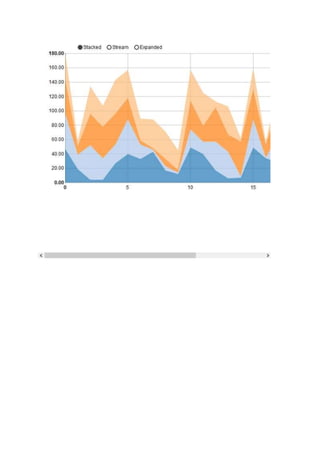
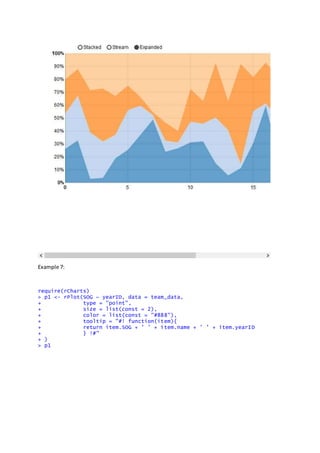
Example6:
dat <- data.frame(
t = rep(0:23, each= 4),
var = rep(LETTERS[1:4],4),
val = round(runif(4*24,0,50)) )
p<- nPlot(val ~t,group = 'var', data = dat, type = 'stackedAreaChart',id='chart' )
p
Example 7:
require(rCharts)
> p1 <- rPlot(SOG ~ yearID, data = team_data,
+ type = "point",
+ size = list(const = 2),
+ color = list(const = "#888"),
+ tooltip = "#! function(item){
+ return item.SOG + ' ' + item.name + ' ' + item.yearID
+ } !#"
+ )
> p1
> myteam = "Boston Red Sox"
> p1$layer(data = team_data[team_data$name == myteam,],
+ color = list(const = 'red'),
+ copy_layer = T)
> p1$set(dom = 'chart3')
> p1
>
Example 8:
>
> library(rCharts)
> library(plyr)
> library(knitr)
> library(reshape2)
> library(scales)
> options(RCHART_WIDTH = 600, RCHART_HEIGHT = 400)
> knitr::opts_chunk$set(comment = NA, results = 'asis', tidy = F, message =
F)
> data(tips, package = 'reshape2')
p= rPlot(x = 'day', y = 'box(tip)', data = tips, type = 'box')
> p
nba = read.csv('http://datasets.flowingdata.com/ppg2008.csv')
> nba.m = ddply(melt(nba), .(variable), transform, rescale = rescale(value)
)
> p= rPlot(Name ~ variable, color = 'rescale', data = nba.m, type = 'tile',
height = 600)
> p
Example:
haireye = as.data.frame(HairEyeColor)
> dat = subset(haireye, Sex == "Female" & Eye == "Blue")
> haireye = as.data.frame(HairEyeColor)
> dat = subset(haireye, Sex == "Female" & Eye == "Blue")
> p1 = mPlot(x = 'Hair', y = list('Freq'), data = dat, type = 'Bar', labels = list("Cou
> p1
dat = subset(haireye, Sex == "Female")
p2 = mPlot(Freq ~ Eye, group = "Hair", data = dat, type = "Bar", labels = 1
:4)
p2
Example:
data(economics, package = 'ggplot2')
dat = transform(economics, date = as.character(date))
p3 <- mPlot(x = "date", y = list("psavert", "uempmed"), data = dat, type =
'Line',
pointSize = 0, lineWidth = 1)
p3$set(xLabelFormat = "#! function (x) {
return x.toString(); }
!#")
p3$set(type = 'Area')
p3
Example:
ecm = reshape2::melt(economics[,c('date', 'uempmed', 'psavert')], id = 'dat
e')
p7 = nPlot(value ~ date, group = 'variable', data = ecm, type = 'lineWithFo
cusChart')
p7$xAxis( tickFormat="#!function(d) {return d3.time.format('%b %Y')(new Dat
e( d * 86400000 ));}!#" )
p7
Example:
library(rpart.plot)
h= hPlot(x = "Wr.Hnd", y = "NW.Hnd", data = MASS::survey,
+ type = c("line", "bubble", "scatter"), group = "Clap", size =
"Age")
h
> map3 = Leaflet$new()
> map3$setView(c(41.7627, -72.6743), zoom = 13)
> map3$marker(c(41.7627, -72.6743), bindPopup = "<p> Hi. I am a popup </p>"
)
> map3$marker(c(41.70, -72.60), bindPopup = "<p> Hi. I am another popup </p
>")
> map3
> map3 = Leaflet$new()
> map3$setView(c(41.7627, -72.6743), zoom = 13)
> map3$marker(c(41.7627, -72.6743), bindPopup = "<p> Hi. I am a popup </p>"
)
> map3$marker(c(41.70, -72.60), bindPopup = "<p> Hi. I am another popup </p
>")
> map3
Example:
> map3 = Leaflet$new()
> map3$setView(c(41.7627, -72.6743), zoom = 13)
> map3$marker(c(41.7627, -72.6743), bindPopup = "<p> Hi. I am a popup </p>"
)
> map3$marker(c(41.70, -72.60), bindPopup = "<p> Hi. I am another popup </p
>")
> map3
Reference:
https://github.com/ramnathv/rCharts/tree/master/inst/libraries
http://www.rpubs.com/dnchari/rcharts
rCharts package by Ramnath Vaidyanathan

Some Examples in R- [Data Visualization--R graphics]

  • 1.
    Some Examples inR- [Data Visualization--R graphics] and others.. library(rpart.plot),library(rCharts),library(plyr),library(knitr), library(reshape2),library(scales) Reference: https://github.com/ramnathv/rCharts/tree/master/inst/libraries http://www.rpubs.com/dnchari/rcharts rCharts package by Ramnath Vaidyanathan Prepared by Volkan OBAN
  • 2.
    CODES: require(rCharts)##Example 1 names(iris)=gsub(".","",names(iris)) rPlot(SepalLength~SepalWidth|Species,data= iris,color='Species',type = 'point') Example2- ## Example 2 FacettedBarplot hair_eye = as.data.frame(HairEyeColor) rPlot(Freq~Hair | Eye,color = 'Eye', data = hair_eye,type = 'bar')
  • 3.
    Example3- require(rCharts) > names(iris) =gsub(".", "", names(iris)) > rPlot(SepalLength ~ SepalWidth | Species, data = iris, color = 'Speci es', type = 'point') > ## Example 2 Facetted Barplot > hair_eye = as.data.frame(HairEyeColor) > rPlot(Freq ~ Hair | Eye, color = 'Eye', data = hair_eye, type = ' bar') > hair_eye = as.data.frame(HairEyeColor) > p2 <- nPlot(Freq ~ Hair, group = 'Eye', + data = subset(hair_eye, Sex == "Female"), + type = 'multiBarChart' + ) > p2$chart(color = c('brown', 'blue', '#594c26', 'green')) > p2
  • 4.
    Example 4: p <-nPlot(~ cyl, data = mtcars, type = 'pieChart') > p$chart(donut = TRUE > p5
  • 5.
    Example 5: data(economics, package= 'ggplot2') > p <- nPlot(uempmed ~ date, data = economics, type = 'lineChart') > p
  • 6.
    Example6: dat <- data.frame( t= rep(0:23, each= 4), var = rep(LETTERS[1:4],4), val = round(runif(4*24,0,50)) ) p<- nPlot(val ~t,group = 'var', data = dat, type = 'stackedAreaChart',id='chart' ) p
  • 9.
    Example 7: require(rCharts) > p1<- rPlot(SOG ~ yearID, data = team_data, + type = "point", + size = list(const = 2), + color = list(const = "#888"), + tooltip = "#! function(item){ + return item.SOG + ' ' + item.name + ' ' + item.yearID + } !#" + ) > p1
  • 10.
    > myteam ="Boston Red Sox" > p1$layer(data = team_data[team_data$name == myteam,], + color = list(const = 'red'), + copy_layer = T) > p1$set(dom = 'chart3') > p1 >
  • 11.
    Example 8: > > library(rCharts) >library(plyr) > library(knitr) > library(reshape2) > library(scales) > options(RCHART_WIDTH = 600, RCHART_HEIGHT = 400) > knitr::opts_chunk$set(comment = NA, results = 'asis', tidy = F, message = F) > data(tips, package = 'reshape2') p= rPlot(x = 'day', y = 'box(tip)', data = tips, type = 'box') > p
  • 12.
    nba = read.csv('http://datasets.flowingdata.com/ppg2008.csv') >nba.m = ddply(melt(nba), .(variable), transform, rescale = rescale(value) ) > p= rPlot(Name ~ variable, color = 'rescale', data = nba.m, type = 'tile', height = 600) > p
  • 13.
    Example: haireye = as.data.frame(HairEyeColor) >dat = subset(haireye, Sex == "Female" & Eye == "Blue") > haireye = as.data.frame(HairEyeColor) > dat = subset(haireye, Sex == "Female" & Eye == "Blue") > p1 = mPlot(x = 'Hair', y = list('Freq'), data = dat, type = 'Bar', labels = list("Cou > p1
  • 14.
    dat = subset(haireye,Sex == "Female") p2 = mPlot(Freq ~ Eye, group = "Hair", data = dat, type = "Bar", labels = 1 :4) p2
  • 15.
    Example: data(economics, package ='ggplot2') dat = transform(economics, date = as.character(date)) p3 <- mPlot(x = "date", y = list("psavert", "uempmed"), data = dat, type = 'Line', pointSize = 0, lineWidth = 1) p3$set(xLabelFormat = "#! function (x) { return x.toString(); } !#") p3$set(type = 'Area') p3
  • 16.
    Example: ecm = reshape2::melt(economics[,c('date','uempmed', 'psavert')], id = 'dat e') p7 = nPlot(value ~ date, group = 'variable', data = ecm, type = 'lineWithFo cusChart') p7$xAxis( tickFormat="#!function(d) {return d3.time.format('%b %Y')(new Dat e( d * 86400000 ));}!#" ) p7
  • 17.
    Example: library(rpart.plot) h= hPlot(x ="Wr.Hnd", y = "NW.Hnd", data = MASS::survey, + type = c("line", "bubble", "scatter"), group = "Clap", size = "Age") h > map3 = Leaflet$new() > map3$setView(c(41.7627, -72.6743), zoom = 13) > map3$marker(c(41.7627, -72.6743), bindPopup = "<p> Hi. I am a popup </p>" ) > map3$marker(c(41.70, -72.60), bindPopup = "<p> Hi. I am another popup </p >") > map3 > map3 = Leaflet$new() > map3$setView(c(41.7627, -72.6743), zoom = 13) > map3$marker(c(41.7627, -72.6743), bindPopup = "<p> Hi. I am a popup </p>" ) > map3$marker(c(41.70, -72.60), bindPopup = "<p> Hi. I am another popup </p >") > map3
  • 18.
    Example: > map3 =Leaflet$new() > map3$setView(c(41.7627, -72.6743), zoom = 13) > map3$marker(c(41.7627, -72.6743), bindPopup = "<p> Hi. I am a popup </p>" ) > map3$marker(c(41.70, -72.60), bindPopup = "<p> Hi. I am another popup </p >") > map3
  • 19.