Data
Visualization in
R
Olga Scrivner
ggplot2
googleVis
plotly
igraphData Visualization in R
Olga Scrivner
Data
Visualization in
R
Olga Scrivner
ggplot2
googleVis
plotly
igraph
Outline
1. ggplot2 (Hadley Wickham)
2. googleVis
3. plotly
4. igraph
Data
Visualization in
R
Olga Scrivner
ggplot2
googleVis
plotly
igraph
R Package - ggplot2
Advantages
flexible
plot specification at a level of abstraction
themes
Things you cannot do with ggplot2
3D and interactive graphics
network graphs (nodes/edges)
Some resources:
http://tutorials.iq.harvard.edu/R/Rgraphics/
Rgraphics.html
Intro http://heather.cs.ucdavis.edu/~matloff/
GGPlot2/GGPlot2Intro.pdf
Data
Visualization in
R
Olga Scrivner
ggplot2
googleVis
plotly
igraph
Grammar of Graphics - Independent Blocks
a) Object initialization
ggplot(data, mapping=aes() )
b) Aesthetic mapping (aes)
Describes how variables in the data are mapped to
visual properties (aesthetics) of geoms
aes(x = mpg, y = wt)
c) Geoms - geometric objects
geom_bar; geom_boxplot; geom_histogram
Plot must have at least one geom
Data
Visualization in
R
Olga Scrivner
ggplot2
googleVis
plotly
igraph
Materials
1. Download: landdata-states.csv
2. Script week4.r
Materials are based on tutorial
http://tutorials.iq.harvard.edu/R/Rgraphics/
Data
Visualization in
R
Olga Scrivner
ggplot2
googleVis
plotly
igraph
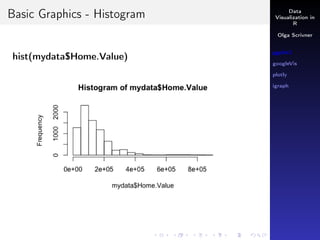
Basic Graphics - Histogram
hist(mydata$Home.Value)
Data
Visualization in
R
Olga Scrivner
ggplot2
googleVis
plotly
igraph
Ggplot
1st Block: Object initialization
p <- ggplot(mydata, aes(Home.Value))
Data
Visualization in
R
Olga Scrivner
ggplot2
googleVis
plotly
igraph
Ggplot
1st Block: Object initialization
p <- ggplot(mydata, aes(Home.Value))
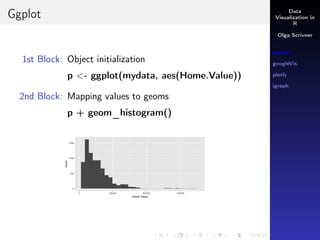
2nd Block: Mapping values to geoms
p + geom_histogram()
Data
Visualization in
R
Olga Scrivner
ggplot2
googleVis
plotly
igraph
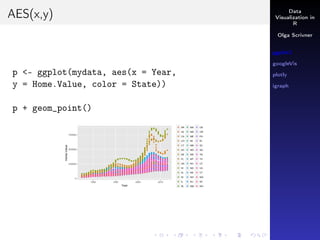
AES(x,y)
p <- ggplot(mydata, aes(x = Year,
y = Home.Value, color = State))
p + geom_point()
Data
Visualization in
R
Olga Scrivner
ggplot2
googleVis
plotly
igraph
AES(x,y)
p <- ggplot(mydata, aes(x = Year,
y = Home.Value, color = State))
p + geom_point()
Data
Visualization in
R
Olga Scrivner
ggplot2
googleVis
plotly
igraph
Points: Shape, Size, Color
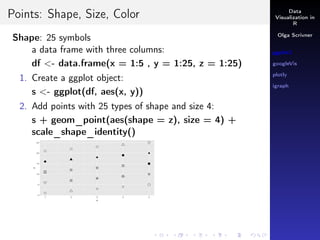
Shape: 25 symbols
a data frame with three columns:
df <- data.frame(x = 1:5 , y = 1:25, z = 1:25)
1. Create a ggplot object:
s <- ggplot(df, aes(x, y))
2. Add points with 25 types of shape and size 4:
s + geom_point(aes(shape = z), size = 4) +
scale_shape_identity()
Data
Visualization in
R
Olga Scrivner
ggplot2
googleVis
plotly
igraph
Points: Shape, Size, Color
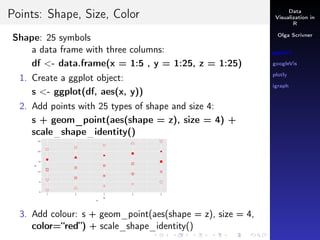
Shape: 25 symbols
a data frame with three columns:
df <- data.frame(x = 1:5 , y = 1:25, z = 1:25)
1. Create a ggplot object:
s <- ggplot(df, aes(x, y))
2. Add points with 25 types of shape and size 4:
s + geom_point(aes(shape = z), size = 4) +
scale_shape_identity()
Data
Visualization in
R
Olga Scrivner
ggplot2
googleVis
plotly
igraph
Points: Shape, Size, Color
Shape: 25 symbols
a data frame with three columns:
df <- data.frame(x = 1:5 , y = 1:25, z = 1:25)
1. Create a ggplot object:
s <- ggplot(df, aes(x, y))
2. Add points with 25 types of shape and size 4:
s + geom_point(aes(shape = z), size = 4) +
scale_shape_identity()
3. Add colour: s + geom_point(aes(shape = z), size = 4,
color=“red”) + scale_shape_identity()
Data
Visualization in
R
Olga Scrivner
ggplot2
googleVis
plotly
igraph
Lines: geom_line
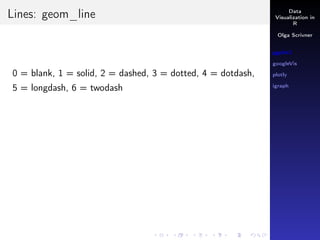
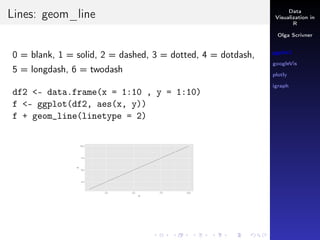
0 = blank, 1 = solid, 2 = dashed, 3 = dotted, 4 = dotdash,
5 = longdash, 6 = twodash
Data
Visualization in
R
Olga Scrivner
ggplot2
googleVis
plotly
igraph
Lines: geom_line
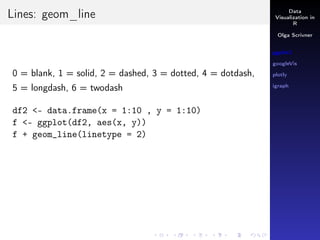
0 = blank, 1 = solid, 2 = dashed, 3 = dotted, 4 = dotdash,
5 = longdash, 6 = twodash
df2 <- data.frame(x = 1:10 , y = 1:10)
f <- ggplot(df2, aes(x, y))
f + geom_line(linetype = 2)
Data
Visualization in
R
Olga Scrivner
ggplot2
googleVis
plotly
igraph
Lines: geom_line
0 = blank, 1 = solid, 2 = dashed, 3 = dotted, 4 = dotdash,
5 = longdash, 6 = twodash
df2 <- data.frame(x = 1:10 , y = 1:10)
f <- ggplot(df2, aes(x, y))
f + geom_line(linetype = 2)
Data
Visualization in
R
Olga Scrivner
ggplot2
googleVis
plotly
igraph
Lines: geom_line
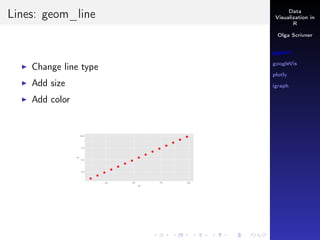
Change line type
Add size
Add color
Data
Visualization in
R
Olga Scrivner
ggplot2
googleVis
plotly
igraph
Lines: geom_line
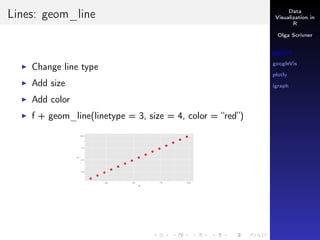
Change line type
Add size
Add color
f + geom_line(linetype = 3, size = 4, color = “red”)
Data
Visualization in
R
Olga Scrivner
ggplot2
googleVis
plotly
igraph
Smoother: geom_smooth()
Let’s select HAWAII from mydata:
mydata[State ==“HI”, ]
attach(mydata)
p <- ggplot(mydata[State == "HI", ],
aes(x = Year, y = Home.Value))
p + geom_point() + geom_smooth()
Data
Visualization in
R
Olga Scrivner
ggplot2
googleVis
plotly
igraph
Conditions
& means AND
| means OR
How would you extract two states HAWAII and DC from
mydata? AND or OR?
Data
Visualization in
R
Olga Scrivner
ggplot2
googleVis
plotly
igraph
Conditions
& means AND
| means OR
How would you extract two states HAWAII and DC from
mydata? AND or OR?
mydata[State == “HI” | State == “DC” ,]
Data
Visualization in
R
Olga Scrivner
ggplot2
googleVis
plotly
igraph
Conditions
& means AND
| means OR
How would you extract two states HAWAII and DC from
mydata? AND or OR?
mydata[State == “HI” | State == “DC” ,]
p <- ggplot(mydata[State == "HI" | State == "DC" ,],
aes(x = Year, y = Home.Value, color = State))
p + geom_point() + geom_smooth()
Data
Visualization in
R
Olga Scrivner
ggplot2
googleVis
plotly
igraph
Scale
One scale per aesthetic (AES)
Data
Visualization in
R
Olga Scrivner
ggplot2
googleVis
plotly
igraph
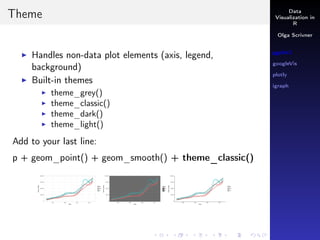
Theme
Handles non-data plot elements (axis, legend,
background)
Built-in themes
theme_grey()
theme_classic()
theme_dark()
theme_light()
Data
Visualization in
R
Olga Scrivner
ggplot2
googleVis
plotly
igraph
Theme
Handles non-data plot elements (axis, legend,
background)
Built-in themes
theme_grey()
theme_classic()
theme_dark()
theme_light()
Add to your last line:
p + geom_point() + geom_smooth() + theme_classic()
Data
Visualization in
R
Olga Scrivner
ggplot2
googleVis
plotly
igraph
What is googleVis?
Interface between R and the Google Charts API
Google Charts - interactive charts that can be embedded
into web pages
Hans Rosling in TED talk 2006
Internet connection
Flash player is required for some charts
https://www.ted.com/talks/hans_rosling_shows_the_
best_stats_you_ve_ever_seen
Data
Visualization in
R
Olga Scrivner
ggplot2
googleVis
plotly
igraph
Chart Types
1. Motion Charts gvisMotionChart()
2. Annotated time lines gvisTimeline()
3. Maps gvisMap()
4. Other (line, bubble, area etc)
5. Output is HTML code with data and references to
JavaScript
Data
Visualization in
R
Olga Scrivner
ggplot2
googleVis
plotly
igraph
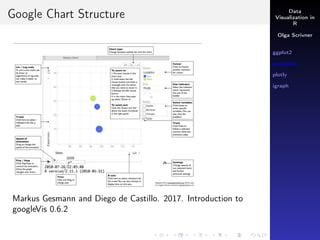
Google Chart Structure
Markus Gesmann and Diego de Castillo. 2017. Introduction to
googleVis 0.6.2
Data
Visualization in
R
Olga Scrivner
ggplot2
googleVis
plotly
igraph
Motion Chart
demo(WorldBank)
Data
Visualization in
R
Olga Scrivner
ggplot2
googleVis
plotly
igraph
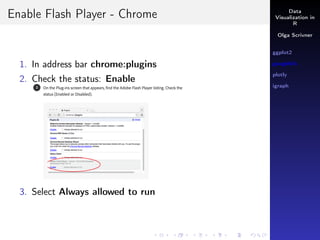
Enable Flash Player - Chrome
1. In address bar chrome:plugins
2. Check the status: Enable
3. Select Always allowed to run
Data
Visualization in
R
Olga Scrivner
ggplot2
googleVis
plotly
igraph
Motion Chart
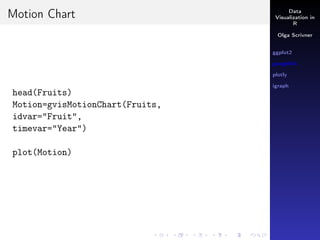
head(Fruits)
Motion=gvisMotionChart(Fruits,
idvar="Fruit",
timevar="Year")
plot(Motion)
Data
Visualization in
R
Olga Scrivner
ggplot2
googleVis
plotly
igraph
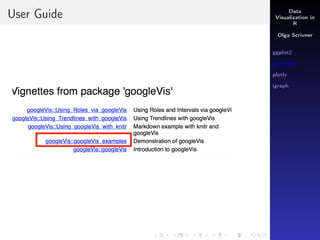
User Guide
Data
Visualization in
R
Olga Scrivner
ggplot2
googleVis
plotly
igraph
Plotly
1. Plotly - a collaborative business intelligence platform
2. Plotly’s R library makes interactive graphs
3. Plotly uses the htmlwidget framework that works in
various contexts (R Markdown documents, shiny apps,
inside RStudio, Jupiter Notebook) without an internet
connection
Data
Visualization in
R
Olga Scrivner
ggplot2
googleVis
plotly
igraph
Resources
Resources:
https://cpsievert.github.io/plotly_book/
https://plot.ly/r/
https://plot.ly/ggplot2/
Data
Visualization in
R
Olga Scrivner
ggplot2
googleVis
plotly
igraph
Ggplot Integration
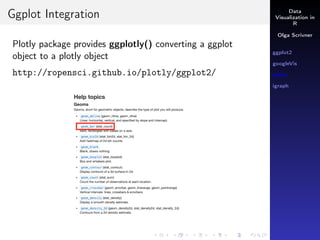
Plotly package provides ggplotly() converting a ggplot
object to a plotly object
http://ropensci.github.io/plotly/ggplot2/
Data
Visualization in
R
Olga Scrivner
ggplot2
googleVis
plotly
igraph
Usage
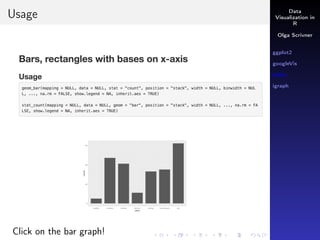
Click on the bar graph!
Data
Visualization in
R
Olga Scrivner
ggplot2
googleVis
plotly
igraph
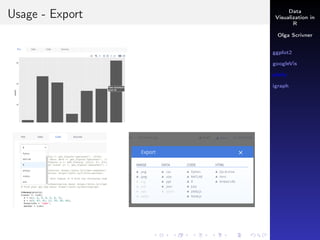
Usage - Export
Data
Visualization in
R
Olga Scrivner
ggplot2
googleVis
plotly
igraph
ggplotly()
Let’s revisit mydata
attach(mydata)
p <- ggplot(mydata[State == "HI" | State == "DC" ,],
aes(x = Year, y = Home.Value, color=State))
p <- p + geom_point() + geom_smooth()
ggplotly(p)
Data
Visualization in
R
Olga Scrivner
ggplot2
googleVis
plotly
igraph
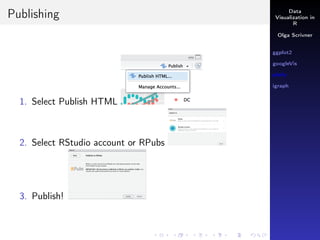
Publishing
1. Select Publish HTML
2. Select RStudio account or RPubs
3. Publish!
Data
Visualization in
R
Olga Scrivner
ggplot2
googleVis
plotly
igraph
Two Approaches
1. ggplotly() function
Converting ggplot objects into plotly objects
Requires data frames
2. plot_ly() interface
Flexible interface to plotly.js
Can use data frames and matrices
Data
Visualization in
R
Olga Scrivner
ggplot2
googleVis
plotly
igraph
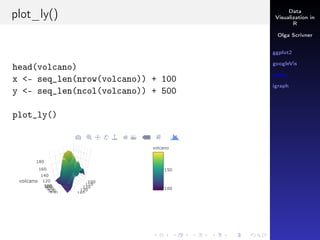
plot_ly()
head(volcano)
x <- seq_len(nrow(volcano)) + 100
y <- seq_len(ncol(volcano)) + 500
plot_ly()
Data
Visualization in
R
Olga Scrivner
ggplot2
googleVis
plotly
igraph
plot_ly()
head(volcano)
x <- seq_len(nrow(volcano)) + 100
y <- seq_len(ncol(volcano)) + 500
plot_ly()
Data
Visualization in
R
Olga Scrivner
ggplot2
googleVis
plotly
igraph
Standalone Web Page
1. Save as Web page
2. View 3D volcano web page
Data
Visualization in
R
Olga Scrivner
ggplot2
googleVis
plotly
igraph
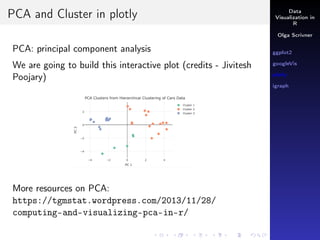
PCA and Cluster in plotly
PCA: principal component analysis
We are going to build this interactive plot (credits - Jivitesh
Poojary)
More resources on PCA:
https://tgmstat.wordpress.com/2013/11/28/
computing-and-visualizing-pca-in-r/
Data
Visualization in
R
Olga Scrivner
ggplot2
googleVis
plotly
igraph
PCA
Download R code for PCA and Cluster from Canvas
pcaCars <- princomp(mtcars, cor = TRUE)
names(pcaCars)
summary(pcaCars)
# scree plot
plot(pcaCars, type = "l")
# cluster cars
carsHC <- hclust(dist(pcaCars$scores), method = "ward.D2")
# dendrogram
plot(carsHC)
# cut the dendrogram into 3 clusters
carsClusters <- cutree(carsHC, k = 3)
A Scree Plot - line segment plot showing the fraction of total
variance in the data
Data
Visualization in
R
Olga Scrivner
ggplot2
googleVis
plotly
igraph
PCA - Cluster Code
# add cluster to data frame of scores
carsDf <- data.frame(pcaCars$scores,
"cluster" = factor(carsClusters))
carsDf <- transform(carsDf,
cluster_name = paste("Cluster",carsClusters))
# Build plotly graph
p <- plot_ly(carsDf, x = carsDf$Comp.1 , y = carsDf$Comp.2,
text = rownames(carsDf), mode = "markers", color =
carsDf$cluster_name, marker = list(size = 11))
p <- layout(p, title = "PCA Clusters from Hierarchical
Clustering of Cars Data",
xaxis = list(title = "PC 1"),
yaxis = list(title = "PC 2"))
Run p
Data
Visualization in
R
Olga Scrivner
ggplot2
googleVis
plotly
igraph
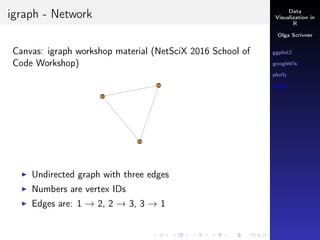
igraph - Network
Canvas: igraph workshop material (NetSciX 2016 School of
Code Workshop)
Undirected graph with three edges
Numbers are vertex IDs
Edges are: 1 → 2, 2 → 3, 3 → 1
Data
Visualization in
R
Olga Scrivner
ggplot2
googleVis
plotly
igraph
Graphs
library(igraph)
g1 <- graph(edges = c(1,2, 2,3, 3, 1), n = 3, directed
= F)
plot(g1)
Data
Visualization in
R
Olga Scrivner
ggplot2
googleVis
plotly
igraph
Graphs
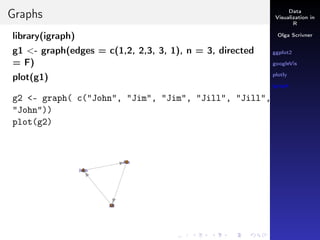
library(igraph)
g1 <- graph(edges = c(1,2, 2,3, 3, 1), n = 3, directed
= F)
plot(g1)
g2 <- graph( c("John", "Jim", "Jim", "Jill", "Jill",
"John"))
plot(g2)
Data
Visualization in
R
Olga Scrivner
ggplot2
googleVis
plotly
igraph
Credits
https://community.uservoice.com/blog/
data-visualization-best-practices/
https://opr.princeton.edu/workshops/Downloads/
2015Jan_ggplot2Koffman.pdf NetSciX 2016 School of Code
Workshop

R visualization: ggplot2, googlevis, plotly, igraph Overview