Presented by:
Ch .Mounika,
14A81A0568,
III CSE-B.
CONTENTS
 INTRODUCTION
 HISTORY
 COMPONENTS
 WORKING
 APPLICATIONS
 ADVANTAGES&DISADVANTAGES
 CONCLUSION
INTRODUCTION
 Sixth sense is a wearable gesture interface that
aguments physical world around us with digital world.
 It lets us use natural hand gestures to interact with
digital world.
 It comprises pocket projector ,a mirror and camera .
The hardware components are coupled independent
like mobile wearable device.
HISTORY
Sixth Sense is a gesture based wearable computer system
developed at MIT Media Lab by Steve Mann in 1994 and 1997
(head worn gestural interface), and 1998 (neck worn version).
Further developed by Pranav Mistry (also at MIT Media Lab),
in 2009, both of whom developed both hardware and software
for both head worn and neck worn versions of it.
components
 Camera
 Projector
 Mirror
 Mobile
 Colour markers
CAMERA
 Captures an object in view and
tracks the users hand gestures.
 It sends data to smart phone.
 It acts as digital eye
,connecting you to the world of
digital information
PROJECTOR
 The projector projects visual
information enabling surfaces
and physical objects to be used
as interfaces.
 A tiny LED project displays
data sent from the smart phone
on the any surface in view-
object, wall or any person.
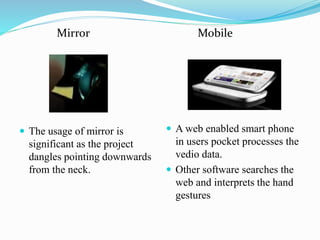
Mirror
 The usage of mirror is
significant as the project
dangles pointing downwards
from the neck.
Mobile
 A web enabled smart phone
in users pocket processes the
vedio data.
 Other software searches the
web and interprets the hand
gestures
Colour markers
 It is at the tip of the user’s fingers.
 Marking the user’s fingers with red, yellow, green, blue tape
help the web cam recognize the gestures
 The movement and arrangement of these makers are
interpreted into gestures that act as interaction instructions for
the projected application interfaces
Working
•The hardware that makes Sixth Sense work is a pendant like mobile
wearable interface.
•It has a camera, a mirror and a projector and is connected wirelessly to
a Bluetooth or 3G or wi-fi smart phone that can slip comfortably into
one’s pocket.
• The camera recognizes individuals, images, pictures, gestures one
makes with their hands.
•Information is sent to the Smartphone for processing.
•The downward-facing projector projects the output
image on to the mirror.
•Mirror reflects image on to the desired surface.
•Thus, digital information is freed from its confines
and placed in the physical world.
How it works?
Applications
TAKE PICTURES
If you fashion your index fingers and
thumbs into a square ( “framing”
gesture) we can take a snap.
After taking the photos, we can
project them onto a surface, and use
gestures to sort through the photos, and
organize and resize them.
ZOOMING FEATURES
We can arrange those pictures. The user
can zoom in or zoom out by just using
hand movements
ABOUT BOOK INFORMATION
Maes says Sixth Sense uses image
recognition or marker technology to recognize
products you pick up , then feeds you
information on books. The system can project
Amazon ratings on that book, as well as
reviews and other relevant information.
MAKE A CALL
You can use sixth sense to project a
keypad onto your hand, then use the that
key pad to make a call
CREATES MULTIMEDIA
READING EXPERIENCES
Sixth sense can be programmed to
project related videos onto news paper
articles you are reading.
FEED INFORMATION ON PEOPLE
The system will project some relevant
information about a person such what
he/she does, where they work, and so
on.
GET FLIGHT UPDATES
The system will recognize your
boarding pass and you know whether
your flight is on time and if the gate
has changed
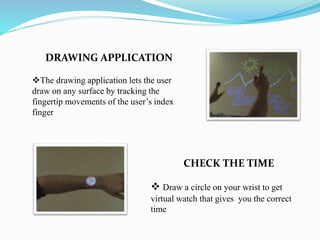
DRAWING APPLICATION
The drawing application lets the user
draw on any surface by tracking the
fingertip movements of the user’s index
finger
CHECK THE TIME
 Draw a circle on your wrist to get
virtual watch that gives you the correct
time
GETS PRODUCT
INFORMATION
Sixth sense uses image recognition or
marker technology to recognize products
we pick up and feed us information on
those products
 The sixth sense also implements
map which lets the user display the
map on any physical surface and find
his destination and he can use his
thumbs and index fingers to navigate
the map
CALL UP A MAP
Advantages
 Portable.
 Support multi touch and multi user interaction.
 Cost effective($330).
 Data access directly from machines in real time.
 Open source software
Disadvantages
 Hardware limitation of the devices ,that we are currently
carry around us.
 For example many phones will not allow the external
camera feed to be manipulated in real time.
 Post processing can occur however.
Conclusion
 Sixth sense recognizes the object around us, displaying the
information automatically and letting us to access it in any way
we need.
 The sixth sense prototype implements several applications that
demonstrate the usefulness , viability and flexibility of the
system.
 The potential of becoming the ultimate “transparent” user
interface for accessing information about everything around us.
 Allowing us to interact with this information via natural hand
gestures.
SIXTH SENSE TECHNOLOGY

SIXTH SENSE TECHNOLOGY

  • 1.
  • 2.
    CONTENTS  INTRODUCTION  HISTORY COMPONENTS  WORKING  APPLICATIONS  ADVANTAGES&DISADVANTAGES  CONCLUSION
  • 3.
    INTRODUCTION  Sixth senseis a wearable gesture interface that aguments physical world around us with digital world.  It lets us use natural hand gestures to interact with digital world.  It comprises pocket projector ,a mirror and camera . The hardware components are coupled independent like mobile wearable device.
  • 4.
    HISTORY Sixth Sense isa gesture based wearable computer system developed at MIT Media Lab by Steve Mann in 1994 and 1997 (head worn gestural interface), and 1998 (neck worn version). Further developed by Pranav Mistry (also at MIT Media Lab), in 2009, both of whom developed both hardware and software for both head worn and neck worn versions of it.
  • 5.
    components  Camera  Projector Mirror  Mobile  Colour markers
  • 6.
    CAMERA  Captures anobject in view and tracks the users hand gestures.  It sends data to smart phone.  It acts as digital eye ,connecting you to the world of digital information PROJECTOR  The projector projects visual information enabling surfaces and physical objects to be used as interfaces.  A tiny LED project displays data sent from the smart phone on the any surface in view- object, wall or any person.
  • 7.
    Mirror  The usageof mirror is significant as the project dangles pointing downwards from the neck. Mobile  A web enabled smart phone in users pocket processes the vedio data.  Other software searches the web and interprets the hand gestures
  • 8.
    Colour markers  Itis at the tip of the user’s fingers.  Marking the user’s fingers with red, yellow, green, blue tape help the web cam recognize the gestures  The movement and arrangement of these makers are interpreted into gestures that act as interaction instructions for the projected application interfaces
  • 9.
    Working •The hardware thatmakes Sixth Sense work is a pendant like mobile wearable interface. •It has a camera, a mirror and a projector and is connected wirelessly to a Bluetooth or 3G or wi-fi smart phone that can slip comfortably into one’s pocket. • The camera recognizes individuals, images, pictures, gestures one makes with their hands.
  • 10.
    •Information is sentto the Smartphone for processing. •The downward-facing projector projects the output image on to the mirror. •Mirror reflects image on to the desired surface. •Thus, digital information is freed from its confines and placed in the physical world.
  • 11.
  • 12.
    Applications TAKE PICTURES If youfashion your index fingers and thumbs into a square ( “framing” gesture) we can take a snap. After taking the photos, we can project them onto a surface, and use gestures to sort through the photos, and organize and resize them.
  • 13.
    ZOOMING FEATURES We canarrange those pictures. The user can zoom in or zoom out by just using hand movements ABOUT BOOK INFORMATION Maes says Sixth Sense uses image recognition or marker technology to recognize products you pick up , then feeds you information on books. The system can project Amazon ratings on that book, as well as reviews and other relevant information.
  • 14.
    MAKE A CALL Youcan use sixth sense to project a keypad onto your hand, then use the that key pad to make a call CREATES MULTIMEDIA READING EXPERIENCES Sixth sense can be programmed to project related videos onto news paper articles you are reading.
  • 15.
    FEED INFORMATION ONPEOPLE The system will project some relevant information about a person such what he/she does, where they work, and so on. GET FLIGHT UPDATES The system will recognize your boarding pass and you know whether your flight is on time and if the gate has changed
  • 16.
    DRAWING APPLICATION The drawingapplication lets the user draw on any surface by tracking the fingertip movements of the user’s index finger CHECK THE TIME  Draw a circle on your wrist to get virtual watch that gives you the correct time
  • 17.
    GETS PRODUCT INFORMATION Sixth senseuses image recognition or marker technology to recognize products we pick up and feed us information on those products  The sixth sense also implements map which lets the user display the map on any physical surface and find his destination and he can use his thumbs and index fingers to navigate the map CALL UP A MAP
  • 18.
    Advantages  Portable.  Supportmulti touch and multi user interaction.  Cost effective($330).  Data access directly from machines in real time.  Open source software
  • 19.
    Disadvantages  Hardware limitationof the devices ,that we are currently carry around us.  For example many phones will not allow the external camera feed to be manipulated in real time.  Post processing can occur however.
  • 20.
    Conclusion  Sixth senserecognizes the object around us, displaying the information automatically and letting us to access it in any way we need.  The sixth sense prototype implements several applications that demonstrate the usefulness , viability and flexibility of the system.  The potential of becoming the ultimate “transparent” user interface for accessing information about everything around us.  Allowing us to interact with this information via natural hand gestures.