Presented by:-
Guddu yadav
1403210088
3rd yr, CSE-B
*Contents :
• About the device
• Components of the
device
Working principle of
the device.
• Software used.
• Tutorials
Advantages
• Conclusion
*
Sixth Sense is a wearable gestural interface that augments the physical
world around us with digital information and lets us use natural hand
gestures to interact with that information.
The neckworn projector and camera combination was first proposed
by MIT Media Lab student Steve Mann. The concept was further developed
by Pranav Mistry, while he was also a student at the MIT Media Lab.
SixthSense bridges the gap by bringing intangible, digital information out
into the tangible world, and allowing us to interact with this information via
natural hand
SixthSense comprises a pocket projector, a mirror and a camera. The
hardware components are coupled in a pendant like mobile wearable device
* Sixth Sense technology is the science of tomorrow with the aim
of connecting the digital world with the physical world
seamlessly, eliminating hardware devices
The 5 senses Here comes the sixth sense
*
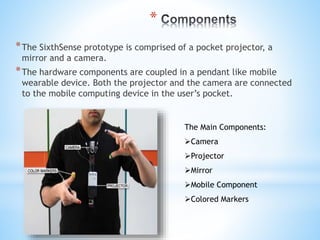
*The SixthSense prototype is comprised of a pocket projector, a
mirror and a camera.
*The hardware components are coupled in a pendant like mobile
wearable device. Both the projector and the camera are connected
to the mobile computing device in the user’s pocket.
The Main Components:
Camera
Projector
Mirror
Mobile Component
Colored Markers
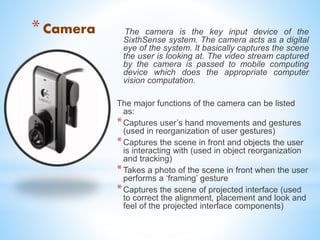
*Camera The camera is the key input device of the
SixthSense system. The camera acts as a digital
eye of the system. It basically captures the scene
the user is looking at. The video stream captured
by the camera is passed to mobile computing
device which does the appropriate computer
vision computation.
The major functions of the camera can be listed
as:
*Captures user’s hand movements and gestures
(used in reorganization of user gestures)
*Captures the scene in front and objects the user
is interacting with (used in object reorganization
and tracking)
*Takes a photo of the scene in front when the user
performs a ‘framing’ gesture
*Captures the scene of projected interface (used
to correct the alignment, placement and look and
feel of the projected interface components)
*
The projector is the key output device of the
SixthSense system. The projector visually
augments surfaces, walls and physical objects
the user is interacting with by projecting digital
information and graphical user interfaces. The
mobile computing device provides the projector
with the content to be projected. The projector
unit used in prototype runs on a rechargeable
battery.
The major functions of the projector can be listed
as:
*Projects graphical user interface of the
selected application onto surfaces or walls
in front.
*Augments the physical objects the user
interacting with by projecting just-in-time
and related information from the Internet.
* Mirror
*The mirror reflects the projection coming out from the projector and thus
helps in projecting onto the desired locations on walls or surfaces. The user
manually can change the tilt of the mirror to change the location of the
projection. For example in application where the user wants the projection to
go on the ground instead of the surface in front, he can change the tilt of the
mirror to change the projection. Thus, the mirror in the SixthSense helps in
overcoming the limitation of the limited projection space of the projector.
Microphone
The microphone is an optional component of the SixthSense. It is required
when using a paper as a computing interface. When the user wants to use
a sheet of paper as an interactive surface, he or she clips the microphone
to the paper. The microphone attached this way captures the sound signals
of user’s touching the paper. This data is passed to computing device for
processing. Later, combined with the tracking information about user’s
finger, the system is able to identify precise touch events on the paper.
* Mobile computing
device
The SixthSense system uses a mobile
computing device in user’s pocket as the
processing device. The software program
enabling all the features of the system runs on
this computing device. This device can be a
mobile phone or a small laptop computer. The
camera, the projector and the microphone are
connected to this device using wired or
wireless connection. The detail of the software
program that runs on this device is provided in
next section. The mobile computing device is
also connected to the Internet via 3G network
or wireless connection.
Color Markers
It is at the tip of the user’s fingers .
 Marking the user’s fingers with red, yellow, green, and blue tape
helps the webcam recognize gestures
The movements and arrangements of these makers are interpreted
into gestures that act as interaction instructions for the projected
application interfaces.
* Suggested Products
* These are the basic pieces that you should buy. We can choose any brand, and the
following list are those items that worked well for Pranav Mistry:
* Pico-Projector
* Laser
* AAXA ~$110
* Microvision ~$200
* L.E.D
* 3M MPro110 ~$270
* Camera
* Logitech QuickCam Pro for notebooks ~$23
* Microphone
* Microphone of Logitech QuickCam pro for notebooks ~$23
* A mirror assembly
* Front faced mirror is best, 1”X1” first surface mirror (this can be purchased
from anywhere, i.e. Ebay).
* Laptop Computer: Any Windows computer (this will act as the mobile computing
device)
*Working
principle
* Software
*The prototype system runs on windows platform and majority of the code is
written in C++ and C#.
WUW v0.1 beta
 WUW_v0.1 is the beta version of SixthSense code (WUW stands for Wear
Ur World, a former name of the project). This version runs on Windows.
Microsoft DirectX
Microsoft Visual Studio.
Adobe Flash Player
Microsoft Outlook
* Working
Draw: The red marker (M) draws when the yellow marker (N) is hidden. When
both the markers are visible you can move the mouse pointer to select different
colours or eraser, etc.
Photo: Make a rectangle with your pointer fingers and thumbs and when the
gesture is recognized, the countdown starts. Remove you hands from the
camera frame to capture the desired photo. (The countdown lasts for 3 secs)
Gallery: Displays the photos that you have taken
Mail: Displays a list of email from outlook (required that MS Outlook be running
for this to work)
Stock: Displays 16 stocks values real time, use the slider at the bottom of the
projected display to set the time scale.
Effects: Play with beautiful wavy lines and explore your imagination.
Newspaper: It projects newspaper stories and related videos from YouTube or
other web sites, directly onto the surface of the paper.
Book: For book-recognition, the program gets activated with a gesture, and the
system snaps a photo of the book, compares it with book-cover images it finds
online, computes a match, and retrieves and projects the ratings
Clock: An Analog clock will be projected by doing a circle gesture.
APPLICATIONS
Make a call
You can use the Sixth Sense to project a
keypad onto your hand, then use that
virtual keypad to make a call.
Call up a map
With the map application we can call
up the map of our choice and then use
thumbs and index fingers to navigate
the map
Check the time
Draw a circle on your wrist to
get a virtual watch that gives you
the correct time
Create multimedia
reading experiences
Sixth Sense can be programmed to
project related videos onto newspaper
articles you are reading
Drawing application
The drawing application lets the user
draw on any surface by tracking the
fingertip movements of the user’s
index finger
Zooming features
The user can zoom in or zoom out
using intuitive hand movements
Get product information
Sixth Sense uses image recognition or
marker technology to recognize products we
pick up, then feeds us information on those
products
Get book information
The system can project Amazon ratings on
that book, as well as reviews and other
relevant information
v
Take pictures
If you fashion your index
fingers and thumbs into a
square ("framing" gesture), the
system will snap a photo.
After taking the desired number
of photos, we can project them
onto a surface, and use
gestures to sort through the
photos, and organize and
resize them.
ADVANTAGES
Supports multi-touch and multi-user interaction
Portable
Connectedness between world and information
Cost effective
Data access directly from machine in real time
Mind map the idea anywhere
It is an open source
*
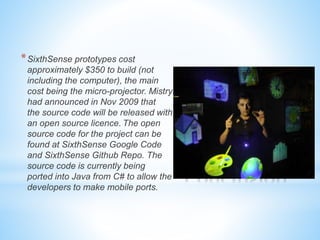
*SixthSense prototypes cost
approximately $350 to build (not
including the computer), the main
cost being the micro-projector. Mistry
had announced in Nov 2009 that
the source code will be released with
an open source licence. The open
source code for the project can be
found at SixthSense Google Code
and SixthSense Github Repo. The
source code is currently being
ported into Java from C# to allow the
developers to make mobile ports.
Sixth sense technology(seminar presentation)

Sixth sense technology(seminar presentation)

  • 1.
  • 2.
    *Contents : • Aboutthe device • Components of the device Working principle of the device. • Software used. • Tutorials Advantages • Conclusion
  • 3.
    * Sixth Sense isa wearable gestural interface that augments the physical world around us with digital information and lets us use natural hand gestures to interact with that information. The neckworn projector and camera combination was first proposed by MIT Media Lab student Steve Mann. The concept was further developed by Pranav Mistry, while he was also a student at the MIT Media Lab. SixthSense bridges the gap by bringing intangible, digital information out into the tangible world, and allowing us to interact with this information via natural hand SixthSense comprises a pocket projector, a mirror and a camera. The hardware components are coupled in a pendant like mobile wearable device
  • 4.
    * Sixth Sensetechnology is the science of tomorrow with the aim of connecting the digital world with the physical world seamlessly, eliminating hardware devices The 5 senses Here comes the sixth sense
  • 5.
    * *The SixthSense prototypeis comprised of a pocket projector, a mirror and a camera. *The hardware components are coupled in a pendant like mobile wearable device. Both the projector and the camera are connected to the mobile computing device in the user’s pocket. The Main Components: Camera Projector Mirror Mobile Component Colored Markers
  • 6.
    *Camera The camerais the key input device of the SixthSense system. The camera acts as a digital eye of the system. It basically captures the scene the user is looking at. The video stream captured by the camera is passed to mobile computing device which does the appropriate computer vision computation. The major functions of the camera can be listed as: *Captures user’s hand movements and gestures (used in reorganization of user gestures) *Captures the scene in front and objects the user is interacting with (used in object reorganization and tracking) *Takes a photo of the scene in front when the user performs a ‘framing’ gesture *Captures the scene of projected interface (used to correct the alignment, placement and look and feel of the projected interface components)
  • 7.
    * The projector isthe key output device of the SixthSense system. The projector visually augments surfaces, walls and physical objects the user is interacting with by projecting digital information and graphical user interfaces. The mobile computing device provides the projector with the content to be projected. The projector unit used in prototype runs on a rechargeable battery. The major functions of the projector can be listed as: *Projects graphical user interface of the selected application onto surfaces or walls in front. *Augments the physical objects the user interacting with by projecting just-in-time and related information from the Internet.
  • 8.
    * Mirror *The mirrorreflects the projection coming out from the projector and thus helps in projecting onto the desired locations on walls or surfaces. The user manually can change the tilt of the mirror to change the location of the projection. For example in application where the user wants the projection to go on the ground instead of the surface in front, he can change the tilt of the mirror to change the projection. Thus, the mirror in the SixthSense helps in overcoming the limitation of the limited projection space of the projector. Microphone The microphone is an optional component of the SixthSense. It is required when using a paper as a computing interface. When the user wants to use a sheet of paper as an interactive surface, he or she clips the microphone to the paper. The microphone attached this way captures the sound signals of user’s touching the paper. This data is passed to computing device for processing. Later, combined with the tracking information about user’s finger, the system is able to identify precise touch events on the paper.
  • 9.
    * Mobile computing device TheSixthSense system uses a mobile computing device in user’s pocket as the processing device. The software program enabling all the features of the system runs on this computing device. This device can be a mobile phone or a small laptop computer. The camera, the projector and the microphone are connected to this device using wired or wireless connection. The detail of the software program that runs on this device is provided in next section. The mobile computing device is also connected to the Internet via 3G network or wireless connection.
  • 10.
    Color Markers It isat the tip of the user’s fingers .  Marking the user’s fingers with red, yellow, green, and blue tape helps the webcam recognize gestures The movements and arrangements of these makers are interpreted into gestures that act as interaction instructions for the projected application interfaces.
  • 11.
    * Suggested Products *These are the basic pieces that you should buy. We can choose any brand, and the following list are those items that worked well for Pranav Mistry: * Pico-Projector * Laser * AAXA ~$110 * Microvision ~$200 * L.E.D * 3M MPro110 ~$270 * Camera * Logitech QuickCam Pro for notebooks ~$23 * Microphone * Microphone of Logitech QuickCam pro for notebooks ~$23 * A mirror assembly * Front faced mirror is best, 1”X1” first surface mirror (this can be purchased from anywhere, i.e. Ebay). * Laptop Computer: Any Windows computer (this will act as the mobile computing device)
  • 12.
  • 13.
    * Software *The prototypesystem runs on windows platform and majority of the code is written in C++ and C#. WUW v0.1 beta  WUW_v0.1 is the beta version of SixthSense code (WUW stands for Wear Ur World, a former name of the project). This version runs on Windows. Microsoft DirectX Microsoft Visual Studio. Adobe Flash Player Microsoft Outlook
  • 15.
    * Working Draw: Thered marker (M) draws when the yellow marker (N) is hidden. When both the markers are visible you can move the mouse pointer to select different colours or eraser, etc. Photo: Make a rectangle with your pointer fingers and thumbs and when the gesture is recognized, the countdown starts. Remove you hands from the camera frame to capture the desired photo. (The countdown lasts for 3 secs) Gallery: Displays the photos that you have taken Mail: Displays a list of email from outlook (required that MS Outlook be running for this to work) Stock: Displays 16 stocks values real time, use the slider at the bottom of the projected display to set the time scale. Effects: Play with beautiful wavy lines and explore your imagination. Newspaper: It projects newspaper stories and related videos from YouTube or other web sites, directly onto the surface of the paper. Book: For book-recognition, the program gets activated with a gesture, and the system snaps a photo of the book, compares it with book-cover images it finds online, computes a match, and retrieves and projects the ratings Clock: An Analog clock will be projected by doing a circle gesture.
  • 16.
  • 17.
    Make a call Youcan use the Sixth Sense to project a keypad onto your hand, then use that virtual keypad to make a call. Call up a map With the map application we can call up the map of our choice and then use thumbs and index fingers to navigate the map
  • 18.
    Check the time Drawa circle on your wrist to get a virtual watch that gives you the correct time Create multimedia reading experiences Sixth Sense can be programmed to project related videos onto newspaper articles you are reading
  • 19.
    Drawing application The drawingapplication lets the user draw on any surface by tracking the fingertip movements of the user’s index finger Zooming features The user can zoom in or zoom out using intuitive hand movements
  • 20.
    Get product information SixthSense uses image recognition or marker technology to recognize products we pick up, then feeds us information on those products Get book information The system can project Amazon ratings on that book, as well as reviews and other relevant information v
  • 21.
    Take pictures If youfashion your index fingers and thumbs into a square ("framing" gesture), the system will snap a photo. After taking the desired number of photos, we can project them onto a surface, and use gestures to sort through the photos, and organize and resize them.
  • 22.
    ADVANTAGES Supports multi-touch andmulti-user interaction Portable Connectedness between world and information Cost effective Data access directly from machine in real time Mind map the idea anywhere It is an open source
  • 23.
    * *SixthSense prototypes cost approximately$350 to build (not including the computer), the main cost being the micro-projector. Mistry had announced in Nov 2009 that the source code will be released with an open source licence. The open source code for the project can be found at SixthSense Google Code and SixthSense Github Repo. The source code is currently being ported into Java from C# to allow the developers to make mobile ports.