Single order processing
(LMD)
In this module we will discuss :-
1. Who are last mile delivery(LMD) sellers?
2. How can you process single order?
3. How can you download duplicate copies?
Who are last mile delivery(LMD) sellers?
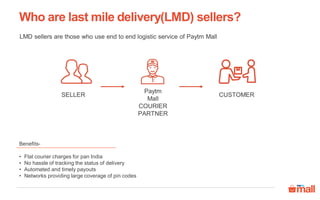
LMD sellers are those who use end to end logistic service of Paytm Mall
Benefits-
• Flat courier charges for pan India
• No hassle of tracking the status of delivery
• Automated and timely payouts
• Networks providing large coverage of pin codes
SELLER
Paytm
Mall
COURIER
PARTNER
CUSTOMER
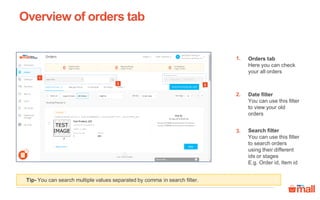
Orders tab
Here you can check
your all orders
Date filter
You can use this filter
to view your old
orders
Search filter
You can use this filter
to search orders
using their different
ids or stages
E.g. Order id, Item id
Tip- You can search multiple values separated by comma in search filter.
Overview of orders tab
1.
2.
2
1
3.
3
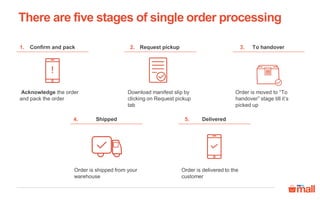
There are five stages of single order processing
Delivered
Order is delivered to the
customer
5.
Confirm and pack
Acknowledge the order
and pack the order
1. To handover
Order is moved to “To
handover” stage till it’s
picked up
3.Request pickup
Download manifest slip by
clicking on Request pickup
tab
2.
Shipped
Order is shipped from your
warehouse
4.
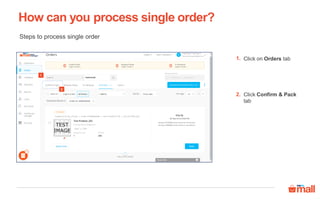
How can you process single order?
1
Steps to process single order
Click on Orders tab
Click Confirm & Pack
tab
1.
2.
2
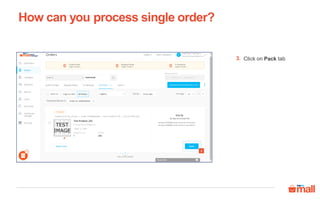
How can you process single order?
3
Click on Pack tab3.
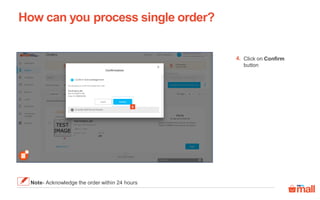
How can you process single order?
Note- Acknowledge the order within 24 hours
4
Click on Confirm
button
4.
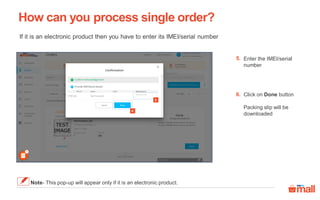
How can you process single order?
If it is an electronic product then you have to enter its IMEI/serial number
Note- This pop-up will appear only if it is an electronic product.
5
6
Enter the IMEI/serial
number
Click on Done button
Packing slip will be
downloaded
5.
6.
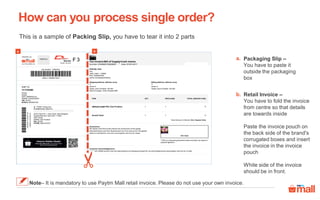
This is a sample of Packing Slip, you have to tear it into 2 parts
How can you process single order?
Packaging Slip –
You have to paste it
outside the packaging
box
a.
b. Retail Invoice –
You have to fold the invoice
from centre so that details
are towards inside
Paste the invoice pouch on
the back side of the brand's
corrugated boxes and insert
the invoice in the invoice
pouch
White side of the invoice
should be in front.
Note– It is mandatory to use Paytm Mall retail invoice. Please do not use your own invoice.
a b
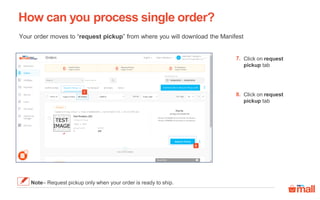
Your order moves to “request pickup” from where you will download the Manifest
How can you process single order?
Note– Request pickup only when your order is ready to ship.
8
7
Click on request
pickup tab
Click on request
pickup tab
7.
8.
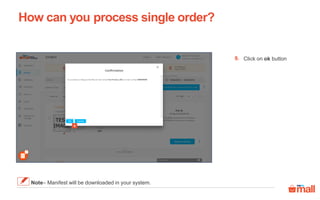
How can you process single order?
Note– Manifest will be downloaded in your system.
9
Click on ok button9.
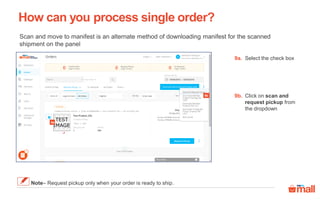
Scan and move to manifest is an alternate method of downloading manifest for the scanned
shipment on the panel
Select the check box9a.
How can you process single order?
Note– Request pickup only when your order is ready to ship.
9b
9a
Click on scan and
request pickup from
the dropdown
9b.
How can you process single order?
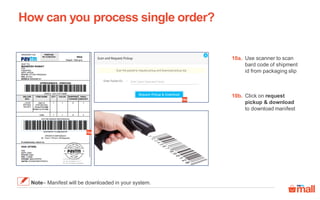
10a
10b
Use scanner to scan
bard code of shipment
id from packaging slip
10a.
Click on request
pickup & download
to download manifest
10b.
Note– Manifest will be downloaded in your system.
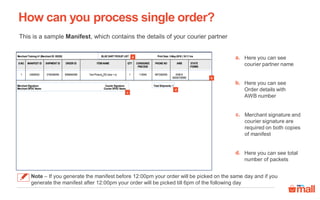
This is a sample Manifest, which contains the details of your courier partner
How can you process single order?
Note – If you generate the manifest before 12:00pm your order will be picked on the same day and if you
generate the manifest after 12:00pm your order will be picked till 6pm of the following day
a
b
c
d
Here you can see
courier partner name
a.
Here you can see
Order details with
AWB number
b.
Merchant signature and
courier signature are
required on both copies
of manifest
c.
Here you can see total
number of packets
d.
How can you process single order?
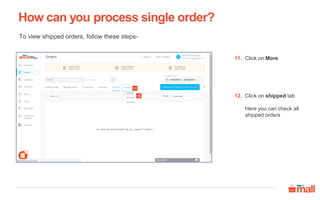
11
12
Click on More11.
Click on shipped tab
Here you can check all
shipped orders
12.
To view shipped orders, follow these steps-
How can you process single order?
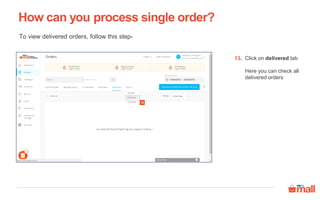
Click on delivered tab
Here you can check all
delivered orders
13.
13
To view delivered orders, follow this step-
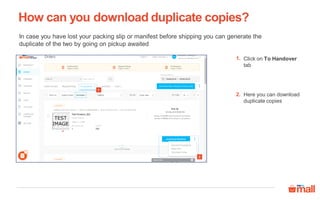
In case you have lost your packing slip or manifest before shipping you can generate the
duplicate of the two by going on pickup awaited
How can you download duplicate copies?
1
2
Click on To Handover
tab
Here you can download
duplicate copies
1.
2.
Thanks everyone!
For any query please raise a ticket on support

Single order processing_LMD

  • 1.
    Single order processing (LMD) Inthis module we will discuss :- 1. Who are last mile delivery(LMD) sellers? 2. How can you process single order? 3. How can you download duplicate copies?
  • 2.
    Who are lastmile delivery(LMD) sellers? LMD sellers are those who use end to end logistic service of Paytm Mall Benefits- • Flat courier charges for pan India • No hassle of tracking the status of delivery • Automated and timely payouts • Networks providing large coverage of pin codes SELLER Paytm Mall COURIER PARTNER CUSTOMER
  • 3.
    Orders tab Here youcan check your all orders Date filter You can use this filter to view your old orders Search filter You can use this filter to search orders using their different ids or stages E.g. Order id, Item id Tip- You can search multiple values separated by comma in search filter. Overview of orders tab 1. 2. 2 1 3. 3
  • 4.
    There are fivestages of single order processing Delivered Order is delivered to the customer 5. Confirm and pack Acknowledge the order and pack the order 1. To handover Order is moved to “To handover” stage till it’s picked up 3.Request pickup Download manifest slip by clicking on Request pickup tab 2. Shipped Order is shipped from your warehouse 4.
  • 5.
    How can youprocess single order? 1 Steps to process single order Click on Orders tab Click Confirm & Pack tab 1. 2. 2
  • 6.
    How can youprocess single order? 3 Click on Pack tab3.
  • 7.
    How can youprocess single order? Note- Acknowledge the order within 24 hours 4 Click on Confirm button 4.
  • 8.
    How can youprocess single order? If it is an electronic product then you have to enter its IMEI/serial number Note- This pop-up will appear only if it is an electronic product. 5 6 Enter the IMEI/serial number Click on Done button Packing slip will be downloaded 5. 6.
  • 9.
    This is asample of Packing Slip, you have to tear it into 2 parts How can you process single order? Packaging Slip – You have to paste it outside the packaging box a. b. Retail Invoice – You have to fold the invoice from centre so that details are towards inside Paste the invoice pouch on the back side of the brand's corrugated boxes and insert the invoice in the invoice pouch White side of the invoice should be in front. Note– It is mandatory to use Paytm Mall retail invoice. Please do not use your own invoice. a b
  • 10.
    Your order movesto “request pickup” from where you will download the Manifest How can you process single order? Note– Request pickup only when your order is ready to ship. 8 7 Click on request pickup tab Click on request pickup tab 7. 8.
  • 11.
    How can youprocess single order? Note– Manifest will be downloaded in your system. 9 Click on ok button9.
  • 12.
    Scan and moveto manifest is an alternate method of downloading manifest for the scanned shipment on the panel Select the check box9a. How can you process single order? Note– Request pickup only when your order is ready to ship. 9b 9a Click on scan and request pickup from the dropdown 9b.
  • 13.
    How can youprocess single order? 10a 10b Use scanner to scan bard code of shipment id from packaging slip 10a. Click on request pickup & download to download manifest 10b. Note– Manifest will be downloaded in your system.
  • 14.
    This is asample Manifest, which contains the details of your courier partner How can you process single order? Note – If you generate the manifest before 12:00pm your order will be picked on the same day and if you generate the manifest after 12:00pm your order will be picked till 6pm of the following day a b c d Here you can see courier partner name a. Here you can see Order details with AWB number b. Merchant signature and courier signature are required on both copies of manifest c. Here you can see total number of packets d.
  • 15.
    How can youprocess single order? 11 12 Click on More11. Click on shipped tab Here you can check all shipped orders 12. To view shipped orders, follow these steps-
  • 16.
    How can youprocess single order? Click on delivered tab Here you can check all delivered orders 13. 13 To view delivered orders, follow this step-
  • 17.
    In case youhave lost your packing slip or manifest before shipping you can generate the duplicate of the two by going on pickup awaited How can you download duplicate copies? 1 2 Click on To Handover tab Here you can download duplicate copies 1. 2.
  • 18.
    Thanks everyone! For anyquery please raise a ticket on support