Tracking returns
In this module, we will discuss:-
1. How to track return before delivery orders on the seller panel?
2. How to track return after delivery orders on the seller panel?
Check returns before delivery
orders
How to check return before delivery orders on the seller panel?
Note - This is illustrative not exhaustive
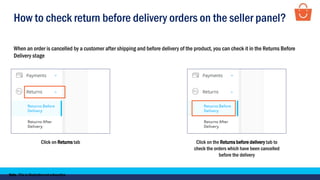
When an order is cancelled by a customer after shipping and before delivery of the product, you can check it in the Returns Before
Delivery stage
Click on Returns tab Click on the Returns before delivery tab to
check the orders which have been cancelled
before the delivery
How to check return before delivery orders on the seller panel?
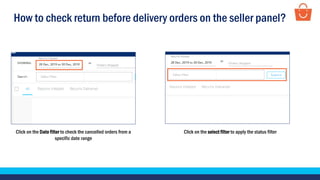
Click on the Date filter to check the cancelled orders from a
specific date range
Click on the select filter to apply the status filter
How to check return before delivery orders on the seller panel?
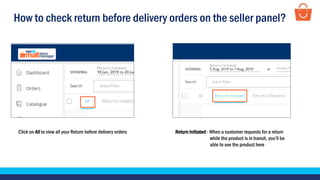
Click on All to view all your Return before delivery orders Return Initiated - When a customer requests for a return
while the product is in transit, you’ll be
able to see the product here
How to check return before delivery orders on the seller panel?
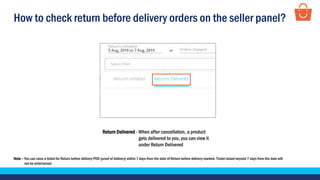
Return Delivered - When after cancellation, a product
gets delivered to you, you can view it
under Return Delivered
Note – You can raise a ticket for Return before delivery POD (proof of delivery) within 7 days from the date of Return before delivery marked. Ticket raised beyond 7 days from the date will
not be entertained.
How to check return before delivery orders on the seller panel?
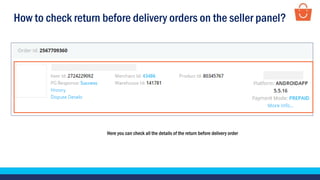
Here you can check all the details of the return before delivery order
Check returns after
delivery orders
How to check return after delivery orders on the seller panel?
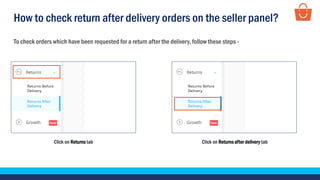
To check orders which have been requested for a return after the delivery, follow these steps -
Click on Returns tab Click on Returns after delivery tab
How to check return after delivery orders on the seller panel?
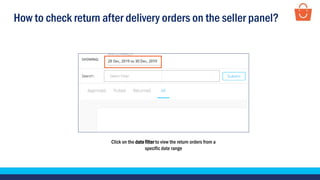
Click on the date filter to view the return orders from a
specific date range
How to check return after delivery orders on the seller panel?
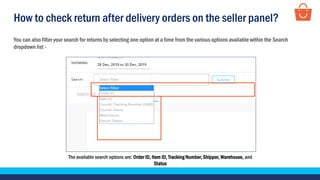
The available search options are: Order ID, Item ID, Tracking Number, Shipper, Warehouse, and
Status
You can also filter your search for returns by selecting one option at a time from the various options available within the Search
dropdown list -
How to check return after delivery orders on the seller panel?
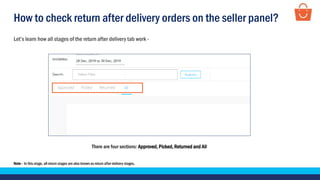
Let’s learn how all stages of the return after delivery tab work -
Note - In this stage, all return stages are also known as return after delivery stages.
There are four sections: Approved, Picked, Returned and All
How to check return after delivery orders on the seller panel?
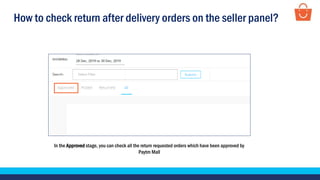
In the Approved stage, you can check all the return requested orders which have been approved by
Paytm Mall
How to check return after delivery orders on the seller panel?
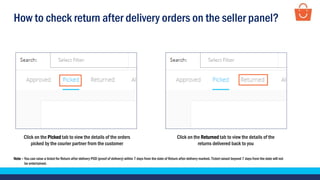
Click on the Picked tab to view the details of the orders
picked by the courier partner from the customer
Click on the Returned tab to view the details of the
returns delivered back to you
Note – You can raise a ticket for Return after delivery POD (proof of delivery) within 7 days from the date of Return after delivery marked. Ticket raised beyond 7 days from the date will not
be entertained.
How to check return after delivery orders on the seller panel?
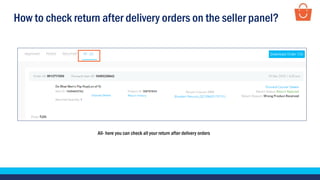
All- here you can check all your return after delivery orders
How to check return after delivery orders on the seller panel?
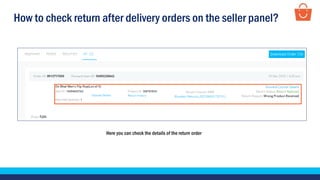
Here you can check the details of the return order
How to check return after delivery orders on the seller panel?
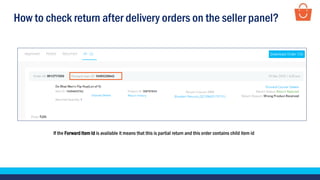
If the Forward Item Id is available it means that this is partial return and this order contains child item id
How to check return after delivery orders on the seller panel?
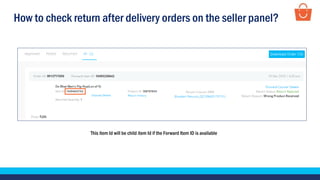
This item Id will be child item Id if the Forward Item ID is available
How to check return after delivery orders on the seller panel?
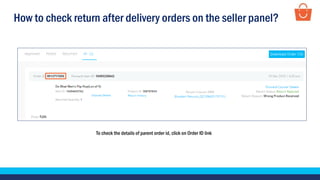
To check the details of parent order id, click on Order ID link
How to check return after delivery orders on the seller panel?
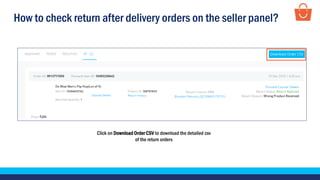
Click on Download Order CSV to download the detailed csv
of the return orders
Thankseveryone!
For any query, please raise a ticket using the Seller Helpdesk tab on your seller panel.

Tracking returns - Wholesale

  • 1.
    Tracking returns In thismodule, we will discuss:- 1. How to track return before delivery orders on the seller panel? 2. How to track return after delivery orders on the seller panel?
  • 2.
    Check returns beforedelivery orders
  • 3.
    How to checkreturn before delivery orders on the seller panel? Note - This is illustrative not exhaustive When an order is cancelled by a customer after shipping and before delivery of the product, you can check it in the Returns Before Delivery stage Click on Returns tab Click on the Returns before delivery tab to check the orders which have been cancelled before the delivery
  • 4.
    How to checkreturn before delivery orders on the seller panel? Click on the Date filter to check the cancelled orders from a specific date range Click on the select filter to apply the status filter
  • 5.
    How to checkreturn before delivery orders on the seller panel? Click on All to view all your Return before delivery orders Return Initiated - When a customer requests for a return while the product is in transit, you’ll be able to see the product here
  • 6.
    How to checkreturn before delivery orders on the seller panel? Return Delivered - When after cancellation, a product gets delivered to you, you can view it under Return Delivered Note – You can raise a ticket for Return before delivery POD (proof of delivery) within 7 days from the date of Return before delivery marked. Ticket raised beyond 7 days from the date will not be entertained.
  • 7.
    How to checkreturn before delivery orders on the seller panel? Here you can check all the details of the return before delivery order
  • 8.
  • 9.
    How to checkreturn after delivery orders on the seller panel? To check orders which have been requested for a return after the delivery, follow these steps - Click on Returns tab Click on Returns after delivery tab
  • 10.
    How to checkreturn after delivery orders on the seller panel? Click on the date filter to view the return orders from a specific date range
  • 11.
    How to checkreturn after delivery orders on the seller panel? The available search options are: Order ID, Item ID, Tracking Number, Shipper, Warehouse, and Status You can also filter your search for returns by selecting one option at a time from the various options available within the Search dropdown list -
  • 12.
    How to checkreturn after delivery orders on the seller panel? Let’s learn how all stages of the return after delivery tab work - Note - In this stage, all return stages are also known as return after delivery stages. There are four sections: Approved, Picked, Returned and All
  • 13.
    How to checkreturn after delivery orders on the seller panel? In the Approved stage, you can check all the return requested orders which have been approved by Paytm Mall
  • 14.
    How to checkreturn after delivery orders on the seller panel? Click on the Picked tab to view the details of the orders picked by the courier partner from the customer Click on the Returned tab to view the details of the returns delivered back to you Note – You can raise a ticket for Return after delivery POD (proof of delivery) within 7 days from the date of Return after delivery marked. Ticket raised beyond 7 days from the date will not be entertained.
  • 15.
    How to checkreturn after delivery orders on the seller panel? All- here you can check all your return after delivery orders
  • 16.
    How to checkreturn after delivery orders on the seller panel? Here you can check the details of the return order
  • 17.
    How to checkreturn after delivery orders on the seller panel? If the Forward Item Id is available it means that this is partial return and this order contains child item id
  • 18.
    How to checkreturn after delivery orders on the seller panel? This item Id will be child item Id if the Forward Item ID is available
  • 19.
    How to checkreturn after delivery orders on the seller panel? To check the details of parent order id, click on Order ID link
  • 20.
    How to checkreturn after delivery orders on the seller panel? Click on Download Order CSV to download the detailed csv of the return orders
  • 21.
    Thankseveryone! For any query,please raise a ticket using the Seller Helpdesk tab on your seller panel.