Single Order Processing (LMD)
In this module, we will discuss:-
1. Who are the Last Mile Delivery (LMD) sellers?
2. How can you process a single order?
3. How can you download duplicate copies?
4. How to download the Paytm Mall invoice?
Who are the Last Mile Delivery (LMD) Sellers?
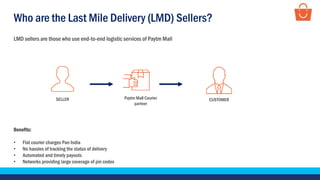
LMD sellers are those who use end-to-end logistic services of Paytm Mall
Benefits:
• Flat courier charges Pan India
• No hassles of tracking the status of delivery
• Automated and timely payouts
• Networks providing large coverage of pin codes
SELLER CUSTOMERPaytm Mall Courier
partner
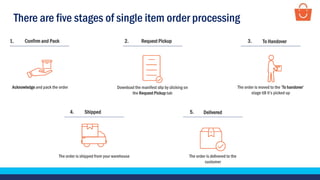
There are five stages of single item order processing
The order is shipped from your warehouse
Shipped4.
Acknowledge and pack the order
Confirm and Pack1.
The order is delivered to the
customer
Delivered5.
Download the manifest slip by clicking on
the Request Pickup tab
Request Pickup2.
The order is moved to the ‘To handover’
stage till it’s picked up
To Handover3.
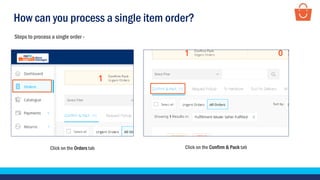
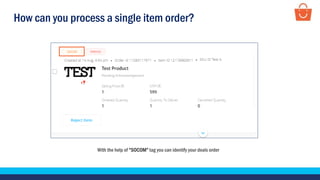
How can you process a single item order?
Click on the Orders tab Click on the Confirm & Pack tab
Steps to process a single order -
How can you process a single item order?
With the help of “SOCOM” tag you can identify your deals order
How can you process a single item order?
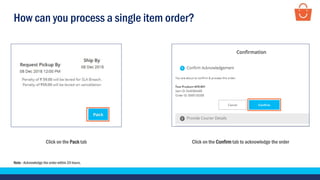
Click on the Pack tab Click on the Confirm tab to acknowledge the order
Note - Acknowledge the order within 24 hours.
How can you process a single item order?
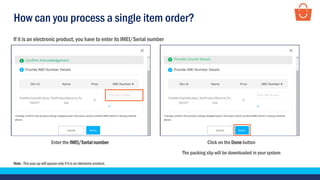
Click on the Done button
The packing slip will be downloaded in your system
Enter the IMEI/Serial number
If it is an electronic product, you have to enter its IMEI/Serial number
Note - This pop-up will appear only if it is an electronic product.
How can you process a single item order?
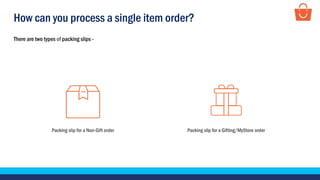
There are two types of packing slips -
Packing slip for a Non-Gift order Packing slip for a Gifting/MyStore order
How can you process a single item order?
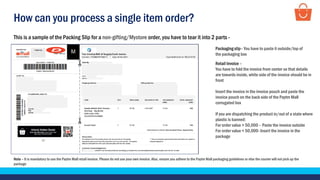
This is a sample of the Packing Slip for a non-gifting/Mystore order, you have to tear it into 2 parts -
Note – It is mandatory to use the Paytm Mall retail invoice. Please do not use your own invoice. Also, ensure you adhere to the Paytm Mall packaging guidelines or else the courier will not pick up the
package
Packaging slip– You have to paste it outside/top of
the packaging box
Retail Invoice –
You have to fold the invoice from center so that details
are towards inside, white side of the invoice should be in
front
Insert the invoice in the invoice pouch and paste the
invoice pouch on the back side of the Paytm Mall
corrugated box
If you are dispatching the product in/out of a state where
plastic is banned:
For order value > 50,000 – Paste the invoice outside
For order value < 50,000- Insert the invoice in the
package
How can you process a single item order?
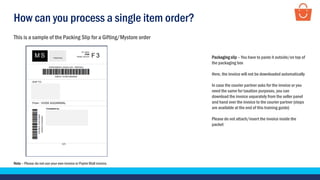
Note – Please do not use your own invoice or Paytm Mall invoice.
This is a sample of the Packing Slip for a Gifting/Mystore order
Packaging slip – You have to paste it outside/on top of
the packaging box
Here, the invoice will not be downloaded automatically
In case the courier partner asks for the invoice or you
need the same for taxation purposes, you can
download the invoice separately from the seller panel
and hand over the invoice to the courier partner (steps
are available at the end of this training guide)
Please do not attach/insert the invoice inside the
packet
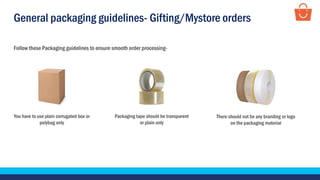
General packaging guidelines- Gifting/Mystore orders
Follow these Packaging guidelines to ensure smooth order processing-
Packaging tape should be transparent
or plain only
You have to use plain corrugated box or
polybag only
There should not be any branding or logo
on the packaging material
How can you process a single item order?
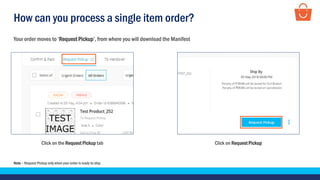
Click on Request PickupClick on the Request Pickup tab
Your order moves to ‘Request Pickup’, from where you will download the Manifest
Note – Request Pickup only when your order is ready to ship.
How can you process a single item order?
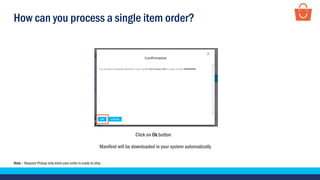
Note – Request Pickup only when your order is ready to ship.
Click on Ok button
Manifest will be downloaded in your system automatically
How can you process a single item order?
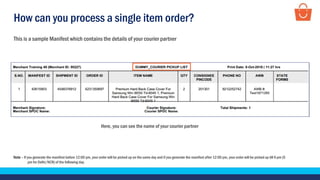
This is a sample Manifest which contains the details of your courier partner
Here, you can see the name of your courier partner
Note – If you generate the manifest before 12:00 pm, your order will be picked up on the same day and if you generate the manifest after 12:00 pm, your order will be picked up till 6 pm (5
pm for Delhi/NCR) of the following day.
How can you process a single item order?
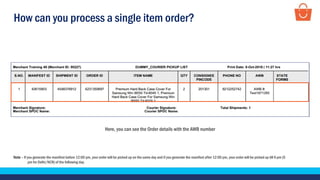
Here, you can see the Order details with the AWB number
Note – If you generate the manifest before 12:00 pm, your order will be picked up on the same day and if you generate the manifest after 12:00 pm, your order will be picked up till 6 pm (5
pm for Delhi/NCR) of the following day.
How can you process a single item order?
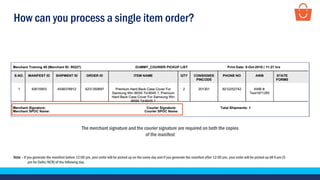
The merchant signature and the courier signature are required on both the copies
of the manifest
Note – If you generate the manifest before 12:00 pm, your order will be picked up on the same day and if you generate the manifest after 12:00 pm, your order will be picked up till 6 pm (5
pm for Delhi/NCR) of the following day.
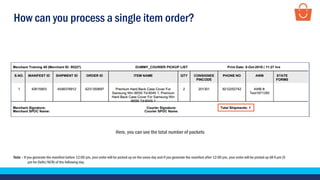
How can you process a single item order?
Here, you can see the total number of packets
Note – If you generate the manifest before 12:00 pm, your order will be picked up on the same day and if you generate the manifest after 12:00 pm, your order will be picked up till 6 pm (5
pm for Delhi/NCR) of the following day.
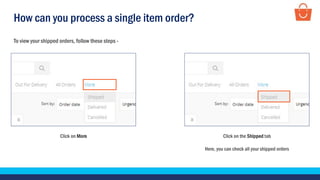
How can you process a single item order?
Click on More
To view your shipped orders, follow these steps -
Click on the Shipped tab
Here, you can check all your shipped orders
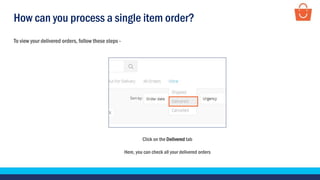
How can you process a single item order?
To view your delivered orders, follow these steps -
Click on the Delivered tab
Here, you can check all your delivered orders
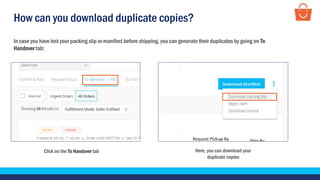
How can you download duplicate copies?
In case you have lost your packing slip or manifest before shipping, you can generate their duplicates by going on To
Handover tab:
Click on the To Handover tab Here, you can download your
duplicate copies
DownloadPaytmMallInvoice
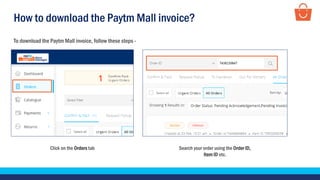
How to download the Paytm Mall invoice?
To download the Paytm Mall invoice, follow these steps -
Search your order using the Order ID,
Item ID etc.
Click on the Orders tab
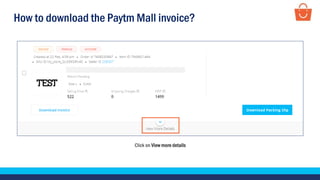
How to download the Paytm Mall invoice?
Click on View more details
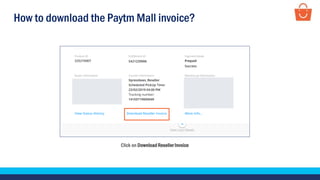
How to download the Paytm Mall invoice?
Click on Download Reseller Invoice
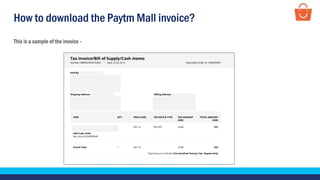
How to download the Paytm Mall invoice?
This is a sample of the invoice -
Thankseveryone!
For any query, please raise a ticket using the Seller Helpdesk tab on your seller panel.

SCD - steps to process a single order - LMD

  • 1.
    Single Order Processing(LMD) In this module, we will discuss:- 1. Who are the Last Mile Delivery (LMD) sellers? 2. How can you process a single order? 3. How can you download duplicate copies? 4. How to download the Paytm Mall invoice?
  • 2.
    Who are theLast Mile Delivery (LMD) Sellers? LMD sellers are those who use end-to-end logistic services of Paytm Mall Benefits: • Flat courier charges Pan India • No hassles of tracking the status of delivery • Automated and timely payouts • Networks providing large coverage of pin codes SELLER CUSTOMERPaytm Mall Courier partner
  • 3.
    There are fivestages of single item order processing The order is shipped from your warehouse Shipped4. Acknowledge and pack the order Confirm and Pack1. The order is delivered to the customer Delivered5. Download the manifest slip by clicking on the Request Pickup tab Request Pickup2. The order is moved to the ‘To handover’ stage till it’s picked up To Handover3.
  • 4.
    How can youprocess a single item order? Click on the Orders tab Click on the Confirm & Pack tab Steps to process a single order -
  • 5.
    How can youprocess a single item order? With the help of “SOCOM” tag you can identify your deals order
  • 6.
    How can youprocess a single item order? Click on the Pack tab Click on the Confirm tab to acknowledge the order Note - Acknowledge the order within 24 hours.
  • 7.
    How can youprocess a single item order? Click on the Done button The packing slip will be downloaded in your system Enter the IMEI/Serial number If it is an electronic product, you have to enter its IMEI/Serial number Note - This pop-up will appear only if it is an electronic product.
  • 8.
    How can youprocess a single item order? There are two types of packing slips - Packing slip for a Non-Gift order Packing slip for a Gifting/MyStore order
  • 9.
    How can youprocess a single item order? This is a sample of the Packing Slip for a non-gifting/Mystore order, you have to tear it into 2 parts - Note – It is mandatory to use the Paytm Mall retail invoice. Please do not use your own invoice. Also, ensure you adhere to the Paytm Mall packaging guidelines or else the courier will not pick up the package Packaging slip– You have to paste it outside/top of the packaging box Retail Invoice – You have to fold the invoice from center so that details are towards inside, white side of the invoice should be in front Insert the invoice in the invoice pouch and paste the invoice pouch on the back side of the Paytm Mall corrugated box If you are dispatching the product in/out of a state where plastic is banned: For order value > 50,000 – Paste the invoice outside For order value < 50,000- Insert the invoice in the package
  • 10.
    How can youprocess a single item order? Note – Please do not use your own invoice or Paytm Mall invoice. This is a sample of the Packing Slip for a Gifting/Mystore order Packaging slip – You have to paste it outside/on top of the packaging box Here, the invoice will not be downloaded automatically In case the courier partner asks for the invoice or you need the same for taxation purposes, you can download the invoice separately from the seller panel and hand over the invoice to the courier partner (steps are available at the end of this training guide) Please do not attach/insert the invoice inside the packet
  • 11.
    General packaging guidelines-Gifting/Mystore orders Follow these Packaging guidelines to ensure smooth order processing- Packaging tape should be transparent or plain only You have to use plain corrugated box or polybag only There should not be any branding or logo on the packaging material
  • 12.
    How can youprocess a single item order? Click on Request PickupClick on the Request Pickup tab Your order moves to ‘Request Pickup’, from where you will download the Manifest Note – Request Pickup only when your order is ready to ship.
  • 13.
    How can youprocess a single item order? Note – Request Pickup only when your order is ready to ship. Click on Ok button Manifest will be downloaded in your system automatically
  • 14.
    How can youprocess a single item order? This is a sample Manifest which contains the details of your courier partner Here, you can see the name of your courier partner Note – If you generate the manifest before 12:00 pm, your order will be picked up on the same day and if you generate the manifest after 12:00 pm, your order will be picked up till 6 pm (5 pm for Delhi/NCR) of the following day.
  • 15.
    How can youprocess a single item order? Here, you can see the Order details with the AWB number Note – If you generate the manifest before 12:00 pm, your order will be picked up on the same day and if you generate the manifest after 12:00 pm, your order will be picked up till 6 pm (5 pm for Delhi/NCR) of the following day.
  • 16.
    How can youprocess a single item order? The merchant signature and the courier signature are required on both the copies of the manifest Note – If you generate the manifest before 12:00 pm, your order will be picked up on the same day and if you generate the manifest after 12:00 pm, your order will be picked up till 6 pm (5 pm for Delhi/NCR) of the following day.
  • 17.
    How can youprocess a single item order? Here, you can see the total number of packets Note – If you generate the manifest before 12:00 pm, your order will be picked up on the same day and if you generate the manifest after 12:00 pm, your order will be picked up till 6 pm (5 pm for Delhi/NCR) of the following day.
  • 18.
    How can youprocess a single item order? Click on More To view your shipped orders, follow these steps - Click on the Shipped tab Here, you can check all your shipped orders
  • 19.
    How can youprocess a single item order? To view your delivered orders, follow these steps - Click on the Delivered tab Here, you can check all your delivered orders
  • 20.
    How can youdownload duplicate copies? In case you have lost your packing slip or manifest before shipping, you can generate their duplicates by going on To Handover tab: Click on the To Handover tab Here, you can download your duplicate copies
  • 21.
  • 22.
    How to downloadthe Paytm Mall invoice? To download the Paytm Mall invoice, follow these steps - Search your order using the Order ID, Item ID etc. Click on the Orders tab
  • 23.
    How to downloadthe Paytm Mall invoice? Click on View more details
  • 24.
    How to downloadthe Paytm Mall invoice? Click on Download Reseller Invoice
  • 25.
    How to downloadthe Paytm Mall invoice? This is a sample of the invoice -
  • 26.
    Thankseveryone! For any query,please raise a ticket using the Seller Helpdesk tab on your seller panel.