Paytm Mall Seller Assurance (PSA)
In this module, we will discuss:-
1. What is Paytm Mall Seller Assurance?
2. How can I raise a PSA claim on the seller panel?
3. What are the TATs for raising a query ticket for returns?
What is Paytm Mall Seller Assurance?
Product returns are inevitable on an online marketplace. Therefore, we have introduced the PSA, that will protect you in the event of
return damages or losses
Note – You must raise a PSA claim within 48 hours of receiving a disputed returned item.
What are the cases for which you can raise a PSA claim?
You can file a claim under PSA in the following events:
Delayed Delivery
• If you do not receive your product within the agreed delivery time committed by Paytm Mall
Damaged Product
• If you receive a partially/completely damaged product that you cannot sell anymore
Missing Items • If you receive the returned shipment with a missing accessory/freebie
Wrong Product or Empty Box • If you receive a wrong product or an empty box
Lost in Transit • If your product is lost in transit
What are the cases for which you can raise a PSA claim?
Let’s now look at the types of mandatory supporting documents that you will be needing to submit as a proof while
raising a PSA claim.
Damaged Product • Images capturing all sides of the product (a 360 degree view is preferable)
Used Product / Tampered Label
• Images or a video capturing all sides of the product (a 360 degree view is preferable)
Empty Box • Video footage and remarks on POD
How can I raise a PSA claim on the seller panel?
To raise a claim against disputed items, follow these steps -
Click on the Support tab
How can I raise a PSA claim on the seller panel?
Click on the Returns tab
How can I raise a PSA claim on the seller panel?
Click on Issue with returned order Click on Raise Return Dispute
How can I raise a PSA claim on the seller panel?
Click here to read more about the PSA policy
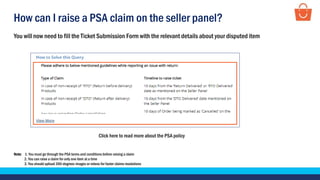
You will now need to fill the Ticket Submission Form with the relevant details about your disputed item
Note: 1. You must go through the PSA terms and conditions before raising a claim
2. You can raise a claim for only one item at a time
3. You should upload 360-degrees images or videos for faster claims resolutions
How can I raise a PSA claim on the seller panel?
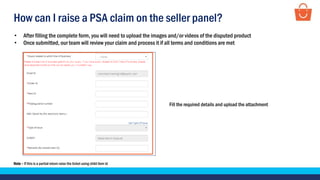
Fill the required details and upload the attachment
• After filling the complete form, you will need to upload the images and/or videos of the disputed product
• Once submitted, our team will review your claim and process it if all terms and conditions are met
Note – If this is a partial return raise the ticket using child item id
How can I raise a PSA claim on the seller panel?
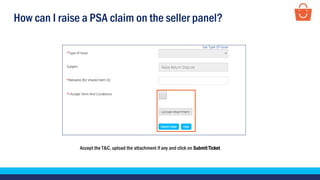
Accept the T&C, upload the attachment if any and click on Submit Ticket
What are the TATs for raising a query ticket for returns?
Type of Issue TAT
Product/ Payment not Received 10 Days
Brand Box/ Original Packaging Damaged 10 Days
Short product/ Accessory/ Freebie missing 10 Days
Partial/ Incomplete received in Combo set 10 Days
Used product/ Returned after installation 10 Days
Minor Defective product 10 Days
Fully Non-functional/ Dead product 10 Days
Fully Damaged/ Partially Damaged/ Torn product 2 Days
Empty Box/ Stone received 2 Days
Wrong/ Duplicate Product 2 Days
Seal Open Only 10 Days
Note: You can raise ticket for a Return before delivery POD (proof of delivery) within 10 days from the date of Return before delivery marked. Ticket raised beyond 10 days from the date will not
be entertained. To know more about PSA guidelines click here.
When should you raise a query ticket for returns?
If Return before delivery order not received
within 50 days
In case of Return queries, raise
a ticket within 24 hrs
If Cancelled order not received within 7 days
If the shipment seems suspicious, you need to
write remarks on the POD (Proof of Delivery)
Note: For more details, click here
Thankseveryone!
For any query, please raise a ticket using the Seller Helpdesk tab on your seller panel.

PSA guidelines - Wholesale

  • 1.
    Paytm Mall SellerAssurance (PSA) In this module, we will discuss:- 1. What is Paytm Mall Seller Assurance? 2. How can I raise a PSA claim on the seller panel? 3. What are the TATs for raising a query ticket for returns?
  • 2.
    What is PaytmMall Seller Assurance? Product returns are inevitable on an online marketplace. Therefore, we have introduced the PSA, that will protect you in the event of return damages or losses Note – You must raise a PSA claim within 48 hours of receiving a disputed returned item.
  • 3.
    What are thecases for which you can raise a PSA claim? You can file a claim under PSA in the following events: Delayed Delivery • If you do not receive your product within the agreed delivery time committed by Paytm Mall Damaged Product • If you receive a partially/completely damaged product that you cannot sell anymore Missing Items • If you receive the returned shipment with a missing accessory/freebie Wrong Product or Empty Box • If you receive a wrong product or an empty box Lost in Transit • If your product is lost in transit
  • 4.
    What are thecases for which you can raise a PSA claim? Let’s now look at the types of mandatory supporting documents that you will be needing to submit as a proof while raising a PSA claim. Damaged Product • Images capturing all sides of the product (a 360 degree view is preferable) Used Product / Tampered Label • Images or a video capturing all sides of the product (a 360 degree view is preferable) Empty Box • Video footage and remarks on POD
  • 5.
    How can Iraise a PSA claim on the seller panel? To raise a claim against disputed items, follow these steps - Click on the Support tab
  • 6.
    How can Iraise a PSA claim on the seller panel? Click on the Returns tab
  • 7.
    How can Iraise a PSA claim on the seller panel? Click on Issue with returned order Click on Raise Return Dispute
  • 8.
    How can Iraise a PSA claim on the seller panel? Click here to read more about the PSA policy You will now need to fill the Ticket Submission Form with the relevant details about your disputed item Note: 1. You must go through the PSA terms and conditions before raising a claim 2. You can raise a claim for only one item at a time 3. You should upload 360-degrees images or videos for faster claims resolutions
  • 9.
    How can Iraise a PSA claim on the seller panel? Fill the required details and upload the attachment • After filling the complete form, you will need to upload the images and/or videos of the disputed product • Once submitted, our team will review your claim and process it if all terms and conditions are met Note – If this is a partial return raise the ticket using child item id
  • 10.
    How can Iraise a PSA claim on the seller panel? Accept the T&C, upload the attachment if any and click on Submit Ticket
  • 11.
    What are theTATs for raising a query ticket for returns? Type of Issue TAT Product/ Payment not Received 10 Days Brand Box/ Original Packaging Damaged 10 Days Short product/ Accessory/ Freebie missing 10 Days Partial/ Incomplete received in Combo set 10 Days Used product/ Returned after installation 10 Days Minor Defective product 10 Days Fully Non-functional/ Dead product 10 Days Fully Damaged/ Partially Damaged/ Torn product 2 Days Empty Box/ Stone received 2 Days Wrong/ Duplicate Product 2 Days Seal Open Only 10 Days Note: You can raise ticket for a Return before delivery POD (proof of delivery) within 10 days from the date of Return before delivery marked. Ticket raised beyond 10 days from the date will not be entertained. To know more about PSA guidelines click here.
  • 12.
    When should youraise a query ticket for returns? If Return before delivery order not received within 50 days In case of Return queries, raise a ticket within 24 hrs If Cancelled order not received within 7 days If the shipment seems suspicious, you need to write remarks on the POD (Proof of Delivery) Note: For more details, click here
  • 13.
    Thankseveryone! For any query,please raise a ticket using the Seller Helpdesk tab on your seller panel.