Simple Methods for Reliable User
         Involvement

         Hugh Beyer
         hugh.beyer@incontextdesign.com


Karen Holtzblatt, CEO    978.823.0100               www.incontextdesign.com
Hugh Beyer, CTO          info@incontextdesign.com   www.innovationincool.com
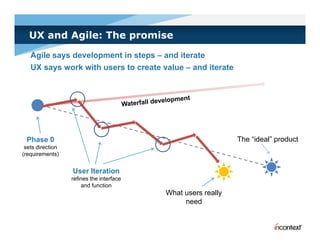
UX and Agile: The promise
   Agile says development in steps – and iterate
   UX says work with users to create value – and iterate


 Phase 0                                                      The “ideal” product
                                                                   ideal
 sets direction
(requirements)


                  User Iteration
                  refines the interface
                      and function
                                          What users really
                                               need
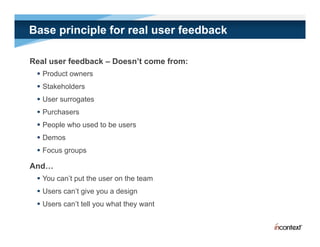
Base principle for real user feedback

Real user feedback – Doesn’t come from:
  Product owners
  Stakeholders
  User surrogates
  Purchasers
  People who used to be users
  Demos
  Focus groups

And…
  You can’t put the user on the team
  Users can’t give you a design
 U
  Users can’t t ll you what th want
           ’t tell      h t they  t
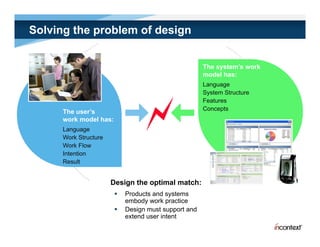
Solving the problem of design


                                                      The system’s work
                                                      model has:
                                                       ode as
                                                      Language
                                                      System Structure
                                                      Features
                                                      Concepts
      The user’s
      work model has:
      Language
      Work Structure
      Work Flow
      Intention
      Result


                       Design the optimal match:
                           Products and systems
                            embody work practice
                           Design must support and
                            extend user intent
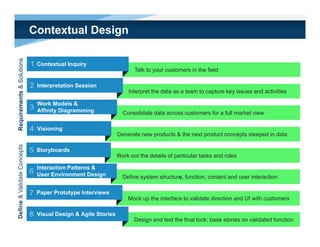
Contextual Design
                olutions


                             1   Contextual Inquiry
                                                                        Talk to your customers in the field
       ments & So


                             2   Interpretation Session
                                                                      Interpret the data as a team to capture key issues and activities

                                 Work Models &
Requirem


                             3   Affinity Diagramming              Consolidate data across customers for a full market view

                             4   Visioning
                                                                 Generate new products & the next product concepts steeped in data
Define & Validate Concepts


                             5   Storyboards
                                                                 Work out the details of particular tasks and roles

                                 Interaction Patterns &
                             6   User Environment Design           Define system structure, function, content and user interaction

                             7   Paper Prototype Interviews
                                                                     Mock up the interface to validate direction and UI with customers
                                                                           p
     e


                             8   Visual Design & Agile Stories
                                                                        Design and test the final look; base stories on validated function
Contextual Design

1   Contextual Inquiry


2   Interpretation Session


3   Work Models & Affinity


4   Visioning


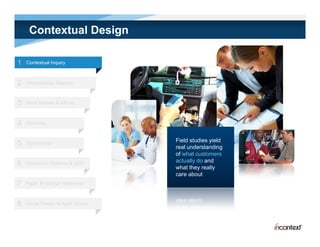
                                    Field t di
                                    Fi ld studies yield
                                                   i ld
5   Storyboards
                                    real understanding
                                    of what customers
                                    actually do and
6   Interaction Patterns & UED
                                    what they really
                                             y     y
                                    care about
7   Paper Prototype Interviews


8   Visual Design & Agile Stories
Contextual Design

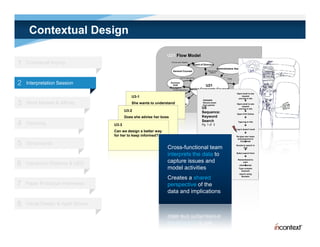
                                                                   U21 Flow Model
1   Contextual Inquiry                                                  Discuss open litigation
                                                                                                     Board of Directors
                                                                                                                             Administrative Assistant
                                                                          General Counsel                         Discuss open
                                                                                                                    litigation

                                                                                                                                   SOP
                                                                                    Ask for legal advice                              Email


2   Interpretation Session                                             Business
                                                                        Unit
                                                                      Managers
                                                                                                                U21
                                                                                                                                      SOP


                                                                                                                                                       Outside
                                                                          Provide legal advice    Senior Corporate Counsel                             Counsel
                                                                   Hand deliver   SOP                                                               Open email to see
                                                                                                                                         Discuss legal options
                                             U3-1                                                                                                       request
                                                                                                                                                     and log in info
                                                                                                             TRIGGER:                                            
3   Work Models & Affinity                   She wants to understand HR
                                             what her boss is doing.
                                                              doing
                                                                     Department
                                                                                                             Receive email
                                                                                                             from partner
                                                                                                                                                    Open email to see
                                                                                                                                                        request
                                                                                                            U5                                       and log in info
                                         U3-2                                                               Sequence:                                            
                                                                                                                                                    Open CCH Online
                                         Does she advise her boss                                           Keyword                                              
                                         on how to answer or                                                Search
4   Visioning                       U3-3 manage his schedule?                                               Pg. 1 of 3
                                                                                                                                                      Type log in info
                                                                                                                                                                 
                                                                                                                                                   Log in doesn’t work
                                    Can we design a better way                                                                                                   
                                    for her to keep informed?                                                                                       Re-type user name
                                                                                                                                                     and password in

5   Storyboards
                                                                                                             Intent: Restrict
                                                                                                             Domain to get
                                                                                                                                                            
                                                                                                                                                        from email

                                                                                                                                                   Decide to search in
                                                                   Cross-functional team                     relevant results
                                                                                                                                                          Fed
                                                                                                                                                                 

                                                                   interprets the data to                    Intent: Account for
                                                                                                             research time
                                                                                                                                                    Select search form
                                                                                                                                                                 

                                                                   capture issues and                                                                 Remembered to

6
                                                                                                             Intent: Say what I
                                                                                                                                                          start
    Interaction Patterns & UED                                                                               want in computer
                                                                                                             terms                                      client
                                                                                                                                                              tracker
                                                                   model activities                                                                    Type complex
                                                                                                                                                         keyword
                                                                                                                                                         k     d
                                                                                                                                                        search using

                                                                   Creates a shared                                                                       Boolean


7   Paper Prototype Interviews                                     perspective of the
                                                                   data and implications

8   Visual Design & Agile Stories
Contextual Design

1   Contextual Inquiry


2   Interpretation Session


3   Work Models & Affinity


4   Visioning

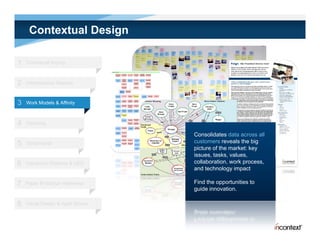
                                    Consolidates data across all
5   Storyboards                     customers reveals the big
                                    picture of the market: key
                                    issues, tasks, values,
6   Interaction Patterns & UED      collaboration, work process,
                                    and technology impact

7   Paper Prototype Interviews      Find the opportunities to
                                    guide innovation.

8   Visual Design & Agile Stories
Contextual Design

1   Contextual Inquiry


2   Interpretation Session


3   Work Models & Affinity


4   Visioning


5   Storyboards

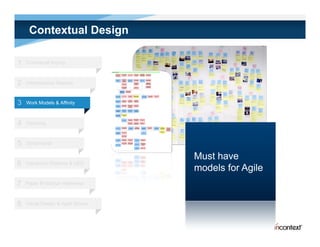
                                    Must have
6   Interaction Patterns & UED
                                    models for Agile
7   Paper Prototype Interviews


8   Visual Design & Agile Stories
Contextual Design

1   Contextual Inquiry


2   Interpretation Session


3   Work Models


4   Visioning


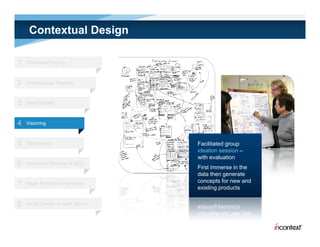
5   Storyboards                     Facilitated group
                                    ideation session –
                                    with evaluation
6   Interaction Patterns & UED
                                    First immerse in the
                                    data then generate
                                    concepts for new and
7   Paper Prototype Interviews
                                    existing products

8   Visual Design & Agile Stories
Contextual Design

1   Contextual Inquiry


2   Interpretation Session


3   Work Models & Affinity


4   Visioning


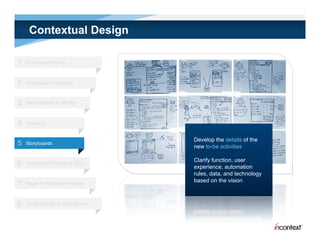
                                    Develop the details of the
5   Storyboards
                                    new to-be activities

                                    Clarify function, user
6   Interaction Patterns & UED
                                    experience, automation
                                    rules, data, and technology
                                    based on the vision
7   Paper Prototype Interviews


8   Visual Design & Agile Stories
Contextual Design

1   Contextual Inquiry


2   Interpretation Session


3   Work Models & Affinity


4   Visioning


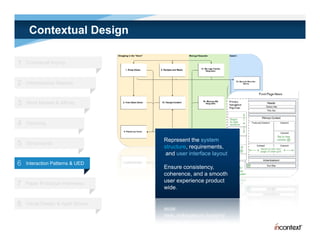
                                    Represent the system
5   Storyboards
                                    structure, requirements,
                                     and user interface layout
6   Interaction Patterns & UED
                                    Ensure consistency,
                                    coherence, and a smooth
                                    user experience product
7   Paper Prototype Interviews
                                    wide.

8   Visual Design & Agile Stories
Contextual Design

1   Contextual Inquiry


2   Interpretation Session


3   Work Models & Affinity


4   Visioning


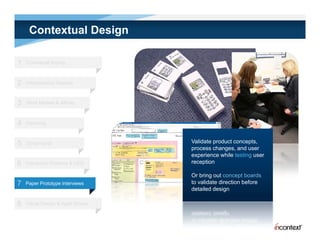
5   Storyboards                     Validate product concepts,
                                    process changes, and user
                                    experience while testing user
6   Interaction Patterns & UED      reception

                                    Or bring out concept boards
7   Paper Prototype Interviews      to validate direction before
                                    detailed design

8   Visual Design & Agile Stories
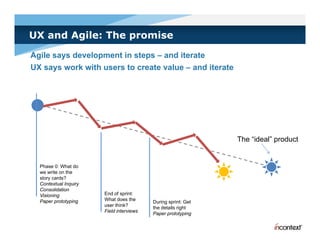
UX and Agile: The promise
Agile says development in steps – and iterate
UX says work with users to create value – and iterate


                                                               The “ideal” product
                                                                    ideal


  Phase 0: What do
  we write on the
  story cards?
  Contextual Inquiry
  Consolidation
  Visioning            End of sprint:
  Paper prototyping    What does the
                                          During sprint: Get
                       user think?
                                          the details right
                       Field interviews
                                          Paper prototyping
Discovering customer work
Di      i      t        k
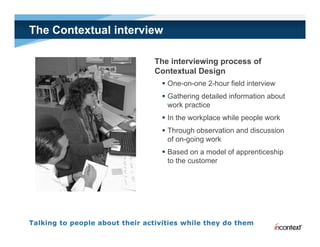
The Contextual interview

                      The interviewing process of
                      Contextual Design
                        One-on-one 2-hour field interview
                        Gathering detailed information about
                         work practice
                              p
                        In the workplace while people work
                        Through observation and discussion
                         of on-going work
                            on going
                        Based on a model of apprenticeship
                         to the customer
Contextual Inquiry principles

Key concepts to guide understanding the customer
  Context: Collect data in the context of people’s work
                                           p p
   • Go to your user's workplace
   • Talk to your users while they work
  Partnership: Work with customers as partners in inquiry
   • Help users articulate their work practice
   • Let them lead
  Interpretation: Uncover the meaning and implications of customer action and
   language
   • Create a shared understanding
   • Draw out the implications
                    p
  Focus: Listen and probe from a clear intention
   • Know your purpose
   • Challenge your assumptions
What is context?

Get as close to the work as possible
  Go to the customer
  Interview while they are working
  Be grounded in real objects and events
  Pay attention to non-verbal communication

Ongoing work versus summary experience
  People tend to give summaries
  Ongoing work is never summarized

Stay concrete don’t abstract
     concrete, don t
  Ongoing work
  Retrospective account — from the last two weeks
  Look at artifacts
Dos and don’ts: Context principle

 Don’t                                     Do

 Let the user talk in the air or talk in   Make talk concrete:
 abstractions                               • Follow actual work and specific cases from
                                              recent past
                                            • Get or draw artifacts; annotate with intent
                                              and usage

 Allow the user to summarize a story       Reconstruct a situation:
                                            • Back up the user when he skips a step
                                            •H
                                             Hypothesize steps to prompt the user
                                                  h i                     h


 Discuss feature requests out of the       Probe to understand what actual work
 context of usage                          situation prompted the request
                                           Follow the real work example

 Ask “What would you have done next?”      Avoid predictions of future scenarios
 when the user did not actually do it in   Only
                                           O l care about what is h
                                                     b t h t i happening now
                                                                     i
 this case
                                           Do a retrospective account of past work
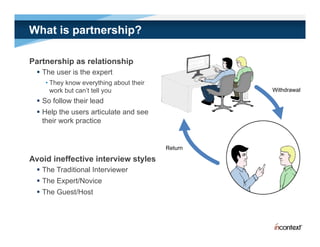
What is partnership?

Partnership as relationship
  The user is the expert
    • They know everything about their
      work but can’t tell you                     Withdrawal

  So follow their lead
  Help the users articulate and see
   their work practice


                                         Return

Avoid ineffective interview styles
  The Traditional Interviewer
  The Expert/Novice
  The Guest/Host
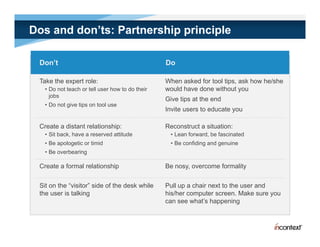
Dos and don’ts: Partnership principle

 Don’t                                           Do

 Take the expert role:                           When asked for tool tips, ask how he/she
   • Do not teach or tell user how to do their   would have done without you
     jobs
                                                 Give tips at the end
   • Do not give tips on tool use
                                                 Invite
                                                 I it users to educate you
                                                            t d     t

 Create a distant relationship:                  Reconstruct a situation:
   • Sit back, have a reserved attitude           • Lean forward, be fascinated
   • Be apologetic or timid                       • Be confiding and genuine
   • Be overbearing

 Create a formal relationship                    Be nosy, overcome formality


 Sit on the “visitor” side of the desk while     Pull up a chair next to the user and
 the user is talking                             his/her computer screen. Make sure you
                                                 can see what’s happening
                                                          what s
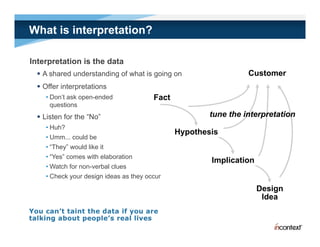
What is interpretation?

Interpretation is the data
   A shared understanding of what is g g on
                         g            going                      Customer
   Offer interpretations
    • Don’t ask open-ended              Fact
      q
      questions
   Listen for the “No”                                tune the interpretation
    • Huh?
                                               Hypothesis
    • Umm... could be
    • “They” would like it
    • “Yes” comes with elaboration
                                                       Implication
    • Watch for non-verbal clues
    • Check your design ideas as they occur
                                                                     Design
                                                                      Idea
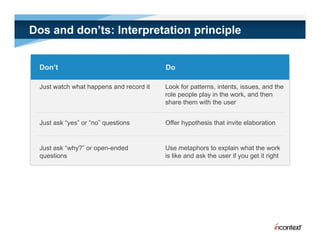
Dos and don’ts: Interpretation principle


 Don’t                                   Do

 Just watch what happens and record it   Look for patterns, intents, issues, and the
                                         role people play in the work, and then
                                         share them with the user


 Just ask “yes” or “no” questions        Offer hypothesis that invite elaboration


 Just ask “why?” or open-ended           Use metaphors to explain what the work
 questions                               is like and ask the user if you get it right
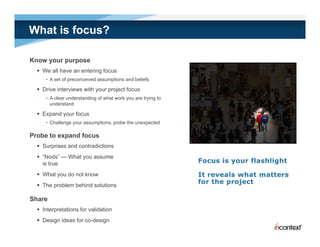
What is focus?

Know your purpose
   We all have an entering focus
     • A set of preconceived assumptions and beliefs

   Drive interviews with your project focus
     • A clear understanding of what work you are trying to
       understand

   Expand your focus
     • Challenge your assumptions, probe the unexpected

Probe to expand focus
   Surprises and contradictions
   “Nods” — What you assume
    is true
   What you do not know
   The problem behind solutions

Share
   Interpretations for validation
   Design ideas for co-design
Dos and don’ts: Focus principle

Don’t                                              Do
Hide your focus                                    Show your focus:
                                                     • The user can help find relevant cases and issues

Focus on the software, configuration or            Focus on work; identify cases in the focus to
hardware                                           pursue

Pursue issues or events outside your focus         Expand focus based on what you see the user do
                                                   Gloss over irrelevant events introduced by the user
                                                   Remember: It is not rude to not engage the users in
                                                   things that are not in focus. You don’t want to teach
                                                       g
                                                   the user that you are interested in irrelevant
                                                   information.


Dismiss issues because you don’t understand
                       y                           Probe things y don’t understand or are
                                                             g you
them                                               surprised by

Talk from an implicit list of questions you want   Follow the work, discuss how the work is
answered                                           structured, not topics in your head

Nod without asking in order to verify everything   Share your interpretations of their words and work
you think you understand                           even if it is obvious
Key concepts in Contextual Inquiry

Be an apprentice
Context
   Go to your user's workplace
   Talk to your users while they work

Partnership
   Help users articulate their work practice
   Let them lead

Interpretation
   Create a shared understanding
   Draw out the implications

Focus
   Know your purpose
   Challenge your assumptions
Structure of the interview

Traditional interview steps         Observe and co-interpret
(5-10 minutes)                      (1 ½ hours)
  Introduce yourself                 Take notes
  Reveal your focus                  Follow your focus
                                      Be nosy
                                             y
  Promise confidentiality
                                      Interruptions are data too
  Start recording
  Get an overview of their work    Wrap-up
                                    (10-15 i t )
                                    (10 15 minutes)
  Look for a starting point
                                      Create a large interpretation of
  Deal with opinions about tools      your learning about
                                       their role
Switch to contextual interview
                                      Ask “pet” questions
  Reset the rules                    Give tips on system use
                                      Th k th user
                                       Thank the
What to record

Record as much detail as possible
  User’s words
  User’s actions, step by step
  Coordination with others
  Indications of the culture and feelings of the user
  Your shared interpretation of the meaning and intent of actions
  Collect artifacts and annotate with usage
  Draw the user’s physical environment and annotate with usage
Exercise: Conference Attendance Planning

What does it take to plan conference attendance?


Discover:
  How the user planned attendance prior to arrival
    • retrospective account
        t      ti         t
  How the user planned today
  Plan tomorrow (if not yet done)
    • Ongoing work

Look at:
  A tif t
   Artifacts
  Annotations
  App usage
    pp    g
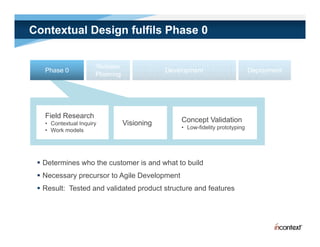
Contextual Design fulfils Phase 0


                      Release
   Phase 0                                   Development                      Deployment
                      Planning
                             g


   Field Research
   • Contextual Inquiry          Visioning       Concept Validation
   • Work models                                 • Low-fidelity prototyping


  Determines who the customer is and what to build
  Necessary precursor to Agile Development
  Result: Tested and validated product structure and features
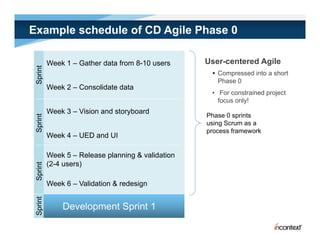
Example schedule of CD Agile Phase 0

          Week 1 – Gather data from 8-10 users     User-centered Agile
  print


                                                     Compressed into a short
 Sp


                                                      Phase 0
          Week 2 – Consolidate data
                                                    • For constrained project
                                                      focus only!
          Week 3 – Vision and storyboard
                                                   Phase 0 sprints
 Sprint


                                                   using Scrum as a
                                                   process framework
          Week 4 – UED and UI

          Week 5 – Release planning & validation
          (2-4 users)
   rint
 Spr


          Week 6 – Validation & redesign
     nt
 Sprin


              Development Sprint 1
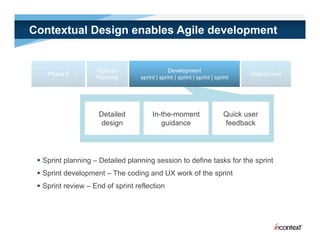
Contextual Design enables Agile development


                    Release                     Development
    Phase 0                                                                      Deployment
                                                                                   p y
                    Planning       sprint | sprint | sprint | sprint | sprint


                     Detailed           In-the-moment                     Quick user
                     design                guidance                       feedback


  Sprint planning – Detailed planning session to define tasks for the sprint
  Sprint development – The coding and UX work of the sprint
  Sprint review – End of sprint reflection
Put the customer at the
center of the design

Simple methods for_reliable_user_involvement

  • 1.
    Simple Methods forReliable User Involvement Hugh Beyer hugh.beyer@incontextdesign.com Karen Holtzblatt, CEO 978.823.0100 www.incontextdesign.com Hugh Beyer, CTO info@incontextdesign.com www.innovationincool.com
  • 2.
    UX and Agile:The promise Agile says development in steps – and iterate UX says work with users to create value – and iterate Phase 0 The “ideal” product ideal sets direction (requirements) User Iteration refines the interface and function What users really need
  • 3.
    Base principle forreal user feedback Real user feedback – Doesn’t come from:  Product owners  Stakeholders  User surrogates  Purchasers  People who used to be users  Demos  Focus groups And…  You can’t put the user on the team  Users can’t give you a design U Users can’t t ll you what th want ’t tell h t they t
  • 4.
    Solving the problemof design The system’s work model has: ode as Language System Structure Features Concepts The user’s work model has: Language Work Structure Work Flow Intention Result Design the optimal match:  Products and systems embody work practice  Design must support and extend user intent
  • 5.
    Contextual Design olutions 1 Contextual Inquiry Talk to your customers in the field ments & So 2 Interpretation Session Interpret the data as a team to capture key issues and activities Work Models & Requirem 3 Affinity Diagramming Consolidate data across customers for a full market view 4 Visioning Generate new products & the next product concepts steeped in data Define & Validate Concepts 5 Storyboards Work out the details of particular tasks and roles Interaction Patterns & 6 User Environment Design Define system structure, function, content and user interaction 7 Paper Prototype Interviews Mock up the interface to validate direction and UI with customers p e 8 Visual Design & Agile Stories Design and test the final look; base stories on validated function
  • 6.
    Contextual Design 1 Contextual Inquiry 2 Interpretation Session 3 Work Models & Affinity 4 Visioning Field t di Fi ld studies yield i ld 5 Storyboards real understanding of what customers actually do and 6 Interaction Patterns & UED what they really y y care about 7 Paper Prototype Interviews 8 Visual Design & Agile Stories
  • 7.
    Contextual Design U21 Flow Model 1 Contextual Inquiry Discuss open litigation Board of Directors Administrative Assistant General Counsel Discuss open litigation SOP Ask for legal advice Email 2 Interpretation Session Business Unit Managers U21 SOP Outside Provide legal advice Senior Corporate Counsel Counsel Hand deliver SOP Open email to see Discuss legal options U3-1 request and log in info TRIGGER:  3 Work Models & Affinity She wants to understand HR what her boss is doing. doing Department Receive email from partner Open email to see request U5 and log in info U3-2 Sequence:  Open CCH Online Does she advise her boss Keyword  on how to answer or Search 4 Visioning U3-3 manage his schedule? Pg. 1 of 3 Type log in info  Log in doesn’t work Can we design a better way  for her to keep informed? Re-type user name and password in 5 Storyboards Intent: Restrict Domain to get  from email Decide to search in Cross-functional team relevant results Fed  interprets the data to Intent: Account for research time Select search form  capture issues and Remembered to 6 Intent: Say what I start Interaction Patterns & UED want in computer terms client tracker model activities Type complex keyword k d search using Creates a shared Boolean 7 Paper Prototype Interviews perspective of the data and implications 8 Visual Design & Agile Stories
  • 8.
    Contextual Design 1 Contextual Inquiry 2 Interpretation Session 3 Work Models & Affinity 4 Visioning Consolidates data across all 5 Storyboards customers reveals the big picture of the market: key issues, tasks, values, 6 Interaction Patterns & UED collaboration, work process, and technology impact 7 Paper Prototype Interviews Find the opportunities to guide innovation. 8 Visual Design & Agile Stories
  • 9.
    Contextual Design 1 Contextual Inquiry 2 Interpretation Session 3 Work Models & Affinity 4 Visioning 5 Storyboards Must have 6 Interaction Patterns & UED models for Agile 7 Paper Prototype Interviews 8 Visual Design & Agile Stories
  • 10.
    Contextual Design 1 Contextual Inquiry 2 Interpretation Session 3 Work Models 4 Visioning 5 Storyboards Facilitated group ideation session – with evaluation 6 Interaction Patterns & UED First immerse in the data then generate concepts for new and 7 Paper Prototype Interviews existing products 8 Visual Design & Agile Stories
  • 11.
    Contextual Design 1 Contextual Inquiry 2 Interpretation Session 3 Work Models & Affinity 4 Visioning Develop the details of the 5 Storyboards new to-be activities Clarify function, user 6 Interaction Patterns & UED experience, automation rules, data, and technology based on the vision 7 Paper Prototype Interviews 8 Visual Design & Agile Stories
  • 12.
    Contextual Design 1 Contextual Inquiry 2 Interpretation Session 3 Work Models & Affinity 4 Visioning Represent the system 5 Storyboards structure, requirements, and user interface layout 6 Interaction Patterns & UED Ensure consistency, coherence, and a smooth user experience product 7 Paper Prototype Interviews wide. 8 Visual Design & Agile Stories
  • 13.
    Contextual Design 1 Contextual Inquiry 2 Interpretation Session 3 Work Models & Affinity 4 Visioning 5 Storyboards Validate product concepts, process changes, and user experience while testing user 6 Interaction Patterns & UED reception Or bring out concept boards 7 Paper Prototype Interviews to validate direction before detailed design 8 Visual Design & Agile Stories
  • 14.
    UX and Agile:The promise Agile says development in steps – and iterate UX says work with users to create value – and iterate The “ideal” product ideal Phase 0: What do we write on the story cards? Contextual Inquiry Consolidation Visioning End of sprint: Paper prototyping What does the During sprint: Get user think? the details right Field interviews Paper prototyping
  • 15.
  • 16.
    The Contextual interview The interviewing process of Contextual Design  One-on-one 2-hour field interview  Gathering detailed information about work practice p  In the workplace while people work  Through observation and discussion of on-going work on going  Based on a model of apprenticeship to the customer
  • 17.
    Contextual Inquiry principles Keyconcepts to guide understanding the customer  Context: Collect data in the context of people’s work p p • Go to your user's workplace • Talk to your users while they work  Partnership: Work with customers as partners in inquiry • Help users articulate their work practice • Let them lead  Interpretation: Uncover the meaning and implications of customer action and language • Create a shared understanding • Draw out the implications p  Focus: Listen and probe from a clear intention • Know your purpose • Challenge your assumptions
  • 18.
    What is context? Getas close to the work as possible  Go to the customer  Interview while they are working  Be grounded in real objects and events  Pay attention to non-verbal communication Ongoing work versus summary experience  People tend to give summaries  Ongoing work is never summarized Stay concrete don’t abstract concrete, don t  Ongoing work  Retrospective account — from the last two weeks  Look at artifacts
  • 19.
    Dos and don’ts:Context principle Don’t Do Let the user talk in the air or talk in Make talk concrete: abstractions • Follow actual work and specific cases from recent past • Get or draw artifacts; annotate with intent and usage Allow the user to summarize a story Reconstruct a situation: • Back up the user when he skips a step •H Hypothesize steps to prompt the user h i h Discuss feature requests out of the Probe to understand what actual work context of usage situation prompted the request Follow the real work example Ask “What would you have done next?” Avoid predictions of future scenarios when the user did not actually do it in Only O l care about what is h b t h t i happening now i this case Do a retrospective account of past work
  • 20.
    What is partnership? Partnershipas relationship  The user is the expert • They know everything about their work but can’t tell you Withdrawal  So follow their lead  Help the users articulate and see their work practice Return Avoid ineffective interview styles  The Traditional Interviewer  The Expert/Novice  The Guest/Host
  • 21.
    Dos and don’ts:Partnership principle Don’t Do Take the expert role: When asked for tool tips, ask how he/she • Do not teach or tell user how to do their would have done without you jobs Give tips at the end • Do not give tips on tool use Invite I it users to educate you t d t Create a distant relationship: Reconstruct a situation: • Sit back, have a reserved attitude • Lean forward, be fascinated • Be apologetic or timid • Be confiding and genuine • Be overbearing Create a formal relationship Be nosy, overcome formality Sit on the “visitor” side of the desk while Pull up a chair next to the user and the user is talking his/her computer screen. Make sure you can see what’s happening what s
  • 22.
    What is interpretation? Interpretationis the data  A shared understanding of what is g g on g going Customer  Offer interpretations • Don’t ask open-ended Fact q questions  Listen for the “No” tune the interpretation • Huh? Hypothesis • Umm... could be • “They” would like it • “Yes” comes with elaboration Implication • Watch for non-verbal clues • Check your design ideas as they occur Design Idea
  • 23.
    Dos and don’ts:Interpretation principle Don’t Do Just watch what happens and record it Look for patterns, intents, issues, and the role people play in the work, and then share them with the user Just ask “yes” or “no” questions Offer hypothesis that invite elaboration Just ask “why?” or open-ended Use metaphors to explain what the work questions is like and ask the user if you get it right
  • 24.
    What is focus? Knowyour purpose  We all have an entering focus • A set of preconceived assumptions and beliefs  Drive interviews with your project focus • A clear understanding of what work you are trying to understand  Expand your focus • Challenge your assumptions, probe the unexpected Probe to expand focus  Surprises and contradictions  “Nods” — What you assume is true  What you do not know  The problem behind solutions Share  Interpretations for validation  Design ideas for co-design
  • 25.
    Dos and don’ts:Focus principle Don’t Do Hide your focus Show your focus: • The user can help find relevant cases and issues Focus on the software, configuration or Focus on work; identify cases in the focus to hardware pursue Pursue issues or events outside your focus Expand focus based on what you see the user do Gloss over irrelevant events introduced by the user Remember: It is not rude to not engage the users in things that are not in focus. You don’t want to teach g the user that you are interested in irrelevant information. Dismiss issues because you don’t understand y Probe things y don’t understand or are g you them surprised by Talk from an implicit list of questions you want Follow the work, discuss how the work is answered structured, not topics in your head Nod without asking in order to verify everything Share your interpretations of their words and work you think you understand even if it is obvious
  • 26.
    Key concepts inContextual Inquiry Be an apprentice Context  Go to your user's workplace  Talk to your users while they work Partnership  Help users articulate their work practice  Let them lead Interpretation  Create a shared understanding  Draw out the implications Focus  Know your purpose  Challenge your assumptions
  • 27.
    Structure of theinterview Traditional interview steps Observe and co-interpret (5-10 minutes) (1 ½ hours)  Introduce yourself  Take notes  Reveal your focus  Follow your focus  Be nosy y  Promise confidentiality  Interruptions are data too  Start recording  Get an overview of their work Wrap-up (10-15 i t ) (10 15 minutes)  Look for a starting point  Create a large interpretation of  Deal with opinions about tools your learning about their role Switch to contextual interview  Ask “pet” questions  Reset the rules  Give tips on system use  Th k th user Thank the
  • 28.
    What to record Recordas much detail as possible  User’s words  User’s actions, step by step  Coordination with others  Indications of the culture and feelings of the user  Your shared interpretation of the meaning and intent of actions  Collect artifacts and annotate with usage  Draw the user’s physical environment and annotate with usage
  • 29.
    Exercise: Conference AttendancePlanning What does it take to plan conference attendance? Discover:  How the user planned attendance prior to arrival • retrospective account t ti t  How the user planned today  Plan tomorrow (if not yet done) • Ongoing work Look at:  A tif t Artifacts  Annotations  App usage pp g
  • 30.
    Contextual Design fulfilsPhase 0 Release Phase 0 Development Deployment Planning g Field Research • Contextual Inquiry Visioning Concept Validation • Work models • Low-fidelity prototyping  Determines who the customer is and what to build  Necessary precursor to Agile Development  Result: Tested and validated product structure and features
  • 31.
    Example schedule ofCD Agile Phase 0 Week 1 – Gather data from 8-10 users User-centered Agile print  Compressed into a short Sp Phase 0 Week 2 – Consolidate data • For constrained project focus only! Week 3 – Vision and storyboard Phase 0 sprints Sprint using Scrum as a process framework Week 4 – UED and UI Week 5 – Release planning & validation (2-4 users) rint Spr Week 6 – Validation & redesign nt Sprin Development Sprint 1
  • 32.
    Contextual Design enablesAgile development Release Development Phase 0 Deployment p y Planning sprint | sprint | sprint | sprint | sprint Detailed In-the-moment Quick user design guidance feedback  Sprint planning – Detailed planning session to define tasks for the sprint  Sprint development – The coding and UX work of the sprint  Sprint review – End of sprint reflection
  • 33.
    Put the customerat the center of the design