




Damian Gordon
 Rather than have to store every
character in a file, it would be great if
we could find a way of reducing the
length of the file to allow it to be
stored in a smaller space.
 This is the File Manager’s job
 Also Rather than have to send every
character in a message, it would be
great if we could find a way of
reducing the length of the message to
allow it to be transmitted quicker.
 This is the Network Manager’s job
 Whether the File Manager or the
Network Manager both take a similar
approach to compression.
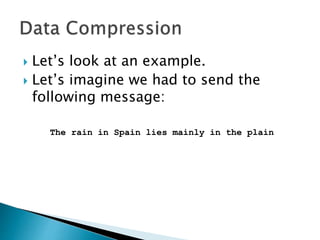
 Let’s look at an example.
 Let’s imagine we had to send the
following message:
The rain in Spain lies mainly in the plain
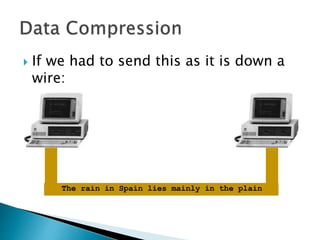
 If we had to send this as it is down a
wire:
The rain in Spain lies mainly in the plain
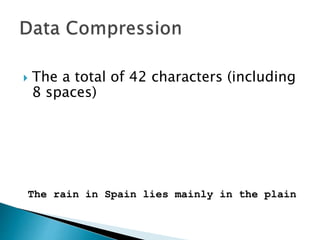
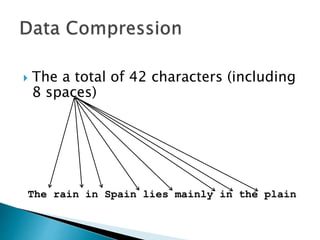
 The a total of 42 characters (including
8 spaces)
The rain in Spain lies mainly in the plain
 The a total of 42 characters (including
8 spaces)
The rain in Spain lies mainly in the plain
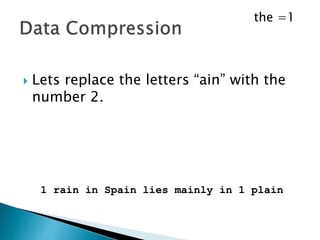
 Lets replace the word “the” with the
number 1.
The rain in Spain lies mainly in the plain
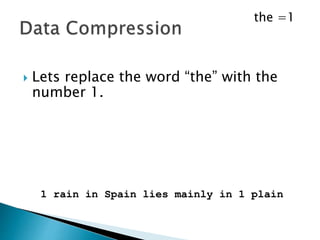
 Lets replace the word “the” with the
number 1.
1 rain in Spain lies mainly in 1 plain
the =1
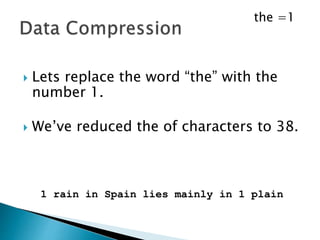
 Lets replace the word “the” with the
number 1.
 We’ve reduced the of characters to 38.
1 rain in Spain lies mainly in 1 plain
the =1
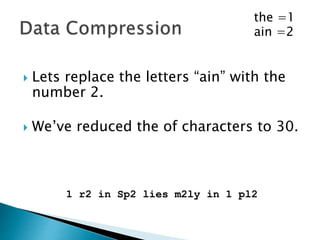
 Lets replace the letters “ain” with the
number 2.
1 rain in Spain lies mainly in 1 plain
the =1
 Lets replace the letters “ain” with the
number 2.
 We’ve reduced the of characters to 30.
1 r2 in Sp2 lies m2ly in 1 pl2
the =1
ain =2
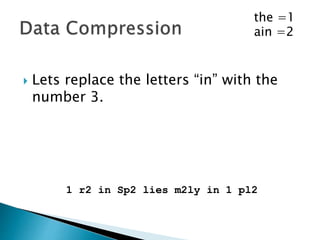
 Lets replace the letters “in” with the
number 3.
1 r2 in Sp2 lies m2ly in 1 pl2
the =1
ain =2
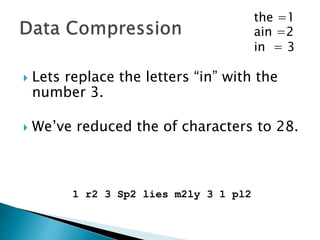
 Lets replace the letters “in” with the
number 3.
 We’ve reduced the of characters to 28.
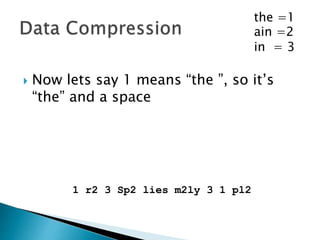
1 r2 3 Sp2 lies m2ly 3 1 pl2
the =1
ain =2
in = 3
 Now lets say 1 means “the ”, so it’s
“the” and a space
1 r2 3 Sp2 lies m2ly 3 1 pl2
the =1
ain =2
in = 3
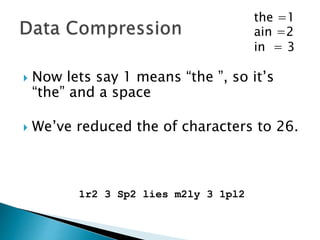
 Now lets say 1 means “the ”, so it’s
“the” and a space
 We’ve reduced the of characters to 26.
1r2 3 Sp2 lies m2ly 3 1pl2
the =1
ain =2
in = 3
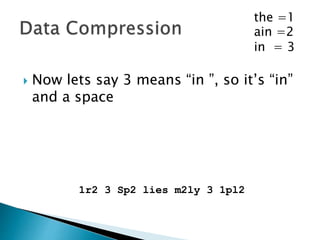
 Now lets say 3 means “in ”, so it’s “in”
and a space
1r2 3 Sp2 lies m2ly 3 1pl2
the =1
ain =2
in = 3
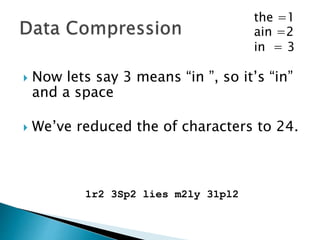
 Now lets say 3 means “in ”, so it’s “in”
and a space
 We’ve reduced the of characters to 24.
1r2 3Sp2 lies m2ly 31pl2
the =1
ain =2
in = 3
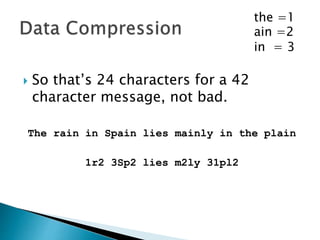
 So that’s 24 characters for a 42
character message, not bad.
The rain in Spain lies mainly in the plain
1r2 3Sp2 lies m2ly 31pl2
the =1
ain =2
in = 3
 Let’s try a different example.
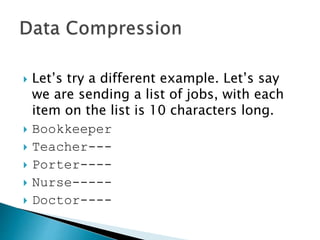
 Let’s try a different example. Let’s say
we are sending a list of jobs, with each
item on the list is 10 characters long.
 Bookkeeper
 Teacher---
 Porter----
 Nurse-----
 Doctor----
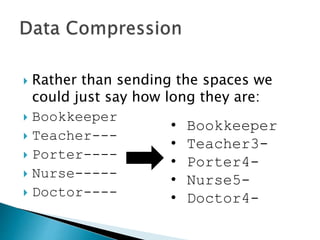
 Rather than sending the spaces we
could just say how long they are:
 Bookkeeper
 Teacher---
 Porter----
 Nurse-----
 Doctor----
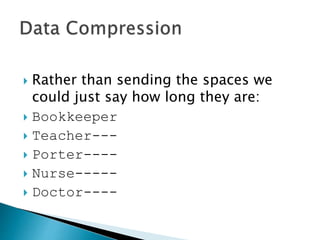
 Rather than sending the spaces we
could just say how long they are:
 Bookkeeper
 Teacher---
 Porter----
 Nurse-----
 Doctor----
• Bookkeeper
• Teacher3-
• Porter4-
• Nurse5-
• Doctor4-
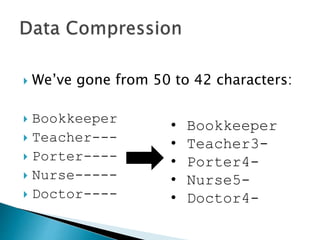
 We’ve gone from 50 to 42 characters:
 Bookkeeper
 Teacher---
 Porter----
 Nurse-----
 Doctor----
• Bookkeeper
• Teacher3-
• Porter4-
• Nurse5-
• Doctor4-
PROGRAM CompressExample:
BEGIN
Get Current Character;
WHILE (NOT End_of_Line)
DO Get Next Character;
IF (Current Character != Next Character)
THEN Get next char, and set current to next;
Write out Current Character;
ELSE
Keep looping while the characters match;
Keep counting;
Get next char, and set current to next;
When finished write out Counter;
Write out Current Character;
Reset Counter;
ENDIF;
ENDWHILE;
END.
PROGRAM CompressExample:
BEGIN
char Current_Char, Next_char;
int Counter;
Current_Char := Get_char();
WHILE (NOT End_of_Line)
DO Next_Char := Get_char();
IF (Current_Char != Next_char)
THEN Current_Char := Next_Char;
Next_Char := Get_char();
Write out Current_Char;
ELSE
WHILE (Current_Char == Next_char)
DO Counter = Counter + 1;
Current_Char := Next_Char;
Next_Char := Get_char();
ENDWHILE;
Write out Counter, Current_Char;
Counter := 0;
ENDIF;
ENDWHILE;
END.
 Or let’s imagine we are sending a list
of house prices.
 350000
 600000
 550000
 2100000
 3000000
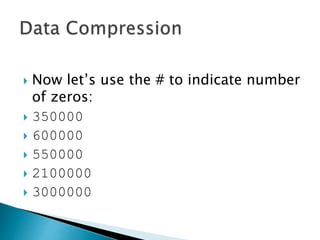
 Now let’s use the # to indicate number
of zeros:
 350000
 600000
 550000
 2100000
 3000000
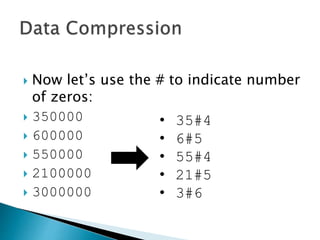
 Now let’s use the # to indicate number
of zeros:
 350000
 600000
 550000
 2100000
 3000000
• 35#4
• 6#5
• 55#4
• 21#5
• 3#6
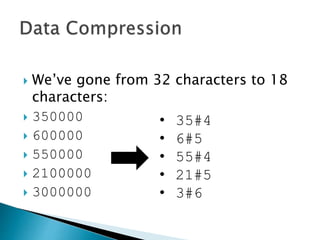
 We’ve gone from 32 characters to 18
characters:
 350000
 600000
 550000
 2100000
 3000000
• 35#4
• 6#5
• 55#4
• 21#5
• 3#6
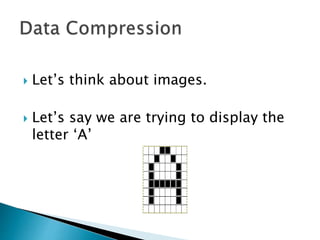
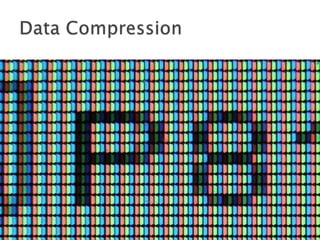
 Let’s think about images.
 Let’s say we are trying to display the
letter ‘A’
 Let’s think about images.
 Let’s say we are trying to display the
letter ‘A’
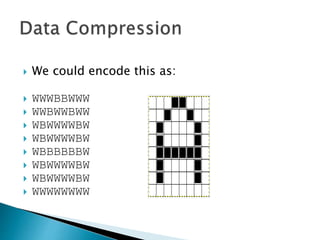
 We could encode this as:
 WWWBBWWW
 WWBWWBWW
 WBWWWWBW
 WBWWWWBW
 WBBBBBBW
 WBWWWWBW
 WBWWWWBW
 WWWWWWWW
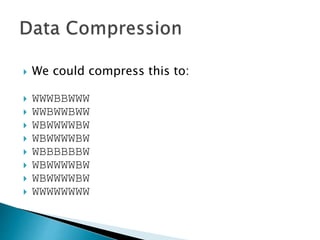
 We could compress this to:
 WWWBBWWW
 WWBWWBWW
 WBWWWWBW
 WBWWWWBW
 WBBBBBBW
 WBWWWWBW
 WBWWWWBW
 WWWWWWWW
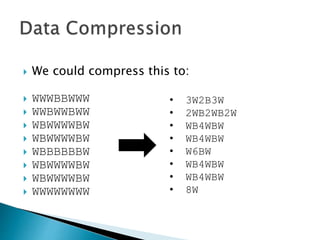
 We could compress this to:
 WWWBBWWW
 WWBWWBWW
 WBWWWWBW
 WBWWWWBW
 WBBBBBBW
 WBWWWWBW
 WBWWWWBW
 WWWWWWWW
• 3W2B3W
• 2WB2WB2W
• WB4WBW
• WB4WBW
• W6BW
• WB4WBW
• WB4WBW
• 8W
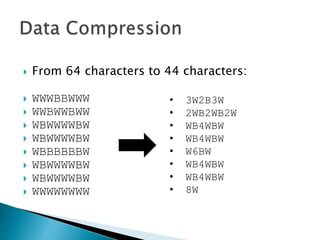
 From 64 characters to 44 characters:
 WWWBBWWW
 WWBWWBWW
 WBWWWWBW
 WBWWWWBW
 WBBBBBBW
 WBWWWWBW
 WBWWWWBW
 WWWWWWWW
• 3W2B3W
• 2WB2WB2W
• WB4WBW
• WB4WBW
• W6BW
• WB4WBW
• WB4WBW
• 8W
 We call this “run-length encoding” or
RLE.
 Now let’s add one more rule.
 Let’s imagine if we send the number
‘0’ it means repeat the previous line.
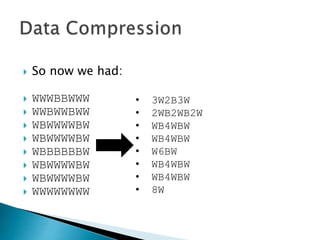
 So now we had:
 WWWBBWWW
 WWBWWBWW
 WBWWWWBW
 WBWWWWBW
 WBBBBBBW
 WBWWWWBW
 WBWWWWBW
 WWWWWWWW
• 3W2B3W
• 2WB2WB2W
• WB4WBW
• WB4WBW
• W6BW
• WB4WBW
• WB4WBW
• 8W
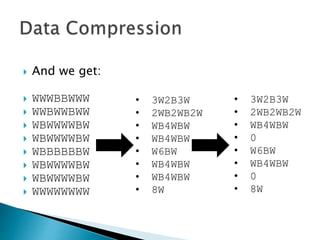
 And we get:
 WWWBBWWW
 WWBWWBWW
 WBWWWWBW
 WBWWWWBW
 WBBBBBBW
 WBWWWWBW
 WBWWWWBW
 WWWWWWWW
• 3W2B3W
• 2WB2WB2W
• WB4WBW
• WB4WBW
• W6BW
• WB4WBW
• WB4WBW
• 8W
• 3W2B3W
• 2WB2WB2W
• WB4WBW
• 0
• W6BW
• WB4WBW
• 0
• 8W
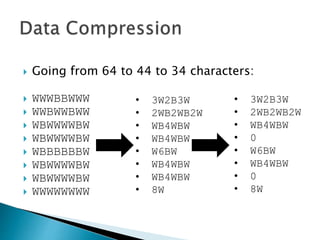
 Going from 64 to 44 to 34 characters:
 WWWBBWWW
 WWBWWBWW
 WBWWWWBW
 WBWWWWBW
 WBBBBBBW
 WBWWWWBW
 WBWWWWBW
 WWWWWWWW
• 3W2B3W
• 2WB2WB2W
• WB4WBW
• WB4WBW
• W6BW
• WB4WBW
• WB4WBW
• 8W
• 3W2B3W
• 2WB2WB2W
• WB4WBW
• 0
• W6BW
• WB4WBW
• 0
• 8W
 For most images, the lines are
repeated frequently, so you can get
massive savings from RLE.
Simple Data Compression

Simple Data Compression

  • 1.
  • 2.
     Rather thanhave to store every character in a file, it would be great if we could find a way of reducing the length of the file to allow it to be stored in a smaller space.  This is the File Manager’s job
  • 3.
     Also Ratherthan have to send every character in a message, it would be great if we could find a way of reducing the length of the message to allow it to be transmitted quicker.  This is the Network Manager’s job
  • 4.
     Whether theFile Manager or the Network Manager both take a similar approach to compression.
  • 5.
     Let’s lookat an example.  Let’s imagine we had to send the following message: The rain in Spain lies mainly in the plain
  • 6.
     If wehad to send this as it is down a wire: The rain in Spain lies mainly in the plain
  • 7.
     The atotal of 42 characters (including 8 spaces) The rain in Spain lies mainly in the plain
  • 8.
     The atotal of 42 characters (including 8 spaces) The rain in Spain lies mainly in the plain
  • 9.
     Lets replacethe word “the” with the number 1. The rain in Spain lies mainly in the plain
  • 10.
     Lets replacethe word “the” with the number 1. 1 rain in Spain lies mainly in 1 plain the =1
  • 11.
     Lets replacethe word “the” with the number 1.  We’ve reduced the of characters to 38. 1 rain in Spain lies mainly in 1 plain the =1
  • 12.
     Lets replacethe letters “ain” with the number 2. 1 rain in Spain lies mainly in 1 plain the =1
  • 13.
     Lets replacethe letters “ain” with the number 2.  We’ve reduced the of characters to 30. 1 r2 in Sp2 lies m2ly in 1 pl2 the =1 ain =2
  • 14.
     Lets replacethe letters “in” with the number 3. 1 r2 in Sp2 lies m2ly in 1 pl2 the =1 ain =2
  • 15.
     Lets replacethe letters “in” with the number 3.  We’ve reduced the of characters to 28. 1 r2 3 Sp2 lies m2ly 3 1 pl2 the =1 ain =2 in = 3
  • 16.
     Now letssay 1 means “the ”, so it’s “the” and a space 1 r2 3 Sp2 lies m2ly 3 1 pl2 the =1 ain =2 in = 3
  • 17.
     Now letssay 1 means “the ”, so it’s “the” and a space  We’ve reduced the of characters to 26. 1r2 3 Sp2 lies m2ly 3 1pl2 the =1 ain =2 in = 3
  • 18.
     Now letssay 3 means “in ”, so it’s “in” and a space 1r2 3 Sp2 lies m2ly 3 1pl2 the =1 ain =2 in = 3
  • 19.
     Now letssay 3 means “in ”, so it’s “in” and a space  We’ve reduced the of characters to 24. 1r2 3Sp2 lies m2ly 31pl2 the =1 ain =2 in = 3
  • 20.
     So that’s24 characters for a 42 character message, not bad. The rain in Spain lies mainly in the plain 1r2 3Sp2 lies m2ly 31pl2 the =1 ain =2 in = 3
  • 21.
     Let’s trya different example.
  • 22.
     Let’s trya different example. Let’s say we are sending a list of jobs, with each item on the list is 10 characters long.  Bookkeeper  Teacher---  Porter----  Nurse-----  Doctor----
  • 23.
     Rather thansending the spaces we could just say how long they are:  Bookkeeper  Teacher---  Porter----  Nurse-----  Doctor----
  • 24.
     Rather thansending the spaces we could just say how long they are:  Bookkeeper  Teacher---  Porter----  Nurse-----  Doctor---- • Bookkeeper • Teacher3- • Porter4- • Nurse5- • Doctor4-
  • 25.
     We’ve gonefrom 50 to 42 characters:  Bookkeeper  Teacher---  Porter----  Nurse-----  Doctor---- • Bookkeeper • Teacher3- • Porter4- • Nurse5- • Doctor4-
  • 26.
    PROGRAM CompressExample: BEGIN Get CurrentCharacter; WHILE (NOT End_of_Line) DO Get Next Character; IF (Current Character != Next Character) THEN Get next char, and set current to next; Write out Current Character; ELSE Keep looping while the characters match; Keep counting; Get next char, and set current to next; When finished write out Counter; Write out Current Character; Reset Counter; ENDIF; ENDWHILE; END.
  • 27.
    PROGRAM CompressExample: BEGIN char Current_Char,Next_char; int Counter; Current_Char := Get_char(); WHILE (NOT End_of_Line) DO Next_Char := Get_char(); IF (Current_Char != Next_char) THEN Current_Char := Next_Char; Next_Char := Get_char(); Write out Current_Char; ELSE WHILE (Current_Char == Next_char) DO Counter = Counter + 1; Current_Char := Next_Char; Next_Char := Get_char(); ENDWHILE; Write out Counter, Current_Char; Counter := 0; ENDIF; ENDWHILE; END.
  • 28.
     Or let’simagine we are sending a list of house prices.  350000  600000  550000  2100000  3000000
  • 29.
     Now let’suse the # to indicate number of zeros:  350000  600000  550000  2100000  3000000
  • 30.
     Now let’suse the # to indicate number of zeros:  350000  600000  550000  2100000  3000000 • 35#4 • 6#5 • 55#4 • 21#5 • 3#6
  • 31.
     We’ve gonefrom 32 characters to 18 characters:  350000  600000  550000  2100000  3000000 • 35#4 • 6#5 • 55#4 • 21#5 • 3#6
  • 33.
     Let’s thinkabout images.  Let’s say we are trying to display the letter ‘A’
  • 34.
     Let’s thinkabout images.  Let’s say we are trying to display the letter ‘A’
  • 35.
     We couldencode this as:  WWWBBWWW  WWBWWBWW  WBWWWWBW  WBWWWWBW  WBBBBBBW  WBWWWWBW  WBWWWWBW  WWWWWWWW
  • 36.
     We couldcompress this to:  WWWBBWWW  WWBWWBWW  WBWWWWBW  WBWWWWBW  WBBBBBBW  WBWWWWBW  WBWWWWBW  WWWWWWWW
  • 37.
     We couldcompress this to:  WWWBBWWW  WWBWWBWW  WBWWWWBW  WBWWWWBW  WBBBBBBW  WBWWWWBW  WBWWWWBW  WWWWWWWW • 3W2B3W • 2WB2WB2W • WB4WBW • WB4WBW • W6BW • WB4WBW • WB4WBW • 8W
  • 38.
     From 64characters to 44 characters:  WWWBBWWW  WWBWWBWW  WBWWWWBW  WBWWWWBW  WBBBBBBW  WBWWWWBW  WBWWWWBW  WWWWWWWW • 3W2B3W • 2WB2WB2W • WB4WBW • WB4WBW • W6BW • WB4WBW • WB4WBW • 8W
  • 39.
     We callthis “run-length encoding” or RLE.
  • 40.
     Now let’sadd one more rule.
  • 41.
     Now let’sadd one more rule.  Let’s imagine if we send the number ‘0’ it means repeat the previous line.
  • 42.
     So nowwe had:  WWWBBWWW  WWBWWBWW  WBWWWWBW  WBWWWWBW  WBBBBBBW  WBWWWWBW  WBWWWWBW  WWWWWWWW • 3W2B3W • 2WB2WB2W • WB4WBW • WB4WBW • W6BW • WB4WBW • WB4WBW • 8W
  • 43.
     And weget:  WWWBBWWW  WWBWWBWW  WBWWWWBW  WBWWWWBW  WBBBBBBW  WBWWWWBW  WBWWWWBW  WWWWWWWW • 3W2B3W • 2WB2WB2W • WB4WBW • WB4WBW • W6BW • WB4WBW • WB4WBW • 8W • 3W2B3W • 2WB2WB2W • WB4WBW • 0 • W6BW • WB4WBW • 0 • 8W
  • 44.
     Going from64 to 44 to 34 characters:  WWWBBWWW  WWBWWBWW  WBWWWWBW  WBWWWWBW  WBBBBBBW  WBWWWWBW  WBWWWWBW  WWWWWWWW • 3W2B3W • 2WB2WB2W • WB4WBW • WB4WBW • W6BW • WB4WBW • WB4WBW • 8W • 3W2B3W • 2WB2WB2W • WB4WBW • 0 • W6BW • WB4WBW • 0 • 8W
  • 45.
     For mostimages, the lines are repeated frequently, so you can get massive savings from RLE.