The Little-Man Computer
Damian Gordon
The Little-Man Computer
• Most computer architectures conform to the
so-called von Neuman Architecture. This
means that they execute programs by
accessing both instructions and data on the
same storage device. The computer performs
the following sequence of steps;
The Little-Man Computer
1. Fetch the next instruction from memory at
the address in the program counter
2. Decode the instruction using the control unit
3. Increment the Program Counter
4. The control unit commands the rest of the
computer to execute the instruction
5. Go to step 1
The Little-Man Computer
• This is the Fetch-Decode-Execute (FDE) cycle.
These computers are known as Stored-
Program Computers since the separation of
storage from the processing unit is implicit in
this model.
The Little-Man Computer
• A conceptual device or thought experiment to
teach this architecture was developed by
Stuart Madnick of MIT in the 1960s and is
called the Little Man Computer (LMC)
Paradigm.
The Little-Man Computer
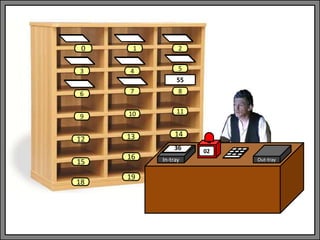
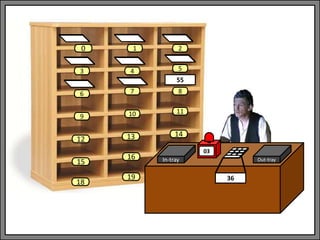
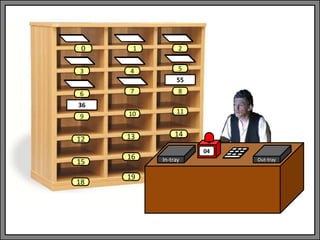
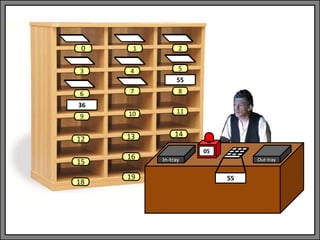
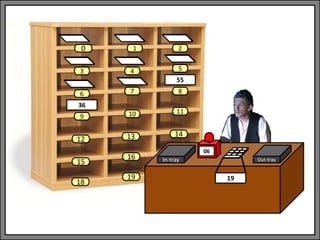
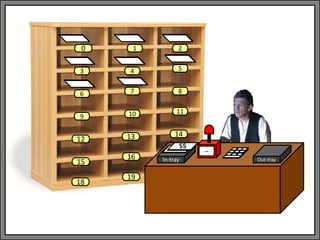
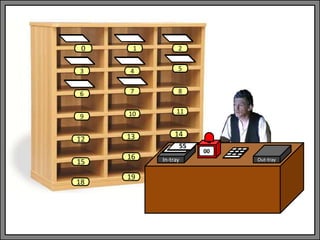
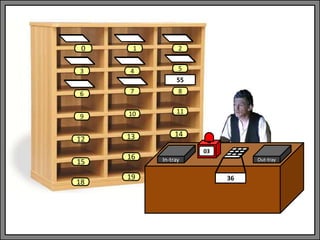
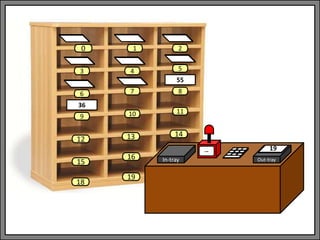
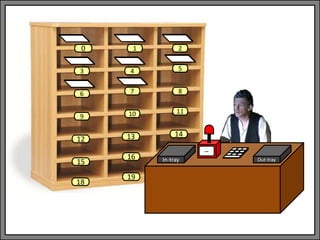
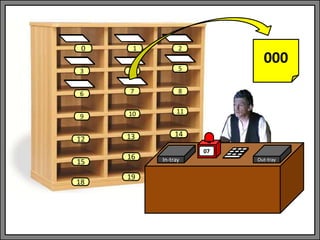
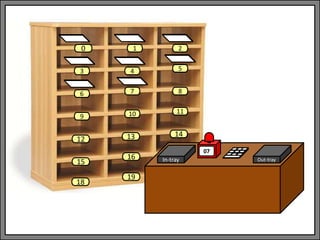
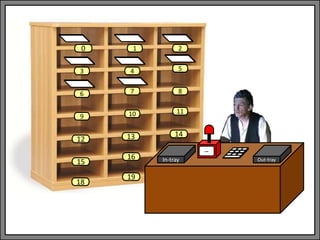
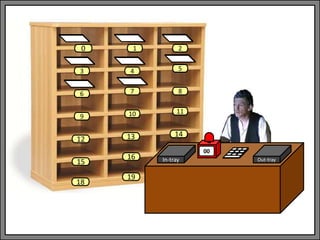
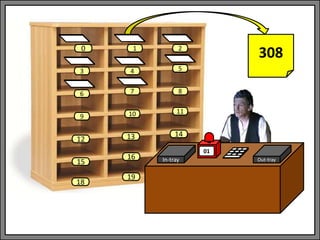
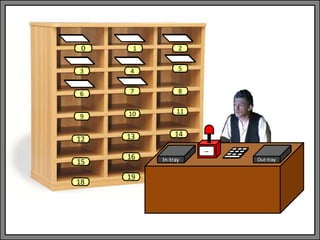
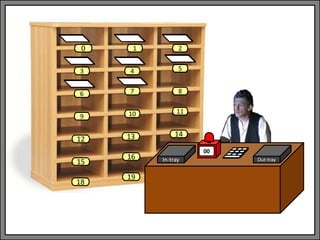
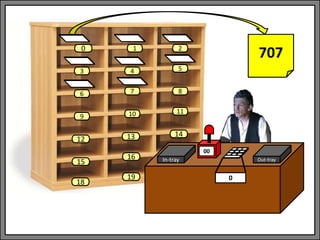
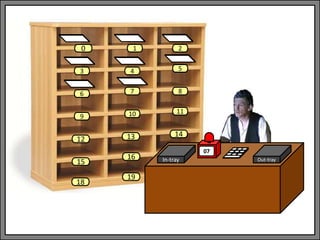
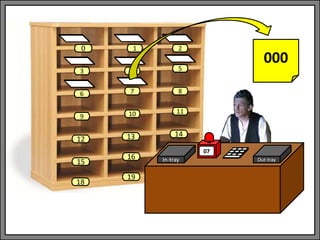
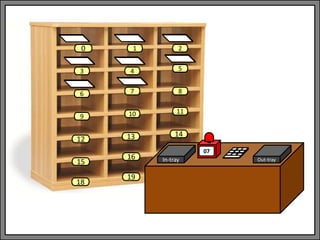
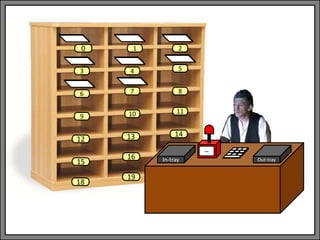
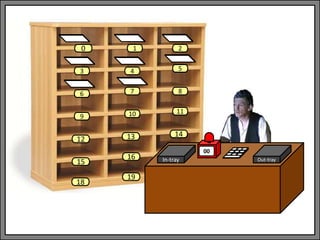
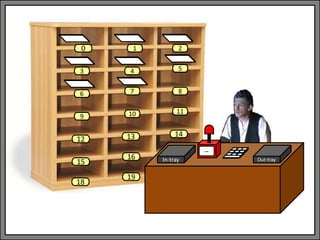
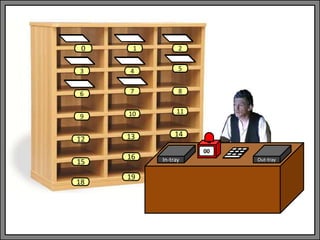
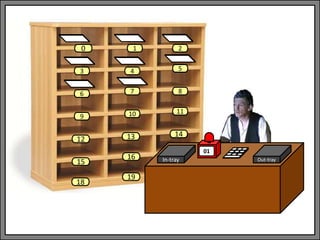
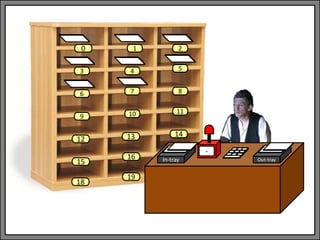
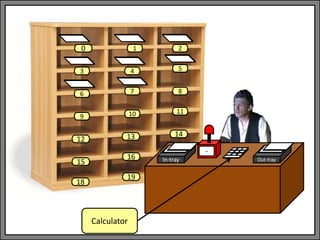
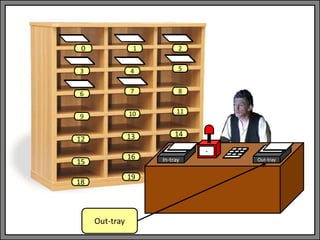
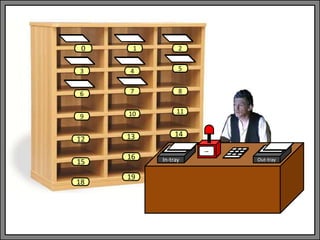
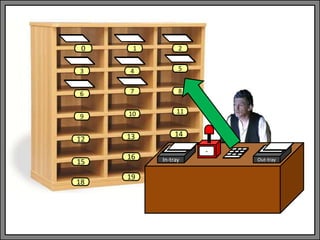
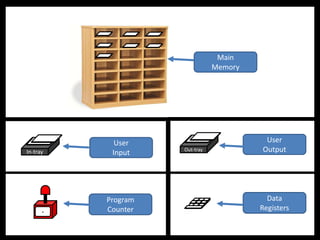
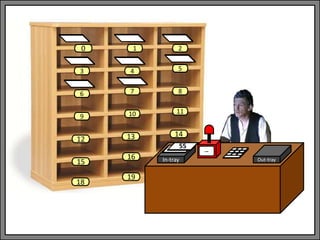
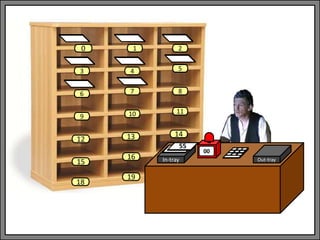
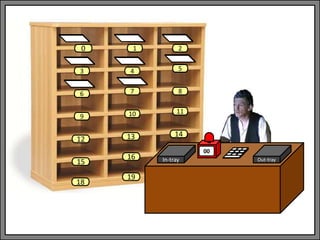
• The LMC Paradigm consists of a room with a
'Little Man' (or homunculus) who simulates
the operations of a computer. The room has
an array of locations that store information
(and instructions), an input and output tray,
and a calculator.
The Little-Man Computer
• The analogy between the LMC and real
computers is not perfect, but this approach is
a simple and powerful conceptual model
which allows us easy entry level to the basics
of computer architecture.
In-tray Out-tray
9 10 11
12 13 14
15
16
18
-
19
1 2
3 4 5
6 7 8
0
In-tray Out-tray
9 10 11
12 13 14
15
16
18
-
19
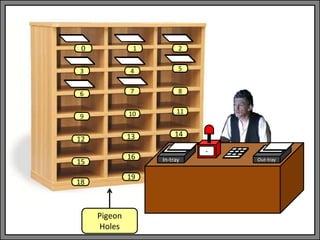
Pigeon
Holes
1 2
3 4 5
6 7 8
0
In-tray Out-tray
9 10 11
12 13 14
15
16
18
-
19
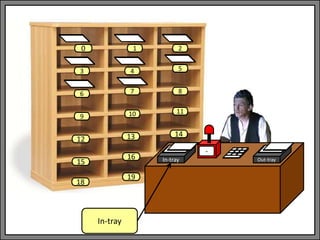
In-tray
1 2
3 4 5
6 7 8
0
In-tray Out-tray
9 10 11
12 13 14
15
16
18
-
19
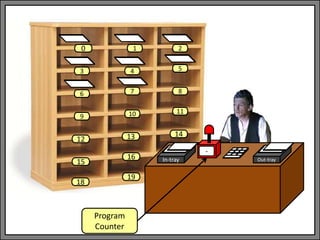
Program
Counter
1 2
3 4 5
6 7 8
0
In-tray Out-tray
9 10 11
12 13 14
15
16
18
-
19
Calculator
1 2
3 4 5
6 7 8
0
In-tray Out-tray
9 10 11
12 13 14
15
16
18
-
19
Out-tray
1 2
3 4 5
6 7 8
0
In-tray Out-tray
9 10 11
12 13 14
15
16
18
--
19
1 2
3 4 5
6 7 8
0
9 10 11
12 13 14
15
16
18
19
1 2
3 4 5
6 7 8
0
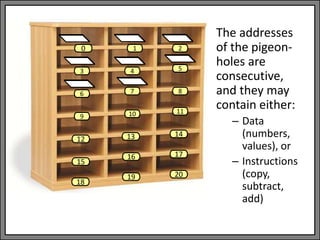
The addresses
of the pigeon-
holes are
consecutive,
and they may
contain either:
– Data
(numbers,
values), or
– Instructions
(copy,
subtract,
add)
17
20
In-tray Out-tray
--
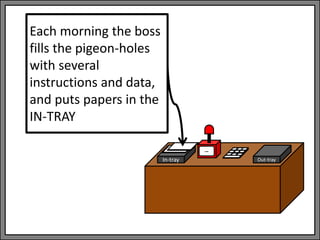
Each morning the boss
fills the pigeon-holes
with several
instructions and data,
and puts papers in the
IN-TRAY
In-tray Out-tray
--
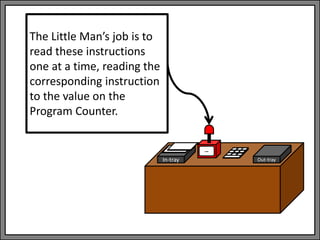
The Little Man’s job is to
read these instructions
one at a time, reading the
corresponding instruction
to the value on the
Program Counter.
In-tray Out-tray
--
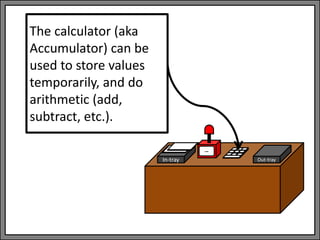
The calculator (aka
Accumulator) can be
used to store values
temporarily, and do
arithmetic (add,
subtract, etc.).
In-tray Out-tray
--
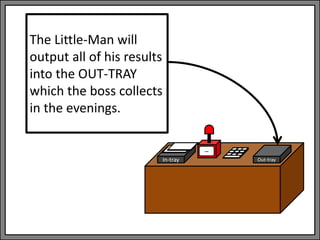
The Little-Man will
output all of his results
into the OUT-TRAY
which the boss collects
in the evenings.
In-tray Out-tray
9 10 11
12 13 14
15
16
18
-
19
1 2
3 4 5
6 7 8
0
In-tray Out-tray
9 10 11
12 13 14
15
16
18
-
19
1 2
3 4 5
6 7 8
0
STORE
In-tray Out-tray
9 10 11
12 13 14
15
16
18
-
19
1 2
3 4 5
6 7 8
0
STORE
In-tray Out-tray
9 10 11
12 13 14
15
16
18
-
19
1 2
3 4 5
6 7 8
0
STORE
LOAD
In-tray Out-tray
-
Program
Counter
Data
Registers
User
Input
User
Output
Main
Memory
The Little-Man Computer
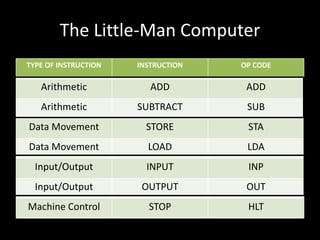
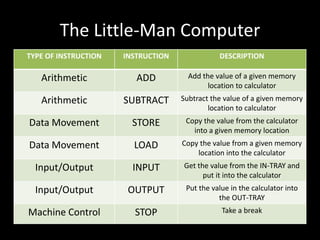
TYPE OF INSTRUCTION INSTRUCTION DESCRIPTION
Arithmetic ADD Add the value of a given memory
location to calculator
Arithmetic SUBTRACT Subtract the value of a given memory
location to calculator
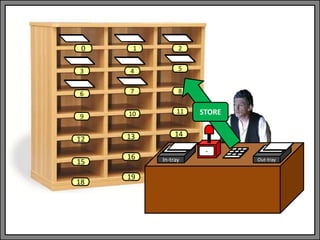
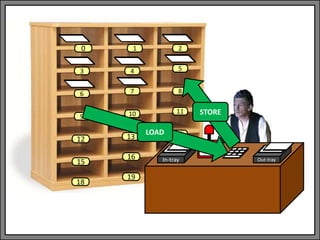
Data Movement STORE Copy the value from the calculator
into a given memory location
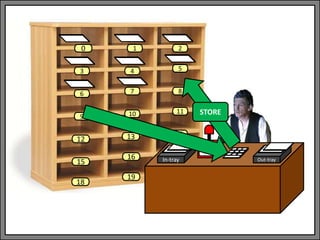
Data Movement LOAD Copy the value from a given memory
location into the calculator
Input/Output INPUT Get the value from the IN-TRAY and
put it into the calculator
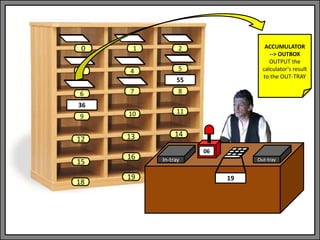
Input/Output OUTPUT Put the value in the calculator into
the OUT-TRAY
Machine Control STOP Take a break
The Little-Man Computer
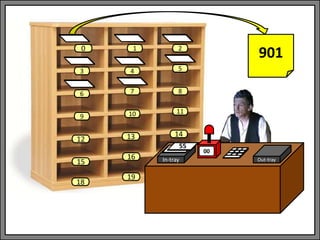
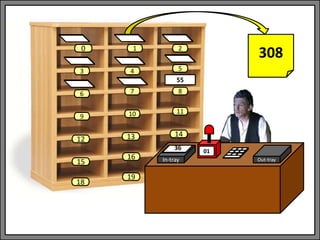
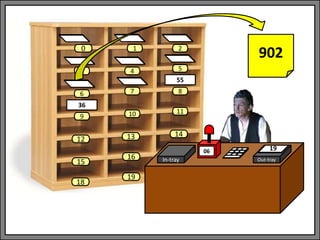
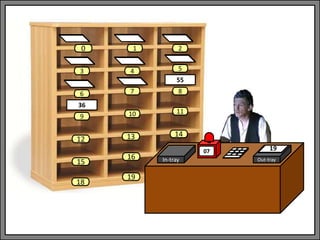
• Let’s see a program in action.
In-tray Out-tray
9 10 11
12 13 14
15
16
18
--
19
1 2
3 4 5
6 7 8
0
55
In-tray Out-tray
00
1 2
3 4 5
6 7 8
9 10 11
13 14
0
12
15
18
16
19
55
In-tray Out-tray
00
1 2
3 4 5
6 7 8
9 10 11
13 14
0
12
15
18
16
19
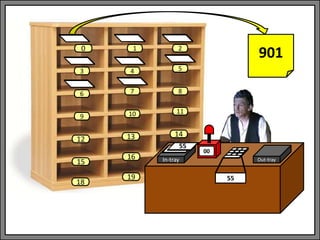
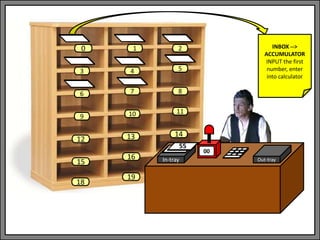
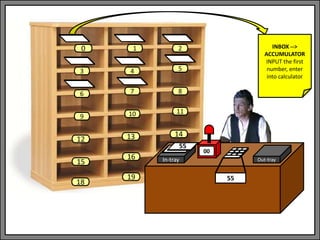
INBOX -->
ACCUMULATOR
INPUT the first
number, enter
into calculator
55
In-tray Out-tray
00
1 2
3 4 5
6 7 8
9 10 11
13 14
0
12
15
18
16
19 55
55
INBOX -->
ACCUMULATOR
INPUT the first
number, enter
into calculator
In-tray Out-tray
01
1 2
3 4 5
6 7 8
9 10 11
13 14
0
12
15
18
16
19 55
36
In-tray Out-tray
01
1 2
3 4 5
6 7 8
9 10 11
13 14
0
12
15
18
16
19 55
36
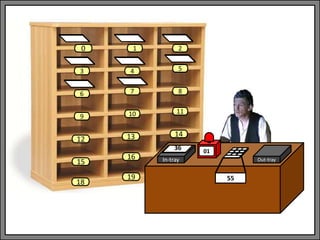
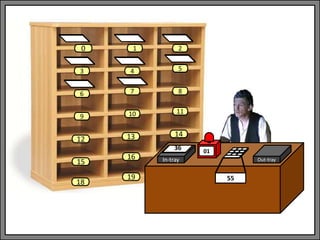
ACCUMULATOR
--> MEMORY[08]
STORE the
calculator's
current value in
memory location
[08]
In-tray Out-tray
01
1 2
3 4 5
6 7 8
9 10 11
13 14
0
12
15
18
16
19
55
36
ACCUMULATOR
--> MEMORY[08]
STORE the
calculator's
current value in
memory location
[08]
In-tray Out-tray
02
1 2
3 4 5
6 7 8
9 10 11
13 14
0
12
15
18
16
19
55
36
In-tray Out-tray
02
1 2
3 4 5
6 7 8
9 10 11
13 14
0
12
15
18
16
19
55
36
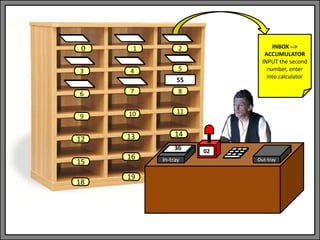
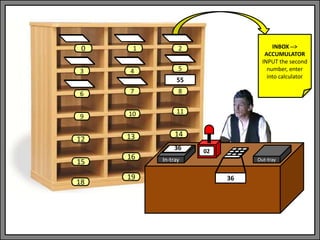
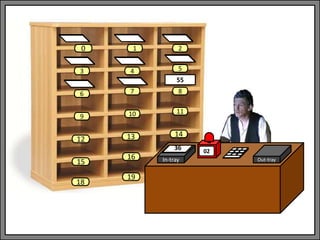
INBOX -->
ACCUMULATOR
INPUT the second
number, enter
into calculator
In-tray Out-tray
02
1 2
3 4 5
6 7 8
9 10 11
13 14
0
12
15
18
16
19
55
36
36
INBOX -->
ACCUMULATOR
INPUT the second
number, enter
into calculator
In-tray Out-tray
03
1 2
3 4 5
6 7 8
9 10 11
13 14
0
12
15
18
16
19
55
36
In-tray Out-tray
03
1 2
3 4 5
6 7 8
9 10 11
13 14
0
12
15
18
16
19
55
36
ACCUMULATOR
--> MEMORY[09]
STORE the
calculator's
current value in
memory location
[09]
In-tray Out-tray
03
1 2
3 4 5
6 7 8
9 10 11
13 14
0
12
15
18
16
19
55
36
ACCUMULATOR
--> MEMORY[09]
STORE the
calculator's
current value in
memory location
[09]
In-tray Out-tray
04
1 2
3 4 5
6 7 8
9 10 11
13 14
0
12
15
18
16
19
55
36
In-tray Out-tray
04
1 2
3 4 5
6 7 8
9 10 11
13 14
0
12
15
18
16
19
55
36
MEMORY[08] -->
ACCUMULATOR
LOAD the first
value back into
the calculator
In-tray Out-tray
04
1 2
3 4 5
6 7 8
9 10 11
13 14
0
12
15
18
16
19
55
36
55
MEMORY[08] -->
ACCUMULATOR
LOAD the first
value back into
the calculator
In-tray Out-tray
05
1 2
3 4 5
6 7 8
9 10 11
13 14
0
12
15
18
16
19
55
36
55
In-tray Out-tray
05
1 2
3 4 5
6 7 8
9 10 11
13 14
0
12
15
18
16
19
55
36
55
ACCUMULATOR =
ACCUMULATOR -
MEMORY[09]
SUBTRACT the
second number
from the first
value
In-tray Out-tray
05
1 2
3 4 5
6 7 8
9 10 11
13 14
0
12
15
18
16
19
55
36
55-36
ACCUMULATOR =
ACCUMULATOR -
MEMORY[09]
SUBTRACT the
second number
from the first
value
In-tray Out-tray
05
1 2
3 4 5
6 7 8
9 10 11
13 14
0
12
15
18
16
19
55
36
19
ACCUMULATOR =
ACCUMULATOR -
MEMORY[09]
SUBTRACT the
second number
from the first
value
In-tray Out-tray
06
1 2
3 4 5
6 7 8
9 10 11
13 14
0
12
15
18
16
19
55
36
19
In-tray Out-tray
06
1 2
3 4 5
6 7 8
9 10 11
13 14
0
12
15
18
16
19
55
36
19
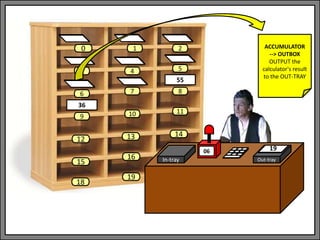
ACCUMULATOR
--> OUTBOX
OUTPUT the
calculator's result
to the OUT-TRAY
In-tray Out-tray
06
1 2
3 4 5
6 7 8
9 10 11
13 14
0
12
15
18
16
19
55
36
19
ACCUMULATOR
--> OUTBOX
OUTPUT the
calculator's result
to the OUT-TRAY
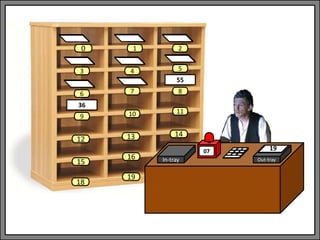
In-tray Out-tray
07
1 2
3 4 5
6 7 8
9 10 11
13 14
0
12
15
18
16
19
55
36
19
In-tray Out-tray
07
1 2
3 4 5
6 7 8
9 10 11
13 14
0
12
15
18
16
19
55
36
19
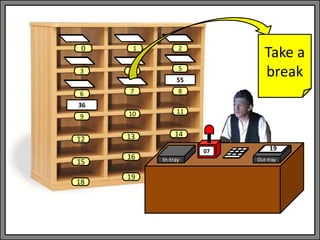
Take a
break
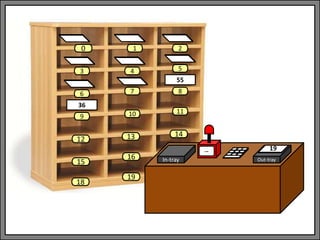
In-tray Out-tray
--
1 2
3 4 5
6 7 8
9 10 11
13 14
0
12
15
18
16
19
55
36
19
The Little-Man Computer
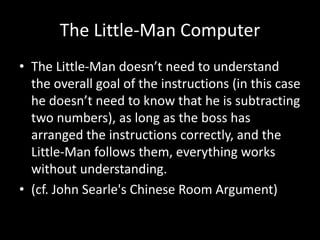
• The Little-Man doesn’t need to understand
the overall goal of the instructions (in this case
he doesn’t need to know that he is subtracting
two numbers), as long as the boss has
arranged the instructions correctly, and the
Little-Man follows them, everything works
without understanding.
• (cf. John Searle's Chinese Room Argument)
The Little-Man Computer
• But, that’s a bit too easy, because the
instructions are in plain English.
• Let’s make it a bit more complicated
• Let’s restate the English as more computer-like
instructions.
The Little-Man Computer
• An instruction has two parts – what to do
(Operation) and what to do it on (the
Operands), e.g.
SUBTRACT Accumulator, [09]
The Little-Man Computer
• An instruction has two parts – what to do
(Operation) and what to do it on (the
Operands), e.g.
SUBTRACT Accumulator, [09]
Operation
The Little-Man Computer
• An instruction has two parts – what to do
(Operation) and what to do it on (the
Operands), e.g.
SUBTRACT Accumulator, [09]
OperandsOperation
The Little-Man Computer
• Note:
SUBTRACT Accumulator, [09]
which is
SUBTRACT 55, 36
which is
29
The Little-Man Computer
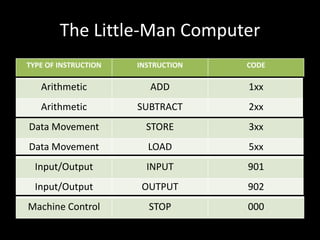
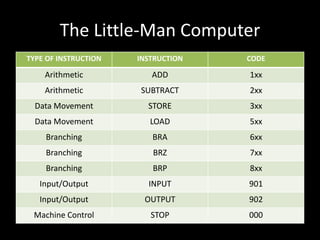
• So, let’s create codes for different kinds of
operations:
The Little-Man Computer
TYPE OF INSTRUCTION INSTRUCTION CODE
Arithmetic ADD 1xx
Arithmetic SUBTRACT 2xx
Data Movement STORE 3xx
Data Movement LOAD 5xx
Input/Output INPUT 901
Input/Output OUTPUT 902
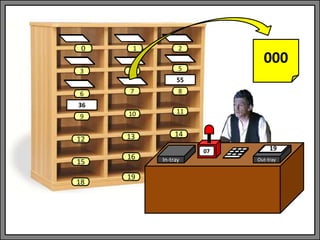
Machine Control STOP 000
The Little-Man Computer
• So:
SUBTRACT Accumulator, [09]
becomes
209
The Little-Man Computer
• And:
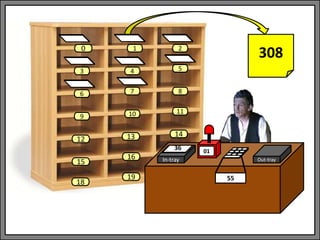
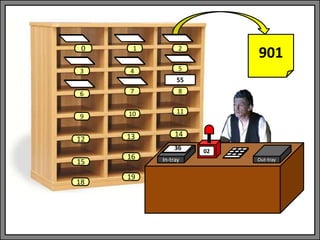
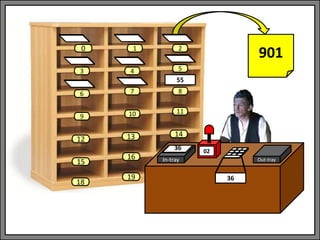
• Becomes: 901, 308, 901, 309,
• 508, 209, 902, 000
INBOX -->
ACCUMULATOR
INPUT the first
number, enter into
calculator
ACCUMULATOR -->
MEMORY[08]
STORE the
calculator's current
value in memory
location [08]
INBOX -->
ACCUMULATOR
INPUT the second
number, enter into
calculator
ACCUMULATOR -->
MEMORY[09]
STORE the
calculator's current
value in memory
location [09]
MEMORY[08] -->
ACCUMULATOR
LOAD the first value
back into the
calculator
ACCUMULATOR =
ACCUMULATOR -
MEMORY[09]
SUBTRACT the
second number
from the first value
ACCUMULATOR -->
OUTBOX
OUTPUT the
calculator's result to
the OUT-TRAY
Take a
break
00 01 02 03
04 05 06 07
The Little-Man Computer
NOTE: We are doing A-B, which is not the same as B-A, so
we read A into the calculator, move it to memory, we read
B into the calculator, move it to memory, move A back into
the calculator, and do the subtraction.
This is because the command works as follows:
SUBTRACT CALCULATOR, MEMORY
So A has to be in the calculator, and B in memory.
The Little-Man Computer
• So what does that look like from the Little-
Man’s perspective?
In-tray Out-tray
9 10 11
12 13 14
15
16
18
--
19
1 2
3 4 5
6 7 8
0
55
In-tray Out-tray
00
1 2
3 4 5
6 7 8
9 10 11
13 14
0
12
15
18
16
19
55
In-tray Out-tray
00
1 2
3 4 5
6 7 8
9 10 11
13 14
0
12
15
18
16
19
901
55
In-tray Out-tray
00
1 2
3 4 5
6 7 8
9 10 11
13 14
0
12
15
18
16
19
901
55
55
In-tray Out-tray
01
1 2
3 4 5
6 7 8
9 10 11
13 14
0
12
15
18
16
19 55
36
In-tray Out-tray
01
1 2
3 4 5
6 7 8
9 10 11
13 14
0
12
15
18
16
19
308
55
36
In-tray Out-tray
01
1 2
3 4 5
6 7 8
9 10 11
13 14
0
12
15
18
16
19
308
55
36
In-tray Out-tray
02
1 2
3 4 5
6 7 8
9 10 11
13 14
0
12
15
18
16
19
55
36
In-tray Out-tray
02
1 2
3 4 5
6 7 8
9 10 11
13 14
0
12
15
18
16
19
901
55
36
In-tray Out-tray
02
1 2
3 4 5
6 7 8
9 10 11
13 14
0
12
15
18
16
19
901
55
36
36
In-tray Out-tray
03
1 2
3 4 5
6 7 8
9 10 11
13 14
0
12
15
18
16
19
55
36
In-tray Out-tray
03
1 2
3 4 5
6 7 8
9 10 11
13 14
0
12
15
18
16
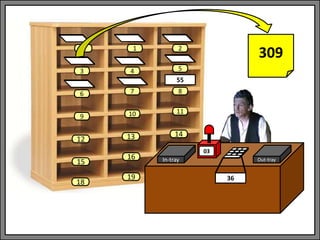
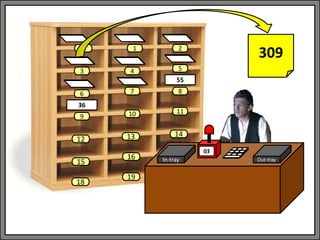
19
309
55
36
In-tray Out-tray
03
1 2
3 4 5
6 7 8
9 10 11
13 14
0
12
15
18
16
19
309
55
36
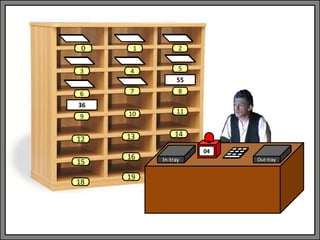
In-tray Out-tray
04
1 2
3 4 5
6 7 8
9 10 11
13 14
0
12
15
18
16
19
55
36
In-tray Out-tray
04
1 2
3 4 5
6 7 8
9 10 11
13 14
0
12
15
18
16
19
55
36
508
In-tray Out-tray
04
1 2
3 4 5
6 7 8
9 10 11
13 14
0
12
15
18
16
19
55
36
508
55
In-tray Out-tray
05
1 2
3 4 5
6 7 8
9 10 11
13 14
0
12
15
18
16
19
55
36
55
In-tray Out-tray
05
1 2
3 4 5
6 7 8
9 10 11
13 14
0
12
15
18
16
19
55
36
55
209
In-tray Out-tray
05
1 2
3 4 5
6 7 8
9 10 11
13 14
0
12
15
18
16
19
55
36
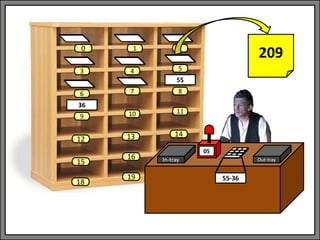
55-36
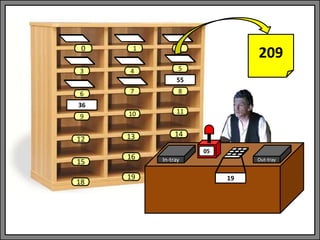
209
In-tray Out-tray
05
1 2
3 4 5
6 7 8
9 10 11
13 14
0
12
15
18
16
19
55
36
19
209
In-tray Out-tray
06
1 2
3 4 5
6 7 8
9 10 11
13 14
0
12
15
18
16
19
55
36
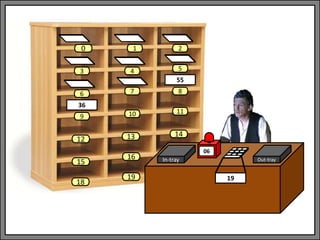
19
In-tray Out-tray
06
1 2
3 4 5
6 7 8
9 10 11
13 14
0
12
15
18
16
19
55
36
19
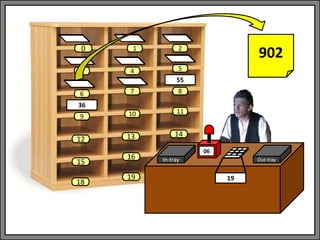
902
In-tray Out-tray
06
1 2
3 4 5
6 7 8
9 10 11
13 14
0
12
15
18
16
19
55
36
902
19
In-tray Out-tray
07
1 2
3 4 5
6 7 8
9 10 11
13 14
0
12
15
18
16
19
55
36
19
In-tray Out-tray
07
1 2
3 4 5
6 7 8
9 10 11
13 14
0
12
15
18
16
19
55
36
000
19
In-tray Out-tray
--
1 2
3 4 5
6 7 8
9 10 11
13 14
0
12
15
18
16
19
55
36
19
The Little-Man Computer
TYPE OF INSTRUCTION INSTRUCTION OP CODE
Arithmetic ADD ADD
Arithmetic SUBTRACT SUB
Data Movement STORE STA
Data Movement LOAD LDA
Input/Output INPUT INP
Input/Output OUTPUT OUT
Machine Control STOP HLT
1 2
3 4 5
6 7 8
9 10 11
13 14
0
12
15
18
16
19
55
36
17
20
1 2
3 4 5
6 7 8
9 10 11
13 14
0
12
15
18
16
19
55
36
17
20
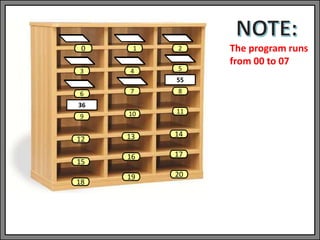
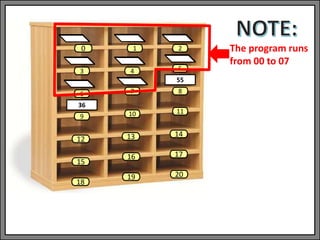
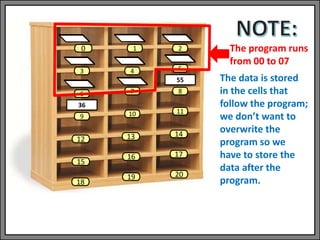
The program runs
from 00 to 07
1 2
3 4 5
6 7 8
9 10 11
13 14
0
12
15
18
16
19
55
36
17
20
The program runs
from 00 to 07
1 2
3 4 5
6 7 8
9 10 11
13 14
0
12
15
18
16
19
55
36
17
20
The program runs
from 00 to 07
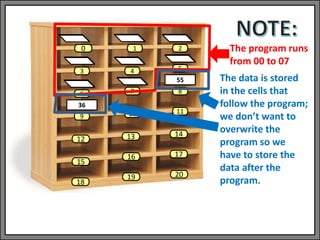
The data is stored
in the cells that
follow the program;
we don’t want to
overwrite the
program so we
have to store the
data after the
program.
1 2
3 4 5
6 7 8
9 10 11
13 14
0
12
15
18
16
19
55
36
17
20
The program runs
from 00 to 07
The data is stored
in the cells that
follow the program;
we don’t want to
overwrite the
program so we
have to store the
data after the
program.
The Little-Man Computer
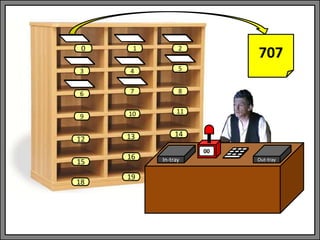
• But what if we want to do IF statements or
WHILE loops, we need some more commands.
• We call there “Branch” commands
The Little-Man Computer
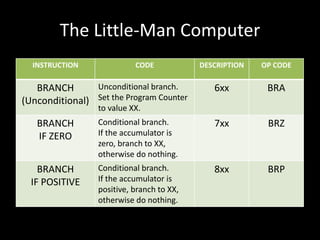
INSTRUCTION CODE DESCRIPTION OP CODE
BRANCH
(Unconditional)
Unconditional branch.
Set the Program Counter
to value XX.
6xx BRA
BRANCH
IF ZERO
Conditional branch.
If the accumulator is
zero, branch to XX,
otherwise do nothing.
7xx BRZ
BRANCH
IF POSITIVE
Conditional branch.
If the accumulator is
positive, branch to XX,
otherwise do nothing.
8xx BRP
The Little-Man Computer
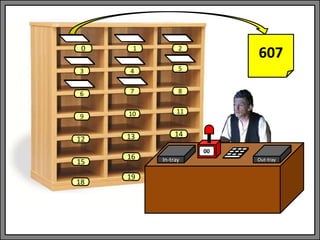
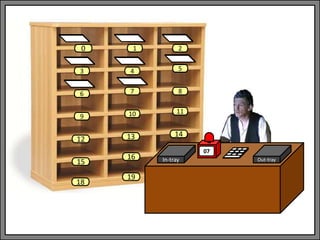
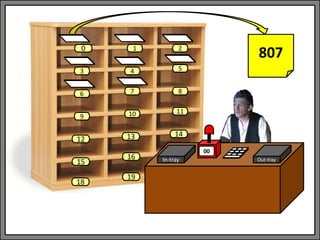
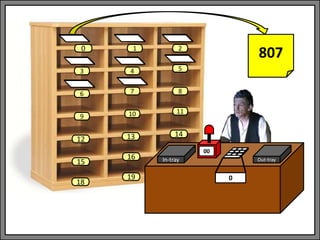
• So what does a BRA look like from the Little-
Man’s perspective?
In-tray Out-tray
9 10 11
12 13 14
15
16
18
--
19
1 2
3 4 5
6 7 8
0
In-tray Out-tray
00
1 2
3 4 5
6 7 8
9 10 11
13 14
0
12
15
18
16
19
In-tray Out-tray
00
1 2
3 4 5
6 7 8
9 10 11
13 14
0
12
15
18
16
19
607
In-tray Out-tray
07
1 2
3 4 5
6 7 8
9 10 11
13 14
0
12
15
18
16
19
In-tray Out-tray
07
1 2
3 4 5
6 7 8
9 10 11
13 14
0
12
15
18
16
19
000
In-tray Out-tray
07
1 2
3 4 5
6 7 8
9 10 11
13 14
0
12
15
18
16
19
The Little-Man Computer
• So what does a BRZ look like from the Little-
Man’s perspective?
In-tray Out-tray
9 10 11
12 13 14
15
16
18
--
19
1 2
3 4 5
6 7 8
0
In-tray Out-tray
00
1 2
3 4 5
6 7 8
9 10 11
13 14
0
12
15
18
16
19
In-tray Out-tray
00
1 2
3 4 5
6 7 8
9 10 11
13 14
0
12
15
18
16
19
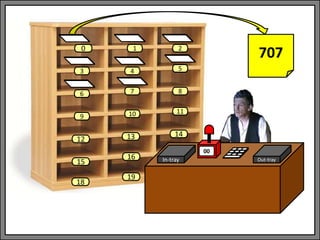
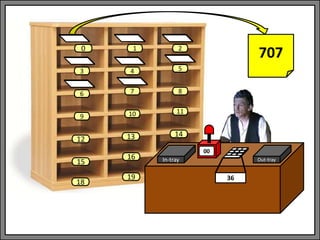
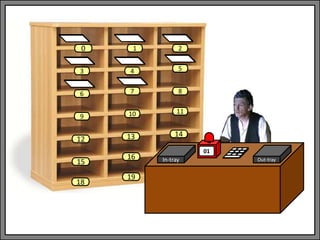
707
In-tray Out-tray
00
1 2
3 4 5
6 7 8
9 10 11
13 14
0
12
15
18
16
19
707
36
In-tray Out-tray
01
1 2
3 4 5
6 7 8
9 10 11
13 14
0
12
15
18
16
19
In-tray Out-tray
01
1 2
3 4 5
6 7 8
9 10 11
13 14
0
12
15
18
16
19
308
The Little-Man Computer
OR
In-tray Out-tray
9 10 11
12 13 14
15
16
18
--
19
1 2
3 4 5
6 7 8
0
In-tray Out-tray
00
1 2
3 4 5
6 7 8
9 10 11
13 14
0
12
15
18
16
19
In-tray Out-tray
00
1 2
3 4 5
6 7 8
9 10 11
13 14
0
12
15
18
16
19
707
In-tray Out-tray
00
1 2
3 4 5
6 7 8
9 10 11
13 14
0
12
15
18
16
19
707
0
In-tray Out-tray
07
1 2
3 4 5
6 7 8
9 10 11
13 14
0
12
15
18
16
19
In-tray Out-tray
07
1 2
3 4 5
6 7 8
9 10 11
13 14
0
12
15
18
16
19
000
In-tray Out-tray
07
1 2
3 4 5
6 7 8
9 10 11
13 14
0
12
15
18
16
19
The Little-Man Computer
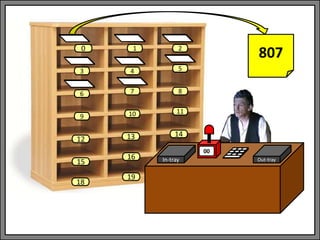
• So what does a BRP look like from the Little-
Man’s perspective?
In-tray Out-tray
9 10 11
12 13 14
15
16
18
--
19
1 2
3 4 5
6 7 8
0
In-tray Out-tray
00
1 2
3 4 5
6 7 8
9 10 11
13 14
0
12
15
18
16
19
In-tray Out-tray
00
1 2
3 4 5
6 7 8
9 10 11
13 14
0
12
15
18
16
19
807
In-tray Out-tray
00
1 2
3 4 5
6 7 8
9 10 11
13 14
0
12
15
18
16
19
807
36
In-tray Out-tray
07
1 2
3 4 5
6 7 8
9 10 11
13 14
0
12
15
18
16
19
In-tray Out-tray
07
1 2
3 4 5
6 7 8
9 10 11
13 14
0
12
15
18
16
19
000
In-tray Out-tray
07
1 2
3 4 5
6 7 8
9 10 11
13 14
0
12
15
18
16
19
The Little-Man Computer
OR
In-tray Out-tray
9 10 11
12 13 14
15
16
18
--
19
1 2
3 4 5
6 7 8
0
In-tray Out-tray
00
1 2
3 4 5
6 7 8
9 10 11
13 14
0
12
15
18
16
19
In-tray Out-tray
00
1 2
3 4 5
6 7 8
9 10 11
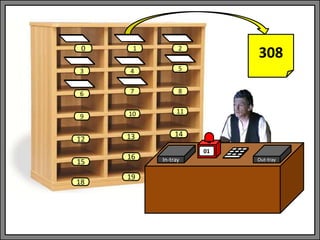
13 14
0
12
15
18
16
19
807
In-tray Out-tray
00
1 2
3 4 5
6 7 8
9 10 11
13 14
0
12
15
18
16
19
807
0
In-tray Out-tray
01
1 2
3 4 5
6 7 8
9 10 11
13 14
0
12
15
18
16
19
In-tray Out-tray
01
1 2
3 4 5
6 7 8
9 10 11
13 14
0
12
15
18
16
19
308
The Little-Man Computer
TYPE OF INSTRUCTION INSTRUCTION CODE
Arithmetic ADD 1xx
Arithmetic SUBTRACT 2xx
Data Movement STORE 3xx
Data Movement LOAD 5xx
Branching BRA 6xx
Branching BRZ 7xx
Branching BRP 8xx
Input/Output INPUT 901
Input/Output OUTPUT 902
Machine Control STOP 000
The Little-Man Computer
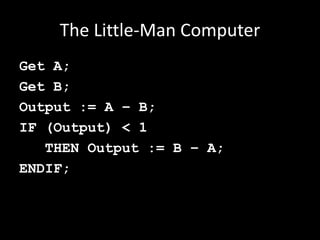
• Let’s say we wanted to write a program to
subtract two numbers, but if the first number
is smaller than the second one, swap them
around, so that the answer is always positive.
The Little-Man Computer
Get A;
Get B;
Output := A – B;
IF (Output) < 1
THEN Output := B – A;
ENDIF;
The Little-Man Computer
Get A;
Get B;
Output := A – B;
IF (Output) < 1
THEN Output := B – A;
ENDIF;
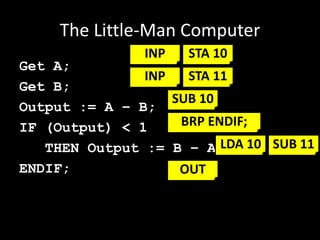
INP STA 10
INP STA 11
SUB 10
BRP ENDIF;
LDA 10 SUB 11
OUT
The Little-Man Computer
INBOX -->
ACCUMULATOR
INPUT the first
number, enter into
calculator
ACCUMULATOR -->
MEMORY[10]
STORE the
calculator's current
value in memory
location [10]
INBOX -->
ACCUMULATOR
INPUT the second
number, enter into
calculator
ACCUMULATOR -->
MEMORY[11]
STORE the
calculator's current
value in memory
location [11]
ACCUMULATOR =
ACCUMULATOR -
MEMORY[10]
SUBTRACT the
second number
from the first value
IS ACCUMULATOR
POSITIVE? GOTO
MEMORY[08]
BRANCH to memory
location [08] if
accumulator is
positive
MEMORY[10] -->
ACCUMULATOR
LOAD the first value
back into the
calculator
ACCUMULATOR =
ACCUMULATOR -
MEMORY[11]
SUBTRACT the
second number
from the first value
00 01 02 03
04 05 06 07
ACCUMULATOR -->
OUTBOX
OUTPUT the
calculator's result to
the OUT-TRAY
Take a
break
[Used
for data]
[Used
for data]
08 09 10 11
The Little-Man Computer
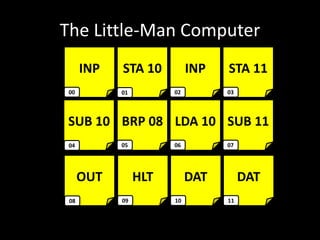
INP STA 10 INP STA 11
SUB 10 BRP 08 LDA 10 SUB 11
00 01 02 03
04 05 06 07
OUT HLT DAT DAT
08 09 10 11
The Little-Man Computer
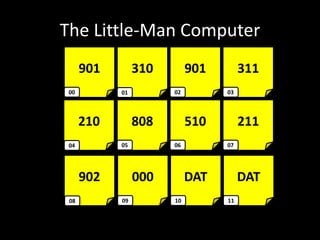
901 310 901 311
210 808 510 211
00 01 02 03
04 05 06 07
902 000 DAT DAT
08 09 10 11
The Little-Man Computer
• The Little-Man Computer helps explain how
the computer works
• The Little-Man doesn’t need to know what the
program does, it just needs to follow orders.
• The Little-Man only does one thing at a time,
but the operating system can swap different
programs so quickly that it looks like they are
all running together.

Operating Systems: The Little-Man Computer

  • 1.
  • 2.
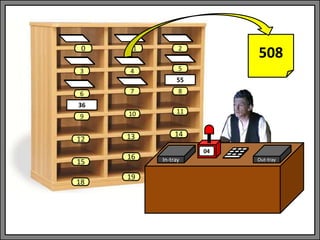
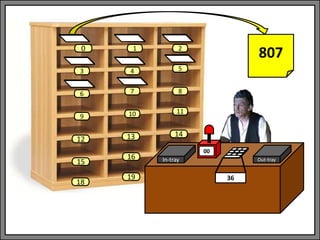
    The Little-Man Computer •Most computer architectures conform to the so-called von Neuman Architecture. This means that they execute programs by accessing both instructions and data on the same storage device. The computer performs the following sequence of steps;
  • 3.
    The Little-Man Computer 1.Fetch the next instruction from memory at the address in the program counter 2. Decode the instruction using the control unit 3. Increment the Program Counter 4. The control unit commands the rest of the computer to execute the instruction 5. Go to step 1
  • 4.
    The Little-Man Computer •This is the Fetch-Decode-Execute (FDE) cycle. These computers are known as Stored- Program Computers since the separation of storage from the processing unit is implicit in this model.
  • 5.
    The Little-Man Computer •A conceptual device or thought experiment to teach this architecture was developed by Stuart Madnick of MIT in the 1960s and is called the Little Man Computer (LMC) Paradigm.
  • 6.
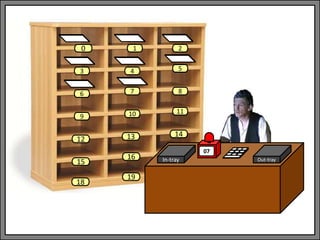
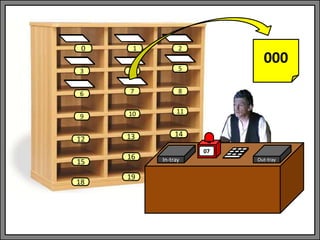
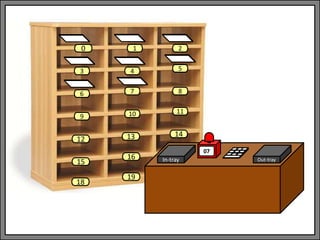
    The Little-Man Computer •The LMC Paradigm consists of a room with a 'Little Man' (or homunculus) who simulates the operations of a computer. The room has an array of locations that store information (and instructions), an input and output tray, and a calculator.
  • 7.
    The Little-Man Computer •The analogy between the LMC and real computers is not perfect, but this approach is a simple and powerful conceptual model which allows us easy entry level to the basics of computer architecture.
  • 8.
    In-tray Out-tray 9 1011 12 13 14 15 16 18 - 19 1 2 3 4 5 6 7 8 0
  • 9.
    In-tray Out-tray 9 1011 12 13 14 15 16 18 - 19 Pigeon Holes 1 2 3 4 5 6 7 8 0
  • 10.
    In-tray Out-tray 9 1011 12 13 14 15 16 18 - 19 In-tray 1 2 3 4 5 6 7 8 0
  • 11.
    In-tray Out-tray 9 1011 12 13 14 15 16 18 - 19 Program Counter 1 2 3 4 5 6 7 8 0
  • 12.
    In-tray Out-tray 9 1011 12 13 14 15 16 18 - 19 Calculator 1 2 3 4 5 6 7 8 0
  • 13.
    In-tray Out-tray 9 1011 12 13 14 15 16 18 - 19 Out-tray 1 2 3 4 5 6 7 8 0
  • 14.
    In-tray Out-tray 9 1011 12 13 14 15 16 18 -- 19 1 2 3 4 5 6 7 8 0
  • 15.
    9 10 11 1213 14 15 16 18 19 1 2 3 4 5 6 7 8 0 The addresses of the pigeon- holes are consecutive, and they may contain either: – Data (numbers, values), or – Instructions (copy, subtract, add) 17 20
  • 16.
    In-tray Out-tray -- Each morningthe boss fills the pigeon-holes with several instructions and data, and puts papers in the IN-TRAY
  • 17.
    In-tray Out-tray -- The LittleMan’s job is to read these instructions one at a time, reading the corresponding instruction to the value on the Program Counter.
  • 18.
    In-tray Out-tray -- The calculator(aka Accumulator) can be used to store values temporarily, and do arithmetic (add, subtract, etc.).
  • 19.
    In-tray Out-tray -- The Little-Manwill output all of his results into the OUT-TRAY which the boss collects in the evenings.
  • 20.
    In-tray Out-tray 9 1011 12 13 14 15 16 18 - 19 1 2 3 4 5 6 7 8 0
  • 21.
    In-tray Out-tray 9 1011 12 13 14 15 16 18 - 19 1 2 3 4 5 6 7 8 0 STORE
  • 22.
    In-tray Out-tray 9 1011 12 13 14 15 16 18 - 19 1 2 3 4 5 6 7 8 0 STORE
  • 23.
    In-tray Out-tray 9 1011 12 13 14 15 16 18 - 19 1 2 3 4 5 6 7 8 0 STORE LOAD
  • 24.
  • 25.
    The Little-Man Computer TYPEOF INSTRUCTION INSTRUCTION DESCRIPTION Arithmetic ADD Add the value of a given memory location to calculator Arithmetic SUBTRACT Subtract the value of a given memory location to calculator Data Movement STORE Copy the value from the calculator into a given memory location Data Movement LOAD Copy the value from a given memory location into the calculator Input/Output INPUT Get the value from the IN-TRAY and put it into the calculator Input/Output OUTPUT Put the value in the calculator into the OUT-TRAY Machine Control STOP Take a break
  • 26.
    The Little-Man Computer •Let’s see a program in action.
  • 27.
    In-tray Out-tray 9 1011 12 13 14 15 16 18 -- 19 1 2 3 4 5 6 7 8 0 55
  • 28.
    In-tray Out-tray 00 1 2 34 5 6 7 8 9 10 11 13 14 0 12 15 18 16 19 55
  • 29.
    In-tray Out-tray 00 1 2 34 5 6 7 8 9 10 11 13 14 0 12 15 18 16 19 INBOX --> ACCUMULATOR INPUT the first number, enter into calculator 55
  • 30.
    In-tray Out-tray 00 1 2 34 5 6 7 8 9 10 11 13 14 0 12 15 18 16 19 55 55 INBOX --> ACCUMULATOR INPUT the first number, enter into calculator
  • 31.
    In-tray Out-tray 01 1 2 34 5 6 7 8 9 10 11 13 14 0 12 15 18 16 19 55 36
  • 32.
    In-tray Out-tray 01 1 2 34 5 6 7 8 9 10 11 13 14 0 12 15 18 16 19 55 36 ACCUMULATOR --> MEMORY[08] STORE the calculator's current value in memory location [08]
  • 33.
    In-tray Out-tray 01 1 2 34 5 6 7 8 9 10 11 13 14 0 12 15 18 16 19 55 36 ACCUMULATOR --> MEMORY[08] STORE the calculator's current value in memory location [08]
  • 34.
    In-tray Out-tray 02 1 2 34 5 6 7 8 9 10 11 13 14 0 12 15 18 16 19 55 36
  • 35.
    In-tray Out-tray 02 1 2 34 5 6 7 8 9 10 11 13 14 0 12 15 18 16 19 55 36 INBOX --> ACCUMULATOR INPUT the second number, enter into calculator
  • 36.
    In-tray Out-tray 02 1 2 34 5 6 7 8 9 10 11 13 14 0 12 15 18 16 19 55 36 36 INBOX --> ACCUMULATOR INPUT the second number, enter into calculator
  • 37.
    In-tray Out-tray 03 1 2 34 5 6 7 8 9 10 11 13 14 0 12 15 18 16 19 55 36
  • 38.
    In-tray Out-tray 03 1 2 34 5 6 7 8 9 10 11 13 14 0 12 15 18 16 19 55 36 ACCUMULATOR --> MEMORY[09] STORE the calculator's current value in memory location [09]
  • 39.
    In-tray Out-tray 03 1 2 34 5 6 7 8 9 10 11 13 14 0 12 15 18 16 19 55 36 ACCUMULATOR --> MEMORY[09] STORE the calculator's current value in memory location [09]
  • 40.
    In-tray Out-tray 04 1 2 34 5 6 7 8 9 10 11 13 14 0 12 15 18 16 19 55 36
  • 41.
    In-tray Out-tray 04 1 2 34 5 6 7 8 9 10 11 13 14 0 12 15 18 16 19 55 36 MEMORY[08] --> ACCUMULATOR LOAD the first value back into the calculator
  • 42.
    In-tray Out-tray 04 1 2 34 5 6 7 8 9 10 11 13 14 0 12 15 18 16 19 55 36 55 MEMORY[08] --> ACCUMULATOR LOAD the first value back into the calculator
  • 43.
    In-tray Out-tray 05 1 2 34 5 6 7 8 9 10 11 13 14 0 12 15 18 16 19 55 36 55
  • 44.
    In-tray Out-tray 05 1 2 34 5 6 7 8 9 10 11 13 14 0 12 15 18 16 19 55 36 55 ACCUMULATOR = ACCUMULATOR - MEMORY[09] SUBTRACT the second number from the first value
  • 45.
    In-tray Out-tray 05 1 2 34 5 6 7 8 9 10 11 13 14 0 12 15 18 16 19 55 36 55-36 ACCUMULATOR = ACCUMULATOR - MEMORY[09] SUBTRACT the second number from the first value
  • 46.
    In-tray Out-tray 05 1 2 34 5 6 7 8 9 10 11 13 14 0 12 15 18 16 19 55 36 19 ACCUMULATOR = ACCUMULATOR - MEMORY[09] SUBTRACT the second number from the first value
  • 47.
    In-tray Out-tray 06 1 2 34 5 6 7 8 9 10 11 13 14 0 12 15 18 16 19 55 36 19
  • 48.
    In-tray Out-tray 06 1 2 34 5 6 7 8 9 10 11 13 14 0 12 15 18 16 19 55 36 19 ACCUMULATOR --> OUTBOX OUTPUT the calculator's result to the OUT-TRAY
  • 49.
    In-tray Out-tray 06 1 2 34 5 6 7 8 9 10 11 13 14 0 12 15 18 16 19 55 36 19 ACCUMULATOR --> OUTBOX OUTPUT the calculator's result to the OUT-TRAY
  • 50.
    In-tray Out-tray 07 1 2 34 5 6 7 8 9 10 11 13 14 0 12 15 18 16 19 55 36 19
  • 51.
    In-tray Out-tray 07 1 2 34 5 6 7 8 9 10 11 13 14 0 12 15 18 16 19 55 36 19 Take a break
  • 52.
    In-tray Out-tray -- 1 2 34 5 6 7 8 9 10 11 13 14 0 12 15 18 16 19 55 36 19
  • 53.
    The Little-Man Computer •The Little-Man doesn’t need to understand the overall goal of the instructions (in this case he doesn’t need to know that he is subtracting two numbers), as long as the boss has arranged the instructions correctly, and the Little-Man follows them, everything works without understanding. • (cf. John Searle's Chinese Room Argument)
  • 54.
    The Little-Man Computer •But, that’s a bit too easy, because the instructions are in plain English. • Let’s make it a bit more complicated • Let’s restate the English as more computer-like instructions.
  • 55.
    The Little-Man Computer •An instruction has two parts – what to do (Operation) and what to do it on (the Operands), e.g. SUBTRACT Accumulator, [09]
  • 56.
    The Little-Man Computer •An instruction has two parts – what to do (Operation) and what to do it on (the Operands), e.g. SUBTRACT Accumulator, [09] Operation
  • 57.
    The Little-Man Computer •An instruction has two parts – what to do (Operation) and what to do it on (the Operands), e.g. SUBTRACT Accumulator, [09] OperandsOperation
  • 58.
    The Little-Man Computer •Note: SUBTRACT Accumulator, [09] which is SUBTRACT 55, 36 which is 29
  • 59.
    The Little-Man Computer •So, let’s create codes for different kinds of operations:
  • 60.
    The Little-Man Computer TYPEOF INSTRUCTION INSTRUCTION CODE Arithmetic ADD 1xx Arithmetic SUBTRACT 2xx Data Movement STORE 3xx Data Movement LOAD 5xx Input/Output INPUT 901 Input/Output OUTPUT 902 Machine Control STOP 000
  • 61.
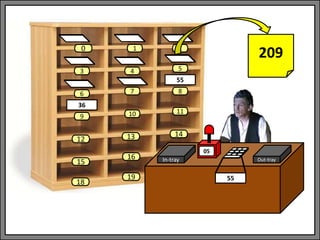
    The Little-Man Computer •So: SUBTRACT Accumulator, [09] becomes 209
  • 62.
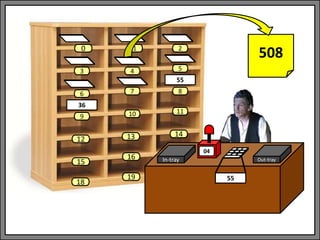
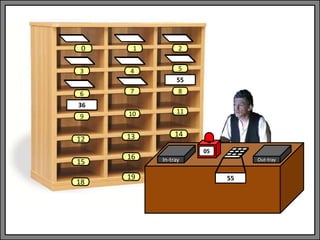
    The Little-Man Computer •And: • Becomes: 901, 308, 901, 309, • 508, 209, 902, 000 INBOX --> ACCUMULATOR INPUT the first number, enter into calculator ACCUMULATOR --> MEMORY[08] STORE the calculator's current value in memory location [08] INBOX --> ACCUMULATOR INPUT the second number, enter into calculator ACCUMULATOR --> MEMORY[09] STORE the calculator's current value in memory location [09] MEMORY[08] --> ACCUMULATOR LOAD the first value back into the calculator ACCUMULATOR = ACCUMULATOR - MEMORY[09] SUBTRACT the second number from the first value ACCUMULATOR --> OUTBOX OUTPUT the calculator's result to the OUT-TRAY Take a break 00 01 02 03 04 05 06 07
  • 63.
    The Little-Man Computer NOTE:We are doing A-B, which is not the same as B-A, so we read A into the calculator, move it to memory, we read B into the calculator, move it to memory, move A back into the calculator, and do the subtraction. This is because the command works as follows: SUBTRACT CALCULATOR, MEMORY So A has to be in the calculator, and B in memory.
  • 64.
    The Little-Man Computer •So what does that look like from the Little- Man’s perspective?
  • 65.
    In-tray Out-tray 9 1011 12 13 14 15 16 18 -- 19 1 2 3 4 5 6 7 8 0 55
  • 66.
    In-tray Out-tray 00 1 2 34 5 6 7 8 9 10 11 13 14 0 12 15 18 16 19 55
  • 67.
    In-tray Out-tray 00 1 2 34 5 6 7 8 9 10 11 13 14 0 12 15 18 16 19 901 55
  • 68.
    In-tray Out-tray 00 1 2 34 5 6 7 8 9 10 11 13 14 0 12 15 18 16 19 901 55 55
  • 69.
    In-tray Out-tray 01 1 2 34 5 6 7 8 9 10 11 13 14 0 12 15 18 16 19 55 36
  • 70.
    In-tray Out-tray 01 1 2 34 5 6 7 8 9 10 11 13 14 0 12 15 18 16 19 308 55 36
  • 71.
    In-tray Out-tray 01 1 2 34 5 6 7 8 9 10 11 13 14 0 12 15 18 16 19 308 55 36
  • 72.
    In-tray Out-tray 02 1 2 34 5 6 7 8 9 10 11 13 14 0 12 15 18 16 19 55 36
  • 73.
    In-tray Out-tray 02 1 2 34 5 6 7 8 9 10 11 13 14 0 12 15 18 16 19 901 55 36
  • 74.
    In-tray Out-tray 02 1 2 34 5 6 7 8 9 10 11 13 14 0 12 15 18 16 19 901 55 36 36
  • 75.
    In-tray Out-tray 03 1 2 34 5 6 7 8 9 10 11 13 14 0 12 15 18 16 19 55 36
  • 76.
    In-tray Out-tray 03 1 2 34 5 6 7 8 9 10 11 13 14 0 12 15 18 16 19 309 55 36
  • 77.
    In-tray Out-tray 03 1 2 34 5 6 7 8 9 10 11 13 14 0 12 15 18 16 19 309 55 36
  • 78.
    In-tray Out-tray 04 1 2 34 5 6 7 8 9 10 11 13 14 0 12 15 18 16 19 55 36
  • 79.
    In-tray Out-tray 04 1 2 34 5 6 7 8 9 10 11 13 14 0 12 15 18 16 19 55 36 508
  • 80.
    In-tray Out-tray 04 1 2 34 5 6 7 8 9 10 11 13 14 0 12 15 18 16 19 55 36 508 55
  • 81.
    In-tray Out-tray 05 1 2 34 5 6 7 8 9 10 11 13 14 0 12 15 18 16 19 55 36 55
  • 82.
    In-tray Out-tray 05 1 2 34 5 6 7 8 9 10 11 13 14 0 12 15 18 16 19 55 36 55 209
  • 83.
    In-tray Out-tray 05 1 2 34 5 6 7 8 9 10 11 13 14 0 12 15 18 16 19 55 36 55-36 209
  • 84.
    In-tray Out-tray 05 1 2 34 5 6 7 8 9 10 11 13 14 0 12 15 18 16 19 55 36 19 209
  • 85.
    In-tray Out-tray 06 1 2 34 5 6 7 8 9 10 11 13 14 0 12 15 18 16 19 55 36 19
  • 86.
    In-tray Out-tray 06 1 2 34 5 6 7 8 9 10 11 13 14 0 12 15 18 16 19 55 36 19 902
  • 87.
    In-tray Out-tray 06 1 2 34 5 6 7 8 9 10 11 13 14 0 12 15 18 16 19 55 36 902 19
  • 88.
    In-tray Out-tray 07 1 2 34 5 6 7 8 9 10 11 13 14 0 12 15 18 16 19 55 36 19
  • 89.
    In-tray Out-tray 07 1 2 34 5 6 7 8 9 10 11 13 14 0 12 15 18 16 19 55 36 000 19
  • 90.
    In-tray Out-tray -- 1 2 34 5 6 7 8 9 10 11 13 14 0 12 15 18 16 19 55 36 19
  • 91.
    The Little-Man Computer TYPEOF INSTRUCTION INSTRUCTION OP CODE Arithmetic ADD ADD Arithmetic SUBTRACT SUB Data Movement STORE STA Data Movement LOAD LDA Input/Output INPUT INP Input/Output OUTPUT OUT Machine Control STOP HLT
  • 92.
    1 2 3 45 6 7 8 9 10 11 13 14 0 12 15 18 16 19 55 36 17 20
  • 93.
    1 2 3 45 6 7 8 9 10 11 13 14 0 12 15 18 16 19 55 36 17 20 The program runs from 00 to 07
  • 94.
    1 2 3 45 6 7 8 9 10 11 13 14 0 12 15 18 16 19 55 36 17 20 The program runs from 00 to 07
  • 95.
    1 2 3 45 6 7 8 9 10 11 13 14 0 12 15 18 16 19 55 36 17 20 The program runs from 00 to 07 The data is stored in the cells that follow the program; we don’t want to overwrite the program so we have to store the data after the program.
  • 96.
    1 2 3 45 6 7 8 9 10 11 13 14 0 12 15 18 16 19 55 36 17 20 The program runs from 00 to 07 The data is stored in the cells that follow the program; we don’t want to overwrite the program so we have to store the data after the program.
  • 97.
    The Little-Man Computer •But what if we want to do IF statements or WHILE loops, we need some more commands. • We call there “Branch” commands
  • 98.
    The Little-Man Computer INSTRUCTIONCODE DESCRIPTION OP CODE BRANCH (Unconditional) Unconditional branch. Set the Program Counter to value XX. 6xx BRA BRANCH IF ZERO Conditional branch. If the accumulator is zero, branch to XX, otherwise do nothing. 7xx BRZ BRANCH IF POSITIVE Conditional branch. If the accumulator is positive, branch to XX, otherwise do nothing. 8xx BRP
  • 99.
    The Little-Man Computer •So what does a BRA look like from the Little- Man’s perspective?
  • 100.
    In-tray Out-tray 9 1011 12 13 14 15 16 18 -- 19 1 2 3 4 5 6 7 8 0
  • 101.
    In-tray Out-tray 00 1 2 34 5 6 7 8 9 10 11 13 14 0 12 15 18 16 19
  • 102.
    In-tray Out-tray 00 1 2 34 5 6 7 8 9 10 11 13 14 0 12 15 18 16 19 607
  • 103.
    In-tray Out-tray 07 1 2 34 5 6 7 8 9 10 11 13 14 0 12 15 18 16 19
  • 104.
    In-tray Out-tray 07 1 2 34 5 6 7 8 9 10 11 13 14 0 12 15 18 16 19 000
  • 105.
    In-tray Out-tray 07 1 2 34 5 6 7 8 9 10 11 13 14 0 12 15 18 16 19
  • 106.
    The Little-Man Computer •So what does a BRZ look like from the Little- Man’s perspective?
  • 107.
    In-tray Out-tray 9 1011 12 13 14 15 16 18 -- 19 1 2 3 4 5 6 7 8 0
  • 108.
    In-tray Out-tray 00 1 2 34 5 6 7 8 9 10 11 13 14 0 12 15 18 16 19
  • 109.
    In-tray Out-tray 00 1 2 34 5 6 7 8 9 10 11 13 14 0 12 15 18 16 19 707
  • 110.
    In-tray Out-tray 00 1 2 34 5 6 7 8 9 10 11 13 14 0 12 15 18 16 19 707 36
  • 111.
    In-tray Out-tray 01 1 2 34 5 6 7 8 9 10 11 13 14 0 12 15 18 16 19
  • 112.
    In-tray Out-tray 01 1 2 34 5 6 7 8 9 10 11 13 14 0 12 15 18 16 19 308
  • 113.
  • 114.
    In-tray Out-tray 9 1011 12 13 14 15 16 18 -- 19 1 2 3 4 5 6 7 8 0
  • 115.
    In-tray Out-tray 00 1 2 34 5 6 7 8 9 10 11 13 14 0 12 15 18 16 19
  • 116.
    In-tray Out-tray 00 1 2 34 5 6 7 8 9 10 11 13 14 0 12 15 18 16 19 707
  • 117.
    In-tray Out-tray 00 1 2 34 5 6 7 8 9 10 11 13 14 0 12 15 18 16 19 707 0
  • 118.
    In-tray Out-tray 07 1 2 34 5 6 7 8 9 10 11 13 14 0 12 15 18 16 19
  • 119.
    In-tray Out-tray 07 1 2 34 5 6 7 8 9 10 11 13 14 0 12 15 18 16 19 000
  • 120.
    In-tray Out-tray 07 1 2 34 5 6 7 8 9 10 11 13 14 0 12 15 18 16 19
  • 121.
    The Little-Man Computer •So what does a BRP look like from the Little- Man’s perspective?
  • 122.
    In-tray Out-tray 9 1011 12 13 14 15 16 18 -- 19 1 2 3 4 5 6 7 8 0
  • 123.
    In-tray Out-tray 00 1 2 34 5 6 7 8 9 10 11 13 14 0 12 15 18 16 19
  • 124.
    In-tray Out-tray 00 1 2 34 5 6 7 8 9 10 11 13 14 0 12 15 18 16 19 807
  • 125.
    In-tray Out-tray 00 1 2 34 5 6 7 8 9 10 11 13 14 0 12 15 18 16 19 807 36
  • 126.
    In-tray Out-tray 07 1 2 34 5 6 7 8 9 10 11 13 14 0 12 15 18 16 19
  • 127.
    In-tray Out-tray 07 1 2 34 5 6 7 8 9 10 11 13 14 0 12 15 18 16 19 000
  • 128.
    In-tray Out-tray 07 1 2 34 5 6 7 8 9 10 11 13 14 0 12 15 18 16 19
  • 129.
  • 130.
    In-tray Out-tray 9 1011 12 13 14 15 16 18 -- 19 1 2 3 4 5 6 7 8 0
  • 131.
    In-tray Out-tray 00 1 2 34 5 6 7 8 9 10 11 13 14 0 12 15 18 16 19
  • 132.
    In-tray Out-tray 00 1 2 34 5 6 7 8 9 10 11 13 14 0 12 15 18 16 19 807
  • 133.
    In-tray Out-tray 00 1 2 34 5 6 7 8 9 10 11 13 14 0 12 15 18 16 19 807 0
  • 134.
    In-tray Out-tray 01 1 2 34 5 6 7 8 9 10 11 13 14 0 12 15 18 16 19
  • 135.
    In-tray Out-tray 01 1 2 34 5 6 7 8 9 10 11 13 14 0 12 15 18 16 19 308
  • 136.
    The Little-Man Computer TYPEOF INSTRUCTION INSTRUCTION CODE Arithmetic ADD 1xx Arithmetic SUBTRACT 2xx Data Movement STORE 3xx Data Movement LOAD 5xx Branching BRA 6xx Branching BRZ 7xx Branching BRP 8xx Input/Output INPUT 901 Input/Output OUTPUT 902 Machine Control STOP 000
  • 137.
    The Little-Man Computer •Let’s say we wanted to write a program to subtract two numbers, but if the first number is smaller than the second one, swap them around, so that the answer is always positive.
  • 138.
    The Little-Man Computer GetA; Get B; Output := A – B; IF (Output) < 1 THEN Output := B – A; ENDIF;
  • 139.
    The Little-Man Computer GetA; Get B; Output := A – B; IF (Output) < 1 THEN Output := B – A; ENDIF; INP STA 10 INP STA 11 SUB 10 BRP ENDIF; LDA 10 SUB 11 OUT
  • 140.
    The Little-Man Computer INBOX--> ACCUMULATOR INPUT the first number, enter into calculator ACCUMULATOR --> MEMORY[10] STORE the calculator's current value in memory location [10] INBOX --> ACCUMULATOR INPUT the second number, enter into calculator ACCUMULATOR --> MEMORY[11] STORE the calculator's current value in memory location [11] ACCUMULATOR = ACCUMULATOR - MEMORY[10] SUBTRACT the second number from the first value IS ACCUMULATOR POSITIVE? GOTO MEMORY[08] BRANCH to memory location [08] if accumulator is positive MEMORY[10] --> ACCUMULATOR LOAD the first value back into the calculator ACCUMULATOR = ACCUMULATOR - MEMORY[11] SUBTRACT the second number from the first value 00 01 02 03 04 05 06 07 ACCUMULATOR --> OUTBOX OUTPUT the calculator's result to the OUT-TRAY Take a break [Used for data] [Used for data] 08 09 10 11
  • 141.
    The Little-Man Computer INPSTA 10 INP STA 11 SUB 10 BRP 08 LDA 10 SUB 11 00 01 02 03 04 05 06 07 OUT HLT DAT DAT 08 09 10 11
  • 142.
    The Little-Man Computer 901310 901 311 210 808 510 211 00 01 02 03 04 05 06 07 902 000 DAT DAT 08 09 10 11
  • 143.
    The Little-Man Computer •The Little-Man Computer helps explain how the computer works • The Little-Man doesn’t need to know what the program does, it just needs to follow orders. • The Little-Man only does one thing at a time, but the operating system can swap different programs so quickly that it looks like they are all running together.