SharePoint Search & IA Jumpstart Series June 4, 2009 Call 1: Creating a SharePoint Strategy Hosted by Earley & Associates in partnership with Consejo, Inc.
About the JumpStart call series Began educational call series in 2005 Past topics have  included Taxonomy and Metadata, Content Management, Search, Semantic Technologies Have had several thousand attendees over the years.  Today’s call has over 600 registrants Calls will be recorded and available for download Be sure to fill in evaluation to let us know what additional topics you would like to learn about
Community of Practice Calls Taxonomy Group url:  http://finance.groups.yahoo.com/group/TaxoCoP Search Group url:  http://tech.groups.yahoo.com/group/SearchCoP Upcoming calls: July 1, 2009 – Conducting a Search Audit August 5, 2009 – DITA September 2, 2009 – Taxonomy Usability Testing October 7, 2009 – Developing an Ontology November 4, 2009 – Applications for Topic Maps December 2, 2009 – Taxonomy Management
Housekeeping Calls last from 60 – 90 minutes Email questions during the call to  [email_address] . Questions will be taken at the end of the session You can also skype Rebecca.M.Allen or SethEarley Questions will be queued through the operator.  Press *1 to ask a question. If you are on twitter, you can follow the discussion and make comments using the hash tag #spjs
Call 1: Creating a SharePoint Strategy Seth Earley, Earley & Associates Information Strategy and SharePoint  Alan Pelz-Sharpe, CMS Watch Evaluating SharePoint in the Enterprise
SharePoint Search & IA Series: Calls 2 – 4  Call 2:  Making Basic SharePoint Search Work Thursday, June 11 th Shawn Shell, Consejo, Inc. Sadie Van Buren, Knowledge Management Associates Call 3:  Navigation, Metadata, & Faceted Search: Approaches & Tools Thursday, June 18 th Lars Farstrup, Farstrup Software Paul Wlodarczyk, Earley & Associates Call 4:  SharePoint IA vs. The Real World Thursday, June 25 th Toby Conrad & Jeremy Bentley, Smartlogic Jeff Carr & Michael Shulha, Earley & Associates
Agenda Context for SharePoint IA and Search issues Goals  and expectations Types of content strategy  Why do we need a SharePoint strategy? Classes of SharePoint applications  Information management strategy approach Steps to developing a SharePoint strategy SharePoint in the Enterprise
Context - SharePoint Search and IA issues Our work in information architecture has exposed us to many different technical environments and a range of user needs We have found that customers have in some cases had difficulty implementing recommendations due to challenges with process and technology SharePoint has a particular set of challenges that we have seen in multiple  environments related to search and findability
Expectations Series will have a focus on information architecture and search This session will explore the role of strategy related to improving short and long term findability  We will cover classes of functionality at a high level Governance is an extensive topic that we cover  separately in Call 4
Expectations After this call series you should be able to: Understand how to better leverage SharePoint to meet business needs in your organization How to better align strategy with implementation Specifically understand the role of information architecture and taxonomy in findability Be familiar with constraints and workarounds for improving search and overall findability of information in SharePoint
Seth Earley, Founder & CEO Co-author of  Practical Knowledge Management  from IBM Press  14 years experience building content and knowledge management systems, 20+ years experience in technology Chair, Academy of Motion Picture Arts and Sciences, Science and Technology Council Metadata Project Committee Founder of the Boston Knowledge Management Forum Former adjunct professor at Northeastern University Currently working with enterprises to develop knowledge and content management systems, taxonomy and metadata governance strategies  Founder of Taxonomy Community of Practice – host monthly conference calls of case studies on taxonomy derivation and application.  http://finance.groups.yahoo.com/group/TaxoCoP Co-founder Search Community of Practice: http://tech.groups.yahoo.com/group/SearchCoP
What kind of “strategy”? Business Alignment with business objectives Editorial What kinds of content will we have and how will this achieve our goals Technical  Technology selection and development Deployment Populating content repositories and enabling collaboration Management Long term maintenance and governance Today we will be focusing on business alignment and some technical/architectural issues.  The rest of the series will address technical issues as they relate to search and findability.  Of course, the context is SharePoint, however many of these principles apply to any content management technology.
Why create a strategy? “ We’re just going to put it out there and see what happens…” (company IT organization with SharePoint) OK, Try that… Let each part of the organization: Make infrastructure choices Develop information architecture Create own taxonomies Build own workflows Create individual governance and maintenance policies
The result…
Been down that road before Early collaboration tools encouraged user adoption with little if any intervention from IT organization This resulted in “information shanty towns”  - disconnected repositories, abandoned workspaces, unstable infrastructure, brittle integration, out of date and duplicated content SharePoint’s broad capabilities combined with widespread deployment magnifies this problem
SharePoint In Your Organization “ Microsoft Office SharePoint Server 2007  is a rich server application for the enterprise that facilitates  collaboration,   provides  full content management features , implements  business processes , and provides access to  [structured] information  essential to organizational goals and processes. It provides an  integrated platform to plan, deploy, and manage intranet, extranet, and Internet applications   across and beyond the enterprise.” Microsoft Let’s spend a few minutes parsing this out and examining the ramifications for SharePoint deployment
Key SharePoint terms Collaboration  – typically refers to an unstructured process for communicating and solving problems.  Ad hoc in nature.  A collaboration platform or environment is an easy to set up, self managed method for sharing information, contributing ideas and synthesizing an output Content management  – A mechanism capturing, organizing, accessing and reusing content.  More structured in nature. Content can be defined broadly as data, documents, digital assets, records, web content and learning objects  It’s important to make the distinction between collaboration – a knowledge creation process and content management – a knowledge access and reuse process. The difference is not trivial and many deployments fail when organizations do not make this distinction.
Key SharePoint terms Business processes  – refers to structured processes for moving information through the organization.  Simple examples of business processes in this context might include workflow approval processes for a purchase order or expense report Structured information  – data contained in transactional and business intelligence systems Integrated platform  – one environment that handles many types of content  (documents, content for a web site or intranet, data, business processes, etc) We are going to define each of the pillars of SharePoint functionality and outline high level considerations
Microsoft Office SharePoint Server (MOSS) has many capabilities Configuration of each  application class  requires decisions about site organization, governance, process, content types, metadata, and taxonomy.
Application class: Collaboration Who is collaborating?  How much control will workgroups have?  Will there be standard structures to follow?  What is the process for commissioning and decommissioning sites? Who will have administrative rights? How will valuable content be harvested? What is the lifecycle of collaborative content? When organizations decide to provide collaboration capabilities to users, they tend to consider this as a self managed process.  As collaborative workspaces proliferate, users realize they can no longer find high value content.
Application class: Portals Portals – Portal is an ambiguous term.  SharePoint provides access to many types of structured and unstructured information and allows for aggregation and “integration at the glass” What applications will be surfaced for users?  How will sites be personalized?  What type of architecture will be applied? How will security be managed?
Application class:  Enterprise search Enterprise search – we’ll deal with search challenges in the next session. Some basic questions include determining how search will leverage metadata, facets, hierarchy, various unstructured sources, overcoming gaps in functionality, use of third party tools, etc Effective search needs to be considered from a holistic perspective – it is at the intersection of content strategy, metadata, taxonomy and information architecture
Application class: CM/DM/RM Content Management – What processes  are being supported?  Who are the content owners?  How will you define content structure? How will you manage content lifecycles? Does SharePoint truly meet the requirements of the organization  from a web content management or intranet perspective? Records Management – SharePoint is not considered a  records management platform however there are companies that build RM modules on top of SharePoint.  This entails custom development and configuration. Document Management – What is the process for ensuring the site does not become a dumping ground?  How will document lifecycles be managed?  What organizing principles will be applied to documents?
Application class:  Business Processes and Business Intelligence Business process – InfoPath is an application to create xml based data entry forms to handle various workflow tasks.  Is forms based workflow part of your initial project mandate? Forms based workflow is distinct from content or document workflow (which is part of the content/document/records management application class)  Business intelligence – Is this going to add value to the organization?  Make BI tools more accessible?  Improve utilization of structured information sources?  Building dashboards and integrating data sources is a significant undertaking
Different content, different tools,  different mechanisms for access The message is that “content” varies in structure, format, value Application classes generally handle different types of content (though search and portal are really access layers to other application classes) SharePoint spans the range of functionality from very unstructured/chaotic applications to highly structured/controlled applications Though not yet mature for things like Records Management, add on modules can provide that capability Microsoft Groove will  be SharePoint Workspace 2010 – this is at the far end of collaboration and user control  (see blog post:  http://sethearley.wordpress.com  ) Key point: User controlled does not mean unmanaged/ungoverned
Different technology classes are appropriate depending upon degree of collaboration and creation vs. structured access More Structured Email Instant Messages Wikis Blogging/ Micro blogging Discussions Collaborative Workspaces Content/ Document Management Workflow/ Business processes Business Intelligence Records Management Knowledge Creation Knowledge Access/Reuse Chaotic Processes  Controlled Processes Less Structured User initiated/ controlled IT initiated/ controlled
Relative value of content Lower Cost Higher Cost Message text External News Reports Discussion postings Interim deliverables Engineering document repositories Success Stories Benchmarks Approved Methods Best Practices Tagging/Organizing Processes Social tagging (“folksonomy”) Structured tagging (taxonomy) Unfiltered Reviewed/Vetted/Approved Lower Value (More difficult to access) Higher Value (Easier to access)
Developing an Information Strategy SharePoint has capabilities that can touch most of the organization’s information streams An information strategy outlines current information flows, business objectives, priorities, scope and resource allocation Broader than SharePoint strategy – includes bigger picture information flows – including upstream and downstream systems Determines the role of SharePoint in the department or across the enterprise Be sure to spell out linkages between project and enterprise goals. An overall information strategy, though not critical to SharePoint deployment, will help to bound project scope
Increase customer satisfaction Expand offerings Develop new markets Customer Support Customer acquisition Engineering  Library Knowledge base Marketing  Collateral Alignment, linkage, measurement Product Development Grow top line revenue Content  supports processes Working here (tools, technology, IA, search, etc) Measuring here (micro level - effects) Measuring here (macro level - outcomes) CEO- “Show me how this project will increase our revenue?” Copyright © 2009 Earley & Associates Inc. All Rights Reserved. Organizational Strategy Business Unit Objectives Business Processes Processes enable objectives L I N K A G E Content Sources Objectives align with strategy
Problem focus What business problem are you solving?  How will SharePoint improve the ability to accomplish work? What are the work tasks that need to be supported/enabled? How can information be structured to be readily accessed and consumed by target audiences? Key concept: Start with a single perspective (audience, process or problem) and then expand.
Defining a SharePoint Strategy With this range of functionality, “just putting it out there” will not allow the organization to realize full benefits and will be counterproductive Strategy is a moving target: what is appropriate for a less mature organization is not appropriate for a more mature organization Strategy needs to be continually redefined in order to keep up with the needs of the business Initially, strategy is defined at a very high level – further iterations allow details of implementation to be adapted to each business area
Requirements Gathering Bring together stakeholder group representatives, from executive level ( strategic business objectives ) to administration ( tactical execution ). Capture ideas and blue sky wish list then start moving from the abstract to the tactical, or from: Improve market share through cross business unit synergies Present solutions to agricultural industry prospects that repurpose technologies from power substation mobile monitoring solutions Strategic Goal Tactical Requirement big picture  what detailed  how   You are guided by the  what  in order to build the  how
Steps to developing a SharePoint strategy Create high level charter and identify owners Define processes and functions to be supported Identify audiences, perspectives, goals and tasks Survey specific applications used in the context of work tasks Audit content sources and determine organizing principles Create use cases based on user tasks Determine feature requirements: what technical functions and features are needed to address problem areas Evaluate options including cost of custom development, add on modules, third party tools You may not need all of this detail – level of detail will be determined by expected outcome.  Some of these steps border on functional and technical requirements (for instance detailed use cases).
1. Typical Project Charter Project owner Project manager Background and context Business need and benefits Project objectives Definitions In scope Out of scope Deliverables Schedule and cost considerations Success criteria There are plenty of examples of SharePoint project charters available on the web.  Don’t copy too much boilerplate – this diminishes impact.  Look for main points moist relevant to your circumstances.
2. Processes and Functions Content by itself is not very useful Content applied to solving a problem is useful How do we measure the ability to solve a problem? What is the nature of the problem? What allows the problem to be solved? What impedes the ability of a user to solve a problem? How does the supported process align with bigger picture goals of the organization?  Achieving alignment  with processes and strategic goals is essential to getting and retaining organizational attention and resources
3. Audiences, perspectives, goals and tasks Who are the target users for the specific process? How can you characterize your audiences? What do they need to accomplish? How much experience do they have with your content, applications, offerings?  Segment audiences according to need, demographic, role, intent
3.  Audiences, perspectives, goals and tasks
4. Application survey
5. Audit content sources Content audit What are the in scope repositories? How relevant is existing content?  What content is missing? Will new content be developed? What kinds of applications? (Databases, document libraries, web pages, business  intelligence applications, etc.) What content is needed to support the user? What other sources do individuals use to accomplish their tasks? Who are the owners?  Can you influence content lifecycles (such as application of metadata) What is the state of content metadata?  Are there inherent organizing principles that can be leveraged? (Process, context, content structure, source, folder hierarchy, etc)
5. Audit content sources
6.  Create use cases Use cases can be formal (with trigger, pre condition, post condition, normal flow, alternative flow, exceptions, comments, etc)  Or can be less formal and simply describe functionality at a high level
7. Requirements & technology Don’t take too narrow a focus Project team may only have small purview, but think more globally to avoid reworking it later Consider upstream and downstream processes Think adaptable, extensible and scalable Turn it into a roadmap: implement over time Even a high level roadmap is better than “just putting it out there”
7. Requirements & technology Align technology with known issues and challenges Can also develop matrix to prioritize functionality and rank level of effort for implementation
8. Evaluate options  Determine what’s possible versus what’s practical Its is critical that requirements gathering is done in conjunction with MOSS expertise An expert can provide sanity checks and ensure that requirements development are aligned with budgets and organizational maturity Customizations are always possible, but may be cost prohibitive or may not be practical in light of other supporting processes
Summary SharePoint is an application platform with a broad range of capabilities for managing structured and unstructured information, enabling collaboration and managing documents and web content  Installing it and “seeing what happens” will lead to fragmented information silos and the inability to find critical information.  Once you let it out, it is very difficult to get things back under control Empowering users does not mean letting chaos reign  Building an effective strategy means understanding the appropriate use of each class of technology and aligning with specific user roles, tasks and needs
Evaluating SharePoint in the Enterprise
Independent We never work for vendors. Period. Detailed Industry veterans with technical backgrounds.  Detailed customer research.  Head-to-head vendor comparisons . Practical Specific advice. Best-practice approaches. The  Real  Story.
What does it mean to “evaluate” SharePoint? Which SharePoint services work better than others? How does SharePoint stack up against its competition? As a departmental solution, how will it scale across our enterprise? How should we put “fences” around SharePoint in our enterprise? Which add-on modules are right for our organization?
Agenda An Architectural Overview SharePoint Services / Collaboration Customizing & Extending SharePoint The SharePoint Ecosystem
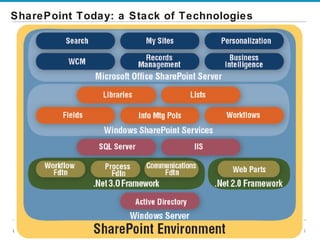
SharePoint Today: a Stack of Technologies
Key Take-Aways Persistent Tension between “free” and “fee” versions Understand what’s in what, and your real costs SharePoint is a key part of Microsoft’s  Office  strategy SharePoint represents a stack of technologies You need to understand more than just WSS and MOSS Multiple products make up the SharePoint family Evaluate carefully what you need and what you don’t MOSS and related licensing can get very expensive for larger enterprises  and/or those exposing services externally But several key variables will affect pricing, including your relationship with Microsoft
SharePoint Architecture: Base Systems
SharePoint & .NET Under-reported and under-appreciated dimension of SharePoint: built solidly on (almost) latest .NET platform  Aligns Redmond’s middleware with the huge army of global MS developers  This is huge : for developers and SharePoint This accounts for much of the excitement around SharePoint 2007 Just be cautious of developer/integrator enthusiasm… Double-edged sword: SharePoint now much more extensible Even simple extensions and customizations require solid .NET expertise
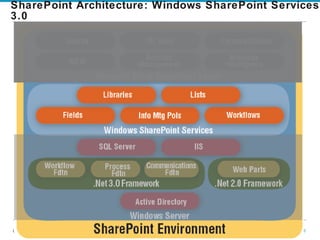
SharePoint Architecture: Windows SharePoint Services 3.0
Sample Document Library
Site Constructs: Sites Sites Single collaborative space: container for set of lists/libraries Important Security and Taxonomic boundary Navigable destination in a “Site Collection” OOTB Sites
Site Constructs:  Site Collections Site Collections: Just that! Collaboration Portal Publishing Portal WSS Site
SharePoint Architecture: Windows SharePoint Services 3.0
Key MOSS Concepts: Building and Extending Functional capabilities -- we’ll deal with in Module 3: Enhanced Search, Business Data Catalog, Excel Services, Forms Services New: licenses to Microsoft Performance Point (business intelligence) Shared Services: Farm-level services User import/management Search engine configuration Basic Usage reporting ( Basic  is operative term) Profile-based site surfacing  to individual users “ My Site” Both profile and personal(izable)  home page Deal with a bit later
Agenda An Architectural Overview SharePoint Services / Collaboration Customizing & Extending SharePoint The SharePoint Ecosystem
SharePoint’s “Six Pillars” (Assume MOSS)… … Are really nine For each service we’ll look at: Scenario Fit Pro’s and Con’s Customer Tier Fit
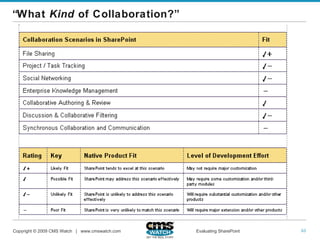
“ What  Kind  of Collaboration?”
Tight Integration with Office
Not-so-tight Integration with Outlook / Exchange
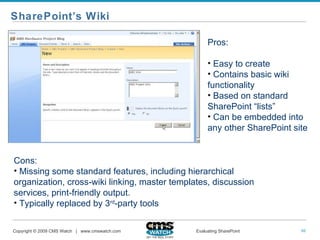
SharePoint’s Wiki Pros: Easy to create Contains basic wiki functionality Based on standard SharePoint “lists” Can be embedded into any other SharePoint site Cons:  Missing some standard features, including hierarchical organization, cross-wiki linking, master templates, discussion services, print-friendly output. Typically replaced by 3 rd -party tools
Collaboration Pros & Cons Selected Pros Flagship service Unusually deep Office integration Presentation Library is differentiator People can create own team sites Selected Cons Different, overlapping products Uneven Exchange / Outlook integration Very poor native social computing services Less oriented towards project management Lacking compliance focus
Collaboration Fit
Agenda An Architectural Overview SharePoint Services / Collaboration Customizing & Extending SharePoint The SharePoint Ecosystem
Defining Some Terms EASIER  HARDER “ You break it,  you own it.”
Skill Sets Typically Required for SharePoint Customization
Templatized Components, Multiple Sites
Agenda An Architectural Overview SharePoint Services / Collaboration Customizing & Extending SharePoint The SharePoint Ecosystem
SharePoint Ecosystem
Third-Party Modules Many customers end up licensing at least one Microsoft lists them at  solutionfinder.microsoft.com However, many are not listed there, and Redmond does not vouch for them Important caveats Test performance, reliability, and security features carefully Contrast software with “consulting-ware” Remember: It’s not just another module, but another  vendor Many partners fervently hope that MS will buy them, but Redmond typically  recreates  rather than  acquires This can be very inconvenient for you down the road when Microsoft upgrades SharePoint
Thank you…and Follow-up www.cmswatch.com [email_address] Twitter: @cmswatch SharePoint Courses: cmswatch.com/Education Contact info@cmswatch to subscribe
Earley & Associates SharePoint Services  (in Partnership with Consejo) SharePoint Assessment  SharePoint Strategy SharePoint Design (Information Architecture, Workflow, UI) SharePoint Implementation SharePoint Integration with Enterprise Search We help organizations succeed from an enterprise-wide perspective, ensuring findability of content through effective document tagging, metadata management, and search http://www.earley.com/SharePointServices.asp
SharePoint Search & IA Series: Calls 2 – 4  Call 2:  Making Basic SharePoint Search Work Thursday, June 11 th Shawn Shell, Consejo, Inc. Sadie Van Buren, Knowledge Management Associates Call 3:  Navigation, Metadata, & Faceted Search: Approaches & Tools Thursday, June 18 th Lars Farstrup, Farstrup Software Paul Wlodarczyk, Earley & Associates Call 4:  SharePoint IA vs. The Real World Thursday, June 25 th Toby Conrad & Jeremy Bentley, Smartlogic Jeff Carr & Michael Shulha, Earley & Associates
Please fill out the survey that should be in your inbox.  Let us know what topics you are interested in and how we can improve the series. Seth Earley [email_address] www.earley.com 781-820-8080

SharePoint Jumpstart #1 Creating a SharePoint Strategy

  • 1.
    SharePoint Search &IA Jumpstart Series June 4, 2009 Call 1: Creating a SharePoint Strategy Hosted by Earley & Associates in partnership with Consejo, Inc.
  • 2.
    About the JumpStartcall series Began educational call series in 2005 Past topics have included Taxonomy and Metadata, Content Management, Search, Semantic Technologies Have had several thousand attendees over the years. Today’s call has over 600 registrants Calls will be recorded and available for download Be sure to fill in evaluation to let us know what additional topics you would like to learn about
  • 3.
    Community of PracticeCalls Taxonomy Group url: http://finance.groups.yahoo.com/group/TaxoCoP Search Group url: http://tech.groups.yahoo.com/group/SearchCoP Upcoming calls: July 1, 2009 – Conducting a Search Audit August 5, 2009 – DITA September 2, 2009 – Taxonomy Usability Testing October 7, 2009 – Developing an Ontology November 4, 2009 – Applications for Topic Maps December 2, 2009 – Taxonomy Management
  • 4.
    Housekeeping Calls lastfrom 60 – 90 minutes Email questions during the call to [email_address] . Questions will be taken at the end of the session You can also skype Rebecca.M.Allen or SethEarley Questions will be queued through the operator. Press *1 to ask a question. If you are on twitter, you can follow the discussion and make comments using the hash tag #spjs
  • 5.
    Call 1: Creatinga SharePoint Strategy Seth Earley, Earley & Associates Information Strategy and SharePoint Alan Pelz-Sharpe, CMS Watch Evaluating SharePoint in the Enterprise
  • 6.
    SharePoint Search &IA Series: Calls 2 – 4 Call 2: Making Basic SharePoint Search Work Thursday, June 11 th Shawn Shell, Consejo, Inc. Sadie Van Buren, Knowledge Management Associates Call 3: Navigation, Metadata, & Faceted Search: Approaches & Tools Thursday, June 18 th Lars Farstrup, Farstrup Software Paul Wlodarczyk, Earley & Associates Call 4: SharePoint IA vs. The Real World Thursday, June 25 th Toby Conrad & Jeremy Bentley, Smartlogic Jeff Carr & Michael Shulha, Earley & Associates
  • 7.
    Agenda Context forSharePoint IA and Search issues Goals and expectations Types of content strategy Why do we need a SharePoint strategy? Classes of SharePoint applications Information management strategy approach Steps to developing a SharePoint strategy SharePoint in the Enterprise
  • 8.
    Context - SharePointSearch and IA issues Our work in information architecture has exposed us to many different technical environments and a range of user needs We have found that customers have in some cases had difficulty implementing recommendations due to challenges with process and technology SharePoint has a particular set of challenges that we have seen in multiple environments related to search and findability
  • 9.
    Expectations Series willhave a focus on information architecture and search This session will explore the role of strategy related to improving short and long term findability We will cover classes of functionality at a high level Governance is an extensive topic that we cover separately in Call 4
  • 10.
    Expectations After thiscall series you should be able to: Understand how to better leverage SharePoint to meet business needs in your organization How to better align strategy with implementation Specifically understand the role of information architecture and taxonomy in findability Be familiar with constraints and workarounds for improving search and overall findability of information in SharePoint
  • 11.
    Seth Earley, Founder& CEO Co-author of Practical Knowledge Management from IBM Press 14 years experience building content and knowledge management systems, 20+ years experience in technology Chair, Academy of Motion Picture Arts and Sciences, Science and Technology Council Metadata Project Committee Founder of the Boston Knowledge Management Forum Former adjunct professor at Northeastern University Currently working with enterprises to develop knowledge and content management systems, taxonomy and metadata governance strategies Founder of Taxonomy Community of Practice – host monthly conference calls of case studies on taxonomy derivation and application. http://finance.groups.yahoo.com/group/TaxoCoP Co-founder Search Community of Practice: http://tech.groups.yahoo.com/group/SearchCoP
  • 12.
    What kind of“strategy”? Business Alignment with business objectives Editorial What kinds of content will we have and how will this achieve our goals Technical Technology selection and development Deployment Populating content repositories and enabling collaboration Management Long term maintenance and governance Today we will be focusing on business alignment and some technical/architectural issues. The rest of the series will address technical issues as they relate to search and findability. Of course, the context is SharePoint, however many of these principles apply to any content management technology.
  • 13.
    Why create astrategy? “ We’re just going to put it out there and see what happens…” (company IT organization with SharePoint) OK, Try that… Let each part of the organization: Make infrastructure choices Develop information architecture Create own taxonomies Build own workflows Create individual governance and maintenance policies
  • 14.
  • 15.
    Been down thatroad before Early collaboration tools encouraged user adoption with little if any intervention from IT organization This resulted in “information shanty towns” - disconnected repositories, abandoned workspaces, unstable infrastructure, brittle integration, out of date and duplicated content SharePoint’s broad capabilities combined with widespread deployment magnifies this problem
  • 16.
    SharePoint In YourOrganization “ Microsoft Office SharePoint Server 2007 is a rich server application for the enterprise that facilitates collaboration, provides full content management features , implements business processes , and provides access to [structured] information essential to organizational goals and processes. It provides an integrated platform to plan, deploy, and manage intranet, extranet, and Internet applications across and beyond the enterprise.” Microsoft Let’s spend a few minutes parsing this out and examining the ramifications for SharePoint deployment
  • 17.
    Key SharePoint termsCollaboration – typically refers to an unstructured process for communicating and solving problems. Ad hoc in nature. A collaboration platform or environment is an easy to set up, self managed method for sharing information, contributing ideas and synthesizing an output Content management – A mechanism capturing, organizing, accessing and reusing content. More structured in nature. Content can be defined broadly as data, documents, digital assets, records, web content and learning objects It’s important to make the distinction between collaboration – a knowledge creation process and content management – a knowledge access and reuse process. The difference is not trivial and many deployments fail when organizations do not make this distinction.
  • 18.
    Key SharePoint termsBusiness processes – refers to structured processes for moving information through the organization. Simple examples of business processes in this context might include workflow approval processes for a purchase order or expense report Structured information – data contained in transactional and business intelligence systems Integrated platform – one environment that handles many types of content (documents, content for a web site or intranet, data, business processes, etc) We are going to define each of the pillars of SharePoint functionality and outline high level considerations
  • 19.
    Microsoft Office SharePointServer (MOSS) has many capabilities Configuration of each application class requires decisions about site organization, governance, process, content types, metadata, and taxonomy.
  • 20.
    Application class: CollaborationWho is collaborating? How much control will workgroups have? Will there be standard structures to follow? What is the process for commissioning and decommissioning sites? Who will have administrative rights? How will valuable content be harvested? What is the lifecycle of collaborative content? When organizations decide to provide collaboration capabilities to users, they tend to consider this as a self managed process. As collaborative workspaces proliferate, users realize they can no longer find high value content.
  • 21.
    Application class: PortalsPortals – Portal is an ambiguous term. SharePoint provides access to many types of structured and unstructured information and allows for aggregation and “integration at the glass” What applications will be surfaced for users? How will sites be personalized? What type of architecture will be applied? How will security be managed?
  • 22.
    Application class: Enterprise search Enterprise search – we’ll deal with search challenges in the next session. Some basic questions include determining how search will leverage metadata, facets, hierarchy, various unstructured sources, overcoming gaps in functionality, use of third party tools, etc Effective search needs to be considered from a holistic perspective – it is at the intersection of content strategy, metadata, taxonomy and information architecture
  • 23.
    Application class: CM/DM/RMContent Management – What processes are being supported? Who are the content owners? How will you define content structure? How will you manage content lifecycles? Does SharePoint truly meet the requirements of the organization from a web content management or intranet perspective? Records Management – SharePoint is not considered a records management platform however there are companies that build RM modules on top of SharePoint. This entails custom development and configuration. Document Management – What is the process for ensuring the site does not become a dumping ground? How will document lifecycles be managed? What organizing principles will be applied to documents?
  • 24.
    Application class: Business Processes and Business Intelligence Business process – InfoPath is an application to create xml based data entry forms to handle various workflow tasks. Is forms based workflow part of your initial project mandate? Forms based workflow is distinct from content or document workflow (which is part of the content/document/records management application class) Business intelligence – Is this going to add value to the organization? Make BI tools more accessible? Improve utilization of structured information sources? Building dashboards and integrating data sources is a significant undertaking
  • 25.
    Different content, differenttools, different mechanisms for access The message is that “content” varies in structure, format, value Application classes generally handle different types of content (though search and portal are really access layers to other application classes) SharePoint spans the range of functionality from very unstructured/chaotic applications to highly structured/controlled applications Though not yet mature for things like Records Management, add on modules can provide that capability Microsoft Groove will be SharePoint Workspace 2010 – this is at the far end of collaboration and user control (see blog post: http://sethearley.wordpress.com ) Key point: User controlled does not mean unmanaged/ungoverned
  • 26.
    Different technology classesare appropriate depending upon degree of collaboration and creation vs. structured access More Structured Email Instant Messages Wikis Blogging/ Micro blogging Discussions Collaborative Workspaces Content/ Document Management Workflow/ Business processes Business Intelligence Records Management Knowledge Creation Knowledge Access/Reuse Chaotic Processes Controlled Processes Less Structured User initiated/ controlled IT initiated/ controlled
  • 27.
    Relative value ofcontent Lower Cost Higher Cost Message text External News Reports Discussion postings Interim deliverables Engineering document repositories Success Stories Benchmarks Approved Methods Best Practices Tagging/Organizing Processes Social tagging (“folksonomy”) Structured tagging (taxonomy) Unfiltered Reviewed/Vetted/Approved Lower Value (More difficult to access) Higher Value (Easier to access)
  • 28.
    Developing an InformationStrategy SharePoint has capabilities that can touch most of the organization’s information streams An information strategy outlines current information flows, business objectives, priorities, scope and resource allocation Broader than SharePoint strategy – includes bigger picture information flows – including upstream and downstream systems Determines the role of SharePoint in the department or across the enterprise Be sure to spell out linkages between project and enterprise goals. An overall information strategy, though not critical to SharePoint deployment, will help to bound project scope
  • 29.
    Increase customer satisfactionExpand offerings Develop new markets Customer Support Customer acquisition Engineering Library Knowledge base Marketing Collateral Alignment, linkage, measurement Product Development Grow top line revenue Content supports processes Working here (tools, technology, IA, search, etc) Measuring here (micro level - effects) Measuring here (macro level - outcomes) CEO- “Show me how this project will increase our revenue?” Copyright © 2009 Earley & Associates Inc. All Rights Reserved. Organizational Strategy Business Unit Objectives Business Processes Processes enable objectives L I N K A G E Content Sources Objectives align with strategy
  • 30.
    Problem focus Whatbusiness problem are you solving? How will SharePoint improve the ability to accomplish work? What are the work tasks that need to be supported/enabled? How can information be structured to be readily accessed and consumed by target audiences? Key concept: Start with a single perspective (audience, process or problem) and then expand.
  • 31.
    Defining a SharePointStrategy With this range of functionality, “just putting it out there” will not allow the organization to realize full benefits and will be counterproductive Strategy is a moving target: what is appropriate for a less mature organization is not appropriate for a more mature organization Strategy needs to be continually redefined in order to keep up with the needs of the business Initially, strategy is defined at a very high level – further iterations allow details of implementation to be adapted to each business area
  • 32.
    Requirements Gathering Bringtogether stakeholder group representatives, from executive level ( strategic business objectives ) to administration ( tactical execution ). Capture ideas and blue sky wish list then start moving from the abstract to the tactical, or from: Improve market share through cross business unit synergies Present solutions to agricultural industry prospects that repurpose technologies from power substation mobile monitoring solutions Strategic Goal Tactical Requirement big picture what detailed how You are guided by the what in order to build the how
  • 33.
    Steps to developinga SharePoint strategy Create high level charter and identify owners Define processes and functions to be supported Identify audiences, perspectives, goals and tasks Survey specific applications used in the context of work tasks Audit content sources and determine organizing principles Create use cases based on user tasks Determine feature requirements: what technical functions and features are needed to address problem areas Evaluate options including cost of custom development, add on modules, third party tools You may not need all of this detail – level of detail will be determined by expected outcome. Some of these steps border on functional and technical requirements (for instance detailed use cases).
  • 34.
    1. Typical ProjectCharter Project owner Project manager Background and context Business need and benefits Project objectives Definitions In scope Out of scope Deliverables Schedule and cost considerations Success criteria There are plenty of examples of SharePoint project charters available on the web. Don’t copy too much boilerplate – this diminishes impact. Look for main points moist relevant to your circumstances.
  • 35.
    2. Processes andFunctions Content by itself is not very useful Content applied to solving a problem is useful How do we measure the ability to solve a problem? What is the nature of the problem? What allows the problem to be solved? What impedes the ability of a user to solve a problem? How does the supported process align with bigger picture goals of the organization? Achieving alignment with processes and strategic goals is essential to getting and retaining organizational attention and resources
  • 36.
    3. Audiences, perspectives,goals and tasks Who are the target users for the specific process? How can you characterize your audiences? What do they need to accomplish? How much experience do they have with your content, applications, offerings? Segment audiences according to need, demographic, role, intent
  • 37.
    3. Audiences,perspectives, goals and tasks
  • 38.
  • 39.
  • 40.
    5. Audit contentsources Content audit What are the in scope repositories? How relevant is existing content? What content is missing? Will new content be developed? What kinds of applications? (Databases, document libraries, web pages, business intelligence applications, etc.) What content is needed to support the user? What other sources do individuals use to accomplish their tasks? Who are the owners? Can you influence content lifecycles (such as application of metadata) What is the state of content metadata? Are there inherent organizing principles that can be leveraged? (Process, context, content structure, source, folder hierarchy, etc)
  • 41.
  • 42.
    6. Createuse cases Use cases can be formal (with trigger, pre condition, post condition, normal flow, alternative flow, exceptions, comments, etc) Or can be less formal and simply describe functionality at a high level
  • 43.
    7. Requirements &technology Don’t take too narrow a focus Project team may only have small purview, but think more globally to avoid reworking it later Consider upstream and downstream processes Think adaptable, extensible and scalable Turn it into a roadmap: implement over time Even a high level roadmap is better than “just putting it out there”
  • 44.
    7. Requirements &technology Align technology with known issues and challenges Can also develop matrix to prioritize functionality and rank level of effort for implementation
  • 45.
    8. Evaluate options Determine what’s possible versus what’s practical Its is critical that requirements gathering is done in conjunction with MOSS expertise An expert can provide sanity checks and ensure that requirements development are aligned with budgets and organizational maturity Customizations are always possible, but may be cost prohibitive or may not be practical in light of other supporting processes
  • 46.
    Summary SharePoint isan application platform with a broad range of capabilities for managing structured and unstructured information, enabling collaboration and managing documents and web content Installing it and “seeing what happens” will lead to fragmented information silos and the inability to find critical information. Once you let it out, it is very difficult to get things back under control Empowering users does not mean letting chaos reign Building an effective strategy means understanding the appropriate use of each class of technology and aligning with specific user roles, tasks and needs
  • 47.
  • 48.
    Independent We neverwork for vendors. Period. Detailed Industry veterans with technical backgrounds. Detailed customer research. Head-to-head vendor comparisons . Practical Specific advice. Best-practice approaches. The Real Story.
  • 49.
    What does itmean to “evaluate” SharePoint? Which SharePoint services work better than others? How does SharePoint stack up against its competition? As a departmental solution, how will it scale across our enterprise? How should we put “fences” around SharePoint in our enterprise? Which add-on modules are right for our organization?
  • 50.
    Agenda An ArchitecturalOverview SharePoint Services / Collaboration Customizing & Extending SharePoint The SharePoint Ecosystem
  • 51.
    SharePoint Today: aStack of Technologies
  • 52.
    Key Take-Aways PersistentTension between “free” and “fee” versions Understand what’s in what, and your real costs SharePoint is a key part of Microsoft’s Office strategy SharePoint represents a stack of technologies You need to understand more than just WSS and MOSS Multiple products make up the SharePoint family Evaluate carefully what you need and what you don’t MOSS and related licensing can get very expensive for larger enterprises and/or those exposing services externally But several key variables will affect pricing, including your relationship with Microsoft
  • 53.
  • 54.
    SharePoint & .NETUnder-reported and under-appreciated dimension of SharePoint: built solidly on (almost) latest .NET platform Aligns Redmond’s middleware with the huge army of global MS developers This is huge : for developers and SharePoint This accounts for much of the excitement around SharePoint 2007 Just be cautious of developer/integrator enthusiasm… Double-edged sword: SharePoint now much more extensible Even simple extensions and customizations require solid .NET expertise
  • 55.
    SharePoint Architecture: WindowsSharePoint Services 3.0
  • 56.
  • 57.
    Site Constructs: SitesSites Single collaborative space: container for set of lists/libraries Important Security and Taxonomic boundary Navigable destination in a “Site Collection” OOTB Sites
  • 58.
    Site Constructs: Site Collections Site Collections: Just that! Collaboration Portal Publishing Portal WSS Site
  • 59.
    SharePoint Architecture: WindowsSharePoint Services 3.0
  • 60.
    Key MOSS Concepts:Building and Extending Functional capabilities -- we’ll deal with in Module 3: Enhanced Search, Business Data Catalog, Excel Services, Forms Services New: licenses to Microsoft Performance Point (business intelligence) Shared Services: Farm-level services User import/management Search engine configuration Basic Usage reporting ( Basic is operative term) Profile-based site surfacing to individual users “ My Site” Both profile and personal(izable) home page Deal with a bit later
  • 61.
    Agenda An ArchitecturalOverview SharePoint Services / Collaboration Customizing & Extending SharePoint The SharePoint Ecosystem
  • 62.
    SharePoint’s “Six Pillars”(Assume MOSS)… … Are really nine For each service we’ll look at: Scenario Fit Pro’s and Con’s Customer Tier Fit
  • 63.
    “ What Kind of Collaboration?”
  • 64.
  • 65.
  • 66.
    SharePoint’s Wiki Pros:Easy to create Contains basic wiki functionality Based on standard SharePoint “lists” Can be embedded into any other SharePoint site Cons: Missing some standard features, including hierarchical organization, cross-wiki linking, master templates, discussion services, print-friendly output. Typically replaced by 3 rd -party tools
  • 67.
    Collaboration Pros &Cons Selected Pros Flagship service Unusually deep Office integration Presentation Library is differentiator People can create own team sites Selected Cons Different, overlapping products Uneven Exchange / Outlook integration Very poor native social computing services Less oriented towards project management Lacking compliance focus
  • 68.
  • 69.
    Agenda An ArchitecturalOverview SharePoint Services / Collaboration Customizing & Extending SharePoint The SharePoint Ecosystem
  • 70.
    Defining Some TermsEASIER HARDER “ You break it, you own it.”
  • 71.
    Skill Sets TypicallyRequired for SharePoint Customization
  • 72.
  • 73.
    Agenda An ArchitecturalOverview SharePoint Services / Collaboration Customizing & Extending SharePoint The SharePoint Ecosystem
  • 74.
  • 75.
    Third-Party Modules Manycustomers end up licensing at least one Microsoft lists them at solutionfinder.microsoft.com However, many are not listed there, and Redmond does not vouch for them Important caveats Test performance, reliability, and security features carefully Contrast software with “consulting-ware” Remember: It’s not just another module, but another vendor Many partners fervently hope that MS will buy them, but Redmond typically recreates rather than acquires This can be very inconvenient for you down the road when Microsoft upgrades SharePoint
  • 76.
    Thank you…and Follow-upwww.cmswatch.com [email_address] Twitter: @cmswatch SharePoint Courses: cmswatch.com/Education Contact info@cmswatch to subscribe
  • 77.
    Earley & AssociatesSharePoint Services (in Partnership with Consejo) SharePoint Assessment SharePoint Strategy SharePoint Design (Information Architecture, Workflow, UI) SharePoint Implementation SharePoint Integration with Enterprise Search We help organizations succeed from an enterprise-wide perspective, ensuring findability of content through effective document tagging, metadata management, and search http://www.earley.com/SharePointServices.asp
  • 78.
    SharePoint Search &IA Series: Calls 2 – 4 Call 2: Making Basic SharePoint Search Work Thursday, June 11 th Shawn Shell, Consejo, Inc. Sadie Van Buren, Knowledge Management Associates Call 3: Navigation, Metadata, & Faceted Search: Approaches & Tools Thursday, June 18 th Lars Farstrup, Farstrup Software Paul Wlodarczyk, Earley & Associates Call 4: SharePoint IA vs. The Real World Thursday, June 25 th Toby Conrad & Jeremy Bentley, Smartlogic Jeff Carr & Michael Shulha, Earley & Associates
  • 79.
    Please fill outthe survey that should be in your inbox. Let us know what topics you are interested in and how we can improve the series. Seth Earley [email_address] www.earley.com 781-820-8080