How to Effectively Plan, Execute
and Control SharePoint Projects
                Dux Raymond Sy, PMP, MVP
                      Managing Partner, Innovative-e


                                     Level: Intermediate


        Video Recording: https://vimeo.com/55729180
Objectives
•    In this presentation, you will learn the essential components
     of delivering successful SharePoint projects

•    In addition, you'll learn key techniques in:
     –    Establishing Project Success Criteria
     –    Collaboratively Engineer a Solution
     –    Developing Relevant Project Plan
     –    Executing and Controlling a SharePoint Project
Agenda

•    Can’t We Just Focus on the Technology?

•    Establish Success Criteria


•    Collaboratively Engineer a Solution


•    Develop Relevant Project Plan


•    Effectively Manage the Project
Agenda

  •    Can’t We Just Focus on the Technology?

  •    Establish Success Criteria


  •    Collaboratively Engineer a Solution

Why won’t 

  •    Develop Relevant Project Plan


this one fit?
  •    Effectively Manage the Project
Typical Scenarios
•    Pilot deployment for IT then magically it becomes an
     enterprise production deployment
     –  No planning
     –  Everything is ad-hoc
     –  No budget earmarked


•    Heavily customized implementation
     by techies lacking SharePoint skillz
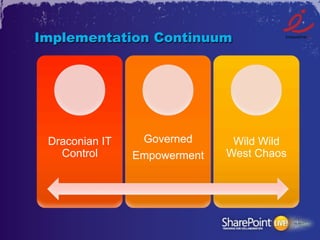
Implementation Continuum


 Draconian IT    Governed      Wild Wild
   Control      Empowerment   West Chaos
Agenda

•    Can’t We Just Focus on the Technology?

•    Establish Success Criteria


•    Collaboratively Engineer a Solution


•    Develop Relevant Project Plan


•    Effectively Manage the Project
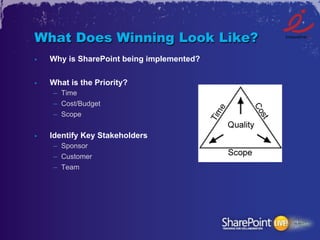
What Does Winning Look Like?
•    Why is SharePoint being implemented?

•    What is the Priority?
     –  Time
     –  Cost/Budget
     –  Scope


•    Identify Key Stakeholders
     –  Sponsor
     –  Customer
     –  Team
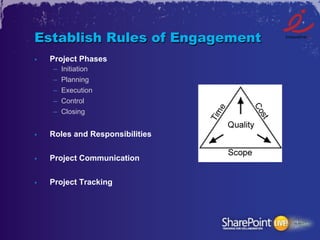
Establish Rules of Engagement
•    Project Phases
     –    Initiation
     –    Planning
     –    Execution
     –    Control
     –    Closing


•    Roles and Responsibilities


•    Project Communication


•    Project Tracking
Agenda

•    Can’t We Just Focus on the Technology?

•    Establish Success Criteria


•    Collaboratively Engineer a Solution


•    Develop Relevant Project Plan


•    Effectively Manage the Project
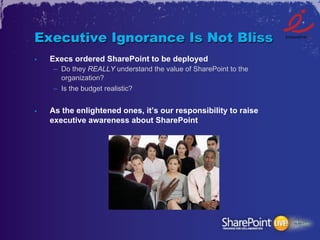
Executive Ignorance Is Not Bliss
•    Execs ordered SharePoint to be deployed
     –  Do they REALLY understand the value of SharePoint to the
        organization?
     –  Is the budget realistic?


•    As the enlightened ones, it’s our responsibility to raise
     executive awareness about SharePoint
Educate and Engage the Business
•    SharePoint is more than just a glorified network share
     –  Stress that SharePoint is a platform


•    Tip: Address their pain points
     –  Provide high-level technology overview
     –  Discuss business challenges
     –  Map it to a SharePoint Solution
Don’t Call it SharePoint
•    Enterprise Solutions
     –  Corporate Intranet
     –  Content Management


•    Point Solutions
     –  Employee Onboarding System for Human Resources
     –  Conference Room Scheduling System for Facilities
     –  Project Management Information System for PMs


•    System Integration


•    Custom Application Development
Keep Priorities in Order
•    You can’t do it all!
      –  What business need should you solve first?
      –  What are common features that can be deployed?


•    Project scope must be limited and specific
      –  What’s important? Time? Budget? Functionality?


•    Tip: Involve decision makers in planning and prioritization
Agenda

•    Can’t We Just Focus on the Technology?

•    Establish Success Criteria


•    Collaboratively Engineer a Solution


•    Develop Relevant Project Plan


•    Effectively Manage the Project
Define Project Goal
•    A clear, quantifiable statement of project intent
     –    Why is the project being undertaken?
     –    What will the project achieve?
     –    Who is the customer?
     –    When is the deadline?
     –    Where will the project be implemented?
     –    Any constraints?
Example: Project Goal
The current SharePoint 2007 intranet will be upgraded to
SharePoint 2010 throughout the university in order to increase
adoption and reduce IT support requirements.

The upgrade should be completed a month before Fall
semester begins.
Identify Relevant Deliverables
•    Apart from the end product, what are the essential project
     artifacts and or milestones that needs to be completed?


•    For example:
     –    Governance Plan
     –    Training
     –    Content Migration
     –    SharePoint 2010 Installation and Configuration
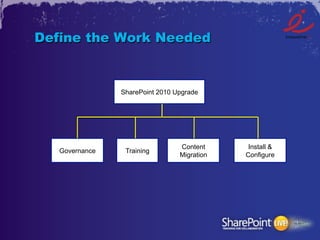
Define the Work Needed


                SharePoint 2010 Upgrade


                                 Content      Install &
   Governance    Training
                                 Migration   Configure
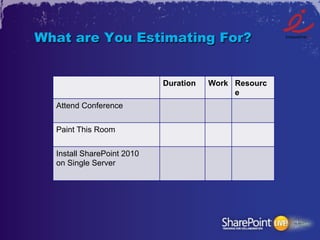
What are You Estimating For?


                            Duration   Work Resourc
                                            e
  Attend Conference

  Paint This Room

  Install SharePoint 2010
  on Single Server
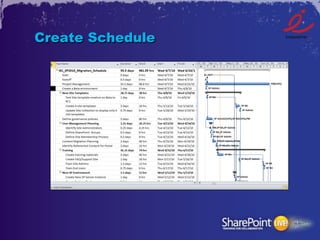
Create Schedule
IT Can You Handle This?
•    Implementation
     –  Do you have the relevant skillsets
        to plan, engage with the business,
        deploy SharePoint?
     –  Are key processes for release
        management, disaster recovery,
        auditing in place?


•    Support and Maintenance
     –  What does the support structure look like?
     –  Resources available for maintaining related technologies?


•    Future Releases
Agenda

•    Can’t We Just Focus on the Technology?

•    Establish Success Criteria


•    Collaboratively Engineer a Solution


•    Develop Relevant Project Plan


•    Effectively Manage the Project
What Do You Track?
•    Making time to gather intelligence about the progress of the
     project is a significant priority for the project manager


•    What critical elements of a project do you track?
     –  Schedule
     –  Risks
     –  Changes


•    Tracking with percentages doesn’t mean jack squat
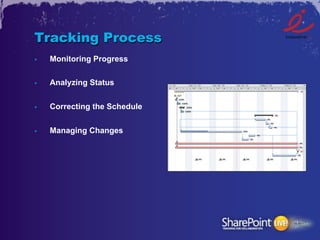
Tracking Process
•    Monitoring Progress

•    Analyzing Status


•    Correcting the Schedule


•    Managing Changes
Questions?
    Dux Raymond Sy
dux.sy@innovative-e.com
Thank You!

How to Plan, Manage and Control SharePoint Projects

  • 1.
    How to EffectivelyPlan, Execute and Control SharePoint Projects Dux Raymond Sy, PMP, MVP Managing Partner, Innovative-e Level: Intermediate Video Recording: https://vimeo.com/55729180
  • 2.
    Objectives •  In this presentation, you will learn the essential components of delivering successful SharePoint projects •  In addition, you'll learn key techniques in: –  Establishing Project Success Criteria –  Collaboratively Engineer a Solution –  Developing Relevant Project Plan –  Executing and Controlling a SharePoint Project
  • 3.
    Agenda •  Can’t We Just Focus on the Technology? •  Establish Success Criteria •  Collaboratively Engineer a Solution •  Develop Relevant Project Plan •  Effectively Manage the Project
  • 4.
    Agenda •  Can’t We Just Focus on the Technology? •  Establish Success Criteria •  Collaboratively Engineer a Solution Why won’t 
 •  Develop Relevant Project Plan this one fit? •  Effectively Manage the Project
  • 5.
    Typical Scenarios •  Pilot deployment for IT then magically it becomes an enterprise production deployment –  No planning –  Everything is ad-hoc –  No budget earmarked •  Heavily customized implementation by techies lacking SharePoint skillz
  • 6.
    Implementation Continuum DraconianIT Governed Wild Wild Control Empowerment West Chaos
  • 7.
    Agenda •  Can’t We Just Focus on the Technology? •  Establish Success Criteria •  Collaboratively Engineer a Solution •  Develop Relevant Project Plan •  Effectively Manage the Project
  • 8.
    What Does WinningLook Like? •  Why is SharePoint being implemented? •  What is the Priority? –  Time –  Cost/Budget –  Scope •  Identify Key Stakeholders –  Sponsor –  Customer –  Team
  • 9.
    Establish Rules ofEngagement •  Project Phases –  Initiation –  Planning –  Execution –  Control –  Closing •  Roles and Responsibilities •  Project Communication •  Project Tracking
  • 10.
    Agenda •  Can’t We Just Focus on the Technology? •  Establish Success Criteria •  Collaboratively Engineer a Solution •  Develop Relevant Project Plan •  Effectively Manage the Project
  • 11.
    Executive Ignorance IsNot Bliss •  Execs ordered SharePoint to be deployed –  Do they REALLY understand the value of SharePoint to the organization? –  Is the budget realistic? •  As the enlightened ones, it’s our responsibility to raise executive awareness about SharePoint
  • 12.
    Educate and Engagethe Business •  SharePoint is more than just a glorified network share –  Stress that SharePoint is a platform •  Tip: Address their pain points –  Provide high-level technology overview –  Discuss business challenges –  Map it to a SharePoint Solution
  • 13.
    Don’t Call itSharePoint •  Enterprise Solutions –  Corporate Intranet –  Content Management •  Point Solutions –  Employee Onboarding System for Human Resources –  Conference Room Scheduling System for Facilities –  Project Management Information System for PMs •  System Integration •  Custom Application Development
  • 14.
    Keep Priorities inOrder •  You can’t do it all! –  What business need should you solve first? –  What are common features that can be deployed? •  Project scope must be limited and specific –  What’s important? Time? Budget? Functionality? •  Tip: Involve decision makers in planning and prioritization
  • 15.
    Agenda •  Can’t We Just Focus on the Technology? •  Establish Success Criteria •  Collaboratively Engineer a Solution •  Develop Relevant Project Plan •  Effectively Manage the Project
  • 16.
    Define Project Goal •  A clear, quantifiable statement of project intent –  Why is the project being undertaken? –  What will the project achieve? –  Who is the customer? –  When is the deadline? –  Where will the project be implemented? –  Any constraints?
  • 17.
    Example: Project Goal Thecurrent SharePoint 2007 intranet will be upgraded to SharePoint 2010 throughout the university in order to increase adoption and reduce IT support requirements. The upgrade should be completed a month before Fall semester begins.
  • 18.
    Identify Relevant Deliverables •  Apart from the end product, what are the essential project artifacts and or milestones that needs to be completed? •  For example: –  Governance Plan –  Training –  Content Migration –  SharePoint 2010 Installation and Configuration
  • 19.
    Define the WorkNeeded SharePoint 2010 Upgrade Content Install & Governance Training Migration Configure
  • 20.
    What are YouEstimating For? Duration Work Resourc e Attend Conference Paint This Room Install SharePoint 2010 on Single Server
  • 21.
  • 22.
    IT Can YouHandle This? •  Implementation –  Do you have the relevant skillsets to plan, engage with the business, deploy SharePoint? –  Are key processes for release management, disaster recovery, auditing in place? •  Support and Maintenance –  What does the support structure look like? –  Resources available for maintaining related technologies? •  Future Releases
  • 23.
    Agenda •  Can’t We Just Focus on the Technology? •  Establish Success Criteria •  Collaboratively Engineer a Solution •  Develop Relevant Project Plan •  Effectively Manage the Project
  • 24.
    What Do YouTrack? •  Making time to gather intelligence about the progress of the project is a significant priority for the project manager •  What critical elements of a project do you track? –  Schedule –  Risks –  Changes •  Tracking with percentages doesn’t mean jack squat
  • 25.
    Tracking Process •  Monitoring Progress •  Analyzing Status •  Correcting the Schedule •  Managing Changes
  • 26.
    Questions? Dux Raymond Sy dux.sy@innovative-e.com
  • 27.