CCIT Consultants


Alphonso Carter
Derek Carraway
Joaquin Colston
Lavhonte Davis
Naaman Butler
                  Group 3.1
CCIT Consultants


   This report will summarize the work schedule, software,
hardware, and the tasks needed to solve the communication,
collaboration and project management issues experienced by
                     Tallahassee Designs.
Communication


• An across the board communication tool for
  the company.
• Control how people reach you
  o See the availability of colleagues immediately with
    detailed presence information.
  o Switch instantly among instant messaging, voice,
    video, conferencing, and application sharing, as
    needed, during any conversation.
  o Dial by name using your Contact list or the search
    functions,
Communication

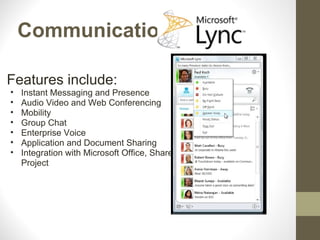
Features include:
•   Instant Messaging and Presence
•   Audio Video and Web Conferencing
•   Mobility
•   Group Chat
•   Enterprise Voice
•   Application and Document Sharing
•   Integration with Microsoft Office, Sharepoint and
    Project
Communication

• Turn any conversation into a collaboration
   o   a single click is all it takes to share an application or your desktop,
       upload a PowerPoint, open a whiteboard, or transfer a file in real
       time.

• Communicate directly from Microsoft Office
   o   Communicate your personal status using the status note in the main
       Lync UI, and keep track of updates from your colleagues through the
       Activity Feed tab. Use pictures and video calling to make long
       distance communications more personal.

• Work from anywhere
   o   no VPN required.

• Mac users in your organization can get integrated
Communication
     Languages Supported         Know Users
 •   English-US            • Hendricks Motorsports
 •   English-UK
 •   English-Australia     • A.T. Kearney
 •   Simplified Chinese    • Commonwealth Bank
 •   Traditional Chinese
 •   Portuguese-Brazil       of Australia
 •   Korean-Korea          • Herrenknecht
 •   Spanish-Mexico
 •   Spanish-Spain
 •   French-Canada
 •   French-France
 •   German-Germany
 •   Italian-Italy
 •   Japanese-Japan
Collaboration


The capabilities of SharePoint 2010 work together to help
  your company quickly respond to changing business
 needs. Using SharePoint 2010, your people can share
ideas and expertise, create custom solutions for specific
 needs, and find the right business information to make
                     better decisions.
Collaboration

• Microsoft SharePoint 2010 makes it easier for people to work
  together.
• Your people can set up Web sites to share information with
  others, manage documents from start to finish, and publish
  reports to help everyone make better decisions.
• Sharepoint provides a centralized location for sharing, storing,
  updating, and management for all documentations, projects
  and files.
• SharePoint 2010 delivers on the promise of flexible deployment
  options
• Use Sandbox Solutions to limit code CPU time, Microsoft SQL
  Server execution time, and exception handling.
Collaboration

           Features
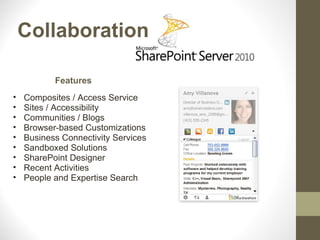
•   Composites / Access Service
•   Sites / Accessibility
•   Communities / Blogs
•   Browser-based Customizations
•   Business Connectivity Services
•   Sandboxed Solutions
•   SharePoint Designer
•   Recent Activities
•   People and Expertise Search
Collaboration
• Enterprise workflow management
• Data management functions
• Rapidly add Sharepoint websites that support specific data
  publishing
• Data management
• Records management
• Enterprise intelligence needs
• You can also conduct effective searches information,
  participate in forms-driven enterprise workflows, and access
  and analyse big amounts of enterprise information.
Collaboration
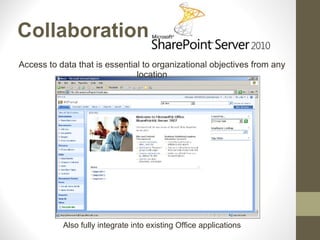
Access to data that is essential to organizational objectives from any
                               location


           Also fully integrate into existing Office applications
Project Management


Microsoft Project Professional 2010 is a project managers software
that gives project managers a new and easier way to manage wide
                  range of projects and programs.
Project Management
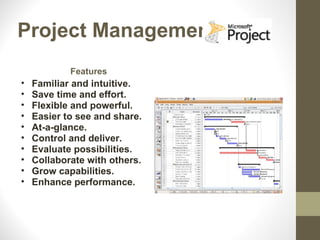
            Features
•   Familiar and intuitive.
•   Save time and effort.
•   Flexible and powerful.
•   Easier to see and share.
•   At-a-glance.
•   Control and deliver.
•   Evaluate possibilities.
•   Collaborate with others.
•   Grow capabilities.
•   Enhance performance.
Project Management

• Microsoft Project Professional 2010 delivers a project
  management system with powerful, visually enhanced ways to
  effectively manage a wide range of projects and programs.
• Work more efficiently with the simple and intuitive Microsoft
  Fluent user interface
• Task-oriented tabs and contextual menu groupings reveal
  powerful features
• Save to XPS or PDF. Quickly share, print, and publish project
  information from one location
• You can simplify planning with inactive and activetasks to
  perform what-if analysis.
Project Management
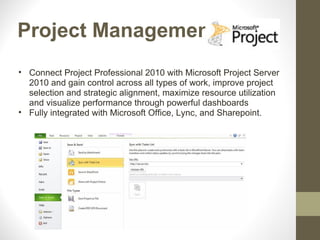
• Connect Project Professional 2010 with Microsoft Project Server
  2010 and gain control across all types of work, improve project
  selection and strategic alignment, maximize resource utilization
  and visualize performance through powerful dashboards
• Fully integrated with Microsoft Office, Lync, and Sharepoint.
Communication,
Collaboration and Project
      Management
•   Secure
•   Reliable
•   Mobility
•   Integrates with existing infrastructure
•   Improves the way you do business
CCIT Consultants
               &
           Microsoft

Providing the right solutions for the job!!
Microsoft Lync

Features include:
o   Instant Messaging and Presence
o   Audio Video and Web Conferencing
o   Mobility
o   Group Chat
o   Enterprise Voice
o   Application and Document Sharing
o   Integration with Microsoft Office, Sharepoint and Project

CCIT Consultants

  • 1.
    CCIT Consultants Alphonso Carter DerekCarraway Joaquin Colston Lavhonte Davis Naaman Butler Group 3.1
  • 2.
    CCIT Consultants This report will summarize the work schedule, software, hardware, and the tasks needed to solve the communication, collaboration and project management issues experienced by Tallahassee Designs.
  • 3.
    Communication • An acrossthe board communication tool for the company. • Control how people reach you o See the availability of colleagues immediately with detailed presence information. o Switch instantly among instant messaging, voice, video, conferencing, and application sharing, as needed, during any conversation. o Dial by name using your Contact list or the search functions,
  • 4.
    Communication Features include: • Instant Messaging and Presence • Audio Video and Web Conferencing • Mobility • Group Chat • Enterprise Voice • Application and Document Sharing • Integration with Microsoft Office, Sharepoint and Project
  • 5.
    Communication • Turn anyconversation into a collaboration o a single click is all it takes to share an application or your desktop, upload a PowerPoint, open a whiteboard, or transfer a file in real time. • Communicate directly from Microsoft Office o Communicate your personal status using the status note in the main Lync UI, and keep track of updates from your colleagues through the Activity Feed tab. Use pictures and video calling to make long distance communications more personal. • Work from anywhere o no VPN required. • Mac users in your organization can get integrated
  • 6.
    Communication Languages Supported Know Users • English-US • Hendricks Motorsports • English-UK • English-Australia • A.T. Kearney • Simplified Chinese • Commonwealth Bank • Traditional Chinese • Portuguese-Brazil of Australia • Korean-Korea • Herrenknecht • Spanish-Mexico • Spanish-Spain • French-Canada • French-France • German-Germany • Italian-Italy • Japanese-Japan
  • 7.
    Collaboration The capabilities ofSharePoint 2010 work together to help your company quickly respond to changing business needs. Using SharePoint 2010, your people can share ideas and expertise, create custom solutions for specific needs, and find the right business information to make better decisions.
  • 8.
    Collaboration • Microsoft SharePoint2010 makes it easier for people to work together. • Your people can set up Web sites to share information with others, manage documents from start to finish, and publish reports to help everyone make better decisions. • Sharepoint provides a centralized location for sharing, storing, updating, and management for all documentations, projects and files. • SharePoint 2010 delivers on the promise of flexible deployment options • Use Sandbox Solutions to limit code CPU time, Microsoft SQL Server execution time, and exception handling.
  • 9.
    Collaboration Features • Composites / Access Service • Sites / Accessibility • Communities / Blogs • Browser-based Customizations • Business Connectivity Services • Sandboxed Solutions • SharePoint Designer • Recent Activities • People and Expertise Search
  • 10.
    Collaboration • Enterprise workflowmanagement • Data management functions • Rapidly add Sharepoint websites that support specific data publishing • Data management • Records management • Enterprise intelligence needs • You can also conduct effective searches information, participate in forms-driven enterprise workflows, and access and analyse big amounts of enterprise information.
  • 11.
    Collaboration Access to datathat is essential to organizational objectives from any location Also fully integrate into existing Office applications
  • 12.
    Project Management Microsoft ProjectProfessional 2010 is a project managers software that gives project managers a new and easier way to manage wide range of projects and programs.
  • 13.
    Project Management Features • Familiar and intuitive. • Save time and effort. • Flexible and powerful. • Easier to see and share. • At-a-glance. • Control and deliver. • Evaluate possibilities. • Collaborate with others. • Grow capabilities. • Enhance performance.
  • 14.
    Project Management • MicrosoftProject Professional 2010 delivers a project management system with powerful, visually enhanced ways to effectively manage a wide range of projects and programs. • Work more efficiently with the simple and intuitive Microsoft Fluent user interface • Task-oriented tabs and contextual menu groupings reveal powerful features • Save to XPS or PDF. Quickly share, print, and publish project information from one location • You can simplify planning with inactive and activetasks to perform what-if analysis.
  • 15.
    Project Management • ConnectProject Professional 2010 with Microsoft Project Server 2010 and gain control across all types of work, improve project selection and strategic alignment, maximize resource utilization and visualize performance through powerful dashboards • Fully integrated with Microsoft Office, Lync, and Sharepoint.
  • 16.
    Communication, Collaboration and Project Management • Secure • Reliable • Mobility • Integrates with existing infrastructure • Improves the way you do business
  • 17.
    CCIT Consultants & Microsoft Providing the right solutions for the job!!
  • 18.
    Microsoft Lync Features include: o Instant Messaging and Presence o Audio Video and Web Conferencing o Mobility o Group Chat o Enterprise Voice o Application and Document Sharing o Integration with Microsoft Office, Sharepoint and Project