SHAREPOINT IA
BEST PRACTICES
(4 out of 5 Dentists Agree)

SHAREPOINT SYMPOSIUM 2013
STEPHANIE LEMIEUX
STEPHANIE LEMIEUX
President & Principal Consultant

•  Specialized in taxonomy & metadata, governance
•  Lots of experience implementing taxonomy & IA
across different tools: CMS, DMS, Intranet, Faceted Search,
DAM…and yes, SharePoint
•  MLIS from McGill University (i.e. I’m a librarian)
•  Huge data nerd
• 

Who we are: Boutique firm specializing
in taxonomy & information
architecture… We create practical and
elegant solutions to make content more
findable.

• 

Based in Montreal, Canada

• 

What we do: taxonomy, metadata
development, search, information
architecture, digital asset management,
governance, etc.
SharePoint is easy
to implement
badly
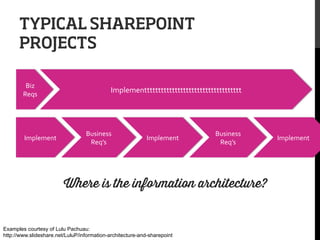
TYPICAL SHAREPOINT
PROJECTS
Biz	
  
Reqs	
  

Implement	
  

Implementtttttttttttttttttttttttttttttttttt	
  

Business	
  
Req’s	
  

Implement	
  

Business	
  
Req’s	
  

Where is the information architecture?

Examples courtesy of Lulu Pachuau:
http://www.slideshare.net/LuluP/information-architecture-and-sharepoint

Implement	
  
4 out of 5 dentists agree that
lying through your teeth
about IA does not count as
flossing
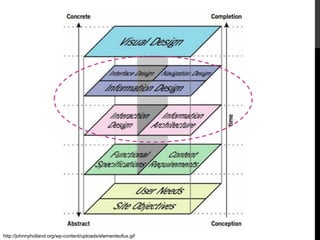
http://johnnyholland.org/wp-content/uploads/elementsofux.gif
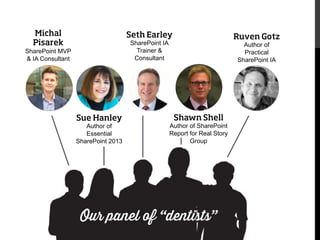
Michal
Pisarek

Seth Earley
SharePoint IA
Trainer &
Consultant

SharePoint MVP
& IA Consultant

Sue Hanley
Author of
Essential
SharePoint 2013

Ruven Gotz
Author of
Practical
SharePoint IA

Shawn Shell
Author of SharePoint
Report for Real Story
Group

Our panel of “dentists”
#1 MISTAKE IN
SHAREPOINT
DESIGN?
Over-reliance on search
to cover for bad IA
5 SHAREPOINT IA
BEST PRACTICES

 2013 game changers
&
#5:
DON’T FOLLOW
THE ORG STRUCTURE
4 out of 5 dentists
agree…
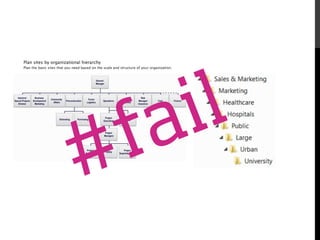
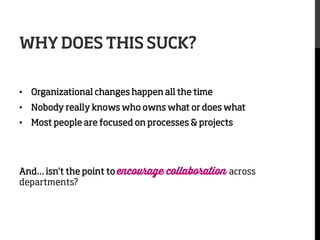
WHY DOES THIS SUCK?
•  Organizational changes happen all the time
•  Nobody really knows who owns what or does what
•  Most people are focused on processes & projects

And… isn’t the point to encourage
departments?

collaboration across
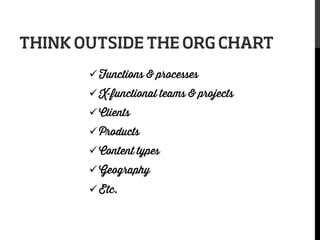
THINK OUTSIDE THE ORG CHART
ü Functions & processes
ü X-functional teams & projects
ü Clients
ü Products
ü Content types
ü Geography
ü Etc.
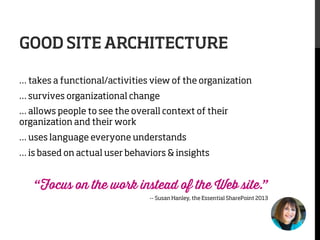
GOOD SITE ARCHITECTURE
… takes a functional/activities view of the organization
… survives organizational change
… allows people to see the overall context of their
organization and their work
… uses language everyone understands
… is based on actual user behaviors & insights

“Focus on the work instead of the Web site.”
-- Susan Hanley, the Essential SharePoint 2013
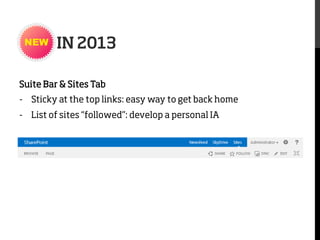
IN 2013
Suite Bar & Sites Tab
-  Sticky at the top links: easy way to get back home
-  List of sites “followed”: develop a personal IA
#4:
TRANSCEND
PHYSICAL STRUCTURE
4 out of 5 dentists
agree…
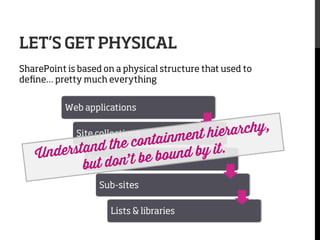
LET’S GET PHYSICAL
SharePoint is based on a physical structure that used to
define… pretty much everything
Web applications

ierarchy,
ainment h
d the cont
nderstan
nd by it.
U
Sites on’ t be bou
but d
Site collections

Sub-sites
Lists & libraries
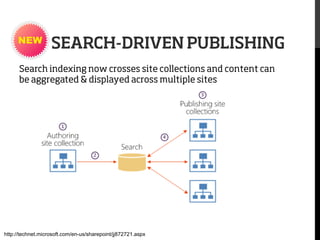
SEARCH-DRIVEN PUBLISHING
Search indexing now crosses site collections and content can
be aggregated & displayed across multiple sites

http://technet.microsoft.com/en-us/sharepoint/jj872721.aspx
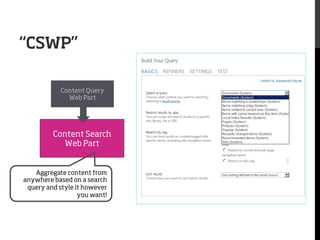
“CSWP”
Content Query
Web Part

Content Search
Web Part

Aggregate content from
anywhere based on a search
query and style it however
you want!
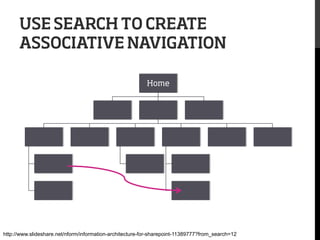
USE SEARCH TO CREATE
ASSOCIATIVE NAVIGATION
Home

http://www.slideshare.net/nform/information-architecture-for-sharepoint-11389777?from_search=12
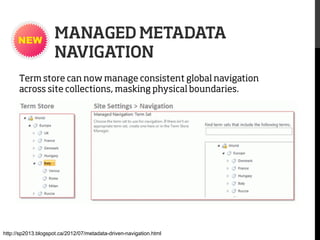
MANAGED METADATA
NAVIGATION
Term store can now manage consistent global navigation
across site collections, masking physical boundaries.

http://sp2013.blogspot.ca/2012/07/metadata-driven-navigation.html
Design the ideal

…then figure out how you can make it happen with the
containment hierarchy and options available
#3:
A LITTLE METADATA GOES
A LONG WAY
4 out of 5 dentists
agree…
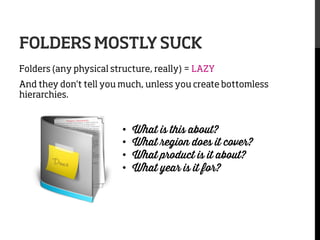
FOLDERS MOSTLY SUCK
Folders (any physical structure, really) = LAZY
And they don’t tell you much, unless you create bottomless
hierarchies.

• 
• 
• 
• 


What is this about?
What region does it cover?
What product is it about?
What year is it for?
USE MOSTLY METADATA
ü  enhance searchability of content
ü  filter/sort/view lists & libraries
ü  control content display (via search web part)
ü  control navigation
ü  enhance search user interface
ü  trigger workflow, info policies
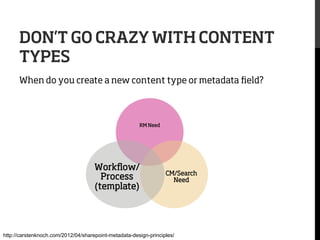
DON’T GO CRAZY WITH CONTENT
TYPES
When do you create a new content type or metadata field?

RM Need

Workflow/
Process
(template)

CM/Search
Need

http://carstenknoch.com/2012/04/sharepoint-metadata-design-principles/
Rule of thumb: 
If you have more
content types than you
do staff, you’re doing
something wrong.
LESS IS MORE.
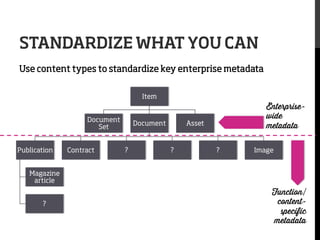
STANDARDIZE WHAT YOU CAN
Use content types to standardize key enterprise metadata
Item
Document
Set
Publication

Contract

Document

?

Enterprisewide
metadata

Asset

?

?

Image

Magazine
article
?

Function/
contentspecific
metadata
AUTOMATE WHAT YOU CAN
Leverage structure & profiles to automate some metadata
•  Document location (document library, sets, smart folders*)
•  User profile

Rules of Thumb

1.  Keep the number of fields as small as possible
2.  Majority of fields should tie back to a work
process with clear user value
3.  Use default values VERY carefully
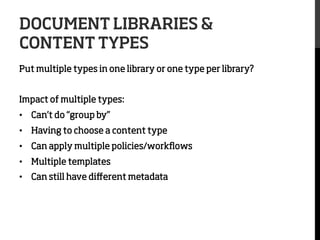
DOCUMENT LIBRARIES &
CONTENT TYPES
Put multiple types in one library or one type per library?
Impact of multiple types:
•  Can’t do “group by”
•  Having to choose a content type
•  Can apply multiple policies/workflows
•  Multiple templates
•  Can still have different metadata
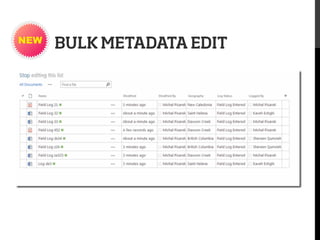
BULK METADATA EDIT
#2:
CONTROL VOCABULARY
USING MANAGED
METADATA
4 out of 5 dentists
agree…
CONTROL KEY METADATA
CENTRALLY
Use the term store to predefine & manage key vocabularies
used in metadata
When to make it managed metadata?
•  Likely to be used by multiple groups (global vs. local)
•  Terminology needs governance
•  Needs synonyms
•  Requires hierarchy
•  Would be useful as navigation/filter options
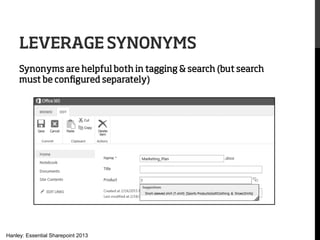
LEVERAGE SYNONYMS
Synonyms are helpful both in tagging & search (but search
must be configured separately)

Hanley: Essential Sharepoint 2013
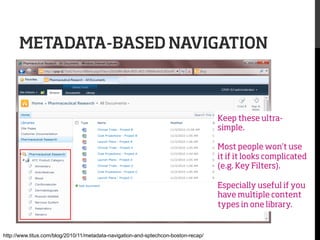
METADATA-BASED NAVIGATION

Keep these ultrasimple.
Most people won’t use
it if it looks complicated
(e.g. Key Filters).
Especially useful if you
have multiple content
types in one library.

http://www.titus.com/blog/2010/11/metadata-navigation-and-sptechcon-boston-recap/
Warning: the term store is not a
taxonomy management tool or autoclassifier.
No matter how awesome your
structure, people will still
search sometimes.

Try to make it suck less.
#1:
GIVE SEARCH A LITTLE
LOVE
4 out of 5 dentists
agree…
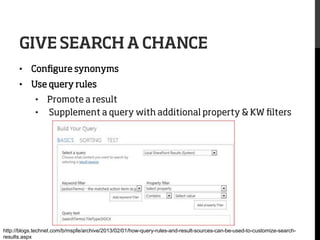
GIVE SEARCH A CHANCE
•  Configure synonyms
•  Use query rules
•  Promote a result
•  Supplement a query with additional property & KW filters

http://blogs.technet.com/b/mspfe/archive/2013/02/01/how-query-rules-and-result-sources-can-be-used-to-customize-searchresults.aspx
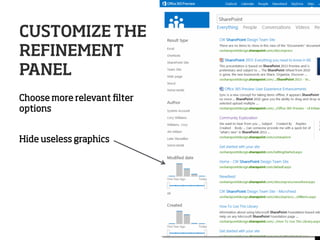
CUSTOMIZE THE
REFINEMENT
PANEL
Choose more relevant filter
options
Hide useless graphics
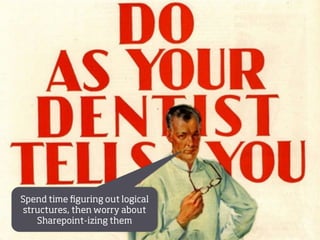
Spend time figuring out logical
structures, then worry about
Sharepoint-izing them
http://www.zazzle.com/red+dirt+posters
Awesome
architecture!
THANK YOU

Stephanie Lemieux
stephanie@dovecotstudio.com
@stephlemieux
www.dovecotstudio.com

SharePoint Information Architecture Best Practices

  • 1.
    SHAREPOINT IA BEST PRACTICES (4out of 5 Dentists Agree) SHAREPOINT SYMPOSIUM 2013 STEPHANIE LEMIEUX
  • 2.
    STEPHANIE LEMIEUX President &Principal Consultant •  Specialized in taxonomy & metadata, governance •  Lots of experience implementing taxonomy & IA across different tools: CMS, DMS, Intranet, Faceted Search, DAM…and yes, SharePoint •  MLIS from McGill University (i.e. I’m a librarian) •  Huge data nerd
  • 3.
    •  Who we are:Boutique firm specializing in taxonomy & information architecture… We create practical and elegant solutions to make content more findable. •  Based in Montreal, Canada •  What we do: taxonomy, metadata development, search, information architecture, digital asset management, governance, etc.
  • 4.
    SharePoint is easy toimplement badly
  • 5.
    TYPICAL SHAREPOINT PROJECTS Biz   Reqs   Implement   Implementtttttttttttttttttttttttttttttttttt   Business   Req’s   Implement   Business   Req’s   Where is the information architecture? Examples courtesy of Lulu Pachuau: http://www.slideshare.net/LuluP/information-architecture-and-sharepoint Implement  
  • 6.
    4 out of5 dentists agree that lying through your teeth about IA does not count as flossing
  • 7.
  • 8.
    Michal Pisarek Seth Earley SharePoint IA Trainer& Consultant SharePoint MVP & IA Consultant Sue Hanley Author of Essential SharePoint 2013 Ruven Gotz Author of Practical SharePoint IA Shawn Shell Author of SharePoint Report for Real Story Group Our panel of “dentists”
  • 9.
  • 10.
  • 11.
    5 SHAREPOINT IA BESTPRACTICES 2013 game changers &
  • 12.
    #5: DON’T FOLLOW THE ORGSTRUCTURE 4 out of 5 dentists agree…
  • 14.
    WHY DOES THISSUCK? •  Organizational changes happen all the time •  Nobody really knows who owns what or does what •  Most people are focused on processes & projects And… isn’t the point to encourage departments? collaboration across
  • 15.
    THINK OUTSIDE THEORG CHART ü Functions & processes ü X-functional teams & projects ü Clients ü Products ü Content types ü Geography ü Etc.
  • 16.
    GOOD SITE ARCHITECTURE …takes a functional/activities view of the organization … survives organizational change … allows people to see the overall context of their organization and their work … uses language everyone understands … is based on actual user behaviors & insights “Focus on the work instead of the Web site.” -- Susan Hanley, the Essential SharePoint 2013
  • 17.
    IN 2013 Suite Bar& Sites Tab -  Sticky at the top links: easy way to get back home -  List of sites “followed”: develop a personal IA
  • 18.
  • 19.
    LET’S GET PHYSICAL SharePointis based on a physical structure that used to define… pretty much everything Web applications ierarchy, ainment h d the cont nderstan nd by it. U Sites on’ t be bou but d Site collections Sub-sites Lists & libraries
  • 20.
    SEARCH-DRIVEN PUBLISHING Search indexingnow crosses site collections and content can be aggregated & displayed across multiple sites http://technet.microsoft.com/en-us/sharepoint/jj872721.aspx
  • 21.
    “CSWP” Content Query Web Part ContentSearch Web Part Aggregate content from anywhere based on a search query and style it however you want!
  • 22.
    USE SEARCH TOCREATE ASSOCIATIVE NAVIGATION Home http://www.slideshare.net/nform/information-architecture-for-sharepoint-11389777?from_search=12
  • 23.
    MANAGED METADATA NAVIGATION Term storecan now manage consistent global navigation across site collections, masking physical boundaries. http://sp2013.blogspot.ca/2012/07/metadata-driven-navigation.html
  • 24.
    Design the ideal …thenfigure out how you can make it happen with the containment hierarchy and options available
  • 25.
    #3: A LITTLE METADATAGOES A LONG WAY 4 out of 5 dentists agree…
  • 26.
    FOLDERS MOSTLY SUCK Folders(any physical structure, really) = LAZY And they don’t tell you much, unless you create bottomless hierarchies. •  •  •  •  What is this about? What region does it cover? What product is it about? What year is it for?
  • 27.
    USE MOSTLY METADATA ü enhance searchability of content ü  filter/sort/view lists & libraries ü  control content display (via search web part) ü  control navigation ü  enhance search user interface ü  trigger workflow, info policies
  • 28.
    DON’T GO CRAZYWITH CONTENT TYPES When do you create a new content type or metadata field? RM Need Workflow/ Process (template) CM/Search Need http://carstenknoch.com/2012/04/sharepoint-metadata-design-principles/
  • 29.
    Rule of thumb: If you have more content types than you do staff, you’re doing something wrong. LESS IS MORE.
  • 30.
    STANDARDIZE WHAT YOUCAN Use content types to standardize key enterprise metadata Item Document Set Publication Contract Document ? Enterprisewide metadata Asset ? ? Image Magazine article ? Function/ contentspecific metadata
  • 31.
    AUTOMATE WHAT YOUCAN Leverage structure & profiles to automate some metadata •  Document location (document library, sets, smart folders*) •  User profile Rules of Thumb 1.  Keep the number of fields as small as possible 2.  Majority of fields should tie back to a work process with clear user value 3.  Use default values VERY carefully
  • 32.
    DOCUMENT LIBRARIES & CONTENTTYPES Put multiple types in one library or one type per library? Impact of multiple types: •  Can’t do “group by” •  Having to choose a content type •  Can apply multiple policies/workflows •  Multiple templates •  Can still have different metadata
  • 33.
  • 34.
  • 35.
    CONTROL KEY METADATA CENTRALLY Usethe term store to predefine & manage key vocabularies used in metadata When to make it managed metadata? •  Likely to be used by multiple groups (global vs. local) •  Terminology needs governance •  Needs synonyms •  Requires hierarchy •  Would be useful as navigation/filter options
  • 36.
    LEVERAGE SYNONYMS Synonyms arehelpful both in tagging & search (but search must be configured separately) Hanley: Essential Sharepoint 2013
  • 37.
    METADATA-BASED NAVIGATION Keep theseultrasimple. Most people won’t use it if it looks complicated (e.g. Key Filters). Especially useful if you have multiple content types in one library. http://www.titus.com/blog/2010/11/metadata-navigation-and-sptechcon-boston-recap/
  • 38.
    Warning: the termstore is not a taxonomy management tool or autoclassifier.
  • 39.
    No matter howawesome your structure, people will still search sometimes. Try to make it suck less.
  • 40.
    #1: GIVE SEARCH ALITTLE LOVE 4 out of 5 dentists agree…
  • 41.
    GIVE SEARCH ACHANCE •  Configure synonyms •  Use query rules •  Promote a result •  Supplement a query with additional property & KW filters http://blogs.technet.com/b/mspfe/archive/2013/02/01/how-query-rules-and-result-sources-can-be-used-to-customize-searchresults.aspx
  • 42.
    CUSTOMIZE THE REFINEMENT PANEL Choose morerelevant filter options Hide useless graphics
  • 43.
    Spend time figuringout logical structures, then worry about Sharepoint-izing them http://www.zazzle.com/red+dirt+posters
  • 44.
  • 45.