Jill Bastian Training and Education Manager VerticalResponse Making Social Media & Email Work Together Page   | VerticalResponse, Inc.
Agenda Why Email Marketing Works Email Marketing Basics and Best Practices Growing Mailing lists Social Media Tools & Resources To Get You Started Page   | VerticalResponse, Inc.
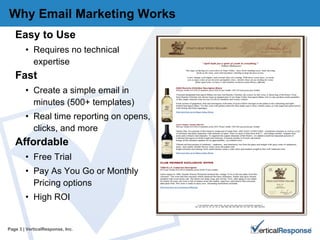
Why Email Marketing Works Easy to Use Requires no technical expertise Fast Create a simple email in minutes (500+ templates) Real time reporting on opens, clicks, and more Affordable Free Trial Pay As You Go or Monthly Pricing options  High ROI Page   | VerticalResponse, Inc.
Why Have an Email Emails build relationships, retention and loyalty It Helps Grow Your Business & Get Referrals Stay in front of your audience Send reminder emails as events near Sell your products & services Send thank you emails and anniversary emails to keep in touch and get referrals
Email Marketing Basics and Best Practices
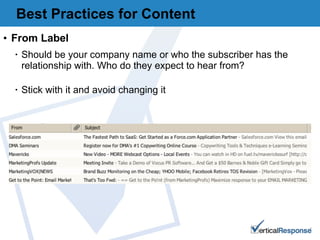
From Label Should be your company name or who the subscriber has the relationship with. Who do they expect to hear from? Stick with it and avoid changing it Best Practices for Content
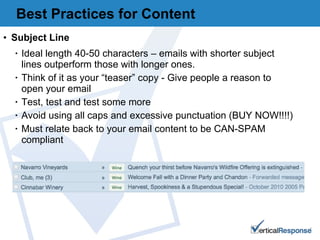
Subject Line Ideal length 40-50 characters – emails with shorter subject lines outperform those with longer ones.  Think of it as your “teaser” copy - Give people a reason to open your email Test, test and test some more Avoid using all caps and excessive punctuation (BUY NOW!!!!) Must relate back to your email content to be CAN-SPAM compliant Best Practices for Content
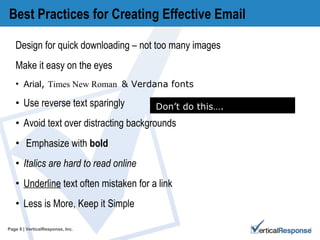
Best Practices for Creating Effective Email Design for quick downloading – not too many images Make it easy on the eyes Arial ,  Times New Roman  & Verdana  fonts  Use reverse text sparingly  Avoid text over distracting backgrounds Emphasize with  bold Italics are hard to read online  Underline  text often mistaken for a link Less is More, Keep it Simple Page   | VerticalResponse, Inc. Don’t do this….
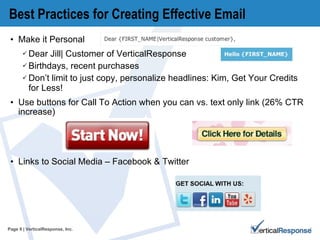
Best Practices for Creating Effective Email Make it Personal  Dear Jill| Customer of VerticalResponse  Birthdays, recent purchases Don’t limit to just copy, personalize headlines: Kim, Get Your Credits for Less! Use buttons for Call To Action when you can vs. text only link (26% CTR increase) Links to Social Media – Facebook & Twitter  Page   | VerticalResponse, Inc.
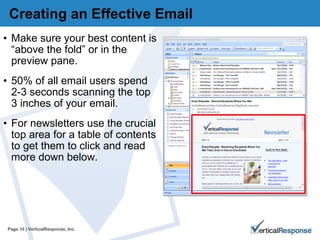
Creating an Effective Email Make sure your best content is “above the fold” or in the preview pane. 50% of all email users spend 2-3 seconds scanning the top 3 inches of your email.  For newsletters use the crucial top area for a table of contents to get them to click and read more down below.  Page   | VerticalResponse, Inc.
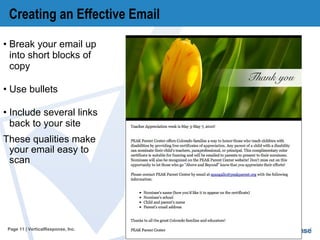
Creating an Effective Email Break your email up into short blocks of copy Use bullets Include several links back to your site These qualities make your email easy to scan Page   | VerticalResponse, Inc.
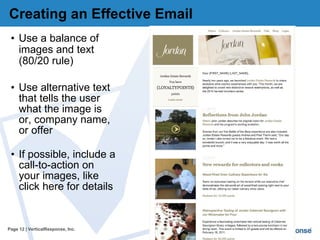
Creating an Effective Email Use a balance of images and text (80/20 rule) Use alternative text that tells the user what the image is or, company name, or offer If possible, include a call-to-action on your images, like click here for details Page   | VerticalResponse, Inc.
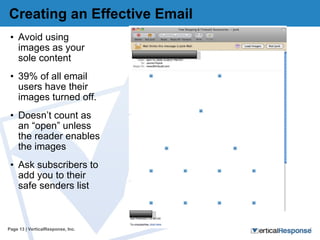
Creating an Effective Email Avoid using images as your sole content 39% of all email users have their images turned off.  Doesn’t count as an “open” unless the reader enables the images Ask subscribers to add you to their safe senders list Page   | VerticalResponse, Inc.
5 RIGHT Ways to Build Your List
Getting Started with Your List  Start at square one – assess where you are.  What are your goals – to grow your list, get more engaged subscribers, expand your reach? Think about what existing resources you have and what news ones you can add. "34% more sales are generated by customers subscribed to newsletters.” – emailstatcenter.com
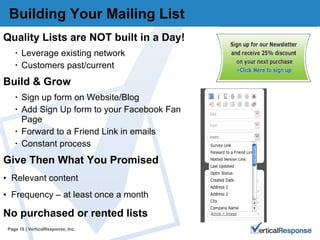
Building Your Mailing List  Quality Lists are NOT built in a Day! Leverage existing network Customers past/current Build & Grow  Sign up form on Website/Blog Add Sign Up form to your Facebook Fan Page Forward to a Friend Link in emails Constant process  Give Then What You Promised Relevant content Frequency – at least once a month No purchased or rented lists  Page   | VerticalResponse, Inc.
Build It & They Will Come Productive email lists are grown over time. Your list building is an on-going process You can lose up to 1/3 of your list each year, so you must keep adding subscribers 28% of email addresses become unreachable on average, within a  12-month period. It is crucial to compensate for list churn and substantially grow your email lists. - MRSS/Advocacy Institute  ENonprofit Benchmarks Study (2005 )
Idea #1 – Use What You’ve Got Friends First  – Send friends, colleagues and customers a message asking them to sign up Go Fishing  – Collect Email Addresses in a fishbowl at POS or events – you can also ask if they want their receipt emailed to them
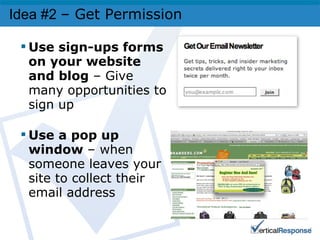
Idea #2  – Get Permission   Use sign-ups forms on your website and blog  – Give many opportunities to sign up Use a pop up window  – when someone leaves your site to collect their email address
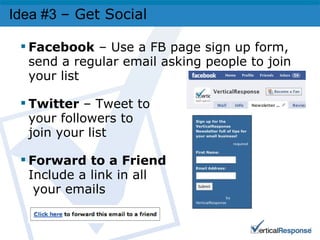
Idea #3  – Get Social Facebook  – Use a FB page sign up form, send a regular email asking people to join your list  Twitter  – Tweet to your followers to join your list Forward to a Friend Include a link in all  your emails
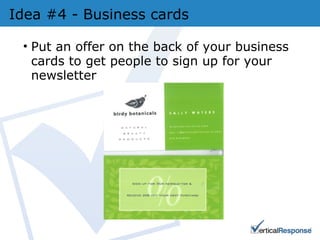
Idea #4 - Business cards Put an offer on the back of your business cards to get people to sign up for your newsletter
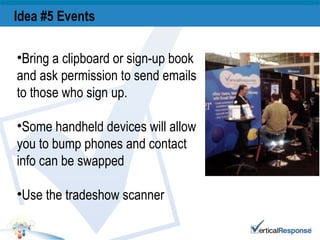
Idea #5 Events   Bring a clipboard or sign-up book and ask permission to send emails to those who sign up. Some handheld devices will allow you to bump phones and contact info can be swapped Use the tradeshow scanner
Making Social Media & Email  Work Together
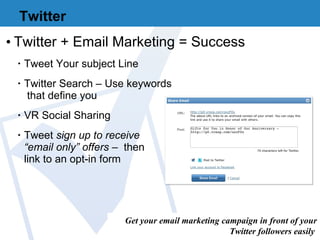
Twitter Twitter + Email Marketing = Success Tweet Your subject Line Twitter Search – Use keywords  that define you VR Social Sharing Tweet  sign up to receive  “email only” offers  –  then  link to an opt-in form Get your email marketing campaign in front of your Twitter followers easily .
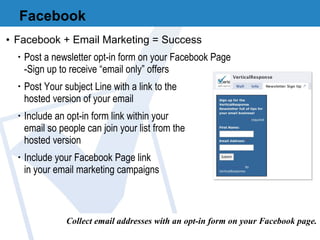
Facebook Facebook + Email Marketing = Success Post a newsletter opt-in form on your Facebook Page -Sign up to receive “email only” offers Post Your subject Line with a link to the  hosted version of your email Include an opt-in form link within your  email so people can join your list from the  hosted version Include your Facebook Page link  in your email marketing campaigns Collect email addresses with an opt-in form on your Facebook page.
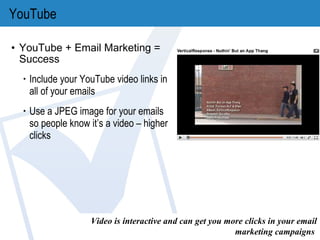
YouTube YouTube + Email Marketing = Success Include your YouTube video links in all of your emails Use a JPEG image for your emails so people know it’s a video – higher clicks Video is interactive and can get you more clicks in your email marketing campaigns .
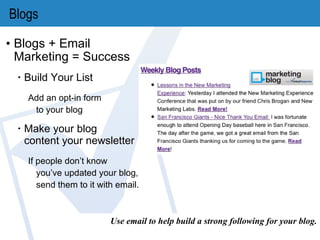
Blogs Blogs + Email Marketing = Success Build Your List Add an opt-in form  to your blog Make your blog  content your newsletter If people don’t know you’ve updated your blog, send them to it with email. Use email to help build a strong following for your blog.
Social Media Best Practices Encourage Customers to Engage  Show Off Your Brand Don’t Be Scared of Bad Reviews Stay with It Highlight Things Other Than Your Business Think About the Connections and related information your customers would like Let People Know Where You Are  Twitter/Facebook/LinkedIn/YouTube/Yelp
Connect To connect with VerticalResponse:  Twitter: @VR4SmallBiz @janinepopick Facebook:  www.facebook.com/verticalresponse YouTube: VRTube To Contact Customer Support:  Live Chat Email Support: Support@VerticalResponse.com Call: 866-6VERTICAL
VerticalResponse Tools & Resources  How to Do Everything http://help.verticalresponse.com Getting Started Kit http://www.verticalresponse.com/getstarted/ Regular Live Demos & Webinars  http://www.verticalresponse.com/events/ Getting Started with VerticalResponse (every Tuesday at 10 am PDT) Recorded Webinars http://help.verticalresponse.com/webinars/ VR Marketing Lounge – Email 101- Email Marketing for Beginners Group Page   | VerticalResponse, Inc.
Special 15% off all VerticalResponse purchases for Chamber members when you sign up here: www.verticalresponse.com/sfchamber Edit footer in the view menu Page   | VerticalResponse, Inc.
Q&A Page   | VerticalResponse, Inc.

SF Chamber jan2011

  • 1.
    Jill Bastian Trainingand Education Manager VerticalResponse Making Social Media & Email Work Together Page | VerticalResponse, Inc.
  • 2.
    Agenda Why EmailMarketing Works Email Marketing Basics and Best Practices Growing Mailing lists Social Media Tools & Resources To Get You Started Page | VerticalResponse, Inc.
  • 3.
    Why Email MarketingWorks Easy to Use Requires no technical expertise Fast Create a simple email in minutes (500+ templates) Real time reporting on opens, clicks, and more Affordable Free Trial Pay As You Go or Monthly Pricing options High ROI Page | VerticalResponse, Inc.
  • 4.
    Why Have anEmail Emails build relationships, retention and loyalty It Helps Grow Your Business & Get Referrals Stay in front of your audience Send reminder emails as events near Sell your products & services Send thank you emails and anniversary emails to keep in touch and get referrals
  • 5.
    Email Marketing Basicsand Best Practices
  • 6.
    From Label Shouldbe your company name or who the subscriber has the relationship with. Who do they expect to hear from? Stick with it and avoid changing it Best Practices for Content
  • 7.
    Subject Line Ideallength 40-50 characters – emails with shorter subject lines outperform those with longer ones. Think of it as your “teaser” copy - Give people a reason to open your email Test, test and test some more Avoid using all caps and excessive punctuation (BUY NOW!!!!) Must relate back to your email content to be CAN-SPAM compliant Best Practices for Content
  • 8.
    Best Practices forCreating Effective Email Design for quick downloading – not too many images Make it easy on the eyes Arial , Times New Roman & Verdana fonts Use reverse text sparingly Avoid text over distracting backgrounds Emphasize with bold Italics are hard to read online Underline text often mistaken for a link Less is More, Keep it Simple Page | VerticalResponse, Inc. Don’t do this….
  • 9.
    Best Practices forCreating Effective Email Make it Personal Dear Jill| Customer of VerticalResponse Birthdays, recent purchases Don’t limit to just copy, personalize headlines: Kim, Get Your Credits for Less! Use buttons for Call To Action when you can vs. text only link (26% CTR increase) Links to Social Media – Facebook & Twitter Page | VerticalResponse, Inc.
  • 10.
    Creating an EffectiveEmail Make sure your best content is “above the fold” or in the preview pane. 50% of all email users spend 2-3 seconds scanning the top 3 inches of your email. For newsletters use the crucial top area for a table of contents to get them to click and read more down below. Page | VerticalResponse, Inc.
  • 11.
    Creating an EffectiveEmail Break your email up into short blocks of copy Use bullets Include several links back to your site These qualities make your email easy to scan Page | VerticalResponse, Inc.
  • 12.
    Creating an EffectiveEmail Use a balance of images and text (80/20 rule) Use alternative text that tells the user what the image is or, company name, or offer If possible, include a call-to-action on your images, like click here for details Page | VerticalResponse, Inc.
  • 13.
    Creating an EffectiveEmail Avoid using images as your sole content 39% of all email users have their images turned off. Doesn’t count as an “open” unless the reader enables the images Ask subscribers to add you to their safe senders list Page | VerticalResponse, Inc.
  • 14.
    5 RIGHT Waysto Build Your List
  • 15.
    Getting Started withYour List Start at square one – assess where you are. What are your goals – to grow your list, get more engaged subscribers, expand your reach? Think about what existing resources you have and what news ones you can add. "34% more sales are generated by customers subscribed to newsletters.” – emailstatcenter.com
  • 16.
    Building Your MailingList Quality Lists are NOT built in a Day! Leverage existing network Customers past/current Build & Grow Sign up form on Website/Blog Add Sign Up form to your Facebook Fan Page Forward to a Friend Link in emails Constant process Give Then What You Promised Relevant content Frequency – at least once a month No purchased or rented lists Page | VerticalResponse, Inc.
  • 17.
    Build It &They Will Come Productive email lists are grown over time. Your list building is an on-going process You can lose up to 1/3 of your list each year, so you must keep adding subscribers 28% of email addresses become unreachable on average, within a 12-month period. It is crucial to compensate for list churn and substantially grow your email lists. - MRSS/Advocacy Institute ENonprofit Benchmarks Study (2005 )
  • 18.
    Idea #1 –Use What You’ve Got Friends First – Send friends, colleagues and customers a message asking them to sign up Go Fishing – Collect Email Addresses in a fishbowl at POS or events – you can also ask if they want their receipt emailed to them
  • 19.
    Idea #2 – Get Permission Use sign-ups forms on your website and blog – Give many opportunities to sign up Use a pop up window – when someone leaves your site to collect their email address
  • 20.
    Idea #3 – Get Social Facebook – Use a FB page sign up form, send a regular email asking people to join your list Twitter – Tweet to your followers to join your list Forward to a Friend Include a link in all your emails
  • 21.
    Idea #4 -Business cards Put an offer on the back of your business cards to get people to sign up for your newsletter
  • 22.
    Idea #5 Events Bring a clipboard or sign-up book and ask permission to send emails to those who sign up. Some handheld devices will allow you to bump phones and contact info can be swapped Use the tradeshow scanner
  • 23.
    Making Social Media& Email Work Together
  • 24.
    Twitter Twitter +Email Marketing = Success Tweet Your subject Line Twitter Search – Use keywords that define you VR Social Sharing Tweet sign up to receive “email only” offers – then link to an opt-in form Get your email marketing campaign in front of your Twitter followers easily .
  • 25.
    Facebook Facebook +Email Marketing = Success Post a newsletter opt-in form on your Facebook Page -Sign up to receive “email only” offers Post Your subject Line with a link to the hosted version of your email Include an opt-in form link within your email so people can join your list from the hosted version Include your Facebook Page link in your email marketing campaigns Collect email addresses with an opt-in form on your Facebook page.
  • 26.
    YouTube YouTube +Email Marketing = Success Include your YouTube video links in all of your emails Use a JPEG image for your emails so people know it’s a video – higher clicks Video is interactive and can get you more clicks in your email marketing campaigns .
  • 27.
    Blogs Blogs +Email Marketing = Success Build Your List Add an opt-in form to your blog Make your blog content your newsletter If people don’t know you’ve updated your blog, send them to it with email. Use email to help build a strong following for your blog.
  • 28.
    Social Media BestPractices Encourage Customers to Engage Show Off Your Brand Don’t Be Scared of Bad Reviews Stay with It Highlight Things Other Than Your Business Think About the Connections and related information your customers would like Let People Know Where You Are Twitter/Facebook/LinkedIn/YouTube/Yelp
  • 29.
    Connect To connectwith VerticalResponse: Twitter: @VR4SmallBiz @janinepopick Facebook: www.facebook.com/verticalresponse YouTube: VRTube To Contact Customer Support: Live Chat Email Support: Support@VerticalResponse.com Call: 866-6VERTICAL
  • 30.
    VerticalResponse Tools &Resources How to Do Everything http://help.verticalresponse.com Getting Started Kit http://www.verticalresponse.com/getstarted/ Regular Live Demos & Webinars http://www.verticalresponse.com/events/ Getting Started with VerticalResponse (every Tuesday at 10 am PDT) Recorded Webinars http://help.verticalresponse.com/webinars/ VR Marketing Lounge – Email 101- Email Marketing for Beginners Group Page | VerticalResponse, Inc.
  • 31.
    Special 15% offall VerticalResponse purchases for Chamber members when you sign up here: www.verticalresponse.com/sfchamber Edit footer in the view menu Page | VerticalResponse, Inc.
  • 32.
    Q&A Page | VerticalResponse, Inc.

Editor's Notes

  • #4 It is very easy and quick to set up your email marketing campaign. In fact, with a bit of preparation, you can create and send your first campaign in about an hour. Then you can use that campaign as a template and add new content. You get your results in real time, Once you hit launch, you immediately have access to our robust reporting that tells you who opened, clicked, etc on your campaign. We offer unlimited emails for as little as $10/month or just about a penny a piece if you want to pay as you go. And, not for profits mail free with VerticalResponse! Email marketing provides the highest ROI across all marketing channels – it is expected that for every dollar marketers spend on email in 2010 they'll receive $42.08. Email marketing delivers the biggest bang for your buck.
  • #5 The best results come when you have an established relationship with people who want and are expecting to hear from you. Make sense right? If you get an email from a friend or a stranger which do you open first? The friend of course. And the best way to keep that friend is to mail them relevant information in a timely and meaningful manner. If you only mail 1/x a quarter, your friends may forget you and unsubscribe. We recommend mailing at least 1/x a month so you don’t get forgotten.
  • #7 What’s the point of having an awesome looking email if no one opens it? From Label Some say this is the most important part of your email. I know it is for me. Every morning as I go through my in box, if I don’t recognize WHO all of those email I got overnight are coming FROM, I usually disregard that message. So its good practice for this to be your company name and stick with it. If you change it up, you may all of a sudden be unrecognizable. Even to the loyalist of readers.
  • #8 Your Subject Line Keep it short & sweet. A lot of email client’s subject space cut off at 40 or so characters so keep that I mind. BIG MISTAKES- Masking words like FREE, using excessive punctuation, and all CAPS (which is considered screaming online) are sure to get your email set directly to the junk folder. Over 50% of consumers determine the value of each email message by using the subject line. –Return Path Holiday Consumer Survey, 2007 The best subject lines: 1) Clearly state the offer 2) Offer a Discount 3) Include Brand name
  • #9 Not too many images – will slow down loading Use easy to read fonts- Arial, verdana Times New roman Text Size: avoid too small – hard to read or too LARGE- affects deliverability 11 -12 pt font Less is More- don’t try to use every font, color and style in the book- too distracting and looks unprofessional
  • #10 Using Personalization can make your campaign more impactful. It makes sense…which do you prefer… To Whom it may concern, or ‘Dear Richard”. The second one seems like someone actually cares and took the time to consider who they were sending the message to. Don’t forget your mailing address in your message- when you use VR, this auto populates from your profile, so you don’t have to worry- and, if for some reason, you’ve forgotten, we check every email that leaves our servers to ensure CAN-SPAM compliance. So, we’ll send you a friendly reminder to fix it before we let your email out of the gates. It’s a good practice to remind your readers that they’ve signed up for your list and asked to hear from you, just in case they’ve forgotten and one of my favorites is including a Forward to A Friend link, This helps spread the word and grow your list too. We used this very effectively when we were nominated for best jeweler and needed to get lots of people to cast a vote for us!
  • #11 Make sure important information is seen with out scrolling Standard view width 600 px; Templates are built this way – fixed width Outlook Preview = 200 pxdown Typical email view window 600px down
  • #12 It can be tempting to try and say too much in an email, but when you want your recipient to take action, it should be clear to them what you want them to do when they open the email. Consumers spend 15-20 seconds with an opened/clicked email Use action verbs Be direct and specific Buy Now = Loyal Customers Learn More = Newer Relationships Incentive/Reward = Building Relationships Clearly state the Value of taking that action: Click to see all 10 tax tips, Learn more techniques to reduce stress, Create a Sense of Urgency: Limited Time Limited Quantities
  • #13 Have a good balance of images and text Make images clickable Use Alt Text for your images- good for those who don’t view images and for blind subscribers who use screen readers.
  • #14 39% of all email users view emails with images turned off - default for gmail and some versions of Outlook We track an email open based on whether or not an invisible tracking image within the email was loaded by the recipient.  Since many email browsers turn images off by default (requiring end users to click a link to view images in the email they receive), only those people interested enough in the email to turn the images on – or those people who do not have this restriction on their own inbox – will be reported as an open if they open the email.  The need for an image also means that opens for plain text emails cannot be tracked.
  • #17 How to Build Your List? Good Question! The answer is thoughtfully and over time. We see lists with as few as 5 people to over millions here at VR, so everyone starts somewhere. The best way to grow your list is to use your existing resources and add a few new ones: If you have a retail location, add a point­of­sale  sign up form. At conferences or events, ask everyone you speak with if you may add them to your list after you exchange business cards. Finally, add your newsletter sign­up form to every page on your web site Ask your customers if they want to join your list to hear from you (let them know what the value is – special offers, etc)- refer a friend programs (VR #1 source) Business partners in like, or complimentary businesses can be great sources (partner up in your industry) An Opt-In form is a easy way to grow your list. When you sign up for VR, you get an opt-in form for free with your account. We recommend adding it to several areas of your website and/or blog. The best results come when you have an established relationship with people who want and are expecting to hear from you. Make sense right? If you get an email from a friend or a stranger which do you open first? The friend of course. And the best way to keep that friend is to mail them relevant information in a timely and meaningful manner. If you only mail 1/x a quarter, your friends may forget you and unsubscribe. We recommend mailing at least 1/x a month so you don’t get forgotten. Why don’t we allow purchased or rented lists? We do not allow the use of purchased, rented, harvested/scraped or third-party lists, as these lists tend to generate a high number of complaints. Complaints can directly impact our relationship with ISPs. We are extremely strict in regards to the mailing lists we allow in our system, in order to preserve our high deliverability rate for all of our clients. Okay, now let’s talk about your offer…
  • #22 One of companies using our system, Birdy Botanicals has a url on the back of their business cards directing people to sign up for their newsletters. Plus, they give a 25% off discount on the first purchase when they do!
  • #25 Twitter and email marketing are a great team when it comes to business marketing. After you launch your email marketing messages post an archived version to Twitter. Many times your subject line is a perfect tweet. But make sure to think about who your twitter followers are. If your subject line is Easter Sale – 15% Off, that is a great subject line for customers who already know who you are – but if someone stumbles upon your tweet and doesn’t know what you sell they might not be as interested to check it out. In that case I would add your product or service to your subject line. The screenshot on the right show you just how easy it is to do this from within your VerticalResponse account. We automatically pull your subject line into this text field for you in case you want to change it. Then you can post it to either Twitter, or Facebook or both! You’ll then be getting your email marketing campaign in front of many more potential customers that aren’t on your list. While I have this picture up I also want to point out the archived link. It is on the top of this image. You can copy and paste this image to show off your newsletter any where you want. We have a few customers that link old versions of their newsletter on their website or blog – they offer them as teasers for people to sign up for their newsletter list – which I personally think is a great strategy especially if you have fresh content every newsletter. Now Twitter Search – Many people who are on Twitter use a handful of Twitter tools to help them search and organize the twitter world. In our office we use, Tweet Deck, CoTweet, Hootsuite, and Back Tweets just to name a few. When customers and potential customers are searching key words really become important. For instance if you’re interested in looking at anyone that mentions chardonnay, you can simply input that keyword and you’ll get all Twitter conversations that have that keyword in the Tweet. So when you’re using twitter, make sure you use keywords you want people to find you with. Also, another reminder to include “follow us on Twitter” links in your email marketing campaigns. Not only do you want your current customers to follow you but you email could get forwarded and you will get a chance to pick up a few more followers. If you’ve got an opt-in form on your site, Tweet to your followers “Sign Up to receive email only offers”, then use the link where your opt in form is hosted. If your followers like you and think they’ll get something of value, you’ll build your list.
  • #26 So, what makes pairing Facebook and Email Marketing a success? You can post a newsletter optin form on your facebook fan page an example of what that would look like is shown here. This way you can also offer “email only” offers for those that join. We touched on this - You’ll want to post that hosted version of your email you just spent onto Facebook. It helps extend the life and reach of each one of your email campaigns – making sure you get what you put into each one. And don’t forget to include a link to your opt-in form in your email marketing campaigns this will help you capture new fans. Include your Facebook links in your email marketing campaigns along with your Twitter handle. Some people just like Facebook more than Twitter or Twitter more than Facebook so you need to make sure you let everyone know you are in both places.
  • #27 So how do you make videos and email marketing successful? Video is a very engaging tactic. People understand it and love multimedia instead of a static image. So if you can make it work, post a few videos, include them in your email campaigns and watch your clicks increase. You cannot actually embed videos in our email – they are just such large files that you can’t guaranteed your email would be delivered. We recommend that you include a picture of your video in the email, then have your recipients click through to it. It makes more of an impact that a text link. RECENT STUDIES SHOW YOU COULD GET 2-3X THE CTR WITH VIDEO LINKS/VIDEO IN YOUR EMAILS
  • #28 It’s also the voice of your business. So many customers want to know there are human beings behind the companies they do business with these days. Blogging is a perfect platform for you to easily do this. Your posts don't have to be long and they should be easy-to-read. People will retweet you and post your blog content to their Facebook pages if they  think it's worthy. This could potentially give you access to new readers and new customers. You can track how many people have retweeted your blog content by going to Backtweets.com , entering your blog post URL and page through all of your retweets. You can also add an opt in form to your blog so that your readers will opt in to getting your newsletter updates of your blog. What we do and have seen many customers do is to make the blog content their news letter content. It’s especially great if you’re updating weekly or monthly. You have a great reason to get in front of your recipients again with an email campaign. You can include a teaser with links back to your blog to drive traffic to it. You can also include links in the email to your store or site as well.
  • #29 So let’s talk about some social media best practices. Encouraging your customers to engage is important. If you cross promote your social media with your email campaigns you’re off to a great start. You need to be pushing your message with both mediums and getting your customers to subscribe to both and get them talking about you. Don’t be scared of showing off your brand. This is your chance to show what your brand really stands for. Bad reviews? No problem. It’s all about transparency here folks. It’s all about how you address the review. Confront it, then have an answer for it, try not to attack. You will get credit for your response. And you will be surprised at how many of your customers might jump in and try to answer questions too. Stay with it – This is important. Social media success is something that happens over time. You are not going to get 1,000 twitter followers over night. You’ll also want to take a moment out to highlight things other than your business. People want to know you’re human and your employees are human, not robots. People buy from people. Make sure, as we’ve noted you highlight where you are in the world of social media!
  • #30 Thanks for spending time with us, I think we’ll be posting this so you can get this information soon and we’ll email you with it. Another great use of social media and email marketing!
  • #31 Also as a wrap-up we want to remind you of all the resources we have available to you. Our website Our new Getting Started Kit- Guides, recorded webinars, and more Our Email Checklist- download Sign up for our Marketing Newsletter Read the Blog