-Hussain KMR Behestee
     Software Engineer
   The JAXARA IT Ltd.
           [Session-1]
Agendas
 iOS App Dev Basics
 Building Hello World App
 Application Architecture
 Application States
 Coding in Objective C
 Short Message Send
 Storyboarding
 Static Table View
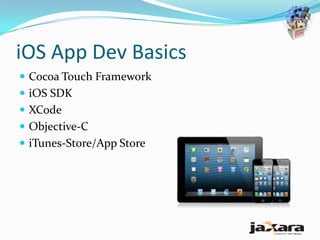
iOS App Dev Basics
 Cocoa Touch Framework
 iOS SDK
 XCode
 Objective-C
 iTunes-Store/App Store
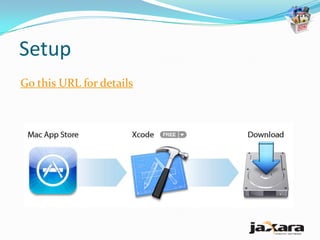
Setup
Go this URL for details
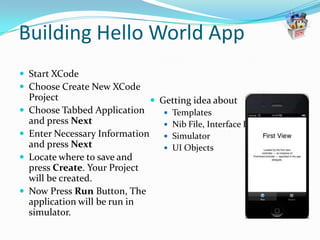
Building Hello World App
 Start XCode
 Choose Create New XCode
    Project                     Getting idea about
   Choose Tabbed Application      Templates
    and press Next                 Nib File, Interface Builder
   Enter Necessary Information  Simulator
    and press Next                 UI Objects
   Locate where to save and
    press Create. Your Project
    will be created.
   Now Press Run Button, The
    application will be run in
    simulator.
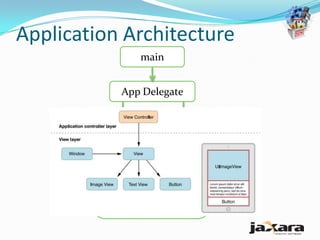
Application Architecture
                main


            App Delegate

                          View
                        Controller

         Main Window

           View Controller
             Screen view
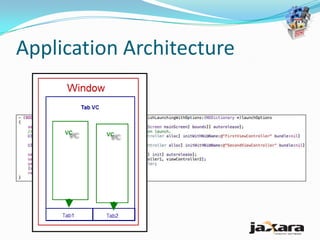
Application Architecture
App          The app delegate is a custom object created at app launch time, usually by the
delegate     UIApplicationMain function. The primary job of this object is to handle state
             transitions within the app. For example, this object is responsible for launch-time
             initialization and handling transitions to and from the background. For information
             about how you use the app delegate to manage state transitions, see Managing
             App State Changes”
View         View controller objects manage the presentation of your app’ s content on screen. A
controller   view controller manages a single view and its collection of subviews. When presented,
             the view controller makes its views visible by installing them in the app’ s window.
             The UIViewController class is the base class for all view controller objects. It provides
             default functionality for loading views, presenting them, rotating them in response to
             device rotations, and several other standard system behaviors. UIKit and other
             frameworks define additional view controller classes to implement standard system
             interfaces such as the image picker , tab bar interface, and navigation interface.
UIWindow     A UIWindow object coordinates the presentation of one or more views on a screen.
             Most apps have only one window, which presents content on the main screen, but apps
             may have an additional window for content displayed on an external display .
             T o change the content of your app, you use a view controller to change the views
             displayed in the corresponding window. Y ou never replace the window itself .
             In addition to hosting views, windows work with the UIApplication object to deliver
             events to your views and view controllers.
Application Architecture
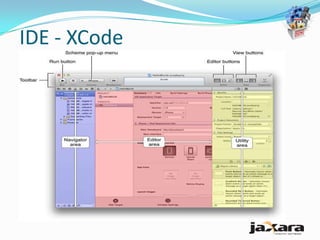
IDE - XCode
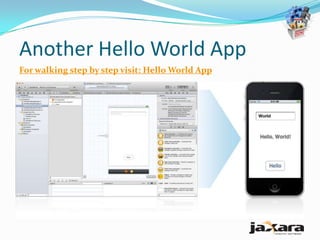
Another Hello World App
For walking step by step visit: Hello World App
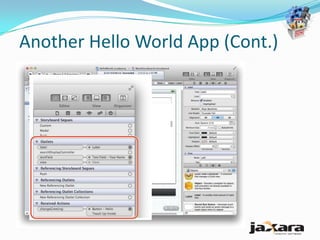
Another Hello World App (Cont.)
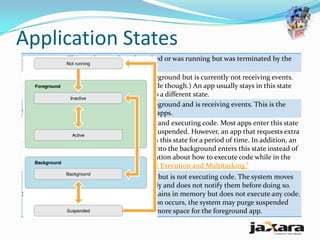
Application States
           The app has not been launched or was running but was terminated by the
Not running
           system.
           The app is running in the foreground but is currently not receiving events.
Inactive   (It may be executing other code though.) An app usually stays in this state
           only briefly as it transitions to a different state.
           The app is running in the foreground and is receiving events. This is the
Active
           normal mode for foreground apps.
           The app is in the background and executing code. Most apps enter this state
           briefly on their way to being suspended. However, an app that requests extra
           execution time may remain in this state for a period of time. In addition, an
Background
           app being launched directly into the background enters this state instead of
           the inactive state. For information about how to execute code while in the
           background, see “Background Execution and Multitasking.”
              The app is in the background but is not executing code. The system moves
              apps to this state automatically and does not notify them before doing so.
Suspended     While suspended, an app remains in memory but does not execute any code.
              When a low-memory condition occurs, the system may purge suspended
              apps without notice to make more space for the foreground app.
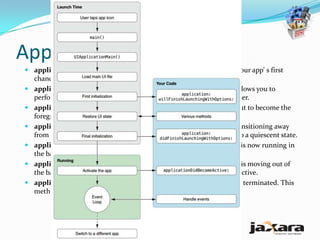
Application States
 application:willFinishLaunchingWithOptions:This method is your app’ s first
  chance to execute code at launch time.
 application:didFinishLaunchingWithOptions:—This method allows you to
  perform any final initialization before your app is displayed to the user.
 applicationDidBecomeActive:—Lets your app know that it is about to become the
  foreground app. Use this method for any last minute preparation.
 applicationWillResignActive:—Lets you know that your app is transitioning away
  from being the foreground app. Use this method to put your app into a quiescent state.
 applicationDidEnterBackground:—Lets you know that your app is now running in
  the background and may be suspended at any time.
 applicationWillEnterForeground:—Lets you know that your app is moving out of
  the background and back into the foreground, but that it is not yet active.
 applicationWillTerminate:—Lets you know that your app is being terminated. This
  method is not called if your app is suspended.
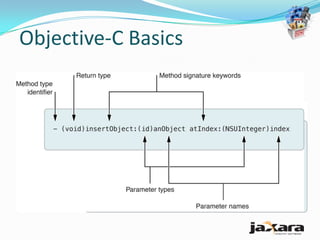
Objective-C Basics
Objective-C Basics
 By default, these accessor methods are synthesized
  automatically for you by the compiler, so you don’t need to
  do anything other than declare the property using
  @property in the class interface.
   @property NSString *firstName;
   NSString *firstName = [somePerson firstName];
   [somePerson setFirstName:@"Johnny"];
 The method used to access the value (the getter method)
  has the same name as the property.
 The method used to set the value (the setter method) starts
  with the word “set” and then uses the capitalized property
  name.
Objective-C Basics
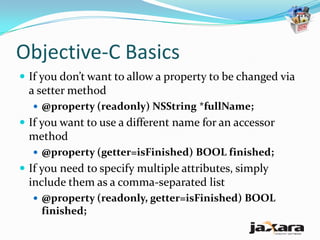
 If you don’t want to allow a property to be changed via
  a setter method
   @property (readonly) NSString *fullName;
 If you want to use a different name for an accessor
  method
   @property (getter=isFinished) BOOL finished;
 If you need to specify multiple attributes, simply
  include them as a comma-separated list
   @property (readonly, getter=isFinished) BOOL
    finished;
Objective-C Basics
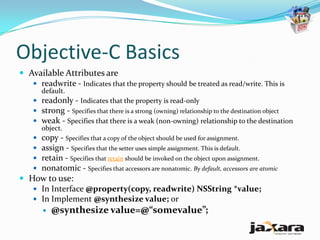
 Available Attributes are
    readwrite - Indicates that the property should be treated as read/write. This is
       default.
     readonly - Indicates that the property is read-only
     strong - Specifies that there is a strong (owning) relationship to the destination object
     weak - Specifies that there is a weak (non-owning) relationship to the destination
      object.
     copy - Specifies that a copy of the object should be used for assignment.
     assign - Specifies that the setter uses simple assignment. This is default.
     retain - Specifies that retain should be invoked on the object upon assignment.
     nonatomic - Specifies that accessors are nonatomic. By default, accessors are atomic
 How to use:
    In Interface @property(copy, readwrite) NSString *value;
    In Implement @synthesize value; or
          @synthesize value=@“somevalue”;
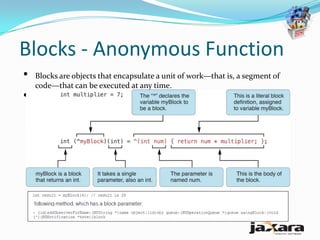
Blocks - Anonymous Function
•   Blocks are objects that encapsulate a unit of work—that is, a segment of
    code—that can be executed at any time.
•   A caret (^) is used as a syntactic marker for blocks.
Short Message Send
 Syntax
    [receiver message]
 Example
    [myRectangle display];
    [myRectangle setWidth:20.0];
    [myRectangle setOriginX: 30.0 y: 50.0];
 When the Params are optional
    [receiver makeGroup:group, memberOne, memberTwo,
     memberThree];
 Nested messaging
    [myRectangle setPrimaryColor:[otherRect primaryColor]];
 Message chaining
    x = [[[person address] street] name];
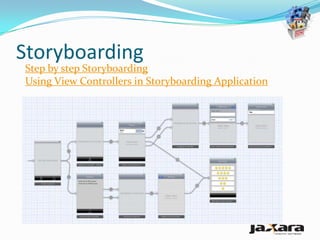
Storyboarding
Step by step Storyboarding
Using View Controllers in Storyboarding Application
Static Table View
 In the Attributes inspector, choose Static Cells in the
  Content pop-up menu.

iOS app dev Training - Session1

  • 2.
    -Hussain KMR Behestee Software Engineer The JAXARA IT Ltd. [Session-1]
  • 3.
    Agendas  iOS AppDev Basics  Building Hello World App  Application Architecture  Application States  Coding in Objective C  Short Message Send  Storyboarding  Static Table View
  • 4.
    iOS App DevBasics  Cocoa Touch Framework  iOS SDK  XCode  Objective-C  iTunes-Store/App Store
  • 5.
    Setup Go this URLfor details
  • 6.
    Building Hello WorldApp  Start XCode  Choose Create New XCode Project  Getting idea about  Choose Tabbed Application  Templates and press Next  Nib File, Interface Builder  Enter Necessary Information  Simulator and press Next  UI Objects  Locate where to save and press Create. Your Project will be created.  Now Press Run Button, The application will be run in simulator.
  • 7.
    Application Architecture main App Delegate View Controller Main Window View Controller Screen view
  • 8.
    Application Architecture App The app delegate is a custom object created at app launch time, usually by the delegate UIApplicationMain function. The primary job of this object is to handle state transitions within the app. For example, this object is responsible for launch-time initialization and handling transitions to and from the background. For information about how you use the app delegate to manage state transitions, see Managing App State Changes” View View controller objects manage the presentation of your app’ s content on screen. A controller view controller manages a single view and its collection of subviews. When presented, the view controller makes its views visible by installing them in the app’ s window. The UIViewController class is the base class for all view controller objects. It provides default functionality for loading views, presenting them, rotating them in response to device rotations, and several other standard system behaviors. UIKit and other frameworks define additional view controller classes to implement standard system interfaces such as the image picker , tab bar interface, and navigation interface. UIWindow A UIWindow object coordinates the presentation of one or more views on a screen. Most apps have only one window, which presents content on the main screen, but apps may have an additional window for content displayed on an external display . T o change the content of your app, you use a view controller to change the views displayed in the corresponding window. Y ou never replace the window itself . In addition to hosting views, windows work with the UIApplication object to deliver events to your views and view controllers.
  • 9.
  • 10.
  • 11.
    Another Hello WorldApp For walking step by step visit: Hello World App
  • 12.
  • 13.
    Application States The app has not been launched or was running but was terminated by the Not running system. The app is running in the foreground but is currently not receiving events. Inactive (It may be executing other code though.) An app usually stays in this state only briefly as it transitions to a different state. The app is running in the foreground and is receiving events. This is the Active normal mode for foreground apps. The app is in the background and executing code. Most apps enter this state briefly on their way to being suspended. However, an app that requests extra execution time may remain in this state for a period of time. In addition, an Background app being launched directly into the background enters this state instead of the inactive state. For information about how to execute code while in the background, see “Background Execution and Multitasking.” The app is in the background but is not executing code. The system moves apps to this state automatically and does not notify them before doing so. Suspended While suspended, an app remains in memory but does not execute any code. When a low-memory condition occurs, the system may purge suspended apps without notice to make more space for the foreground app.
  • 14.
    Application States  application:willFinishLaunchingWithOptions:Thismethod is your app’ s first chance to execute code at launch time.  application:didFinishLaunchingWithOptions:—This method allows you to perform any final initialization before your app is displayed to the user.  applicationDidBecomeActive:—Lets your app know that it is about to become the foreground app. Use this method for any last minute preparation.  applicationWillResignActive:—Lets you know that your app is transitioning away from being the foreground app. Use this method to put your app into a quiescent state.  applicationDidEnterBackground:—Lets you know that your app is now running in the background and may be suspended at any time.  applicationWillEnterForeground:—Lets you know that your app is moving out of the background and back into the foreground, but that it is not yet active.  applicationWillTerminate:—Lets you know that your app is being terminated. This method is not called if your app is suspended.
  • 15.
  • 16.
    Objective-C Basics  Bydefault, these accessor methods are synthesized automatically for you by the compiler, so you don’t need to do anything other than declare the property using @property in the class interface.  @property NSString *firstName;  NSString *firstName = [somePerson firstName];  [somePerson setFirstName:@"Johnny"];  The method used to access the value (the getter method) has the same name as the property.  The method used to set the value (the setter method) starts with the word “set” and then uses the capitalized property name.
  • 17.
    Objective-C Basics  Ifyou don’t want to allow a property to be changed via a setter method  @property (readonly) NSString *fullName;  If you want to use a different name for an accessor method  @property (getter=isFinished) BOOL finished;  If you need to specify multiple attributes, simply include them as a comma-separated list  @property (readonly, getter=isFinished) BOOL finished;
  • 18.
    Objective-C Basics  AvailableAttributes are  readwrite - Indicates that the property should be treated as read/write. This is default.  readonly - Indicates that the property is read-only  strong - Specifies that there is a strong (owning) relationship to the destination object  weak - Specifies that there is a weak (non-owning) relationship to the destination object.  copy - Specifies that a copy of the object should be used for assignment.  assign - Specifies that the setter uses simple assignment. This is default.  retain - Specifies that retain should be invoked on the object upon assignment.  nonatomic - Specifies that accessors are nonatomic. By default, accessors are atomic  How to use:  In Interface @property(copy, readwrite) NSString *value;  In Implement @synthesize value; or  @synthesize value=@“somevalue”;
  • 19.
    Blocks - AnonymousFunction • Blocks are objects that encapsulate a unit of work—that is, a segment of code—that can be executed at any time. • A caret (^) is used as a syntactic marker for blocks.
  • 20.
    Short Message Send Syntax  [receiver message]  Example  [myRectangle display];  [myRectangle setWidth:20.0];  [myRectangle setOriginX: 30.0 y: 50.0];  When the Params are optional  [receiver makeGroup:group, memberOne, memberTwo, memberThree];  Nested messaging  [myRectangle setPrimaryColor:[otherRect primaryColor]];  Message chaining  x = [[[person address] street] name];
  • 21.
    Storyboarding Step by stepStoryboarding Using View Controllers in Storyboarding Application
  • 22.
    Static Table View In the Attributes inspector, choose Static Cells in the Content pop-up menu.