ANDROID TRAINING
SESSION – 3
-Hussain KMR Behestee
AGENDAS
• Intents
– Explicit Intents
– Implicit intents
• Broadcast Receivers
• Notifications & Toasts
EXPLICIT INTENTS
• We saw some Explicit Intents in previous
session.
• Today we will see few more, like as
– Start another activity
– Start another activity with sending data
– Start another activity for getting result
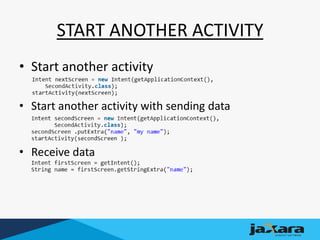
START ANOTHER ACTIVITY
• Start another activity
• Start another activity with sending data
• Receive data
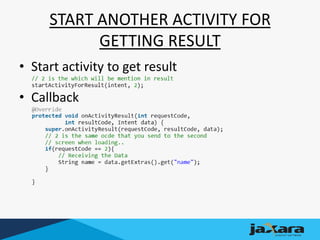
START ANOTHER ACTIVITY FOR
GETTING RESULT
• Start activity to get result
• Callback
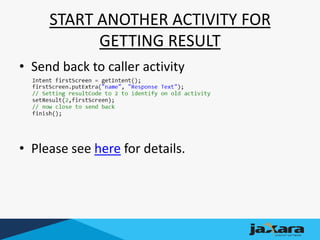
START ANOTHER ACTIVITY FOR
GETTING RESULT
• Send back to caller activity
• Please see here for details.
IMPLICIT INTENT
• Implicit intent are those which intents have no
specific activity to show. We will learn here-
– Call other app to share your content
– Allow other apps to start your activity
– Call other app to do a task
– Caution
CALL OTHER APP TO SHARE YOUR
CONTENT
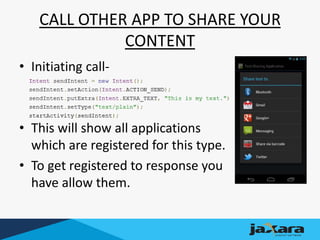
• Initiating call-
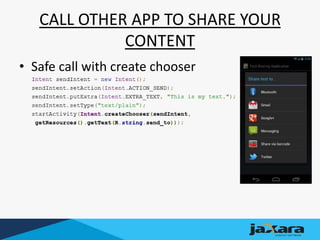
• This will show all applications
which are registered for this type.
• To get registered to response you
have allow them.
ALLOW OTHER APP TO START YOUR
ACTIVITY
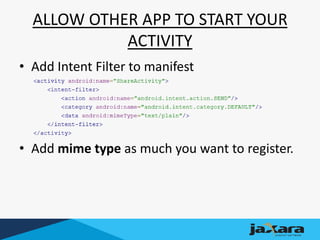
• Add Intent Filter to manifest
• Add mime type as much you want to register.
EXTRA
• Install apps to simulator
– adb install <file>
IMPLICIT INTENT: CAUTION
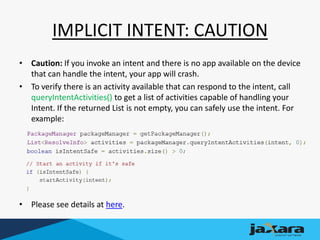
• Caution: If you invoke an intent and there is no app available on the device
that can handle the intent, your app will crash.
• To verify there is an activity available that can respond to the intent, call
queryIntentActivities() to get a list of activities capable of handling your
Intent. If the returned List is not empty, you can safely use the intent. For
example:
• Please see details at here.
CALL OTHER APP TO SHARE YOUR
CONTENT
• Safe call with create chooser
BROADCAST RECEIVERS
• A broadcast receiver is a component that
responds to system-wide Broadcast
announcements.
• Many broadcasts originate from the system
– For example, a Broadcast announcing that the
screen has turned off, the battery is low, or a
picture was captured or an SMS is received.
BROADCAST RECEIVERS
• Applications can also initiate broadcasts—for
example, to let other applications know that
some data has been downloaded to the
device and is available for them to use.
• Although broadcast receivers don't display a
user interface, they may create a status bar
notification to alert the user when a broadcast
event occurs.
BROADCAST RECEIVERS
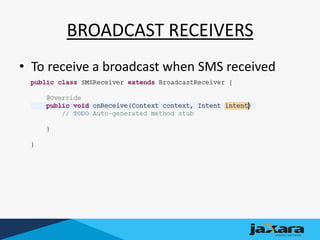
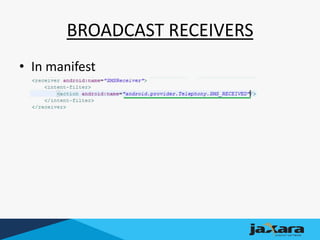
• To receive a broadcast when SMS received
BROADCAST RECEIVERS
• In manifest
NOTIFICATION
• Toast Display
– Toast.makeText(context, str,Toast.LENGTH_LONG).show();
• Notification drawer
– On Next Session ;-)
QUESTION?
THANK YOU

Android session 3-behestee

  • 1.
    ANDROID TRAINING SESSION –3 -Hussain KMR Behestee
  • 2.
    AGENDAS • Intents – ExplicitIntents – Implicit intents • Broadcast Receivers • Notifications & Toasts
  • 3.
    EXPLICIT INTENTS • Wesaw some Explicit Intents in previous session. • Today we will see few more, like as – Start another activity – Start another activity with sending data – Start another activity for getting result
  • 4.
    START ANOTHER ACTIVITY •Start another activity • Start another activity with sending data • Receive data
  • 5.
    START ANOTHER ACTIVITYFOR GETTING RESULT • Start activity to get result • Callback
  • 6.
    START ANOTHER ACTIVITYFOR GETTING RESULT • Send back to caller activity • Please see here for details.
  • 7.
    IMPLICIT INTENT • Implicitintent are those which intents have no specific activity to show. We will learn here- – Call other app to share your content – Allow other apps to start your activity – Call other app to do a task – Caution
  • 8.
    CALL OTHER APPTO SHARE YOUR CONTENT • Initiating call- • This will show all applications which are registered for this type. • To get registered to response you have allow them.
  • 9.
    ALLOW OTHER APPTO START YOUR ACTIVITY • Add Intent Filter to manifest • Add mime type as much you want to register.
  • 10.
    EXTRA • Install appsto simulator – adb install <file>
  • 11.
    IMPLICIT INTENT: CAUTION •Caution: If you invoke an intent and there is no app available on the device that can handle the intent, your app will crash. • To verify there is an activity available that can respond to the intent, call queryIntentActivities() to get a list of activities capable of handling your Intent. If the returned List is not empty, you can safely use the intent. For example: • Please see details at here.
  • 12.
    CALL OTHER APPTO SHARE YOUR CONTENT • Safe call with create chooser
  • 13.
    BROADCAST RECEIVERS • Abroadcast receiver is a component that responds to system-wide Broadcast announcements. • Many broadcasts originate from the system – For example, a Broadcast announcing that the screen has turned off, the battery is low, or a picture was captured or an SMS is received.
  • 14.
    BROADCAST RECEIVERS • Applicationscan also initiate broadcasts—for example, to let other applications know that some data has been downloaded to the device and is available for them to use. • Although broadcast receivers don't display a user interface, they may create a status bar notification to alert the user when a broadcast event occurs.
  • 15.
    BROADCAST RECEIVERS • Toreceive a broadcast when SMS received
  • 16.
  • 17.
    NOTIFICATION • Toast Display –Toast.makeText(context, str,Toast.LENGTH_LONG).show(); • Notification drawer – On Next Session ;-)
  • 18.
  • 19.