Session - 2


Presented By: A.T.M. Hassan Uzzaman
Agendas

 OOP Concepts in Objective-c
 Delegates and callbacks in Cocoa touch
 Table View, Customizing Cells
 PList (Read, write)
Obj-C vs C#
           Obj-C                                C#
 [[object method] method];           obj.method().method();
       Memory Pools                   Garbage Collection
             +/-                         static/instance
             nil                                null
(void)methodWithArg:(int)value {}   void method(int value) {}
            YES NO                          true false
           @protocol                         interface
Classes from Apple (and some history)
 NSString is a string of text that is immutable.
 NSMutableString is a string of text that is mutable.
 NSArray is an array of objects that is immutable.
 NSMutableArray is an array of objects that is
  mutable.
 NSNumber holds a numeric value.
Objective-C Characteristics and
Symbols
 Written differently from other languages
 Object communicate with messages—does not “call” a
  method.
 @ indicates a compiler directive. Objective-C has own
  preprocessor that processes @ directives.
 # indicates a preprocessor directive. Processes any #
  before it compiles.
Declare in Header file (.h)
Each method will start with either a – or a + symbol.
  - indicates an instance method (the receiver is an
  instance)
  +indicates a class method (the receiver is a class name)
Example of a instance method
-(IBAction)buttonPressed:(id)sender;
Or with one argument
-(void)setFillColor:(NSColor*) newFillColor;
Parts of a Method in a Class
 Implement the method in the .m file
 Example:
-(IBAction)buttonPressed:(id)sender{
do code here….
}
 Example 2:
-(void) setOutlineColor:(NSColor*) outlineColor{
  do code here….
}
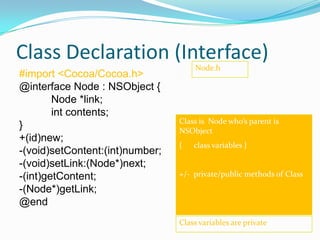
Class Declaration (Interface)
                                     Node.h
#import <Cocoa/Cocoa.h>
@interface Node : NSObject {
        Node *link;
        int contents;
                                 Class is Node who’s parent is
}                                NSObject
+(id)new;
                                 {   class variables }
-(void)setContent:(int)number;
-(void)setLink:(Node*)next;
-(int)getContent;                +/- private/public methods of Class
-(Node*)getLink;
@end
                                 Class variables are private
Class Definition (Implementation)
#import “Node.h”
@implementation Node                Node.m
+(id)new
          { return [Node alloc];}
-(void)setContent:(int)number
          {contents = number;}
-(void)setLink:(Node*)next {
          [link autorelease];
          link = [next retain];     Like your C++ .cpp
}                                   file
-(int)getContent
          {return contents;}
-(Node*)getLink                     >>just give the
          {return link;}            methods here
@end
Creating class instances
Creating an Object
    ClassName *object = [[ClassName alloc] init];
    ClassName *object = [[ClassName alloc] initWith* ];
         NSString* myString = [[NSString alloc] init];
         Nested method call. The first is the alloc method called on NSString itself.
            This is a relatively low-level call which reserves memory and instantiates an
            object. The second is a call to init on the new object. The init implementation
            usually does basic setup, such as creating instance variables. The details of
            that are unknown to you as a client of the class. In some cases, you may use a
            different version of init which takes input:


    ClassName *object = [ClassName method_to_create];
         NSString* myString = [NSString string];
         Some classes may define a special method that will in essence call alloc followed by some
          kind of init
Reference [[Person alloc] init];action
Person *person =
                 counting in
 Retain count begins at 1 with +alloc
[person retain];
 Retain count increases to 2 with -retain
[person release];
 Retain count decreases to 1 with -release
[person release];
 Retain count decreases to 0, -dealloc automatically
called
Autorelease
 Example: returning a newly created object
-(NSString *)fullName
{
  NSString *result;
  result = [[NSString alloc] initWithFormat:@“%@
%@”, firstName, lastName];

    [result autorelease]

    return result;
}
Method Names & Autorelease
 Methods whose names includes alloc, copy, or new return a retained
  object that the caller needs to release

NSMutableString *string = [[NSMutableString alloc] init];
// We are responsible for calling -release or -autorelease
[string autorelease];

 All other methods return autoreleased objects

NSMutableString *string = [NSMutableString string];
// The method name doesn’t indicate that we need to release
it, so don’t

 This is a convention- follow it in methods you define!
Polymorphism
 Just as the fields of a C structure are in a protected
  namespace, so are an object’s instance variables.
 Method names are also protected. Unlike the names of
  C functions, method names aren’t global symbols. The
  name of a method in one class can’t conflict with
  method names in other classes; two very different
  classes can implement identically named methods.
 Objective-C implements polymorphism of method
  names, but not parameter or operator overloading.
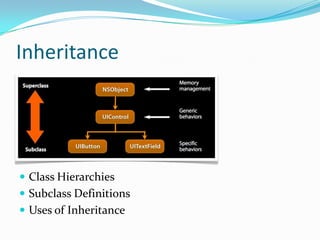
Inheritance


 Class Hierarchies
 Subclass Definitions
 Uses of Inheritance
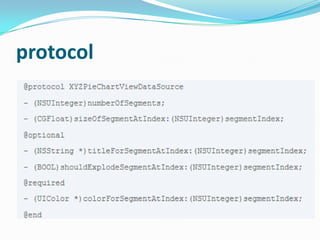
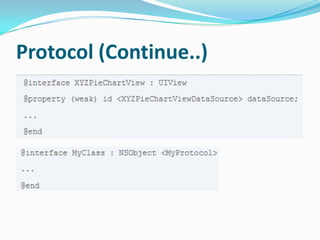
protocol
Protocol (Continue..)
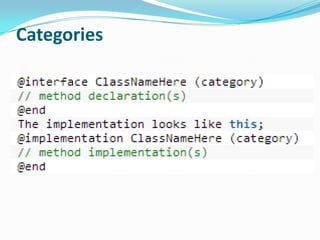
Categories
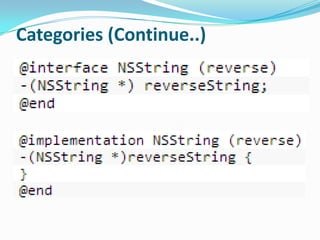
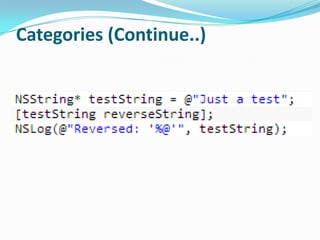
Categories (Continue..)
NSDictionary
 Immutable hash table. Look up objects using a key to get a
   value.
+ (id)dictionaryWithObjects:(NSArray *)values forKeys:(NSArray *)keys;
+ (id)dictionaryWithObjectsAndKeys:(id)firstObject, ...;
 Creation example:
NSDictionary *base = [NSDictionary dictionaryWithObjectsAndKeys:
                          [NSNumber numberWithInt:2], @“binary”,
                          [NSNumber numberWithInt:16], @“hexadecimal”, nil];
 Methods
              - (int)count;
              - (id)objectForKey:(id)key;
              - (NSArray *)allKeys;
              - (NSArray *)allValues;
see documentation (apple.com) for more details
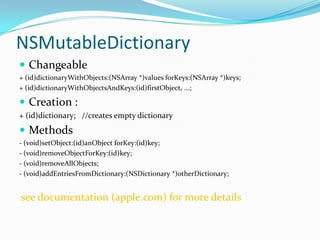
NSMutableDictionary
 Changeable
+ (id)dictionaryWithObjects:(NSArray *)values forKeys:(NSArray *)keys;
+ (id)dictionaryWithObjectsAndKeys:(id)firstObject, ...;

 Creation :
+ (id)dictionary; //creates empty dictionary
 Methods
- (void)setObject:(id)anObject forKey:(id)key;
- (void)removeObjectForKey:(id)key;
- (void)removeAllObjects;
- (void)addEntriesFromDictionary:(NSDictionary *)otherDictionary;


see documentation (apple.com) for more details
We will see this in

Property list (plist)                                            practice later


 A collection of collections
 Specifically, it is any graph of objects containing only the following classes:
          NSArray, NSDictionary, NSNumber, NSString, NSDate, NSData

 Example1 : NSArray is a Property List if all its members are too
     NSArray of NSString is a Property List
     NSArray of NSArray as long as those NSArray’s members are Property Lists.
 Example 2: NSDictionary is one only if all keys and values are too

 Why define this term?
     Because the SDK has a number of methods which operate on Property Lists.
     Usually to read them from somewhere or write them out to somewhere.
     [plist writeToFile:(NSString *)path atomically:(BOOL)]; // plist is NSArray or
      NSDictionary
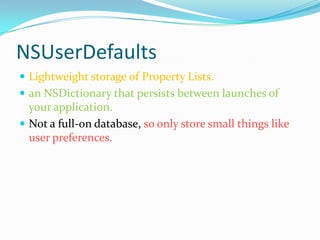
NSUserDefaults
 Lightweight storage of Property Lists.
 an NSDictionary that persists between launches of
  your application.
 Not a full-on database, so only store small things like
  user preferences.
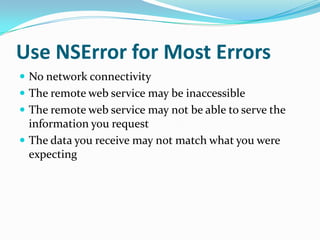
Use NSError for Most Errors
 No network connectivity
 The remote web service may be inaccessible
 The remote web service may not be able to serve the
  information you request
 The data you receive may not match what you were
  expecting
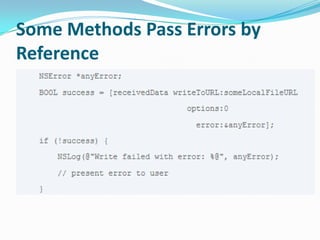
Some Methods Pass Errors by
Reference
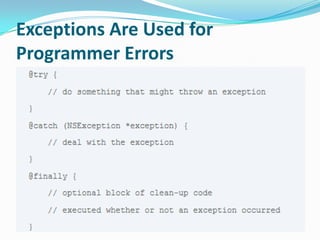
Exceptions Are Used for
Programmer Errors
Delegates and callbacks in
      Cocoa touch
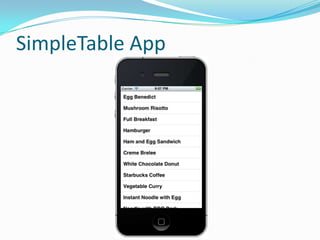
SimpleTable App
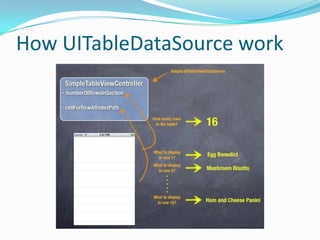
How UITableDataSource work
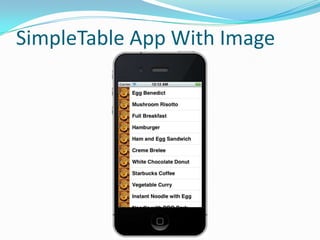
SimpleTable App With Image
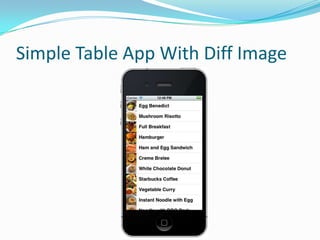
Simple Table App With Diff Image
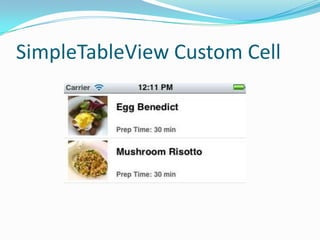
SimpleTableView Custom Cell
Questions ?
Thank you.

iOS Session-2

  • 1.
    Session - 2 PresentedBy: A.T.M. Hassan Uzzaman
  • 2.
    Agendas  OOP Conceptsin Objective-c  Delegates and callbacks in Cocoa touch  Table View, Customizing Cells  PList (Read, write)
  • 3.
    Obj-C vs C# Obj-C C# [[object method] method]; obj.method().method(); Memory Pools Garbage Collection +/- static/instance nil null (void)methodWithArg:(int)value {} void method(int value) {} YES NO true false @protocol interface
  • 4.
    Classes from Apple(and some history)  NSString is a string of text that is immutable.  NSMutableString is a string of text that is mutable.  NSArray is an array of objects that is immutable.  NSMutableArray is an array of objects that is mutable.  NSNumber holds a numeric value.
  • 5.
    Objective-C Characteristics and Symbols Written differently from other languages  Object communicate with messages—does not “call” a method.  @ indicates a compiler directive. Objective-C has own preprocessor that processes @ directives.  # indicates a preprocessor directive. Processes any # before it compiles.
  • 6.
    Declare in Headerfile (.h) Each method will start with either a – or a + symbol. - indicates an instance method (the receiver is an instance) +indicates a class method (the receiver is a class name) Example of a instance method -(IBAction)buttonPressed:(id)sender; Or with one argument -(void)setFillColor:(NSColor*) newFillColor;
  • 7.
    Parts of aMethod in a Class  Implement the method in the .m file  Example: -(IBAction)buttonPressed:(id)sender{ do code here…. }  Example 2: -(void) setOutlineColor:(NSColor*) outlineColor{ do code here…. }
  • 8.
    Class Declaration (Interface) Node.h #import <Cocoa/Cocoa.h> @interface Node : NSObject { Node *link; int contents; Class is Node who’s parent is } NSObject +(id)new; { class variables } -(void)setContent:(int)number; -(void)setLink:(Node*)next; -(int)getContent; +/- private/public methods of Class -(Node*)getLink; @end Class variables are private
  • 9.
    Class Definition (Implementation) #import“Node.h” @implementation Node Node.m +(id)new { return [Node alloc];} -(void)setContent:(int)number {contents = number;} -(void)setLink:(Node*)next { [link autorelease]; link = [next retain]; Like your C++ .cpp } file -(int)getContent {return contents;} -(Node*)getLink >>just give the {return link;} methods here @end
  • 10.
    Creating class instances Creatingan Object ClassName *object = [[ClassName alloc] init]; ClassName *object = [[ClassName alloc] initWith* ];  NSString* myString = [[NSString alloc] init];  Nested method call. The first is the alloc method called on NSString itself. This is a relatively low-level call which reserves memory and instantiates an object. The second is a call to init on the new object. The init implementation usually does basic setup, such as creating instance variables. The details of that are unknown to you as a client of the class. In some cases, you may use a different version of init which takes input: ClassName *object = [ClassName method_to_create];  NSString* myString = [NSString string];  Some classes may define a special method that will in essence call alloc followed by some kind of init
  • 11.
    Reference [[Person alloc]init];action Person *person = counting in Retain count begins at 1 with +alloc [person retain]; Retain count increases to 2 with -retain [person release]; Retain count decreases to 1 with -release [person release]; Retain count decreases to 0, -dealloc automatically called
  • 12.
    Autorelease  Example: returninga newly created object -(NSString *)fullName { NSString *result; result = [[NSString alloc] initWithFormat:@“%@ %@”, firstName, lastName]; [result autorelease] return result; }
  • 13.
    Method Names &Autorelease  Methods whose names includes alloc, copy, or new return a retained object that the caller needs to release NSMutableString *string = [[NSMutableString alloc] init]; // We are responsible for calling -release or -autorelease [string autorelease];  All other methods return autoreleased objects NSMutableString *string = [NSMutableString string]; // The method name doesn’t indicate that we need to release it, so don’t  This is a convention- follow it in methods you define!
  • 14.
    Polymorphism  Just asthe fields of a C structure are in a protected namespace, so are an object’s instance variables.  Method names are also protected. Unlike the names of C functions, method names aren’t global symbols. The name of a method in one class can’t conflict with method names in other classes; two very different classes can implement identically named methods.  Objective-C implements polymorphism of method names, but not parameter or operator overloading.
  • 15.
    Inheritance  Class Hierarchies Subclass Definitions  Uses of Inheritance
  • 16.
  • 17.
  • 18.
  • 19.
  • 20.
  • 21.
    NSDictionary  Immutable hashtable. Look up objects using a key to get a value. + (id)dictionaryWithObjects:(NSArray *)values forKeys:(NSArray *)keys; + (id)dictionaryWithObjectsAndKeys:(id)firstObject, ...;  Creation example: NSDictionary *base = [NSDictionary dictionaryWithObjectsAndKeys: [NSNumber numberWithInt:2], @“binary”, [NSNumber numberWithInt:16], @“hexadecimal”, nil];  Methods  - (int)count;  - (id)objectForKey:(id)key;  - (NSArray *)allKeys;  - (NSArray *)allValues; see documentation (apple.com) for more details
  • 22.
    NSMutableDictionary  Changeable + (id)dictionaryWithObjects:(NSArray*)values forKeys:(NSArray *)keys; + (id)dictionaryWithObjectsAndKeys:(id)firstObject, ...;  Creation : + (id)dictionary; //creates empty dictionary  Methods - (void)setObject:(id)anObject forKey:(id)key; - (void)removeObjectForKey:(id)key; - (void)removeAllObjects; - (void)addEntriesFromDictionary:(NSDictionary *)otherDictionary; see documentation (apple.com) for more details
  • 23.
    We will seethis in Property list (plist) practice later  A collection of collections  Specifically, it is any graph of objects containing only the following classes:  NSArray, NSDictionary, NSNumber, NSString, NSDate, NSData  Example1 : NSArray is a Property List if all its members are too  NSArray of NSString is a Property List  NSArray of NSArray as long as those NSArray’s members are Property Lists.  Example 2: NSDictionary is one only if all keys and values are too  Why define this term?  Because the SDK has a number of methods which operate on Property Lists.  Usually to read them from somewhere or write them out to somewhere.  [plist writeToFile:(NSString *)path atomically:(BOOL)]; // plist is NSArray or NSDictionary
  • 24.
    NSUserDefaults  Lightweight storageof Property Lists.  an NSDictionary that persists between launches of your application.  Not a full-on database, so only store small things like user preferences.
  • 25.
    Use NSError forMost Errors  No network connectivity  The remote web service may be inaccessible  The remote web service may not be able to serve the information you request  The data you receive may not match what you were expecting
  • 26.
    Some Methods PassErrors by Reference
  • 27.
    Exceptions Are Usedfor Programmer Errors
  • 28.
  • 29.
  • 30.
  • 31.
  • 32.
    Simple Table AppWith Diff Image
  • 33.
  • 34.
  • 35.