IOS Development
Lec 2
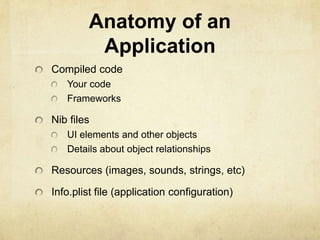
Anatomy of an
         Application
Compiled code
   Your code
   Frameworks

Nib files
   UI elements and other objects
   Details about object relationships

Resources (images, sounds, strings, etc)

Info.plist file (application configuration)
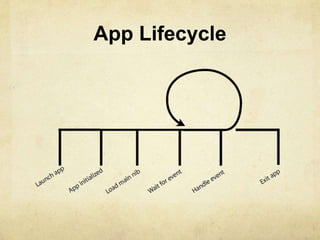
App Lifecycle
UIKit Framework
Starts your application
Every application has a single instance of UIApplication
   Singleton design pattern
@interface UIApplication + (UIApplication *)sharedApplication
@end
   Orchestrates the lifecycle of an application
   Dispatches events
   Manages status bar, application icon badge
   Rarely subclassed
      Uses delegation instead
Delegation
Control passed to delegate objects to perform
application- specific behavior

Avoids need to subclass complex objects

Many UIKit classes use delegates
   UIApplication
   UITableView
   UITextField
UIApplicationDelegate
Xcode project templates have one set up by
default

Object you provide that participates in application
lifecycle

Can implement various methods which
UIApplication will call
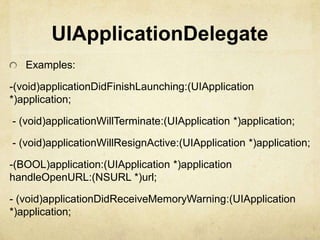
UIApplicationDelegate
   Examples:

-(void)applicationDidFinishLaunching:(UIApplication
*)application;

- (void)applicationWillTerminate:(UIApplication *)application;

- (void)applicationWillResignActive:(UIApplication *)application;

-(BOOL)application:(UIApplication *)application
handleOpenURL:(NSURL *)url;

- (void)applicationDidReceiveMemoryWarning:(UIApplication
*)application;
Info.plist file
Property List (often XML), describing your application
   Icon appearance
   Status bar style (default, black, hidden)
   Orientation
   Uses Wifi networking
   System Requirements

Can edit most properties in Xcode
Project > Edit Active Target “Foo” menu item
On the properties tab
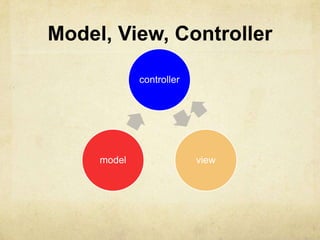
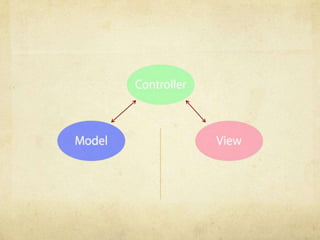
MVC
Model, View, Controller

             controller


     model                view
Model
Manages the app data and state

Not concerned with UI or presentation

Often persists somewhere

Same model should be reusable, unchanged in
different interfaces
View
Present the Model to the user in an appropriate
interface

Allows user to manipulate data

Does not store any data
   (except to cache state)

Easily reusable & configurable to display different
data
Controller
Intermediary between Model & View

Updates the view when the model changes

Updates the model when the user manipulates
the view

Typically where the app logic lives.
Demo
Interface Builder and
         Nibs
Nib Files - Design time
Helps you design the „V‟ in MVC:
   layout user interface elements
   add controller objects
   Connect the controller and UI
Nib Loading
At runtime, objects are unarchived
    Values/settings in Interface Builder are restored
    Ensures all outlets and actions are connected
    Order of unarchiving is not defined

If loading the nib automatically creates objects and order is
undefined, how do I customize?
    For example, to displaying initial state

    -awakeFromNib
Control point to implement any additional logic after nib
loading
Default empty implementation on NSObject

You often implement it in your controller class
   e.g. to restore previously saved application state

Guaranteed everything has been unarchived
from nib, and all connections are made before -
awakeFromNib is called
Controls – Events
View objects that allows users to initiate some type of
action

Respond to variety of events
   Touch events
      touchDown
      touchDragged (entered, exited, drag inside, drag
      outside)
      touchUp (inside, outside)
   Value changed
   Editing events
      editing began
      editing changed
      editing ended
Demo
Target/Action - event
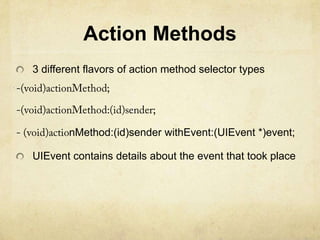
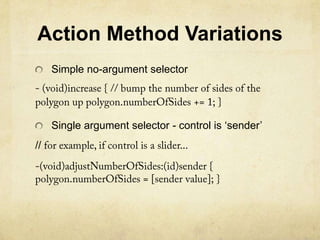
Action Methods
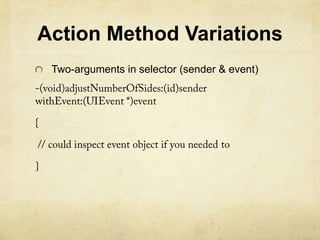
3 different flavors of action method selector types


        nMethod:(id)sender withEvent:(UIEvent *)event;

UIEvent contains details about the event that took place
Action Method Variations
     Simple no-argument selector


     Single argument selector - control is „sender‟
//
Action Method Variations
 Two-arguments in selector (sender & event)
Multiple target-actions
Controls can trigger multiple actions on different
targets in response to the same event

Different than Cocoa on the desktop where only
one target- action is supported

Different events can be setup in IB
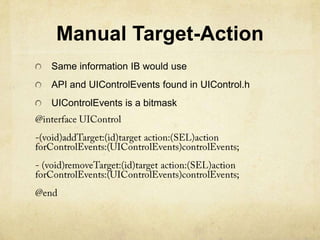
Manual Target-Action
Same information IB would use
API and UIControlEvents found in UIControl.h
UIControlEvents is a bitmask

Ios development 2

  • 1.
  • 2.
    Anatomy of an Application Compiled code Your code Frameworks Nib files UI elements and other objects Details about object relationships Resources (images, sounds, strings, etc) Info.plist file (application configuration)
  • 3.
  • 4.
    UIKit Framework Starts yourapplication Every application has a single instance of UIApplication Singleton design pattern @interface UIApplication + (UIApplication *)sharedApplication @end Orchestrates the lifecycle of an application Dispatches events Manages status bar, application icon badge Rarely subclassed Uses delegation instead
  • 5.
    Delegation Control passed todelegate objects to perform application- specific behavior Avoids need to subclass complex objects Many UIKit classes use delegates UIApplication UITableView UITextField
  • 6.
    UIApplicationDelegate Xcode project templateshave one set up by default Object you provide that participates in application lifecycle Can implement various methods which UIApplication will call
  • 7.
    UIApplicationDelegate Examples: -(void)applicationDidFinishLaunching:(UIApplication *)application; - (void)applicationWillTerminate:(UIApplication *)application; - (void)applicationWillResignActive:(UIApplication *)application; -(BOOL)application:(UIApplication *)application handleOpenURL:(NSURL *)url; - (void)applicationDidReceiveMemoryWarning:(UIApplication *)application;
  • 8.
    Info.plist file Property List(often XML), describing your application Icon appearance Status bar style (default, black, hidden) Orientation Uses Wifi networking System Requirements Can edit most properties in Xcode Project > Edit Active Target “Foo” menu item On the properties tab
  • 9.
  • 10.
    Model, View, Controller controller model view
  • 11.
    Model Manages the appdata and state Not concerned with UI or presentation Often persists somewhere Same model should be reusable, unchanged in different interfaces
  • 12.
    View Present the Modelto the user in an appropriate interface Allows user to manipulate data Does not store any data (except to cache state) Easily reusable & configurable to display different data
  • 13.
    Controller Intermediary between Model& View Updates the view when the model changes Updates the model when the user manipulates the view Typically where the app logic lives.
  • 15.
  • 16.
  • 17.
    Nib Files -Design time Helps you design the „V‟ in MVC: layout user interface elements add controller objects Connect the controller and UI
  • 18.
    Nib Loading At runtime,objects are unarchived Values/settings in Interface Builder are restored Ensures all outlets and actions are connected Order of unarchiving is not defined If loading the nib automatically creates objects and order is undefined, how do I customize? For example, to displaying initial state -awakeFromNib Control point to implement any additional logic after nib loading
  • 19.
    Default empty implementationon NSObject You often implement it in your controller class e.g. to restore previously saved application state Guaranteed everything has been unarchived from nib, and all connections are made before - awakeFromNib is called
  • 20.
    Controls – Events Viewobjects that allows users to initiate some type of action Respond to variety of events Touch events touchDown touchDragged (entered, exited, drag inside, drag outside) touchUp (inside, outside) Value changed Editing events editing began editing changed editing ended
  • 21.
  • 22.
    Action Methods 3 differentflavors of action method selector types nMethod:(id)sender withEvent:(UIEvent *)event; UIEvent contains details about the event that took place
  • 23.
    Action Method Variations Simple no-argument selector Single argument selector - control is „sender‟ //
  • 24.
    Action Method Variations Two-arguments in selector (sender & event)
  • 25.
    Multiple target-actions Controls cantrigger multiple actions on different targets in response to the same event Different than Cocoa on the desktop where only one target- action is supported Different events can be setup in IB
  • 26.
    Manual Target-Action Same informationIB would use API and UIControlEvents found in UIControl.h UIControlEvents is a bitmask

Editor's Notes

  • #22 UIControlEventTouchUpInside-(void)decrease