iOS Application Development
        -Hussain KMR Behestee
           The Jaxara IT LTD.
              [Session-3]
Agendas


∗ Programming with Segue
∗ Dynamic design through coding
  ∗ Views and its Co-ordinates
∗ Core animations
∗ Picture pickers
∗ Sound manager
∗ Address book picker
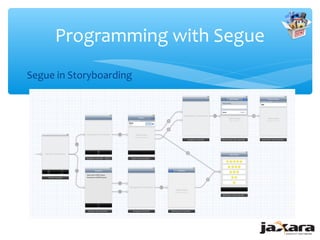
Programming with Segue
Segue in Storyboarding
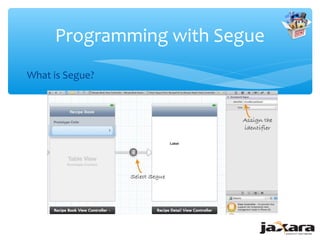
Programming with Segue
What is Segue?
Programming with Segue
Life Cycle of Segue
∗ Your app never creates segue objects directly, they are always created on
  your behalf by iOS when a segue is triggered.
∗ The destination controller is created and initialized.
∗ The segue object is created and its initWithIdentifier:source:destination:
  method is called. The identifier is the unique string you provided for the
  segue in Interface Builder, and the two other parameters represent the
  two controller objects in the transition.
∗ The source view controller’s prepareForSegue:sender: method is called.
∗ The segue object’s perform method is called. This method performs a
  transition to bring the destination view controller on-screen.
∗ The reference to the segue object is released, causing it to be
  deallocated.
Programming with Segue

Triggering a segue programmatically
- (void)orientationChanged:(NSNotification *)notification
{
   UIDeviceOrientation deviceOrientation =
            [UIDevice currentDevice].orientation;

    if (UIDeviceOrientationIsLandscape(deviceOrientation) &&
       !isShowingLandscapeView)

    {
        [self performSegueWithIdentifier:@"DisplayAlternateView" sender:self];
        isShowingLandscapeView = YES;
    }
}
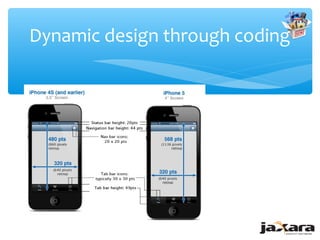
Dynamic design through coding


        UIView's frame:     The CGPoint:           The CGSize :
        struct CGRect       struct CGPoint         struct CGSize
        { CGPoint origin;   { CGFloat x; CGFloat   { CGFloat width;
        CGSize size; };     y; };                  CGFloat height; };


        [button setFrame:CGRectMake(x, y, width, height)];
Dynamic design through coding


∗ Creating UI Object on the fly
  UIImageView* campFireView = [[UIImageView alloc]
    initWithFrame: self.view.frame];
  campFireView.image = [UIImage
    imageWithName:@"image.png"];
∗ Adding to view
  [self.view addSubview: campFireView];
Core animations


∗ View Based Animation
  [UIView beginAnimations:nil context:NULL];
  [UIView setAnimationDuration:0.8];
  //animation logic here
  [UIView commitAnimations];
∗ Set animation complete callback
  [UIView setAnimationDidStopSelector:
    @selector(onAnimationComplete:finished:context:)];
∗ onAnimationComplete – Callback
  - (void)onAnimationComplete:(NSString *)animationID finished:
      (NSNumber *)finished context:(void *)context
Core animations

∗ Image Based Animation
   ∗   create the view that will execute our animation
   UIImageView* campFireView = [[UIImageView alloc]
      initWithFrame:self.view.frame];
   ∗   load all the frames of our animation
   campFireView.animationImages = [NSArray arrayWithObjects:
        [UIImage imageNamed:@"campFire01.gif"],
        [UIImage imageNamed:@"campFire02.gif"], nil];
   campFireView.animationDuration = 1.75;
   ∗   repeat the annimation forever
   campFireView.animationRepeatCount = 0;
   ∗   start animating
   [campFireView startAnimating];
   ∗ add the animation view to the main window
   [self.view addSubview:campFireView];
Picture pickers
Initialization..

∗ Initialize the Image Picker and set delegate for interaction
  picker = [[UIImagePickerController alloc] init];
  picker.delegate = self;
∗ Checking and setting Source type
  if ([UIImagePickerController isSourceTypeAvailable:UIImagePickerControllerSourceTypeCamera]){
           picker.sourceType = UIImagePickerControllerSourceTypeCamera;
  } else{
           picker.sourceType = UIImagePickerControllerSourceTypePhotoLibrary;
  }

∗ Call the picker to front
  [self presentViewController:picker animated:YES completion:NULL];
Picture pickers
Grabbing the image

∗ If the user cancels we just dismiss the picker and release the object
    - (void)imagePickerControllerDidCancel:(UIImagePickerController *) Picker
    {
             [[picker presentingViewController] dismissViewControllerAnimated:YES
                         completion:NULL];
    }
∗ But if the user selects an image or takes a photo with the camera
    (void)imagePickerController:(UIImagePickerController *)picker
    didFinishPickingMediaWithInfo:(NSDictionary *)info{
    {
            selectedImage.image = [info
                       objectForKey:UIImagePickerControllerOriginalImage];

            [[picker presentingViewController] dismissViewControllerAnimated:YES
                        completion:NULL];
    }
∗   For more information
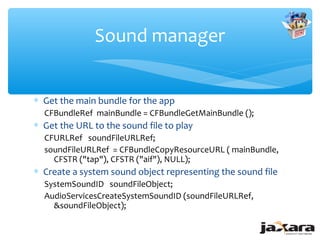
Sound manager


∗ Get the main bundle for the app
  CFBundleRef mainBundle = CFBundleGetMainBundle ();
∗ Get the URL to the sound file to play
  CFURLRef soundFileURLRef;
  soundFileURLRef = CFBundleCopyResourceURL ( mainBundle,
    CFSTR ("tap"), CFSTR ("aif"), NULL);
∗ Create a system sound object representing the sound file
  SystemSoundID soundFileObject;
  AudioServicesCreateSystemSoundID (soundFileURLRef,
    &soundFileObject);
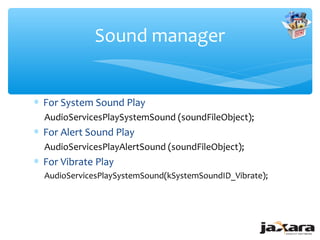
Sound manager


∗ For System Sound Play
  AudioServicesPlaySystemSound (soundFileObject);
∗ For Alert Sound Play
  AudioServicesPlayAlertSound (soundFileObject);
∗ For Vibrate Play
  AudioServicesPlaySystemSound(kSystemSoundID_Vibrate);
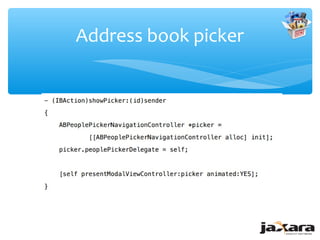
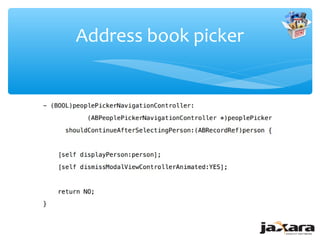
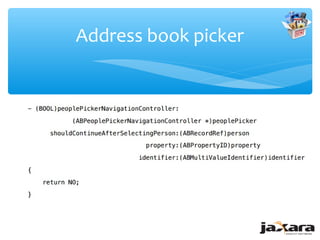
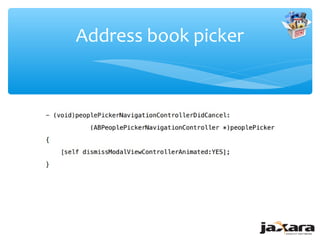
Address book picker


∗   Add Framework: AddressBookUI, AddressBook
∗   Add Header File: #import <AddressBookUI/AddressBookUI.h>
∗   Add Protocol : ABPeoplePickerNavigationControllerDelegate
∗   Responding to User Events
    ∗ peoplePickerNavigationController:shouldContinueAfterSelectingPerson:
    ∗ peoplePickerNavigationController:shouldContinueAfterSelectingPerson:pro
      perty:identifier:
    ∗ peoplePickerNavigationControllerDidCancel:
Address book picker
Address book picker
Address book picker
Address book picker
Question?


Thanks

iOS Training Session-3

  • 2.
    iOS Application Development -Hussain KMR Behestee The Jaxara IT LTD. [Session-3]
  • 3.
    Agendas ∗ Programming withSegue ∗ Dynamic design through coding ∗ Views and its Co-ordinates ∗ Core animations ∗ Picture pickers ∗ Sound manager ∗ Address book picker
  • 4.
  • 5.
  • 6.
    Programming with Segue LifeCycle of Segue ∗ Your app never creates segue objects directly, they are always created on your behalf by iOS when a segue is triggered. ∗ The destination controller is created and initialized. ∗ The segue object is created and its initWithIdentifier:source:destination: method is called. The identifier is the unique string you provided for the segue in Interface Builder, and the two other parameters represent the two controller objects in the transition. ∗ The source view controller’s prepareForSegue:sender: method is called. ∗ The segue object’s perform method is called. This method performs a transition to bring the destination view controller on-screen. ∗ The reference to the segue object is released, causing it to be deallocated.
  • 7.
    Programming with Segue Triggeringa segue programmatically - (void)orientationChanged:(NSNotification *)notification { UIDeviceOrientation deviceOrientation = [UIDevice currentDevice].orientation; if (UIDeviceOrientationIsLandscape(deviceOrientation) && !isShowingLandscapeView) { [self performSegueWithIdentifier:@"DisplayAlternateView" sender:self]; isShowingLandscapeView = YES; } }
  • 8.
    Dynamic design throughcoding UIView's frame: The CGPoint: The CGSize : struct CGRect struct CGPoint struct CGSize { CGPoint origin; { CGFloat x; CGFloat { CGFloat width; CGSize size; }; y; }; CGFloat height; }; [button setFrame:CGRectMake(x, y, width, height)];
  • 9.
  • 10.
    Dynamic design throughcoding ∗ Creating UI Object on the fly UIImageView* campFireView = [[UIImageView alloc] initWithFrame: self.view.frame]; campFireView.image = [UIImage imageWithName:@"image.png"]; ∗ Adding to view [self.view addSubview: campFireView];
  • 11.
    Core animations ∗ ViewBased Animation [UIView beginAnimations:nil context:NULL]; [UIView setAnimationDuration:0.8]; //animation logic here [UIView commitAnimations]; ∗ Set animation complete callback [UIView setAnimationDidStopSelector: @selector(onAnimationComplete:finished:context:)]; ∗ onAnimationComplete – Callback - (void)onAnimationComplete:(NSString *)animationID finished: (NSNumber *)finished context:(void *)context
  • 12.
    Core animations ∗ ImageBased Animation ∗ create the view that will execute our animation UIImageView* campFireView = [[UIImageView alloc] initWithFrame:self.view.frame]; ∗ load all the frames of our animation campFireView.animationImages = [NSArray arrayWithObjects: [UIImage imageNamed:@"campFire01.gif"], [UIImage imageNamed:@"campFire02.gif"], nil]; campFireView.animationDuration = 1.75; ∗ repeat the annimation forever campFireView.animationRepeatCount = 0; ∗ start animating [campFireView startAnimating]; ∗ add the animation view to the main window [self.view addSubview:campFireView];
  • 13.
    Picture pickers Initialization.. ∗ Initializethe Image Picker and set delegate for interaction picker = [[UIImagePickerController alloc] init]; picker.delegate = self; ∗ Checking and setting Source type if ([UIImagePickerController isSourceTypeAvailable:UIImagePickerControllerSourceTypeCamera]){ picker.sourceType = UIImagePickerControllerSourceTypeCamera; } else{ picker.sourceType = UIImagePickerControllerSourceTypePhotoLibrary; } ∗ Call the picker to front [self presentViewController:picker animated:YES completion:NULL];
  • 14.
    Picture pickers Grabbing theimage ∗ If the user cancels we just dismiss the picker and release the object - (void)imagePickerControllerDidCancel:(UIImagePickerController *) Picker { [[picker presentingViewController] dismissViewControllerAnimated:YES completion:NULL]; } ∗ But if the user selects an image or takes a photo with the camera (void)imagePickerController:(UIImagePickerController *)picker didFinishPickingMediaWithInfo:(NSDictionary *)info{ { selectedImage.image = [info objectForKey:UIImagePickerControllerOriginalImage]; [[picker presentingViewController] dismissViewControllerAnimated:YES completion:NULL]; } ∗ For more information
  • 15.
    Sound manager ∗ Getthe main bundle for the app CFBundleRef mainBundle = CFBundleGetMainBundle (); ∗ Get the URL to the sound file to play CFURLRef soundFileURLRef; soundFileURLRef = CFBundleCopyResourceURL ( mainBundle, CFSTR ("tap"), CFSTR ("aif"), NULL); ∗ Create a system sound object representing the sound file SystemSoundID soundFileObject; AudioServicesCreateSystemSoundID (soundFileURLRef, &soundFileObject);
  • 16.
    Sound manager ∗ ForSystem Sound Play AudioServicesPlaySystemSound (soundFileObject); ∗ For Alert Sound Play AudioServicesPlayAlertSound (soundFileObject); ∗ For Vibrate Play AudioServicesPlaySystemSound(kSystemSoundID_Vibrate);
  • 17.
    Address book picker ∗ Add Framework: AddressBookUI, AddressBook ∗ Add Header File: #import <AddressBookUI/AddressBookUI.h> ∗ Add Protocol : ABPeoplePickerNavigationControllerDelegate ∗ Responding to User Events ∗ peoplePickerNavigationController:shouldContinueAfterSelectingPerson: ∗ peoplePickerNavigationController:shouldContinueAfterSelectingPerson:pro perty:identifier: ∗ peoplePickerNavigationControllerDidCancel:
  • 18.
  • 19.
  • 20.
  • 21.
  • 22.