
08. Intent (Explicit)
Oum Saokosal
Master of Engineering in Information Systems, South Korea
855-12-252-752
oum_saokosal@yahoo.com
Agenda
• What is Intent?
• Intent: Invoke another Activity explicitly
• Put Extra with Intent
What is Intent? (1)
• There are many uses of intent.
– You can use intents to invoke other applications
from your application.
– You can use intents to invoke internal or external
components from your application.
– You can use intents to raise events so that others
can respond in a manner similar to a publish-and
subscribe model.
What is Intent? (2)
• At the simplest level, an intent is an action that
you can tell Android to invoke. That is, you can
invoke activity 02 from activity 01.
• In order to invoke like that, you need to register
those activities in AndroidManifest.xml.
• See Example: IntentExplicit.
Intent: Invoke another Activity
explicitly
public class Activity01 extends Activity {
/** Called when the activity is first created. */
@Override
public void onCreate(Bundle savedInstanceState) {
super.onCreate(savedInstanceState);
setContentView(R.layout.main01);
}
public void gotoProfile(View v){
Intent in = new Intent(this, Activity02.class);
startActivity(in);
}
}
main01.xml
<?xml version="1.0" encoding="utf-8"?>
<LinearLayout xmlns:android="http://schemas.android.com/apk/res/android"
android:layout_width="fill_parent"
android:layout_height="fill_parent"
android:orientation="vertical" >
<TextView
android:layout_width="fill_parent"
android:layout_height="wrap_content"
android:text="Name: Oum Saokosal" />
……
……
……
<Button
android:onClick="gotoProfile"
android:id="@+id/btnProfile"
android:layout_width="wrap_content"
android:layout_height="wrap_content"
android:text="Profile" />
</LinearLayout>
public class Activity02 extends Activity {
@Override
public void onCreate(Bundle savedInstanceState) {
super.onCreate(savedInstanceState);
setContentView(R.layout.main02);
}
public void backtoMain(View v){
Intent in = new Intent(this, Activity01.class);
startActivity(in);
}
}
main02.xml
<?xml version="1.0" encoding="utf-8"?>
<LinearLayout xmlns:android="http://schemas.android.com/apk/res/android"
android:layout_width="match_parent"
android:layout_height="match_parent"
android:orientation="vertical" >
<TextView
android:id="@+id/textView1"
android:layout_width="wrap_content"
android:layout_height="wrap_content"
android:text="Relationship: Engaged"
android:textAppearance="?android:attr/textAppearanceMedium" />
……
……
<Button
android:onClick="backtoMain"
android:id="@+id/btnBack"
android:layout_width="wrap_content"
android:layout_height="wrap_content"
android:text="Back"/>
</LinearLayout>
AndroidManifest.xml
<?xml version="1.0" encoding="utf-8"?>
<manifest xmlns:android="http://schemas.android.com/apk/res/android"
package="com.kosalab" android:versionCode="1" android:versionName="1.0" >
<uses-sdk android:minSdkVersion="10" />
<application
android:icon="@drawable/ic_launcher"
android:label="Intent Explicit" >
<activity
android:label="Activity01"
android:name=".Activity01" >
<intent-filter >
<action android:name="android.intent.action.MAIN" />
<category android:name="android.intent.category.LAUNCHER" />
</intent-filter>
</activity>
<activity android:label="Activity02" android:name=".Activity02"></activity>
</application>
</manifest>
Put Extra with Intent
• In PHP, you can send data from a file to
another file through session.
• Similar to that, you can send data from one
Activity to other one by putting extra with
Intent.
• The extra data is in the form of key/value
pairs.
putExtra() into Intent
public class Activity01 extends Activity {
/** Called when the activity is first created. */
@Override
public void onCreate(Bundle savedInstanceState) {
super.onCreate(savedInstanceState);
setContentView(R.layout.main01);
}
public void gotoProfile(View v){
Intent in = new Intent(this, Activity02.class);
in.putExtra("id", "4312");
startActivity(in);
}
}
getExtras() from getIntent
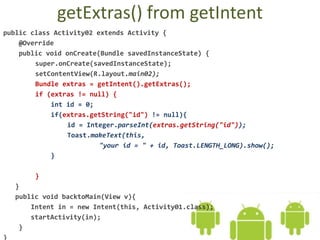
public class Activity02 extends Activity {
@Override
public void onCreate(Bundle savedInstanceState) {
super.onCreate(savedInstanceState);
setContentView(R.layout.main02);
Bundle extras = getIntent().getExtras();
if (extras != null) {
int id = 0;
if(extras.getString("id") != null){
id = Integer.parseInt(extras.getString("id"));
Toast.makeText(this,
"your id = " + id, Toast.LENGTH_LONG).show();
}
}
}
public void backtoMain(View v){
Intent in = new Intent(this, Activity01.class);
startActivity(in);
}
}
Go on to the next slide

08.1. Android How to Use Intent (explicit)

  • 1.
    08. Intent (Explicit) OumSaokosal Master of Engineering in Information Systems, South Korea 855-12-252-752 oum_saokosal@yahoo.com
  • 2.
    Agenda • What isIntent? • Intent: Invoke another Activity explicitly • Put Extra with Intent
  • 3.
    What is Intent?(1) • There are many uses of intent. – You can use intents to invoke other applications from your application. – You can use intents to invoke internal or external components from your application. – You can use intents to raise events so that others can respond in a manner similar to a publish-and subscribe model.
  • 4.
    What is Intent?(2) • At the simplest level, an intent is an action that you can tell Android to invoke. That is, you can invoke activity 02 from activity 01. • In order to invoke like that, you need to register those activities in AndroidManifest.xml. • See Example: IntentExplicit.
  • 5.
    Intent: Invoke anotherActivity explicitly
  • 6.
    public class Activity01extends Activity { /** Called when the activity is first created. */ @Override public void onCreate(Bundle savedInstanceState) { super.onCreate(savedInstanceState); setContentView(R.layout.main01); } public void gotoProfile(View v){ Intent in = new Intent(this, Activity02.class); startActivity(in); } }
  • 7.
    main01.xml <?xml version="1.0" encoding="utf-8"?> <LinearLayoutxmlns:android="http://schemas.android.com/apk/res/android" android:layout_width="fill_parent" android:layout_height="fill_parent" android:orientation="vertical" > <TextView android:layout_width="fill_parent" android:layout_height="wrap_content" android:text="Name: Oum Saokosal" /> …… …… …… <Button android:onClick="gotoProfile" android:id="@+id/btnProfile" android:layout_width="wrap_content" android:layout_height="wrap_content" android:text="Profile" /> </LinearLayout>
  • 8.
    public class Activity02extends Activity { @Override public void onCreate(Bundle savedInstanceState) { super.onCreate(savedInstanceState); setContentView(R.layout.main02); } public void backtoMain(View v){ Intent in = new Intent(this, Activity01.class); startActivity(in); } }
  • 9.
    main02.xml <?xml version="1.0" encoding="utf-8"?> <LinearLayoutxmlns:android="http://schemas.android.com/apk/res/android" android:layout_width="match_parent" android:layout_height="match_parent" android:orientation="vertical" > <TextView android:id="@+id/textView1" android:layout_width="wrap_content" android:layout_height="wrap_content" android:text="Relationship: Engaged" android:textAppearance="?android:attr/textAppearanceMedium" /> …… …… <Button android:onClick="backtoMain" android:id="@+id/btnBack" android:layout_width="wrap_content" android:layout_height="wrap_content" android:text="Back"/> </LinearLayout>
  • 10.
    AndroidManifest.xml <?xml version="1.0" encoding="utf-8"?> <manifestxmlns:android="http://schemas.android.com/apk/res/android" package="com.kosalab" android:versionCode="1" android:versionName="1.0" > <uses-sdk android:minSdkVersion="10" /> <application android:icon="@drawable/ic_launcher" android:label="Intent Explicit" > <activity android:label="Activity01" android:name=".Activity01" > <intent-filter > <action android:name="android.intent.action.MAIN" /> <category android:name="android.intent.category.LAUNCHER" /> </intent-filter> </activity> <activity android:label="Activity02" android:name=".Activity02"></activity> </application> </manifest>
  • 11.
    Put Extra withIntent • In PHP, you can send data from a file to another file through session. • Similar to that, you can send data from one Activity to other one by putting extra with Intent. • The extra data is in the form of key/value pairs.
  • 12.
    putExtra() into Intent publicclass Activity01 extends Activity { /** Called when the activity is first created. */ @Override public void onCreate(Bundle savedInstanceState) { super.onCreate(savedInstanceState); setContentView(R.layout.main01); } public void gotoProfile(View v){ Intent in = new Intent(this, Activity02.class); in.putExtra("id", "4312"); startActivity(in); } }
  • 13.
    getExtras() from getIntent publicclass Activity02 extends Activity { @Override public void onCreate(Bundle savedInstanceState) { super.onCreate(savedInstanceState); setContentView(R.layout.main02); Bundle extras = getIntent().getExtras(); if (extras != null) { int id = 0; if(extras.getString("id") != null){ id = Integer.parseInt(extras.getString("id")); Toast.makeText(this, "your id = " + id, Toast.LENGTH_LONG).show(); } } } public void backtoMain(View v){ Intent in = new Intent(this, Activity01.class); startActivity(in); } }
  • 15.
    Go on tothe next slide