ADO.NET
Session-11-12
Objectives
• ADO versus ADO.NET
• ADO.NET Architecture
• Connection Object
• Command Object
• DataReader Object
• DataAdapter Object
• DataSet Object
• DataView Object
• Use ADO.NET to access data in an application
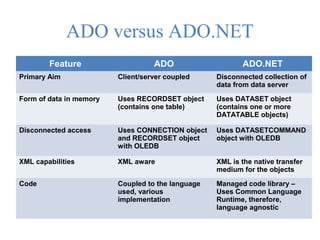
ADO versus ADO.NET
Feature ADO ADO.NET
Primary Aim Client/server coupled Disconnected collection of
data from data server
Form of data in memory Uses RECORDSET object
(contains one table)
Uses DATASET object
(contains one or more
DATATABLE objects)
Disconnected access Uses CONNECTION object
and RECORDSET object
with OLEDB
Uses DATASETCOMMAND
object with OLEDB
XML capabilities XML aware XML is the native transfer
medium for the objects
Code Coupled to the language
used, various
implementation
Managed code library –
Uses Common Language
Runtime, therefore,
language agnostic
 Although classic ADO was geared for a two - tiered
environment (client - server), ADO.NET addresses a
multi - tiered environment.
 ADO.NET offers many advanced features and many
different ways to retrieve your data and manipulate it
before presenting it to the end user.
 ADO.NET addresses a couple of the most common
data - access strategies that are used for
applications today
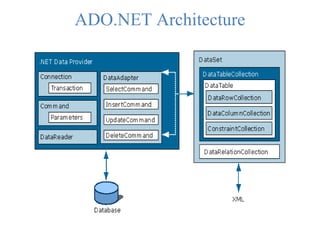
ADO.NET Architecture
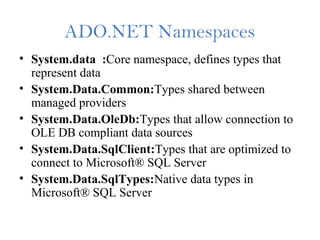
ADO.NET Namespaces
• System.data :Core namespace, defines types that
represent data
• System.Data.Common:Types shared between
managed providers
• System.Data.OleDb:Types that allow connection to
OLE DB compliant data sources
• System.Data.SqlClient:Types that are optimized to
connect to Microsoft® SQL Server
• System.Data.SqlTypes:Native data types in
Microsoft® SQL Server
Needed to build a data access
application
• For OLE DB:
using System.Data
using System.Data.OleDB
• For SQL Server:
using System.Data
using System.Data.SQLClient
Connection Object
• Two provider-specific classes
SqlConnection
OleDbConnection.
This information is provided via a single string
called a connection string.
You can also store this connection string in the
web.config file of your application.
 The OLEDbConnection object, which can provide
connection to a wide range of database types like
Microsoft Access and Oracle.
 The Connection object contains all of the information
required to open a connection to the database
 With ASP.NET , you will find that there is an easy
way to manage the storage of your connection strings
using the web.config file.
 This is actually a better way to store your connection
strings rather than hard-coding them within the code
of the application itself.
• To define your connection string within the
web.config file, you are going to make use of the
<connectionStrings> section. Within this section, you
can place an <add> element to define your
connection.
• What is Web.Config File?
• Web.config file, as it sounds like is a configuration
file for the Asp .net web application. An Asp .net
application has one web.config file which keeps the
configurations required for the corresponding
application. Web.config file is written in
XML(eXtensible Markup Language) with specific
tags having specific meanings.
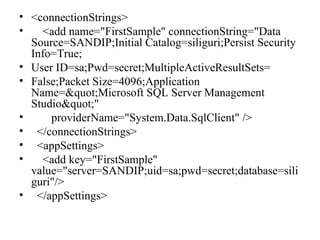
• <connectionStrings>
• <add name="FirstSample" connectionString="Data
Source=SANDIP;Initial Catalog=siliguri;Persist Security
Info=True;
• User ID=sa;Pwd=secret;MultipleActiveResultSets=
• False;Packet Size=4096;Application
Name=&quot;Microsoft SQL Server Management
Studio&quot;"
• providerName="System.Data.SqlClient" />
• </connectionStrings>
• <appSettings>
• <add key="FirstSample"
value="server=SANDIP;uid=sa;pwd=secret;database=sili
guri"/>
• </appSettings>
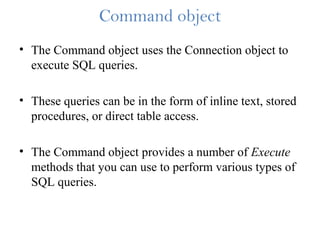
Command object
• The Command object uses the Connection object to
execute SQL queries.
• These queries can be in the form of inline text, stored
procedures, or direct table access.
• The Command object provides a number of Execute
methods that you can use to perform various types of
SQL queries.
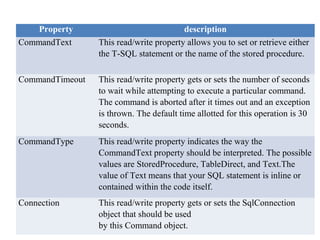
Property description
CommandText This read/write property allows you to set or retrieve either
the T-SQL statement or the name of the stored procedure.
CommandTimeout This read/write property gets or sets the number of seconds
to wait while attempting to execute a particular command.
The command is aborted after it times out and an exception
is thrown. The default time allotted for this operation is 30
seconds.
CommandType This read/write property indicates the way the
CommandText property should be interpreted. The possible
values are StoredProcedure, TableDirect, and Text.The
value of Text means that your SQL statement is inline or
contained within the code itself.
Connection This read/write property gets or sets the SqlConnection
object that should be used
by this Command object.
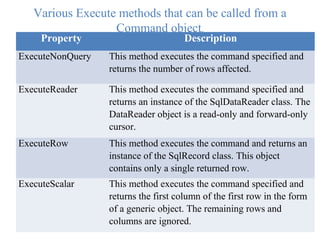
Various Execute methods that can be called from a
Command object.
Property Description
ExecuteNonQuery This method executes the command specified and
returns the number of rows affected.
ExecuteReader This method executes the command specified and
returns an instance of the SqlDataReader class. The
DataReader object is a read-only and forward-only
cursor.
ExecuteRow This method executes the command and returns an
instance of the SqlRecord class. This object
contains only a single returned row.
ExecuteScalar This method executes the command specified and
returns the first column of the first row in the form
of a generic object. The remaining rows and
columns are ignored.
DataReader Object
• The DataReader object is a simple forward-only and
read-only cursor.
• Provides methods and properties that deliver a
forward-only stream of data rows from a data source
• When a DataReader is used, parts of the ADO.NET
model are cut out, providing faster and more efficient
data access
• It requires a live connection with the data source and
provides a very efficient way of looping and
consuming all or part of the result set.
 When using a DataReader object, be sure to close the
connection when you are done using the data reader.
 If not, then the connection stays alive.
 The connection utilized stays alive until it is
explicitly closed using the Close() method or until
you have enabled your Command object to close the
connection.
 Data Reader is returned as the result of the Command
objects,s ExecuteReader method.
void Page_Load(Object sender, EventArgs e)
{
SqlConnection myConnection;
SqlCommand myCommand;
SqlDataReader myDataReader;
myConnection = new
SqlConnection(ConfigurationSettings.AppSettings["strConn"]
); myConnection.Open();
//prepare sql statements
myCommand = new SqlCommand("SELECT TOP 10 * FROM
EMPLOYEE", myConnection);
myDataReader = myCommand.ExecuteReader();
while (myDataReader.Read())
{
Response.Write(myDataReader["fname"]);
//Spacing
Response.Write(" ");
Response.Write(myDataReader["minit"]);
//Spacing
Response.Write(" ");
Response.Write(myDataReader["lname"]);
//New Line
Response.Write("<br>");
}
//cleanup objects
myDataReader.Close();
myConnection.Close();
}
DataAdapter Object
• The SqlDataAdapter is a special class whose purpose
is to bridge the gap between the disconnected
DataTable objects and the physical data source.
• Provides a set of methods and properties to retrieve
and save data between a DataSet and its source data
store
• Allows the use of stored procedures Connects to the
database to fill the DataSet and also update the
database
• It is capable of executing a SELECT statement on a
data source and transferring the result set into a
DataTable object.
It is also capable of executing the standard INSERT,
UPDATE, and DELETE statements and extracting
the input data from a DataTable object.
The SqlDataAdapter class also provides a method
called Fill().
Summaries
• ADO.NET architecture.
• Several classes on ADO.NET.
• Web Config.

ASP.NET Session 11 12

  • 1.
  • 2.
    Objectives • ADO versusADO.NET • ADO.NET Architecture • Connection Object • Command Object • DataReader Object • DataAdapter Object • DataSet Object • DataView Object • Use ADO.NET to access data in an application
  • 3.
    ADO versus ADO.NET FeatureADO ADO.NET Primary Aim Client/server coupled Disconnected collection of data from data server Form of data in memory Uses RECORDSET object (contains one table) Uses DATASET object (contains one or more DATATABLE objects) Disconnected access Uses CONNECTION object and RECORDSET object with OLEDB Uses DATASETCOMMAND object with OLEDB XML capabilities XML aware XML is the native transfer medium for the objects Code Coupled to the language used, various implementation Managed code library – Uses Common Language Runtime, therefore, language agnostic
  • 4.
     Although classicADO was geared for a two - tiered environment (client - server), ADO.NET addresses a multi - tiered environment.  ADO.NET offers many advanced features and many different ways to retrieve your data and manipulate it before presenting it to the end user.  ADO.NET addresses a couple of the most common data - access strategies that are used for applications today
  • 5.
  • 6.
    ADO.NET Namespaces • System.data:Core namespace, defines types that represent data • System.Data.Common:Types shared between managed providers • System.Data.OleDb:Types that allow connection to OLE DB compliant data sources • System.Data.SqlClient:Types that are optimized to connect to Microsoft® SQL Server • System.Data.SqlTypes:Native data types in Microsoft® SQL Server
  • 7.
    Needed to builda data access application • For OLE DB: using System.Data using System.Data.OleDB • For SQL Server: using System.Data using System.Data.SQLClient
  • 8.
    Connection Object • Twoprovider-specific classes SqlConnection OleDbConnection. This information is provided via a single string called a connection string. You can also store this connection string in the web.config file of your application.
  • 9.
     The OLEDbConnectionobject, which can provide connection to a wide range of database types like Microsoft Access and Oracle.  The Connection object contains all of the information required to open a connection to the database  With ASP.NET , you will find that there is an easy way to manage the storage of your connection strings using the web.config file.  This is actually a better way to store your connection strings rather than hard-coding them within the code of the application itself.
  • 10.
    • To defineyour connection string within the web.config file, you are going to make use of the <connectionStrings> section. Within this section, you can place an <add> element to define your connection. • What is Web.Config File? • Web.config file, as it sounds like is a configuration file for the Asp .net web application. An Asp .net application has one web.config file which keeps the configurations required for the corresponding application. Web.config file is written in XML(eXtensible Markup Language) with specific tags having specific meanings.
  • 11.
    • <connectionStrings> • <addname="FirstSample" connectionString="Data Source=SANDIP;Initial Catalog=siliguri;Persist Security Info=True; • User ID=sa;Pwd=secret;MultipleActiveResultSets= • False;Packet Size=4096;Application Name=&quot;Microsoft SQL Server Management Studio&quot;" • providerName="System.Data.SqlClient" /> • </connectionStrings> • <appSettings> • <add key="FirstSample" value="server=SANDIP;uid=sa;pwd=secret;database=sili guri"/> • </appSettings>
  • 12.
    Command object • TheCommand object uses the Connection object to execute SQL queries. • These queries can be in the form of inline text, stored procedures, or direct table access. • The Command object provides a number of Execute methods that you can use to perform various types of SQL queries.
  • 13.
    Property description CommandText Thisread/write property allows you to set or retrieve either the T-SQL statement or the name of the stored procedure. CommandTimeout This read/write property gets or sets the number of seconds to wait while attempting to execute a particular command. The command is aborted after it times out and an exception is thrown. The default time allotted for this operation is 30 seconds. CommandType This read/write property indicates the way the CommandText property should be interpreted. The possible values are StoredProcedure, TableDirect, and Text.The value of Text means that your SQL statement is inline or contained within the code itself. Connection This read/write property gets or sets the SqlConnection object that should be used by this Command object.
  • 14.
    Various Execute methodsthat can be called from a Command object. Property Description ExecuteNonQuery This method executes the command specified and returns the number of rows affected. ExecuteReader This method executes the command specified and returns an instance of the SqlDataReader class. The DataReader object is a read-only and forward-only cursor. ExecuteRow This method executes the command and returns an instance of the SqlRecord class. This object contains only a single returned row. ExecuteScalar This method executes the command specified and returns the first column of the first row in the form of a generic object. The remaining rows and columns are ignored.
  • 15.
    DataReader Object • TheDataReader object is a simple forward-only and read-only cursor. • Provides methods and properties that deliver a forward-only stream of data rows from a data source • When a DataReader is used, parts of the ADO.NET model are cut out, providing faster and more efficient data access • It requires a live connection with the data source and provides a very efficient way of looping and consuming all or part of the result set.
  • 16.
     When usinga DataReader object, be sure to close the connection when you are done using the data reader.  If not, then the connection stays alive.  The connection utilized stays alive until it is explicitly closed using the Close() method or until you have enabled your Command object to close the connection.  Data Reader is returned as the result of the Command objects,s ExecuteReader method.
  • 17.
    void Page_Load(Object sender,EventArgs e) { SqlConnection myConnection; SqlCommand myCommand; SqlDataReader myDataReader; myConnection = new SqlConnection(ConfigurationSettings.AppSettings["strConn"] ); myConnection.Open(); //prepare sql statements myCommand = new SqlCommand("SELECT TOP 10 * FROM EMPLOYEE", myConnection); myDataReader = myCommand.ExecuteReader(); while (myDataReader.Read()) { Response.Write(myDataReader["fname"]);
  • 18.
  • 19.
    DataAdapter Object • TheSqlDataAdapter is a special class whose purpose is to bridge the gap between the disconnected DataTable objects and the physical data source. • Provides a set of methods and properties to retrieve and save data between a DataSet and its source data store • Allows the use of stored procedures Connects to the database to fill the DataSet and also update the database • It is capable of executing a SELECT statement on a data source and transferring the result set into a DataTable object.
  • 20.
    It is alsocapable of executing the standard INSERT, UPDATE, and DELETE statements and extracting the input data from a DataTable object. The SqlDataAdapter class also provides a method called Fill().
  • 21.
    Summaries • ADO.NET architecture. •Several classes on ADO.NET. • Web Config.