Events,Postback,AutoPostback
Session 6
Objectives
• Events
• Postback
• Auto postback property in Asp.net
application
Events
• ASP.NET is an event driven environment, which means that code
can execute based on certain events that occur in your code.
Events are raised by certain objects in the application and then
handled by others. There are many objects in the .NET Framework
capable of raising an event, and you can even add your own events
to classes that you write.
• To be able to handle an event raised by an object, you need to write
an event handler, which is basically a normal method with a special
signature. You can wire up this event handler to the event using
event wiring syntax. When an object, such as a control in a web
page, raises an event, it may have the need to pass additional
information to the event handler, to inform it about relevant data that
caused or influenced the event. You can send out this information
using an event arguments class, which is the class
System.EventArgs or any class that inherits from it.
• To see how all these terms fit together, consider what happens
when you click a button in a web page. When you click it, the
client-side button in the browser causes a postback. At the
server, the Button control sees it was clicked in the browser
and then raises its Click event.
• Usually, the code that is interested in the button’s Click event
is your own page that needs to have an event handler to handle
the click. You can create an event handler for the Button by
double-clicking it in the designer.
• Alternatively, you can double-click the relevant event on the
Properties Grid of the control with the Events category listed
in the following diagram which you can open by pressing the
button with the lightning bolt on the toolbar.
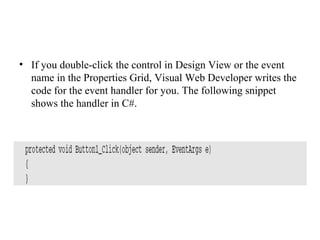
• If you double-click the control in Design View or the event
name in the Properties Grid, Visual Web Developer writes the
code for the event handler for you. The following snippet
shows the handler in C#.
• The C# version doesn’t have this Handles keyword.
Instead, with C# you’ll find that VWD has added the
following bold code to the Button control in the markup
of the page:
• With this piece of markup, the .NET runtime will generate the
necessary code to link up the Button1_Click method to the
Click event of the button. At runtime you’ll see the exact same
behavior: when you click the button, the code in
Button1_Click is executed.
Post Back
• Each of the asp .net pages will be a separate entity with
ability to process its own posted data. That is, the values
of the Form are posted to the same page and the very
same page can process the data. This model is called
post back.
• Each Asp .net page when loaded goes through a regular
creation and destruction cycle like Initialization, Page
load (already discussed in Page Life cycle) etc., in the
beginning and unload while closing it.
• This Postback is false when the first time the page is
loaded and is true when the page is submitted and
processed. This enables users to write the code
depending on if the PostBack is true or false (with the
use of the function Page.IsPostBack()).
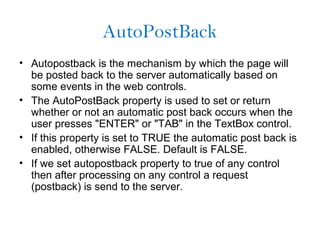
AutoPostBack
• Autopostback is the mechanism by which the page will
be posted back to the server automatically based on
some events in the web controls.
• The AutoPostBack property is used to set or return
whether or not an automatic post back occurs when the
user presses "ENTER" or "TAB" in the TextBox control.
• If this property is set to TRUE the automatic post back is
enabled, otherwise FALSE. Default is FALSE.
• If we set autopostback property to true of any control
then after processing on any control a request
(postback) is send to the server.
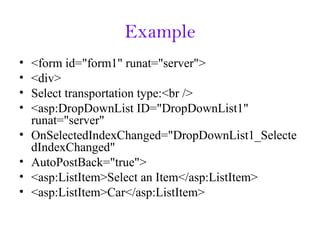
Example
• <form id="form1" runat="server">
• <div>
• Select transportation type:<br />
• <asp:DropDownList ID="DropDownList1"
runat="server"
• OnSelectedIndexChanged="DropDownList1_Selecte
dIndexChanged"
• AutoPostBack="true">
• <asp:ListItem>Select an Item</asp:ListItem>
• <asp:ListItem>Car</asp:ListItem>
• <asp:ListItem>Airplane</asp:ListItem>
• <asp:ListItem>Train</asp:ListItem>
• </asp:DropDownList>&nbsp;
• <asp:DropDownList ID="DropDownList2"
runat="server" Visible="false">
• </asp:DropDownList>
• <asp:Button ID="Button1" runat="server"
Text="Select Options"
• OnClick="Button1_Click" />
• </div>
• </form>
Summery
• PostBack Concept
• AutoPostBack property

ASP.NET Session 6

  • 1.
  • 2.
    Objectives • Events • Postback •Auto postback property in Asp.net application
  • 3.
    Events • ASP.NET isan event driven environment, which means that code can execute based on certain events that occur in your code. Events are raised by certain objects in the application and then handled by others. There are many objects in the .NET Framework capable of raising an event, and you can even add your own events to classes that you write. • To be able to handle an event raised by an object, you need to write an event handler, which is basically a normal method with a special signature. You can wire up this event handler to the event using event wiring syntax. When an object, such as a control in a web page, raises an event, it may have the need to pass additional information to the event handler, to inform it about relevant data that caused or influenced the event. You can send out this information using an event arguments class, which is the class System.EventArgs or any class that inherits from it.
  • 4.
    • To seehow all these terms fit together, consider what happens when you click a button in a web page. When you click it, the client-side button in the browser causes a postback. At the server, the Button control sees it was clicked in the browser and then raises its Click event. • Usually, the code that is interested in the button’s Click event is your own page that needs to have an event handler to handle the click. You can create an event handler for the Button by double-clicking it in the designer. • Alternatively, you can double-click the relevant event on the Properties Grid of the control with the Events category listed in the following diagram which you can open by pressing the button with the lightning bolt on the toolbar.
  • 5.
    • If youdouble-click the control in Design View or the event name in the Properties Grid, Visual Web Developer writes the code for the event handler for you. The following snippet shows the handler in C#.
  • 6.
    • The C#version doesn’t have this Handles keyword. Instead, with C# you’ll find that VWD has added the following bold code to the Button control in the markup of the page:
  • 7.
    • With thispiece of markup, the .NET runtime will generate the necessary code to link up the Button1_Click method to the Click event of the button. At runtime you’ll see the exact same behavior: when you click the button, the code in Button1_Click is executed.
  • 8.
    Post Back • Eachof the asp .net pages will be a separate entity with ability to process its own posted data. That is, the values of the Form are posted to the same page and the very same page can process the data. This model is called post back. • Each Asp .net page when loaded goes through a regular creation and destruction cycle like Initialization, Page load (already discussed in Page Life cycle) etc., in the beginning and unload while closing it. • This Postback is false when the first time the page is loaded and is true when the page is submitted and processed. This enables users to write the code depending on if the PostBack is true or false (with the use of the function Page.IsPostBack()).
  • 9.
    AutoPostBack • Autopostback isthe mechanism by which the page will be posted back to the server automatically based on some events in the web controls. • The AutoPostBack property is used to set or return whether or not an automatic post back occurs when the user presses "ENTER" or "TAB" in the TextBox control. • If this property is set to TRUE the automatic post back is enabled, otherwise FALSE. Default is FALSE. • If we set autopostback property to true of any control then after processing on any control a request (postback) is send to the server.
  • 10.
    Example • <form id="form1"runat="server"> • <div> • Select transportation type:<br /> • <asp:DropDownList ID="DropDownList1" runat="server" • OnSelectedIndexChanged="DropDownList1_Selecte dIndexChanged" • AutoPostBack="true"> • <asp:ListItem>Select an Item</asp:ListItem> • <asp:ListItem>Car</asp:ListItem>
  • 11.
    • <asp:ListItem>Airplane</asp:ListItem> • <asp:ListItem>Train</asp:ListItem> •</asp:DropDownList>&nbsp; • <asp:DropDownList ID="DropDownList2" runat="server" Visible="false"> • </asp:DropDownList> • <asp:Button ID="Button1" runat="server" Text="Select Options" • OnClick="Button1_Click" /> • </div> • </form>
  • 12.
    Summery • PostBack Concept •AutoPostBack property