11 Basics for improving your SEO
 What Search Engines Are Looking For
 What Search Engines Are NOT Looking For
 Block duplicate content with robots.txt
 Don't Forget to Optimize for Multi-Channels
 Optimizing for Different Types of Results
 Crawling of your website
 Focus on Your Meta Data Too
 10 Essential WordPress Plugins
 Use heading tags the way they were meant to be used
 Use keywords in the addresses of your pages
 Create and maintain a sitemap
 Google Authorship picture Appear
What Search Engines Are Looking For
 Content: Is determined by the theme that is being given, the text on the 
page, and the titles and descriptions that are given.
 Performance: How fast is your site and does it work properly?
 Authority: Does your site have good enough content to link to or do 
other good sites use your website as a reference or cite the information 
that's available?
 User Experience: How does the site look? Is it easy to navigate around? 
Does it look safe? Does it have a high bounce rate.
What Search Engines Are NOT Looking For
 Keyword Stuffing: Overuse of keywords on your pages.
 Purchased Links: Buying links will get you nowhere when it comes to SEO, 
so be warned.
 Poor User Experience: more ads on website increase bounce rate
Block duplicate content with robots.txt
 Duplicate content on a site can be really bad when it comes to ranking
well within search engines. If the structure of your site results in a lot of
duplicated content (for example, having summaries on one page of a blog
and full articles on another) you can actually be penalized by Google for it.
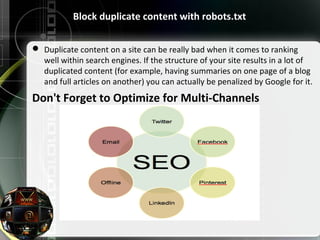
Don't Forget to Optimize for Multi-Channels
Optimizing for Different Types of Results
 Optimize your non-text content so search engines can see it. If your site
uses Flash or PDFs, make sure you read up on the latest best practices so
search engines can crawl that content and give your site credit for it.
 Create rich media content like video, as it's easier to get a video to rank
on the first page than it is to get a plain text page to rank.
Crawling of your Website
when the crawling of your website is done for your website by Googlebot
.Then Google gives you a another option for crawling your website Fetch
as Google by submitting your website url then google crawl your website.
you use fetch as google more times then google ban your fetch as google
option
Focus on Your Meta Data Too
10 Essential WordPress Plugins
 Akismet
 All In One SEO Pack
 Contact Form 7
 Google+ rel=author Plugin
 Google Analytics
 Google XML Sitemaps
 SEO Friendly Images
 W3 Total Cache
 Widget Context
 WP Socializer
Use keywords in the addresses of your pages
 if you have a site about apples, rather than having a URL like:
http://www.mysite.com/page/page1.html change it to something like
http://www.mysite.com/granny-smith/granny-smith-orchards-in-
california.html where the content of the page is somewhat represented
by the address of the page.
Create and maintain sitemap
If you want Google or Yahoo to index your entire site,
one of the best ways to do that is to tell them what
pages are in your site. Sitemaps are a really simple
listing of every single page within your site. If you
create and maintain a sitemap for your site, the
search engines will easily find all your content.
Google Authorship picture Appear
 To check your website performance Google gives you a Google
webmaster tool and in this tool you can verify and check your authorship
using Google Structured Data Testing Tool
Seo search engine optimization ppt

Seo search engine optimization ppt

  • 2.
    11 Basics forimproving your SEO  What Search Engines Are Looking For  What Search Engines Are NOT Looking For  Block duplicate content with robots.txt  Don't Forget to Optimize for Multi-Channels  Optimizing for Different Types of Results  Crawling of your website  Focus on Your Meta Data Too  10 Essential WordPress Plugins  Use heading tags the way they were meant to be used  Use keywords in the addresses of your pages  Create and maintain a sitemap  Google Authorship picture Appear
  • 3.
    What Search EnginesAre Looking For  Content: Is determined by the theme that is being given, the text on the  page, and the titles and descriptions that are given.  Performance: How fast is your site and does it work properly?  Authority: Does your site have good enough content to link to or do  other good sites use your website as a reference or cite the information  that's available?  User Experience: How does the site look? Is it easy to navigate around?  Does it look safe? Does it have a high bounce rate. What Search Engines Are NOT Looking For  Keyword Stuffing: Overuse of keywords on your pages.  Purchased Links: Buying links will get you nowhere when it comes to SEO,  so be warned.  Poor User Experience: more ads on website increase bounce rate
  • 4.
    Block duplicate contentwith robots.txt  Duplicate content on a site can be really bad when it comes to ranking well within search engines. If the structure of your site results in a lot of duplicated content (for example, having summaries on one page of a blog and full articles on another) you can actually be penalized by Google for it. Don't Forget to Optimize for Multi-Channels
  • 5.
    Optimizing for DifferentTypes of Results  Optimize your non-text content so search engines can see it. If your site uses Flash or PDFs, make sure you read up on the latest best practices so search engines can crawl that content and give your site credit for it.  Create rich media content like video, as it's easier to get a video to rank on the first page than it is to get a plain text page to rank. Crawling of your Website when the crawling of your website is done for your website by Googlebot .Then Google gives you a another option for crawling your website Fetch as Google by submitting your website url then google crawl your website. you use fetch as google more times then google ban your fetch as google option
  • 6.
    Focus on YourMeta Data Too
  • 7.
    10 Essential WordPressPlugins  Akismet  All In One SEO Pack  Contact Form 7  Google+ rel=author Plugin  Google Analytics  Google XML Sitemaps  SEO Friendly Images  W3 Total Cache  Widget Context  WP Socializer
  • 8.
    Use keywords inthe addresses of your pages  if you have a site about apples, rather than having a URL like: http://www.mysite.com/page/page1.html change it to something like http://www.mysite.com/granny-smith/granny-smith-orchards-in- california.html where the content of the page is somewhat represented by the address of the page. Create and maintain sitemap If you want Google or Yahoo to index your entire site, one of the best ways to do that is to tell them what pages are in your site. Sitemaps are a really simple listing of every single page within your site. If you create and maintain a sitemap for your site, the search engines will easily find all your content.
  • 9.
    Google Authorship pictureAppear  To check your website performance Google gives you a Google webmaster tool and in this tool you can verify and check your authorship using Google Structured Data Testing Tool