










search enginesearch engine
optimizationoptimization
ppctutorial.wordpress.com
1
ppctutorial.wordpress.com
2
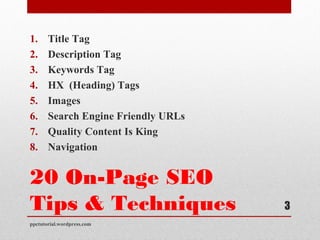
20 On-Page SEO
Tips & Techniques
1. Title Tag
2. Description Tag
3. Keywords Tag
4. HX (Heading) Tags
5. Images
6. Search Engine Friendly URLs
7. Quality Content Is King
8. Navigation
ppctutorial.wordpress.com
3
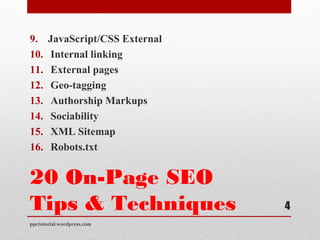
20 On-Page SEO
Tips & Techniques
9. JavaScript/CSS External
10. Internal linking
11. External pages
12. Geo-tagging
13. Authorship Markups
14. Sociability
15. XML Sitemap
16. Robots.txt
ppctutorial.wordpress.com
4
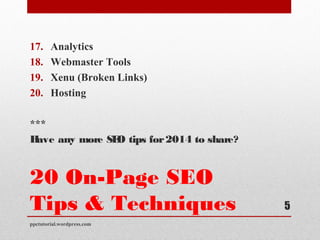
20 On-Page SEO
Tips & Techniques
17. Analytics
18. Webmaster Tools
19. Xenu (Broken Links)
20. Hosting
***
Have any more SEO tips for2014 to share?
ppctutorial.wordpress.com
5
Title Tag
The best and most effective way to use the title tag is to not to
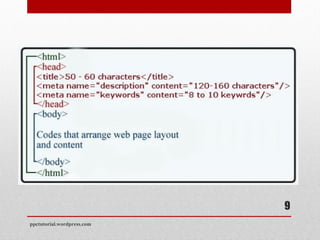
make the title tag longer than 70 characters. The title should be
according to your page; try to use the long phrased keyword
within the title tag.
ppctutorial.wordpress.com
6
Description Tag
Use this tag smartly. Describe your page content and try to use
your most competitive keywords in the text. Use no more than
160 characters.
ppctutorial.wordpress.com
7
Keywords Tag
We all know that Google stated that this tag does not affect your
rankings but there are many SEOs, who still use this tag for other
search engines. Target your 5 most competitive keywords within
the tag.
ppctutorial.wordpress.com
8
ppctutorial.wordpress.com
9
HX  (Heading) Tags
Use HX tags with each of your main article headings / sections.
Use h1 for the main headings and the rest in h2, h3, h4 and so on.
Try use your keywords in the headings and highlight them in the
eye of search engines with these HX tags.
ppctutorial.wordpress.com
10
Images
Optimize each image with ALT and Title tags. Image name can
also be optimized; try to use the keywords smartly within the tags
as well.
ppctutorial.wordpress.com
11
Search Engine Friendly
URLs
Try not to use signs like &, Spaces, ?, etc. in your URLs
otherwise it can come across as spammy. Ask your developer to
make the URLs look easy to read, short and clean.
ppctutorial.wordpress.com
12
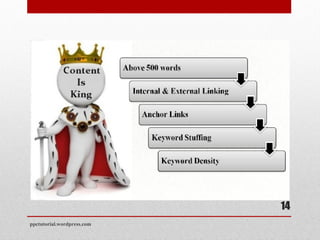
Quality Content Is King
As we all know “Content is King” in the SEO industry, so we
can’t ignore this one. Each page should have a minimum of 500
words of great quality content.
ppctutorial.wordpress.com
13
ppctutorial.wordpress.com
14
Navigation
Make sure your navigation is crawlable, whether it be text or
image based.
ppctutorial.wordpress.com
15
JavaScript/CSS
External
Externalize the JS and CSS codes to make your website pages
load faster. Take this with a grain of salt as it’s not always the
best choice in any case. Sometimes it’s better to use
progressively inline JS and CSS for faster rendering and
perceived time.
ppctutorial.wordpress.com
16
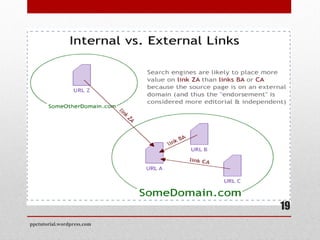
Internal linking
Internal linking will help you to engage your customers within
the website. Internal linking will also help you to control the
bounce rate as well.
ppctutorial.wordpress.com
17
External pages
Adding links to external high quality website (not just popular)
resources builds a good relation in the eye of search engines and
this trust will help the websites to get higher positions on search
engines.
ppctutorial.wordpress.com
18
ppctutorial.wordpress.com
19
Geo-tagging
Use geo-tagging to let your users and search engines see your
actual business location.
ppctutorial.wordpress.com
20
Authorship Markups
Use authorship to take the ownership of the content you publish
on your website.
ppctutorial.wordpress.com
21
Sociability
Add social media buttons to encourage your readers to share your
website’s content on their profiles. Websites with social signals
can get better rankings in search engines.
ppctutorial.wordpress.com
22
XML Sitemap
Create xml sitemap and add each of your website in it. You can
submit to sitemap in Google and Bing webmaster tools to make
your website index soon.
ppctutorial.wordpress.com
23
ppctutorial.wordpress.com
24
Robots.txt
Updated: The robots.txt is a text file webmasters create to
instruct robots (typically search engine robots) how to crawl and
index pages on their website.
ppctutorial.wordpress.com
25
Analytics
Make sure you have added and setup the analytics code so you
can properly analyze your website.
ppctutorial.wordpress.com
26
Webmaster Tools
Add and verify the ownership of your websites via Google
Webmaster Tools. These webmaster tools will also help to
analyze the on-page validations.
ppctutorial.wordpress.com
27
Xenu (Broken Links)
Xenu is free software to find broken links within your web pages.
Find and fix those broken links as soon as you find them.
ppctutorial.wordpress.com
28
Hosting
A website hosting server should be up and running 24/7, with at
least 99.9% uptime. A website with too much downtime can be
de-indexed from and won’t be able to rank higher on search
engines.
ppctutorial.wordpress.com
29
ppctutorial.wordpress.com
30
Thanks You!!!
ppctutorial.wordpress.com
31
Thanks You!!!
• Email Us:Email Us: martinastern2012@gmail.commartinastern2012@gmail.com
• Twitter: @martinasternTwitter: @martinastern
• www.ppcblogonline.blogspot.comwww.ppcblogonline.blogspot.com
ppctutorial.wordpress.com
32

On page optimization 2014 technique by seo and ppc expert

  • 1.
  • 2.
  • 3.
    20 On-Page SEO Tips& Techniques 1. Title Tag 2. Description Tag 3. Keywords Tag 4. HX (Heading) Tags 5. Images 6. Search Engine Friendly URLs 7. Quality Content Is King 8. Navigation ppctutorial.wordpress.com 3
  • 4.
    20 On-Page SEO Tips& Techniques 9. JavaScript/CSS External 10. Internal linking 11. External pages 12. Geo-tagging 13. Authorship Markups 14. Sociability 15. XML Sitemap 16. Robots.txt ppctutorial.wordpress.com 4
  • 5.
    20 On-Page SEO Tips& Techniques 17. Analytics 18. Webmaster Tools 19. Xenu (Broken Links) 20. Hosting *** Have any more SEO tips for2014 to share? ppctutorial.wordpress.com 5
  • 6.
    Title Tag The bestand most effective way to use the title tag is to not to make the title tag longer than 70 characters. The title should be according to your page; try to use the long phrased keyword within the title tag. ppctutorial.wordpress.com 6
  • 7.
    Description Tag Use thistag smartly. Describe your page content and try to use your most competitive keywords in the text. Use no more than 160 characters. ppctutorial.wordpress.com 7
  • 8.
    Keywords Tag We allknow that Google stated that this tag does not affect your rankings but there are many SEOs, who still use this tag for other search engines. Target your 5 most competitive keywords within the tag. ppctutorial.wordpress.com 8
  • 9.
  • 10.
    HX  (Heading) Tags UseHX tags with each of your main article headings / sections. Use h1 for the main headings and the rest in h2, h3, h4 and so on. Try use your keywords in the headings and highlight them in the eye of search engines with these HX tags. ppctutorial.wordpress.com 10
  • 11.
    Images Optimize each imagewith ALT and Title tags. Image name can also be optimized; try to use the keywords smartly within the tags as well. ppctutorial.wordpress.com 11
  • 12.
    Search Engine Friendly URLs Trynot to use signs like &, Spaces, ?, etc. in your URLs otherwise it can come across as spammy. Ask your developer to make the URLs look easy to read, short and clean. ppctutorial.wordpress.com 12
  • 13.
    Quality Content IsKing As we all know “Content is King” in the SEO industry, so we can’t ignore this one. Each page should have a minimum of 500 words of great quality content. ppctutorial.wordpress.com 13
  • 14.
  • 15.
    Navigation Make sure yournavigation is crawlable, whether it be text or image based. ppctutorial.wordpress.com 15
  • 16.
    JavaScript/CSS External Externalize the JSand CSS codes to make your website pages load faster. Take this with a grain of salt as it’s not always the best choice in any case. Sometimes it’s better to use progressively inline JS and CSS for faster rendering and perceived time. ppctutorial.wordpress.com 16
  • 17.
    Internal linking Internal linkingwill help you to engage your customers within the website. Internal linking will also help you to control the bounce rate as well. ppctutorial.wordpress.com 17
  • 18.
    External pages Adding linksto external high quality website (not just popular) resources builds a good relation in the eye of search engines and this trust will help the websites to get higher positions on search engines. ppctutorial.wordpress.com 18
  • 19.
  • 20.
    Geo-tagging Use geo-tagging tolet your users and search engines see your actual business location. ppctutorial.wordpress.com 20
  • 21.
    Authorship Markups Use authorshipto take the ownership of the content you publish on your website. ppctutorial.wordpress.com 21
  • 22.
    Sociability Add social mediabuttons to encourage your readers to share your website’s content on their profiles. Websites with social signals can get better rankings in search engines. ppctutorial.wordpress.com 22
  • 23.
    XML Sitemap Create xmlsitemap and add each of your website in it. You can submit to sitemap in Google and Bing webmaster tools to make your website index soon. ppctutorial.wordpress.com 23
  • 24.
  • 25.
    Robots.txt Updated: The robots.txtis a text file webmasters create to instruct robots (typically search engine robots) how to crawl and index pages on their website. ppctutorial.wordpress.com 25
  • 26.
    Analytics Make sure youhave added and setup the analytics code so you can properly analyze your website. ppctutorial.wordpress.com 26
  • 27.
    Webmaster Tools Add andverify the ownership of your websites via Google Webmaster Tools. These webmaster tools will also help to analyze the on-page validations. ppctutorial.wordpress.com 27
  • 28.
    Xenu (Broken Links) Xenuis free software to find broken links within your web pages. Find and fix those broken links as soon as you find them. ppctutorial.wordpress.com 28
  • 29.
    Hosting A website hostingserver should be up and running 24/7, with at least 99.9% uptime. A website with too much downtime can be de-indexed from and won’t be able to rank higher on search engines. ppctutorial.wordpress.com 29
  • 30.
  • 31.
  • 32.
    Thanks You!!! • EmailUs:Email Us: martinastern2012@gmail.commartinastern2012@gmail.com • Twitter: @martinasternTwitter: @martinastern • www.ppcblogonline.blogspot.comwww.ppcblogonline.blogspot.com ppctutorial.wordpress.com 32