

Making the most of your content Guidelines, Tools, Advice Chewy Trewhella Developer Advocate
Agenda Understanding Search How Search Works Webmaster Guidelines Hot Topics Site Owner Resources
Understanding search Google and Search Results
Overview Google's mission is to organize the world's information and make it universally accessible and useful.
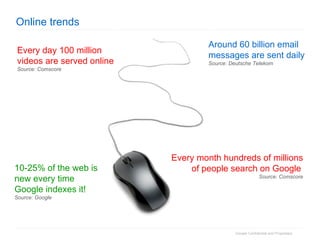
Online trends Every day 100 million videos are served online Source: Comscore Around 60 billion email messages are sent daily Source: Deutsche Telekom Every month hundreds of millions of people search on Google   Source: Comscore 10-25% of the web is new every time Google indexes it! Source: Google
How Search Works Fundamentals of Crawling, Indexing, and Ranking
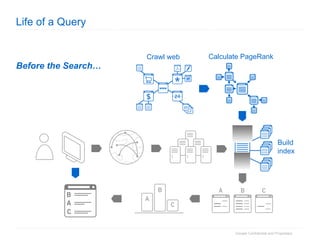
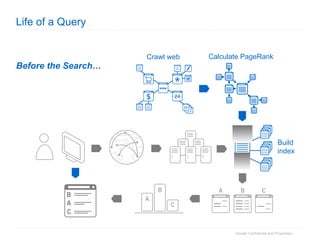
Life of a Query Before the Search… www Build index Crawl web Calculate PageRank
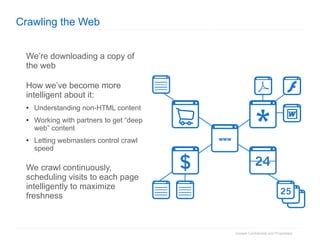
Crawling the Web We’re downloading a copy of the web How we’ve become more intelligent about it: Understanding non-HTML content Working with partners to get “deep web” content Letting webmasters control crawl speed We crawl continuously, scheduling visits to each page intelligently to maximize freshness www
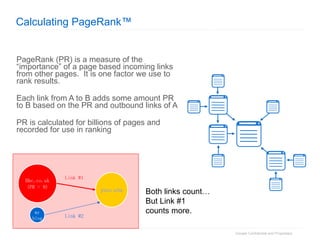
Calculating PageRank™ PageRank (PR) is a measure of the “importance” of a page based incoming links from other pages.  It is one factor we use to rank results. Each link from A to B adds some amount PR to B based on the PR and outbound links of A PR is calculated for billions of pages and recorded for use in ranking Both links count… But Link #1  counts more. Bbc.co.uk (PR = 9) my blog Link #1 Link #2 your   site
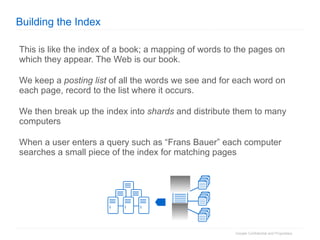
Building the Index This is like the index of a book; a mapping of words to the pages on which they appear. The Web is our book. We keep a  posting list  of all the words we see and for each word on each page, record to the list where it occurs. We then break up the index into  shards  and distribute them to many computers When a user enters a query such as “Frans Bauer” each computer searches a small piece of the index for matching pages
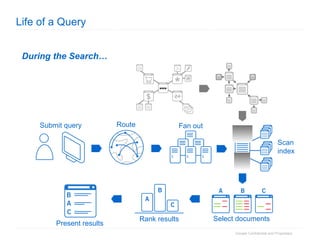
Life of a Query During the Search… www Scan index Submit query Route Fan out Select documents Rank results Present results www
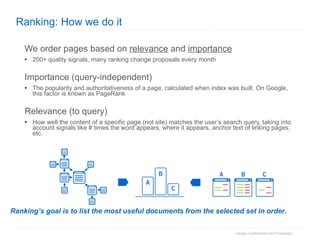
Ranking: How we do it We order pages based on  relevance  and  importance 200+ quality signals, many ranking change proposals every month Importance (query-independent) The popularity and authoritativeness of a page, calculated when index was built. On Google, this factor is known as PageRank Relevance (to query) How well the content of a specific page (not site) matches the user’s search query, taking into account signals like # times the word appears, where it appears, anchor text of linking pages, etc.  Ranking’s goal is to list the most useful documents from the selected set in order.
Goals of ranking We create general methods to improve our ranking that are scalable, impartial and provide benefit to users Hard problem: 25% of queries have not been seen in 3 months Hard problem 2: 10-25% of the web is new each time we crawl it  Considerations the  query  (intent, query variations, language) the  user  (web history, location, task) the  content  (page rank, reputation, quality, language) the  web  (changing content, current events)
Webmaster Guidelines And Basic Site Preparation
Basic site preparation Discoverable Can your site’s pages be found by Google? Indexable Can your site’s URLs be indexed? Are they unique? Content Is the content useful?  Will user searches match? Is the structure and content of the page clear to Google? Rank How well do your site’s pages rank?
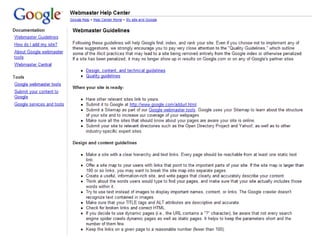
Webmaster Guidelines
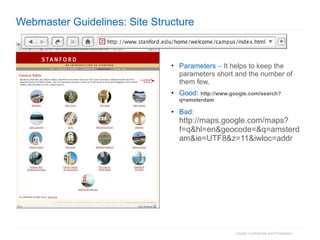
Webmaster Guidelines: Site Structure Parameters     It helps to keep the parameters short and the number of them few. Good:   http://www.google.com/search?q=amsterdam Bad :  http://maps.google.com/maps?f=q&hl=en&geocode=&q=amsterdam&ie=UTF8&z=11&iwloc=addr
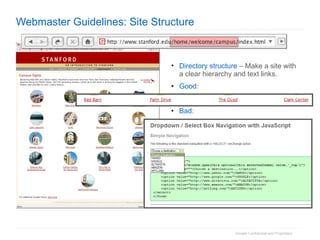
Webmaster Guidelines: Site Structure Directory structure     Make a site with a clear hierarchy and text links. Good :  Bad :
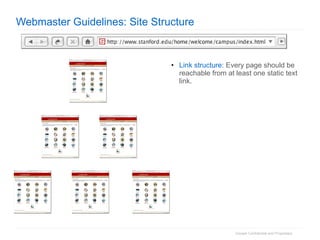
Webmaster Guidelines: Site Structure Link structure : Every page should be reachable from at least one static text link.
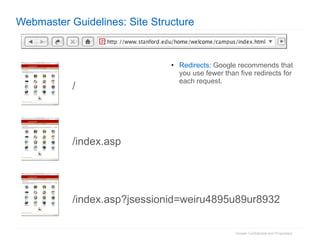
Webmaster Guidelines: Site Structure Redirects:  Google recommends that you use fewer than five redirects for each request. /  /index.asp /index.asp?jsessionid=weiru4895u89ur8932
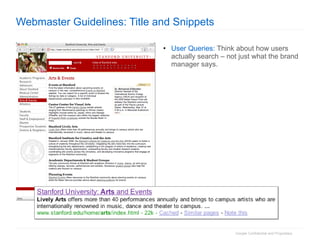
Webmaster Guidelines: Title and Snippets User Queries:  Think about how users actually search – not just what the brand manager says.
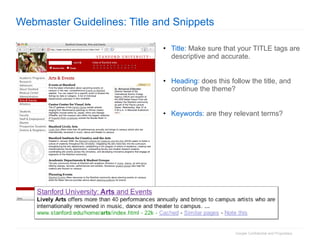
Webmaster Guidelines: Title and Snippets Title:  Make sure that your TITLE tags are descriptive and accurate. Heading : does this follow the title, and continue the theme? Keywords:  are they relevant terms?
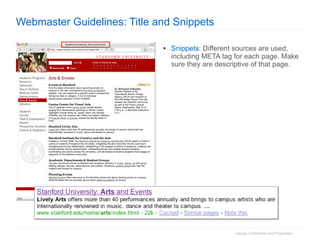
Webmaster Guidelines: Title and Snippets Snippets : Different sources are used, including META tag for each page. Make sure they are descriptive of that page.
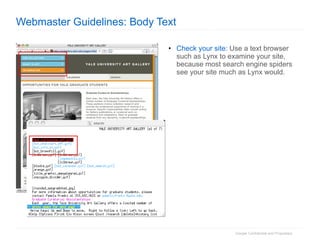
Webmaster Guidelines: Body Text Check your site:  Use a text browser such as Lynx to examine your site, because most search engine spiders see your site much as Lynx would.
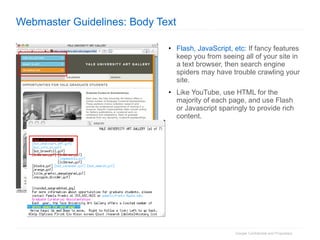
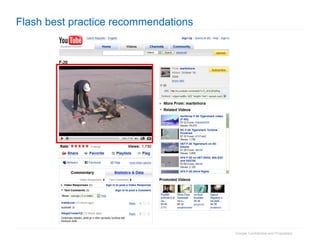
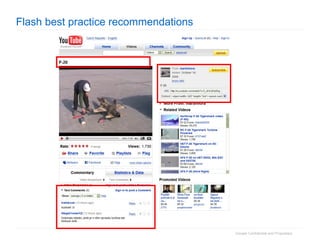
Webmaster Guidelines: Body Text Flash, JavaScript, etc:  If fancy features keep you from seeing all of your site in a text browser, then search engine spiders may have trouble crawling your site. Like YouTube, use HTML for the majority of each page, and use Flash or Javascript sparingly to provide rich content.
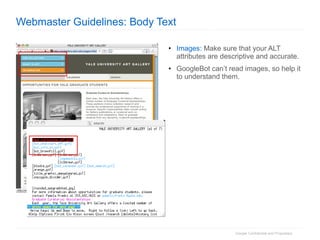
Webmaster Guidelines: Body Text Images:  Make sure that your ALT attributes are descriptive and accurate. GoogleBot can’t read images, so help it to understand them.
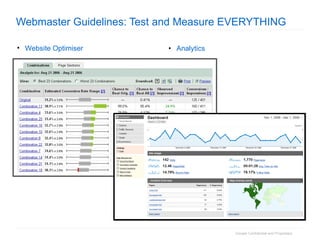
Webmaster Guidelines: Test and Measure EVERYTHING Analytics Website Optimiser
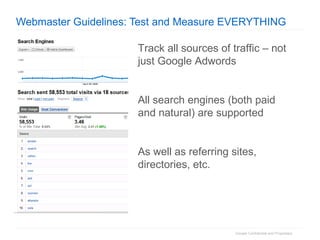
Webmaster Guidelines: Test and Measure EVERYTHING Track all sources of traffic – not just Google Adwords All search engines (both paid and natural) are supported As well as referring sites, directories, etc.
Hot Topics Geo-Localization, Universal, Flash, Robots, Duplicates, Paid Links
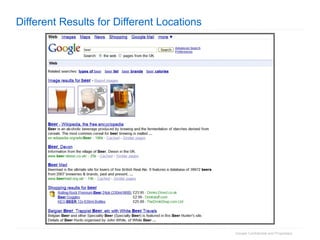
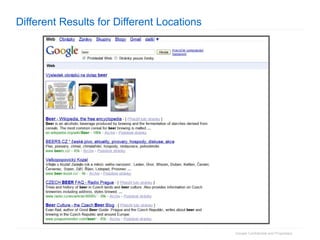
Different Results for Different Locations
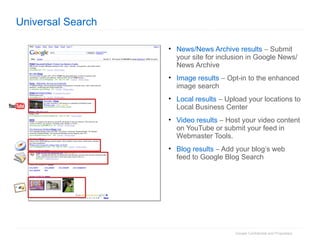
Universal Search News/News Archive results     Submit your site for inclusion in Google News/News Archive Image results     Opt-in to the enhanced image search Local results     Upload your locations to Local Business Center Video results     Host your video content on YouTube or submit your feed in Webmaster Tools. Blog results     Add your blog’s web feed to Google Blog Search
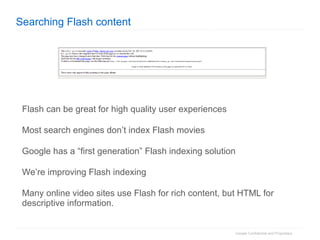
Searching Flash content Flash can be great for high quality user experiences Most search engines don’t index Flash movies Google has a “first generation” Flash indexing solution We’re improving Flash indexing Many online video sites use Flash for rich content, but HTML for descriptive information.
Flash indexing today - best practices Advantages : A rich user experience Flash sites can be highly interactive and “magical” Disadvantages : Search engines struggle to read it Many users can’t access it: screen readers, mobile devices, Linux Best practices : Use Flash for content, use HTML for navigation
Flash best practice recommendations Use HTML for navigation , Flash for page content Allows us to see all the pages of your site Use the  description meta tag Gives us text to index if we can’t access your content Use  text tracks  within Flash Google can extract text tracks, but not text burnt into images Create an HTML version of your site  for non-Flash users: Google can navigate and index this Great for users with page readers etc. Avoid cloaking:  don’t  show different versions based on user-agent
Flash best practice recommendations
Robots exclusion protocol (aka robots.txt) Robots  Exclusion  Protocol Tells search engines what not to index Created in June 1994. Now de-facto standard Ongoing work to improve
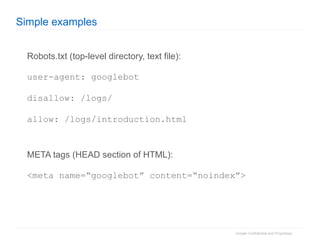
Simple examples Robots.txt (top-level directory, text file): user-agent: googlebot disallow: /logs/ allow: /logs/introduction.html META tags (HEAD section of HTML): <meta name=“googlebot” content=“noindex”>
Policy and per-page Use  robots.txt  for: general rules about directories to exclude Use  META tags  for: Per-page control Control when you don’t have access to robots.txt
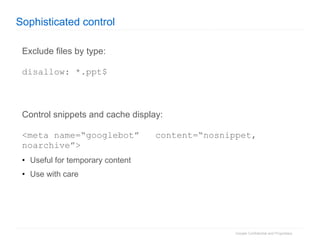
Sophisticated control Exclude files by type: disallow: *.ppt$ Control snippets and cache display: <meta name=“googlebot”  content=“nosnippet, noarchive”> Useful for temporary content Use with care
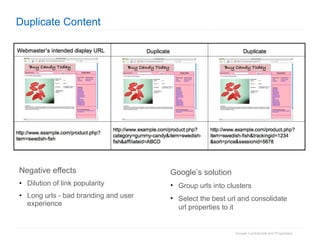
Duplicate Content Negative effects Dilution of link popularity  Long urls - bad branding and user experience Google’s solution Group urls into clusters Select the best url and consolidate url properties to it
Paid Links Passing PageRank It is a violation of webmaster guidelines Skews organic search results for users All major search engines oppose it Will impact the site’s reputation with Google If you feel your were impacted, fix the violation and submit reconsideration request It is not a violation when Buying or selling links for traffic or branding without passing PageRank
Site Owner Resources Webmaster Central, Webmaster Tools, Sitemaps
Our goal is high-quality, objective search results Our goal is to have the most relevant, useful search results on the web. We  strive to provide scalable, equitable support for all webmasters and all sites, large and small. By some estimates, there are 100 million sites on the web, so we need something  really  scalable.
Life of a Query Before the Search… www Build index Crawl web Calculate PageRank
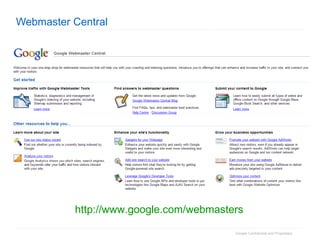
Webmaster Central http://www.google.com/webmasters
Questions Webmaster Central Can Answer How can I improve my site's visibility in the web index?  How can I tell Google my desired geographies?  Where is my Google traffic coming from? How do I ensure all my pages are indexed?  How can I change the snippet (or sitelink) under my site? What’s the best way to redirect traffic?
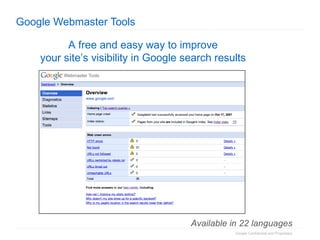
Google Webmaster Tools A free and easy way to improve  your site’s visibility in Google search results   Available in 22 languages
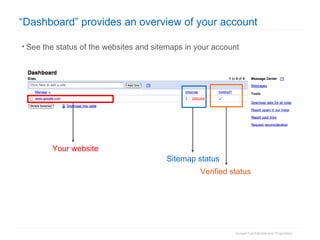
“Dashboard” provides an overview of your account See the status of the websites and sitemaps in your account Your website Sitemap status Verified status
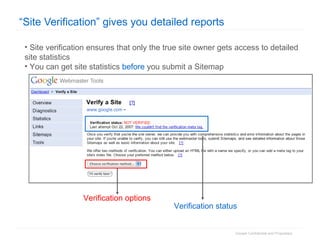
“Site Verification” gives you detailed reports Site verification ensures that only the true site owner gets access to detailed site statistics You can get site statistics  before  you submit a Sitemap  Verification options Verification status
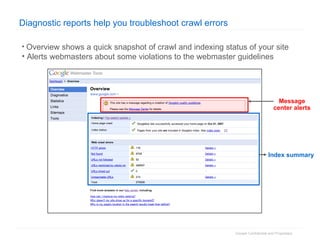
Diagnostic reports help you troubleshoot crawl errors Overview shows a quick snapshot of crawl and indexing status of your site Alerts webmasters about some violations to the webmaster guidelines Message center alerts Index summary
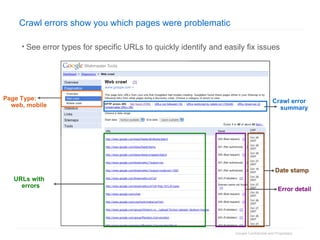
Crawl errors show you which pages were problematic See error types for specific URLs to quickly identify and easily fix issues Page Type: web, mobile Crawl error summary Error detail Date stamp URLs with errors
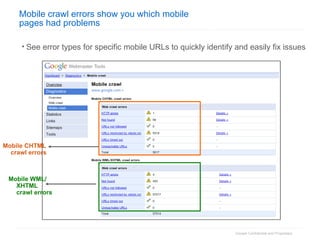
Mobile crawl errors show you which mobile  pages had problems See error types for specific mobile URLs to quickly identify and easily fix issues Mobile CHTML crawl errors Mobile WML/ XHTML crawl errors
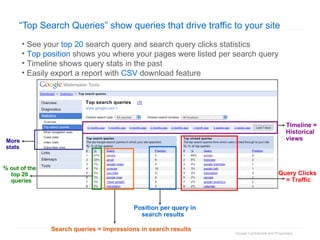
“ Top Search Queries” show queries that drive traffic to your site See your  top 20  search query and search query clicks statistics Top position  shows you where your pages were listed per search query Timeline shows query stats in the past  Easily export a report with  CSV  download feature Search queries = impressions in search results Position per query in search results Query Clicks = Traffic More stats % out of the top 20 queries Timeline = Historical views
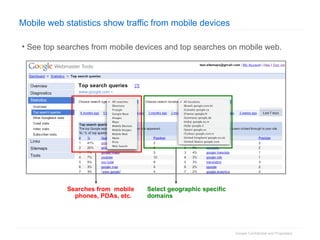
Mobile web statistics show traffic from mobile devices See top searches from mobile devices and top searches on mobile web.  Searches from  mobile phones, PDAs, etc.  Select geographic specific domains
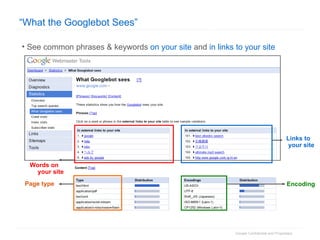
“ What the Googlebot Sees” See common phrases & keywords  on your site  and  in links to your site Words on your site Links to your site Page type Encoding
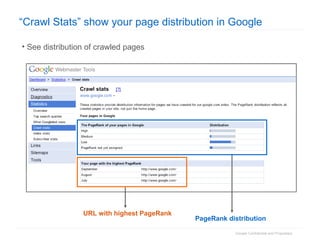
“Crawl Stats” show your page distribution in Google See distribution of crawled pages PageRank distribution URL with highest PageRank
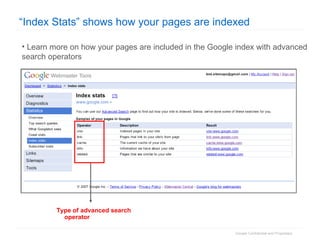
“Index Stats” shows how your pages are indexed Learn more on how your pages are included in the Google index with advanced search operators Type of advanced search operator
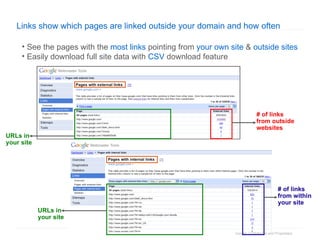
Links show which pages are linked outside your domain and how often See the pages with the  most links  pointing from  your own site  &  outside sites Easily download full site data with  CSV  download feature # of links from outside websites URLs in your site URLs in your site # of links from within your site
 
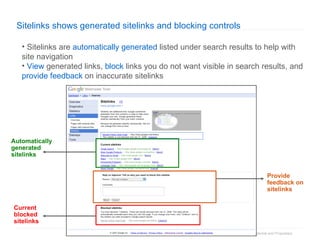
Sitelinks shows generated sitelinks and blocking controls  Sitelinks are  automatically generated  listed under search results to help with site navigation View  generated links,  block  links you do not want visible in search results, and  provide feedback  on inaccurate sitelinks Current blocked sitelinks Automatically generated sitelinks Provide feedback on sitelinks
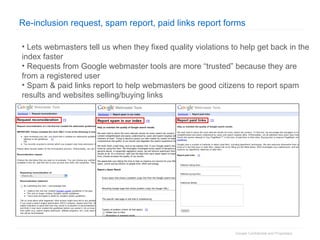
Re-inclusion request, spam report, paid links report forms Lets webmasters tell us when they fixed quality violations to help get back in the index faster Requests from Google webmaster tools are more “trusted” because they are from a registered user Spam & paid links report to help webmasters be good citizens to report spam results and websites selling/buying links
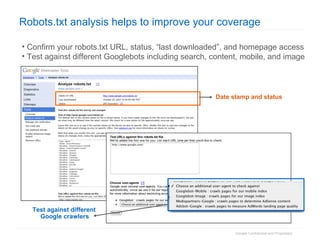
Robots.txt analysis helps to improve your coverage Confirm your robots.txt URL, status, “last downloaded”, and homepage access Test against different Googlebots including search, content, mobile, and image  Date stamp and status Test against different Google crawlers
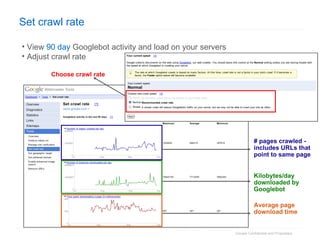
Set crawl rate  View  90 day  Googlebot activity and load on your servers Adjust crawl rate Choose crawl rate  Kilobytes/day downloaded by Googlebot Average page download time # pages crawled - includes URLs that point to same page
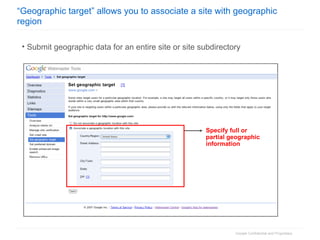
“ Geographic target” allows you to associate a site with geographic region   Submit geographic data for an entire site or site subdirectory Specify full or partial geographic information
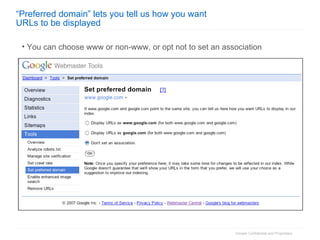
“ Preferred domain” lets you tell us how you want  URLs to be displayed You can choose www or non-www, or opt not to set an association
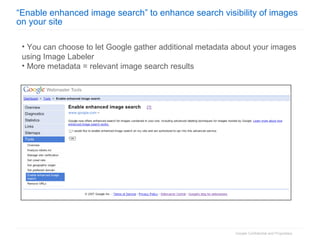
“ Enable enhanced image search” to enhance search visibility of images on your site You can choose to let Google gather additional metadata about your images using Image Labeler More metadata = relevant image search results
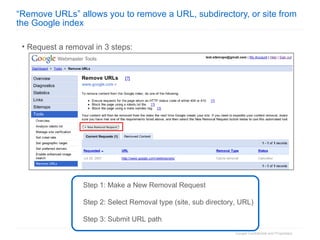
“ Remove URLs” allows you to remove a URL, subdirectory, or site from the Google index Request a removal in 3 steps: Step 1: Make a New Removal Request Step 2: Select Removal type (site, sub directory, URL)  Step 3: Submit URL path
Sitemaps: make sure we know about your site The problem: islands of links Pages that aren’t linked from outside your site Search engines can’t find these The problem: crawling large sites Crawl of very large sites is limited If we know when pages have changed, we can optimize crawling The solution: Sitemaps The open standard for providing a list of all your pages Supported by Google, Yahoo, Microsoft and Ask
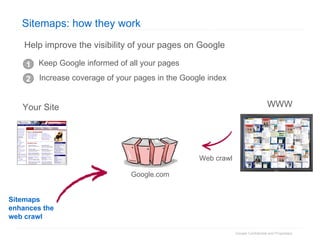
Keep Google informed of all your pages 1 2 Increase coverage of your pages in the Google index WWW Web crawl Sitemaps enhances the web crawl Google.com Help improve the visibility of your pages on Google Sitemaps: how they work Your Site
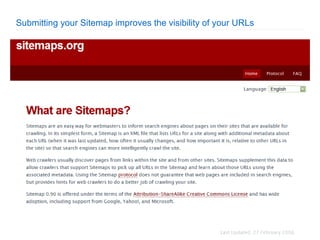
Submitting your Sitemap improves the visibility of your URLs
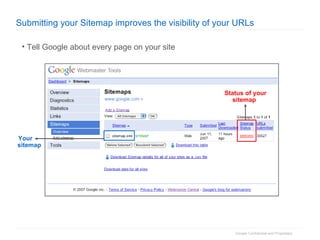
Submitting your Sitemap improves the visibility of your URLs Status of your sitemap Your sitemap Tell Google about every page on your site
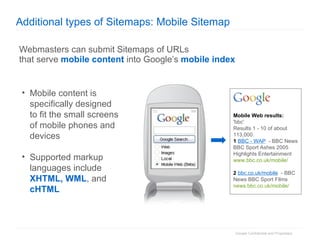
Additional types of Sitemaps: Mobile Sitemap Webmasters can submit Sitemaps of URLs that serve  mobile content  into Google’s  mobile index Mobile content is specifically designed to fit the small screens of mobile phones and devices Supported markup languages include XHTML, WML , and cHTML Mobile Web results: 'bbc' Results 1 - 10 of about 113,000. 1   BBC - WAP   - BBC News BBC Sport Ashes 2005 Highlights Entertainment www.bbc.co.uk/mobile/ 2   bbc.co.uk/mobile   - BBC News BBC Sport Films news.bbc.co.uk/mobile/
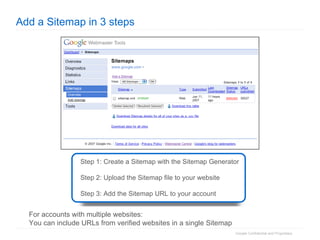
Add a Sitemap in 3 steps Step 1: Create a Sitemap with the Sitemap Generator Step 2: Upload the Sitemap file to your website  Step 3: Add the Sitemap URL to your account For accounts with multiple websites: You can include URLs from verified websites in a single Sitemap
What have we learnt? Build content for users, not search engines Test and measure everything Sign up for webmaster tools and control how we crawl you site Describe all the content on your site effectively Submit a sitemap Visit  http://google.com/webmasters/ Help us to crawl you comprehensively, so your content can be found
Q & A
Useful resources Webmaster Central: http://www.google.com/webmasters/   Sitemaps: http://www.google.com/support/webmasters/bin/answer.py?answer=40318 http://www.sitemaps.org Webmaster guidelines: http://www.google.com/webmasters/guidelines.html

Chewy Trewella - Google Searchtips

  • 1.
    Making the mostof your content Guidelines, Tools, Advice Chewy Trewhella Developer Advocate
  • 2.
    Agenda Understanding SearchHow Search Works Webmaster Guidelines Hot Topics Site Owner Resources
  • 3.
    Understanding search Googleand Search Results
  • 4.
    Overview Google's missionis to organize the world's information and make it universally accessible and useful.
  • 5.
    Online trends Everyday 100 million videos are served online Source: Comscore Around 60 billion email messages are sent daily Source: Deutsche Telekom Every month hundreds of millions of people search on Google Source: Comscore 10-25% of the web is new every time Google indexes it! Source: Google
  • 6.
    How Search WorksFundamentals of Crawling, Indexing, and Ranking
  • 7.
    Life of aQuery Before the Search… www Build index Crawl web Calculate PageRank
  • 8.
    Crawling the WebWe’re downloading a copy of the web How we’ve become more intelligent about it: Understanding non-HTML content Working with partners to get “deep web” content Letting webmasters control crawl speed We crawl continuously, scheduling visits to each page intelligently to maximize freshness www
  • 9.
    Calculating PageRank™ PageRank(PR) is a measure of the “importance” of a page based incoming links from other pages. It is one factor we use to rank results. Each link from A to B adds some amount PR to B based on the PR and outbound links of A PR is calculated for billions of pages and recorded for use in ranking Both links count… But Link #1 counts more. Bbc.co.uk (PR = 9) my blog Link #1 Link #2 your site
  • 10.
    Building the IndexThis is like the index of a book; a mapping of words to the pages on which they appear. The Web is our book. We keep a posting list of all the words we see and for each word on each page, record to the list where it occurs. We then break up the index into shards and distribute them to many computers When a user enters a query such as “Frans Bauer” each computer searches a small piece of the index for matching pages
  • 11.
    Life of aQuery During the Search… www Scan index Submit query Route Fan out Select documents Rank results Present results www
  • 12.
    Ranking: How wedo it We order pages based on relevance and importance 200+ quality signals, many ranking change proposals every month Importance (query-independent) The popularity and authoritativeness of a page, calculated when index was built. On Google, this factor is known as PageRank Relevance (to query) How well the content of a specific page (not site) matches the user’s search query, taking into account signals like # times the word appears, where it appears, anchor text of linking pages, etc. Ranking’s goal is to list the most useful documents from the selected set in order.
  • 13.
    Goals of rankingWe create general methods to improve our ranking that are scalable, impartial and provide benefit to users Hard problem: 25% of queries have not been seen in 3 months Hard problem 2: 10-25% of the web is new each time we crawl it Considerations the query (intent, query variations, language) the user (web history, location, task) the content (page rank, reputation, quality, language) the web (changing content, current events)
  • 14.
    Webmaster Guidelines AndBasic Site Preparation
  • 15.
    Basic site preparationDiscoverable Can your site’s pages be found by Google? Indexable Can your site’s URLs be indexed? Are they unique? Content Is the content useful? Will user searches match? Is the structure and content of the page clear to Google? Rank How well do your site’s pages rank?
  • 16.
  • 17.
    Webmaster Guidelines: SiteStructure Parameters  It helps to keep the parameters short and the number of them few. Good: http://www.google.com/search?q=amsterdam Bad : http://maps.google.com/maps?f=q&hl=en&geocode=&q=amsterdam&ie=UTF8&z=11&iwloc=addr
  • 18.
    Webmaster Guidelines: SiteStructure Directory structure  Make a site with a clear hierarchy and text links. Good : Bad :
  • 19.
    Webmaster Guidelines: SiteStructure Link structure : Every page should be reachable from at least one static text link.
  • 20.
    Webmaster Guidelines: SiteStructure Redirects: Google recommends that you use fewer than five redirects for each request. / /index.asp /index.asp?jsessionid=weiru4895u89ur8932
  • 21.
    Webmaster Guidelines: Titleand Snippets User Queries: Think about how users actually search – not just what the brand manager says.
  • 22.
    Webmaster Guidelines: Titleand Snippets Title: Make sure that your TITLE tags are descriptive and accurate. Heading : does this follow the title, and continue the theme? Keywords: are they relevant terms?
  • 23.
    Webmaster Guidelines: Titleand Snippets Snippets : Different sources are used, including META tag for each page. Make sure they are descriptive of that page.
  • 24.
    Webmaster Guidelines: BodyText Check your site: Use a text browser such as Lynx to examine your site, because most search engine spiders see your site much as Lynx would.
  • 25.
    Webmaster Guidelines: BodyText Flash, JavaScript, etc: If fancy features keep you from seeing all of your site in a text browser, then search engine spiders may have trouble crawling your site. Like YouTube, use HTML for the majority of each page, and use Flash or Javascript sparingly to provide rich content.
  • 26.
    Webmaster Guidelines: BodyText Images: Make sure that your ALT attributes are descriptive and accurate. GoogleBot can’t read images, so help it to understand them.
  • 27.
    Webmaster Guidelines: Testand Measure EVERYTHING Analytics Website Optimiser
  • 28.
    Webmaster Guidelines: Testand Measure EVERYTHING Track all sources of traffic – not just Google Adwords All search engines (both paid and natural) are supported As well as referring sites, directories, etc.
  • 29.
    Hot Topics Geo-Localization,Universal, Flash, Robots, Duplicates, Paid Links
  • 30.
    Different Results forDifferent Locations
  • 31.
    Different Results forDifferent Locations
  • 32.
    Universal Search News/NewsArchive results  Submit your site for inclusion in Google News/News Archive Image results  Opt-in to the enhanced image search Local results  Upload your locations to Local Business Center Video results  Host your video content on YouTube or submit your feed in Webmaster Tools. Blog results  Add your blog’s web feed to Google Blog Search
  • 33.
    Searching Flash contentFlash can be great for high quality user experiences Most search engines don’t index Flash movies Google has a “first generation” Flash indexing solution We’re improving Flash indexing Many online video sites use Flash for rich content, but HTML for descriptive information.
  • 34.
    Flash indexing today- best practices Advantages : A rich user experience Flash sites can be highly interactive and “magical” Disadvantages : Search engines struggle to read it Many users can’t access it: screen readers, mobile devices, Linux Best practices : Use Flash for content, use HTML for navigation
  • 35.
    Flash best practicerecommendations Use HTML for navigation , Flash for page content Allows us to see all the pages of your site Use the description meta tag Gives us text to index if we can’t access your content Use text tracks within Flash Google can extract text tracks, but not text burnt into images Create an HTML version of your site for non-Flash users: Google can navigate and index this Great for users with page readers etc. Avoid cloaking: don’t show different versions based on user-agent
  • 36.
    Flash best practicerecommendations
  • 37.
    Flash best practicerecommendations
  • 38.
    Robots exclusion protocol(aka robots.txt) Robots Exclusion Protocol Tells search engines what not to index Created in June 1994. Now de-facto standard Ongoing work to improve
  • 39.
    Simple examples Robots.txt(top-level directory, text file): user-agent: googlebot disallow: /logs/ allow: /logs/introduction.html META tags (HEAD section of HTML): <meta name=“googlebot” content=“noindex”>
  • 40.
    Policy and per-pageUse robots.txt for: general rules about directories to exclude Use META tags for: Per-page control Control when you don’t have access to robots.txt
  • 41.
    Sophisticated control Excludefiles by type: disallow: *.ppt$ Control snippets and cache display: <meta name=“googlebot” content=“nosnippet, noarchive”> Useful for temporary content Use with care
  • 42.
    Duplicate Content Negativeeffects Dilution of link popularity Long urls - bad branding and user experience Google’s solution Group urls into clusters Select the best url and consolidate url properties to it
  • 43.
    Paid Links PassingPageRank It is a violation of webmaster guidelines Skews organic search results for users All major search engines oppose it Will impact the site’s reputation with Google If you feel your were impacted, fix the violation and submit reconsideration request It is not a violation when Buying or selling links for traffic or branding without passing PageRank
  • 44.
    Site Owner ResourcesWebmaster Central, Webmaster Tools, Sitemaps
  • 45.
    Our goal ishigh-quality, objective search results Our goal is to have the most relevant, useful search results on the web. We strive to provide scalable, equitable support for all webmasters and all sites, large and small. By some estimates, there are 100 million sites on the web, so we need something really scalable.
  • 46.
    Life of aQuery Before the Search… www Build index Crawl web Calculate PageRank
  • 47.
  • 48.
    Questions Webmaster CentralCan Answer How can I improve my site's visibility in the web index? How can I tell Google my desired geographies? Where is my Google traffic coming from? How do I ensure all my pages are indexed? How can I change the snippet (or sitelink) under my site? What’s the best way to redirect traffic?
  • 49.
    Google Webmaster ToolsA free and easy way to improve your site’s visibility in Google search results Available in 22 languages
  • 50.
    “Dashboard” provides anoverview of your account See the status of the websites and sitemaps in your account Your website Sitemap status Verified status
  • 51.
    “Site Verification” givesyou detailed reports Site verification ensures that only the true site owner gets access to detailed site statistics You can get site statistics before you submit a Sitemap Verification options Verification status
  • 52.
    Diagnostic reports helpyou troubleshoot crawl errors Overview shows a quick snapshot of crawl and indexing status of your site Alerts webmasters about some violations to the webmaster guidelines Message center alerts Index summary
  • 53.
    Crawl errors showyou which pages were problematic See error types for specific URLs to quickly identify and easily fix issues Page Type: web, mobile Crawl error summary Error detail Date stamp URLs with errors
  • 54.
    Mobile crawl errorsshow you which mobile pages had problems See error types for specific mobile URLs to quickly identify and easily fix issues Mobile CHTML crawl errors Mobile WML/ XHTML crawl errors
  • 55.
    “ Top SearchQueries” show queries that drive traffic to your site See your top 20 search query and search query clicks statistics Top position shows you where your pages were listed per search query Timeline shows query stats in the past Easily export a report with CSV download feature Search queries = impressions in search results Position per query in search results Query Clicks = Traffic More stats % out of the top 20 queries Timeline = Historical views
  • 56.
    Mobile web statisticsshow traffic from mobile devices See top searches from mobile devices and top searches on mobile web. Searches from mobile phones, PDAs, etc. Select geographic specific domains
  • 57.
    “ What theGooglebot Sees” See common phrases & keywords on your site and in links to your site Words on your site Links to your site Page type Encoding
  • 58.
    “Crawl Stats” showyour page distribution in Google See distribution of crawled pages PageRank distribution URL with highest PageRank
  • 59.
    “Index Stats” showshow your pages are indexed Learn more on how your pages are included in the Google index with advanced search operators Type of advanced search operator
  • 60.
    Links show whichpages are linked outside your domain and how often See the pages with the most links pointing from your own site & outside sites Easily download full site data with CSV download feature # of links from outside websites URLs in your site URLs in your site # of links from within your site
  • 61.
  • 62.
    Sitelinks shows generatedsitelinks and blocking controls Sitelinks are automatically generated listed under search results to help with site navigation View generated links, block links you do not want visible in search results, and provide feedback on inaccurate sitelinks Current blocked sitelinks Automatically generated sitelinks Provide feedback on sitelinks
  • 63.
    Re-inclusion request, spamreport, paid links report forms Lets webmasters tell us when they fixed quality violations to help get back in the index faster Requests from Google webmaster tools are more “trusted” because they are from a registered user Spam & paid links report to help webmasters be good citizens to report spam results and websites selling/buying links
  • 64.
    Robots.txt analysis helpsto improve your coverage Confirm your robots.txt URL, status, “last downloaded”, and homepage access Test against different Googlebots including search, content, mobile, and image Date stamp and status Test against different Google crawlers
  • 65.
    Set crawl rate View 90 day Googlebot activity and load on your servers Adjust crawl rate Choose crawl rate Kilobytes/day downloaded by Googlebot Average page download time # pages crawled - includes URLs that point to same page
  • 66.
    “ Geographic target”allows you to associate a site with geographic region Submit geographic data for an entire site or site subdirectory Specify full or partial geographic information
  • 67.
    “ Preferred domain”lets you tell us how you want URLs to be displayed You can choose www or non-www, or opt not to set an association
  • 68.
    “ Enable enhancedimage search” to enhance search visibility of images on your site You can choose to let Google gather additional metadata about your images using Image Labeler More metadata = relevant image search results
  • 69.
    “ Remove URLs”allows you to remove a URL, subdirectory, or site from the Google index Request a removal in 3 steps: Step 1: Make a New Removal Request Step 2: Select Removal type (site, sub directory, URL) Step 3: Submit URL path
  • 70.
    Sitemaps: make surewe know about your site The problem: islands of links Pages that aren’t linked from outside your site Search engines can’t find these The problem: crawling large sites Crawl of very large sites is limited If we know when pages have changed, we can optimize crawling The solution: Sitemaps The open standard for providing a list of all your pages Supported by Google, Yahoo, Microsoft and Ask
  • 71.
    Keep Google informedof all your pages 1 2 Increase coverage of your pages in the Google index WWW Web crawl Sitemaps enhances the web crawl Google.com Help improve the visibility of your pages on Google Sitemaps: how they work Your Site
  • 72.
    Submitting your Sitemapimproves the visibility of your URLs
  • 73.
    Submitting your Sitemapimproves the visibility of your URLs Status of your sitemap Your sitemap Tell Google about every page on your site
  • 74.
    Additional types ofSitemaps: Mobile Sitemap Webmasters can submit Sitemaps of URLs that serve mobile content into Google’s mobile index Mobile content is specifically designed to fit the small screens of mobile phones and devices Supported markup languages include XHTML, WML , and cHTML Mobile Web results: 'bbc' Results 1 - 10 of about 113,000. 1 BBC - WAP - BBC News BBC Sport Ashes 2005 Highlights Entertainment www.bbc.co.uk/mobile/ 2 bbc.co.uk/mobile - BBC News BBC Sport Films news.bbc.co.uk/mobile/
  • 75.
    Add a Sitemapin 3 steps Step 1: Create a Sitemap with the Sitemap Generator Step 2: Upload the Sitemap file to your website Step 3: Add the Sitemap URL to your account For accounts with multiple websites: You can include URLs from verified websites in a single Sitemap
  • 76.
    What have welearnt? Build content for users, not search engines Test and measure everything Sign up for webmaster tools and control how we crawl you site Describe all the content on your site effectively Submit a sitemap Visit http://google.com/webmasters/ Help us to crawl you comprehensively, so your content can be found
  • 77.
  • 78.
    Useful resources WebmasterCentral: http://www.google.com/webmasters/ Sitemaps: http://www.google.com/support/webmasters/bin/answer.py?answer=40318 http://www.sitemaps.org Webmaster guidelines: http://www.google.com/webmasters/guidelines.html