SEO/Inbound
Marketing
(Crash Course Edition)
Presented by Frank Ramey of Enotto
Should you care about
SEO?
● Are people actively looking for
what you sell/offer?
● Do people research your
product/service?
● Will customers seek you out
directly (i.e. non-
marketplace)?
● Do you like free marketing-
qualified traffic?
SEO and ranking well help
you build a predictable and
scalable sales model
(a sales engine)
SEO/Inbound should...
● Help search engines crawl and index your site & rank
it well for relevant queries
● Grow your brand while earning & converting traffic
through various methods and sources
● Maximize your website’s contribution to your
business and marketing goals
SEO and ranking well are
just means to an end.
Do you convert visitors to customers
(and keep them)?
Today’s Goals
Provide you with tools and knowledge so you
can better use SEO & Inbound Marketing
➔ Keyword Research
➔ On-Page SEO
➔ Link Building
➔ Content Creation
➔ Social Media
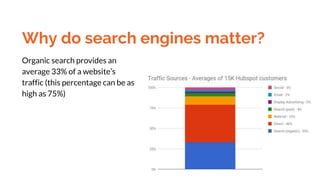
Why do search engines matter?
Organic search provides an
average 33% of a website’s
traffic (this percentage can be as
high as 75%)
Which search engines matter?
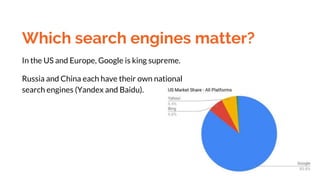
In the US and Europe, Google is king supreme.
Russia and China each have their own national
search engines (Yandex and Baidu).
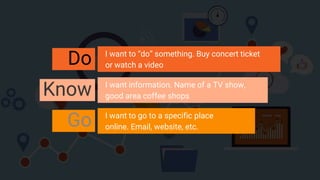
Do I want to “do” something. Buy concert ticket
or watch a video
Know I want information. Name of a TV show,
good area coffee shops
Go I want to go to a specific place
online. Email, website, etc.
Will a searcher be
satisfied with what
they find on your site?
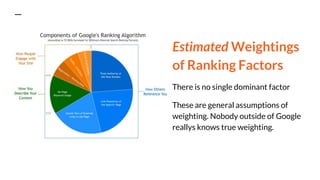
Estimated Weightings
of Ranking Factors
There is no single dominant factor
These are general assumptions of
weighting. Nobody outside of Google
reallys knows true weighting.
Search Engine
Optimization: a marketing
effort that is focused on
organic search
results
in order to improve
rankings, drive traffic, and
accomplish a goal (increase
awareness, conversions,
leads, etc).
The Tools of the Trade
● Search Friendly Site
○ Technical
● Target Keywords
○ On-Page Optimization
● Link Building Campaigns
○ Off-Page Optimization
You have to help a search
engine understand what
your site is about in order for
it to rank you.
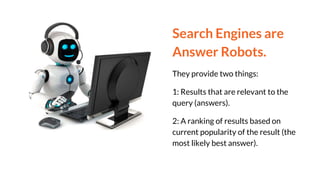
Search Engines are
Answer Robots.
They provide two things:
1: Results that are relevant to the
query (answers).
2: A ranking of results based on
current popularity of the result (the
most likely best answer).
How People Use
Search
1. Experience the need for an answer,
solution or information
2. Articulate the need via a query (string
of words)
3. Enter the query in search engine
4. Look through search results for
match
5. Click result
6. Quickly review result and decide if
need was met
7. If not, return to search results and
click another link
8. If need still isn’t met, perform new
search
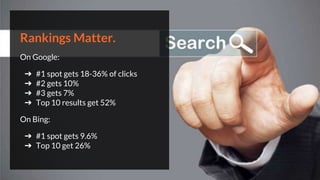
Rankings Matter.
On Google:
➔ #1 spot gets 18-36% of clicks
➔ #2 gets 10%
➔ #3 gets 7%
➔ Top 10 results get 52%
On Bing:
➔ #1 spot gets 9.6%
➔ Top 10 get 26%
On-Page SEO helps search
engines figure out what a
page is about, and how it
may be useful to searchers
What search engines ask for.
○ Make pages for users, not crawlers (but do both)
○ Don’t present content differently to crawlers and users
○ Don’t bury content in “rich media” like Adobe Flash &
JavaScript.
■ Crawlers can’t really read that info
○ Display text that you want indexed
■ Don’t “hide” relevant information like addresses as images
What is bad SEO?
○ Content blocked behind logins or forms
○ Duplicate pages/content
○ Requested blocking in code
■ (robot.txt or robot meta)
What else is bad SEO?
○ “Deep” and confusing site structures
○ Non-text content
○ Targeting the wrong audience
On-Page SEO
❏ Make sure your website is
mobile responsive (50% of
web traffic)
❏ Make your site secure
(HTTPS)
❏ Wrap your page Titles in a
<H1> tag (use keywords!)
❏ Wrap your Subheadings in a
<H2> tag
❏ Good outbound links to
other relevant sites
On-Page SEO pg2
❏ Keep under 3mb, 3sec load
❏ KW/LSI every ~100 words
❏ Use good alt text for images
❏ Add contextual text to
Flash/Javascript pages
❏ Provide transcripts for audio
and video files
❏ Submit sitemap to Google
Webmaster Tools & Bing
Webmaster
Audit your site every quarter
● Check site speed
○ GTMetrix
○ Google Page Speed Analyzer
● Know how crawlers see your site
○ Screaming Frog SEO Spider
● Review links to your site (aka backlinks)
○ MOZ Open Site Explorer
Target keywords and
phrases help search
engines understand what
your site is about.
Do your keyword
research homework
● MOZ Keyword Explorer
● Google Keyword Planner
○ Part of Google Ads
● Google Trends
● Ubersuggest
● Pay-Per-Click
It’s important to understand
the intent of the searcher.
Why that query?
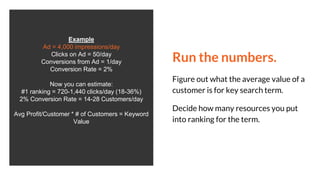
Run the numbers.
Figure out what the average value of a
customer is for key search term.
Decide how many resources you put
into ranking for the term.
Example
Ad = 4,000 impressions/day
Clicks on Ad = 50/day
Conversions from Ad = 1/day
Conversion Rate = 2%
Now you can estimate:
#1 ranking = 720-1,440 clicks/day (18-36%)
2% Conversion Rate = 14-28 Customers/day
Avg Profit/Customer * # of Customers = Keyword
Value
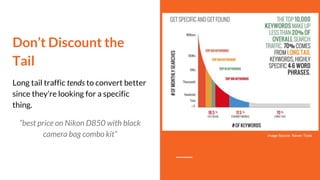
Don’t Discount the
Tail
Long tail traffic tends to convert better
since they’re looking for a specific
thing.
“best price on Nikon D850 with black
camera bag combo kit” Image Source: Raven Tools
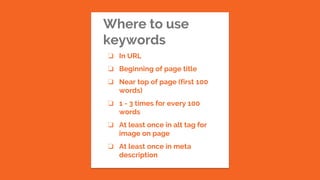
Where to use
keywords
❏ In URL
❏ Beginning of page title
❏ Near top of page (first 100
words)
❏ 1 - 3 times for every 100
words
❏ At least once in alt tag for
image on page
❏ At least once in meta
description
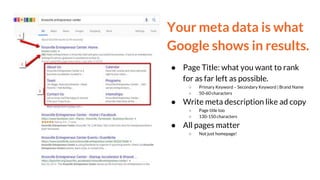
Your meta data is what
Google shows in results.
● Page Title: what you want to rank
for as far left as possible.
○ Primary Keyword – Secondary Keyword | Brand Name
○ 50-60 characters
● Write meta description like ad copy
○ Page title too
○ 130-150 characters
● All pages matter
○ Not just homepage!
What affects rankings?
➔ Engagement
◆ More relevant to searchers = lower
bounce rates = better ranking
➔ Quality of Content
◆ Create valuable, unique, and rich
content
➔ Links
◆ Inbound links indicate popularity
Inbound links are one of the
most important aspects for
ranking well.
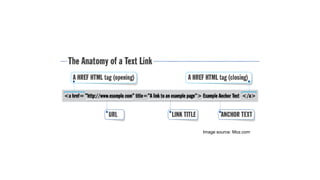
Image source: Moz.com
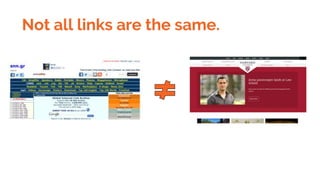
Not all links are the same.
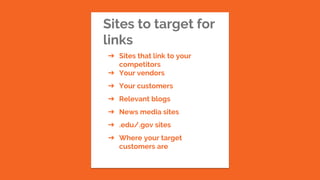
Sites to target for
links
➔ Sites that link to your
competitors
➔ Your vendors
➔ Your customers
➔ Relevant blogs
➔ News media sites
➔ .edu/.gov sites
➔ Where your target
customers are
How to get links.
● Sharing your content
● Product reviews
● Product giveaways
● Guest posts
● Going “viral”
● Broken link building
● Earned media
Content Creation
❏ Unique content
❏ Solves a customer pain
❏ Know, Like, Trust
❏ 2000+ words (min is 300)
❏ Use Keywords/LSI
❏ Update old with new data
❏ Internal linking
❏ Look in the long tail
Effects of Social Media.
● Some correlation, but not
sustaining
● Google looking for “brand
awareness”
○ People talking about you
● Posting isn’t enough, engagement
is what matters (likes, shares,
retweets)
○ Videos and photos do the best
Measure your efforts.
○ Google Analytics to identify traffic
sources/popular pages
○ Use Google/Bing Webmaster tools
to review/track keyword traffic
■ Know what you rank for (Authority Labs Rank
Checker)
○ Review keyword conversion rates
Common SEO Myths
● Length of Domain registrations matters
● #1 spot on a key term will make everything better
● SEO is a “once and done” endeavour
● No value in multiple links from same domain
● You should believe everything Google says about SEO
● PPC/Adwords play a role in organic ranking
● SEO is expensive
This is just the start.
You’re now better off than almost all other
website creators/owners! Start applying the
knowledge & learn more about SEO.
Resources to learn more:
Moz.com Learning Center
Webmaster World
Search Engine Journal
Search Engine Land
SE Roundtable
Google's SEO Guide
Need a deeper understanding of SEO and
Inbound Marketing?
Email me at frank@enotto.com.
You can also visit enotto.com.
I want to help you.
Want to help
others?
Share this
presentation!

What Is SEO - Search Engine Optimization Basics

  • 1.
  • 2.
    Should you careabout SEO? ● Are people actively looking for what you sell/offer? ● Do people research your product/service? ● Will customers seek you out directly (i.e. non- marketplace)? ● Do you like free marketing- qualified traffic?
  • 3.
    SEO and rankingwell help you build a predictable and scalable sales model (a sales engine)
  • 4.
    SEO/Inbound should... ● Helpsearch engines crawl and index your site & rank it well for relevant queries ● Grow your brand while earning & converting traffic through various methods and sources ● Maximize your website’s contribution to your business and marketing goals
  • 5.
    SEO and rankingwell are just means to an end. Do you convert visitors to customers (and keep them)?
  • 6.
    Today’s Goals Provide youwith tools and knowledge so you can better use SEO & Inbound Marketing ➔ Keyword Research ➔ On-Page SEO ➔ Link Building ➔ Content Creation ➔ Social Media
  • 7.
    Why do searchengines matter? Organic search provides an average 33% of a website’s traffic (this percentage can be as high as 75%)
  • 8.
    Which search enginesmatter? In the US and Europe, Google is king supreme. Russia and China each have their own national search engines (Yandex and Baidu).
  • 9.
    Do I wantto “do” something. Buy concert ticket or watch a video Know I want information. Name of a TV show, good area coffee shops Go I want to go to a specific place online. Email, website, etc.
  • 10.
    Will a searcherbe satisfied with what they find on your site?
  • 11.
    Estimated Weightings of RankingFactors There is no single dominant factor These are general assumptions of weighting. Nobody outside of Google reallys knows true weighting.
  • 12.
    Search Engine Optimization: amarketing effort that is focused on organic search results in order to improve rankings, drive traffic, and accomplish a goal (increase awareness, conversions, leads, etc). The Tools of the Trade ● Search Friendly Site ○ Technical ● Target Keywords ○ On-Page Optimization ● Link Building Campaigns ○ Off-Page Optimization
  • 13.
    You have tohelp a search engine understand what your site is about in order for it to rank you.
  • 14.
    Search Engines are AnswerRobots. They provide two things: 1: Results that are relevant to the query (answers). 2: A ranking of results based on current popularity of the result (the most likely best answer).
  • 15.
    How People Use Search 1.Experience the need for an answer, solution or information 2. Articulate the need via a query (string of words) 3. Enter the query in search engine 4. Look through search results for match 5. Click result 6. Quickly review result and decide if need was met 7. If not, return to search results and click another link 8. If need still isn’t met, perform new search
  • 16.
    Rankings Matter. On Google: ➔#1 spot gets 18-36% of clicks ➔ #2 gets 10% ➔ #3 gets 7% ➔ Top 10 results get 52% On Bing: ➔ #1 spot gets 9.6% ➔ Top 10 get 26%
  • 17.
    On-Page SEO helpssearch engines figure out what a page is about, and how it may be useful to searchers
  • 18.
    What search enginesask for. ○ Make pages for users, not crawlers (but do both) ○ Don’t present content differently to crawlers and users ○ Don’t bury content in “rich media” like Adobe Flash & JavaScript. ■ Crawlers can’t really read that info ○ Display text that you want indexed ■ Don’t “hide” relevant information like addresses as images
  • 19.
    What is badSEO? ○ Content blocked behind logins or forms ○ Duplicate pages/content ○ Requested blocking in code ■ (robot.txt or robot meta)
  • 20.
    What else isbad SEO? ○ “Deep” and confusing site structures ○ Non-text content ○ Targeting the wrong audience
  • 21.
    On-Page SEO ❏ Makesure your website is mobile responsive (50% of web traffic) ❏ Make your site secure (HTTPS) ❏ Wrap your page Titles in a <H1> tag (use keywords!) ❏ Wrap your Subheadings in a <H2> tag ❏ Good outbound links to other relevant sites
  • 22.
    On-Page SEO pg2 ❏Keep under 3mb, 3sec load ❏ KW/LSI every ~100 words ❏ Use good alt text for images ❏ Add contextual text to Flash/Javascript pages ❏ Provide transcripts for audio and video files ❏ Submit sitemap to Google Webmaster Tools & Bing Webmaster
  • 23.
    Audit your siteevery quarter ● Check site speed ○ GTMetrix ○ Google Page Speed Analyzer ● Know how crawlers see your site ○ Screaming Frog SEO Spider ● Review links to your site (aka backlinks) ○ MOZ Open Site Explorer
  • 24.
    Target keywords and phraseshelp search engines understand what your site is about.
  • 25.
    Do your keyword researchhomework ● MOZ Keyword Explorer ● Google Keyword Planner ○ Part of Google Ads ● Google Trends ● Ubersuggest ● Pay-Per-Click
  • 26.
    It’s important tounderstand the intent of the searcher. Why that query?
  • 27.
    Run the numbers. Figureout what the average value of a customer is for key search term. Decide how many resources you put into ranking for the term. Example Ad = 4,000 impressions/day Clicks on Ad = 50/day Conversions from Ad = 1/day Conversion Rate = 2% Now you can estimate: #1 ranking = 720-1,440 clicks/day (18-36%) 2% Conversion Rate = 14-28 Customers/day Avg Profit/Customer * # of Customers = Keyword Value
  • 28.
    Don’t Discount the Tail Longtail traffic tends to convert better since they’re looking for a specific thing. “best price on Nikon D850 with black camera bag combo kit” Image Source: Raven Tools
  • 29.
    Where to use keywords ❏In URL ❏ Beginning of page title ❏ Near top of page (first 100 words) ❏ 1 - 3 times for every 100 words ❏ At least once in alt tag for image on page ❏ At least once in meta description
  • 30.
    Your meta datais what Google shows in results. ● Page Title: what you want to rank for as far left as possible. ○ Primary Keyword – Secondary Keyword | Brand Name ○ 50-60 characters ● Write meta description like ad copy ○ Page title too ○ 130-150 characters ● All pages matter ○ Not just homepage!
  • 31.
    What affects rankings? ➔Engagement ◆ More relevant to searchers = lower bounce rates = better ranking ➔ Quality of Content ◆ Create valuable, unique, and rich content ➔ Links ◆ Inbound links indicate popularity
  • 32.
    Inbound links areone of the most important aspects for ranking well.
  • 33.
  • 34.
    Not all linksare the same.
  • 35.
    Sites to targetfor links ➔ Sites that link to your competitors ➔ Your vendors ➔ Your customers ➔ Relevant blogs ➔ News media sites ➔ .edu/.gov sites ➔ Where your target customers are
  • 36.
    How to getlinks. ● Sharing your content ● Product reviews ● Product giveaways ● Guest posts ● Going “viral” ● Broken link building ● Earned media
  • 37.
    Content Creation ❏ Uniquecontent ❏ Solves a customer pain ❏ Know, Like, Trust ❏ 2000+ words (min is 300) ❏ Use Keywords/LSI ❏ Update old with new data ❏ Internal linking ❏ Look in the long tail
  • 38.
    Effects of SocialMedia. ● Some correlation, but not sustaining ● Google looking for “brand awareness” ○ People talking about you ● Posting isn’t enough, engagement is what matters (likes, shares, retweets) ○ Videos and photos do the best
  • 39.
    Measure your efforts. ○Google Analytics to identify traffic sources/popular pages ○ Use Google/Bing Webmaster tools to review/track keyword traffic ■ Know what you rank for (Authority Labs Rank Checker) ○ Review keyword conversion rates
  • 40.
    Common SEO Myths ●Length of Domain registrations matters ● #1 spot on a key term will make everything better ● SEO is a “once and done” endeavour ● No value in multiple links from same domain ● You should believe everything Google says about SEO ● PPC/Adwords play a role in organic ranking ● SEO is expensive
  • 41.
    This is justthe start. You’re now better off than almost all other website creators/owners! Start applying the knowledge & learn more about SEO. Resources to learn more: Moz.com Learning Center Webmaster World Search Engine Journal Search Engine Land SE Roundtable Google's SEO Guide
  • 42.
    Need a deeperunderstanding of SEO and Inbound Marketing? Email me at frank@enotto.com. You can also visit enotto.com. I want to help you.
  • 43.
    Want to help others? Sharethis presentation!

Editor's Notes

  • #6 Ranking gets you visitors to turn into customers/clients. Up to you to keep them as customers (don’t give them a reason to search again)
  • #8 With a weekly product newsletter, the email channel can jump up to 15 - 25% of traffic. Search (organic) 33% Direct 46% Referral 10% Search (paid) 4% Display Advertising 2% Email 2% Social 3%
  • #9 Google: 85.82% (85.38%) Yahoo!: 6.58% (6.99%) Bing: 6.39% (6.39%) AOL: 0.46% (0.46%) DuckDuckGo: 0.35% (0.37%) Other: 0.4% (0.42%)
  • #10 Three types of search. Transactional Informational Navigational
  • #16 They need to stay with you
  • #17 40-60% of searchers don’t click
  • #18 Don’t think of search engines as all powerful. The more you think like a simple robot (ie logical with little context) the better when laying out and creating your site
  • #24 Look for new links to competitor/other relevant sites as well
  • #26 Not all visitors are the same Make sure you’re targeting visitors that matter to your bottom line “Is Jupiter’s Red Spot Hot?” example Lots of traffic from elementary school kids across the world (not target market for local night club)
  • #28 $40 average profit from customer = $560 - $1,120/profit/day.
  • #29 The keywords that have over 500 searches a day only result in about 30% of month search traffic. The remaining 70% are known as the “long tail”
  • #30 In URL At the beginning of page title Search engines display only the first 65-75 characters of a title tag Include branding Near the top of the page In the first 100 words of the page you want to rank Two - three times in the body copy. Don’t get spammy. Keep the usage to ~7% of all text on page Use LSI keywords (Latent Semantic Indexing) on page as well At least once in alt tag for image on page At least once in meta description Short description of a page's content Search engines generally will cut snippets longer than 160 characters
  • #32 Create great and engaging content Create content that people will want to share and talk about with their spheres Create content that will give you the “long click” - keeps visitors on the page for longer, even if you don’t get a transaction Engines pay attention to how long a user is gone before they return to search results
  • #33 You want lots of relevant links pointing to your site and your content
  • #34 You want the anchor text to contain the target keyword. “Click Here” is a terrible anchor text. Link title doesn’t seem to have bearing on SEO ranking
  • #35 Links from sites that have high Domain Authority (DA) carry more weight with SE than low DA sites (think ESPN.com vs random no-name sports blogger on free web hosting) Universities, government and non-profit org sites are some of the best (and hardest to get) Almost all links matter though Be open to getting links from low DA sites, as long as they’re relevant to your site NoFollow Links Some sites will tag most outbound links with “rel=nofollow”. This is to tell SE to not folllow the link. SE still do, but typically just give the link a lower weighting You can use NoFollow links to try to retain “link juice” but it may not matter, just depends Link building efforts should be targeted towards sites that are relevant to your site and your target audience
  • #36 Keep links “fresh” Don’t stop link building efforts since Google considers recency of links as a weighting tool in algorithm Beware spammy links Google has recently been on warpath against links that try to game the system. If the link is from a non-relevant site that is a low DA site and was really easy to get the link, chance are Google will see it as a spammy link. A few may not hurt you, but if your while SEO campaign is built on them, then you’ll likely get punished by Google
  • #37 Beware Nofollow links Sharing your content “Hey check out this cool thing we did/wrote about that is relevant to what your site is about” Providing product for honest reviews FCC and Google have started to crackdown on this, but still useful Guest posts Be sure to sprinkle in links to other relevant sites and also write awesome content Going “viral” Best way to get links, but also the hardest to do. Right place, right time, right content sort of thing. Those who work harder tend to get luckier Broken link building Finding broken links on sites you’d like links from, telling them about the broken link, and then suggesting they instead link to content (or your site) to help keep their page relevant
  • #39 There is some correlation, but one offs won’t do it Google is looking to promote “brands” so if your content and company is continually shared and talked about on social media, you’re in good shape. Just posting isn’t really enough, people have to engage with what you're doing in social to have any value on Google
  • #40 Measure Traffic & Results Use website analytics software to see where traffic is coming from Use Webmaster tools to track the terms your site is ranking for and the traffic you’re getting from those keywords Identify what terms you could be ranking for to get even more relevant traffic Review conversion rates for referring search terms If you rank #5 for a keyword that has a conversion rate of 5% for you site, then run the math to see what a #1 or #2 spot would do for you
  • #41 Domain reg matter - Not by anything Google has said. Great content w/ great backlinks matter way more. Iffy on those, and maybe 3+ year registration could help. #1 spot - No. Target keywords are important but keep in mind the value of long tail. Create content around topics SEO efforts should be an investment for your business, never an expense
  • #44 SE crawlers follow links, record where they start from, where they go, what’s there, and what other links exist beyond