Search Engine Optimization (SEO)
Presentation by
Rakesh Singh
What is Search Engine Optimization?
– Refers to the process of “optimizing” both the on-
page and off-page ranking factors in order to
achieve high search engine rankings for targeted
search terms.
– Refers to the “industry” that has been created
regarding using keyword searching a means of
increasing relevant traffic to a website
Why is Search Engine Marketing
important?
• 85% of all traffic on the internet is referred to by search engines
• 90% of all users don’t look past the first 30 results (most only view top 10)
• Search engine traffic is low and websites aren’t indexed because they are
generally poorly optimized
• Cost-effective advertising
• Clear and measurable ROI
• Operates under this assumption:
More (relevant) traffic + Good Conversions Rate =
More Sales/Leads
How Do Search Engines Work?
• Spider “crawls” the web to find new documents (web pages, other documents) typically by
following hyperlinks from websites already in their database
• Search engines indexes the content (text, code) in these documents by adding it to their
databases and then periodically updates this content
• Search engines search their own databases when a user enters in a search to find related
documents.
• Search engines rank the resulting documents using an algorithm (mathematical formula) by
assigning various weights and ranking factors
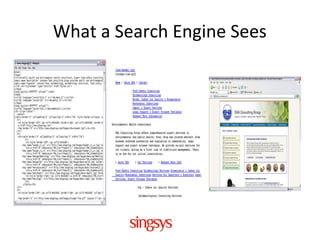
What a Search Engine Sees
• View > Source (HTML code)
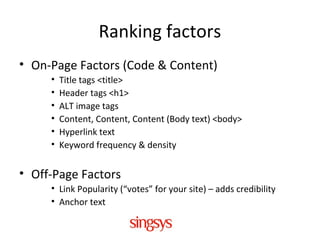
Ranking factors
• On-Page Factors (Code & Content)
• Title tags <title>
• Header tags <h1>
• ALT image tags
• Content, Content, Content (Body text) <body>
• Hyperlink text
• Keyword frequency & density
• Off-Page Factors
• Link Popularity (“votes” for your site) – adds credibility
• Anchor text
Points for Design and Development of
SEO friendly websites
• Canonicalization Issues: Sites make the same HTML content or files
available via different URLs
for ex: http://xyz.com/, http://www.xyz.com/index.php and
http://www. xyz.com/home.php URLs must redirect to http://www.
xyz.com/
• Search Engine Friendly URLs: Search Engine Friendly (SEF) URLs are
beneficial to both users and search engines, helping to clarify what
a page is about and what category it can be found in. See below for
an example of a search engine friendly and non-search engine
friendly URL.
SEF-URL: [domain.com/category/]
Non-SEF: [domain.com/index.php?catid=321&prodid=123] or
[domain.com/ node/58]
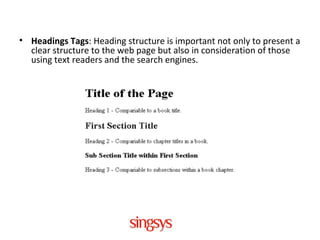
• Headings Tags: Heading structure is important not only to present a
clear structure to the web page but also in consideration of those
using text readers and the search engines.
• Alt Attributes: Use the image alt attribute (mistakenly called the alt tag by
some) properly on your website.
<img src="imagename.gif" width="10" height="10" alt="Image
Description" />
For example ALT tags for images which includes your keyword, such as
alt="packers-movers-in-pune“
• Make sure your URL includes keywords such as blahblah.tld/packers-
movers-in-pune/
• Use - in URLs instead of _. The usage of - shows a space, hence Google will
come to know packers movers are two different words. If you make
packers_movers, it means packersmovers
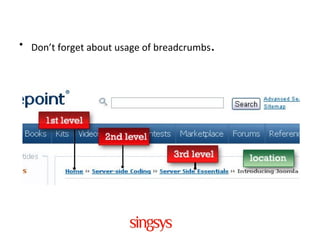
• Don’t forget about usage of breadcrumbs.
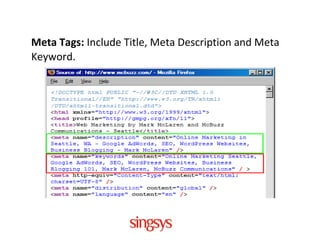
Meta Tags: Include Title, Meta Description and Meta
Keyword.
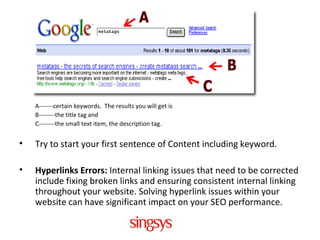
A-------certain keywords. The results you will get is
B--------the title tag and
C--------the small text item, the description tag.
• Try to start your first sentence of Content including keyword.
• Hyperlinks Errors: Internal linking issues that need to be corrected
include fixing broken links and ensuring consistent internal linking
throughout your website. Solving hyperlink issues within your
website can have significant impact on your SEO performance.
• Using less <table> tags may result in faster page load
• Having smaller HTML will result in faster page load
• Avoid broken images on your site as it slows down page load
• Try to less use of flash files for animation.
• It’s also a good habit to name your images using descriptive
keywords. An appropriate file name can be the difference
between your image appearing in Google images searches or
not. For instance the name “1234.jpg” isn’t going to be as
successful as “midcentury-furniture.jpg” when someone is
looking for design inspiration.
• Sitemaps: Sitemaps are useful from both a user perspective
and an SEO perspective, allowing for ease of navigation
around your site. There are two different types of sitemap,
HTML and XML. It must include in website.
• Put CSS in external files. If you can combine all CSS
information into one file it will make your page load faster
• Placing the JavaScript code like mouse over, etc., in a
separate .js file in order to create less code for the search
engine spiders to wade through to get to the "meat." Place all
your JavaScript into a plain text file. Name the file whatever
you want, and use the .js file extension.
• Link to the JavaScript from your web page like this: <script
language="JavaScript" src="filename.js"
type="text/javascript"></script>
• Try to keep your images’ file size as small as possible so
mobile visitors in addition to those with slow internet
connections can get the same intended, fast experience.( An
optimal image size is anywhere from 30-100kb and the best
resolution is 72dpi.)
• Place your images inside a folder named “images” or
something similar so the final URL of the image looks
something like this: /images/image.jpg.
• Remove all errors and warning from W3C (validator.w3.org)

Points for Design and Development of SEO friendly websites

  • 1.
    Search Engine Optimization(SEO) Presentation by Rakesh Singh
  • 2.
    What is SearchEngine Optimization? – Refers to the process of “optimizing” both the on- page and off-page ranking factors in order to achieve high search engine rankings for targeted search terms. – Refers to the “industry” that has been created regarding using keyword searching a means of increasing relevant traffic to a website
  • 3.
    Why is SearchEngine Marketing important? • 85% of all traffic on the internet is referred to by search engines • 90% of all users don’t look past the first 30 results (most only view top 10) • Search engine traffic is low and websites aren’t indexed because they are generally poorly optimized • Cost-effective advertising • Clear and measurable ROI • Operates under this assumption: More (relevant) traffic + Good Conversions Rate = More Sales/Leads
  • 4.
    How Do SearchEngines Work? • Spider “crawls” the web to find new documents (web pages, other documents) typically by following hyperlinks from websites already in their database • Search engines indexes the content (text, code) in these documents by adding it to their databases and then periodically updates this content • Search engines search their own databases when a user enters in a search to find related documents. • Search engines rank the resulting documents using an algorithm (mathematical formula) by assigning various weights and ranking factors
  • 5.
    What a SearchEngine Sees • View > Source (HTML code)
  • 6.
    Ranking factors • On-PageFactors (Code & Content) • Title tags <title> • Header tags <h1> • ALT image tags • Content, Content, Content (Body text) <body> • Hyperlink text • Keyword frequency & density • Off-Page Factors • Link Popularity (“votes” for your site) – adds credibility • Anchor text
  • 7.
    Points for Designand Development of SEO friendly websites • Canonicalization Issues: Sites make the same HTML content or files available via different URLs for ex: http://xyz.com/, http://www.xyz.com/index.php and http://www. xyz.com/home.php URLs must redirect to http://www. xyz.com/ • Search Engine Friendly URLs: Search Engine Friendly (SEF) URLs are beneficial to both users and search engines, helping to clarify what a page is about and what category it can be found in. See below for an example of a search engine friendly and non-search engine friendly URL. SEF-URL: [domain.com/category/] Non-SEF: [domain.com/index.php?catid=321&prodid=123] or [domain.com/ node/58]
  • 8.
    • Headings Tags:Heading structure is important not only to present a clear structure to the web page but also in consideration of those using text readers and the search engines.
  • 9.
    • Alt Attributes:Use the image alt attribute (mistakenly called the alt tag by some) properly on your website. <img src="imagename.gif" width="10" height="10" alt="Image Description" /> For example ALT tags for images which includes your keyword, such as alt="packers-movers-in-pune“ • Make sure your URL includes keywords such as blahblah.tld/packers- movers-in-pune/ • Use - in URLs instead of _. The usage of - shows a space, hence Google will come to know packers movers are two different words. If you make packers_movers, it means packersmovers
  • 10.
    • Don’t forgetabout usage of breadcrumbs.
  • 11.
    Meta Tags: IncludeTitle, Meta Description and Meta Keyword.
  • 12.
    A-------certain keywords. Theresults you will get is B--------the title tag and C--------the small text item, the description tag. • Try to start your first sentence of Content including keyword. • Hyperlinks Errors: Internal linking issues that need to be corrected include fixing broken links and ensuring consistent internal linking throughout your website. Solving hyperlink issues within your website can have significant impact on your SEO performance.
  • 13.
    • Using less<table> tags may result in faster page load • Having smaller HTML will result in faster page load • Avoid broken images on your site as it slows down page load • Try to less use of flash files for animation. • It’s also a good habit to name your images using descriptive keywords. An appropriate file name can be the difference between your image appearing in Google images searches or not. For instance the name “1234.jpg” isn’t going to be as successful as “midcentury-furniture.jpg” when someone is looking for design inspiration.
  • 14.
    • Sitemaps: Sitemapsare useful from both a user perspective and an SEO perspective, allowing for ease of navigation around your site. There are two different types of sitemap, HTML and XML. It must include in website. • Put CSS in external files. If you can combine all CSS information into one file it will make your page load faster
  • 15.
    • Placing theJavaScript code like mouse over, etc., in a separate .js file in order to create less code for the search engine spiders to wade through to get to the "meat." Place all your JavaScript into a plain text file. Name the file whatever you want, and use the .js file extension. • Link to the JavaScript from your web page like this: <script language="JavaScript" src="filename.js" type="text/javascript"></script>
  • 16.
    • Try tokeep your images’ file size as small as possible so mobile visitors in addition to those with slow internet connections can get the same intended, fast experience.( An optimal image size is anywhere from 30-100kb and the best resolution is 72dpi.) • Place your images inside a folder named “images” or something similar so the final URL of the image looks something like this: /images/image.jpg. • Remove all errors and warning from W3C (validator.w3.org)

Editor's Notes

  • #2 Most of the techniques I will be sharing with you today will be all common sense … but the secret for a good search engine marketing strategy is the integration of all the common sense techniques to result in the most fruitful results possible, Today I will speak about some of those techniques on a high level…. To warn you further…. I will only be scratching the surface about search engines and search engine optimization but this will allow anyone in the audience to understand the basic elements of this exciting techniques to increase sales, traffic, and conversions by 100,200 and even 500% based on the industry they are in. This will be relevant to anyone and everyone that currently hosts a website, from universities, non-profit, government etc.
  • #5 If you were not take anything away from this session today… and only understand how Spider or crawlers work you would have understood 40% of Search engines.
  • #7 Anchor text is the visible hyperlinked text on the page. anchor text is usually used to indicate the subject matter of the page that it links to. For example, the text “7 th world congress ebusiness&quot; indicates to visitors that they can expect to see content about conference pertaining to ebusiness if they visit the link. This pattern of usage has been applied in search engine algorithms to enhance the relevance of the &quot;target&quot; or the &quot;landing page&quot; URL for the keywords appearing within the anchor text.