PROXY SERVER
                      INTRODUCTION

   PROXY -          A proxy act as an intermediary agent between its

    client and the server which they want to access ,performing
    function directed towards a variety of purposes like security,
    caching etc .

                             As the name proxy it means server
    which fills up or acts and provides functionalities of some other
    server .

   PROXY SERVER –                     A server that sits between a

    client application, such as a Web browser, and a real server. It
    intercepts all requests to the real server to see if it can fulfill the
    requests itself. If not, it forwards the request to the real server.

                                      A Proxy server is a computer
    that offers a computer network services to allow clients to make
    indirect connections to other network services .

                    It also act as an intermediary between web
    server and its clients

                     A proxy server is a server ,a computer system

    Or application program that acts as an intermediary from clients
Seeking resources from other server . A client connecting to the
      proxy server such as file , connection, webpage or other
      resources available from different servers.

                      A proxy server may optionally alter the client's
      request or the server's response, and sometimes it may serve
      the request without contacting the specified server. In this case,
      it 'caches' responses from the remote server, and returns
      subsequent requests for the same content directly.

   Proxy Server solves the problems of network congestion and
    slow response time and provides control over network resources
    without burdening end users or network administrators.


              PURPOSES OF PROXY SERVER
      Proxy servers have mainly two purposes:
           Improve performance :
             Proxy servers can dramatically improve performance for
groups of users. This is because it saves the results of all requests for a
certain amount of time. Consider the case where both users X and
user Y access the World Wide Web through a proxy server. First user X
requests a certain Web page, which we'll call Page 1. Sometime later,
user Y requests the same page. Instead of forwarding the request to
the Web server where Page 1 resides, which can be a time-consuming
operation, the proxy server simply returns the Page 1 that it already
fetched for user X. Since the proxy server is often on the same
network as the user, this is a much faster operation. Real proxy
servers supports hundreds or thousands of users. The major online
services such as America Online, MSN and Yahoo, for example,
employ an array of proxy servers.

            Filter Requests:
        Proxy servers can also be used to filter requests. For
example, a company might use a proxy server to prevent its
employees from accessing a specific set of Web sites.

              WORKING OF PROXY SERVER
      The proxy server evaluates the request according to its filtering
       rules. For example, it may filter traffic by IP address or protocol.
       If the request is validated by the filter, the proxy provides the
       resource by connecting to the relevant server and requesting
       the service on behalf of the client.

    Proxy sites enable you to bypass your own Internet provider
     and browse through the proxy web site. All that you have to
     do is type the web site address you would like to visit in the
     form they provide, and start browsing. Once you keep
     browsing using that form, you are protected and your real IP
     address is not being logged.
      Once you have configured your web browser as described,
       your browser will load a CGI script each time it is restarted.
       This script redefines the function that determines how to fetch
       the URL that is being requested. If the URL matches a pattern
       or a site that requires a proxy, it will connect to the proxy
       server rather than going directly to the site.
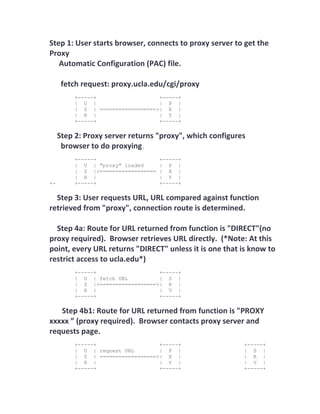
Step 1: User starts browser, connects to proxy server to get the
Proxy
   Automatic Configuration (PAC) file.

      fetch request: proxy.ucla.edu/cgi/proxy
          +-----+                  +-----+
          | U |                    | P |
          | S | ==================>| X |
          | R |                    | Y |
          +-----+                  +-----+

     Step 2: Proxy server returns "proxy", which configures
      browser to do proxying.
          +-----+                    +-----+
          | U | "proxy" loaded       | P |
          | S |<==================   | X |
          | R |                      | Y |
+-        +-----+                    +-----+

  Step 3: User requests URL, URL compared against function
retrieved from "proxy", connection route is determined.

  Step 4a: Route for URL returned from function is "DIRECT"(no
proxy required). Browser retrieves URL directly. (*Note: At this
point, every URL returns "DIRECT" unless it is one that is know to
restrict access to ucla.edu*)
          +-----+                  +-----+
          | U | fetch URL          | S |
          | S |<==================>| R |
          | R |                    | V |
          +-----+                  +-----+

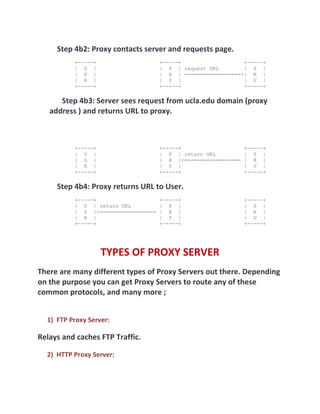
   Step 4b1: Route for URL returned from function is "PROXY
xxxxx ” (proxy required). Browser contacts proxy server and
requests page.
          +-----+                  +-----+                +-----+
          | U | request URL        | P |                  | S |
          | S | ==================>| X |                  | R |
          | R |                    | Y |                  | V |
          +-----+                  +-----+                +-----+
Step 4b2: Proxy contacts server and requests page.
          +-----+                    +-----+                  +-----+
          | U |                      | P | request URL        | S |
          | S |                      | X | ==================>| R |
          | R |                      | Y |                    | V |
          +-----+                    +-----+                  +-----+

      Step 4b3: Server sees request from ucla.edu domain (proxy
   address ) and returns URL to proxy.


          +-----+                    +-----+                    +-----+
          | U |                      | P | return URL           | S |
          | S |                      | X |<==================   | R |
          | R |                      | Y |                      | V |
          +-----+                    +-----+                    +-----+

     Step 4b4: Proxy returns URL to User.
          +-----+                    +-----+                    +-----+
          | U | return URL           | P |                      | S |
          | S |<==================   | X |                      | R |
          | R |                      | Y |                      | V |
          +-----+                    +-----+                    +-----+


                    TYPES OF PROXY SERVER
There are many different types of Proxy Servers out there. Depending
on the purpose you can get Proxy Servers to route any of these
common protocols, and many more ;


  1) FTP Proxy Server:

Relays and caches FTP Traffic.

  2) HTTP Proxy Server:
A one way request to retrieve Web Pages.

  3) Socks Proxy Server:

A newer protocol to allow relaying of far more different types of data,
whether TCP or UDP.

  4) NAT Proxy Server:

This one works a little different, it allows the redirection of all packets
without a Program having to support a Proxy Server.

  5) SSL Proxy Server:

An extension was created to the HTTP Proxy Server which allows
relaying of TCP data similar to a Socks Proxy Server. This one done
mainly to allow encryption of Web Page
requests.

  6) Caching proxy server:

A caching proxy server accelerates service requests by retrieving
content saved from a previous request made by the same client or
even other clients. Caching proxies keep local copies of frequently
requested resources, allowing large organizations to significantly
reduce their upstream bandwidth usage and cost, while significantly
increasing performance

  7) Web proxy :

A proxy that focuses on World Wide Web traffic is called a "web
proxy". The most common use of a web proxy is to serve as a web
cache.
Furthermore, a Proxy Server can be split into another two Categories:

  1) Anonymous:

An Anonymous Proxy Server blocks the remote Computer from
knowing the identity of the
Computer using the Proxy Server to make requests.

  2) Transparent:

A Transparent Proxy Server tells the remote Computer the IP Address
of your Computer. This provides no privacy.


                    Functional Modules


  1)Proxy User Interface :
This Module is responsible to control and manage the User Interface.
It will provide the user with an easy to use GUI, a window with menu.

The menu options should provide commands to perform the following
functions:

Start Proxy

Stop Proxy

Exit

Blocking URL
Blocking Client

Manage Log

Manage Cache

Modify Configuration

  2)   Proxy Server Listener :
The main function of the proxy starts here. This module will serve as a
Port listening to clients i.e. page requests from a web browser. It will
create a new connection for each request from the clients. One more
important feature of this module would to block clients which are
there in the blocked list given by the user.

  3)Connection Manager
This module will contain the main functions of the Proxy Server. It
will read the request header from the client. It will parse the URL and
determine whether the URL is blocked or not. Else it will generate a
connection to the web server. Then it will read the reply header from
the web server. If there is no copy of the page in then cache then it
will download the page from Web Server else will check its last
modified date from the reply header and accordingly will read from
the cache or serve from the Web. Then it will also check the header
for caching allowed or not and accordingly will cache the page.

  4)   Cache Manager :
The Cache Manager is responsible for storing, deleting, clearing and
searching of web pages in the cache.
5)   Log Manager :
The Log Manager is responsible viewing, clearing and updating the
Log.

  6)   Configuration :
This module will enable the user to make his configuration settings. It
will work with the other modules to perform the desired
configurations such as caching (on/off), log (on/off), etc.


       WEBSITES WHICH PROVIDES PROXY SERVERS

www.freeproxyserver.ca –
       this proxy server provide a way to bypass school filter
www.proxyblind.org –
        It is used to hide IP address of your computer .
www.publicproxyservers.com –
      PublicProxyServers.com provides proxy lists solely based on
quality parameters of proxy servers
www.proxyway.com –
       ProxyWay provides anonymous surfing and allows you to hide/
change IP address from the web sites you visit and your ISP.
 You can easily configure different browsers/applications to work
through ProxyWay - you stay anonymous when you visit web sites,
download files, send emails, etc.
www.proxyserverprivacy.com/proxy-web-sites -
     You can access blocked or restricted websites by using Yahoo
Babelfish or Google Translate language tools as a proxy server

www.topproxysites.com –
Top Proxy Sites and list server sorted out daily!
www.bestproxysites.com –
It provides you with a Free list of proxy websites for unfiltered web
www.daveproxy.co.uk-
If you require a proxy server that lets you anonymously surf the web
to the sites you want from our UK server
www.hideglobal.com –
HideGlobal.com - Free anonymous proxy sites, Free proxy server to
unblock websites myspace ,bebo, facebook - bypass web filter from
school and office .


            DISADVANTAGE OF PROXY SERVER
     1)    It is possible for a computer to run as an open
           proxy server without the computer's owner
           knowing this. This can result from
           misconfiguration of proxy software running on
           the computer, or from infection
           with malware (viruses, trojans or worms)
           designed for this purpose.[2] If it is caused
by malware, the infected computer is known as
     a zombie computer.
2)   A feasible risk that a malicious proxy server
     may record everything sent
3)   the user may fall victim to a false sense of
     security just because those details are out of
     sight and mind
4)   Does not filter content

5)   Works only on single machine

6)   GUI not controlled via K/B

7)   There are hundreds of thousands of open
     proxies online. This is rarely a matter of
     misconfiguration, in most cases an open
     proxy is unknown to the server owner.
     Using an open proxy can be legally
     dangerous: the current law in Germany,
     for example, makes it illegal to access a
     computer or network without the owner's
     knowledge, even if the proxy is not
     password-protected. There are no
reasons to run a clean open proxy for an
     organisation, so any open proxy is
     suspicious. The main sign of a legal open
     proxy is the fact that it is not
     anonymizing the connection
8)   Running an open proxy is a high risk for
     the server operator; providing an
     anonymous proxy server can cause real
     legal troubles to the owner. Such
     services are frequently used to break into
     foreign computer systems, child
     pornography is usually consumed
     through proxies, and illegal content is
     likely to be spread through such proxies
9)   Also, such a proxy can cause a high
     bandwidth usage resulting in higher
     latency to the subnetwork and violation
     of bandwidth limits
10) A wrongly configured open proxy can
     also allow access to a private
     subnetwork or DMZ: this is a high
     security concern for any company or
home network because computers that
    usually are out of risk or firewalled can
    be directly attacked.
11) The final disadvantage is that you may see
    some issues with speed. Speed must be
    weighed against the value of a cache, and how
    much time it takes the request to traverse
    several firewalls.

seminar on proxyserver

  • 1.
    PROXY SERVER INTRODUCTION  PROXY - A proxy act as an intermediary agent between its client and the server which they want to access ,performing function directed towards a variety of purposes like security, caching etc .  As the name proxy it means server which fills up or acts and provides functionalities of some other server .  PROXY SERVER – A server that sits between a client application, such as a Web browser, and a real server. It intercepts all requests to the real server to see if it can fulfill the requests itself. If not, it forwards the request to the real server. A Proxy server is a computer that offers a computer network services to allow clients to make indirect connections to other network services .  It also act as an intermediary between web server and its clients  A proxy server is a server ,a computer system Or application program that acts as an intermediary from clients
  • 2.
    Seeking resources fromother server . A client connecting to the proxy server such as file , connection, webpage or other resources available from different servers.  A proxy server may optionally alter the client's request or the server's response, and sometimes it may serve the request without contacting the specified server. In this case, it 'caches' responses from the remote server, and returns subsequent requests for the same content directly.  Proxy Server solves the problems of network congestion and slow response time and provides control over network resources without burdening end users or network administrators. PURPOSES OF PROXY SERVER Proxy servers have mainly two purposes:  Improve performance : Proxy servers can dramatically improve performance for groups of users. This is because it saves the results of all requests for a certain amount of time. Consider the case where both users X and user Y access the World Wide Web through a proxy server. First user X requests a certain Web page, which we'll call Page 1. Sometime later, user Y requests the same page. Instead of forwarding the request to the Web server where Page 1 resides, which can be a time-consuming operation, the proxy server simply returns the Page 1 that it already fetched for user X. Since the proxy server is often on the same
  • 3.
    network as theuser, this is a much faster operation. Real proxy servers supports hundreds or thousands of users. The major online services such as America Online, MSN and Yahoo, for example, employ an array of proxy servers.  Filter Requests: Proxy servers can also be used to filter requests. For example, a company might use a proxy server to prevent its employees from accessing a specific set of Web sites. WORKING OF PROXY SERVER  The proxy server evaluates the request according to its filtering rules. For example, it may filter traffic by IP address or protocol. If the request is validated by the filter, the proxy provides the resource by connecting to the relevant server and requesting the service on behalf of the client.  Proxy sites enable you to bypass your own Internet provider and browse through the proxy web site. All that you have to do is type the web site address you would like to visit in the form they provide, and start browsing. Once you keep browsing using that form, you are protected and your real IP address is not being logged.  Once you have configured your web browser as described, your browser will load a CGI script each time it is restarted. This script redefines the function that determines how to fetch the URL that is being requested. If the URL matches a pattern or a site that requires a proxy, it will connect to the proxy server rather than going directly to the site.
  • 4.
    Step 1: Userstarts browser, connects to proxy server to get the Proxy Automatic Configuration (PAC) file. fetch request: proxy.ucla.edu/cgi/proxy +-----+ +-----+ | U | | P | | S | ==================>| X | | R | | Y | +-----+ +-----+ Step 2: Proxy server returns "proxy", which configures browser to do proxying. +-----+ +-----+ | U | "proxy" loaded | P | | S |<================== | X | | R | | Y | +- +-----+ +-----+ Step 3: User requests URL, URL compared against function retrieved from "proxy", connection route is determined. Step 4a: Route for URL returned from function is "DIRECT"(no proxy required). Browser retrieves URL directly. (*Note: At this point, every URL returns "DIRECT" unless it is one that is know to restrict access to ucla.edu*) +-----+ +-----+ | U | fetch URL | S | | S |<==================>| R | | R | | V | +-----+ +-----+ Step 4b1: Route for URL returned from function is "PROXY xxxxx ” (proxy required). Browser contacts proxy server and requests page. +-----+ +-----+ +-----+ | U | request URL | P | | S | | S | ==================>| X | | R | | R | | Y | | V | +-----+ +-----+ +-----+
  • 5.
    Step 4b2: Proxycontacts server and requests page. +-----+ +-----+ +-----+ | U | | P | request URL | S | | S | | X | ==================>| R | | R | | Y | | V | +-----+ +-----+ +-----+ Step 4b3: Server sees request from ucla.edu domain (proxy address ) and returns URL to proxy. +-----+ +-----+ +-----+ | U | | P | return URL | S | | S | | X |<================== | R | | R | | Y | | V | +-----+ +-----+ +-----+ Step 4b4: Proxy returns URL to User. +-----+ +-----+ +-----+ | U | return URL | P | | S | | S |<================== | X | | R | | R | | Y | | V | +-----+ +-----+ +-----+ TYPES OF PROXY SERVER There are many different types of Proxy Servers out there. Depending on the purpose you can get Proxy Servers to route any of these common protocols, and many more ; 1) FTP Proxy Server: Relays and caches FTP Traffic. 2) HTTP Proxy Server:
  • 6.
    A one wayrequest to retrieve Web Pages. 3) Socks Proxy Server: A newer protocol to allow relaying of far more different types of data, whether TCP or UDP. 4) NAT Proxy Server: This one works a little different, it allows the redirection of all packets without a Program having to support a Proxy Server. 5) SSL Proxy Server: An extension was created to the HTTP Proxy Server which allows relaying of TCP data similar to a Socks Proxy Server. This one done mainly to allow encryption of Web Page requests. 6) Caching proxy server: A caching proxy server accelerates service requests by retrieving content saved from a previous request made by the same client or even other clients. Caching proxies keep local copies of frequently requested resources, allowing large organizations to significantly reduce their upstream bandwidth usage and cost, while significantly increasing performance 7) Web proxy : A proxy that focuses on World Wide Web traffic is called a "web proxy". The most common use of a web proxy is to serve as a web cache.
  • 7.
    Furthermore, a ProxyServer can be split into another two Categories: 1) Anonymous: An Anonymous Proxy Server blocks the remote Computer from knowing the identity of the Computer using the Proxy Server to make requests. 2) Transparent: A Transparent Proxy Server tells the remote Computer the IP Address of your Computer. This provides no privacy. Functional Modules 1)Proxy User Interface : This Module is responsible to control and manage the User Interface. It will provide the user with an easy to use GUI, a window with menu. The menu options should provide commands to perform the following functions: Start Proxy Stop Proxy Exit Blocking URL
  • 8.
    Blocking Client Manage Log ManageCache Modify Configuration 2) Proxy Server Listener : The main function of the proxy starts here. This module will serve as a Port listening to clients i.e. page requests from a web browser. It will create a new connection for each request from the clients. One more important feature of this module would to block clients which are there in the blocked list given by the user. 3)Connection Manager This module will contain the main functions of the Proxy Server. It will read the request header from the client. It will parse the URL and determine whether the URL is blocked or not. Else it will generate a connection to the web server. Then it will read the reply header from the web server. If there is no copy of the page in then cache then it will download the page from Web Server else will check its last modified date from the reply header and accordingly will read from the cache or serve from the Web. Then it will also check the header for caching allowed or not and accordingly will cache the page. 4) Cache Manager : The Cache Manager is responsible for storing, deleting, clearing and searching of web pages in the cache.
  • 9.
    5) Log Manager : The Log Manager is responsible viewing, clearing and updating the Log. 6) Configuration : This module will enable the user to make his configuration settings. It will work with the other modules to perform the desired configurations such as caching (on/off), log (on/off), etc. WEBSITES WHICH PROVIDES PROXY SERVERS www.freeproxyserver.ca – this proxy server provide a way to bypass school filter www.proxyblind.org – It is used to hide IP address of your computer . www.publicproxyservers.com – PublicProxyServers.com provides proxy lists solely based on quality parameters of proxy servers www.proxyway.com – ProxyWay provides anonymous surfing and allows you to hide/ change IP address from the web sites you visit and your ISP. You can easily configure different browsers/applications to work
  • 10.
    through ProxyWay -you stay anonymous when you visit web sites, download files, send emails, etc. www.proxyserverprivacy.com/proxy-web-sites - You can access blocked or restricted websites by using Yahoo Babelfish or Google Translate language tools as a proxy server www.topproxysites.com – Top Proxy Sites and list server sorted out daily! www.bestproxysites.com – It provides you with a Free list of proxy websites for unfiltered web www.daveproxy.co.uk- If you require a proxy server that lets you anonymously surf the web to the sites you want from our UK server www.hideglobal.com – HideGlobal.com - Free anonymous proxy sites, Free proxy server to unblock websites myspace ,bebo, facebook - bypass web filter from school and office . DISADVANTAGE OF PROXY SERVER 1) It is possible for a computer to run as an open proxy server without the computer's owner knowing this. This can result from misconfiguration of proxy software running on the computer, or from infection with malware (viruses, trojans or worms) designed for this purpose.[2] If it is caused
  • 11.
    by malware, theinfected computer is known as a zombie computer. 2) A feasible risk that a malicious proxy server may record everything sent 3) the user may fall victim to a false sense of security just because those details are out of sight and mind 4) Does not filter content 5) Works only on single machine 6) GUI not controlled via K/B 7) There are hundreds of thousands of open proxies online. This is rarely a matter of misconfiguration, in most cases an open proxy is unknown to the server owner. Using an open proxy can be legally dangerous: the current law in Germany, for example, makes it illegal to access a computer or network without the owner's knowledge, even if the proxy is not password-protected. There are no
  • 12.
    reasons to runa clean open proxy for an organisation, so any open proxy is suspicious. The main sign of a legal open proxy is the fact that it is not anonymizing the connection 8) Running an open proxy is a high risk for the server operator; providing an anonymous proxy server can cause real legal troubles to the owner. Such services are frequently used to break into foreign computer systems, child pornography is usually consumed through proxies, and illegal content is likely to be spread through such proxies 9) Also, such a proxy can cause a high bandwidth usage resulting in higher latency to the subnetwork and violation of bandwidth limits 10) A wrongly configured open proxy can also allow access to a private subnetwork or DMZ: this is a high security concern for any company or
  • 13.
    home network becausecomputers that usually are out of risk or firewalled can be directly attacked. 11) The final disadvantage is that you may see some issues with speed. Speed must be weighed against the value of a cache, and how much time it takes the request to traverse several firewalls.