Presentation
on Static,
Dynamic and
Active web pages
Group members
Sl. No Name ID
01 Mahbuba Yesmin Turaba 1109016
02 Aftabur Rahman Parvez 1109015
03 Mohammad Kamrul Hasan 1109010
04 Mesbah Uddin 1109011
05 Najmul Hasan 1109013
Outline
Web Page
A web page is a document that is suitable for the World Wide
Web and web browsers. A web browser displays a web page on a monitor or
mobile device. The web page is what displays, but the term also refers to a
computer file, usually written in HTML or comparable markup language.
The pages in the WWW can be grouped into three broad categories:
1. Static
2. Dynamic
3. Active
The category is based on the time at which the contents of the document are
determined.
Static Web pages
content : medium and message text, graphics, movies and sound
Static Web pages
• A static web page displays the same information for all users,
from all contexts or subject making customization
impossible.
• Thus, Static web pages are suitable for the contents that
never or rarely need to be updated.
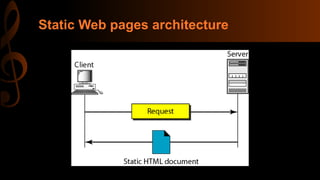
• Each request for a static document results in exactly the same
response.
Static Web pages architecture
Static Web pages content
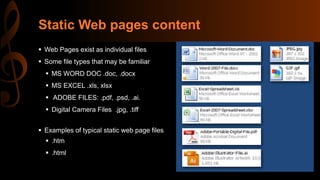
 Web Pages exist as individual files
 Some file types that may be familiar
 MS WORD DOC .doc, .docx
 MS EXCEL .xls, xlsx
 ADOBE FILES: .pdf, .psd, .ai.
 Digital Camera Files .jpg, .tiff
 Examples of typical static web page files
 .htm
 .html
Static Web pages content(continued)
Pages typically contain text,
hyper links, photos, and graphics
Pages may also contain animated
or interactive media such as:
Movie Clips (YouTube etc.)
Adobe Flash Presentations
Microsoft Silverlight
Other media types
Static Website Navigation
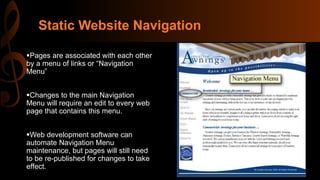
Pages are associated with each other
by a menu of links or “Navigation
Menu”
Changes to the main Navigation
Menu will require an edit to every web
page that contains this menu.
Web development software can
automate Navigation Menu
maintenance, but pages will still need
to be re-published for changes to take
effect.
Static Websites - Publishing
 Pages are published by uploading files to
a Web Hosting Computer
 Directly from within the development
software
 By transferring individual or groups of
files with a File Transfer program.
 Maintaining a networked folder with
the Web Hosting Serve
 Static Web Page Files are
published by physical transfer from
the development PC to a Web
Hosting Computer
Advantages and Disadvantages
Advantages:
• Quick to develop
• Cheap to develop
• Cheap to host
Disadvantages :
• Requires web development expertise to update site
• Content can get stagnant
Dynamic Web Pages
Dynamic Web Pages
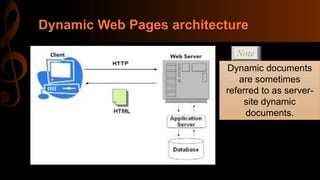
• Dynamic web page is a web page whose construction is controlled by an
application server processing server-side scripts.
• They can be customized according to the need of the user!
• When a request arrives the web server runs an application program that
creates the document.
• The server returns the output of the program as a response to the
browser that requested the document.
• Because a fresh document is created for each request, the contents of a
dynamic document can vary from one request to another.
Dynamic Web Pages architecture
Note
Dynamic documents
are sometimes
referred to as server-
site dynamic
documents.
Client
Dynamic Websites
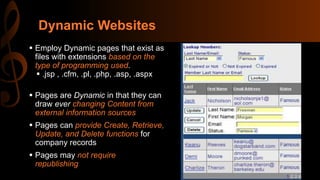
 Employ Dynamic pages that exist as
files with extensions based on the
type of programming used.
 .jsp , .cfm, .pl, .php, .asp, .aspx
 Pages are Dynamic in that they can
draw ever changing Content from
external information sources
 Pages can provide Create, Retrieve,
Update, and Delete functions for
company records
 Pages may not require
republishing
Dynamic Websites - Features
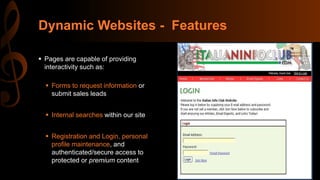
 Pages are capable of providing
interactivity such as:
 Forms to request information or
submit sales leads
 Internal searches within our site
 Registration and Login, personal
profile maintenance, and
authenticated/secure access to
protected or premium content
Dynamic Websites -Features (continued)
• Dynamic Product Catalogs and online sales
(Ecommerce)
• Information that is already maintained within
company I.T. Systems such as Databases,
Spreadsheets, and text files can be leveraged as
Web Content.
• Access can be granted to allow customers to
maintain their own information.
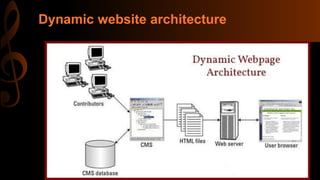
Dynamic website architecture
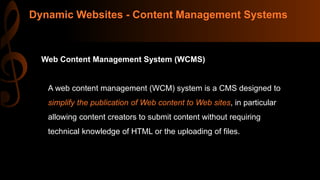
Dynamic Websites - Content Management Systems
Web Content Management System (WCMS)
A web content management (WCM) system is a CMS designed to
simplify the publication of Web content to Web sites, in particular
allowing content creators to submit content without requiring
technical knowledge of HTML or the uploading of files.
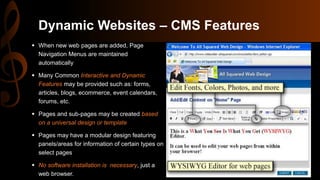
Dynamic Websites – CMS Features
 When new web pages are added, Page
Navigation Menus are maintained
automatically
 Many Common Interactive and Dynamic
Features may be provided such as: forms,
articles, blogs, ecommerce, event calendars,
forums, etc.
 Pages and sub-pages may be created based
on a universal design or template
 Pages may have a modular design featuring
panels/areas for information of certain types on
select pages
 No software installation is necessary, just a
web browser.
Advantages and Disadvantages
Advantages
• Restructuring of dynamic websites is easier, thus ensuring its longevity
• Can be developed/amended/added to as and when required
• Access to be able to content manage the website from any computer, anywhere
in the world (that has Internet connection)
• Website content contributors/editors only need basic content editing skills
Disadvantages
• For smaller companies a Dynamic website might be too expensive or seen as
unnecessary so the investment might not be justified
• Slightly longer initial development time
• Cost of implementing training of Content management system to Client/Staff
Active Web Pages
Active Web Pages
• An active web document consists of a computer
program(JS,applet etc.) that the server sends to the
browser and that the browser must run locally.
• When it runs, the active document program can interact
with the user and change the display continuously.
Active document using Java applet
Active document using client-site script
Active documents are sometimes
referred to as client-site dynamic
documents.
Note
Advantages and Disadvantages
Advantages :
oAbility to update information continuously.
oMore important, an active document can access sources of information
directly and update the display continuously.
 Disadvantages :
oBecause, an active document can run on an arbitrary computer instead
on a server, the program must be written to avoid depending by
particular features of a computer.
oAn active document is a potential risk because the document can export
or import information
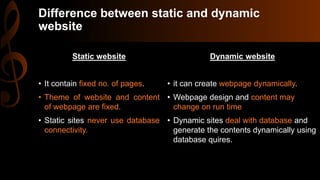
Difference between static and dynamic
website
Static website
• It contain fixed no. of pages.
• Theme of website and content
of webpage are fixed.
• Static sites never use database
connectivity.
Dynamic website
• it can create webpage dynamically.
• Webpage design and content may
change on run time
• Dynamic sites deal with database and
generate the contents dynamically using
database quires.
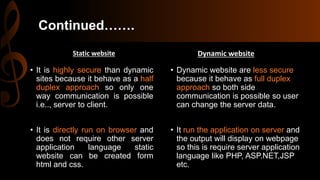
Continued…….
Static website
• It is highly secure than dynamic
sites because it behave as a half
duplex approach so only one
way communication is possible
i.e.., server to client.
• It is directly run on browser and
does not require other server
application language static
website can be created form
html and css.
Dynamic website
• Dynamic website are less secure
because it behave as full duplex
approach so both side
communication is possible so user
can change the server data.
• It run the application on server and
the output will display on webpage
so this is require server application
language like PHP, ASP.NET,JSP
etc.
Difference between dynamic and active
website
Dynamic website
• Dynamic is what's being executed
on the server and then the result is
being sent back to the client
(browser). So for example when
using PHP, your browser isn't able
to execute PHP, so the server
executes the PHP file and performs
all logic in your code. The result will
be an HTML file, which is then sent
back to the client. The important
thing to understand is that when the
result is served to the client, the
information in it won't change.
Active website
• An active web page is a page
where the browser performs the
logic instead of the server. So for
example when you've got a page
where you're showing share prices,
then you want it to update e.g. every
5 seconds. A solution would be to
use AJAX with JavaScript. In
contrast to PHP, your browser is
able to execute JavaScript, so it is
happening without reloading the
page. So with an active page,
everything is happening inside your
browser without the need to reload
the page every time you want new
information.
Is Static Right for Your Organization
Static websites are a better choice when you:
are limited in budget and are starting with a core web presence
are dealing with 20 pages or less
are planning to add new pages occasionally
are assigning maintenance to a provider or have skilled staff and
proper software
need of portable, physical web page files
Is Dynamic Right for Your Organization
Dynamic websites are a better choice when you:
need custom programming to accommodate your unique business needs
need pages that must pull information from sources external to the website proper
need to be able to easily add and edit web pages (Content) from within a browser
need web pages that will display and update records from your information systems
need to give one or more staff members access to edit the site
need convenient access to setup common interactive features such as Article
Publishing, Event Calendaring, Blogs, Secure Login, Ecommerce, and others.
Conclusions
 Who will maintain the site when it’s complete?
 What are the key features offered in the website hosting:
 File Space and Bandwidth limits?
 Email Accounts – Storage size limits, Lists, Webmail and its features?
 Are website statistics available via web browser?
 Can Secure Connections be accommodated?
 Do you have qualified staff and the proper software to perform maintenance?
The decision as to which type of website design is right for you should start
with an assessment of your business needs. Ask questions like:
Conclusions
 What functionality is critical to provide to:
 Prospective Customers
 Existing Customers
 Your Staff
 Your Vendors
 Others . . .
 What are your criteria for ecommerce?
 Search enabled product catalog pages
 Shipping options
 Compatible payment processing vendors
 Are your needs fairly common ones or are they unique to your industry,
products, or services?
Questions ?
Thank you all…

Static dynamic and active web pages

  • 1.
  • 2.
    Group members Sl. NoName ID 01 Mahbuba Yesmin Turaba 1109016 02 Aftabur Rahman Parvez 1109015 03 Mohammad Kamrul Hasan 1109010 04 Mesbah Uddin 1109011 05 Najmul Hasan 1109013
  • 3.
  • 4.
    Web Page A webpage is a document that is suitable for the World Wide Web and web browsers. A web browser displays a web page on a monitor or mobile device. The web page is what displays, but the term also refers to a computer file, usually written in HTML or comparable markup language. The pages in the WWW can be grouped into three broad categories: 1. Static 2. Dynamic 3. Active The category is based on the time at which the contents of the document are determined.
  • 5.
    Static Web pages content: medium and message text, graphics, movies and sound
  • 6.
    Static Web pages •A static web page displays the same information for all users, from all contexts or subject making customization impossible. • Thus, Static web pages are suitable for the contents that never or rarely need to be updated. • Each request for a static document results in exactly the same response.
  • 7.
    Static Web pagesarchitecture
  • 8.
    Static Web pagescontent  Web Pages exist as individual files  Some file types that may be familiar  MS WORD DOC .doc, .docx  MS EXCEL .xls, xlsx  ADOBE FILES: .pdf, .psd, .ai.  Digital Camera Files .jpg, .tiff  Examples of typical static web page files  .htm  .html
  • 9.
    Static Web pagescontent(continued) Pages typically contain text, hyper links, photos, and graphics Pages may also contain animated or interactive media such as: Movie Clips (YouTube etc.) Adobe Flash Presentations Microsoft Silverlight Other media types
  • 10.
    Static Website Navigation Pagesare associated with each other by a menu of links or “Navigation Menu” Changes to the main Navigation Menu will require an edit to every web page that contains this menu. Web development software can automate Navigation Menu maintenance, but pages will still need to be re-published for changes to take effect.
  • 11.
    Static Websites -Publishing  Pages are published by uploading files to a Web Hosting Computer  Directly from within the development software  By transferring individual or groups of files with a File Transfer program.  Maintaining a networked folder with the Web Hosting Serve  Static Web Page Files are published by physical transfer from the development PC to a Web Hosting Computer
  • 12.
    Advantages and Disadvantages Advantages: •Quick to develop • Cheap to develop • Cheap to host Disadvantages : • Requires web development expertise to update site • Content can get stagnant
  • 13.
  • 14.
    Dynamic Web Pages •Dynamic web page is a web page whose construction is controlled by an application server processing server-side scripts. • They can be customized according to the need of the user! • When a request arrives the web server runs an application program that creates the document. • The server returns the output of the program as a response to the browser that requested the document. • Because a fresh document is created for each request, the contents of a dynamic document can vary from one request to another.
  • 15.
    Dynamic Web Pagesarchitecture Note Dynamic documents are sometimes referred to as server- site dynamic documents. Client
  • 16.
    Dynamic Websites  EmployDynamic pages that exist as files with extensions based on the type of programming used.  .jsp , .cfm, .pl, .php, .asp, .aspx  Pages are Dynamic in that they can draw ever changing Content from external information sources  Pages can provide Create, Retrieve, Update, and Delete functions for company records  Pages may not require republishing
  • 17.
    Dynamic Websites -Features  Pages are capable of providing interactivity such as:  Forms to request information or submit sales leads  Internal searches within our site  Registration and Login, personal profile maintenance, and authenticated/secure access to protected or premium content
  • 18.
    Dynamic Websites -Features(continued) • Dynamic Product Catalogs and online sales (Ecommerce) • Information that is already maintained within company I.T. Systems such as Databases, Spreadsheets, and text files can be leveraged as Web Content. • Access can be granted to allow customers to maintain their own information.
  • 19.
  • 20.
    Dynamic Websites -Content Management Systems Web Content Management System (WCMS) A web content management (WCM) system is a CMS designed to simplify the publication of Web content to Web sites, in particular allowing content creators to submit content without requiring technical knowledge of HTML or the uploading of files.
  • 21.
    Dynamic Websites –CMS Features  When new web pages are added, Page Navigation Menus are maintained automatically  Many Common Interactive and Dynamic Features may be provided such as: forms, articles, blogs, ecommerce, event calendars, forums, etc.  Pages and sub-pages may be created based on a universal design or template  Pages may have a modular design featuring panels/areas for information of certain types on select pages  No software installation is necessary, just a web browser.
  • 22.
    Advantages and Disadvantages Advantages •Restructuring of dynamic websites is easier, thus ensuring its longevity • Can be developed/amended/added to as and when required • Access to be able to content manage the website from any computer, anywhere in the world (that has Internet connection) • Website content contributors/editors only need basic content editing skills Disadvantages • For smaller companies a Dynamic website might be too expensive or seen as unnecessary so the investment might not be justified • Slightly longer initial development time • Cost of implementing training of Content management system to Client/Staff
  • 23.
  • 24.
    Active Web Pages •An active web document consists of a computer program(JS,applet etc.) that the server sends to the browser and that the browser must run locally. • When it runs, the active document program can interact with the user and change the display continuously.
  • 25.
  • 26.
    Active document usingclient-site script
  • 27.
    Active documents aresometimes referred to as client-site dynamic documents. Note
  • 28.
    Advantages and Disadvantages Advantages: oAbility to update information continuously. oMore important, an active document can access sources of information directly and update the display continuously.  Disadvantages : oBecause, an active document can run on an arbitrary computer instead on a server, the program must be written to avoid depending by particular features of a computer. oAn active document is a potential risk because the document can export or import information
  • 29.
    Difference between staticand dynamic website Static website • It contain fixed no. of pages. • Theme of website and content of webpage are fixed. • Static sites never use database connectivity. Dynamic website • it can create webpage dynamically. • Webpage design and content may change on run time • Dynamic sites deal with database and generate the contents dynamically using database quires.
  • 30.
    Continued……. Static website • Itis highly secure than dynamic sites because it behave as a half duplex approach so only one way communication is possible i.e.., server to client. • It is directly run on browser and does not require other server application language static website can be created form html and css. Dynamic website • Dynamic website are less secure because it behave as full duplex approach so both side communication is possible so user can change the server data. • It run the application on server and the output will display on webpage so this is require server application language like PHP, ASP.NET,JSP etc.
  • 31.
    Difference between dynamicand active website Dynamic website • Dynamic is what's being executed on the server and then the result is being sent back to the client (browser). So for example when using PHP, your browser isn't able to execute PHP, so the server executes the PHP file and performs all logic in your code. The result will be an HTML file, which is then sent back to the client. The important thing to understand is that when the result is served to the client, the information in it won't change. Active website • An active web page is a page where the browser performs the logic instead of the server. So for example when you've got a page where you're showing share prices, then you want it to update e.g. every 5 seconds. A solution would be to use AJAX with JavaScript. In contrast to PHP, your browser is able to execute JavaScript, so it is happening without reloading the page. So with an active page, everything is happening inside your browser without the need to reload the page every time you want new information.
  • 32.
    Is Static Rightfor Your Organization Static websites are a better choice when you: are limited in budget and are starting with a core web presence are dealing with 20 pages or less are planning to add new pages occasionally are assigning maintenance to a provider or have skilled staff and proper software need of portable, physical web page files
  • 33.
    Is Dynamic Rightfor Your Organization Dynamic websites are a better choice when you: need custom programming to accommodate your unique business needs need pages that must pull information from sources external to the website proper need to be able to easily add and edit web pages (Content) from within a browser need web pages that will display and update records from your information systems need to give one or more staff members access to edit the site need convenient access to setup common interactive features such as Article Publishing, Event Calendaring, Blogs, Secure Login, Ecommerce, and others.
  • 34.
    Conclusions  Who willmaintain the site when it’s complete?  What are the key features offered in the website hosting:  File Space and Bandwidth limits?  Email Accounts – Storage size limits, Lists, Webmail and its features?  Are website statistics available via web browser?  Can Secure Connections be accommodated?  Do you have qualified staff and the proper software to perform maintenance? The decision as to which type of website design is right for you should start with an assessment of your business needs. Ask questions like:
  • 35.
    Conclusions  What functionalityis critical to provide to:  Prospective Customers  Existing Customers  Your Staff  Your Vendors  Others . . .  What are your criteria for ecommerce?  Search enabled product catalog pages  Shipping options  Compatible payment processing vendors  Are your needs fairly common ones or are they unique to your industry, products, or services?
  • 36.
  • 37.